Changing the FROM line of a Dockerfile replaces the libc of the image, the C library that almost every program calls to read a file, open a connection or reserve memory. Debian and Ubuntu use glibc, Alpine uses musl, and a program compiled for one may no longer start with the other.
This lesson is for people who already know how to choose a base and now want to predict what a change breaks, before publishing. You will learn to read what a binary asks for, to fix a glibc binary that no longer starts on Alpine, to understand why pip does not install the same files from one base to another, and to recognize the error caused by an architecture difference. All measurements come from Docker 29.9.2 on amd64.
Several names in this lesson are French because the commands and outputs are the ones that were run: cumul means "total" and pluies "rainfall measurements" in the C program, and ~/changer-socle is the "change base" work folder. They are identifiers, so they stay as they are.
What you will learn
- Read the ELF interpreter of a binary and check that it exists in the new base
- Fix a glibc binary that no longer starts on Alpine, in three measured ways
- Explain why
pippicks amanylinuxwheel on Debian and amusllinuxwheel on Alpine - Spot a Python package with no wheel for the new base, and a silently degraded installation
- Diagnose an architecture difference, whose error is not always the one you expect
- Test the application in the new base before publishing
Prerequisites
- A working Docker (Docker installation)
- Having followed the lesson Choose and maintain a Docker base image, which shows why a glibc binary fails on Alpine
- Knowing how to read the identity of an image and its platform (the lesson Read an OCI image and its identity of the same course)
What does a FROM change do to a compiled binary?
A Linux executable is a file in ELF format. When it is dynamic, it does not contain the libc: its header designates a small program, its interpreter (or loader), which loads the libraries at startup. This file must exist in the image, otherwise the binary does not start.
glibc and musl do not place it at the same location. The kernel then answers no such file or directory on a binary that is nevertheless present: the execve(2) system call returns the ENOENT error also when the interpreter is the missing file, and the message names the requested file, not the interpreter. The lesson Choose and maintain a Docker base image shows this case in detail. Here, you take it up again to learn to predict the failure, then to fix it.
Take the same C program, cumul.c, which adds up four rainfall measurements. Work in a dedicated folder, which the cleanup section removes.
mkdir -p ~/changer-socle/glibc ~/changer-socle/musl ~/changer-socle/static ~/changer-socle/py && cd ~/changer-socle#include <stdio.h>
int main(void) { int pluies[] = {4, 9, 3, 17}; int cumul = 0; for (int i = 0; i < 4; i++) { cumul += pluies[i]; } printf("cumul=%d\n", cumul); return 0;}Save this code as cumul.c in ~/changer-socle. You compile it in a glibc image, gcc:14, which weighs about 2.14 GB: it only serves to produce the binary. The file command displays its interpreter, ldd its libraries.
docker run --rm --user "$(id -u):$(id -g)" -v "$PWD":/src -w /src \ gcc:14@sha256:435c3cbc2ad1c25fbc1684c367808ff0ca2035a1bed56734a40165ab5cd7e3bd \ sh -c 'gcc -O2 -o glibc/cumul cumul.c && file glibc/cumul && ldd glibc/cumul'glibc/cumul: ELF 64-bit LSB executable, x86-64, version 1 (SYSV), dynamically linked, interpreter /lib64/ld-linux-x86-64.so.2, for GNU/Linux 3.2.0, not stripped linux-vdso.so.1 (0x00007f8451359000) libc.so.6 => /lib/x86_64-linux-gnu/libc.so.6 (0x00007f8451157000) /lib64/ld-linux-x86-64.so.2 (0x00007f845135b000)Look at the interpreter /lib64/ld-linux-x86-64.so.2 line: it is the file that the kernel must find to start this binary. The addresses in parentheses change on every run. Now run this binary in each of the two bases to see the consequence.
docker run --rm -v "$PWD":/src:ro \ debian:13-slim@sha256:f6b08b09a05725f9431502d3b5714f5c4576e82c1a84fa1debe0c24a7e0c3ec4 /src/glibc/cumuldocker run --rm -v "$PWD":/src:ro \ alpine:3.24@sha256:be2656061b536c1883c4034790e21d0a09c5aaaf51968b89368a3c0371ea2c9a /src/glibc/cumulOn Debian, the binary runs and displays cumul=33; on Alpine, it fails with exec /src/glibc/cumul: no such file or directory, with the code 255 returned by docker run (code 127 only appears if a shell launches the program).
How do you know, before changing, whether the binary will run?
You know it by reading the interpreter of the binary in the image that built it, then checking that this path exists in the new base. Neither file nor readelf is installed in alpine or debian:13-slim (sh: file: not found), hence the reading in the build image. The path read above is then searched for in each candidate.
docker run --rm alpine:3.24@sha256:be2656061b536c1883c4034790e21d0a09c5aaaf51968b89368a3c0371ea2c9a \ sh -c 'ls -l /lib/ld-* /lib64 2>&1'docker run --rm debian:13-slim@sha256:f6b08b09a05725f9431502d3b5714f5c4576e82c1a84fa1debe0c24a7e0c3ec4 \ sh -c 'ls -l /lib64/ld-* /lib/x86_64-linux-gnu/ld-* 2>&1'ls: /lib64: No such file or directory-rwxr-xr-x 1 root root 670312 Oct 21 15:50 /lib/ld-musl-x86_64.so.1-rwxr-xr-x 1 root root 225672 Jun 29 21:37 /lib/x86_64-linux-gnu/ld-linux-x86-64.so.2lrwxrwxrwx 1 root root 44 Jun 29 21:37 /lib64/ld-linux-x86-64.so.2 -> ../lib/x86_64-linux-gnu/ld-linux-x86-64.so.2Alpine has no /lib64 and its loader is called /lib/ld-musl-x86_64.so.1; Debian provides /lib64/ld-linux-x86-64.so.2. The path the binary asks for therefore exists on Debian and not on Alpine: the reading predicted the failure without running anything.
Why not rely on ldd in Alpine?
Because the ldd of Alpine answers without error on a glibc binary that cannot start. It returns code 0 and displays an answer that looks valid.
docker run --rm -v "$PWD":/src:ro \ alpine:3.24@sha256:be2656061b536c1883c4034790e21d0a09c5aaaf51968b89368a3c0371ea2c9a ldd /src/glibc/cumul /lib64/ld-linux-x86-64.so.2 (0x7f1d81374000) libc.so.6 => /lib64/ld-linux-x86-64.so.2 (0x7f1d81374000)Look at the second line: libc.so.6 is attached to the interpreter itself, which proves nothing. The musl ldd reports no incompatibility, so do not use it as a test; run the binary, or read its interpreter in a glibc image as above.
How do you identify the libc of a base?
A few commands tell which libc a base has. They serve to confirm, not to decide: the referee remains the smoke test, which consists in running the application in the candidate image (it is detailed at the end of this lesson). The /etc/os-release file names the distribution (ID=alpine and VERSION_ID=3.24.3 on Alpine), not the libc. Two commands stand out from the others because their failure is itself information.
docker run --rm alpine:3.24@sha256:be2656061b536c1883c4034790e21d0a09c5aaaf51968b89368a3c0371ea2c9a getconf GNU_LIBC_VERSIONdocker run --rm alpine:3.24@sha256:be2656061b536c1883c4034790e21d0a09c5aaaf51968b89368a3c0371ea2c9a ldd --versiondocker run --rm debian:13-slim@sha256:f6b08b09a05725f9431502d3b5714f5c4576e82c1a84fa1debe0c24a7e0c3ec4 getconf GNU_LIBC_VERSIONgetconf: GNU_LIBC_VERSION: unknown variablemusl libc (x86_64)Version 1.2.6Dynamic Program LoaderUsage: /lib/ld-musl-x86_64.so.1 [options] [--] pathnameglibc 2.41getconf GNU_LIBC_VERSION answers glibc 2.41 on Debian and unknown variable (code 1) on Alpine: the failure is the signal "this is not glibc". ldd --version also names the libc of Alpine, but returns code 1 because musl treats the option as a usage error and writes the version on the error output. A script that tests the exit code of ldd --version therefore wrongly concludes, on Alpine, that the command failed, whereas musl answers and names its version.
What can you do when the glibc binary does not run on Alpine?
Three fixes exist: rebuild in the new base, link the binary statically, or add a compatibility layer. The first two require the sources of the program, the third is for when you do not have them. They do not cost the same.
Rebuild against musl in Alpine
Compile in an Alpine image with the build-base package. The container runs as root to install the package; the command then gives the file back to your account with chown, evaluated by your shell before launch.
docker run --rm -v "$PWD":/src -w /src \ alpine:3.24@sha256:be2656061b536c1883c4034790e21d0a09c5aaaf51968b89368a3c0371ea2c9a \ sh -c "apk add --no-cache build-base 2>&1 | tail -2 && gcc -O2 -o musl/cumul cumul.c && ldd musl/cumul && chown $(id -u):$(id -g) musl/cumul"Executing busybox-1.37.0-r31.triggerOK: 275.5 MiB in 38 packages /lib/ld-musl-x86_64.so.1 (0x7fc37aa29000) libc.musl-x86_64.so.1 => /lib/ld-musl-x86_64.so.1 (0x7fc37aa29000)The musl binary is 18,384 bytes. To get it, the container installed 38 packages (275.5 MiB) in about 7 s, not counting the image download: a compiler has no place in the final image (see Optimize the size of images, in French, for the multi-stage build). Now run this binary in both bases: you are going to see a symmetry.
docker run --rm -v "$PWD":/src:ro \ alpine:3.24@sha256:be2656061b536c1883c4034790e21d0a09c5aaaf51968b89368a3c0371ea2c9a /src/musl/cumuldocker run --rm -v "$PWD":/src:ro \ debian:13-slim@sha256:f6b08b09a05725f9431502d3b5714f5c4576e82c1a84fa1debe0c24a7e0c3ec4 /src/musl/cumulUnder Alpine, it displays cumul=33. Under debian:13-slim, it fails exactly like the glibc binary under Alpine, with exec /src/musl/cumul: no such file or directory (code 255). Changing base, in either direction, forces a rebuild.
Link the binary statically
A static link copies the libraries into the binary, which no longer asks for any interpreter. You get it with the -static option of gcc, in the glibc image.
docker run --rm --user "$(id -u):$(id -g)" -v "$PWD":/src -w /src \ gcc:14@sha256:435c3cbc2ad1c25fbc1684c367808ff0ca2035a1bed56734a40165ab5cd7e3bd \ sh -c 'gcc -O2 -static -o static/cumul cumul.c && file static/cumul && ldd static/cumul'static/cumul: ELF 64-bit LSB executable, x86-64, version 1 (GNU/Linux), statically linked, for GNU/Linux 3.2.0, with debug_info, not stripped not a dynamic executableldd answers not a dynamic executable with code 1: here this code is expected. Run the binary in both bases.
docker run --rm -v "$PWD":/src:ro \ alpine:3.24@sha256:be2656061b536c1883c4034790e21d0a09c5aaaf51968b89368a3c0371ea2c9a /src/static/cumuldocker run --rm -v "$PWD":/src:ro \ debian:13-slim@sha256:f6b08b09a05725f9431502d3b5714f5c4576e82c1a84fa1debe0c24a7e0c3ec4 /src/static/cumulThis binary displays cumul=33 under Alpine and under Debian. Its cost is size: 934,520 bytes against 15,688 for the dynamic version, about 60 times more for this tiny program, because it carries the libc with it.
With glibc, the static link has a limit. Functions that resolve names, such as getaddrinfo, still load glibc libraries at run time, and the linker warns that the binary then requires those of the version used at compile time. A program that resolves names or users must therefore be tested on each base, or linked against musl.
Add gcompat when you cannot rebuild
gcompat is an Alpine package that provides a replacement loader bearing the name of the glibc interpreter, plus functions compatible with the glibc interface: the kernel finds the requested file, and the binary runs on musl. It fits when the binary comes from a third party that you do not rebuild.
docker run --rm -v "$PWD":/src:ro \ alpine:3.24@sha256:be2656061b536c1883c4034790e21d0a09c5aaaf51968b89368a3c0371ea2c9a \ sh -c 'apk add --no-cache gcompat 2>&1 | tail -1; /src/glibc/cumul'OK: 8336 KiB in 19 packagescumul=33The glibc binary runs. The OK: line of apk gives the total state of the container (19 packages, 8336 KiB), not the weight of gcompat alone: the lesson Choose and maintain a Docker base image measures its addition at 225 kB in an image layer.
This measurement, however, covers only a trivial program, which calls almost nothing from the libc: it does not guarantee that a real program runs, and a real program is checked by its smoke test. The table compares the three fixes on this program.
| Fix | Runs under Alpine | Runs under Debian | Binary size | When to choose it |
|---|---|---|---|---|
| Rebuild in Alpine | yes | no | 18,384 bytes | code you control, shipped on Alpine only |
| Static link | yes | yes | 934,520 bytes | one binary for several bases, no name resolution |
gcompat | yes, trivial case | yes (binary unchanged) | 15,688 bytes, plus the gcompat package | third-party binary that cannot be rebuilt |
Why does pip not install the same files on both bases?
Because pip, the Python package installer, picks a wheel according to the libc of the image. A wheel is the precompiled archive of a Python package; its name carries a platform tag: manylinux for glibc systems, musllinux for musl systems. The measurements in this section and the following ones use python:3.14-slim (Debian, glibc 2.41) and python:3.14-alpine (musl), with Python 3.14.10 and pip 26.2.2, on amd64.
pip debug --verbose lists the tags that the interpreter accepts. Look at the prefix: it is what decides.
docker run --rm python:3.14-slim@sha256:930e1abba7c4e8f96ed93e8012c35d174d7732752731bbd5e8e757d7ec6f3966 \ sh -c 'pip debug --verbose 2>/dev/null | grep -E "cp314-cp314-(many|musl)" | head -4'docker run --rm python:3.14-alpine@sha256:eb2c62658b8d51bff0acc408504b76521d02030de56a8a3c1e830083e89b89d2 \ sh -c 'pip debug --verbose 2>/dev/null | grep -E "cp314-cp314-(many|musl)" | head -4' cp314-cp314-manylinux_2_41_x86_64 cp314-cp314-manylinux_2_40_x86_64 cp314-cp314-manylinux_2_39_x86_64 cp314-cp314-manylinux_2_38_x86_64 cp314-cp314-musllinux_1_2_x86_64 cp314-cp314-musllinux_1_1_x86_64 cp314-cp314-musllinux_1_0_x86_64The first four lines come from Debian, the last three from Alpine. The Debian base accepts manylinux wheels, and the Alpine base accepts no manylinux wheel, only musllinux. For current tags, the number that follows the prefix is the minimum libc version required (the old names manylinux2010 and manylinux2014 are an exception, see the table below): a manylinux_2_28 wheel suits glibc 2.28 and later, a musllinux_1_2 wheel musl 1.2 and later. The same pip install markupsafe therefore downloads two different files, which the loaded file confirms.
docker run --rm python:3.14-slim@sha256:930e1abba7c4e8f96ed93e8012c35d174d7732752731bbd5e8e757d7ec6f3966 \ sh -c 'pip install --no-cache-dir --root-user-action=ignore markupsafe 2>&1 | grep -v notice; python -c "import markupsafe._speedups as s;print(s.__file__)"'docker run --rm python:3.14-alpine@sha256:eb2c62658b8d51bff0acc408504b76521d02030de56a8a3c1e830083e89b89d2 \ sh -c 'pip install --no-cache-dir --root-user-action=ignore markupsafe 2>&1 | grep -v notice; python -c "import markupsafe._speedups as s;print(s.__file__)"'Downloading markupsafe-3.0.4-cp314-cp314-manylinux2014_x86_64.manylinux_2_17_x86_64.manylinux_2_28_x86_64.whl (23 kB)/usr/local/lib/python3.14/site-packages/markupsafe/_speedups.cpython-314-x86_64-linux-gnu.soDownloading markupsafe-3.0.4-cp314-cp314-musllinux_1_2_x86_64.whl (23 kB)/usr/local/lib/python3.14/site-packages/markupsafe/_speedups.cpython-314-x86_64-linux-musl.soThe outputs are shortened to the Downloading lines and the last line. The native extension (a module written in C, which Python loads like a library), here _speedups, carries the linux-gnu suffix on Debian and linux-musl on Alpine. On this example, the installation takes 1.8 s on Debian and 2.2 s on Alpine, with images already pulled: the idea that Alpine forces you to compile is outdated for this package.
Which common packages have a musllinux wheel?
The eight packages tested all have one, as of November 3, 2026. The following command downloads the wheel of each without installing it; --only-binary :all: forbids compilation, so a package with no wheel would fail.
docker run --rm python:3.14-alpine@sha256:eb2c62658b8d51bff0acc408504b76521d02030de56a8a3c1e830083e89b89d2 \ sh -c 'cd /tmp; for p in markupsafe psutil orjson pyyaml cryptography pillow grpcio numpy; do printf "%s: " $p; pip download --no-deps --only-binary :all: -d /tmp/d_$p -q $p 2>&1 | tail -1; ls /tmp/d_$p 2>/dev/null; echo; done'Under each package name, the command displays the downloaded wheel file, preceded by a [notice] line from pip to ignore. The table gives the result, with the first platform tag of the file name on Debian (the same command on python:3.14-slim) and on Alpine.
The names manylinux2010 and manylinux2014 are old tag names, kept for wheels already published: manylinux2010 is equivalent to manylinux_2_12 and manylinux2014 to manylinux_2_17, hence glibc 2.12 and 2.17 at minimum (PEP 571, PEP 599, and PEP 600 for the manylinux_x_y form).
| Package | Wheel on Debian | Wheel on Alpine |
|---|---|---|
markupsafe | manylinux2014_x86_64 | musllinux_1_2_x86_64 |
psutil | manylinux2010_x86_64 | musllinux_1_2_x86_64 |
orjson | manylinux_2_17_x86_64 | musllinux_1_2_x86_64 |
pyyaml | manylinux2014_x86_64 | musllinux_1_2_x86_64 |
cryptography | manylinux_2_34_x86_64 | musllinux_1_2_x86_64 |
pillow | manylinux_2_27_x86_64 | musllinux_1_2_x86_64 |
grpcio | manylinux2014_x86_64 | musllinux_1_2_x86_64 |
numpy | manylinux_2_27_x86_64 | musllinux_1_2_x86_64 |
These eight packages cost no compilation on Alpine. The risk is elsewhere, with a package whose publisher does not publish a musllinux wheel.
What happens when a Python package has no wheel for the new base?
The installation fails with a message that does not mention the libc, or worse, it succeeds while delivering a truncated package. onnxruntime illustrates the first case: as of November 3, 2026, its wheel for amd64 and Python 3.14 is published as manylinux_2_28 only.
docker run --rm python:3.14-slim@sha256:930e1abba7c4e8f96ed93e8012c35d174d7732752731bbd5e8e757d7ec6f3966 \ sh -c 'pip install --dry-run --no-deps --only-binary :all: --root-user-action=ignore onnxruntime 2>&1 | grep -v notice | tail -8'docker run --rm python:3.14-alpine@sha256:eb2c62658b8d51bff0acc408504b76521d02030de56a8a3c1e830083e89b89d2 \ sh -c 'pip install --dry-run --no-deps --only-binary :all: --root-user-action=ignore onnxruntime 2>&1 | grep -v notice | tail -8'Collecting onnxruntime Downloading onnxruntime-1.31.1-cp314-cp314-manylinux_2_28_x86_64.whl.metadata (5.8 kB)Would install onnxruntime-1.31.1
ERROR: Could not find a version that satisfies the requirement onnxruntime (from versions: none)
ERROR: No matching distribution found for onnxruntimeDebian finds the wheel; Alpine answers from versions: none, as if the package did not exist. The message mentions neither musl nor a wheel: without knowing the mechanism, you would look for a typo or a network problem. After a FROM change, a No matching distribution found on a package that used to install should therefore make you think of a missing wheel for this libc. A Python version or an architecture with no wheel gives the same message.
What happens if pip compiles instead?
With no wheel, pip can compile the package from its sources, which requires a C compiler. Neither of the two Python images has one (which gcc cc returns code 1 on both). Forcing the compilation with --no-binary shows it: psutil fails on both bases.
docker run --rm python:3.14-alpine@sha256:eb2c62658b8d51bff0acc408504b76521d02030de56a8a3c1e830083e89b89d2 \ sh -c 'pip install --no-cache-dir --root-user-action=ignore --no-binary psutil psutil 2>&1 | grep -v notice | tail -12' sudo apk add gcc python3-dev musl-dev linux-headers error: [Errno 2] No such file or directory: 'gcc' [end of output]
note: This error originates from a subprocess, and is likely not a problem with pip. ERROR: Failed building wheel for psutilFailed to build psutil
error: failed-wheel-build-for-install
× Failed to build installable wheels for some pyproject.toml based projects╰─> psutilThe output suggests installing gcc and the development headers (the apk command above; on Debian, sudo apt-get install gcc python3-dev), then gives the error No such file or directory: 'gcc'. That error is a clear one. In a container, sudo does not exist, and on the official python: images measured here, installing the compiler (build-base on Alpine, build-essential on Debian) was enough to compile.
The trap is a package that knows how to do without its C extension: with --no-binary, markupsafe installs without gcc, because the installation falls back to a py3-none-any wheel, the pure Python version.
docker run --rm python:3.14-alpine@sha256:eb2c62658b8d51bff0acc408504b76521d02030de56a8a3c1e830083e89b89d2 \ sh -c 'pip install -q --no-cache-dir --root-user-action=ignore --no-binary markupsafe markupsafe 2>&1 | grep -v notice; python -c "import markupsafe._speedups" 2>&1 | tail -1'ModuleNotFoundError: No module named 'markupsafe._speedups'The installation is green, the creation of the markupsafe-3.0.4-py3-none-any.whl wheel too, and the _speedups extension is absent; the result is identical on Debian. Without the -q option, pip displays the line Created wheel for markupsafe: filename=markupsafe-3.0.4-py3-none-any.whl. The application runs without its C extension, with nothing to signal it: you have to import the extension to notice.
With a compiler, the compilation does produce the native extension, but it costs time. The two commands install the compiler in the container then compile markupsafe; the last line displayed is the path of the extension, this time present.
docker run --rm python:3.14-alpine@sha256:eb2c62658b8d51bff0acc408504b76521d02030de56a8a3c1e830083e89b89d2 \ sh -c 'apk add --no-cache build-base >/dev/null 2>&1; pip install -q --no-cache-dir --root-user-action=ignore --no-binary markupsafe markupsafe 2>&1 | grep -v notice; python -c "import markupsafe._speedups as s;print(s.__file__)"'docker run --rm python:3.14-slim@sha256:930e1abba7c4e8f96ed93e8012c35d174d7732752731bbd5e8e757d7ec6f3966 \ sh -c 'apt-get update -qq >/dev/null 2>&1; apt-get install -y -qq build-essential >/dev/null 2>&1; pip install -q --no-cache-dir --root-user-action=ignore --no-binary markupsafe markupsafe 2>&1 | grep -v notice; python -c "import markupsafe._speedups as s;print(s.__file__)"'/usr/local/lib/python3.14/site-packages/markupsafe/_speedups.cpython-314-x86_64-linux-musl.so
/usr/local/lib/python3.14/site-packages/markupsafe/_speedups.cpython-314-x86_64-linux-gnu.soEach command takes about 11 s on Alpine and 24 s on Debian, against 2 s for the wheel. These durations depend on the network, only the order of magnitude matters. Two safeguards avoid the silence: refuse implicit compilation with --only-binary :all:, which turns the silence into an error, and import, in the Dockerfile or the smoke test, the native extension the application depends on.
When an essential package truly has no musllinux wheel, two options remain: install a compiler and the headers in the build stage of the image, or keep a glibc base such as python:3.14-slim. The first costs build time, the second a bigger image.
What if the architecture changes with the base?
When the platform changes too (for example from amd64, 64-bit x86 processors, to arm64, ARM processors), the error is not necessarily exec format error. The lesson Choose and maintain a Docker base image shows that exec format error appears when the program itself is of another architecture. The case here is different: an amd64 glibc binary run in an arm64 image, on an amd64 host with no emulation (no tool translates the instructions from one architecture to the other).
docker run --rm --platform linux/arm64 -v "$PWD":/src:ro \ alpine:3.24@sha256:be2656061b536c1883c4034790e21d0a09c5aaaf51968b89368a3c0371ea2c9a /src/glibc/cumuldocker run --rm --platform linux/arm64 -v "$PWD":/src:ro \ debian:13-slim@sha256:f6b08b09a05725f9431502d3b5714f5c4576e82c1a84fa1debe0c24a7e0c3ec4 /src/glibc/cumulexec /src/glibc/cumul: no such file or directoryexec /src/glibc/cumul: no such file or directoryBoth images answer no such file or directory with code 255, not exec format error. The explanation: the kernel, which is that of the amd64 host, runs the x86 binary without looking at the image label; what is missing is its loader /lib64/ld-linux-x86-64.so.2, absent from the arm64 image. The message is therefore the same as for a libc change, and it is diagnosed the same way: read the interpreter, check that it exists.
On an arm64 host, the same amd64 binary fails differently: the kernel cannot run x86 instructions, and the answer is exec format error, the mechanism described in Choose and maintain a Docker base image. A first run with --platform also pulls the arm64 content of the image, which adds up on disk (docker image ls goes from 13 MB to 26.6 MB for Alpine).
To check that an arm64 base does contain the expected loader, docker image inspect --format '{{.Architecture}}' is useless: it returns amd64 even after a docker run --platform linux/arm64, and only docker image inspect --platform linux/arm64 returns arm64, with another image identifier. An ls in the arm64 image is also impossible without emulation (docker run --platform linux/arm64 … ls returns exec /bin/ls: exec format error, code 255).
The method therefore consists in reading the interpreter with file in the build image, then listing the content of the platform's image without running it: docker create prepares a container that does not start, and docker export writes its file system as an archive that tar -t enumerates.
c=$(docker create --platform linux/arm64 alpine:3.24@sha256:be2656061b536c1883c4034790e21d0a09c5aaaf51968b89368a3c0371ea2c9a /bin/true)docker export "$c" | tar -t | grep ld-docker rm "$c"lib/ld-musl-aarch64.so.1The docker rm command prints the identifier of the removed container again, which the output above omits. Alpine arm64 provides lib/ld-musl-aarch64.so.1 and no ld-linux-x86-64.so.2, so the amd64 glibc binary does not find its loader there. With Debian, the same command on debian:13-slim@sha256:f6b08b09a05725f9431502d3b5714f5c4576e82c1a84fa1debe0c24a7e0c3ec4 lists usr/lib/ld-linux-aarch64.so.1 and usr/lib/aarch64-linux-gnu/ld-linux-aarch64.so.1, and there either, no ld-linux-x86-64.so.2.
To know all the platforms that an image publishes, query its manifest.
docker buildx imagetools inspect alpine:3.24@sha256:be2656061b536c1883c4034790e21d0a09c5aaaf51968b89368a3c0371ea2c9aFor Alpine, the list contains amd64, arm/v6, arm/v7, arm64/v8, 386, ppc64le, riscv64 and s390x. To change architecture, rebuild for the target platform; a binary that is already built cannot be converted.
On an amd64 host with no emulation, an arm64 image does not run (see Choose and maintain a Docker base image). To test it anyway, three ways exist: QEMU emulation, which binfmt_misc registers with the kernel, cross-compilation (compiling on the host for the target architecture), or a machine of the target architecture. The measurement machine has no emulation: /proc/sys/fs/binfmt_misc/ only contains python3.13, register and status there, with no entry for arm64.
In which order should you check before changing the FROM?
In the order of the diagram below: the binary, then the Python packages, then the platform, and finally a smoke test in the new base. Each question on the left matches one of the three previous sections, and each "no" or "yes" that comes out on the right, in red, is a fix to make before publishing.
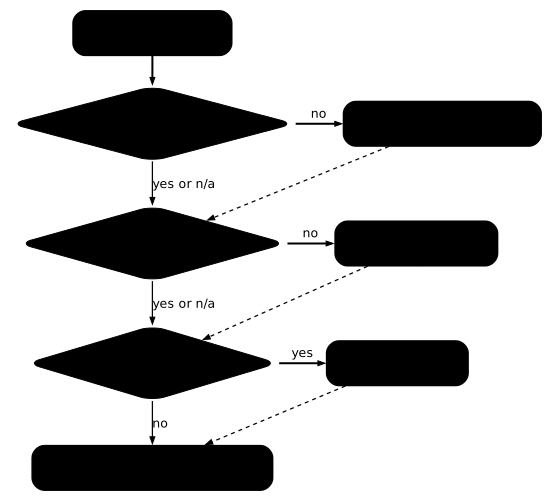
The smoke test is the referee. None of the previous readings (interpreter, getconf, wheel tags) is a proof: they predict. The test runs the real application, or its binary, in the candidate image, with its real dependencies, and checks the exit code and the expected output.
docker run --rm -v "$PWD":/src:ro \ alpine:3.24@sha256:be2656061b536c1883c4034790e21d0a09c5aaaf51968b89368a3c0371ea2c9a /src/musl/cumulecho "code=$?"cumul=33code=0For a Python application, add to this test the import of the native extensions it depends on, as in the section on Python packages. For an application that listens on a port, the test is a request on that port. A FROM change is only validated by this launch.
How do you play the smoke test in the build?
The smoke test goes in the Dockerfile itself: a RUN step that runs the binary or imports the extension makes the build fail before any publication. It is the last box of the diagram, played at build time. First case, a multi-stage build: the first stage (gcc:14) compiles cumul, the second copies the binary into the candidate base, passed as the BASE argument, and runs it. The default value of ARG BASE avoids the InvalidDefaultArgInFrom warning, which BuildKit emits when the argument of a FROM line has no value.
Save this file as Dockerfile, in ~/changer-socle next to cumul.c.
ARG BASE=debian:13-slim@sha256:f6b08b09a05725f9431502d3b5714f5c4576e82c1a84fa1debe0c24a7e0c3ec4FROM gcc:14@sha256:435c3cbc2ad1c25fbc1684c367808ff0ca2035a1bed56734a40165ab5cd7e3bd AS buildCOPY cumul.c .RUN gcc -O2 -o /cumul cumul.c
FROM ${BASE}COPY --from=build /cumul /usr/local/bin/cumulRUN /usr/local/bin/cumul
Build the image twice, with Debian then with Alpine as the candidate base. On Debian, the build ends without error and the RUN step displays cumul=33. On Alpine, it stops at that step.
docker build --progress=plain --build-arg BASE=debian:13-slim@sha256:f6b08b09a05725f9431502d3b5714f5c4576e82c1a84fa1debe0c24a7e0c3ec4 -t cumul-test:debian .docker build --progress=plain --build-arg BASE=alpine:3.24@sha256:be2656061b536c1883c4034790e21d0a09c5aaaf51968b89368a3c0371ea2c9a -t cumul-test:alpine . > [stage-1 3/3] RUN /usr/local/bin/cumul:0.179 /bin/sh: /usr/local/bin/cumul: not foundDockerfile:8 8 | >>> RUN /usr/local/bin/cumulERROR: failed to build: failed to solve: process "/bin/sh -c /usr/local/bin/cumul" did not complete successfully: exit code: 127Look at the exit code: 127 is that of the shell that executes the RUN (/bin/sh -c), which answers not found because the interpreter of the binary is missing. The same binary run directly by docker run returns 255, as seen above: the code depends on who launches the program. The image is not produced, so nothing unusable goes to production.
Second case, a Python application: the --only-binary :all: option forbids compilation, and the next step imports the native extension. Save the following two files in ~/changer-socle/py.
FROM python:3.14-alpine@sha256:eb2c62658b8d51bff0acc408504b76521d02030de56a8a3c1e830083e89b89d2RUN pip install --no-cache-dir --only-binary :all: markupsafeRUN python -c "import markupsafe._speedups"This Dockerfile builds without error, because markupsafe has a musllinux wheel. The next one replaces the package with onnxruntime, which has none.
FROM python:3.14-alpine@sha256:eb2c62658b8d51bff0acc408504b76521d02030de56a8a3c1e830083e89b89d2RUN pip install --no-cache-dir --only-binary :all: onnxruntimeRUN python -c "import onnxruntime"docker build --progress=plain -f py/ok.Dockerfile -t cumul-test:python-ok pydocker build --progress=plain -f py/ko.Dockerfile -t cumul-test:python-ko py1.717 ERROR: Could not find a version that satisfies the requirement onnxruntime (from versions: none)1.719 ERROR: No matching distribution found for onnxruntimeERROR: failed to build: failed to solve: process "/bin/sh -c pip install --no-cache-dir --only-binary :all: onnxruntime" did not complete successfully: exit code: 1The build stops at the pip install step with code 1 (the output is shortened: the [notice] lines from pip and the reminder of the faulty Dockerfile are omitted). The message does not mention the libc, but since it occurs at build time, you see it before publishing and not at deployment.
Troubleshooting
In most of these symptoms, the message accuses a file or a package that does exist: the cause is elsewhere. The table links each symptom to its cause and to the check that confirms it.
| Symptom | Likely cause | Check |
|---|---|---|
exec /path: no such file or directory, code 255, file present | ELF interpreter missing from the new base | file in the build image, then ls of the path read in the new base |
ldd of Alpine answers without error on a glibc binary | the musl ldd does not report the incompatibility | run the binary, do not rely on ldd |
No matching distribution found, from versions: none | no musllinux wheel for this package | pip download --no-deps --only-binary :all: <package> in the target image |
Failed to build ..., No such file or directory: 'gcc' | pip compiles, the image has no compiler | install gcc and its headers, or choose a package with a wheel |
ModuleNotFoundError: No module named '..._speedups' | py3-none-any wheel installed by the compilation without gcc | import the native extension in the smoke test, use --only-binary :all: |
amd64 binary in arm64 image: no such file or directory | amd64 loader missing from the arm64 image | file in the build image, then docker create --platform linux/arm64 … and docker export … | tar -t | grep ld- (an ls in the image is impossible without emulation) |
docker build stops on a RUN step with not found, code 127 | interpreter of the binary missing from the candidate base (the RUN shell returns 127, docker run returns 255) | file in the build image, then ls of the path read in the candidate base |
| The binary rebuilt for Alpine fails under Debian | symmetry: the musl interpreter does not exist on Debian | ls /lib/ld-musl-* in the image |
How do you clean up after the measurements?
The measurements leave heavy images, a build cache and a working folder. The gcc:14 image weighs 2.14 GB and the two Python images 178 MB and 73 MB (sizes from docker image inspect --format '{{.Size}}'): remove them by their reference, after the cumul-test images built in the previous section. The alpine and debian:13-slim images serve other lessons and stay.
docker rmi cumul-test:debian cumul-test:python-okdocker rmi gcc:14@sha256:435c3cbc2ad1c25fbc1684c367808ff0ca2035a1bed56734a40165ab5cd7e3bddocker rmi python:3.14-slim@sha256:930e1abba7c4e8f96ed93e8012c35d174d7732752731bbd5e8e757d7ec6f3966docker rmi python:3.14-alpine@sha256:eb2c62658b8d51bff0acc408504b76521d02030de56a8a3c1e830083e89b89d2cd ~/changer-socle && rm glibc/cumul musl/cumul static/cumul py/ok.Dockerfile py/ko.Dockerfile Dockerfile cumul.crmdir glibc musl static py && cd ~ && rmdir ~/changer-socleTo check, docker images must no longer list gcc, python or cumul-test, and ls -d ~/changer-socle must answer No such file or directory. One trap remains: after builds, a docker rmi of an image followed by a new docker pull does not bring it back to its original size, because the build cache retains its content (Alpine stays at 26.6 MB instead of 13 MB). You must first empty this cache. This step erases the whole build cache of the machine, not only that of this lesson: avoid it on a shared machine. The cache reached 2.6 GB after the measurements.
The following sequence empties the cache, removes Alpine, pulls it again by its digest (the A variable keeps it) and gives it back the name alpine:latest, useful only if another lesson uses it.
docker builder prune -afA=alpine:3.24@sha256:be2656061b536c1883c4034790e21d0a09c5aaaf51968b89368a3c0371ea2c9adocker rmi alpine:latest "$A"docker pull -q "$A" && docker tag "$A" alpine:latestdocker image lsIMAGE ID DISK USAGE CONTENT SIZE EXTRAalpine:latest be2656061b53 13MB 3.94MBalpine@sha256:be2656061b536c1883c4034790e21d0a09c5aaaf51968b89368a3c0371ea2c9a be2656061b53 13MB 3.94MBAlpine goes back down to 13 MB (measured on November 3, 2026 with Docker 29.9.2). The output is shortened to the Alpine lines: docker image ls also lists the other images you keep, such as the Debian one. The docker rmi answers No such image for the second reference, which the removal of the first has already taken away, with no consequence for what follows.
Key points
-
Changing the
FROMchanges the libc, hence the interpreter that dynamic binaries ask for: glibc and musl do not place it at the same location. -
The compatibility of a binary is predicted by reading:
filein the build image gives the ELF interpreter,lsin the new base says whether it exists. -
Do not rely on
lddin Alpine: it answers with code 0 on a glibc binary that cannot start. A failinggetconf GNU_LIBC_VERSIONsignals a libc that is not glibc. -
Three fixes for a glibc binary on Alpine: rebuild in Alpine (the musl binary then fails under Debian), link statically (about 60 times bigger on this program, it runs on both bases tested, with a reservation for name resolution),
gcompat(third-party binary, trivial case measured). -
The libc of the image chooses the Python wheel:
pip debug --verboseshowsmanylinuxon Debian andmusllinuxon Alpine, and the eight packages tested have amusllinuxwheel. -
The risk is a package with no
musllinuxwheel:No matching distribution founddoes not mention the libc. An installation by compilation withoutgcccan also succeed while delivering a wheel without the C extension. -
An architecture difference does not always give
exec format error: on anamd64host with no emulation, anamd64binary in anarm64image answersno such file or directory; on anarm64host, this same binary answersexec format error. -
The smoke test decides: run the application in the new base, native extensions included, before publishing. Placed in a
RUNstep of the Dockerfile, it makes the build fail: code 127 for a binary with no interpreter, and code 1 from the installation for a package with no wheel, even before the import.
Knowledge check
Check that the essentials of this lesson have stuck. The questions cover only what has just been explained here.
Knowledge check
Check what you have learned with this interactive quiz
How it works
- The timer starts when you click Start
- Multiple choice, true/false and short answer questions
- You can move between questions
- Detailed results are shown at the end
Starts the quiz and the timer
Review
(0/0)Score by domain
A domain groups several guides and gets several questions, so its score is more reliable than a per-topic score, which often rests on a single question.
Summary
Strengths
No topic passed at 80% on at least two questions yet.
Weak areas
No topic below the pass mark.
Recommended next
Hints before you try again?
Continue the course: Separate build from runtime: the multi-stage build
A new full quiz with random questions
Work again only on the questions you missed