In a Compose stack, depends_on orders the launch of the containers, not their readiness. A service can start while its database is still initializing its data, and its first connection attempt fails. This lesson is for a beginner who can already write a Compose stack: you learn to make a service wait until its database really answers.
To do that, you give the database a health check (healthcheck), a command that Docker runs regularly to know whether the service is ready. You then make the dependent service wait, first on that health with service_healthy, then on the end of a migration with service_completed_successfully. Finally you see what Docker does not do: a service that became unhealthy is neither restarted nor isolated. The application must therefore retry by itself.
What you will learn
- See that a
depends_onwithout a condition does not guarantee that a database is ready. - Declare a
healthcheckand choose a probe that tests what the dependent service needs. - Make a service depend on the health of another one with
service_healthy. - Make a service wait for a one-off task, such as a migration, with
service_completed_successfully, and read its failure. - Explain why the application must retry when its dependency disappears, and recognize a client with no retry.
- See that an
unhealthyservice is not restarted by Docker.
Prerequisites
You need a Linux host with Docker Engine 29.9.2 and its Compose 5.6.1 plugin, installed from the official repository as shown in the lesson on installing Docker. The images are pinned by their digest.
You know how to write a stack thanks to the lesson Describe an application with Compose. Three neighboring lessons provide the base:
- Interpolation and environment files, for
${VARIABLE:-default}and$$; - Persist the data of a recreated stack, which shows that the
postgresimage runs its initialization script on an empty volume, and that a query must be retried there as long as the database does not answer; - Inject secrets, and know their limits, because the demonstration below does without a secret to stay short.
The states of a container (Exited, Restarting) and the restart policies are explained in Read a container that does not start or restarts in a loop. This page does not repeat them.
You work in a ~/librairie folder, which the lesson has you create. The folder name becomes the project name: the containers are called librairie-....
Why is a started service not a ready service?
Because depends_on, written in its short form, only waits for the container it depends on to be launched. The program inside may not answer yet. On a fast machine, a database that initializes in half a second gives the impression that the order is enough. To see the problem, you therefore need a database that really takes time.
Create the folder, then an initialization script that pauses for six seconds. This script simulates a long initialization: the postgres image runs it at first startup, when its data folder is empty.
mkdir -p ~/librairie/initdb ~/librairie/migrations ~/librairie/sitecd ~/librairieprintf 'SELECT pg_sleep(6);\n' > initdb/01-delai.sqlThen write a first compose.yaml. The base service is a PostgreSQL. The catalogue service tries only once to read the database, prints a message if it fails, then stays alive so that you can read its logs.
services:  base:    image: postgres:18.6-alpine3.24@sha256:10a5c69a83035ab5239f5620d708520e8b28f5aa1f2b20143e6024532edadfb5    environment:      POSTGRES_USER: librairie      POSTGRES_PASSWORD: demo-seulement      POSTGRES_DB: librairie    volumes:      - ./initdb:/docker-entrypoint-initdb.d:ro
  catalogue:    image: postgres:18.6-alpine3.24@sha256:10a5c69a83035ab5239f5620d708520e8b28f5aa1f2b20143e6024532edadfb5    environment:      PGPASSWORD: demo-seulement    command:      - sh      - -c      - psql -h base -U librairie -d librairie -tAc 'SELECT 1' || echo 'connection failed'; exec sleep infinity    depends_on:      - base
The value demo-seulement is that of a disposable demonstration, as in the neighboring lessons: a real database receives its password through a secret. The PGPASSWORD variable gives this password to the psql client of the catalogue service.
The catalogue service reuses the postgres image because it contains the psql client. Start the stack and read what it printed. On the very first run, Compose downloads the image first, which adds progress lines before the ones below.
docker compose up -ddocker compose logs catalogue[+] up 3/3 ✔ Network librairie_default Created 0.0s ✔ Container librairie-base-1 Started 0.3s ✔ Container librairie-catalogue-1 Started 0.4scatalogue-1 | psql: error: connection to server at "base" (172.18.0.2), port 5432 failed: Connection refusedcatalogue-1 | Is the server running on that host and accepting TCP/IP connections?catalogue-1 | connection failedLook at two things. Compose launched catalogue as soon as base was started: the output shows no wait. And the connection is refused, because the database is not listening on the network yet. The IP address shown may differ on your machine. Wait ten seconds, then repeat the same query from catalogue.
docker compose exec catalogue psql -h base -U librairie -d librairie -tAc 'SELECT 1'1The database answers now. It was therefore not down: catalogue left too early, and nothing in the file forbade it.
How do you declare a health check?
A health check is a command that Docker runs regularly inside the container: exit code 0 declares it successful, any non-zero code declares it failed (Docker recommends code 1). Docker derives a state from it, visible in docker inspect and docker compose ps.
Thanks to the health check, the container is in one of three states. It is starting before the first success, healthy when the last probe succeeded, and unhealthy after retries consecutive failures outside the grace period. The table gives the six settings of a Compose healthcheck, with Docker's default values.
| Setting | Role | Default |
|---|---|---|
test | the command, as ["CMD", ...] without a shell or ["CMD-SHELL", "..."] with a shell | none |
interval | delay between two probes | 30 s |
timeout | duration beyond which a probe counts as failed | 30 s |
retries | number of consecutive failures before unhealthy | 3 |
start_period | grace period during which failures do not count | 0 s |
start_interval | delay between two probes during start_period (Docker Engine 25.0 or later) | 5 s |
The grace period does not delay the healthy state: a probe that succeeds during start_period declares the service healthy right away. It only avoids counting as failures the attempts of a service that is slow to start. During this period, the probes follow one another at the pace of start_interval, not of interval.
These settings also set the failure detection delay: roughly interval times retries, plus the duration of each probe, and a little less if the failure happens in the middle of an interval. With interval: 2s and retries: 3, the switch to unhealthy takes a few seconds (4.6 seconds measured below, on an nginx service). With the default values, it takes about a minute and a half, which is long for a demonstration and often reasonable in production.
Which command should you pick to test a PostgreSQL database?
The pg_isready command answers the question "does the server accept connections?", but its answer depends on how you query it. At first startup, the postgres image first launches a temporary server, which only listens on a connection point local to the container (the socket). It runs the initialization script, stops, then the real server starts on the network.
A pg_isready without an address queries the socket: it can answer "ready" too early, while the other containers, which go through the network, are still refused.
Measure it. Start again from an empty volume, start the database alone, then run both forms of the command within the first five seconds.
docker compose down -vdocker compose up -d basedocker compose exec base pg_isready -U librairie -d librairiedocker compose exec base pg_isready -h 127.0.0.1 -U librairie -d librairie/var/run/postgresql:5432 - accepting connections127.0.0.1:5432 - no responseThe first line announces "accepting connections" at a moment when no other container can connect yet. The second tells the truth. In the measurement, repeated every half second, the form without an address answered from 0.8 seconds, and the -h 127.0.0.1 form only from 7.4 seconds, after the end of the initialization. The probe must therefore go through -h 127.0.0.1, which the temporary server does not listen on.
If your attempt does not give this result, it is a matter of timing. Two "no response" lines: the temporary server is not started yet, wait a second and run the two commands again. Two "accepting connections" lines: you went past the seven seconds, start over with docker compose down -v.
Keep the principle in mind: a probe tests what the dependent service needs, here being able to connect through the network, and not only the existence of the process.
Add the health check to the base service of the compose.yaml.
healthcheck: test: ["CMD-SHELL", "pg_isready -h 127.0.0.1 -U librairie -d librairie"] interval: 2s timeout: 3s retries: 10 start_period: 15sThe values are short for the demonstration. The grace period of 15 seconds comfortably covers the 6-second initialization. Recreate the database and follow its state every two seconds.
docker compose down -vdocker compose up -d basefor i in 1 2 3 4 5 6 7 8; do docker inspect -f '{{.State.Health.Status}}' librairie-base-1; sleep 2; donestartingstartingstartingstartingstartinghealthyhealthyhealthyLook at the switch from starting to healthy. It comes after the end of the initialization, not when the container starts: here about ten seconds after launch. The probe calculation is in the optional box above.
How do you make a service wait until its dependency is healthy?
With the long form of depends_on, which attaches a condition to each dependency. There are three conditions, and only the first is that of the short form.
| Condition | Compose waits until the dependency is… | Use case |
|---|---|---|
service_started | launched | no need for it to be ready |
service_healthy | healthy | database, API, server that takes time to answer |
service_completed_successfully | finished with code 0 | one-off task, such as a migration |
The service_healthy condition assumes that the dependency declares a healthcheck: without a probe, there is nothing to wait for. Change the catalogue service to request it.
depends_on: base: condition: service_healthyStart the stack again from an empty volume and watch the sequence.
docker compose down -vdocker compose up -ddocker compose logs catalogue[+] up 3/3 ✔ Network librairie_default Created 0.0s ✔ Container librairie-base-1 Healthy 10.8s ✔ Container librairie-catalogue-1 Started 10.9scatalogue-1 | 1Look at the durations: base becomes Healthy after about ten seconds, and catalogue starts right after. This time its query returns 1. The dependent service was delayed until the database really served.
How do you wait for a one-off task such as a migration?
A migration is a script that prepares the schema of the database (tables, columns) before the application uses it. It runs once then stops: it is a task, not a service that keeps running. You therefore declare it as a separate service, and Compose waits for its successful end rather than for its health.
Write a repeatable migration, like the one in the lesson Persist the data of a recreated stack: it does nothing if its work is already done. Here, IF NOT EXISTS and ON CONFLICT DO NOTHING avoid the failure and the duplicate on the second run.
cat > migrations/001-livres.sql <<'EOF'CREATE TABLE IF NOT EXISTS livres ( id serial PRIMARY KEY, titre text NOT NULL UNIQUE);INSERT INTO livres (titre) VALUES ('Candide'), ('Germinal') ON CONFLICT DO NOTHING;EOFprintf 'SELEKT 1;\n' > migrations/002-erreur.sqlThe second file contains a deliberate mistake, used further down. Then add the migration service, and make catalogue wait for it. The file to run is chosen by a variable, with a default value, so that you can simulate a failure without editing the file.
migration: image: postgres:18.6-alpine3.24@sha256:10a5c69a83035ab5239f5620d708520e8b28f5aa1f2b20143e6024532edadfb5 environment: PGPASSWORD: demo-seulement command: - psql - -h - base - -U - librairie - -d - librairie - -v - ON_ERROR_STOP=1 - -f - /migrations/${FICHIER_MIGRATION:-001-livres.sql} volumes: - ./migrations:/migrations:ro restart: "no" depends_on: base: condition: service_healthyThe -v ON_ERROR_STOP=1 option makes psql exit with a non-zero code at the first error of the script. Without it, a broken migration could end with code 0, and Compose would believe it succeeded.
The restart: "no" value is the default behavior. It is written here to say that Docker must not restart a finished task. It does not prevent a new docker compose up -d from starting it again, as the test further down shows; the restart policies are detailed in the troubleshooting lesson cited above. Now replace the depends_on of catalogue and its query.
catalogue: image: postgres:18.6-alpine3.24@sha256:10a5c69a83035ab5239f5620d708520e8b28f5aa1f2b20143e6024532edadfb5 environment: PGPASSWORD: demo-seulement command: - sh - -c - psql -h base -U librairie -d librairie -tAc 'SELECT count(*) FROM livres' || echo 'read failed'; exec sleep infinity depends_on: migration: condition: service_completed_successfullyThe diagram follows the order in time, from top to bottom. Compose starts base and waits for it to be healthy, launches the migration and waits for its code 0, then only catalogue. Look at the note at the bottom right: once catalogue is launched, Compose no longer watches anything.
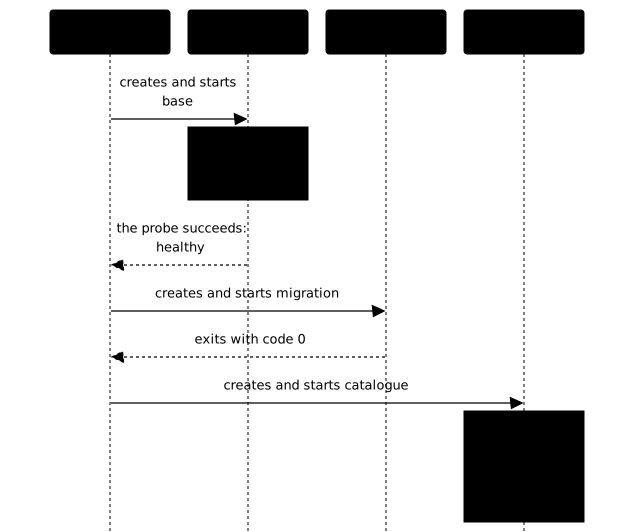
Start the stack and read the state of the three services. The -a option is needed, because migration has stopped and docker compose ps alone only shows the containers that are running.
docker compose down -vdocker compose up -ddocker compose ps -a --format '{{.Service}} {{.Status}}'docker compose logs catalogue[+] up 4/4 ✔ Network librairie_default Created 0.0s ✔ Container librairie-base-1 Healthy 10.9s ✔ Container librairie-migration-1 Exited 11.5s ✔ Container librairie-catalogue-1 Started 11.6sbase Up 11 seconds (healthy)catalogue Up Less than a secondmigration Exited (0) Less than a second agocatalogue-1 | 2Look at the state of each service: base is healthy, migration exited with code 0 (Exited (0)) and catalogue reads the two books. The durations in docker compose ps depend on when you read the state.
Now replay the migration alone. The --no-deps option avoids restarting its dependencies, and --rm removes the container of the task at the end.
docker compose run --rm --no-deps migrationdocker compose exec base psql -U librairie -d librairie -tAc 'SELECT count(*) FROM livres' Container librairie-migration-run-53a89a924edb Creating Container librairie-migration-run-53a89a924edb Createdpsql:/migrations/001-livres.sql:4: NOTICE: relation "livres" already exists, skippingCREATE TABLEINSERT 0 02The second run creates nothing and inserts nothing. psql reports that the table already exists, the insert returns INSERT 0 0 and the table still contains two rows. The CREATE TABLE line is only the name of the command that was run, even when it created nothing, and the identifier of the temporary container changes at every run.
This repeatability is necessary: a new docker compose up -d also restarts the migration that already finished, because up starts every stopped service of the file, dependent or not.
The same test on a task with no dependent at all, with or without restart: "no", restarts it the same way. Check it by running the command again without changing anything.
docker compose up -d[+] up 3/3 ✔ Container librairie-catalogue-1 Running 0.0s ✔ Container librairie-base-1 Healthy 0.5s ✔ Container librairie-migration-1 Exited 0.7sCompose touches neither base nor catalogue, which are already running, but it restarts the migration container: the word Exited at the end shows that it ran and stopped again. The log of the migration (docker compose logs migration) then contains two runs. The second one prints INSERT 0 0, because the two books already exist. A repeatable migration can therefore be replayed safely at every deployment.
What happens when the migration fails?
The dependent service never starts. Start the stack again from scratch, pointing to the broken file through the variable.
docker compose down -vFICHIER_MIGRATION=002-erreur.sql docker compose up -ddocker compose ps -a --format '{{.Service}} {{.State}}'docker inspect -f '{{.State.ExitCode}}' librairie-migration-1[+] up 4/4 ✔ Network librairie_default Created 0.0s ✔ Container librairie-base-1 Healthy 10.9s ✘ Container librairie-migration-1 Error service "migration" didn't co... 11.5s ✔ Container librairie-catalogue-1 Created 0.1sservice "migration" didn't complete successfully: exit 3base runningcatalogue createdmigration exited3Look at three points:
- Compose stops with a message that names the service and its exit code. The container line is cut by the width of the terminal, but the last line of Compose gives the full message.
cataloguenever reached therunningstate. It stays in thecreatedstate: the container exists, but Compose did not start it.- Code 3 is the one
psqlgives to a script error withON_ERROR_STOP.
To understand the cause, read docker compose logs migration, which contains ERROR: syntax error at or near "SELEKT".
Then put the stack back in shape with the correct file.
docker compose down -vdocker compose up -dWhy must the application retry anyway?
Because depends_on only protects the startup. Once catalogue is launched, the database can stop for maintenance or because of an incident, and Compose no longer watches anything. A client that tries only once, like the one used so far, then never resumes its reading.
A robust client retries after a pause. Replace the command of catalogue with a loop that reads every two seconds and reports each failure. The $$ leaves the $ sign to the shell of the container, instead of letting Compose interpret it. A failing attempt itself lasts about five seconds, the time for the resolution of the name base to fail: the name of a stopped container no longer resolves, and psql answers "could not translate host name "base" to address" after 5.0 seconds measured. The failure message therefore comes back about every seven seconds.
command: - sh - -c - | while true; do n=$$(psql -h base -U librairie -d librairie -tAc 'SELECT count(*) FROM livres' 2>/dev/null) \ && echo "read succeeded: $$n books" \ || echo "database unavailable, retrying in 2 s" sleep 2 doneApply the change, then stop the database. Run the commands one by one, with a pause before reading the logs.
docker compose up -ddocker compose stop basesleep 20docker compose logs --tail 2 cataloguedocker compose ps --format '{{.Service}} {{.Status}}'catalogue-1 | database unavailable, retrying in 2 scatalogue-1 | database unavailable, retrying in 2 scatalogue Up 20 secondsLook at the catalogue service: it is still started, and Compose did nothing more than the requested stop. The stopped database no longer appears, because docker compose ps without -a only lists the containers that are running. Turn the database back on and give it time to answer.
docker compose start basesleep 10docker compose logs --tail 2 cataloguedocker compose ps --format '{{.Service}} {{.Status}}'catalogue-1 | read succeeded: 2 bookscatalogue-1 | read succeeded: 2 booksbase Up 10 seconds (healthy)catalogue Up 30 secondsThe reading resumed without anyone touching catalogue, which stayed Up during the whole stop. The data of the database survived, because stopping does not erase its volume. The retries of the application therefore cover the case that neither the probe nor the startup order covers: a dependency that disappears after startup.
An infinite and silent loop remains a trap, though, because it hides a lasting failure. A real application limits the number of attempts, lengthens the pause between two attempts (this is called backoff) and ends up failing with a clear message, so that the incident is visible.
What does Docker do when a service becomes unhealthy?
Nothing. The unhealthy state is information, read by docker compose ps, by the service_healthy condition at startup, or by an outside tool such as a reverse proxy. Docker does not restart the container, and a restart policy does not deal with it either: it reacts to the end of the process, not to its health state, as the troubleshooting lesson recalls.
A reverse proxy such as Traefik can on the other hand read this state to set the instance aside, which Traefik with Docker details.
To see it, add a web server whose probe looks at a state file, and not at the presence of the process. Create the two files, then the service.
printf 'Welcome\n' > site/index.htmlprintf 'ok\n' > site/etat.txt vitrine: image: nginx:1.30.6-alpine@sha256:0e52bd054126cdc040b1276c0af347aeb02a41b9cfe305d6094767ac30e97949 volumes: - ./site:/usr/share/nginx/html:ro healthcheck: test: ["CMD", "wget", "-q", "-O", "/dev/null", "http://127.0.0.1/etat.txt"] interval: 2s timeout: 2s retries: 3The state file stands for what a real application would check before declaring itself available: database reachable, cache loaded. Start the service, check that it is healthy, then delete the state file on the host. The folder is read-only in the container, not on your host: you can therefore delete the file there.
docker compose up -d vitrinesleep 6docker inspect -f '{{.State.Status}} {{.State.Health.Status}} restarts={{.RestartCount}}' librairie-vitrine-1rm site/etat.txtsleep 10docker inspect -f '{{.State.Status}} {{.State.Health.Status}} restarts={{.RestartCount}}' librairie-vitrine-1docker compose exec vitrine wget -q -O - http://127.0.0.1/running healthy restarts=0running unhealthy restarts=0WelcomeRead the three lines. The container is first healthy, then unhealthy a few seconds after the file is deleted (4.6 seconds measured). Yet its status stays running, the restart counter stays at 0 and the server keeps answering. Only the health label changed.
The probe uses wget, provided by the Alpine variant of the nginx image, which is not the case of every image. The probe log says why it fails.
docker inspect -f '{{range .State.Health.Log}}code={{.ExitCode}} {{.Output}}{{end}}' librairie-vitrine-1code=1 wget: server returned error: HTTP/1.1 404 Not Foundcode=1 wget: server returned error: HTTP/1.1 404 Not Foundcode=1 wget: server returned error: HTTP/1.1 404 Not Foundcode=1 wget: server returned error: HTTP/1.1 404 Not Foundcode=1 wget: server returned error: HTTP/1.1 404 Not FoundEach line is a failed probe: wget did not find the state file and returned code 1. Docker only keeps the last five probes in this log. Put the file back and wait for one probe.
printf 'ok\n' > site/etat.txtsleep 4docker inspect -f '{{.State.Health.Status}} restarts={{.RestartCount}}' librairie-vitrine-1healthy restarts=0The service is healthy again without a restart: it is the same process that resumed. Keep the consequence in mind: if you want a detected failure to trigger an action, another tool has to do it, not the probe.
What should you do when startup does not wait as expected?
Start from what you see, then read the probe log before changing the file. The table links the symptoms of this lesson to their cause.
| What you observe | Probable cause | What you do |
|---|---|---|
docker compose up -d stops with exit code 1 and the message "dependency failed to start: container librairie-base-1 is unhealthy" | The probe never succeeded: wrong command, wrong host, or grace period too short | Read docker inspect -f '{{range .State.Health.Log}}{{.Output}}{{end}}' <container>, test the command with docker compose exec, then fix test or start_period |
| The probe log contains "executable file not found" or code 127 | The tool of the probe does not exist in the image | Choose a command present in the image, or install the tool in the image |
The service stays in starting for a long time | interval too long (or start_interval during the grace period), or initialization longer than expected | Shorten interval or start_interval and check that start_period covers the initialization |
The probe is healthy but the client is refused | The probe tests something other than what the client needs, for example the local socket instead of the network | Make the probe test through the same path as the client |
| Compose prints "didn't complete successfully" followed by a code | The task failed | Read docker compose logs <task>, fix it, and run docker compose up -d again |
| The dependent service starts before the migration ends | depends_on in short form, hence service_started | Use the long form with service_completed_successfully |
The service is unhealthy and nothing happens | Normal behavior: Docker does not restart on this state alone | Fix the cause, or hand the reaction to a tool that reads the state |
| The client fails for good when the database restarts | No retry in the application | Add bounded retries with a pause |
If up -d seems stuck, open a second terminal: docker compose ps shows the starting or unhealthy state, and the probe log is already filled.
How do you clean everything up after the demonstration?
The demonstration leaves four containers, one network, an anonymous volume created by the postgres image, the ~/librairie folder and two images. The docker compose down -v command removes the containers, the network and this volume.
cd ~/librairiedocker compose down -vThen remove the images, then the folder.
docker rmi postgres:18.6-alpine3.24@sha256:10a5c69a83035ab5239f5620d708520e8b28f5aa1f2b20143e6024532edadfb5docker rmi nginx:1.30.6-alpine@sha256:0e52bd054126cdc040b1276c0af347aeb02a41b9cfe305d6094767ac30e97949cd ~ && rm -r librairieAfter that, docker ps -a shows no librairie-... container, docker volume ls shows no volume of the stack, and ls ~/librairie answers that the folder no longer exists.
Practice
The first lab gives you two ready images and no running container: a server whose readiness comes after a slow initialization, and a client that tries only once. You write the compose.yaml with a readiness probe, not a simple presence probe, a short interval and a sufficient grace period, then you make the client depend on the health of the server. The validation temporarily removes the readiness of the server and waits for it to become unhealthy within a bounded delay. It also starts isolated projects with a slower server, which must delay the client, and a server that is never ready, with which the client must never start.
The project name is imposed, with the -p option seen in the first Compose lesson. The images already carry their command: unlike the demonstration, you do not change it and you add neither a mount nor a restart policy.
The second lab gives an image with a migration script and an application script that refuses to start without a schema. You declare the migration as a one-off task and you make the application wait for its successful end, with a shared volume that the migration and the application both mount in read-write mode. This shared named volume is taught by the lesson Persist the data of a recreated stack. The validation replays the migration twice to check that it preserves the data already written, then tests, in separate projects, an empty volume and a migration that exits with an error, where the application must never start.
The project name is imposed, with the -p option. The migration receives the provided script as its command, without replacing the entrypoint of the image. The shared volume is the only mount, and the migration carries no restart policy that would run it again.
Key points
-
A
depends_onin its short form only waits for the container to be launched. It says nothing about the readiness of the program inside, and on a fast machine it may seem to be enough. -
A
healthcheckruns a command at a regular interval and derives thestarting,healthyandunhealthystates from it. The failure detection delay is roughlyintervaltimesretries. Thestart_periodgrace period does not count the failures of a service that is slow to start, without delaying thehealthystate. -
A probe tests what the dependent service needs, through the same path as it. On PostgreSQL,
pg_isreadywithout an address can answer during initialization: aim at127.0.0.1. -
The long form of
depends_onsets a condition:service_healthyfor a dependency that must serve,service_completed_successfullyfor a one-off task that must end with code 0. -
A migration is declared as a separate, repeatable service, with
ON_ERROR_STOPso that the error becomes a non-zero code. If it fails, the dependent service does not start. A newdocker compose up -druns it again, hence the value of a migration that can be replayed safely. -
An
unhealthyservice is neither restarted nor stopped by Docker: the state is information, read by those who want to use it. -
depends_ononly protects the startup. A dependency that disappears afterwards is handled in the application, with bounded retries spaced by a pause.
Knowledge check
Check that the essentials of this lesson have stuck. The questions cover only what has just been explained here.
Knowledge check
Check what you have learned with this interactive quiz
How it works
- The timer starts when you click Start
- Multiple choice, true/false and short answer questions
- You can move between questions
- Detailed results are shown at the end
Starts the quiz and the timer
Review
(0/0)Score by domain
A domain groups several guides and gets several questions, so its score is more reliable than a per-topic score, which often rests on a single question.
Summary
Strengths
No topic passed at 80% on at least two questions yet.
Weak areas
No topic below the pass mark.
Recommended next
Hints before you try again?
Continue the course: Limit resources and restarts of a Compose stack
A new full quiz with random questions
Work again only on the questions you missed