An audit can surface a line that chills: the database of an internal application answers from the outside. Nobody opened it, no firewall rule written by the team allows it, and the command that launched the container fits on one banal line, docker run -d -p 5432:5432 --env-file postgres.env postgres:18.6-alpine3.24@sha256:10a5c69a83035ab5239f5620d708520e8b28f5aa1f2b20143e6024532edadfb5. It is no typo, and that is exactly the problem: -p 5432:5432 does not publish "on the machine", it publishes on all interfaces. The publishing address is optional, and its default is the most open of all possible choices. This lesson teaches the three forms of -p, how to read what the engine and the system have really opened, why a firewall such as ufw does not catch the mistake, and how to untangle two port conflicts that look alike.
Publishing a port means asking the engine to redirect a port of the host (the machine that runs Docker) to a port of the container, so that a client outside the container can reach it.
What you will learn
- The three forms of
-p: address omitted, address named, no publishing at all. - What each one really opens on the host, measured from the loopback and from the routable address.
- Reading the state rather than the command: the
PORTScolumn,docker port, and the system's socket table. - The posture that gets forgotten: publish nothing, and still serve the other containers.
- The host firewall: why
ufwdoes not filter a published port (measured), what Docker's documentation says aboutfirewalld, and where to put a filter. EXPOSEand the listening address in the container: what they change, and what they do not change.- Publishing is not serving: an accepted connection does not prove the service answers, and the publication of an existing container can only be changed by recreating it.
- Two port conflicts that look alike, only one of which is visible from Docker.
Prerequisites
A running Docker engine, the nc (netcat), curl and python3 commands on the host, and an account allowed to talk to the engine, as in the lesson on inspecting a container, from which it takes docker port and the reading of an IP address. The outputs of this page were taken on Docker 29.9.2, on a machine whose routable address is 10.10.114.11: on yours, it will be your own. The ports used here are all in the range 18190 to 18199, except 18290 and 18296 and the port drawn at random by the -P option (see below), so as not to collide with any other service on the machine.
Publishing means choosing an address
The full form of the option is -p <host address>:<host port>:<container port>. The address can be omitted, and that is where everything is decided: its absence is not an absence of choice, it is the choice of all interfaces.
A network interface is an entry point of the machine, with its address. The host has at least two: the loopback (127.0.0.1), which never leaves the machine and serves only local programs, and a routable address, through which the other machines of the network reach it. The address 0.0.0.0 stands for all interfaces at once.
The commands on this page designate the routable address with a variable, HOTE, which you fill in once and for all in your terminal. ip -o -4 route get 1.1.1.1 asks the kernel which route it would take to a public address, without sending a packet, and answers on one line; awk extracts the field that follows the word src, the source address of that route, wherever it sits on the line.
HOTE=$(ip -o -4 route get 1.1.1.1 | awk '{for (i = 1; i <= NF; i++) if ($i == "src") print $(i + 1)}')echo "$HOTE"10.10.114.11The outputs on the page keep the address read on the measurement machine, 10.10.114.11: on yours, they will show the value of $HOTE. If echo does not print an IPv4 address, your machine's route has a different shape: read the address with ip -4 addr and assign it to HOTE by hand.
| What you write | What is open on the host |
|---|---|
-p 18190:80 | all interfaces, IPv4 and IPv6 |
-p 127.0.0.1:18191:80 | the loopback only |
-p "$HOTE":18192:80 | the routable address only |
| no publishing option | no host port |
The diagram below reads from left to right: the container always listens on the same port, and the form of the -p alone decides the scope. Look above all at the bottom branch, the one that stays true in all three cases.

Observing the four cases at once
The four containers below listen on their port 80 and answer a random badge to whoever connects. So as not to repeat the responder's command, a small shell function wraps it: docker run -d, the options you pass it, then the pinned Alpine image and a one-line script. nc -ll -p 80 -e echo ... is busybox's nc in server mode: it listens on port 80, resumes listening after each connection, and runs echo to answer.
repondeur() { docker run -d "$@" alpine:3.24@sha256:be2656061b536c1883c4034790e21d0a09c5aaaf51968b89368a3c0371ea2c9a sh -c \ 'badge=$(od -An -tx1 -N6 /dev/urandom | tr -d " \n"); exec nc -ll -p 80 -e echo "badge=$badge"'}The four different publications are then launched like this:
repondeur --name demo-toutes -p 18190:80repondeur --name demo-loopback -p 127.0.0.1:18191:80repondeur --name demo-routable -p "$HOTE":18192:80repondeur --name demo-interneThe PORTS column of docker ps says what the engine retained, and it says so for each one:
docker ps --filter name=demo- --format 'table {{.Names}}\t{{.Ports}}'NAMES PORTSdemo-internedemo-routable 10.10.114.11:18192->80/tcpdemo-loopback 127.0.0.1:18191->80/tcpdemo-toutes 0.0.0.0:18190->80/tcp, [::]:18190->80/tcpThree details of this output deserve a pause:
demo-toutescarries two entries,0.0.0.0:18190and[::]:18190. The omitted address opened both the IPv4 and the IPv6 stack.demo-loopbackanddemo-routablecarry only one, the one that was named. Naming the address restricts publishing to it, which is the whole point of naming it.demo-internehas an emptyPORTScolumn, and yet it is running.
Read the state, not the command
docker ps prints one line per container, which becomes unreadable as soon as there are many. docker port, already met in the lesson on inspection, answers about a single container, and it is the reflex command when you want a clear answer:
docker port demo-toutes 80/tcp0.0.0.0:18190[::]:18190docker port demo-loopback 80/tcp127.0.0.1:18191On a container that publishes nothing, this command does not return an empty output: it fails, with a return code of 1 and an explicit message.
docker port demo-interne 80/tcpno public port '80/tcp' published for demo-interneThis is a useful distinction in a script: the return code carries the information, not only the text.
The system's point of view
The engine declares what it reserved. The system shows what is really listening. ss -ltnp lists the listening sockets (-l) in TCP (-t), with numbers rather than names (-n) and the process that holds them (-p), which requires superuser privileges:
sudo ss -ltnp | grep -E ':1819[0-2]\b'LISTEN 0 4096 0.0.0.0:18190 0.0.0.0:* users:(("docker-proxy",pid=4738,fd=8))LISTEN 0 4096 127.0.0.1:18191 0.0.0.0:* users:(("docker-proxy",pid=4826,fd=8))LISTEN 0 4096 10.10.114.11:18192 0.0.0.0:* users:(("docker-proxy",pid=4898,fd=8))LISTEN 0 4096 [::]:18190 [::]:* users:(("docker-proxy",pid=4744,fd=8))The listening address, fourth column of each line, repeats exactly what docker ps declared. The listening program, for its part, is never the container: it is docker-proxy, the engine's userland proxy, a host process placed for each published port. Remember this name: the section "Publishing is not serving" explains the part it plays when the connection arrives through the host's loopback.
The observable consequence
A declaration is not proof. Reading the answer from each of the machine's two addresses says what is really reachable. The probe connects with nc -w 3 (give up after three seconds), prints the container's answer, and writes "aucune reponse" when the connection fails or stays silent:
for ip in 127.0.0.1 "$HOTE"; do for port in 18190 18191 18192; do printf '%s:%s -> ' "$ip" "$port" nc -w 3 "$ip" "$port" || echo "aucune reponse" donedone127.0.0.1:18190 -> badge=7ca9b73f09e1127.0.0.1:18191 -> badge=dd0179f80f14127.0.0.1:18192 -> aucune reponse10.10.114.11:18190 -> badge=7ca9b73f09e110.10.114.11:18191 -> aucune reponse10.10.114.11:18192 -> badge=d0b689cd6454The six lines are summed up in the following table:
| Port | From 127.0.0.1 | From the routable address ($HOTE) |
|---|---|---|
18190, address omitted | answers | answers |
18191, published on the loopback | answers | no response |
18192, published on the routable address | no response | answers |
The second row is the posture to know: an administration service, a database, a cache, anything with no reason to leave the machine is published on 127.0.0.1 and stays reachable by whatever runs locally. The third is its mirror, and it often surprises: a publication on the routable address is not reachable from the loopback.
Why doesn't the host firewall filter this port?
Docker writes its own firewall rules, and ufw does not filter by default the traffic those rules direct to a container. For each published port, the engine adds network address translation (NAT) rules and its own chains, including DOCKER, in the kernel's firewall. Docker's documentation says so for ufw: traffic to a container is diverted in the nat table, before reaching the INPUT and OUTPUT chains that ufw uses. A packet destined for a published port is redirected to the container before the host's inbound rules, the ones ufw allow and ufw deny drive, get the chance to judge it. The administrator who typed ufw deny 18190 therefore sees the rule displayed as active, while the published port still answers.
The measurement confirms it on a Debian 13 VM with ufw active (inbound policy deny, only port 22 allowed): a port published on 18198 answered from the VM's host machine, even after ufw deny 18198/tcp, whereas a port held by an ordinary program of the VM (18199) stayed silent, nc -w 3 returning a timeout and code 1. This measurement covers ufw alone.
For firewalld, the documentation describes something else: a docker zone with an ACCEPT target, which receives the bridge interfaces created by Docker, and a forwarding policy that allows traffic from all zones to it. It does not claim that a published port escapes firewalld the way it escapes ufw, and this case was not replayed here: before counting on firewalld to filter a published port, measure it as above.
The remedy takes three gestures: name the publishing address (-p 127.0.0.1:18191:80) so the port does not leave the machine, publish nothing when only containers have to reach each other, and put the filtering rules you want in the DOCKER-USER chain, which Docker reserves for the administrator's rules and processes before its own with its default rules engine, iptables (Docker with iptables). The Packet filtering and firewalls page of the official documentation describes the integration with ufw and firewalld. To handle the DOCKER-USER chain, see the guide on the firewall (in French), and for the two firewalls themselves the guides UFW and Firewalld.
The overlooked posture: publish nothing
demo-interne publishes no host port. It is nonetheless reachable, and this is a point that is easily forgotten. Containers on the same network talk to each other without any publishing: publishing opens a host port, it does not create connectivity between containers.
Containers are attached by default to a private virtual network named bridge, created by the engine. On this network, the neighbors reach each other by address, which the engine provides as in the lesson on inspection:
docker container inspect demo-interne \ --format '{{range .NetworkSettings.Networks}}{{.IPAddress}}{{end}}'172.17.0.7The address depends on the order in which the engine handed out its own: on your machine, it will be different, and it is the one to pass to the next command.
docker exec demo-toutes nc -w 3 172.17.0.7 80badge=f05ef96cfbcdBy name, on the other hand, nothing gets through on this default network:
docker exec demo-toutes nc -w 3 demo-interne 80nc: bad address 'demo-interne'On a network you create, the engine also provides name resolution, and the container's name is enough:
docker network create demo-reseaurepondeur --name demo-app --network demo-reseaurepondeur --name demo-base --network demo-reseaudocker exec demo-app nc -w 3 demo-base 80badge=20d6a688b88cdemo-base answers, and docker port demo-base prints no line: nothing is published, nothing is open on the host, and the service is served all the same. A database consumed only by the stack's own application therefore has no reason to carry a -p. Publishing is a reflex, and that is how databases end up exposed without anyone having wanted it.
Publishing is not serving
A published port that leads nowhere behaves exactly like a port that works, until you read the answer. Here is a container whose service listens on port 80, but whose publication targets port 1234:
repondeur --name demo-muet -p 127.0.0.1:18196:1234docker port demo-muet1234/tcp -> 127.0.0.1:18196The engine declares the publication, and the system honors it: ss -ltn does show 127.0.0.1:18196 listening. A connection attempt succeeds:
nc -w 3 -z 127.0.0.1 18196Connection to 127.0.0.1 18196 port [tcp/*] succeeded!Reading the answer, however, fails: a curl to this address returns Connection reset by peer (code 56), because nobody is behind this port.
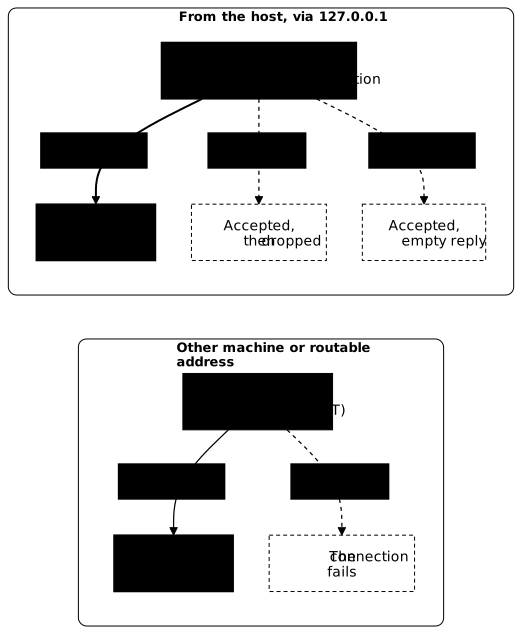
A connection that arrives through the host's loopback goes through docker-proxy, which accepts it without knowing what awaits it in the container. That is why the test succeeds while nothing listens. With "userland-proxy": false in daemon.json, the same test fails: nc -z prints Connection refused (code 1) and curl returns code 7, because no host process accepts the connection in place of the container any more.
Other connections take a different path. Take the same container, published this time on all interfaces, still with nothing listening in the container. On Docker 29.9.2, with its default configuration, nc -z 127.0.0.1 still succeeds, but nc -z to the host's routable address fails with code 1, and so does the same command run from another machine. Docker has indeed added a destination NAT (DNAT) rule to the kernel's firewall: the kernel sends this traffic straight to the container's address, without going through docker-proxy. Since nobody listens, the connection fails.
A successful connection therefore proves nothing, since the result changes depending on where you test from. To check that a service is served, read its answer.
The next diagram shows these two paths. At the top, a client on the host arrives through 127.0.0.1: docker-proxy always accepts the connection, and what follows depends on the container. The service answers only if it listens on the right port and on an address the proxy can reach. The two dotted branches end in no answer: the first is the wrong port you have just seen, the second is explained in the section on the listening address. At the bottom, a client on another machine, or the host through its routable address, is redirected by the kernel. With no service listening, the connection fails at once.
What does EXPOSE change, and does the application listen in the right place?
EXPOSE is a declaration of the image, not a publication. The EXPOSE 80 instruction of a Dockerfile records in the image metadata that the service listens on port 80. It opens nothing on the host, and reading it is a hint for humans and for the -P option.
docker image inspect --format '{{json .Config.ExposedPorts}}' nginx:1.30.6-alpine@sha256:0e52bd054126cdc040b1276c0af347aeb02a41b9cfe305d6094767ac30e97949{"80/tcp":{}}The uppercase -P option publishes all the ports declared by EXPOSE, each on a free host port chosen by the engine, and on all interfaces like a -p without an address:
docker run -d --name demo-expose -P nginx:1.30.6-alpine@sha256:0e52bd054126cdc040b1276c0af347aeb02a41b9cfe305d6094767ac30e97949docker port demo-expose96b8801de9af4c503a81397a19b00ff4272b92cd60f551c2bc75ec22dad1a2df80/tcp -> 0.0.0.0:3276880/tcp -> [::]:32768An image without EXPOSE, like the alpine of this page, declares null: -P publishes nothing on it. What a forgotten EXPOSE does not change is the listening itself: -p 18190:80 works without it, as long as a service does listen on port 80.
Is an application listening on 127.0.0.1 inside the container reachable?
No: publishing redirects to the container's address, not to its loopback. A container's 127.0.0.1 is not the host's, it is its own loopback, which the engine does not reach. An application configured to listen only on 127.0.0.1 therefore stays unreachable despite a correct -p, which often happens with a development server launched with its default setting. Here is the responder from above, restricted to the container's loopback by nc's -s option, and published on the host's loopback:
docker run -d --name demo-local -p 127.0.0.1:18197:80 alpine:3.24@sha256:be2656061b536c1883c4034790e21d0a09c5aaaf51968b89368a3c0371ea2c9a \ sh -c 'exec nc -ll -s 127.0.0.1 -p 80 -e echo "bonjour"'docker port demo-local 80/tcpreponse=$(nc -w 3 127.0.0.1 18197); echo "reponse = [$reponse]"28ca63afeb4e15741856199169e026eebf07fbba3366f7ededba4371a375c008127.0.0.1:18197reponse = []The engine does declare the publication, and the probe returns nothing. The symptom is confirmed from the container side, by reading the address the service listens on:
docker exec demo-local netstat -ltnActive Internet connections (only servers)Proto Recv-Q Send-Q Local Address Foreign Address Statetcp 0 0 127.0.0.1:80 0.0.0.0:* LISTENThe Local Address column must show 0.0.0.0:80 (or :::80) for a client outside the container to reach it. The fix is made in the application's configuration, never in the -p: for a web server or a database, it is the listening address setting (listen_addresses, --host, bind) that changes to 0.0.0.0, access restriction then being done at publication, on the host.
Changing a publication means recreating the container
No command changes the -p of an existing container. The publication is fixed at creation, and the only way to correct it is to destroy the container and launch it again. A demo-ouvert container, launched with -p 18193:80 and therefore too open, is tightened to the loopback like this:
repondeur --name demo-ouvert -p 18193:80docker ps --filter name=demo-ouvert --format 'table {{.Names}}\t{{.Ports}}'NAMES PORTSdemo-ouvert 0.0.0.0:18193->80/tcp, [::]:18193->80/tcpYou then only have to delete it and launch it again with the address named:
docker rm -f demo-ouvertrepondeur --name demo-ouvert -p 127.0.0.1:18193:80docker ps --filter name=demo-ouvert --format 'table {{.Names}}\t{{.Ports}}'NAMES PORTSdemo-ouvert 127.0.0.1:18193->80/tcpThis is one more reason for the launch command to live in a file rather than in a shell history: it will be replayed.
Two port conflicts, two causes
A host port cannot be shared, and the engine refuses to start a container that claims one already taken. The refusal comes in two different forms, and the difference is the whole diagnosis.
The port is held by another container
Port 18190 is already held by demo-toutes. A second container that claims it is refused:
repondeur --name demo-doublon-a -p 18190:80d3ea426c011c2acf0ee3c3b6e099163ac49cbdec6d00cd018e2d8750e1224a47docker: Error response from daemon: failed to set up container networking: driverfailed programming external connectivity on endpoint demo-doublon-a (d5577b989a75…):Bind for 0.0.0.0:18190 failed: port is already allocatedThe word that matters is allocated. The engine speaks of a port it reserved itself, so the culprit is one of its containers, and docker ps names it at once by looking at the PORTS column.
The port is held by an ordinary program
To reproduce the second case, a host program foreign to Docker has to be listening on the port already. Python's minimal web server fits: python3 -m http.server serves a folder over HTTP, --bind 0.0.0.0 opens it on all interfaces the way a -p without an address would, --directory limits it to an empty folder created for the occasion, and the final & gives the shell back.
mkdir -p "$HOME/demo-web"python3 -m http.server 18195 --bind 0.0.0.0 --directory "$HOME/demo-web" &Serving HTTP on 0.0.0.0 port 18195 (http://0.0.0.0:18195/) ...A container that now claims this port is refused:
repondeur --name demo-doublon-b -p 18195:8056487d682d5e939319f1062ebeacc9ce36a76b4cd9716c21387ba0998e197055docker: Error response from daemon: failed to set up container networking: driverfailed programming external connectivity on endpoint demo-doublon-b (5a2fa399a0230…):failed to bind host port 0.0.0.0:18195/tcp: address already in useThis message does not speak of allocation, it speaks of a refused listen. The message comes from the system, not from the engine's bookkeeping, and it says the culprit is outside Docker. Measured: docker ps --filter name=demo-doublon then lists nothing, neither demo-doublon-a nor demo-doublon-b, whereas the socket table names the program in one line.
sudo ss -ltnp | grep ':18195'LISTEN 0 5 0.0.0.0:18195 0.0.0.0:* users:(("python3",pid=5877,fd=3))Compare with the same command on the port held by a container, and the method becomes obvious:
sudo ss -ltnp | grep ':18190'LISTEN 0 4096 0.0.0.0:18190 0.0.0.0:* users:(("docker-proxy",pid=4738,fd=8))LISTEN 0 4096 [::]:18190 [::]:* users:(("docker-proxy",pid=4744,fd=8))ss sees both cases, and tells them apart by the process name: docker-proxy points to Docker, any other name designates a program of the machine. It is the tool to reach for first, because it reads the system's socket table, whether Docker has a hand in it or not.
| Culprit | Engine message | docker ps sees it | ss -ltnp names it |
|---|---|---|---|
| a container | port is already allocated | yes | docker-proxy |
| a host program | address already in use | no | the program |
The message that changes on the second try
A container whose publication is refused is created all the same, but it is never started. It does not appear in docker ps, which lists only what is running; docker ps -a shows it in the Created state, and it occupies its name:
docker ps -a --filter name=demo-doublon-a --format 'table {{.Names}}\t{{.Status}}\t{{.Ports}}'NAMES STATUS PORTSdemo-doublon-a CreatedHence a trap: a second try under the same name fails on a completely different message, which no longer speaks of a port at all.
repondeur --name demo-doublon-a -p 18290:80docker: Error response from daemon: Conflict. The container name "/demo-doublon-a"is already in use by container "d3ea426c011c…". You have to remove (or rename)that container to be able to reuse that name.Two messages, two symptoms, a single cause, and you go looking for two problems. The gesture that unblocks is a docker rm of the refused container before trying again.
The right repair reflex
A port is often taken for a reason. Freeing the culprit's port is the spontaneous gesture, and it is the wrong one: nothing says the service holding it is useless, and you do not cut what works to start a newcomer. The operations gesture is to move the newcomer to another host port, which settles the conflict without breaking anything.
docker rm demo-doublon-arepondeur --name demo-doublon-a -p 18290:80docker rm demo-doublon-brepondeur --name demo-doublon-b -p 18296:80docker ps --filter name=demo-doublon --format 'table {{.Names}}\t{{.Ports}}'NAMES PORTSdemo-doublon-b 0.0.0.0:18296->80/tcp, [::]:18296->80/tcpdemo-doublon-a 0.0.0.0:18290->80/tcp, [::]:18290->80/tcpThe container's port does not have to move: two containers can perfectly well publish their port 80 on two different host ports. It is the host port that is unique, not the container's. The Python server was not touched: the program that occupied the port is still running.
How do you clean up after the measurements?
Every measurement on this page leaves objects behind: demo-* containers, the demo-reseau network, a Python server in the background on the host and its folder. None of this disappears when you close the terminal, and ports 18190 to 18199 stay taken as long as the containers live. The first command deletes the containers by name (only those of this page, never those of the machine's other projects); the -f option silently ignores those that do not exist on your machine. The next one deletes the network, then you stop the Python server by its command-line pattern and remove its folder.
docker rm -f demo-toutes demo-loopback demo-routable demo-interne demo-app demo-base \ demo-ouvert demo-muet demo-local demo-expose demo-doublon-a demo-doublon-bdocker network rm demo-reseaupkill -f 'http.server 18195'rmdir "$HOME/demo-web"unset HOTEunset -f repondeurTo check that everything is gone, list the remaining containers, the sockets still listening in the page's range, and the Python processes:
docker ps -a --filter name=demo- --format '{{.Names}}'sudo ss -ltnp | grep -E ':(1819[0-9]|18290|18296)\b' || echo "ports libres"pgrep -af http.server || echo "plus de http.server"The three commands must print nothing but the two messages ports libres and plus de http.server. The downloaded alpine and nginx images stay on the machine: they are reused from one lesson to the next.
Practice
The first lab sets up three badly published containers, one per posture, and asks you to fix them. The validation measures each posture twice: what the engine declares it publishes, and what the machine really answers, from the loopback and then from the routable address. It reads the service's answer and never the connection alone, and it requires the unpublished container to remain reachable by another container on the same network.
The second follows up on the diagnosis. Two containers refused to start, and you have to name in a form the status of the refused container, the container that occupies the first port, then the host program that occupies the second, the one Docker shows nothing about. The validation reads these three values on the system at grading time, then checks both halves of the repair: that the two containers run on another port, and that the two culprits are still there.
Key points
- The publishing address is optional, and its default is the most open:
-p 18190:80opens all interfaces, in IPv4 and in IPv6. - Naming the address restricts publishing to it alone. A service published on
127.0.0.1is not reachable from the network, and a service published on the routable address is not reachable from the loopback. - A container that publishes nothing still serves the containers on its network: publishing opens a host port, it does not create connectivity between containers.
docker portfails with a return code of 1 on a container without publishing, instead of returning an empty output.- An accepted connection proves nothing. From the host's loopback,
docker-proxyaccepts before knowing whether anything listens in the container. From another machine, the kernel redirects directly and the connection fails if nothing listens. In both cases, read the service's answer. port is already allocatedpoints to a container, whichdocker psshows.address already in usepoints to a host program, which Docker knows nothing about and whichss -ltnpnames.- A refused container is created all the same, in the
Createdstate thatdocker ps -ashows, and it occupies its name: hence a second message that speaks of a name already taken. - Docker writes its own firewall rules:
ufwdoes not filter traffic to a published port (measured), and Docker's documentation describes forfirewalldadockerzone with anACCEPTtarget, to be checked on your side. Protection is put at publication (127.0.0.1) or in theDOCKER-USERchain. EXPOSEdeclares,-ppublishes,-Ppublishes the declared ports on random host ports.- An application that listens on
127.0.0.1in the container stays unreachable despite-p: the listening address is fixed in the application. - The publication cannot be changed on the fly: the container has to be recreated. And faced with a conflict, you move the newcomer rather than free the port of what was already working.
Knowledge check
Check that the essentials of this guide stuck. The questions cover only what has just been explained here.
Knowledge check
Check what you have learned with this interactive quiz
How it works
- The timer starts when you click Start
- Multiple choice, true/false and short answer questions
- You can move between questions
- Detailed results are shown at the end
Starts the quiz and the timer
Review
(0/0)Score by domain
A domain groups several guides and gets several questions, so its score is more reliable than a per-topic score, which often rests on a single question.
Summary
Strengths
No topic passed at 80% on at least two questions yet.
Weak areas
No topic below the pass mark.
Recommended next
Hints before you try again?
Continue the course: Default Docker network or your own: which to choose?
A new full quiz with random questions
Work again only on the questions you missed