You run busybox:1.37.0 today, a colleague runs it tomorrow: nothing guarantees that you run the same image. This lesson teaches you to say exactly which image runs on a machine, by its digest, and for which platform. You will read what Docker displays for an image pulled by its tag, then by its digest, you will inspect an image that exists for several platforms, you will see that the same tag can point to two successive images, and you will find the base image of an image that you built yourself.
The angle is Docker's: what docker image ls, docker image inspect and docker inspect display, and what they leave out. The OCI structure itself, opened without an engine, is detailed in Read an OCI image and check its digest (in French); the format and its specifications are in Understanding OCI. The diagnosis of exec format error when choosing a base is in Choose and maintain a Docker base image. Publishing an image and pulling it by digest are in Publish and pull an image in a controlled way. Multi-architecture builds, image signing and attestation verification are not covered here.
The outputs on this page come from Docker Engine 29.9.2 and Buildx 0.38.1, on a Debian 13 machine in amd64. Docker stores its images there in the containerd image store (the place on disk where the engine keeps images), the default for new Docker 29 installations. The busybox digests are those read on November 3, 2026, and the section on the foreign platform uses another busybox index than the rest of the lesson; the digests of the images you build will differ from those on the page.
Several names on this page are French because the commands and outputs are the ones that were run: essai-tag and essai-digest mean "test-tag" and "test-digest", registre-identite is the identity registry, identite-image the work folder, and horloge means "clock". They are identifiers, so they stay as they are.
What you will learn
- Tell the tag, the index, the manifest, the configuration and the layer of an image apart
- Read in
docker image inspectthe identity that Docker keeps for an image, and know whether it is that of an index or of a manifest - Check that a container started by tag and a container started by digest run the same image
- Read the state of an image of which only a foreign platform is stored, and inspect the right platform
- Prove that the same tag has designated two different images
- Find, in the provenance, the base image a build really used, with its own digest
Prerequisites
- A working Docker Engine (Docker installation), and access to Docker Hub to pull a public image.
- Knowing how to build an image from a Dockerfile (Write a Dockerfile).
- Knowing how to publish an image to a registry and pull it by digest (Publish and pull an image).
- Having seen why a tag can change content (Choose a base image).
What is the identity of an image made of?
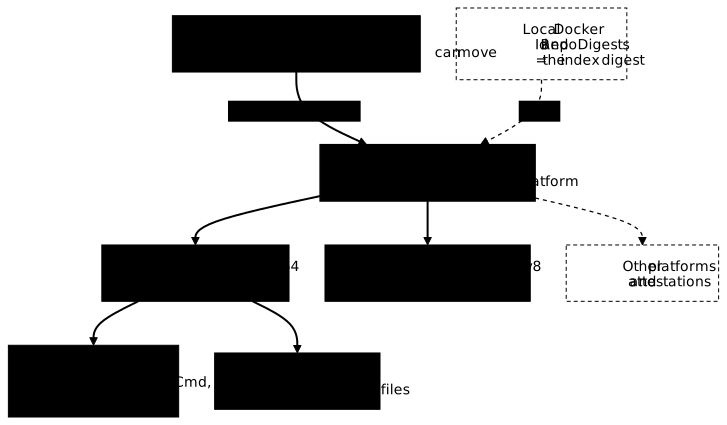
An image does not have a single name but a chain of documents, and only the digest of a document is reliable. The tag 1.37.0 is a name that the publisher can move. It leads to an index, the list of the manifests of the image, one per platform. A platform is the combination of an operating system and a processor architecture, for example linux/amd64.
Each manifest describes the image for a single platform. It points to a configuration (the platform, the environment variables, the default command and the list of layers) and to layers (the archives of the files).
The digest is the fingerprint of one of these documents: a value computed over its bytes (in practice with sha256), which changes as soon as a single byte changes. The index digest identifies the image for all its platforms, a manifest digest the image for a single one.
The diagram follows this chain from top to bottom. The tag, at the very top, is the only link that can change. The index, outlined in red, is what the registry returns when you ask it for the tag. Below it, one manifest per platform, including linux/amd64 and linux/arm64/v8; the other platforms fit in a grayed box. The linux/amd64 manifest leads to its configuration and its layer. The grayed "Local Docker" box, at the top, announces what the following sections measure: the identity that Docker keeps locally is that of the index.
The index is not always there: an image built for a single platform can be published with a lone manifest. Official images such as busybox, however, publish an index.
What does the tag I just pulled contain?
Pull the image by its tag. This command is the starting point of the comparison, not a model to follow in production, since the content behind a tag can change.
docker pull busybox:1.37.0 # ❌ tag only, to compare it with the digest1.37.0: Pulling from library/busybox68fe9bff2ad4: Pulling fs layer68fe9bff2ad4: Download complete9177639ff916: Download complete68fe9bff2ad4: Pull completeDigest: sha256:a7dbc319b1438115a207e11930dc4bb3e643dcb3ec0bdd694bb36cd8fad289ecStatus: Downloaded newer image for busybox:1.37.0docker.io/library/busybox:1.37.0Three lines matter. The 68fe9bff2ad4 line is the only layer downloaded: an image is transferred layer by layer. The 9177639ff916: Download complete line is not a layer, it is the attestation of this platform (the same goes for arm64 further down). The Digest: line gives the fingerprint of what the registry served for the tag, and it is that of the index, which you are going to check below.
Store this digest in a variable, to reuse it without copying it:
IDX=$(docker image inspect busybox:1.37.0 --format '{{index .RepoDigests 0}}' | cut -d@ -f2)echo "$IDX"If your digest differs from a7dbc319…, the tag has been republished since this page was measured: that is exactly the phenomenon the lesson studies, and you keep your own. The outputs below keep a7dbc319…. Now list the images with their digest. The outputs on this page keep only the images of the lesson; your list may contain others.
docker image ls --digestsREPOSITORY TAG DIGEST IMAGE ID CREATED SIZEbusybox 1.37.0 sha256:a7dbc319b1438115a207e11930dc4bb3e643dcb3ec0bdd694bb36cd8fad289ec a7dbc319b143 2 years ago 6.77MBThe DIGEST column repeats the one from the pull, and the IMAGE ID column is its beginning: a7dbc319b143 matches the first twelve characters of the digest. With the containerd image store, the local identifier of an image pulled by its tag is the digest of its index, like that of a built image. RepoDigests (read further down) carries this same digest preceded by the name, and it is the form to note for an image that came from a registry, as Publish and pull an image shows. With another image store, the local identifier may be a value the registry does not know: note RepoDigests, not the local identifier.
To see the platforms that the index announces, add the --tree option:
docker image ls --treeIMAGE ID DISK USAGE CONTENT SIZE EXTRAbusybox:1.37.0 a7dbc319b143 6.77MB 2.22MB├─ linux/amd64 66a6306db78b 6.77MB 2.21MB├─ linux/arm/v5 88132f86ce62 0B 0B├─ linux/arm/v6 6d857b42a8c6 0B 0B├─ linux/arm/v7 91aa2a66a996 0B 0B├─ linux/arm64/v8 d82c2ab94640 0B 0B├─ linux/386 a88c21a22c5d 0B 0B├─ linux/ppc64le 025d95c7d9b6 0B 0B├─ linux/riscv64 be2e8702261d 0B 0B└─ linux/s390x 7f0d4675ec87 0B 0BThe index announces nine linux platforms, and each one carries the identifier of its manifest. Look at the DISK USAGE column: only linux/amd64 takes up space (6.77 MB), because Docker only downloaded the content of your machine's platform, here amd64. The other eight are known by their manifest, but their layers are not on disk.
The raw index of this tag actually has seventeen entries: the nine platforms, and eight attestations. An attestation is an unknown/unknown platform manifest that describes how the image was made instead of containing files to run (see Read an OCI image, in French). docker image ls --tree does not display them.
Which identity does Docker keep for this image?
Read the full record of the image with docker image inspect.
docker image inspect busybox:1.37.0[ { "Id": "sha256:a7dbc319b1438115a207e11930dc4bb3e643dcb3ec0bdd694bb36cd8fad289ec", "RepoTags": [ "busybox:1.37.0" ], "RepoDigests": [ "busybox@sha256:a7dbc319b1438115a207e11930dc4bb3e643dcb3ec0bdd694bb36cd8fad289ec" ], "Created": "2024-09-26T21:31:42Z", "Config": { "Env": [ "PATH=/usr/local/sbin:/usr/local/bin:/usr/sbin:/usr/bin:/sbin:/bin" ], "Cmd": [ "sh" ] }, "Architecture": "amd64", "Os": "linux", "Size": 6767335, "RootFS": { "Type": "layers", "Layers": [ "sha256:5a9bfd996c6d49c6c3cb4ddfb76e8d09cf16b6b7cf6601d1f2dffbdbc3edb5d4" ] }, … "Descriptor": { "mediaType": "application/vnd.oci.image.index.v1+json", "digest": "sha256:a7dbc319b1438115a207e11930dc4bb3e643dcb3ec0bdd694bb36cd8fad289ec", "size": 9535 }, … }]The output is truncated by … where the content is of no interest to this lesson (the tag timestamp and the pull provenance). Five landmarks carry the identity.
IdandDescriptor.digesthave the same value, andDescriptor.mediaTypesays why: it is an index (application/vnd.oci.image.index.v1+json, 9535 bytes).RepoDigestsalso carries the digest of the index, not that of thelinux/amd64manifest. It is the value to note to find this image again on a registry.ArchitectureandOssay which platform this local image is made for. There is noVariantkey. The variant refines the architecture (such asv8forarm64), but only some images declare one, and theamd64image of busybox does not.RootFS.Layerslists the layers by the fingerprint of their uncompressed content. The image has only one,5a9bfd99…. This value is not68fe9bff2ad4, the fingerprint displayed at pull time: that one is the fingerprint of the compressed archive that was downloaded, the digest from thelayerslist of thelinux/amd64manifest. Read an OCI image (in French) explains why a layer has two fingerprints.Createdis September 26, 2024, whereas the annotations of thelinux/amd64entry of the index (visible further down) announce a creation on September 8, 2026. The two dates do not measure the same thing: one is written in the image configuration, the other in these annotations. Do not infer the age of an image before identifying which one you are reading.
Do a container started by tag and one started by digest run the same image?
Start two containers on the same image, one designated by its tag, the other by the digest stored earlier in $IDX.
docker run -d --name essai-tag busybox:1.37.0 sleep 300 # ❌ tag only, for the comparisondocker run -d --name essai-digest busybox@$IDX sleep 300Each command displays the long identifier of the container it created. Then ask both containers about the image they run and about the reference typed at creation:
docker inspect essai-tag --format 'Image={{.Image}} | Config.Image={{.Config.Image}}'docker inspect essai-digest --format 'Image={{.Image}} | Config.Image={{.Config.Image}}'Image=sha256:a7dbc319b1438115a207e11930dc4bb3e643dcb3ec0bdd694bb36cd8fad289ec | Config.Image=busybox:1.37.0Image=sha256:a7dbc319b1438115a207e11930dc4bb3e643dcb3ec0bdd694bb36cd8fad289ec | Config.Image=busybox@sha256:a7dbc319b1438115a207e11930dc4bb3e643dcb3ec0bdd694bb36cd8fad289ecThe Image field is identical in both cases: the two containers run the same image. The Config.Image field, for its part, keeps the reference as it was typed. It proves what you typed, not what is running. A container started by tag always shows its tag, even if the tag has been moved since; only Image (or the manifest digest, below) says which content it rests on.
The IMAGE column of docker ps follows the same logic, with a surprise:
docker ps --format '{{.Names}} {{.Image}}'essai-digest a7dbc319b143essai-tag busybox:1.37.0For the container started by digest, docker ps does not display the typed reference but the shortened identifier of the image. If you look for a digest in the output of docker ps, you will not find it: go through docker inspect.
One last field names the manifest actually used among those of the index:
docker inspect essai-tag --format 'ImageManifestDescriptor={{json .ImageManifestDescriptor}}'ImageManifestDescriptor={"mediaType":"application/vnd.oci.image.manifest.v1+json","digest":"sha256:66a6306db78bf2dbf3487f293aa8d6990d8e506fdffab9cc43fe422becf886e4","size":610,"annotations":{"com.docker.official-images.bashbrew.arch":"amd64","org.opencontainers.image.base.name":"scratch","org.opencontainers.image.created":"2026-09-08T23:04:09Z","org.opencontainers.image.revision":"066dbf90090ab2dbb905310fac2fa10ea39a7ba6","org.opencontainers.image.source":"https://github.com/docker-library/busybox.git","org.opencontainers.image.url":"https://hub.docker.com/_/busybox","org.opencontainers.image.version":"1.37.0-glibc"},"platform":{"architecture":"amd64","os":"linux"}}Look at digest and platform: sha256:66a6306d… is the linux/amd64 manifest of the index, the one the container actually used, and its platform is linux/amd64. The index offers nine choices, the container runs one. Remove both containers before going on:
docker rm -f essai-tag essai-digestDoes pulling the digest of a manifest give the same identity?
No. The digest of the index and the digest of a manifest designate two different documents, hence two different local identities for Docker. Remove the image, then pull the linux/amd64 manifest directly by its digest.
docker image rm busybox:1.37.0docker pull busybox@sha256:66a6306db78bf2dbf3487f293aa8d6990d8e506fdffab9cc43fe422becf886e4docker image ls --digestsdocker.io/library/busybox@sha256:66a6306db78bf2dbf3487f293aa8d6990d8e506fdffab9cc43fe422becf886e4: Pulling from library/busybox68fe9bff2ad4: Pulling fs layer68fe9bff2ad4: Download complete68fe9bff2ad4: Pull completeDigest: sha256:66a6306db78bf2dbf3487f293aa8d6990d8e506fdffab9cc43fe422becf886e4Status: Downloaded newer image for busybox@sha256:66a6306db78bf2dbf3487f293aa8d6990d8e506fdffab9cc43fe422becf886e4docker.io/library/busybox@sha256:66a6306db78bf2dbf3487f293aa8d6990d8e506fdffab9cc43fe422becf886e4REPOSITORY TAG DIGEST IMAGE ID CREATED SIZEbusybox <none> sha256:66a6306db78bf2dbf3487f293aa8d6990d8e506fdffab9cc43fe422becf886e4 66a6306db78b 2 years ago 6.77MBThe layer is the same (68fe9bff2ad4), but the local identity is now 66a6306db78b, the beginning of the manifest digest, and no longer a7dbc319b143. The two images share their content and have two identities: one designates "busybox for all platforms", the other "busybox for linux/amd64 only".
The digest to pin therefore depends on what you want to freeze. With the index digest, the platform is chosen at run time according to the machine. With a manifest digest, you freeze the platform, and, without emulation, the image will not start on a machine of another architecture. For a deployment that may run on different machines, the index digest is the right reference. Remove this image before going on:
docker image rm busybox@sha256:66a6306db78bf2dbf3487f293aa8d6990d8e506fdffab9cc43fe422becf886e4What happens with a platform that is not the machine's?
Pulling a single platform, and a platform foreign to the machine at that, leaves the store in a peculiar state: the index is present, but no content exists for the machine's platform. The diagnosis of exec format error (exit code 255, engine warning, role of binfmt_misc) is already demonstrated in Choose and maintain a Docker base image. This section looks at what that other lesson does not show: what docker image ls and docker image inspect return in this state, and why the identity of an image depends on the platform being queried.
To start from a store where no platform is present, this section uses a busybox index that the lesson has not pulled yet, the one for the 1.35.0 tag. Its index digest starts with 98ad9d1a. It is designated in the form busybox@sha256:…, because Docker does not keep the tag when you pull by digest. First check that it is absent: the following command must display nothing.
docker image ls --digests | grep 98ad9d1a2be3Pull this index while requesting the linux/arm64 platform, although the machine is amd64:
docker pull --platform linux/arm64 busybox@sha256:98ad9d1a2be345201bb0709b0d38655eb1b370145c7d94ca1fe9c421f76e245adocker.io/library/busybox@sha256:98ad9d1a2be345201bb0709b0d38655eb1b370145c7d94ca1fe9c421f76e245a: Pulling from library/busybox235378d388b7: Pulling fs layer0260d15b349c: Download complete235378d388b7: Download complete235378d388b7: Pull completeDigest: sha256:98ad9d1a2be345201bb0709b0d38655eb1b370145c7d94ca1fe9c421f76e245aStatus: Downloaded newer image for busybox@sha256:98ad9d1a2be345201bb0709b0d38655eb1b370145c7d94ca1fe9c421f76e245adocker.io/library/busybox@sha256:98ad9d1a2be345201bb0709b0d38655eb1b370145c7d94ca1fe9c421f76e245aThe pull succeeds: Docker does not check that the requested platform can run on this machine. 235378d388b7 is the arm64 layer. The 0260d15b349c line is not the image configuration, it is the attestation document of this platform, which you can ignore here. Now look at the state of the store.
docker image ls --treeIMAGE ID DISK USAGE CONTENT SIZE EXTRAbusybox@sha256:98ad9d1a2be345201bb0709b0d38655eb1b370145c7d94ca1fe9c421f76e245a 98ad9d1a2be3 6.01MB 1.84MB├─ linux/amd64 584c3aa5ea27 0B 0B├─ linux/arm/v5 09eda79e741b 0B 0B├─ linux/arm/v6 239384fd9d83 0B 0B├─ linux/arm/v7 d54919441af6 0B 0B├─ linux/arm64/v8 2c600b8134e6 6.01MB 1.84MB├─ linux/386 9d52a4c48435 0B 0B├─ linux/mips64le 5cf00c12beea 0B 0B├─ linux/ppc64le 48bab78e87cc 0B 0B├─ linux/riscv64 a1051192e4b2 0B 0B└─ linux/s390x cb5e3290aa0c 0B 0BRead the DISK USAGE column: the index is present (6.01 MB in total), but the linux/amd64 line, the machine's platform, takes 0B, and only linux/arm64/v8 takes up space. It is the opposite of the pull by tag in the previous section. For Docker, the image is therefore there, with no content that this machine can run.
docker image ls --digestsREPOSITORY TAG DIGEST IMAGE ID CREATED SIZEbusybox <none> sha256:98ad9d1a2be345201bb0709b0d38655eb1b370145c7d94ca1fe9c421f76e245a 98ad9d1a2be3 56 years ago 6.01MBThe identity is that of the index (98ad9d1a2be3), as for a pull by tag, but two details differ. The CREATED column displays "56 years ago": docker image ls reads the date in the configuration of the machine's platform, this configuration is not stored, the Created field is absent, and a missing date is displayed as the year 1970. The size of 6.01 MB is that of the arm64 content, the only one on disk.
The trap comes from the inspection. Without a platform option, docker image inspect reads the machine's platform, and that one is not stored. The command succeeds (exit code 0) and returns an emptied record: Config and RootFS are {}, Architecture and Os are "", Size is 0. The record does not even have a Created field, as a template that reads it proves:
docker image inspect busybox@sha256:98ad9d1a2be345201bb0709b0d38655eb1b370145c7d94ca1fe9c421f76e245a --format 'Id={{.Id}} Arch={{.Architecture}} Os={{.Os}} Created={{.Created}}'template parsing error: template: :1:55: executing "" at <.Created>: map has no entry for key "Created"The image is not broken: the inspection queries a platform that is not stored. Name the platform to read the right record:
docker image inspect --platform linux/arm64 busybox@sha256:98ad9d1a2be345201bb0709b0d38655eb1b370145c7d94ca1fe9c421f76e245a --format 'Id={{.Id}} Arch={{.Architecture}} Os={{.Os}} Variant={{.Variant}} layers={{len .RootFS.Layers}} {{json .RootFS.Layers}}'Id=sha256:2c600b8134e63d2cc2b04c98bb496e721296c31087ac039b074a374d9f4875b8 Arch=arm64 Os=linux Variant=v8 layers=1 ["sha256:6212b10af89b703c40267722bd32ae49a55232e35d759708a386fc1038f23b56"]This time, the Id is 2c600b81…, the digest of the linux/arm64/v8 manifest (the one in the --tree output above), the architecture is arm64, the variant v8, and the record describes one layer. For the same image, the identity therefore depends on the platform you query: the index answers for all of them, a manifest for a single one.
Now start a container on this image, without specifying a platform, then requesting arm64:
docker run --rm busybox@sha256:98ad9d1a2be345201bb0709b0d38655eb1b370145c7d94ca1fe9c421f76e245a uname -mecho $?docker run --rm --platform linux/arm64 busybox@sha256:98ad9d1a2be345201bb0709b0d38655eb1b370145c7d94ca1fe9c421f76e245a uname -mecho $?WARNING: The requested image's platform (linux/arm64/v8) does not match the detected host platform (linux/amd64/v3) and no specific platform was requestedexec /bin/uname: exec format error255exec /bin/uname: exec format error255Both launches fail with code 255; only the warning disappears when --platform is explicit. This is the error described in Choose and maintain a Docker base image, which happens at run time and never at pull time. It assumes that no architecture emulation is registered in the kernel. To check, list ls /proc/sys/fs/binfmt_misc/: on the measurement machine, the list contains python3.13, register and status, and no entry for arm64. An arm64 emulation would show up as a qemu-aarch64 entry (the usual name for QEMU, not measured here).
Finally, request the machine's platform:
docker run --rm --platform linux/amd64 busybox@sha256:98ad9d1a2be345201bb0709b0d38655eb1b370145c7d94ca1fe9c421f76e245a uname -mUnable to find image 'busybox@sha256:98ad9d1a2be345201bb0709b0d38655eb1b370145c7d94ca1fe9c421f76e245a' locallydocker.io/library/busybox@sha256:98ad9d1a2be345201bb0709b0d38655eb1b370145c7d94ca1fe9c421f76e245a: Pulling from library/busyboxa9b82d1f2d6e: Pulling fs layera9b82d1f2d6e: Download completefb0ee184eda1: Download completea9b82d1f2d6e: Pull completeDigest: sha256:98ad9d1a2be345201bb0709b0d38655eb1b370145c7d94ca1fe9c421f76e245aStatus: Image is up to date for busybox@sha256:98ad9d1a2be345201bb0709b0d38655eb1b370145c7d94ca1fe9c421f76e245ax86_64Two things can be read here. The "Unable to find image locally" message appears although the index is present: the amd64 content is missing, and docker run --platform downloads it at launch time (a9b82d1f2d6e is its layer, fb0ee184eda1 its attestation). Then uname -m answers x86_64: the container runs. The store now contains both platforms:
docker image ls --treeIMAGE ID DISK USAGE CONTENT SIZE EXTRAbusybox@sha256:98ad9d1a2be345201bb0709b0d38655eb1b370145c7d94ca1fe9c421f76e245a 98ad9d1a2be3 12.6MB 3.99MB├─ linux/amd64 584c3aa5ea27 6.55MB 2.15MB├─ linux/arm/v5 09eda79e741b 0B 0B├─ linux/arm/v6 239384fd9d83 0B 0B├─ linux/arm/v7 d54919441af6 0B 0B├─ linux/arm64/v8 2c600b8134e6 6.01MB 1.84MB├─ linux/386 9d52a4c48435 0B 0B├─ linux/mips64le 5cf00c12beea 0B 0B├─ linux/ppc64le 48bab78e87cc 0B 0B├─ linux/riscv64 a1051192e4b2 0B 0B└─ linux/s390x cb5e3290aa0c 0B 0BThe index takes 12.6 MB, the sum of the two contents (6.55 MB for amd64, 6.01 MB for arm64/v8).
Can a tag designate two successive images?
Yes, and a local registry is enough to prove it. This section rebuilds the situation described by Publish and pull an image, to read it this time with digests. Start a local registry, pinned by digest, that only listens on the loopback interface:
docker run -d --name registre-identite -p 127.0.0.1:5000:5000 registry:3@sha256:d4032d4cc323c1731c707931ecada07a53076eac38e3b61ae57533f170f2c6c3In a working folder, write two Dockerfiles that differ only by the content of a file, then build and publish the first under the 1.0 tag:
mkdir -p ~/identite-image && cd ~/identite-imageprintf 'FROM busybox:1.37.0@sha256:a7dbc319b1438115a207e11930dc4bb3e643dcb3ec0bdd694bb36cd8fad289ec\nRUN echo v1 > /version\nCMD ["cat","/version"]\n' > Dockerfile.v1printf 'FROM busybox:1.37.0@sha256:a7dbc319b1438115a207e11930dc4bb3e643dcb3ec0bdd694bb36cd8fad289ec\nRUN echo v2 > /version\nCMD ["cat","/version"]\n' > Dockerfile.v2docker build -f Dockerfile.v1 -t localhost:5000/demo:1.0 .docker push localhost:5000/demo:1.0The push refers to repository [localhost:5000/demo]44136fa355b3: Pushed68fe9bff2ad4: Pushed47a073a1b52e: Pushed8cb537d930a3: Pushed1.0: digest: sha256:6d89c2360a281fe7d4c97e7d101d601938f831f9b0f233a19108463e1209213a size: 855The digest displayed on the last line is that of an 855-byte index, although you built for a single platform. With Docker 29.9.2 and the containerd image store, docker build produces an index that contains the image manifest and a provenance attestation, a document that describes how the image was built. You will find it further down, as the unknown/unknown entry that imagetools inspect shows.
Check that the local identity follows the same principle, and keep this digest in a variable:
docker image inspect localhost:5000/demo:1.0 --format '{{.Id}} {{json .RepoDigests}}'D1=$(docker image inspect localhost:5000/demo:1.0 --format '{{index .RepoDigests 0}}' | cut -d@ -f2)sha256:6d89c2360a281fe7d4c97e7d101d601938f831f9b0f233a19108463e1209213a ["localhost:5000/demo@sha256:6d89c2360a281fe7d4c97e7d101d601938f831f9b0f233a19108463e1209213a"]The local Id, the push digest and RepoDigests are the same value, that of the index: a built image follows the same rule as a pulled one. RepoDigests is a list; index .RepoDigests 0 takes its first entry, which is safe here since the image has only one, and cut -d@ -f2 keeps only what follows the @. Now rebuild with the second Dockerfile, under the same tag, and republish. The docker image rm in the next block removes the v1 image from the local list: the 1.0 tag then designates only the new image, and the digest of the first one stays in $D1, its content in the registry.
docker image rm localhost:5000/demo:1.0docker build -f Dockerfile.v2 -t localhost:5000/demo:1.0 .docker push localhost:5000/demo:1.0D2=$(docker image inspect localhost:5000/demo:1.0 --format '{{index .RepoDigests 0}}' | cut -d@ -f2)The push refers to repository [localhost:5000/demo]a30ce9ef8501: Pushed44136fa355b3: Already exists27427d4eab2d: Pushed68fe9bff2ad4: Layer already exists1.0: digest: sha256:b7871059c1ff315d11455e61fcae280567cfe3899a70014d1e310d5ee10f8b81 size: 855The push accepts the tag without a warning, and the digest has changed: b7871059… instead of 6d89c236…. Ask the registry what it lists, then what it serves for the tag:
curl -s http://localhost:5000/v2/demo/tags/listcurl -sI -H 'Accept: application/vnd.oci.image.manifest.v1+json, application/vnd.oci.image.index.v1+json' http://localhost:5000/v2/demo/manifests/1.0 | grep -i docker-content-digest{"name":"demo","tags":["1.0"]}Docker-Content-Digest: sha256:b7871059c1ff315d11455e61fcae280567cfe3899a70014d1e310d5ee10f8b81The registry still knows only one tag, 1.0, but the digest it serves for this tag has changed: the Docker-Content-Digest header is now the digest of the second push. To read the index that the tag designates, with its entries, use Buildx:
docker buildx imagetools inspect localhost:5000/demo:1.0Name: localhost:5000/demo:1.0MediaType: application/vnd.oci.image.index.v1+jsonDigest: sha256:b7871059c1ff315d11455e61fcae280567cfe3899a70014d1e310d5ee10f8b81
Manifests: Name: localhost:5000/demo:1.0@sha256:0de200393ec2039fe02aa81808804128eb99a6bdaed0c291e6e722e344e68b20 MediaType: application/vnd.oci.image.manifest.v1+json Platform: linux/amd64
Name: localhost:5000/demo:1.0@sha256:eaef13c89f99ea0b144fa73d965ae134c5d6eb2a337d6c98cf7b14dfb3eee481 MediaType: application/vnd.oci.image.manifest.v1+json Platform: unknown/unknown Annotations: vnd.docker.reference.type: attestation-manifest vnd.docker.reference.digest: sha256:0de200393ec2039fe02aa81808804128eb99a6bdaed0c291e6e722e344e68b20Read the output like the diagram: one index, two manifests. The first is the image for linux/amd64. The second, with platform unknown/unknown and the attestation-manifest annotation, is the attestation, which points through vnd.docker.reference.digest to the manifest it describes.
What happens to the first content? It is still in the registry, addressable by its digest. Pull and run each of the two digests:
docker image rm localhost:5000/demo:1.0docker pull localhost:5000/demo@$D1docker run --rm localhost:5000/demo@$D1docker pull localhost:5000/demo@$D2docker run --rm localhost:5000/demo@$D2localhost:5000/demo@sha256:6d89c2360a281fe7d4c97e7d101d601938f831f9b0f233a19108463e1209213a: Pulling from demo47a073a1b52e: Pulling fs layer68fe9bff2ad4: Pulling fs layer68fe9bff2ad4: Already exists47a073a1b52e: Already exists8cb537d930a3: Download complete44136fa355b3: Download complete68fe9bff2ad4: Pull complete47a073a1b52e: Pull completeDigest: sha256:6d89c2360a281fe7d4c97e7d101d601938f831f9b0f233a19108463e1209213aStatus: Downloaded newer image for localhost:5000/demo@sha256:6d89c2360a281fe7d4c97e7d101d601938f831f9b0f233a19108463e1209213alocalhost:5000/demo@sha256:6d89c2360a281fe7d4c97e7d101d601938f831f9b0f233a19108463e1209213av1localhost:5000/demo@sha256:b7871059c1ff315d11455e61fcae280567cfe3899a70014d1e310d5ee10f8b81: Pulling from demoa30ce9ef8501: Pulling fs layer68fe9bff2ad4: Pulling fs layera30ce9ef8501: Already exists68fe9bff2ad4: Already exists27427d4eab2d: Download complete44136fa355b3: Already existsa30ce9ef8501: Pull completeDigest: sha256:b7871059c1ff315d11455e61fcae280567cfe3899a70014d1e310d5ee10f8b81Status: Downloaded newer image for localhost:5000/demo@sha256:b7871059c1ff315d11455e61fcae280567cfe3899a70014d1e310d5ee10f8b81localhost:5000/demo@sha256:b7871059c1ff315d11455e61fcae280567cfe3899a70014d1e310d5ee10f8b81v2The first digest runs v1 again, the second v2. The 1.0 tag has therefore designated two successive images, and only the digest lets you choose which one you run.
Two more points to remember. A reference by tag (docker pull localhost:5000/demo:1.0) would have pulled the v2 version. And in the local store, rebuilding under an existing tag also moves the tag to the new image, as Write a Dockerfile recalls: keep the digest before rebuilding.
Which base image does an image rest on?
The base image of a built image is an image in its own right, with its own digest, different from that of the built image. This section builds an image that rests on busybox, then reads the base that the build actually used. One point is surprising: BuildKit, Docker's build engine, uses the base without putting it in the local image list. The proof of the base is therefore in the provenance, and reading it locally requires pulling it first. The registre-identite registry from the previous section must still be running.
Write a Dockerfile whose FROM line designates the base by its tag and its digest, then build and publish the image under the 1.0 tag:
cd ~/identite-imageprintf 'FROM busybox:1.37.0@sha256:a7dbc319b1438115a207e11930dc4bb3e643dcb3ec0bdd694bb36cd8fad289ec\nRUN echo horloge > /etc/horloge\n' > Dockerfiledocker buildx build --push -t localhost:5000/atelier/horloge:1.0 .The build displays its step log, which is not reproduced here. The --push option sends the image to the registry and also leaves it in the local image list. Read its identity:
docker image inspect localhost:5000/atelier/horloge:1.0 --format '{{.Id}} {{json .RepoDigests}}'sha256:4d59158ac547237d5049bb0c12e987dc2756cf158d27411f8f8a62562f796725 ["localhost:5000/atelier/horloge@sha256:4d59158ac547237d5049bb0c12e987dc2756cf158d27411f8f8a62562f796725"]The rule is the same as for a pulled image: the local Id is the digest of the index, and RepoDigests carries this same digest preceded by the name. It is the form to note to find an image in a registry. The digest of your image will differ from this one, since it changes with every build; only the busybox one is fixed, because the FROM designates it.
A filled RepoDigests list does not prove a publication. An image built with docker build and never pushed has one too, derived from its name:
docker build -t localhost:5000/atelier/horloge:local .docker image inspect localhost:5000/atelier/horloge:local --format '{{.Id}} {{json .RepoDigests}}'sha256:3ef1438741afe2623f2ddd4a52d4f7b1089563fa4dfdc49571b4d469e9d6b773 ["localhost:5000/atelier/horloge@sha256:3ef1438741afe2623f2ddd4a52d4f7b1089563fa4dfdc49571b4d469e9d6b773"]To know whether an image is published, ask the registry, not this list.
The base image is not in the image list
Now look for the base, with the exact reference from the FROM:
docker image inspect busybox:1.37.0@sha256:a7dbc319b1438115a207e11930dc4bb3e643dcb3ec0bdd694bb36cd8fad289ec[]Error response from daemon: No such image: busybox:1.37.0@sha256:a7dbc319b1438115a207e11930dc4bb3e643dcb3ec0bdd694bb36cd8fad289ecThe error is not a defect of the build: BuildKit read the base from the registry without putting it in the image list. It appears after docker buildx build --push as after docker build. This is why docker image inspect on the base proves nothing until it has been pulled, and why the real proof is elsewhere.
The provenance proves the base image actually used
The provenance attestation, produced at build time, declares the images that BuildKit resolved. With docker buildx build --push run without a provenance option, it is present by default. Read its resolved dependencies:
docker buildx imagetools inspect localhost:5000/atelier/horloge:1.0 --format '{{json .Provenance.SLSA.buildDefinition.resolvedDependencies}}'[ { "digest": { "sha256": "a7dbc319b1438115a207e11930dc4bb3e643dcb3ec0bdd694bb36cd8fad289ec" }, "uri": "pkg:docker/busybox@1.37.0?digest=sha256:a7dbc319b1438115a207e11930dc4bb3e643dcb3ec0bdd694bb36cd8fad289ec\u0026platform=linux%2Famd64" }]The digest field gives the digest of the base as the FROM designated it: the algorithm (sha256) serves as the key, so the value has no sha256: prefix. The uri field recalls its name, its version and its platform (\u0026 is the & character in JSON). This is the proof of the base actually used by the build. It disappears if you build with --provenance=false: imagetools inspect then answers {}. The package inventory (SBOM), for its part, is absent by default:
docker buildx imagetools inspect localhost:5000/atelier/horloge:1.0 --format '{{json .SBOM}}'{}The base can be read locally after a pull
To read the base like any other image, pull it first, then read its identity:
docker pull busybox:1.37.0@sha256:a7dbc319b1438115a207e11930dc4bb3e643dcb3ec0bdd694bb36cd8fad289ecdocker image inspect busybox:1.37.0@sha256:a7dbc319b1438115a207e11930dc4bb3e643dcb3ec0bdd694bb36cd8fad289ec --format '{{.Id}} {{json .RepoDigests}}'docker.io/library/busybox@sha256:a7dbc319b1438115a207e11930dc4bb3e643dcb3ec0bdd694bb36cd8fad289ec: Pulling from library/busyboxDigest: sha256:a7dbc319b1438115a207e11930dc4bb3e643dcb3ec0bdd694bb36cd8fad289ecStatus: Downloaded newer image for busybox@sha256:a7dbc319b1438115a207e11930dc4bb3e643dcb3ec0bdd694bb36cd8fad289ecdocker.io/library/busybox:1.37.0@sha256:a7dbc319b1438115a207e11930dc4bb3e643dcb3ec0bdd694bb36cd8fad289ecsha256:a7dbc319b1438115a207e11930dc4bb3e643dcb3ec0bdd694bb36cd8fad289ec ["busybox@sha256:a7dbc319b1438115a207e11930dc4bb3e643dcb3ec0bdd694bb36cd8fad289ec"]Look at the last two lines: the Id and RepoDigests are the digest of the FROM, whereas the built image has its own (4d59158a…). The two images are distinct in the local store. This reading confirms the provenance, it does not replace it: it assumes that you pull the base by its digest, which is precisely what the FROM does.
The layers prove the lineage
Two images can have two digests and still share their content. Compare their layers:
docker image inspect --format '{{json .RootFS.Layers}}' busybox:1.37.0@sha256:a7dbc319b1438115a207e11930dc4bb3e643dcb3ec0bdd694bb36cd8fad289ecdocker image inspect --format '{{json .RootFS.Layers}}' localhost:5000/atelier/horloge:1.0["sha256:5a9bfd996c6d49c6c3cb4ddfb76e8d09cf16b6b7cf6601d1f2dffbdbc3edb5d4"]["sha256:5a9bfd996c6d49c6c3cb4ddfb76e8d09cf16b6b7cf6601d1f2dffbdbc3edb5d4","sha256:65fa40cc5c9114e805a75a9e51c5060cb13c7ad6f286972799c02ce30e47dfbf"]The list of the built image starts with the layer of the base, 5a9bfd99…, then adds one layer, 65fa40cc…, that of the RUN instruction. This lineage by layers is a proof of content. It does not give the digest of the base: two different images could start with the same layer.
One last command is tempting: docker history lists the step that produced the base among the steps of the history, but without the digest of the base image. It displays <missing> for a step that has no local image identifier, which is not an error. For the digest of the base, read the provenance.
What should you do when the identity of an image is confusing?
The symptoms in this lesson each have a precise cause. The table matches them with their diagnosis.
| Symptom | Cause | What to do |
|---|---|---|
exec format error at launch, exit code 255 | The architecture of the image binary is not the machine's, and no emulation is installed (see Choose a base image) | Read Architecture with docker image inspect --platform <platform>, then pull or build the image of the right platform |
docker image inspect returns empty Architecture and Os, with no error | Only a platform foreign to the machine is stored, and the inspection queries the machine's | Add --platform linux/arm64 (or the stored platform) to the inspection |
docker history displays <missing> instead of the digest of the base | The step has no local image identifier, and docker history does not give the digest of the base | Read the provenance with imagetools inspect --format '{{json .Provenance.SLSA.buildDefinition.resolvedDependencies}}' |
No such image: busybox:1.37.0@sha256:… on the base, right after a build | BuildKit uses the base without putting it in the local image list | Pull the base with docker pull, or read the provenance |
template parsing error … map has no entry for key "Variant" (or "Created") | The template reads an absent field: the amd64 image does not declare a variant, and the record of a platform that is not stored has no Created | Remove the field from the template, or read {{.Variant}} only for platforms that have one (arm/v7, arm64/v8) |
The template symptom can be reproduced with a template close to the one in the section on platforms, run without --platform on the base pulled earlier, in the section on the base image: the inspection then reads the machine's amd64 platform, which declares no variant. The error names the faulty field, which lets you find the cause without guessing:
docker image inspect busybox@sha256:a7dbc319b1438115a207e11930dc4bb3e643dcb3ec0bdd694bb36cd8fad289ec --format '{{.Id}} | {{json .RepoTags}} | {{json .RepoDigests}} | {{.Architecture}} {{.Os}} variant=[{{.Variant}}] | layers={{len .RootFS.Layers}}'template parsing error: template: :1:92: executing "" at <.Variant>: map has no entry for key "Variant"How do you clean up after the experiments?
The images in this lesson are no longer needed. Remove the registry with its data, the built images and the base images. The variables $IDX, $D1 and $D2 exist only in the terminal where you created them: in another terminal, they are empty and the command fails, so replace them with the digests read in docker image ls --digests.
docker rm -f -v registre-identitedocker image rm localhost:5000/demo@$D1 localhost:5000/demo@$D2 localhost:5000/atelier/horloge:1.0 localhost:5000/atelier/horloge:local registry:3@sha256:d4032d4cc323c1731c707931ecada07a53076eac38e3b61ae57533f170f2c6c3 busybox@$IDX busybox@sha256:98ad9d1a2be345201bb0709b0d38655eb1b370145c7d94ca1fe9c421f76e245acd ~ && rm -rf ~/identite-imagedocker builder prune -afThe last two digests of the docker image rm command are those of the busybox indexes, removed together with the platform contents they downloaded. If your $IDX differs from a7dbc319…, the base pinned by the FROM lines stays on the machine: remove it too with docker image rm busybox@sha256:a7dbc319b1438115a207e11930dc4bb3e643dcb3ec0bdd694bb36cd8fad289ec. The docker builder prune -af command empties the whole build cache of the machine, not only that of this lesson: avoid it on a shared machine. If a command answers that an image is in use by a container, first remove that container with docker rm -f.
Practice
The lab puts you in front of a local image for which you do not know whether the tag still designates what it used to. You must establish three facts and write them in an answer file that the lab statement designates: the digest of the image that this tag designates today, the digest of the base image stored on the machine, and its platform in the form os/architecture. Copying a digest found in a help file is refused. No command is graded: only the result counts, and the validation is launched with dsoxlab check.
Key points
An image is a chain of documents: a tag, which is a movable name, leads to an index, which lists one manifest per platform, each designating a configuration and layers. Only a digest, computed over the content, is reliable.
With the containerd image store of Docker 29.9.2, the local Id of an image is the digest of its index, whether it was pulled or built. RepoDigests carries the same digest preceded by the name: it is the form to note for an image that came from a registry, but its presence does not prove a publication. Pulling the digest of a manifest gives another local identity, that of this manifest.
A container started by tag and a container started by digest can run the same image. docker inspect says which one through .Image, and which manifest through .ImageManifestDescriptor. .Config.Image only recalls the reference as typed, and docker ps displays the shortened identifier for a container started by digest.
The platform is read on the image with docker image inspect --platform. Without this option, an image of which only a foreign platform is stored gives empty fields, with no error. The pull succeeds with --platform even for a platform that the machine cannot run, and the exec format error error comes only at launch. docker run --platform downloads the missing content. The full diagnosis of the error is in Choose a base image.
A tag can designate two successive images without any message announcing it, and the old image stays addressable by its digest as long as the registry keeps it. For a deployment on varied machines, pin the digest of the index; to freeze an architecture, that of a manifest.
The base image of a built image has its own digest, but BuildKit does not put it in the image list: the base actually used is read in resolvedDependencies of the provenance, present by default with docker buildx build --push. Reading it locally with docker image inspect requires pulling it first. The layers of the built image start with those of the base, and docker history does not give its digest.
Knowledge check
Check that the essentials of this lesson have stuck. The questions cover only what has just been explained here.
Knowledge check
Check what you have learned with this interactive quiz
How it works
- The timer starts when you click Start
- Multiple choice, true/false and short answer questions
- You can move between questions
- Detailed results are shown at the end
Starts the quiz and the timer
Review
(0/0)Score by domain
A domain groups several guides and gets several questions, so its score is more reliable than a per-topic score, which often rests on a single question.
Summary
Strengths
No topic passed at 80% on at least two questions yet.
Weak areas
No topic below the pass mark.
Recommended next
Hints before you try again?
Continue the course: Change base without breaking the application
A new full quiz with random questions
Work again only on the questions you missed