Have you noticed that docker pull nginx:1.25 does not always download the same layers? There are two main causes:
- A different platform (AMD64 vs ARM64) → different layers (multi-arch images)
- A mutable tag → the image was rebuilt/republished
To understand these behaviors, you need to know the OCI standard (Open Container Initiative). This guide explains the key concepts: tags, digests, manifests, multi-arch and artifacts.
What you will learn
- OCI: the open standard that defines the format of images and registries
- Tag vs digest: why a tag can change, but a digest cannot
- Manifest: the JSON file that describes an image
- Multi-arch: how a single reference serves several architectures
- OCI artifacts: storing Helm charts, SBOMs and signatures in a registry
What is OCI?
The Open Container Initiative (OCI) is an organization that defines the open standards for containers:
| Specification | What it defines |
|---|---|
| OCI Image | Image format (layers, config, manifest) |
| OCI Runtime | How to run a container (runc) |
| OCI Distribution | Registry API (push, pull, list) |
Why does it matter? Thanks to OCI, an image built with Docker works with Podman, containerd, CRI-O. A registry such as Harbor, Quay or GHCR speaks the same language as Docker Hub.
Anatomy of an OCI image
An OCI image is made of 3 types of objects, all identified by their digest (SHA256 hash). It is a content-addressable system: the content determines the identifier, not the other way around.
In the diagram, follow the arrows from the tag: it points to the manifest, which in turn references the config and each layer by their digest.
| Object | Content | Identifier |
|---|---|---|
| Manifest | Reference to config + layers | sha256:xxx... |
| Config | Metadata (env, cmd, user, ports) | sha256:yyy... |
| Layers | Files of each layer (tar.gz) | sha256:zzz... |
The digest of an image = the SHA256 hash of its manifest. If the manifest changes (even slightly), the digest changes.
Content-addressable vs location-addressable
Unlike classic URLs (location-addressable), OCI uses content addressing:
| Approach | Example | Characteristic |
|---|---|---|
| Location-addressable | https://example.com/image.tar | Same URL, content can change |
| Content-addressable | sha256:abc123... | Same hash = same content guaranteed |
Advantages of content-addressable storage:
- Deduplication: identical layers shared between images
- Verification: integrity can be checked by recomputing the hash
- Immutability: a digest always references the same content
Tag vs digest: the fundamental difference
The tag: a mutable alias
A tag is a readable name that points to a manifest. The same tag can point to different manifests over time.
# Todaynginx:1.25 → sha256:abc123...
# Tomorrow (after a rebuild)nginx:1.25 → sha256:def456...  # Different!
It is like a bookmark: it points to a page, but you can move it.
The digest: an immutable fingerprint
A digest is the SHA256 hash of the manifest. It identifies one exact version of the image, permanently.
# Always the same image, forevernginx@sha256:6926dd802f40e5e7257fded83e0d8030039642e4e10c4a98a6478e9c6fe06153It is like a fingerprint: it never changes for a given person.
When to use which?
| Context | Use | Example |
|---|---|---|
| Local development | Tag | nginx:1.25 |
| CI/CD (publishing) | Versioned tag + capture the digest | mon-app:1.2.3 → sha256:abc... |
| Production (deploy) | Digest | mon-app@sha256:abc... |
| Audit / compliance | Digest | Exact traceability |
Dockerfile FROM | Tag or digest depending on how critical it is | FROM alpine:3.19 or FROM alpine@sha256:... |
Golden rule: in production, pin by digest, not by tag. A versioned tag such as v1.2.3 is not immutable for all that: it can be republished, unless the registry forbids it through a policy.
Promotion by digest in CI/CD
The recommended workflow to guarantee traceability:
# 1. Build and push with a tagdocker buildx build --tag ghcr.io/mon-org/mon-app:v1.2.3 --push .
# 2. Capture the digest from the registryDIGEST=$(crane digest ghcr.io/mon-org/mon-app:v1.2.3)echo "Built: ghcr.io/mon-org/mon-app@${DIGEST}" >> release-metadata.txt
# 3. Deploy by digest (immutable)kubectl set image deployment/mon-app \  app=ghcr.io/mon-org/mon-app@${DIGEST}
This pattern separates publishing (a tag for humans) from deployment (a digest for reproducibility).
The manifest: the heart of the image
The manifest is a JSON file that describes an image. It contains:
- The digest of the config (metadata)
- The list of layers with their digests and sizes
- The media type (format)
{ "schemaVersion": 2, "mediaType": "application/vnd.oci.image.manifest.v1+json", "config": { "mediaType": "application/vnd.oci.image.config.v1+json", "digest": "sha256:aaa...", "size": 1234 }, "layers": [ { "mediaType": "application/vnd.oci.image.layer.v1.tar+gzip", "digest": "sha256:bbb...", "size": 5678 }, { "mediaType": "application/vnd.oci.image.layer.v1.tar+gzip", "digest": "sha256:ccc...", "size": 9012 } ]}Media types: Docker vs OCI
Registries support two manifest formats. In practice, most tools handle both transparently.
| Format | Manifest media type | Usage |
|---|---|---|
| Docker v2 | application/vnd.docker.distribution.manifest.v2+json | Legacy, historical Docker Hub |
| OCI | application/vnd.oci.image.manifest.v1+json | Current standard, recommended |
See the manifest of an image:
# With cranecrane manifest nginx:1.25 | jq .
# With skopeoskopeo inspect --raw docker://nginx:1.25 | jq .
Multi-arch: one reference, several architectures
How does docker pull nginx download the right version for your CPU (AMD64 or ARM64)? Thanks to the manifest list (or OCI image index).
The principle
A manifest list is a special manifest that contains references to several manifests, one per architecture.
The diagram follows a docker pull: the client reads the manifest list, keeps the manifest for its platform (the others stay dotted), then downloads the matching layers.

When you run docker pull nginx:1.25:
- Docker downloads the manifest list
- It identifies your architecture (e.g.
linux/amd64) - It downloads the manifest specific to your architecture
- It downloads the matching layers
Build multi-arch images with Buildx
# Create a multi-platform builderdocker buildx create --name multi-arch --driver docker-container --use
# Build and push for AMD64 + ARM64docker buildx build \  --platform linux/amd64,linux/arm64 \  --tag mon-registry/mon-app:v1.0 \  --push .
# Check the available architecturesdocker manifest inspect mon-registry/mon-app:v1.0See the available architectures
# With docker manifestdocker manifest inspect nginx:1.25
# With cranecrane manifest nginx:1.25 | jq '.manifests[] | {platform, digest}'
# Result{ "platform": { "architecture": "amd64", "os": "linux" }, "digest": "sha256:amd123..."}{ "platform": { "architecture": "arm64", "os": "linux" }, "digest": "sha256:arm123..."}OCI artifacts: beyond images
OCI registries can store other types of artifacts than container images:
| Artifact | Use case | Tool |
|---|---|---|
| Helm charts | Kubernetes packages | helm push |
| SBOM | List of software components | ORAS, Syft |
| Signatures | Attestation of origin | Cosign, Notation |
| Policies | OPA/Rego rules | Conftest |
| WASM modules | WebAssembly | ORAS |
OCI 1.1 and the Referrers API
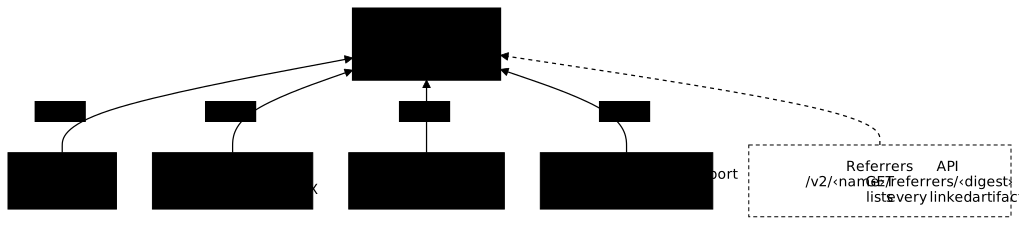
Since March 2024, the OCI 1.1 specs make it possible to associate artifacts with an image through the subject field. This solves a major problem: how do you know which SBOMs, signatures and attestations are linked to an image?
In the diagram, each artifact (signature, SBOM, attestation, vulnerability report) points to the image through its subject field, and the Referrers API lists them all from the image digest.
How it works:
- The artifact (signature, SBOM...) contains a
subjectfield with the digest of the target image - The registry automatically indexes this relationship
- The
GET /v2/<name>/referrers/<digest>API returns all the linked artifacts
# List the artifacts linked to an image (with ORAS)oras discover ghcr.io/mon-org/mon-app:v1.0
# Typical resultghcr.io/mon-org/mon-app@sha256:abc123├── application/vnd.dev.cosign.simplesigning.v1+json (signature)├── application/spdx+json (SBOM)└── application/vnd.in-toto+json (SLSA attestation)ORAS: OCI Registry As Storage
ORAS (OCI Registry As Storage) is a tool and a specification to push/pull any file to an OCI registry.
# Push any fileoras push ghcr.io/mon-org/configs:v1 config.yaml:application/yaml
# Pull the fileoras pull ghcr.io/mon-org/configs:v1
# Push an SBOM generated by Syft, linked to an image (OCI 1.1)syft nginx:1.25 -o spdx-json > sbom.jsonoras push ghcr.io/mon-org/sboms:nginx-1.25 \ --artifact-type application/spdx+json \ --subject ghcr.io/mon-org/nginx@sha256:abc... \ sbom.json:application/spdx+jsonWhy is it useful?
- A single system to store images, configs, SBOMs, signatures
- The same authentication as for images
- The same replication between registries
- Associate an SBOM or a signature with an image through its digest
CLI tools to handle OCI images
| Tool | Strengths | Installation |
|---|---|---|
| crane | Lightweight, fast, reusable Go API | go install github.com/google/go-containerregistry/cmd/crane@latest |
| skopeo | Copy between registries, air-gap | System package (apt, dnf) |
| regctl | Tag cleanup, garbage collection | go install github.com/regclient/regclient/cmd/regctl@latest |
| oras | Generic artifacts, Referrers API | go install oras.land/oras/cmd/oras@latest |
# Copy an image between registries (without a Docker daemon)skopeo copy docker://nginx:1.25 docker://mon-registry/nginx:1.25
# Delete a tag (careful: irreversible)crane delete mon-registry/mon-app:old-tag
# Explore the layers of an imagecrane export nginx:1.25 - | tar -tvf - | head -20
Each tool in the table has its own guide: ORAS (in French) to handle OCI artifacts, Skopeo (in French) to inspect and copy images without a daemon, and Crane (in French), Google's CLI to handle OCI images. The tag strategy, the cache, multi-arch and the promotion of an image from one environment to the next are covered in CI/CD for images (in French). Now that the OCI format is clear, the supply chain of images (in French) (SBOM, scan, signature) draws the DevSecOps basics from it for trusted images.
Key points
- OCI = open standard for images and registries (Docker/Podman/containerd interoperability)
- Tag = mutable alias to a manifest (can change) → development
- Digest = immutable SHA256 hash of the manifest → production, audit
- Content-addressable = the identifier is the hash of the content → deduplication, verification
- Manifest = JSON that lists config + layers with their digests
- Manifest list = multi-arch index that points to one manifest per architecture
- OCI 1.1 (March 2024) = Referrers API to link signatures, SBOMs, attestations to images
- ORAS = store any artifact (SBOM, signatures, configs) in an OCI registry
- Tools: crane (lightweight), skopeo (copy), regctl (cleanup), oras (artifacts)
Knowledge check
Check that you have absorbed the essential OCI concepts: tags versus digests, the manifest, multi-arch images and OCI artifacts.
Knowledge check
Check what you have learned with this interactive quiz
How it works
- The timer starts when you click Start
- Multiple choice, true/false and short answer questions
- You can move between questions
- Detailed results are shown at the end
Starts the quiz and the timer
Review
(0/0)Score by domain
A domain groups several guides and gets several questions, so its score is more reliable than a per-topic score, which often rests on a single question.
Summary
Strengths
No topic passed at 80% on at least two questions yet.
Weak areas
No topic below the pass mark.
Recommended next
Hints before you try again?
Continue the course: Promoting an artifact: build once, deploy twice
A new full quiz with random questions
Work again only on the questions you missed