
Every build that downloads its dependencies straight from PyPI, npm or Maven Central pays twice: in latency and in fragility (a removed package or an unavailable repository breaks the CI). A Nexus proxy repository fixes both: it sits in front of the public repository, caches what passes through, and serves later requests from the local disk. This guide creates a PyPI proxy, plugs pip into it, and proves the pull-through cache. Intended audience: beginner to intermediate. Validated on Nexus 3.96.0-09.
What you will learn
- Understand how a proxy repository works (pull-through cache).
- Create a PyPI, npm or Maven proxy.
- Configure a client to go through Nexus.
- Verify that a package is really cached.
Prerequisites
- A running Nexus instance, see Install Nexus.
- The admin password.
What a proxy repository is
A proxy repository is a lazy mirror of a remote repository. It copies nothing in advance: on the first download of a package, Nexus fetches it upstream, serves it to the client and keeps a copy. Later requests are served from this local cache, without touching the public repository again. This is the pull-through cache.
The benefits are direct: faster builds (the package is already there), resilience (an outage of the upstream repository does not prevent serving what is cached) and control (you see everything your projects consume go through).
Create a proxy repository
Nexus already creates a pypi-public-proxy by default, but let us see how to declare one. In the interface, Administration, Repositories, Create repository, then pypi (proxy). Two fields matter: the name and the remote URL.
| Field | Value for PyPI |
|---|---|
| Name | pypi-public-proxy |
| Remote storage | https://pypi.org |
The same mechanism exists for each format: https://registry.npmjs.org for npm, https://repo1.maven.org/maven2/ for Maven Central. You can also create a proxy through the API, handy for scripting an installation:
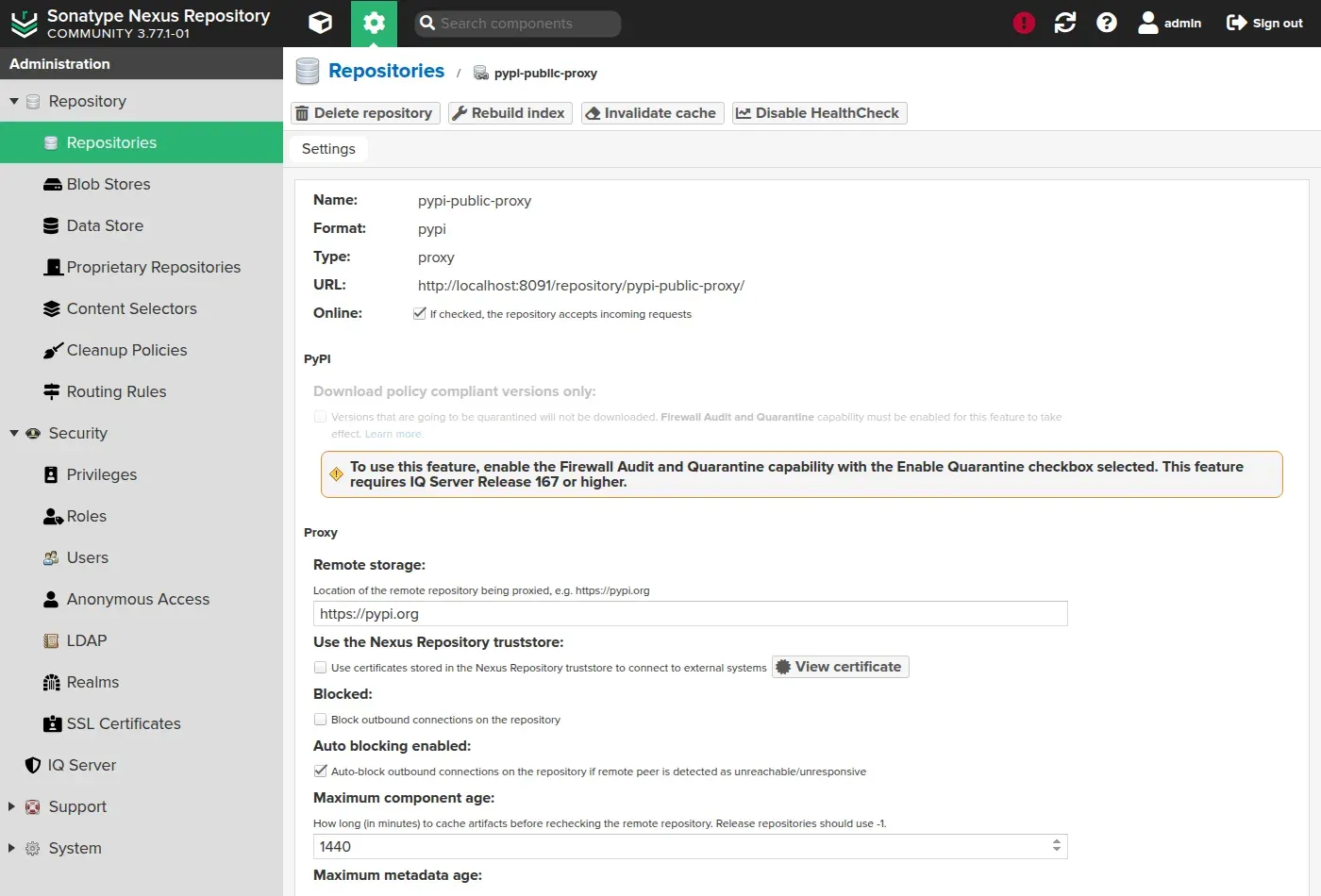
curl -u admin:VOTRE_MDP -X POST \ http://localhost:8081/service/rest/v1/repositories/pypi/proxy \ -H 'Content-Type: application/json' -d '{ "name": "pypi-public-proxy", "online": true, "storage": {"blobStoreName": "default", "strictContentTypeValidation": true}, "proxy": {"remoteUrl": "https://pypi.org", "contentMaxAge": 1440, "metadataMaxAge": 1440}, "negativeCache": {"enabled": true, "timeToLive": 1440}, "httpClient": {"blocked": false, "autoBlock": true} }'The repository configuration page shows these same settings in the interface:
The settings that matter
Three options govern the behaviour of the cache:
- Remote storage: the URL of the remote repository to cache (
https://pypi.org). It is the only truly mandatory field. - Maximum component age: the duration (in minutes, 1440 = 24 h) during which Nexus serves an artifact without rechecking upstream. For a releases repository (immutable), you set -1 (never recheck); for snapshots, a short value.
- Auto blocking: if upstream becomes unreachable, Nexus automatically blocks outgoing calls so as not to make clients wait, and restores them when upstream comes back. This is what makes your builds resilient to a PyPI outage.
Plug the client into Nexus
On the client side, you replace the public repository URL with the one of the Nexus proxy. For pip, you point the index at the URL of the Nexus repository:
[global]index-url = http://localhost:8081/repository/pypi-public-proxy/simple/From now on, pip install <package> goes through Nexus, which caches along the way. For npm, you would do the same with npm config set registry http://localhost:8081/repository/npm-public-proxy/.
Prove the pull-through cache
This is the check that counts. You count the cached components, download a package through the proxy, then recount: the package must appear.
-
Count the components before:
Terminal window curl -s -u admin:VOTRE_MDP \"http://localhost:8081/service/rest/v1/components?repository=pypi-public-proxy" \| jq '.items | length'6 -
Download a package through the proxy (here the
sixwheel):Terminal window curl -s -u admin:VOTRE_MDP -o /tmp/six.whl \"http://localhost:8081/repository/pypi-public-proxy/packages/six/1.16.0/six-1.16.0-py2.py3-none-any.whl"You authenticate, because anonymous access is not enabled by default: without credentials, the index answers
401and you believe the proxy is down. -
Recount and verify that
sixis now cached:Terminal window curl -s -u admin:VOTRE_MDP \"http://localhost:8081/service/rest/v1/components?repository=pypi-public-proxy" \| jq -r '.items | "nb: \(length)"'nb: 7
The counter goes from 6 to 7 and six 1.16.0 now appears in the cache. The second download of the same package will be served without contacting PyPI: the pull-through cache is proven.
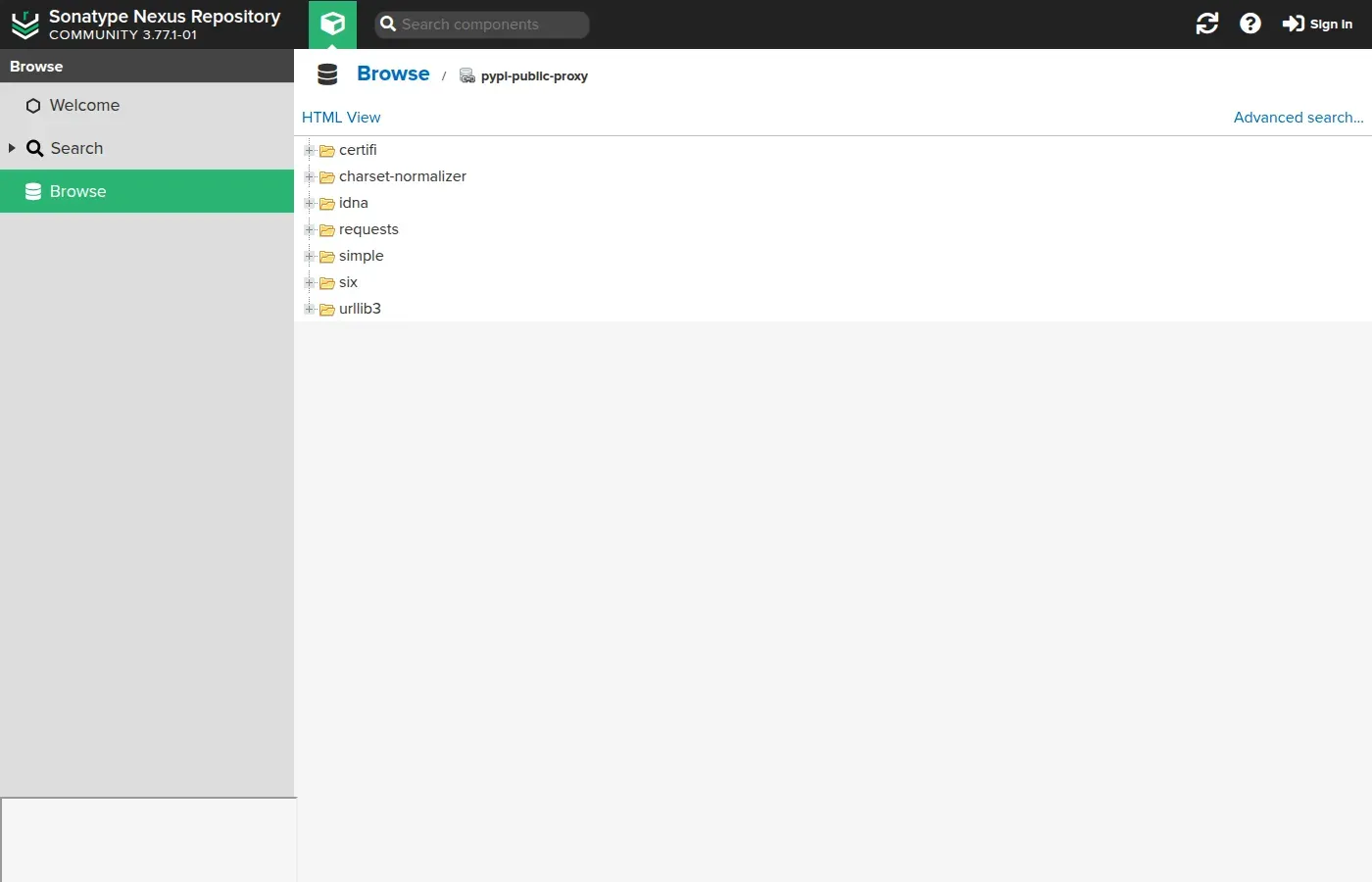
The Browse view of the proxy repository lists the packages actually cached, including six which we just downloaded, alongside requests, urllib3 and their dependencies:
Aggregate behind a single URL: the group repository
In practice, you never configure a client directly on a proxy. You create a group repository that brings together the public proxy and a private hosted repository, and the clients point at that group. Nexus then looks first in the private one, then in the proxy, behind a single URL.
Configuring a group boils down to ordering its members. Here, the pypi-all group contains the private hosted repository, then the public proxy:
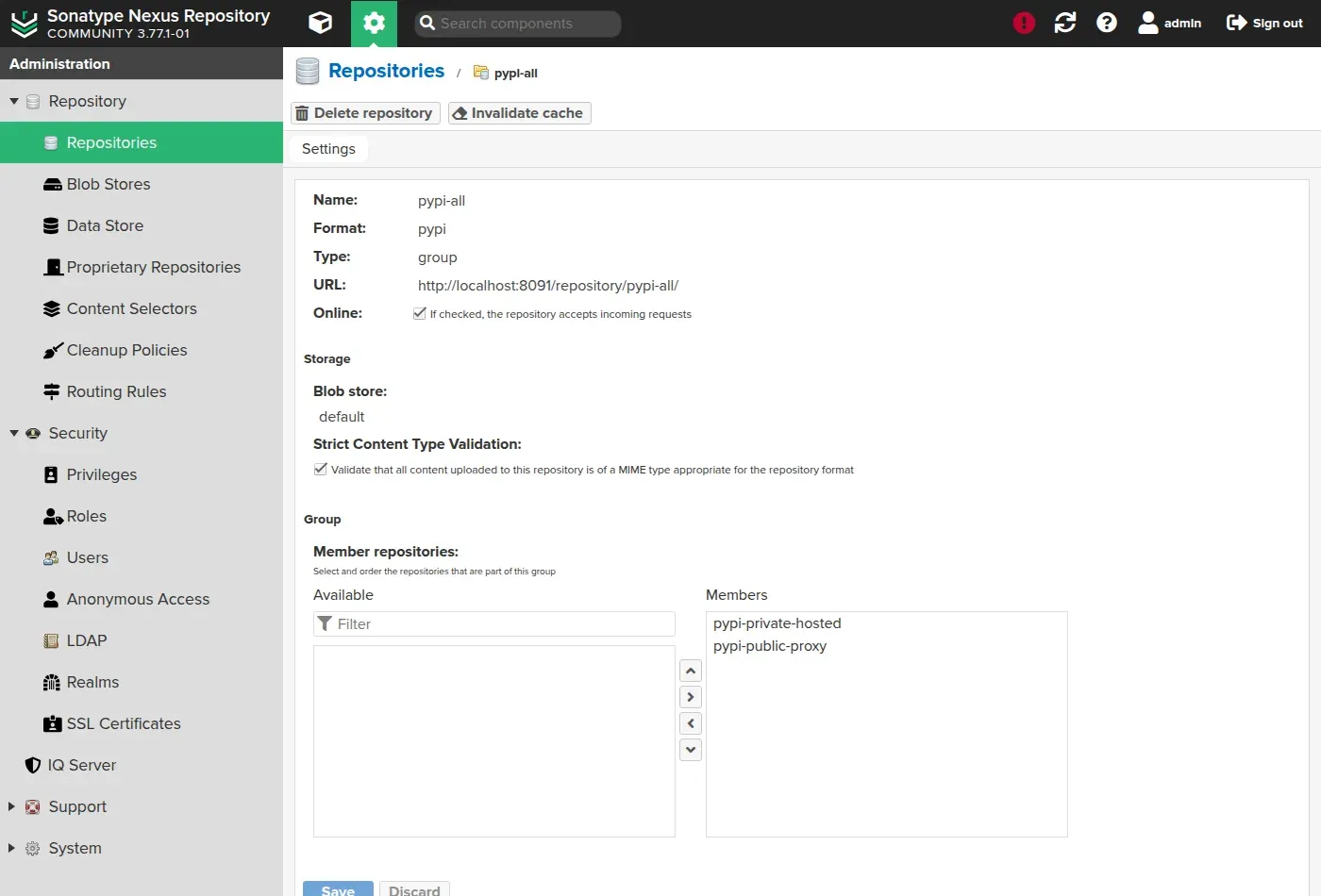
The order matters: Nexus queries the members from top to bottom and returns the first match. By putting the private hosted first, an internal version masks any public namesake, which protects against a dependency confusion attack. On the client side, you simply point at the group:
[global]index-url = http://localhost:8081/repository/pypi-all/simple/Clean up automatically: cleanup policies
A cache grows endlessly if you do not prune it, and in the Community Edition it ends up hitting the 40,000-component quota. Cleanup policies automatically delete artifacts according to criteria: not downloaded for X days, older than Y, or beyond a number of versions to keep.
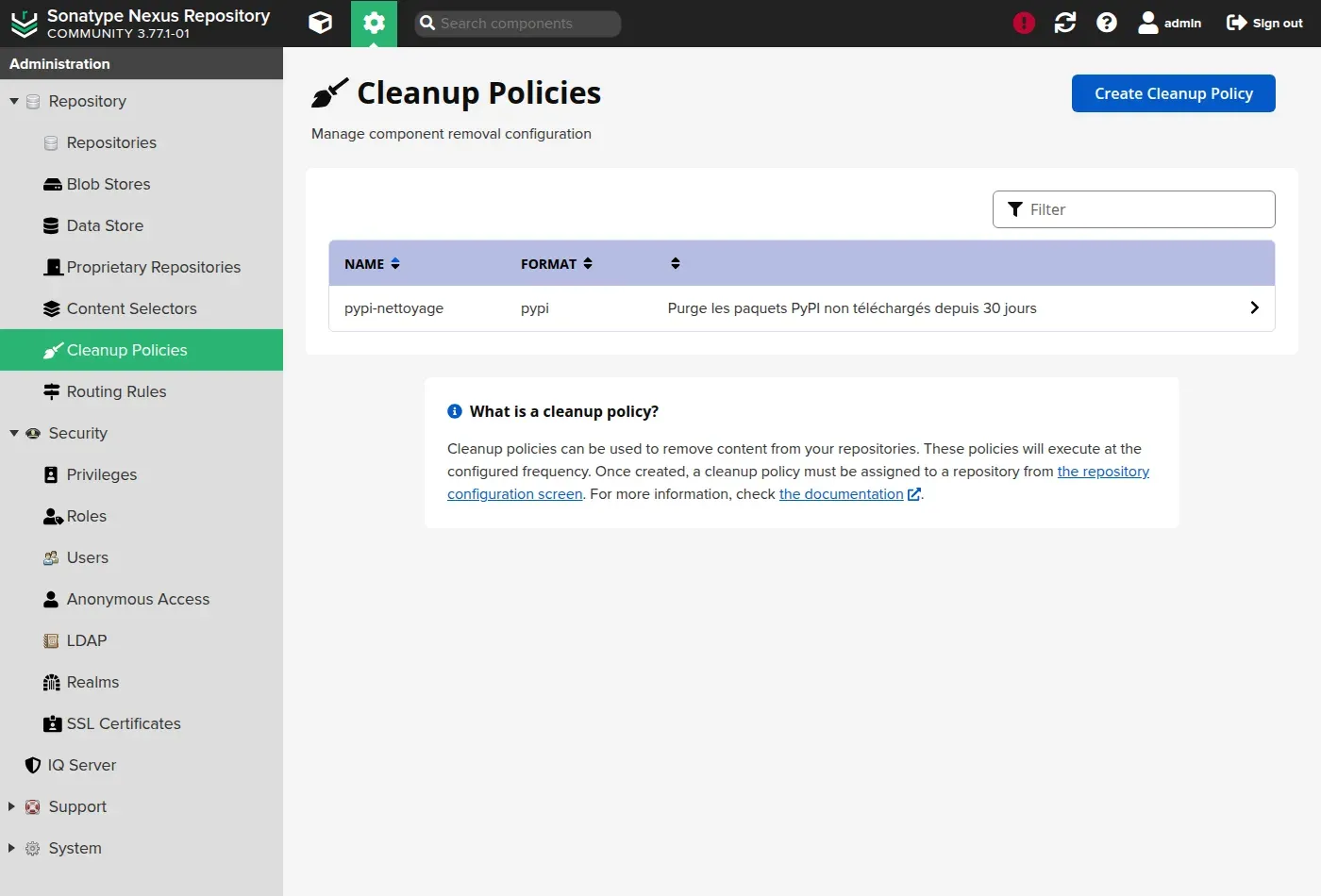
You create a policy under Administration, Cleanup Policies. Here, a rule purges PyPI packages not downloaded for 30 days:
Hands-on practice
The lab has you bring into service a Nexus that is already running: accept the EULA, change the throwaway password, then create the three repositories this guide talks about, the proxy, the hosted and the group that aggregates them. The validation checks the order of the members of the group, not only their presence: Nexus serves the first match, and this order is the only protection against dependency confusion. It finally requires a cache that is really filled, measured after a client has gone through it.
Troubleshooting
| Symptom | Likely cause | Solution |
|---|---|---|
The proxy returns 404 on a package | Wrong repository path | Check the /repository/<name>/ URL |
| Nothing gets cached | Request on the index only | The cache stores the downloaded artifacts, not the index pages |
| The proxy is "auto-blocked" | Upstream repository unreachable | Nexus restores it on its own as soon as upstream answers; to avoid waiting, unblock it from the repository's page |
pip ignores Nexus | Wrong configuration file | Check index-url in pip.conf |
Key takeaways
- A proxy repository caches a public repository on first download (pull-through cache).
- It brings speed, resilience (auto-blocking) and visibility into the dependencies consumed.
- The maximum component age sets how often upstream is rechecked (
-1for immutable releases). - You expose a group repository (hosted before proxy), not the proxy directly: a single URL and a protection against dependency confusion.
- Cleanup policies prune the cache to keep storage under control and stay under the quota; they must be assigned to a repository.
Knowledge check
Eight questions on the pull-through cache: what gets cached and what does not, what auto blocking does, and why clients point at a group.
Knowledge check
Check what you have learned with this interactive quiz
How it works
- The timer starts when you click Start
- Multiple choice, true/false and short answer questions
- You can move between questions
- Detailed results are shown at the end
Starts the quiz and the timer
Review
(0/0)Score by domain
A domain groups several guides and gets several questions, so its score is more reliable than a per-topic score, which often rests on a single question.
Summary
Strengths
No topic passed at 80% on at least two questions yet.
Weak areas
No topic below the pass mark.
Recommended next
Hints before you try again?
Continue the course: Private Docker registry with Nexus
A new full quiz with random questions
Work again only on the questions you missed