In a DevOps approach, artifact management is essential to successful continuous integration and delivery. JFrog Artifactory presents itself as a solution to that challenge.
Artifactory stands out for its ability to support a wide range of package formats, its integration with CI/CD tools and its repository management and security features. Whether you work with Java, Docker or npm, it adapts to your needs and makes managing dependencies and artifacts workable.
What you will learn
- Understand the role of Artifactory in a CI/CD chain.
- Tell apart the local, remote and virtual repositories.
- Configure a repository exposed to your clients (Maven, npm, Docker).
- Place Artifactory within the JFrog Platform (Xray).
- Decide when to adopt it rather than Pulp, Nexus or Harbor, on verifiable criteria.
History of JFrog Artifactory
To understand the value and the capabilities of JFrog Artifactory, it helps to know how it evolved. Artifactory was launched in 2006, at a time when artifact management and dependency management were becoming a major challenge of software development.
In its early days, Artifactory was one of the first solutions dedicated to binary artifacts. It answered the need for structured dependency management in development cycles, particularly for Java projects built with Maven. The vision was simple: make artifact management predictable enough to be automated.
Over the years, Artifactory became much more than a Maven repository manager. It was extended to a wide range of package formats, including Docker (in French), npm and NuGet, as teams' needs changed. This evolution coincided with the rise of continuous integration, which placed it at the heart of pipelines.
JFrog, the company behind Artifactory, has broadened its offer over time: repository replication, integration with CI/CD chains, fine-grained security management. It also split the product into Pro and Enterprise editions, which reserve some of these functions for large organisations.
Today, JFrog Artifactory is an established tool of the DevOps ecosystem, used by thousands of companies. Its multi-format coverage and its integration with delivery chains make it a common choice for artifact management, provided you accept its licensing model.
Key features of JFrog Artifactory
JFrog Artifactory is a complete artifact management solution, designed to meet the varied demands of modern development environments. Here is a detailed overview of its main features:
- Multi-technology support: Artifactory handles a wide range of package management formats, including Maven, Gradle, npm, Docker and many others, offering a centralised solution for every kind of artifact.
- Hybrid repositories: it can manage local repositories (hosted internally), remote repositories (to proxy external ones) and virtual repositories (an aggregation of several repositories).
- Intuitive web interface: a friendly graphical user interface to manage repositories, users and permissions.
- Complete REST API: a REST API (in French) to automate and integrate Artifactory with other systems and tools.
- Build automation: Artifactory integrates tightly with CI/CD tools such as Jenkins, GitLab CI/CD and CircleCI to automate the creation, storage and management of artifacts.
- Build traceability: it provides full artifact traceability, keeping detailed metadata for every build.
- Fine-grained access control: Artifactory allows fine management of access rights, with the ability to define detailed permissions at user and group level.
- Authentication and SSO integration: it supports LDAP/Active Directory, OAuth and SAML authentication for seamless integration with existing authentication systems.
- High availability architecture: the Enterprise version supports a high availability configuration with clustering and load balancing.
- Global replication: it lets you replicate repositories between different Artifactory instances, which eases collaboration and distribution worldwide.
- Advanced search and management: it offers powerful search tools and REST APIs for programmable artifact management.
- Cleanup and storage management: features to manage storage space, including the cleanup of old or unused artifacts.
- JFrog Xray: integration with JFrog Xray for an in-depth analysis of vulnerabilities and licences in artifacts and Docker images.
- JFrog Pipelines: it lets you orchestrate automated deployment pipelines and software distribution.
When to choose Artifactory rather than Pulp or Nexus?
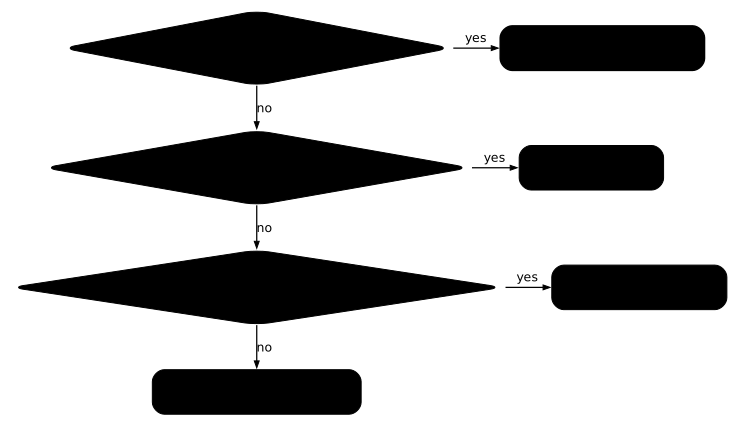
Choose Artifactory when you need functions that the other two do not deliver for free (Xray analysis, build traceability, multi-site replication, high availability) and you accept a commercial licence. If your need is limited to storing and caching packages, a cheaper or free alternative is almost always enough. The choice and licence table on the course home page gives the overview; this section adds what sets Artifactory apart from its two direct competitors.
This diagram summarises the decision for the four managers of the course. Read it from top to bottom: the first question singles out Harbor (images only), the second the licence criterion that points to Pulp, the third the need for enterprise functions that points to Artifactory, failing which Nexus in Community Edition remains the reasonable default.
The criteria that set them apart
Four criteria can be checked in each product's documentation, with no subjective judgement. Those that concern Pulp and Nexus are detailed in their own guides, Pulp and Nexus; here they serve as a point of comparison.
| Criterion | Artifactory | Pulp | Nexus |
|---|---|---|---|
| Licence | Proprietary, limited OSS edition | GPL-2.0 (core and plugins), no EULA | Community Edition under EULA |
| Free version limits | Maven, Gradle and Ivy formats only | No limit on components or requests | 40,000 components, 100,000 requests per day |
| High availability and replication | Enterprise editions (see the editions table further down) | Kubernetes deployment described in the Pulp guide | Pro edition |
| Vulnerability analysis | Xray, a JFrog product under licence | External scanner plugged in, Trivy in the Pulp guide | Not covered in the course |
The table can be read in one sentence: on the free tier, Artifactory is the most limited of the three on formats, which is why it is rarely chosen for its storage merits alone.
What Artifactory does that the others do not
Three contributions justify it. First build traceability: for each build it keeps the metadata of what was produced and consumed, with a full history per build. Then Xray, which analyses vulnerabilities and licences directly on the stored artifacts. Finally replication between instances, which brings artifacts closer to teams spread over several sites.
These three functions make up the JFrog Platform: their value lies in the integration, not in any single function. A free manager such as Pulp can stand in for it by assembling Trivy and an access control, but the assembly becomes your job.
What Artifactory does not do, or not for free
Its Pro and Enterprise editions are proprietary: using them requires a commercial licence, which rules out strict sovereignty contexts. The free version only covers Java formats, so no Docker, npm or PyPI. Finally, it is heavy to operate: the installation below shows a PostgreSQL database, a JDK, several jf-* processes and a reverse proxy, whereas an image registry such as Harbor installs with a single script.
The use case that justifies it
A company spread over several sites, delivering Java applications, Docker images and npm packages, and needing to prove what each build contains, justifies Artifactory. Conversely, a team of ten people hosting a few RPM packages gains nothing from it: Pulp or Nexus Community cover the need without a licence.
Installing JFrog Artifactory
Here is a simplified Artifactory installation, built with Vagrant to stay reproducible:
Vagrant.configure("2") do |config|  config.vm.box = "generic/alma8"  config.vm.provider "libvirt" do |lv|    lv.cpus = "4"    lv.memory = "4096"  end  config.vm.synced_folder '.', '/vagrant', disabled: true
  config.vm.define "artifactory" do |artifactory|    artifactory.vm.network :private_network, ip: "192.168.3.10"    artifactory.vm.hostname = "artifactory"  endend
Let's start the VM
vagrant upvagrant sshOn to the installation...
Installing the prerequisites
Installing PostgreSQL
Before installing JFrog Artifactory, you need a database: the instance stores its metadata there, and without it the service does not start. PostgreSQL 15 will do, and here is how to install it on AlmaLinux 8:
First, add the official PostgreSQL repository:
sudo dnf install -y https://download.postgresql.org/pub/repos/yum/reporpms/EL-8-x86_64/pgdg-redhat-repo-latest.noarch.rpm
AlmaLinux 8 - BaseOS                                                  3.3 MB/s | 4.0 MB     00:01AlmaLinux 8 - AppStream                                                11 MB/s |  11 MB     00:01AlmaLinux 8 - Extras                                                   44 kB/s |  20 kB     00:00Extra Packages for Enterprise Linux 8 - x86_64                         12 MB/s |  16 MB     00:01pgdg-redhat-repo-latest.noarch.rpm                                     15 kB/s |  13 kB     00:00Dependencies resolved.====================================================================================================== Package                     Architecture      Version                  Repository               Size======================================================================================================Installing: pgdg-redhat-repo            noarch            42.0-35PGDG              @commandline             13 k
Transaction Summary======================================================================================================Install  1 Package
Total size: 13 kInstalled size: 15 kDownloading Packages:Running transaction checkTransaction check succeeded.Running transaction testTransaction test succeeded.Running transaction  Preparing        :                                                                              1/1  Installing       : pgdg-redhat-repo-42.0-35PGDG.noarch                                          1/1  Verifying        : pgdg-redhat-repo-42.0-35PGDG.noarch                                          1/1
Installed:  pgdg-redhat-repo-42.0-35PGDG.noarch
Disable the built-in module:
sudo dnf -qy module disable postgresqlImporting GPG key 0x442DF0F8:... Userid : "PostgreSQL RPM Building Project <pgsql-pkg-yum@postgresql.org>" Fingerprint: 68C9 E2B9 1A37 D136 FE74 D176 1F16 D2E1 442D F0F8 From : /etc/pki/rpm-gpg/RPM-GPG-KEY-PGDGThen install PostgreSQL 15:
sudo dnf install -y postgresql15-server postgresql15-contribLast metadata expiration check: 0:01:28 ago on Wed Dec 20 13:27:45 2023.Dependencies resolved.====================================================================================================== Package                        Architecture      Version                     Repository         Size======================================================================================================Installing: postgresql15-server            x86_64            15.5-2PGDG.rhel8            pgdg15            6.0 MInstalling dependencies: libicu                         x86_64            60.3-2.el8_1                baseos            8.8 M lz4                            x86_64            1.8.3-3.el8_4               baseos            102 k postgresql15                   x86_64            15.5-2PGDG.rhel8            pgdg15            1.6 M postgresql15-libs              x86_64            15.5-2PGDG.rhel8            pgdg15            294 k
...
Installed:  libicu-60.3-2.el8_1.x86_64                         lz4-1.8.3-3.el8_4.x86_64  postgresql15-15.5-2PGDG.rhel8.x86_64               postgresql15-libs-15.5-2PGDG.rhel8.x86_64  postgresql15-server-15.5-2PGDG.rhel8.x86_64
After the installation, initialise the database:
sudo /usr/pgsql-15/bin/postgresql-15-setup initdbInitializing database ... OKEnable and start the PostgreSQL service:
sudo systemctl enable postgresql-15Created symlink /etc/systemd/system/multi-user.target.wants/postgresql-15.service → /usr/lib/systemd/sConfiguring the database
Edit the following file:
sudo vi /var/lib/pgsql/15/data/pg_hba.confIf you are not comfortable with the vi editor, I recommend reading my guide on vi.
Add the following line at the end of the file:
host artifactory artifactory 127.0.0.1/32 md5Create the Artifactory user and database:
sudo su - postgrespsql
CREATE USER artifactory WITH PASSWORD 'password';CREATE DATABASE artifactory WITH OWNER=artifactory ENCODING='UTF8';GRANT ALL PRIVILEGES ON DATABASE artifactory TO artifactory;CREATE EXTENSION pg_trgm;
That completes the database installation. Log out of the Postgres user.
Installing Java
On to the Java installation:
sudo dnf updatesudo dnf install java-17-openjdkInstalling Artifactory
wget https://releases.jfrog.io/artifactory/artifactory-pro-rpms/artifactory-pro-rpms.repo -O jfrog-artifactory-pro-rpms.reposudo mv jfrog-artifactory-pro-rpms.repo /etc/yum.repos.d/sudo dnf update -ysudo dnf install jfrog-artifactory-pro -yConfiguring Artifactory
We are going to tell Artifactory to use the database created earlier. To do so, edit the following file:
sudo vi /var/opt/jfrog/artifactory/etc/system.yamlIn the database section, set these values:
## Example for postgresql type: postgresql driver: org.postgresql.Driver url: "jdbc:postgresql://localhost:5432/artifactory" username: artifactory password: passwordCreate the keys:
sudo -icd /var/opt/jfrog/artifactoryopenssl rand -hex 16 > etc/security/master.keychown artifactory.artifactory etc/security/master.keychmod 600 etc/security/master.key
openssl rand -hex 16 > etc/security/join.keychown artifactory.artifactory etc/security/join.keychmod 600 etc/security/join.keyexit
Start Artifactory:
sudo systemctl enable artifactory.servicesudo systemctl start artifactory.service
sudo systemctl status artifactory.service● artifactory.service - Artifactory service   Loaded: loaded (/usr/lib/systemd/system/artifactory.service; enabled; vendor preset: disabled)   Active: inactive (dead)[root@artifactory /]# systemctl start artifactory.service[root@artifactory /]# systemctl status artifactory.service● artifactory.service - Artifactory service   Loaded: loaded (/usr/lib/systemd/system/artifactory.service; enabled; vendor preset: disabled)   Active: active (running) since Wed 2023-12-20 13:47:10 UTC; 10s ago  Process: 8069 ExecStart=/opt/jfrog/artifactory/app/bin/artifactoryManage.sh start (code=exited, sta> Main PID: 11768 (java)    Tasks: 0 (limit: 23144)   Memory: 103.9M   CGroup: /system.slice/artifactory.service           ‣ 11768 /opt/jfrog/artifactory/app/third-party/java/bin/java -Djava.util.logging.config.fi>Dec 20 13:47:09 artifactory su[12928]: (to artifactory) root on noneDec 20 13:47:10 artifactory su[12928]: pam_unix(su:session): session opened for user artifactory by (>Dec 20 13:47:10 artifactory su[12928]: pam_unix(su:session): session closed for user artifactoryDec 20 13:47:10 artifactory systemd[1]: Started Artifactory service.
Everything seems to work.
A quick check:
netstat -tlnpActive Internet connections (only servers)Proto Recv-Q Send-Q Local Address           Foreign Address         State       PID/Program nametcp        0      0 127.0.0.1:8035          0.0.0.0:*               LISTEN      12795/jf-connecttcp        0      0 127.0.0.1:8036          0.0.0.0:*               LISTEN      12661/jf-observabiltcp        0      0 127.0.0.1:8070          0.0.0.0:*               LISTEN      12542/nodetcp        0      0 127.0.0.1:8071          0.0.0.0:*               LISTEN      12926/jf-integratiotcp        0      0 127.0.0.1:8072          0.0.0.0:*               LISTEN      12926/jf-integratiotcp        0      0 127.0.0.1:8046          0.0.0.0:*               LISTEN      12231/jf-routertcp        0      0 127.0.0.1:8047          0.0.0.0:*               LISTEN      12231/jf-routertcp        0      0 127.0.0.1:8049          0.0.0.0:*               LISTEN      12231/jf-routertcp        0      0 127.0.0.1:8086          0.0.0.0:*               LISTEN      12405/jf-metadatatcp        0      0 0.0.0.0:22              0.0.0.0:*               LISTEN      813/sshdtcp        0      0 127.0.0.1:5432          0.0.0.0:*               LISTEN      7989/postmastertcp        0      0 127.0.0.1:8061          0.0.0.0:*               LISTEN      13048/jf-eventtcp        0      0 127.0.0.1:8062          0.0.0.0:*               LISTEN      13048/jf-eventtcp        0      0 127.0.0.1:8030          0.0.0.0:*               LISTEN      12795/jf-connecttcp6       0      0 127.0.0.1:8040          :::*                    LISTEN      11768/javatcp6       0      0 :::8045                 :::*                    LISTEN      11768/javatcp6       0      0 127.0.0.1:8015          :::*                    LISTEN      11768/javatcp6       0      0 :::8081                 :::*                    LISTEN      11768/javatcp6       0      0 :::8082                 :::*                    LISTEN      12231/jf-routertcp6       0      0 :::22                   :::*                    LISTEN      813/sshdtcp6       0      0 127.0.0.1:8091          :::*                    LISTEN      11768/java
curl localhost:8082/artifactory/api/system/version -u admin:password{  "version" : "7.71.8",  "revision" : "77108900",  "addons" : [ ],  "license" : "da39a3ee5e6b4b0d3255bfef95601890afd807090",  "entitlements" : {    "EVENT_BASED_PULL_REPLICATION" : false,    "SMART_REMOTE_TARGET_FOR_EDGE" : false,    "REPO_REPLICATION" : false,    "MULTIPUSH_REPLICATION" : false  }
Perfect
Installing the Nginx reverse proxy
Configuring Nginx as a reverse proxy in front of JFrog Artifactory improves the security and the performance of the deployment. Here, the example stays on HTTP: a production setup would add TLS termination at this point.
Here is how to configure Nginx with Artifactory.
Make sure Nginx is installed on your server. On AlmaLinux 8, you can install it with:
sudo dnf install nginx -yAfter the installation, open the Nginx configuration file to edit the
settings. Use a text editor such as vi or nano.
sudo vi /etc/nginx/conf.d/artifactory.confPut these lines in it:
## server configurationserver {    listen 80;
    server_name artifactory.robert.local;
    ## Application specific logs    ## access_log /var/log/nginx/yourdomain.com-access.log timing;    ## error_log /var/log/nginx/yourdomain.com-error.log;    rewrite ^/$ /ui/ redirect;    rewrite ^/ui$ /ui/ redirect;    chunked_transfer_encoding on;    client_max_body_size 0;    location / {        proxy_read_timeout  2400s;        proxy_pass_header   Server;        proxy_cookie_path   ~*^/.* /;        proxy_pass          http://192.168.3.10:8082;        proxy_next_upstream error timeout non_idempotent;        proxy_next_upstream_tries    1;        proxy_set_header    X-JFrog-Override-Base-Url $http_x_forwarded_proto://$host:$server_port;        proxy_set_header    X-Forwarded-Port  $server_port;        proxy_set_header    X-Forwarded-Proto $http_x_forwarded_proto;        proxy_set_header    Host              $http_host;        proxy_set_header    X-Forwarded-For   $proxy_add_x_forwarded_for;
        location ~ ^/artifactory/ {            proxy_pass    http://192.168.3.10:8081;        }    }}
Restart the nginx service:
sudo systemctl restart nginx.serviceAllow HTTP traffic:
sudo firewall-cmd --zone=public --add-service=http --permanentsudo firewall-cmd --reloadAllow nginx to open network connections. What we set here is indeed an
SELinux boolean, not a disabling of SELinux: without it, the proxy
answers 502 even though its configuration is correct.
sudo setsebool -P httpd_can_network_connect 1Add the following line to the /etc/hosts file:
192.168.3.10 artifactory.robert.localTest it:
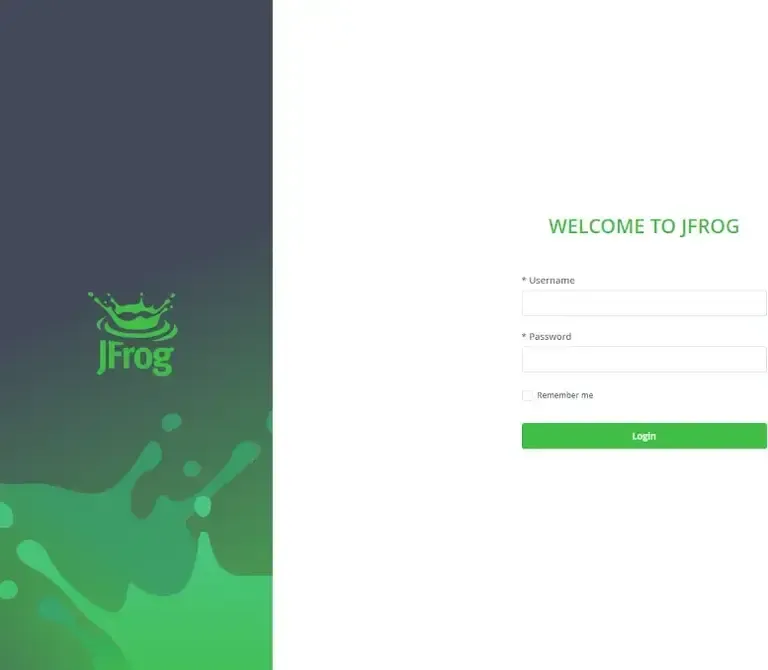
The login screen responds, which validates the installation and the proxy. What comes next, creating repositories and Xray, requires a licence: the evaluation edition provides a temporary one, and the OSS edition is limited to Java formats.
Comparing the JFrog Artifactory editions
Each Artifactory edition meets a different need, from basic artifact management with the OSS edition up to the high availability and the analysis of the Enterprise Plus edition. The choice depends on three criteria: the size of the team, the formats to host, and the budget.
OSS edition (Open Source Software)
-
Features:
- Artifact management for Maven and Gradle.
- Basic repository support.
- Web interface for repository management.
-
Ideal for:
- Small teams or individual projects.
- Projects that only need basic management of Maven, Gradle and Ivy artifacts.
Pro edition
-
Features:
- All the features of the OSS edition.
- Support for Docker, npm, PyPI, NuGet and others.
- Advanced security and LDAP/AD integration.
- Complete REST API for automation.
- CI/CD integration with Jenkins, GitLab CI/CD (in French) etc.
-
Ideal for:
- Medium to large teams.
- Projects that need broad package type support and CI/CD integration.
Pro X edition
-
Features:
- All the features of the Pro edition.
- Security and compliance analysis.
- Xray for vulnerability analysis and management.
-
Ideal for:
- Organisations that need in-depth security analysis.
- Projects where artifact security is a priority.
Enterprise edition
-
Features:
- All the features of Pro X.
- High availability with multi-site support (replication).
- Load balancing and clustering.
-
Ideal for:
- Large companies with high availability requirements.
- Organisations that need artifact management at a global scale.
Enterprise Plus edition
-
Features:
- All the features of the Enterprise edition.
- Large-scale artifact distribution.
- Access to Mission Control and Insight for centralised management and monitoring.
-
Ideal for:
- Large-scale companies with distributed operations.
- Organisations that want artifact management and analysis in the same product.
Pros and cons of JFrog Artifactory
JFrog Artifactory has advantages and drawbacks that need weighing before you adopt it, because an artifact manager is hard to change once your pipelines are wired to it.
Advantages of JFrog Artifactory
- Universal artifact management: Artifactory supports a wide variety of package formats, which makes it ideal for heterogeneous development environments.
- Integration with CI/CD tools: its easy integration with tools such as Jenkins, GitLab CI/CD and others makes it simpler to set up a continuous integration and delivery pipeline.
- Security and access control: Artifactory offers advanced security features, including access control and fine-grained permission management.
- High availability and scalability: designed for enterprises, it can be deployed in high availability architectures and adapts to scalability requirements.
- Repository replication: it allows replication between different Artifactory instances, which eases collaboration at a global scale.
Drawbacks of JFrog Artifactory
- Configuration complexity: the richness of the features can bring complexity to configuration and maintenance, especially for less experienced users.
- Cost of the advanced editions: while the OSS edition is free, the Pro and Enterprise editions can represent a significant cost for small companies or individual projects.
- System resources: Artifactory can be resource-hungry, particularly in large-scale configurations.
- Learning curve: users may need time to get used to the interface and the many features it offers.
- Dependence on the JFrog ecosystem: to take full advantage of all its features, you may need to commit more deeply to the JFrog ecosystem, which could limit your flexibility in choosing other tools.
Conclusion
JFrog Artifactory is a robust solution for artifact management. Its integration with CI/CD tools, its support for multiple formats and the fineness of its configuration make it suitable for a very wide range of contexts.
What remains is to weigh its strengths against its limits, in particular the complexity of the configuration and the cost of the higher editions. The section "When to choose Artifactory rather than Pulp or Nexus?" settles it on four criteria: the licence, the limits of the free version, high availability and vulnerability analysis.
Key takeaways
- Artifactory (JFrog) is a universal, multi-format artifact manager for CI/CD.
- Three repository types: local (private), remote (public cache), virtual (aggregation).
- It plugs into the JFrog Platform, including Xray (vulnerabilities and licences).
- The free version is limited; advanced features (HA, replication, full Xray) are paid.
- You choose it for Xray, build traceability and multi-site replication; without that need, Pulp or Nexus Community are enough.
- Alternative: Nexus (Sonatype), or Pulp for a multi-format manager that is 100% open source (GPL); compare the paid editions and the security integration.
FAQ: JFrog Artifactory
| Type | Role |
|---|---|
| local | hosts your private artifacts |
| remote | caches a public remote repository |
| virtual | aggregates local + remote behind a single URL |
virtual repository: a single URL that combines the public cache and your internal packages. It is the equivalent of the Nexus group.- The free version covers basic needs (local/remote/virtual repositories, common formats).
- Advanced features (high availability, multi-site replication, full Xray) belong to the paid offers.
- Artifactory (JFrog): an integrated platform (Xray for security, distribution), with very broad format coverage.
- Nexus (Sonatype): a free but limited Community edition (quotas, EULA).
Knowledge check
Eight questions on Artifactory: what its free edition covers, what it does that the others do not, and the case that justifies it.
Knowledge check
Check what you have learned with this interactive quiz
How it works
- The timer starts when you click Start
- Multiple choice, true/false and short answer questions
- You can move between questions
- Detailed results are shown at the end
Starts the quiz and the timer
Review
(0/0)Score by domain
A domain groups several guides and gets several questions, so its score is more reliable than a per-topic score, which often rests on a single question.
Summary
Strengths
No topic passed at 80% on at least two questions yet.
Weak areas
No topic below the pass mark.
Recommended next
Hints before you try again?
Continue the course: Harbor: the image registry for DevSecOps teams
A new full quiz with random questions
Work again only on the questions you missed