In December 2021, the Log4Shell flaw raised a question most teams could not answer: "do we use Log4j, and where?". The software supply chain, everything that sits between a line of code and the application in production, has become a favourite target for attackers: in 2025, Sonatype counted more than 454,600 new malicious packages. This lesson opens the module on the supply chain: it gives the map of the risks and of the three answers, SBOM, SLSA and Sigstore, that the following lessons cover one by one.
The dependency installation commands are measured: npm ci refuses a
tampered lock, pip refuses a package whose hash does not match, and an
Express application with a single dependency pulls in 69 others.
What you will learn
- Place the links of the chain and the attacks that targeted them
- Distinguish the three questions: transparency, integrity, provenance
- Produce an SBOM and read what it contains
- Place a build on the SLSA 1.2 levels
- Explain Sigstore keyless signing and Trusted Publishing
- Harden dependency installation with a lock, hashes and
--ignore-scripts
What is the software supply chain?
The software supply chain is the set of suppliers, tools and processes involved between your first line of code and the deployed application. The term comes from logistics, and the analogy holds: a product is no safer than the least controlled part it is made of. Every link is a possible entry point.
| Link | Examples | What an attacker does there |
|---|---|---|
| Source code | your repository, external contributions | injects code through a weak account or review |
| Dependencies | npm, PyPI, Maven, Go modules | publishes a trapped version or a look-alike name (typosquatting) |
| Build | CI runners, compilers, actions | modifies the artifact while it is being built |
| Artifacts | images, binaries, packages | swaps one artifact for another with the same name |
| Distribution | registries, CDNs | serves an altered version to every client |
How much code comes from elsewhere?
According to Black Duck's OSSRA 2026 report, 98% of the audited commercial applications contain open source, which makes up on average 70% of their code. The figure can be checked with a single command: an application that declares only Express as a dependency installs 69 packages, measured with npm 11.19.0.
$ cat package.json{ "name": "demo-sbom", "version": "1.0.0", "dependencies": { "express": "4.21.2" } }$ npm install --silent$ node -e 'const l=require("./package-lock.json"); console.log(Object.keys(l.packages).length - 1)'69Each of these 69 packages has one or more maintainers whose account security you have never checked. The 2026 Sonatype report shows the other side of the problem: 454,600 malicious packages published in 2025, 1.233 million in total, and more than 99% of this malware on npm.
Five attacks that changed practices
Each major attack targeted a different link, and each one left a countermeasure behind it. Remembering them as pairs, attack and countermeasure, is the surest way to understand what each tool in the module is for.
| Attack | Link targeted | What happened | Countermeasure that followed |
|---|---|---|---|
| SolarWinds (2020) | build | malicious code inserted while Orion was compiled; around 18,000 customers receive the trapped update | build provenance (SLSA) |
| ua-parser-js (2021) | dependency | the maintainer's npm account is hijacked, three versions published with a cryptominer and a password stealer | lock, pinning, Trusted Publishing |
| xz utils (2024) | source code | a backdoor introduced after two years of social engineering against the maintainer (CVE-2024-3094) | two-person review, source provenance |
| Polyfill.io (2024) | distribution | the CDN domain, once bought, serves malicious code to more than 100,000 sites | resource integrity, self-hosting |
| Shai-Hulud (2025) | dependency | an npm worm steals publishing tokens and republishes itself: more than 500 packages in September, around 800 in November | Trusted Publishing, --ignore-scripts |
OWASP drew the consequences: in its Top 10:2025, the category A03 Software Supply Chain Failures comes third, and half of the respondents to its community survey ranked it their top concern. In 2026, Trivy itself, a security scanner, was compromised: the lesson on Trivy details the incident.
The three questions: transparency, integrity, provenance
All of supply chain security comes down to three questions. If one of them is left without a verifiable answer, the chain has a gap, however much care went into the other two.
| Question | What it asks | Tooled answer |
|---|---|---|
| Transparency | What is my software made of? | an SBOM |
| Integrity | Has the artifact been modified since it was built? | a signature |
| Provenance | Which commit and which build does it come from? | an SLSA attestation |
The three hold together. An unsigned SBOM can be forged by whoever modifies the image. A signature proves that an artifact has not changed, not what it contains. A provenance attestation says where the image comes from, not whether it embeds a vulnerable dependency. The following lessons of the module each cover one of these answers.
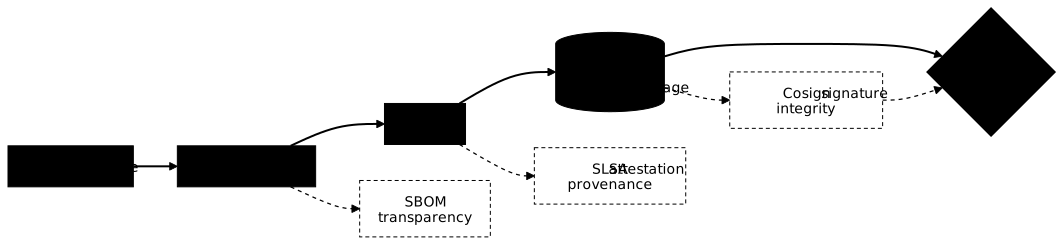
The diagram below places each answer on the chain: the SBOM inventories the dependencies, the provenance attestation is born at build time, and the signature travels with the artifact up to admission, where it is verified before deployment.
SBOM: knowing what you ship
An SBOM (Software Bill of Materials) is the inventory of all the
components of a piece of software: direct and transitive dependencies,
exact versions, licences and standard identifiers (purl). It is what lets
you answer "are we affected by this CVE?" in a few minutes, where
Log4Shell cost weeks of manual audit.
Two formats dominate. CycloneDX, backed by OWASP and standardised by Ecma as ECMA-424, is security-oriented and carries VEX exploitability statements. SPDX, backed by the Linux Foundation and standardised as ISO/IEC 5962, comes from licence compliance. The common tools produce both.
Producing an SBOM with Syft
Syft (Anchore) inventories a folder or an image. The command to remember
is syft scan: the old form syft packages, still quoted everywhere, now
prints Command "packages" is deprecated, use syft scan instead with Syft
1.52.0. On the Express application, the CycloneDX SBOM lists 71
components: the 69 npm packages, plus the application and its lock.
$ syft scan dir:. -o cyclonedx-json > sbom.cdx.json$ jq '.specVersion, (.components | length)' sbom.cdx.json"1.7"71$ jq '.components[] | select(.name == "express") | {name, version, purl, licenses}' sbom.cdx.json{ "name": "express", "version": "4.21.2", "purl": "pkg:npm/express@4.21.2", "licenses": [ { "license": { "id": "MIT" } } ]}The purl field (package URL) is the key that links the SBOM to
vulnerability databases. Producing, publishing and using this inventory is
the subject of the next lesson, on the
SBOM.
SLSA: how far can you trust the build?
SLSA (Supply-chain Levels for Software Artifacts, pronounced "salsa") is an OpenSSF framework that grades the trust you can place in an artifact. Its version 1.2, the current one, has two tracks: the Build track, which judges how the artifact is built, and the Source track, reintroduced in this version after being removed from 1.0, which judges how the code is managed.
| Build level | Requirement | What it proves |
|---|---|---|
| L0 | none | nothing |
| L1 | a provenance exists | the build is documented |
| L2 | provenance signed by a hosted build platform | it was not forged after the fact |
| L3 | isolated build, signing secret out of reach of the build steps | even a compromised build cannot lie about its provenance |
The Source track goes from L1 (code under version control) to L4 (review by two trusted people on protected branches). On the tooling side, GitHub says so in its documentation: its artifact attestations alone provide Build L2, and a reusable workflow, which separates the build from the calling workflow, makes it possible to reach L3. The lesson on SLSA provenance shows how to verify it before deploying.
Signing without managing a key: Sigstore
Signing an artifact long meant managing a private key: storing it, renewing it, revoking it if it leaks. Almost nobody did it. Sigstore, an OpenSSF project, removes the long-lived key: the signature relies on the signer's OIDC identity, for example the GitHub Actions workflow that publishes.
Three building blocks work together. Fulcio issues a ten-minute certificate bound to that identity. Cosign signs the artifact with it. Rekor records the signature in a public, tamper-proof transparency log: the certificate expires, but the signature stays verifiable, and any fraudulent signature leaves a trace there.
# Sign an image by its digest, in a CI job that has the OIDC identitycosign sign ghcr.io/acme/facturation@sha256:<digest>
# Verify: who signed, and from which identity issuercosign verify \  --certificate-identity-regexp '^https://github.com/acme/facturation/' \  --certificate-oidc-issuer https://token.actions.githubusercontent.com \  ghcr.io/acme/facturation@sha256:<digest>
Verification matters more than signing: a signed image that nobody verifies protects nothing. In a cluster, this check falls to an admission controller such as Kyverno, which refuses a pod whose image is not signed by the expected identity. The lesson on Cosign practises signing and its verification failures.
Trusted Publishing: publishing without a token
Shai-Hulud exploited the last weak link: long-lived npm publishing tokens, stolen from workstations or from CI variables. Trusted Publishing, available on npm and PyPI, replaces that token with an OIDC authentication of the pipeline to the registry, which issues a short-lived token. The published package then carries a signed provenance. npm revoked its old classic tokens in December 2025, which pushes every maintainer towards this mode.
Hardening dependency installation
Dependencies are a link attacked again and again (two of the five attacks above), because their code runs with your privileges, often at install time. Four practices reduce this risk, and three of them can be checked in a few seconds. The lesson on securing dependencies applies them ecosystem by ecosystem.
Pinning and locking
A version range such as ^4.17.0 accepts any compatible future version,
including a trapped version published tomorrow. So you pin an exact
version, and above all you commit the lock file, which freezes the
complete tree, transitive dependencies included, with the hash of each
package.
// ❌ Avoid: accepts any future version{ "dependencies": { "lodash": "^4.17.0", "express": "*" } }
// Exact version, and package-lock.json committed{ "dependencies": { "lodash": "4.17.21", "express": "4.21.2" } }
In CI, you install with npm ci, never npm install. Measured with
npm 11.19.0: when package.json and the lock diverge, npm ci
refuses to install instead of silently rewriting the lock.
$ npm cinpm error code EUSAGEnpm error `npm ci` can only install packages when your package.json and package-lock.jsonor npm-shrinkwrap.json are in sync. Please update your lock file with `npm install` before continuing.Verifying hashes
The lock carries the SHA-512 hash of each package (integrity field). If
the registry, a mirror or a proxy serves a different file, the
installation fails. Measured by replacing Express's hash in the lock: npm ci
exits with code 1 on an EINTEGRITY error.
$ npm cinpm error code EINTEGRITYnpm error sha512-AAAA…== integrity checksum failed when using sha512:wanted sha512-AAAA…== but got sha512-28HqgMZAmih1Czt9…== (58016 bytes)Python does the same with pip install --require-hashes, on a file
produced by pip-compile --generate-hashes. One subtlety, measured with
pip 26.1.2: each package lists several hashes, one per published file,
and pip accepts any of them. Tampering with a single hash therefore blocks
nothing; tampering with all those of requests makes the installation fail
with THESE PACKAGES DO NOT MATCH THE HASHES FROM THE REQUIREMENTS FILE.
Disabling install scripts
An npm package can declare preinstall or postinstall scripts that
run at install time. It was through a preinstall that Shai-Hulud 2.0
launched its payload, before the code was even imported. The
--ignore-scripts option disables them: npm ci --ignore-scripts
installs the tree without running a single line of third-party code. A
few packages need them to compile a native module; you then handle them
one by one.
Scanning for known vulnerabilities
The three previous practices protect against a substitution, not against
a known flaw in a legitimate version. A software composition analysis
(SCA) scanner compares the dependencies with CVE databases: npm audit,
Trivy or Grype. The module on code and dependencies measured them,
with their exit codes, in the lesson on
SCA.
A complete chain in one workflow
This workflow brings the three answers together when a release is published: it builds the image, attests its provenance with GitHub's official action (Build L2 level) and produces its SBOM, archived with the run. Each action is pinned to the SHA of its commit, and the workflow passes actionlint, zizmor 1.30.0 and poutine with no finding.
name: release
on:  push:    tags:      - "v*"
permissions: {}
jobs:  build:    runs-on: ubuntu-24.04    permissions:      contents: read      packages: write      id-token: write      attestations: write    env:      IMAGE: ghcr.io/acme/facturation    steps:      - uses: actions/checkout@3d3c42e5aac5ba805825da76410c181273ba90b1 # v7.0.1        with:          persist-credentials: false
      - name: Build and push the image        id: push        env:          TAG: ${{ github.ref_name }}          GH_TOKEN: ${{ secrets.GITHUB_TOKEN }}        run: |          echo "$GH_TOKEN" | docker login ghcr.io -u "$GITHUB_ACTOR" --password-stdin          docker build -t "$IMAGE:$TAG" .          docker push "$IMAGE:$TAG"          digest=$(docker inspect --format='{{index .RepoDigests 0}}' "$IMAGE:$TAG" | cut -d@ -f2)          echo "digest=$digest" >> "$GITHUB_OUTPUT"
      - name: Attest provenance        uses: actions/attest-build-provenance@4d101475d8b20a2381f78447822ac1eab6504dd8 # v4.2.2        with:          subject-name: ${{ env.IMAGE }}          subject-digest: ${{ steps.push.outputs.digest }}          push-to-registry: true
      - name: Generate the SBOM        uses: anchore/sbom-action@3ad7283483fc7af8ff2b4ea19663c2d5ca935e26 # v0.24.2        with:          image: ${{ env.IMAGE }}@${{ steps.push.outputs.digest }}          format: cyclonedx-json          output-file: sbom.cdx.json          registry-username: ${{ github.actor }}          registry-password: ${{ secrets.GITHUB_TOKEN }}
The Git tag never appears directly in the script: it goes through the
TAG variable, which prevents a command injection through a forged
tag name. The sbom-action action archives the SBOM itself as a run
artifact, its upload-artifact option defaulting to true.
Where do you start?
Setting everything up at once almost always fails. The order that works follows the three questions, from the cheapest to the most demanding, and each step brings useful protection before the next one.
-
Inventory: an SBOM on every build of critical projects, and a dependency scanner in CI.
-
Lock: committed lock files,
npm ci --ignore-scripts, verified hashes, Trusted Publishing for your own packages. -
Prove: images signed with Cosign and provenance attestations, Build L2 level.
-
Enforce: signature verification at admission into the cluster, then L3 level with a reusable build workflow.
Key points
- The supply chain runs from source code to distribution; every link has already been attacked.
- 98% of applications contain open source, 70% of their code on average (OSSRA 2026).
- Three questions: transparency (SBOM), integrity (signature), provenance (SLSA attestation).
- An SBOM is produced with
syft scan, not the oldsyft packagesform. - SLSA 1.2 has two tracks: Build (L0 to L3) and Source (L1 to L4); GitHub attestations alone give Build L2.
- Sigstore signs without a long-lived key: a ten-minute Fulcio certificate, a public trace in Rekor.
- In CI:
npm ci --ignore-scripts, committed lock, verified hashes; pip fails only if none of the listed hashes matches.
Knowledge check
Check that you have the essentials of this lesson. The questions cover only what has just been explained here.
Knowledge check
Check what you have learned with this interactive quiz
How it works
- The timer starts when you click Start
- Multiple choice, true/false and short answer questions
- You can move between questions
- Detailed results are shown at the end
Starts the quiz and the timer
Review
(0/0)Score by domain
A domain groups several guides and gets several questions, so its score is more reliable than a per-topic score, which often rests on a single question.
Summary
Strengths
No topic passed at 80% on at least two questions yet.
Weak areas
No topic below the pass mark.
Recommended next
Hints before you try again?
Continue the course: Transitive trust: inheriting the risk of your chain
Continue the course: SBOM: the inventory of what you ship, measured with Syft
A new full quiz with random questions
Work again only on the questions you missed
FAQ: frequently asked questions
The questions below cover the most common doubts about the software supply chain: SBOM, SLSA, Sigstore and dependency protection, with the same measured versions as the lesson.
| Link | Example attack |
|---|---|
| Source code | xz utils (2024) |
| Dependencies | ua-parser-js (2021), Shai-Hulud (2025) |
| Build | SolarWinds (2020) |
| Distribution | Polyfill.io (2024) |
| Question | Answer | Common tool |
|---|---|---|
| Transparency: what is my software made of? | SBOM | Syft, Trivy |
| Integrity: has it been modified? | signature | Cosign (Sigstore) |
| Provenance: which build does it come from? | SLSA attestation | actions/attest-build-provenance |
With Syft
syft scan dir:. -o cyclonedx-json > sbom.cdx.json
jq '.specVersion, (.components | length)' sbom.cdx.json
syft packages form prints Command "packages" is deprecated, use syft scan instead.With Trivy
trivy fs --format cyclonedx -o sbom.cdx.json .
anchore/sbom-action produces the SBOM of an image and archives it as a run artifact.Build track
| Level | Requirement |
|---|---|
| L1 | a provenance exists |
| L2 | provenance signed by a hosted build platform |
| L3 | isolated build, signing secret out of reach of the build |
Source track
From L1 (code under version control) to L4 (review by two trusted people on protected branches). Removed from version 1.0, it came back in SLSA 1.2.In practice
GitHub says so: its artifact attestations alone provide Build L2; a reusable workflow that isolates the build makes it possible to reach L3.- Fulcio issues a certificate valid for ten minutes;
- Cosign signs the artifact;
- Rekor keeps the signature in a public transparency log.
cosign verify \
  --certificate-identity-regexp '^https://github.com/acme/facturation/' \
  --certificate-oidc-issuer https://token.actions.githubusercontent.com \
  ghcr.io/acme/facturation@sha256:<digest>
- the pipeline proves its identity through OIDC;
- the registry issues a short-lived token;
- the published package carries a signed provenance.
The practices, measured with npm 11.19.0
| Practice | What it blocks |
|---|---|
| Exact version + committed lock | a trapped version published tomorrow |
npm ci |
refuses an out-of-sync lock (EUSAGE) |
integrity hash |
refuses a substituted file (EINTEGRITY) |
--ignore-scripts |
the payload launched by a preinstall script |
| SCA scanner | a known CVE in a legitimate version |
npm ci --ignore-scripts
pip install --require-hashes on a file produced by pip-compile --generate-hashes. Watch out: pip accepts a file if it matches any of the hashes listed for the package.