
Nexus Repository is an artifact manager: a central server that stores your private packages, caches public dependencies and serves everything to your workstations and your CI/CD, whatever the format (Maven, npm, PyPI, Docker and many more). This section explains what it brings, how its repositories are structured, what its editions are worth, and takes you from installation to a private Docker registry. Each hands-on guide is validated on a real instance (Community Edition). Intended audience: developers and administrators who want to control their dependency chain.
What this module adds, and what it does not repeat
At this point in the course, you already know why an artifact repository exists and you have set one up: the previous modules established it with Pulp, and this module does not repeat them. It answers a different question: what changes when the tool is Nexus, the most widespread manager in enterprises, and therefore the one you will most often find already in place.
Three gestures are taken up again, the very ones you did with Pulp, so that the comparison is about the tool and not the task: installing the instance and getting past its EULA, putting it in cache in front of PyPI, npm or Maven, then making it serve as an image registry. The differences are real and they come at a price: a licence to accept before any download, a closed anonymous access by default, a connector on a dedicated port for Docker, and quotas on the free edition. The rest of this page lays out what you need to know before opening the interface: its formats, its three repository types, its storage, and what its free edition is worth.
Supported formats
The strength of Nexus is to handle many formats behind a single interface. One server hosts your Java artifacts, your front-end packages, your container images and your system packages.
| Ecosystem | Nexus formats |
|---|---|
| Java / JVM | Maven, Gradle (via Maven) |
| JavaScript | npm |
| Python | PyPI, Conda |
| Containers | Docker (OCI), Helm |
| .NET | NuGet |
| Systems | apt (Debian/Ubuntu), yum (RHEL) |
| Others | raw (arbitrary files), Composer (PHP), Cargo (Rust), Conan (C/C++), R, Go |
The raw format deserves a mention: it stores any file (archives, binaries, reports) with no format logic. It is the catch-all repository for whatever fits in no other category.
The three repository types
Everything rests on three repository types that you combine. Understanding them is understanding Nexus.
| Type | Role | Example |
|---|---|---|
| proxy | Caches a remote public repository | a mirror of Maven Central or PyPI |
| hosted | Stores your private artifacts | your internal images, your in-house releases |
| group | Aggregates several repositories behind a single URL | private + proxy served together |
The recommended setup is the group: your clients point at a single URL, and Nexus looks first in the private repository, then in the public proxy. You configure it once on the client side, and the internal organisation of the repositories stays invisible. At installation, Nexus already creates these three types for each major format, as the repository list shows:
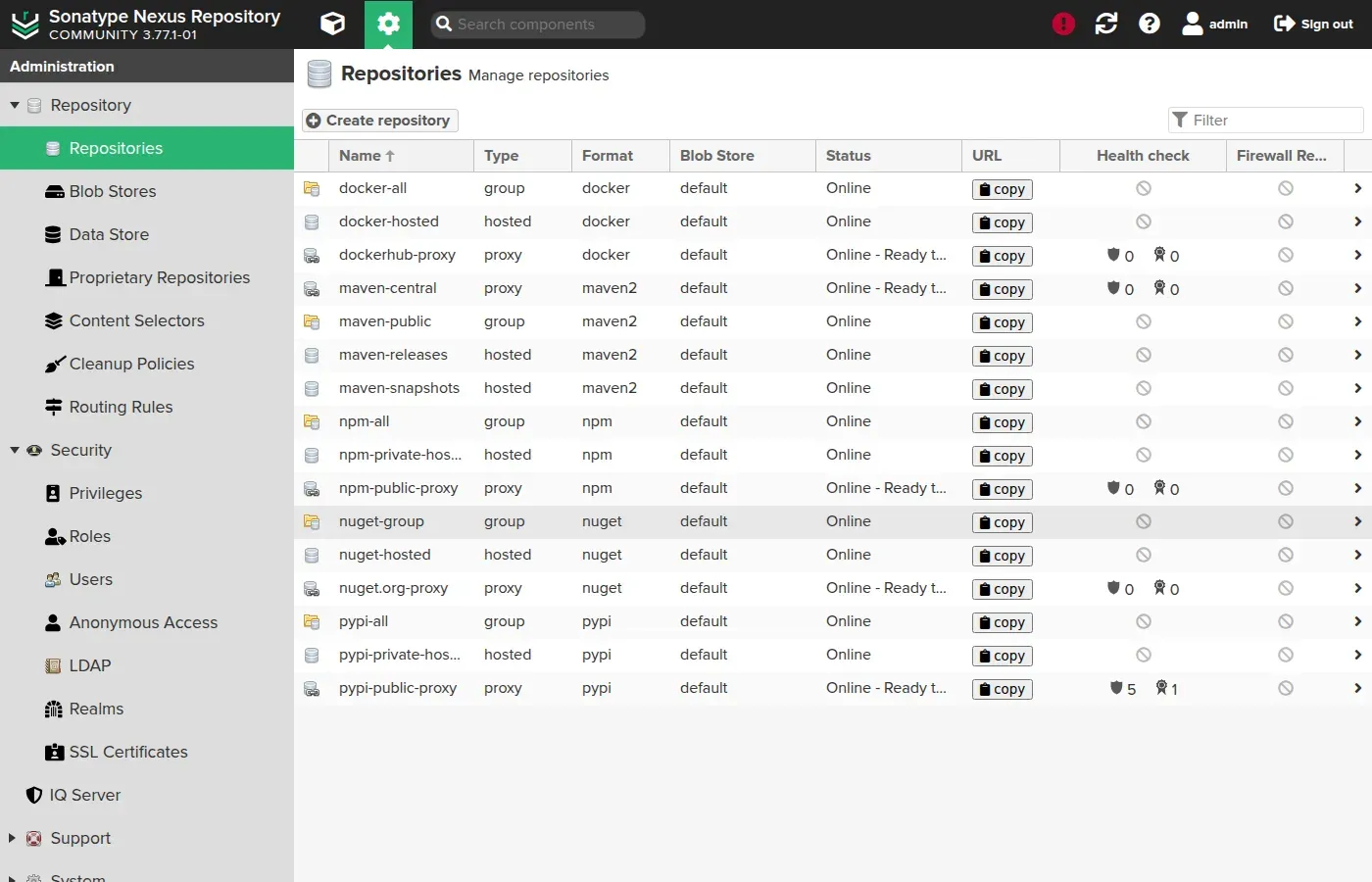
For each ecosystem, you can read a proxy (public cache), a hosted (private) and a group that brings them together. This is the model that the guides on proxy and cache and the Docker registry build on.
Where Nexus stores data: the blob store
Nexus separates two things. The metadata (which component, which version, which repository) lives in its database. The files themselves (the .jar, the .whl, the image layers) are written to a blob store, a storage space on disk or on object storage.
This separation has practical consequences: a complete backup must cover the database and the blob store, and disk space is managed at the blob store level. One blob store can serve several repositories, or you can dedicate one per use to isolate storage.
Community Edition and Pro: quotas and licence
The term "Nexus OSS" is still the most searched, but it no longer matches the offer. Since 2025, the free edition is called Community Edition: it is no longer pure free software, and its use is bound by a licence (EULA) accepted at installation and by quotas.
| Community Edition | Pro | |
|---|---|---|
| Price | Free | Paid |
| Licence | EULA to accept | Commercial |
| Component quota | 40,000 in total | unlimited |
| Request quota | 100,000 per day | unlimited |
| Enterprise | no | SSO/SAML, high availability, replication, support |
To host only container images without these constraints, a genuinely free OCI registry such as Harbor may be enough. For a multi-format manager that stayed 100% open source (GPL), see Pulp. The current version of Nexus is 3.97.1 (October 2026); the guides in this section are validated on 3.96.0-09, the version their front matter declares.
Plugging Nexus into CI/CD
An artifact manager shows its full value plugged into CI/CD: pipelines pull their dependencies from Nexus and push their deliverables into it. The principle is the same whatever the tool.
- Dependency resolution: you configure the build tool (Maven, npm, pip) to point at the Nexus group instead of the public repository. The cache speeds up and stabilises the build.
- Publishing deliverables: after a successful build, the pipeline pushes the artifact (JAR, image, wheel) to a hosted repository, with a dedicated service account.
- Authentication: in CI, you never use the admin account. You create a service user with only the rights needed (read on the proxies, write on the target hosted repository).
On the Jenkins side, an official plugin handles publishing; on the GitLab CI (in French) side, you set the Nexus URL and credentials in the .gitlab-ci.yml. The Docker registry guide shows a concrete docker login followed by a docker push to Nexus.
Security and operations
A central repository is a target and a point of failure: it deserves the same care as a production database.
- Centralised authentication: Nexus integrates with LDAP or an enterprise directory so you do not manage accounts by hand, and applies role-based access control (who reads, who publishes, on which repository).
- Controlled anonymous access: handy in a lab, it must be disabled in production so that no repository is readable without credentials.
- Cleanup policies: they automatically delete outdated artifacts (old snapshots, versions not downloaded for X days) to keep storage under control and stay under the quotas.
- Backup: it must cover the database and the blob store consistently; backing up one without the other gives an unusable restore.
- Updates: follow the releases for security fixes, testing the upgrade on a staging instance.
Nexus compared with the alternatives
Nexus is not alone. The right choice depends on formats, budget and the open source constraint.
| Solution | Positioning | When to choose it |
|---|---|---|
| Nexus | Multi-format, long-established | Many formats, established Java/DevOps ecosystem |
| Artifactory (JFrog) | Multi-format, enterprise | Large enterprise needs, dedicated budget |
| Harbor | OCI registry dedicated to containers | Images only, 100% open source |
| Pulp | Multi-format, 100% GPL | Sovereignty, no EULA and no quota |
Nexus remains an excellent default when you juggle several formats and the Community Edition is enough for your volume. As soon as 100% open source or the absence of quotas becomes a hard criterion, Pulp or Harbor take the lead depending on whether you want multi-format or containers only.
Best practices
- Expose a group repository to clients, not the individual repositories: a single URL to configure, and the internal organisation stays flexible.
- One service account per use in CI, with the minimum of rights, never the admin account.
- Cleanup policies from the start, so you do not discover the quotas the day they block you.
- Back up the database and the blob store together, and test the restore, not only the backup.
- Pin the image version in production and plan upgrades for security fixes.
Key takeaways
- Nexus Repository centralises the cache of public dependencies and the storage of your private artifacts, across many formats.
- Three repository types: proxy (public cache), hosted (private), group (aggregation behind one URL); expose the group.
- Files live in a blob store, metadata in the database: back up both.
- The free edition is the Community Edition: EULA, 40,000 components and 100,000 requests/day; beyond that, adding components is suspended.
- Current version: Nexus 3.97.1 (October 2026), guides validated on 3.96.0-09. Alternatives: Artifactory, or Harbor / Pulp for 100% open source.
Knowledge check
Six questions on what to know before opening the interface: the three repository types, the storage, and what the free edition's quotas cost you.
Knowledge check
Check what you have learned with this interactive quiz
How it works
- The timer starts when you click Start
- Multiple choice, true/false and short answer questions
- You can move between questions
- Detailed results are shown at the end
Starts the quiz and the timer
Review
(0/0)Score by domain
A domain groups several guides and gets several questions, so its score is more reliable than a per-topic score, which often rests on a single question.
Summary
Strengths
No topic passed at 80% on at least two questions yet.
Weak areas
No topic below the pass mark.
Recommended next
Hints before you try again?
Continue the course: Install Nexus Repository in a container
A new full quiz with random questions
Work again only on the questions you missed
FAQ: Nexus Repository
- proxy to public repositories (local cache, faster builds),
- hosting of your private artifacts,
- a single entry point for CI/CD.
- It is subject to quotas (number of components and requests).
- It requires accepting an EULA at startup.
- Beyond the limits, you must move to the Pro edition (paid).
| Type | Role |
|---|---|
| proxy | caches a public remote repository |
| hosted | stores your private artifacts |
| group | aggregates several repositories behind a single URL |
group to clients (a single URL to configure), which combines the proxy cache and your hosted packages.- Nexus (Sonatype): a free Community edition, now limited (quotas, EULA).
- Artifactory (JFrog): broad offering, strong DevOps integration (JFrog Platform, Xray), restricted free version.