
Storing your container images on a public registry is not always desirable: confidentiality, pull quotas, dependence on a third party. Nexus hosts a private Docker registry in the same place as your other artifacts. The particularity, often a source of errors, is that Docker requires a connector on a dedicated port, separate from the port of the Nexus interface. This guide creates a docker (hosted) repository, exposes its connector, and pushes an image. Intended audience: intermediate. Validated on Nexus 3.96.0-09.
What you will learn
- Create a docker (hosted) repository in Nexus.
- Understand why Docker requires a connector on a dedicated port.
- Connect the Docker daemon to the registry.
- Push and pull an image.
Prerequisites
- A running Nexus instance, see Install Nexus.
- Docker on your workstation, and the Nexus admin password.
The connector: the key to the Docker registry
One point often throws people off: unlike Maven or PyPI repositories, which go through Nexus port 8081, a Docker repository requires its own HTTP connector on a separate port (for example 8082). It is the Docker registry protocol that imposes it. This port must be unique per connector and published by the Nexus container.
Concretely, you add the port publication to the Nexus service:
services: nexus: image: sonatype/nexus3:3.96.0@sha256:56f8e1d241507338be1f91c9de9a9b97d72a7376f0404f6c1e914b542c983f75 ports: - "8081:8081" - "8082:8082" # Docker registry connectorCreate the docker (hosted) repository
In the interface, Administration, Repositories, Create repository, docker (hosted). Give it a name, enable the HTTP connector on port 8082, and leave Force basic authentication enabled. Through the API, the creation takes a single request:
curl -u admin:VOTRE_MDP -X POST \ http://localhost:8081/service/rest/v1/repositories/docker/hosted \ -H 'Content-Type: application/json' -d '{ "name": "docker-hosted", "online": true, "storage": {"blobStoreName": "default", "strictContentTypeValidation": true, "writePolicy": "ALLOW"}, "docker": {"v1Enabled": false, "forceBasicAuth": true, "httpPort": 8082} }'In the interface, the Repository Connectors section of the repository shows this setting: the HTTP connector is enabled on a dedicated port, separate from the service URL http://localhost:8081/repository/docker-hosted/.
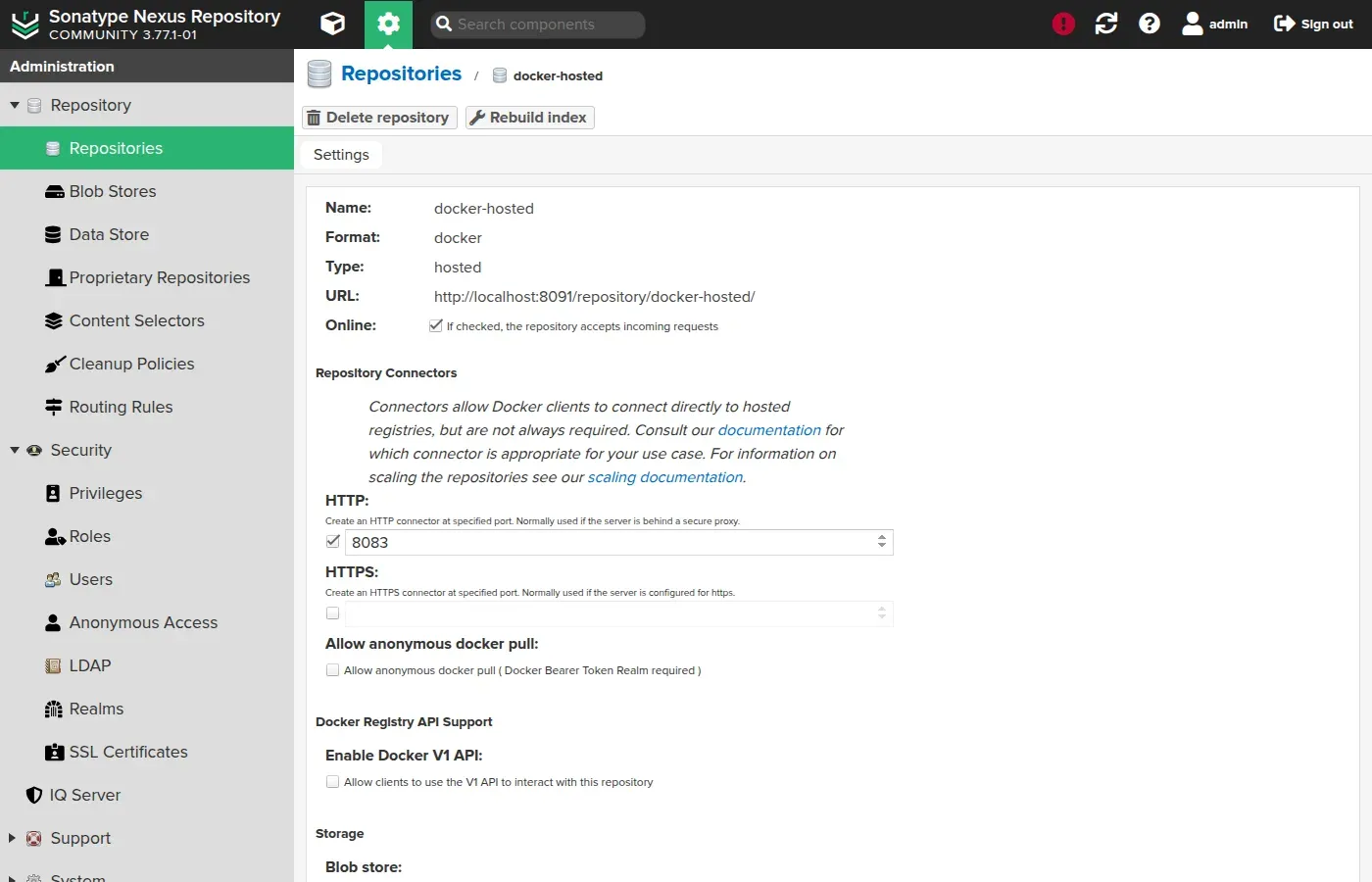
A 201 response confirms the creation. Check that the repository exists:
curl -s -u admin:VOTRE_MDP http://localhost:8081/service/rest/v1/repositories \ | jq -r '.[] | select(.format=="docker") | "\(.type)\t\(.name)"'hosted docker-hostedConnect the Docker daemon
The Nexus registry is served over HTTP, without TLS, on localhost:8082. Docker refuses remote HTTP registries by default, but makes an exception for localhost: locally, no extra configuration is needed.
docker login localhost:8082 -u adminPassword:Login SucceededPush and pull an image
You tag an image with the registry address, push it, and check that it is stored. The image address becomes localhost:8082/<name>:<tag>.
-
Tag an existing image towards the Nexus registry:
Terminal window docker pull alpine:3.20@sha256:d9e853e87e55526f6b2917df91a2115c36dd7c696a35be12163d44e6e2a4b6bcdocker tag alpine:3.20@sha256:d9e853e87e55526f6b2917df91a2115c36dd7c696a35be12163d44e6e2a4b6bc localhost:8082/alpine:3.20 -
Push the image:
Terminal window docker push localhost:8082/alpine:3.20The push refers to repository [localhost:8082/alpine]3.20: digest: sha256:c64c687cbea9300178b30c95835354e34c4e4febc4badfe27102879de0483b5e size: 1023 -
Verify on the Nexus side that the image is referenced, through the Docker catalog API:
Terminal window curl -s -u admin:VOTRE_MDP http://localhost:8082/v2/_catalog{"repositories":["alpine"]}
In the Nexus interface, the Browse view of the repository confirms visually that the image is stored: under v2, the alpine component appears next to the blobs.
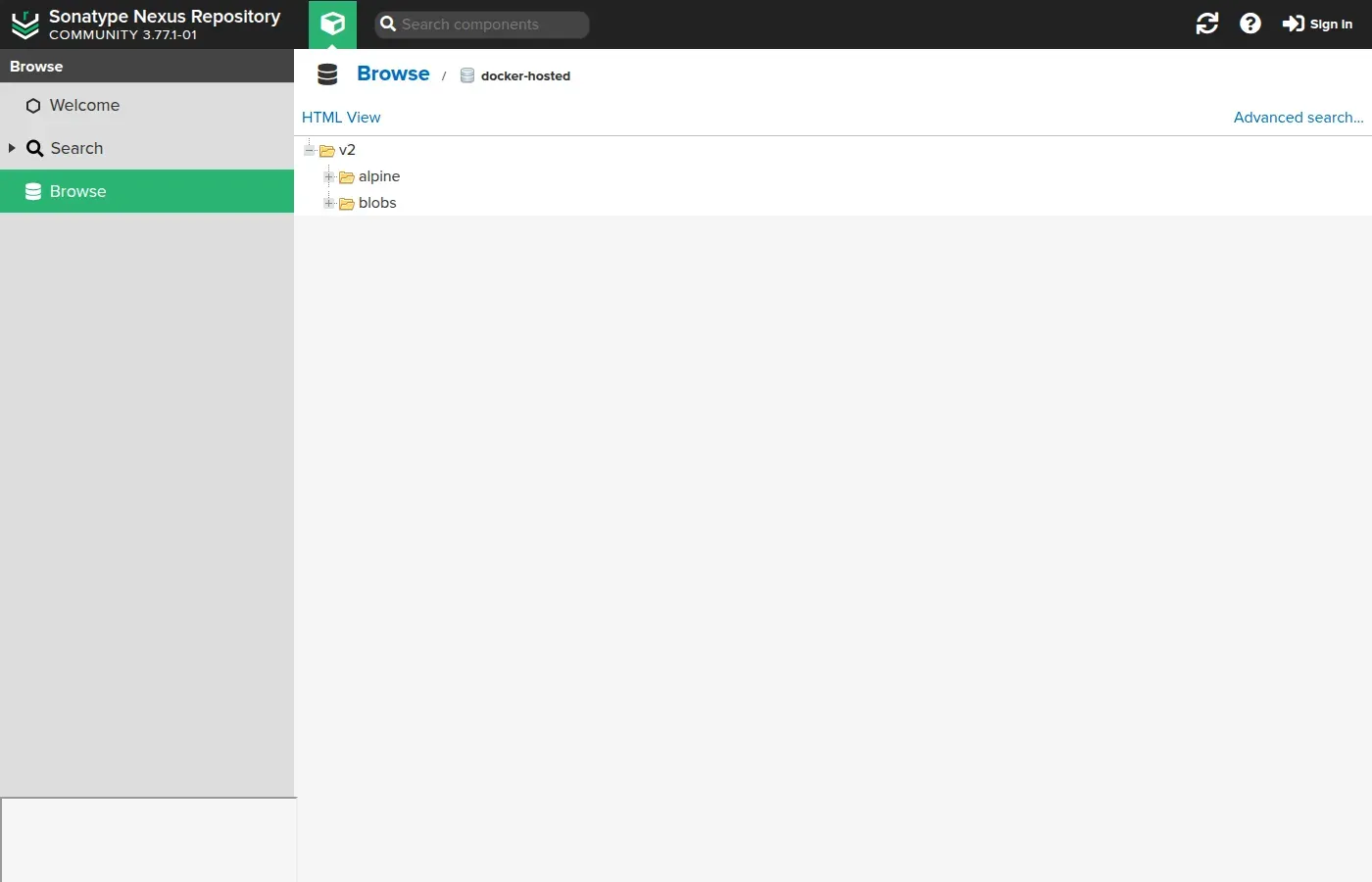
Any authorised machine can now pull the image from your private registry: docker pull localhost:8082/alpine:3.20.
Hands-on practice
The lab has you create the Docker repository, open its connector and enable the tokens realm, then push an image from another machine. Its validation does not stop at the push: it removes the image from the local cache before pulling it from the registry, because pushing proves nothing and pulling proves it. It also checks that a port not published by the container is recognised by a response with no code at all, whereas Nexus itself signals nothing.
Troubleshooting
| Symptom | Likely cause | Solution |
|---|---|---|
Port must be unique at creation | Port already taken by another Docker repository | Choose another port or go through a group |
docker login fails over HTTP | Non-localhost registry without TLS | Expose it through an HTTPS reverse proxy |
docker push returns 401 | Insufficient rights | Use an account with the write privilege on the repository |
| Port 8082 does not answer | Connector not published | Add - "8082:8082" to the container and recreate it |
login fails with correct credentials | forceBasicAuth: false without the DockerToken realm | Enable the realm, or set forceBasicAuth back to true |
Key takeaways
- A docker (hosted) repository turns Nexus into a private Docker registry.
- Docker requires a connector on a dedicated port (e.g. 8082), separate from the interface port 8081.
- Each connector occupies a unique port; a group repository shares a single one for several repositories.
- Docker tolerates HTTP for
localhost; elsewhere, HTTPS is required. - You push with the address
localhost:8082/<image>:<tag>after adocker login. forceBasicAuth: trueavoids theDockerTokenrealm, which the installation does not leave active and which no error message names.
Knowledge check
Eight questions on the Docker registry: the dedicated port it demands, the realm the installation leaves inactive, and when HTTP is tolerated.
Knowledge check
Check what you have learned with this interactive quiz
How it works
- The timer starts when you click Start
- Multiple choice, true/false and short answer questions
- You can move between questions
- Detailed results are shown at the end
Starts the quiz and the timer
Review
(0/0)Score by domain
A domain groups several guides and gets several questions, so its score is more reliable than a per-topic score, which often rests on a single question.
Summary
Strengths
No topic passed at 80% on at least two questions yet.
Weak areas
No topic below the pass mark.
Recommended next
Hints before you try again?
Continue the course: Introduction to JFrog Artifactory
A new full quiz with random questions
Work again only on the questions you missed