You change the version of an image in your stack, the database restarts, and soon afterwards something is wrong. This lesson is for someone who can already write and start a Compose stack with a database: you learn to update with the way back already prepared, to prove which version is running, and to recognize the update you cannot undo by simply changing the image.
The rule fits in one sentence: an update is decided together with its rollback. For a minor update, the rollback is a line to put back. For a PostgreSQL major migration, the old image refuses to read the data written by the new one. Two ways back are then guaranteed: start the old image again on the old volume, which stayed intact, or restore a backup taken before the migration. In both cases, the writes made since then do not come back. A logical export taken under 18 and then reloaded into 17 may work, but nothing guarantees it.
What you will learn
- Pin an image by its digest in a variable, so that the update and the rollback change a single line.
- Prove the running version with
docker inspect,docker compose imagesandshow server_version. - Use
docker compose up -d --waitas a gate, and know whatup -dalone lets through. - Check with a contract (number of rows and checksum) that the data is intact after a rollback.
- Recognize a major migration, perform it by backup and restore, and explain why it is not undone by changing the image.
Prerequisites
You need a Linux host with Docker Engine 29.9.2 and its Compose 5.6.1 plugin, installed as the lesson on installing Docker shows. The demonstration uses PostgreSQL, but no knowledge of SQL is needed beyond what is written here.
Three lessons of this course are assumed to be read. Interpolation and environment files explains the ${...} variables and the .env file that the lesson handles. Persist the data of a recreated stack explains why a volume survives the recreation of a container. Startup, readiness and health explains the healthcheck that --wait relies on.
A digest is the sha256:... fingerprint of an image: unlike a tag, which can be moved to another image, it always designates the same one. If this notion is new, Understanding OCI: tag, digest, manifest, multi-arch and artifacts details it. The previous lesson, Back up and restore an application, teaches pg_dump (which backs up a database) and pg_restore (which reloads it): they are used here without being explained again. To go further on these two tools, the guide Sauvegarder et restaurer PostgreSQL (in French) details them.
Which stack serves as the demonstration?
A single PostgreSQL database, in a ~/registre folder, which keeps the register of the pages visited on a site. The name: registre field sets the project name, so the container is called registre-base-1. Create the folder, then the compose.yaml file.
The names are French (registre is a register, visites visits, donnees data), because the commands and outputs shown are the ones that were run. They are identifiers and program output, so they stay as they are.
mkdir -p ~/registrecd ~/registrename: registreservices: base: image: ${BASE_IMAGE:?renseignez BASE_IMAGE dans .env} command: ${BASE_CMD:-postgres} environment: POSTGRES_PASSWORD: lab POSTGRES_DB: registre volumes: - donnees:/var/lib/postgresql healthcheck: test: ["CMD-SHELL", "pg_isready -U postgres -d registre"] interval: 2s timeout: 3s retries: 5volumes: donnees:The image comes from the BASE_IMAGE variable: the ${BASE_IMAGE:?...} form makes Compose fail with the given message when the variable is missing or empty, which avoids starting without a chosen image. Without a .env, docker compose config answers error while interpolating services.base.image: required variable BASE_IMAGE is missing a value: renseignez BASE_IMAGE dans .env and starts nothing.
The startup command comes from BASE_CMD, which defaults to postgres; it will be used further down to inject a failure without touching the file. The healthcheck queries the database every 2 seconds with pg_isready, and declares it unhealthy after 5 failures. The volume is mounted on /var/lib/postgresql, the location that the PostgreSQL 18 image expects.
The .env file contains a single line, the starting image with its tag and its digest.
echo 'BASE_IMAGE=postgres:18.4-alpine@sha256:9a8afca54e7861fd90fab5fdf4c42477a6b1cb7d293595148e674e0a3181de15' > .envdocker compose up -d --waitCompose downloads the image the first time, then creates the network, the volume and the container. The command returns once the container is declared healthy. Now create the demonstration table and its five rows.
docker compose exec -T base psql -U postgres -d registre -q -c "create table visites(id int primary key, page text, vu_le date); insert into visites values (1,'/accueil','2026-01-01'),(2,'/docs','2026-01-02'),(3,'/blog','2026-01-03'),(4,'/docs','2026-01-04'),(5,'/contact','2026-01-05')"The -q option asks psql to stay quiet: without it, it would display CREATE TABLE and INSERT 0 5 on screen. The -T option of docker compose exec avoids allocating a pseudo-terminal: it is the form to use in a script, or when the command receives a file on its input.
How do you prove that the data is intact?
With a data contract: a query that returns the number of rows and a checksum of their contents. If the contract returns the same answer before and after an operation, the data has not moved. The number of rows alone is not enough, because a modified row leaves the count unchanged; the md5 checksum computed over all the rows, in order, detects this case.
docker compose exec -T base psql -U postgres -d registre -Atc "select count(*), md5(string_agg(id||':'||page||':'||vu_le::text, ',' order by id)) from visites"5|1bb343a30ac39e6428bc86e43dc419d3Note this answer: five rows, and the checksum 1bb343a3.... It serves as the reference for the whole lesson, and it only changes if a row changes. The -A option removes the alignment of psql and -t the header, so that the output fits on one line.
How do you pin the image so that the rollback fits on one line?
By putting it in a variable of the .env file, with its digest. A tag such as postgres:18 is a label that can be moved: the next day, it may designate another image, and you could no longer say what is running or where to go back to. A digest designates a single image, and the tag that precedes it (18.4-alpine) is there to help you remember it.
With this organization, compose.yaml never changes. Updating means replacing the value of BASE_IMAGE, rolling back means putting the old value back. To check what Compose will use before launching anything, config --images displays the resolved image.
docker compose config --imagespostgres:18.4-alpine@sha256:9a8afca54e7861fd90fab5fdf4c42477a6b1cb7d293595148e674e0a3181de15The image appears in full, tag and digest. The digests in this lesson correspond to PostgreSQL 18.4, 18.6 and 17.10. The 17-alpine tag, for example, moves forward with each minor version: after the next release, it designates a different image from the one you tested, and that is exactly what the digest prevents.
How do you update and prove the running version?
By changing the line of .env, then rerunning docker compose up -d --wait. Let us go from 18.4 to 18.6: replace the contents of .env.
echo 'BASE_IMAGE=postgres:18.6-alpine3.24@sha256:10a5c69a83035ab5239f5620d708520e8b28f5aa1f2b20143e6024532edadfb5' > .envdocker compose up -d --wait Container registre-base-1 Recreate Container registre-base-1 Recreated Container registre-base-1 Starting Container registre-base-1 Started Container registre-base-1 Waiting Container registre-base-1 HealthyThe output omits the download lines of the new image. Look at the words Recreate then Healthy: Compose detected that the configuration of the service had changed, recreated the container with the new image, then --wait waited for the healthcheck to succeed. The volume was not touched.
The command returned code 0 in 13.5 seconds, including the download of about 115 MB. Rerun without any change, docker compose up -d answers Container registre-base-1 Running in under a second and recreates nothing.
How do you know which version is really running?
By reading it in three places, which answer three different questions. The table sorts them, then the commands show them.
| Command | What it proves |
|---|---|
docker inspect --format '{{.Config.Image}}' | The reference with which the container was created, the one written in .env |
docker compose images | The identifier of the image used by the container |
show server_version | The version that the PostgreSQL server announces, the only one that comes from the software itself |
docker inspect registre-base-1 --format '{{.Config.Image}}'docker compose imagesdocker compose exec -T base psql -U postgres -Atc 'show server_version'postgres:18.6-alpine3.24@sha256:10a5c69a83035ab5239f5620d708520e8b28f5aa1f2b20143e6024532edadfb5CONTAINER REPOSITORY TAG PLATFORM IMAGE ID SIZE CREATEDregistre-base-1 postgres <none> linux/amd64 10a5c69a8303 433MB 12 days ago18.6Look first at Config.Image: it is the line of .env, tag and digest, the most readable proof of what Compose asked for. Then look at the TAG column of docker compose images, which is <none>: an image referenced by digest has no tag, and IMAGE ID repeats its first twelve characters (10a5c69a8303). This correspondence was observed with the containerd image store, that is, the place where Docker keeps images and which fresh Docker 29 installations use. Finally, 18.6 comes from the server itself.
The three readings agree: what was requested, what was launched and what answers are the same version.
How do you go back to the previous version without touching the data?
By putting the old digest back in .env, then rerunning the same command. A minor PostgreSQL update (18.4 to 18.6) keeps the same file format on disk: the old image reads without difficulty what the new one left.
echo 'BASE_IMAGE=postgres:18.4-alpine@sha256:9a8afca54e7861fd90fab5fdf4c42477a6b1cb7d293595148e674e0a3181de15' > .envdocker compose up -d --waitdocker compose exec -T base psql -U postgres -d registre -Atc "select count(*), md5(string_agg(id||':'||page||':'||vu_le::text, ',' order by id)) from visites"docker compose exec -T base psql -U postgres -Atc 'show server_version'5|1bb343a30ac39e6428bc86e43dc419d318.4This time the image is already on the machine: the command takes about 3 seconds. Look at the first line: the contract is identical, five rows and the same checksum. Look at the second: the server announces 18.4 again. The rollback brought the old version back without losing any data, because the volume stayed in place throughout the round trip.
This result holds for an update that does not change the data format. Further down, the lesson shows what happens when it does change; let us first see what happens when the new version starts badly.
What happens when the new version is faulty?
With --wait, the command fails and returns code 1. Without --wait, it returns 0 and the failure is discovered afterwards. The difference decides the usefulness of --wait as a gate: the moment when you know that the update did not succeed, and when you trigger the rollback.
To test it without really breaking your image, the BASE_CMD variable changes the startup command for this single run. First put 18.6 back in .env, then ask PostgreSQL to start with an invalid parameter value.
echo 'BASE_IMAGE=postgres:18.6-alpine3.24@sha256:10a5c69a83035ab5239f5620d708520e8b28f5aa1f2b20143e6024532edadfb5' > .envBASE_CMD='postgres -c shared_buffers=bogus' docker compose up -d --waitecho "code $?" Container registre-base-1 Recreate Container registre-base-1 Recreated Container registre-base-1 Starting Container registre-base-1 Started Container registre-base-1 Waitingcontainer registre-base-1 exited (1)code 1The container stopped with code 1 in a little over a second, and --wait reported it: the command returns 1. To understand why, read the logs of the service.
docker compose logs basebase-1 |base-1 | PostgreSQL Database directory appears to contain a database; Skipping initializationbase-1 |base-1 | 2026-11-03 05:55:26.510 GMT [1] FATAL: invalid value for parameter "shared_buffers": "bogus"The last line names the cause: shared_buffers received an invalid value. Note also that the old container was replaced (Recreate): there is no running database any more. The data, for its part, has not moved, because the server never started to write to it.
What if the container starts but does not respond?
The case is different: the process runs, but the database accepts no connection. Simulate it with a command that does nothing.
BASE_CMD='sleep 3600' docker compose up -d --waitecho "code $?" Container registre-base-1 Recreate Container registre-base-1 Recreated Container registre-base-1 Starting Container registre-base-1 Started Container registre-base-1 Waitingcontainer registre-base-1 is unhealthycode 1The command waited about ten seconds, that is, the 5 probe failures spaced 2 seconds apart plus a margin, then returned 1. docker compose ps then shows unhealthy: the container is alive, but its probe fails. It is the healthcheck that allowed --wait to see the failure. A service without a health probe would have been declared ready as soon as it started.
What does up -d do without --wait?
It returns code 0 without waiting for the result, even when the process crashes or its probe fails. Replay the startup failure, without the option, and wait a few seconds before looking at the state of the container.
BASE_CMD='postgres -c shared_buffers=bogus' docker compose up -decho "code $?"sleep 3docker compose ps -a Container registre-base-1 Recreate Container registre-base-1 Recreated Container registre-base-1 Starting Container registre-base-1 Startedcode 0NAME IMAGE COMMAND SERVICE CREATED STATUS PORTSregistre-base-1 postgres:18.6-alpine3.24@sha256:10a5c69a83035ab5239f5620d708520e8b28f5aa1f2b20143e6024532edadfb5 "docker-entrypoint.s…" base 13 seconds ago Exited (1) 3 seconds agoThe command takes about ten seconds to return: that is the time needed to stop the container of the previous attempt, whose sleep process ignores the usual stop signal (SIGTERM), so Docker waits for its timeout before killing it. Then look at the code: 0, while a few seconds later the container is Exited (1). With the probe failure, the command also returns 0, and docker compose ps only shows unhealthy about ten seconds after the launch. A deployment script that runs up -d without --wait announces a success that nothing has verified.
Does Compose go back to the old image by itself?
No. The faulty container stays stopped (Exited) as long as you do nothing, since the service has no restart policy: Compose does not keep the previous version and has no rollback command. The rollback is a gesture: put the old digest back in .env and rerun.
echo 'BASE_IMAGE=postgres:18.4-alpine@sha256:9a8afca54e7861fd90fab5fdf4c42477a6b1cb7d293595148e674e0a3181de15' > .envdocker compose up -d --waitdocker compose exec -T base psql -U postgres -d registre -Atc "select count(*), md5(string_agg(id||':'||page||':'||vu_le::text, ',' order by id)) from visites"5|1bb343a30ac39e6428bc86e43dc419d3For this rollback, the up -d --wait command returned code 0 in 3 seconds, proof that the old image is healthy, and the contract is unchanged. Keep this gesture as your first reaction: put the known-good digest back, rerun with --wait, then check the contract.
Why is a major migration not undone?
Because the files that the new version writes cannot be read by the old one. A minor update keeps the data format, a major migration may change it. The major version is the first number of the version: 17 and 18 are two major versions, 18.4 and 18.6 are two minor versions of 18. PostgreSQL stores its files in a format specific to each major version: the 18 image does not read a data folder created by 17, and 17 does not read that of 18.
The diagram sums up the choice that the following sections detail. Look at where the path splits: as long as the format does not change, the rollback is the old digest; when it changes, the rollback is the old volume left intact, or the backup.
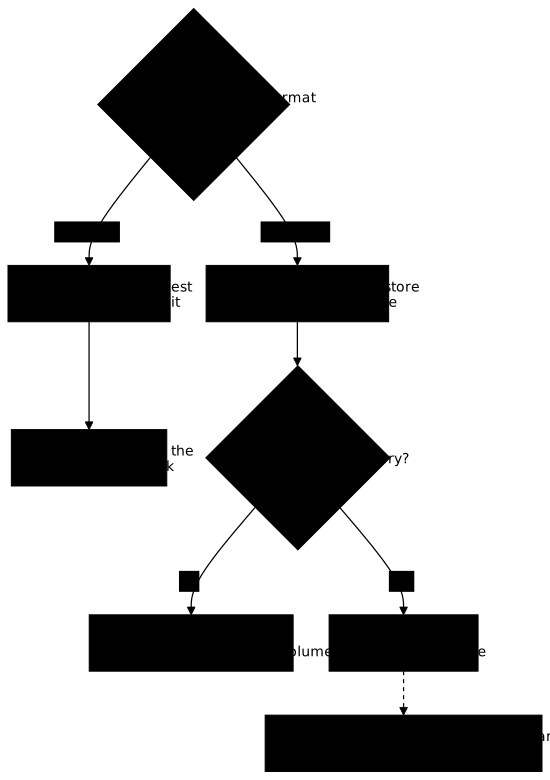
To show it, the demonstration goes from PostgreSQL 17 to 18. Stop and delete the previous stack, volume included, then write two files: compose-17.yaml and compose-18.yaml. Both use name: registre and the same base service, but not the same volume.
docker compose down -vname: registreservices: base: image: postgres:17.10-alpine@sha256:742f40ea20b9ff2ff31db5458d127452988a2164df9e17441e191f3b72252193 environment: POSTGRES_PASSWORD: lab POSTGRES_DB: registre volumes: - data17:/var/lib/postgresql/data healthcheck: test: ["CMD-SHELL", "pg_isready -U postgres -d registre"] interval: 2s timeout: 3s retries: 5volumes: data17:The 17 image stores its data in /var/lib/postgresql/data, and the volume is mounted there. The compose-18.yaml file is identical, with three differences.
name: registreservices: base: image: postgres:18.6-alpine3.24@sha256:10a5c69a83035ab5239f5620d708520e8b28f5aa1f2b20143e6024532edadfb5 environment: POSTGRES_PASSWORD: lab POSTGRES_DB: registre volumes: - data18:/var/lib/postgresql healthcheck: test: ["CMD-SHELL", "pg_isready -U postgres -d registre"] interval: 2s timeout: 3s retries: 5volumes: data18:Look at the three differences: the image, the name of the volume (data18) and its mount point, /var/lib/postgresql without /data. The 18 image itself creates a subfolder per major version inside (/var/lib/postgresql/18/docker), which makes it possible to use pg_upgrade --link with a single mount point. pg_upgrade is the PostgreSQL tool that converts a data folder from one major version to the next, and its --link option avoids copying the files, provided that the old and the new folder are on the same mount. This lesson does not use pg_upgrade: it goes through the backup.
Start 17, recreate the table with its five rows, check the contract, then take the backup before any migration. The psql commands are those from earlier, with -f compose-17.yaml added after docker compose. The -Fc format of pg_dump is the one that pg_restore reads back.
docker compose -f compose-17.yaml up -d --waitdocker compose -f compose-17.yaml exec -T base psql -U postgres -d registre -q -c "create table visites(id int primary key, page text, vu_le date); insert into visites values (1,'/accueil','2026-01-01'),(2,'/docs','2026-01-02'),(3,'/blog','2026-01-03'),(4,'/docs','2026-01-04'),(5,'/contact','2026-01-05')"docker compose -f compose-17.yaml exec -T base psql -U postgres -d registre -Atc "select count(*), md5(string_agg(id||':'||page||':'||vu_le::text, ',' order by id)) from visites"docker compose -f compose-17.yaml exec -T base pg_dump -U postgres -Fc registre > avant-migration.dumpls -l avant-migration.dumpdocker compose -f compose-17.yaml down5|1bb343a30ac39e6428bc86e43dc419d3-rw-rw-r-- 1 ansible ansible 1682 Nov 3 05:58 avant-migration.dumpThe backup weighs 1,682 bytes for this small database. The down without -v stops the container but keeps the volume registre_data17: it is the one that will serve as the way back.
What does the 18 image answer to a volume created by 17?
It refuses to start. Copy compose-18.yaml to compose-refus.yaml, and replace data18 with data17 in both places: the 18 image is thus plugged into the volume of 17. The --wait-timeout 25 option limits the wait to 25 seconds.
docker compose -f compose-refus.yaml up -d --wait --wait-timeout 25echo "code $?"docker compose -f compose-refus.yaml logs basedocker compose -f compose-refus.yaml downcontainer registre-base-1 exited (1)code 1base-1 | This is usually the result of upgrading the Docker image withoutbase-1 | upgrading the underlying database using "pg_upgrade" (which requires bothbase-1 | versions).base-1 |base-1 | The suggested container configuration for 18+ is to place a single mountbase-1 | at /var/lib/postgresql which will then place PostgreSQL data in abase-1 | subdirectory, allowing usage of "pg_upgrade --link" without mount pointbase-1 | boundary issues.base-1 |base-1 | See https://github.com/docker-library/postgres/issues/37 for a (long)base-1 | discussion around this process, and suggestions for how to do so.The final down, without -v, removes the stopped container to start again from a clean container and keeps the volume. The container exits in about a second with code 1. The log begins with a line that says Error: in 18+, these Docker images are configured to store database data in a format which is compatible with "pg_ctlcluster" (specifically, using major-version-specific directory names); the excerpt above shows the end of it.
Read the meaning: the image recognizes data in the old format and refuses to take it for its own. It does not create an empty database in its place, which would have hidden the problem. The same message appears if the volume of 17 is mounted on /var/lib/postgresql/data.
A side effect to know about: the refusal had time to create an empty 18/docker folder in the volume of 17. The data, for its part, is intact, and starting the 17 image on its volume again proves it.
docker compose -f compose-17.yaml up -d --waitdocker compose -f compose-17.yaml exec -T base psql -U postgres -d registre -Atc "select count(*), md5(string_agg(id||':'||page||':'||vu_le::text, ',' order by id)) from visites"docker compose -f compose-17.yaml down5|1bb343a30ac39e6428bc86e43dc419d3The contract is identical: the old volume stayed valid after the failure. Remember this property, it is what makes the rollback simplest: as long as you do not touch the old volume, you can always start the old image on it again.
If you mount the volume of 17 on /var/lib/postgresql/data and additionally force PGDATA=/var/lib/postgresql/data under environment to get around the refusal, the message changes: FATAL: database files are incompatible with server, with The data directory was initialized by PostgreSQL version 17, which is not compatible with this version 18.6. Forcing PGDATA skips the check of the image (the log shows Skipping initialization), but it is then the server itself that refuses: forcing PGDATA gets around nothing.
How do you migrate to 18 without losing data?
By backup and restore, into a new volume. Version 18 starts on the empty data18 volume, initializes its own folder, then pg_restore reloads into it the backup taken under 17. The pg_upgrade presented above migrates faster, but it requires the programs of both versions in the same container: the backup remains the simplest path here, and the one that leaves the old volume intact.
docker compose -f compose-18.yaml up -d --waitdocker compose -f compose-18.yaml exec -T base psql -U postgres -Atc 'show server_version'docker compose -f compose-18.yaml exec -T base psql -U postgres -Atc 'show data_directory'docker compose -f compose-18.yaml exec -T base pg_restore -U postgres -d registre < avant-migration.dumpecho "code $?"18.6/var/lib/postgresql/18/dockercode 0Look at the data folder: /var/lib/postgresql/18/docker, the per-version subfolder that the image mentioned. The registre database already existed, empty, because POSTGRES_DB created it on the first start; pg_restore loads the table and its rows into it. Rerun the data contract query with -f compose-18.yaml: it returns 5|1bb343a30ac39e6428bc86e43dc419d3, identical to 17. The data changed version without changing content.
Now imagine that the application writes a sixth row under 18. Insert it, then stop the stack with down without -v, which keeps the volume.
docker compose -f compose-18.yaml exec -T base psql -U postgres -d registre -Atc "insert into visites values (6,'/nouveau','2026-02-01')"docker compose -f compose-18.yaml exec -T base psql -U postgres -d registre -Atc "select count(*), md5(string_agg(id||':'||page||':'||vu_le::text, ',' order by id)) from visites"docker compose -f compose-18.yaml downThe insertion answers INSERT 0 1, then the contract becomes 6|30d06c3e20372f18e6801d7298dfd346. This row exists only in the data18 volume.
Can you hand the migrated volume back to the 17 image?
No, and the error messages do not say so clearly. To see it, copy compose-17.yaml to compose-retour.yaml and replace data17 with data18 in both places: the 17 image is plugged into the data18 volume, mounted the way 17 is used to (data18:/var/lib/postgresql/data). Then run docker compose -f compose-retour.yaml up -d --wait --wait-timeout 25 and read the logs with docker compose -f compose-retour.yaml logs base.
base-1 | initdb: error: directory "/var/lib/postgresql/data" exists but is not emptybase-1 | initdb: hint: If you want to create a new database system, either remove or empty the directory "/var/lib/postgresql/data" or run initdb with an argument other than "/var/lib/postgresql/data".The exit code is 1. Look at what the message says: a non-empty folder, not a version. The 17 image sees a folder that contains 18/, refuses to recognize it as a database, wants to create one and stops because the folder is not empty. The message does not mention the version, and that is what misleads: it looks like a mount error when the root cause is an incompatibility.
Do not follow the advice of initdb (emptying the folder): it would destroy the migrated data. After the test, run docker compose -f compose-retour.yaml down, without -v, to start again from a clean container while keeping the volume.
If you add PGDATA: /var/lib/postgresql/data/18/docker under environment in compose-retour.yaml to point 17 at the right place, the error changes again.
base-1 | 2026-11-03 05:58:30.054 GMT [1] LOG: unrecognized configuration parameter "autovacuum_worker_slots" in file "/var/lib/postgresql/data/18/docker/postgresql.conf" line 687base-1 | 2026-11-03 05:58:30.054 GMT [1] FATAL: configuration file "/var/lib/postgresql/data/18/docker/postgresql.conf" contains errorsThis time the 17 image finds the database, reads its postgresql.conf and stops on a parameter it does not know, autovacuum_worker_slots, which appeared in 18. The incompatible-version message is not reached: reading the configuration file fails before. In both cases, the 18 volume stays intact. Here too, end the test with docker compose -f compose-retour.yaml down, without -v.
How do you go back to 17 after a migration?
The 18 volume cannot be used. If you have written nothing since the migration, the simplest is to start the 17 image again on the old data17 volume, which stayed intact. If writes took place under 18, restore the earlier backup into a new 17 volume. To do so, copy compose-17.yaml to compose-17b.yaml, replacing data17 with data17b in both places.
docker compose -f compose-17b.yaml up -d --waitdocker compose -f compose-17b.yaml exec -T base pg_restore -U postgres -d registre < avant-migration.dumpecho "restore $?"docker compose -f compose-17b.yaml exec -T base psql -U postgres -Atc 'show server_version'restore 017.10The contract returns 5|1bb343a30ac39e6428bc86e43dc419d3: the database is the one from before the migration. The sixth row, written under 18, is lost: the backup did not contain it. That is the cost of rolling back through a backup, and it grows with the time elapsed since the migration.
Two practical consequences. Before a major migration, take the backup and check that it restores, as the previous lesson teaches. During the migration, keep the old volume intact and the new stack on a separate volume: decide on the rollback before the application writes under the new version, and it is enough to start the old image again on the old volume.
What should you do when the update or the rollback fails?
The table starts from what you observe on screen or in the logs. Look in the first column for the message or behavior that resembles yours, read the probable cause next to it, then apply the gesture of the last column. In almost every case, the first reflex is the same: put the known-good digest back, without touching the volume.
| What you observe | Probable cause | What you do |
|---|---|---|
up -d returns 0 and the service is Exited or unhealthy afterwards | There was no --wait | Add --wait, read docker compose logs, put the old digest back |
--wait returns 1 with exited (1) | The process crashed at startup | docker compose logs <service> gives the cause; put the old digest back |
--wait returns 1 with is unhealthy | The process runs but the probe fails | Check the probe and the service; put the old digest back |
Error: in 18+, these Docker images... | A PostgreSQL 18 image is plugged into data from an earlier version | Do not touch the volume; migrate by backup and restore into a new volume |
directory ... exists but is not empty with the 17 image | It is plugged into a volume written by 18 | Rollback by image is impossible; restore the earlier backup into a new 17 volume |
unrecognized configuration parameter with the 17 image | Same cause: the postgresql.conf of the volume comes from 18 | Same answer |
required variable BASE_IMAGE is missing a value | The .env is missing or empty, or you are not in the project folder | Move into ~/registre and check that .env contains the line BASE_IMAGE=... |
docker compose config --images shows the old digest | The .env was not modified, or a shell variable overrides it | Reread .env and check that BASE_IMAGE is not already exported in the shell |
docker compose up -d only displays Running | Nothing changed in the configuration | Check the value of BASE_IMAGE with config --images |
How do you clean everything up after the demonstration?
The demonstration leaves a container, a network, three volumes, three images and the ~/registre folder. First stop the containers still in place, then delete the named volumes.
cd ~/registredocker compose -f compose-18.yaml downdocker compose -f compose-17b.yaml downdocker volume rm registre_data17 registre_data17b registre_data18docker volume lsThe docker volume ls command must no longer list any volume of the project. If you tried the 18 image with PGDATA forced, or with the 17 volume mounted on /var/lib/postgresql/data, Docker also created an anonymous volume (a name of 64 hexadecimal characters) that down does not remove: spot it in the list and delete it with docker volume rm <name>. Then delete the images and the folder.
docker rmi postgres:18.4-alpine@sha256:9a8afca54e7861fd90fab5fdf4c42477a6b1cb7d293595148e674e0a3181de15docker rmi postgres:18.6-alpine3.24@sha256:10a5c69a83035ab5239f5620d708520e8b28f5aa1f2b20143e6024532edadfb5docker rmi postgres:17.10-alpine@sha256:742f40ea20b9ff2ff31db5458d127452988a2164df9e17441e191f3b72252193cd ~ && rm -r registreAfter that, docker ps -a no longer shows any registre-... container, and the backup file avant-migration.dump is deleted with the folder.
Practice
The lab gives you a Compose stack that is already running, pinned by digest, with its data volume and a record written before you arrived. Three releases of the same service are available, one of which migrates the schema of the state. You deploy the second by its digest, write a record, go back to the first without losing anything, then deploy the third and establish that the rollback is no longer possible by reading the refusal of the previous release, which you record in a findings file.
The validation reads the final state of the machine rather than your commands: the third release is running and pinned by digest, the state is migrated, both records survived, and the findings name the release that refuses, the schema it cannot read and the exit code of its process.
Key points
- An update is decided together with its rollback: before changing an image, know what you will put back and whether the data allows it.
- Put the image, tag and digest, in a variable of
.env:compose.yamlno longer moves, and the update as well as the rollback change a single line. - The running version is proven by three agreeing readings:
Config.Imagefromdocker inspect, the identifier fromdocker compose images(theTAGis<none>for a digest, and the identifier repeats the start of the digest with the containerd image store) andshow server_version. docker compose up -d --waitis the gate: it returns 1 on a crash as on a failing probe, whereasup -dalone returns 0.- Compose never goes back by itself: the rollback is a gesture, put the old digest back and rerun with
--wait. - A data contract (number of rows and
md5checksum) measured before and after proves that the data is intact. - A PostgreSQL major migration is not undone by changing the image: the 18 image refuses a 17 volume, and the 17 image does not read an 18 volume, with messages that do not always mention the version.
- Migrate by backup and restore into a new volume, and keep the old volume intact: the rollback is then to start the old image again on it. After writes under the new version, the only guaranteed rollback is the earlier backup, and the later writes are lost.
Knowledge check
Check that the essentials of this lesson have stuck. The questions cover only what has just been explained here.
Knowledge check
Check what you have learned with this interactive quiz
How it works
- The timer starts when you click Start
- Multiple choice, true/false and short answer questions
- You can move between questions
- Detailed results are shown at the end
Starts the quiz and the timer
Review
(0/0)Score by domain
A domain groups several guides and gets several questions, so its score is more reliable than a per-topic score, which often rests on a single question.
Summary
Strengths
No topic passed at 80% on at least two questions yet.
Weak areas
No topic below the pass mark.
Recommended next
Hints before you try again?
Continue the course: Exam: operate and restore a stack
A new full quiz with random questions
Work again only on the questions you missed