A container that does not write to its volume always produces the same ticket: "permissions problem". The wording is convenient, and it costs a morning, because it files under a single word three failures that have nothing to do with each other. One comes from the mount, which forbids writing whoever asks. Another comes from the permissions, and the mount is in fact fine with it. The third is not even about a write: the container does not start, because the mode of a mounted file (its read, write and execute rights) is not what you thought.
This page does not explain volumes: the neighboring page does that. It deals with what decides who can write there, and with what to do when the answer is "nobody". These three failures are common, not the only ones: the section on the grid's limits says where it stops.
What you will learn
- The starting point: who owns a volume that Docker has just created
- Three common causes of an access denied, and the message that tells them apart in one word
- The inspection that settles between a mount that forbids and permissions that refuse
- A file's mode, which Docker never changes at mount time
- The two usual bad answers, and why they hold up poorly
- Alignment through a shared group, which lets two different identities write side by side
- Where to apply the fix, depending on whether the mount is a named volume or a bind mount
- The setgid bit and the creation mask, which decide whether the group fix lasts
- A grid of three readings to diagnose an access denied without guessing anything
- The limits of the grid: the SELinux label and the uid shift
The measurements on this page are for Docker 29.9.2, on a Linux host, with the alpine:3.24 image, pinned by its digest in every command. The examples use a small fictional accounting team: a team compta (accounting, gid 3000) whose two accounts, exporteur (the exporter, uid 1500) and archiveur (the archiver, uid 1501), write to the same volume.
Prerequisites
The lesson on Docker volumes is the most useful previous lesson: it explains what a named volume and a bind mount are, which this page assumes you know. You also need an account able to run docker without going through sudo (a member of the docker group, or a rootless engine) and allowed to use sudo. The sudo commands on this page are not a convenience: they create, hand over to another owner and delete directories under /srv, which belongs to root, and an ordinary account has no right to touch them. Without sudo, the page cannot be replayed as is: a directory created in your home folder belongs to you (measured: 1000:1000 in mode 775, and not 0:0 in 755 as under /srv), and a chown to a uid that is not yours is refused with Operation not permitted.
Starting point: a new volume belongs to root
Before looking for a cause, you need to know where you start from. A volume that Docker has just created is not an empty, neutral space: it is a directory with an owner and a mode, and Docker makes it under the daemon's identity.
On Linux, the permissions of a directory or a file rest on three elements: an owner, designated by a number called a uid; a group, designated by a number called a gid; and a mode, which says what the owner, the group and the others can do (read, write, execute or traverse). The mode is written in digits, 755, or in letters, drwxr-xr-x, and the stat command displays both.
docker volume create exports-comptadocker run --rm -v exports-compta:/exports alpine:3.24@sha256:be2656061b536c1883c4034790e21d0a09c5aaaf51968b89368a3c0371ea2c9a \ stat -c '%u:%g %a %A' /exports0:0 755 drwxr-xr-xThe volume belongs to 0:0, that is, to root, and its mode is 755. Read the line to the end: the owner writes, the group reads and traverses, the others read and traverse. Nobody but root writes. A container started under an ordinary account therefore hits a refusal on the first file, and this refusal is not a Docker defect: it is exactly what the line above says.
This starting situation explains why the first answer that comes to mind is "switch it to root".
The modes on this page, 755 for a directory and -rw-r--r-- for a file, assume a creation mask (umask) of 022 on the host, the default of the common distributions: the mask removes rights from new directories and files. With a umask of 002, the directories you create on the host come out as 775 and the files as -rw-rw-r--.
This starting point holds when the mounted path does not exist in the image, like /exports here. If the image already contains that directory and you mount a new, empty named volume on it, Docker first copies the image's content into it, with its owners and modes. The Docker documentation describes this copy for volumes, and the engine's code only does it if the volume is empty. A bind mount, which mounts into the container a host directory rather than a volume managed by Docker, receives nothing of the kind: the host directory simply hides the image's one.
To measure it, you need an image that already contains the directory. A Dockerfile is a text file that describes, line by line, how to build an image: FROM names the starting image, RUN runs a command during the build. The lesson Writing a Dockerfile details it; here, two lines are enough.
Create a working directory and move into it (mkdir ex-chemin && cd ex-chemin), then write this file in it under the name Dockerfile.
FROM alpine:3.24@sha256:be2656061b536c1883c4034790e21d0a09c5aaaf51968b89368a3c0371ea2c9aRUN mkdir /d && chown 1500:3000 /d && chmod 750 /dYou build it from this directory, which contains only this file, and give the image a name along with a version:
docker build -t ex-chemin:1.0 .A new named volume mounted on /d then returns the image's permissions, and a bind mount of a host directory owned by root returns the host's:
sudo mkdir /srv/hote-videdocker run --rm -v vneuf:/d ex-chemin:1.0 stat -c '%u:%g %a' /ddocker run --rm -v /srv/hote-vide:/d ex-chemin:1.0 stat -c '%u:%g %a' /d1500:3000 7500:0 755The named volume returns the image's permissions, 1500:3000 and 750, and the bind mount those of the directory created by sudo on the host, 0:0 and 755.
The three common causes, and the message already tells them apart
The three failures look the same in a ticket and do not resemble each other once you read the engine's output. Look at the tree from its entry point: it is not the command that failed that guides you, it is the sentence the engine returned.
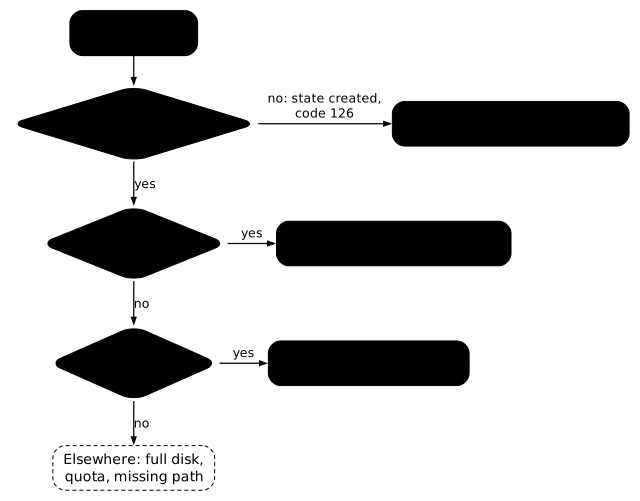
| Message or symptom | What the inspection says | Cause |
|---|---|---|
Read-only file system | RW=false | the mount forbids writing |
Permission denied | RW=true | the permissions refuse the write |
exit with code 126, container never started | RW=true | the file mode, which comes from the host |
The rest of the page takes these three rows in order, and shows for each the measurement that confirms it.
Cause 1: the mount forbids writing
A mount declared read-only refuses writing even before the permissions are consulted. The case is built with one option, :ro, on a host directory prepared for the example, /srv/modeles (templates), which belongs to uid 1500 and stays open for writing to its owner and its group:
sudo mkdir -p /srv/modeles && sudo chown 1500:1500 /srv/modeles && sudo chmod 775 /srv/modelesdocker run -d --name ctl-lecture -v /srv/modeles:/modeles:ro alpine:3.24@sha256:be2656061b536c1883c4034790e21d0a09c5aaaf51968b89368a3c0371ea2c9a \ sleep infinitydocker exec ctl-lecture sh -c 'echo essai > /modeles/essai'sh: can't create /modeles/essai: Read-only file systemThe message does not talk about permissions, it talks about the file system. And the detail that defeats approximate diagnoses is that the directory's permissions can be perfectly open:
docker exec ctl-lecture stat -c '%u:%g %A' /modelesdocker container inspect ctl-lecture \ --format '{{range .Mounts}}RW={{.RW}} Mode={{.Mode}}{{end}}'1500:1500 drwxrwxr-xRW=false Mode=roThe directory grants writing to its owner and its group, and writing is refused all the same. Any chmod and any chown run here would be wasted time: the inspection's RW field is false, and it is what settled the matter.
One last thing, and it decides the repair: a mount's mode is fixed at container creation. You do not change it on a running container; you have to destroy it and recreate it without :ro. It is the same rule as for published ports and for the container's identity.
Cause 2: permissions refuse, and the mount agrees
Let us take the new volume from earlier, and start on it a container that does not run as root. The --user uid:gid option chooses the process's identity. For this you need an image that knows the team's two accounts, placed in the same group, which will be useful further down. You write it like the previous Dockerfile, but in a second directory (cd .. && mkdir ex-comptes && cd ex-comptes), because the two files have the same name Dockerfile and docker build reads the one in the current directory: addgroup creates the group, adduser creates an account (-D: without a password, -G: in this group), and CMD gives the command run by default, here an endless wait to keep the container alive.
FROM alpine:3.24@sha256:be2656061b536c1883c4034790e21d0a09c5aaaf51968b89368a3c0371ea2c9aRUN addgroup -g 3000 compta \ && adduser -D -u 1500 -G compta exporteur \ && adduser -D -u 1501 -G compta archiveurCMD ["sleep", "infinity"]docker build -t ex-comptes:1.0 .docker run -d --name exporteur --user 1500:3000 \ -v exports-compta:/exports ex-comptes:1.0docker exec exporteur sh -c 'echo essai > /exports/export-1.txt'sh: can't create /exports/export-1.txt: Permission deniedThe sentence is not the same as before, and that is the whole lesson of this page. Here the engine does not blame the file system: it says the request was examined and refused. The inspection confirms that the mount has nothing to do with it:
docker container inspect exporteur --format '{{(index .Mounts 0).RW}}'docker exec exporteur idtrueuid=1500(exporteur) gid=3000(compta) groups=3000(compta)RW=true: the mount allows writing. The question becomes "who is writing?", and the answer is read inside the container with id, not in what was requested at creation. The nuance matters, because --user accepts an identity that the image does not know:
docker run --rm --user 4242:4242 ex-comptes:1.0 sh -c 'whoami; echo "HOME=$HOME"'whoami: unknown uid 4242HOME=/The container runs, the permissions apply to uid 4242, and no message flags it. A --user that designates an account absent from the image therefore produces baffling diagnoses, since the permissions target a uid that no name designates: declare the accounts in the image, and always read the real identity with id.
Cause 3: the file mode, which no mount changes
The third failure does not resemble the other two: the container never started. Drop on the host a script without its execute bit, mount it, and ask the container to run it. The preparation creates a directory /srv/outils (tools) that belongs to you, writes a two-line script in it, then removes its execute bit:
sudo mkdir -p /srv/outils && sudo chown "$USER" /srv/outilsprintf '#!/bin/sh\necho sauvegarde\n' > /srv/outils/sauvegarde.shchmod 644 /srv/outils/sauvegarde.shdocker run -d --name ctl-script -v /srv/outils:/outils alpine:3.24@sha256:be2656061b536c1883c4034790e21d0a09c5aaaf51968b89368a3c0371ea2c9a \ /outils/sauvegarde.sh9a24fede48d6d9fa22e00bae916f1b9dc6f2c7abc5f941c5e320e4b48c888544docker: Error response from daemon: failed to create task for container: failed to create shim task: OCI runtime create failed: runc create failed: unable to start container process: error during container init: exec: "/outils/sauvegarde.sh": permission denied
Run 'docker run --help' for more informationThe container exists, and it has no process:
docker container inspect ctl-script --format 'Status={{.State.Status}} ExitCode={{.State.ExitCode}}'Status=created ExitCode=126Code 126 is that of a file found but not executable, not to be confused with 127, which says the file was not found at all. And the cause is neither the mount nor the directory's permissions: it is the file's mode, which Docker takes as is from the host.
docker run --rm -v /srv/outils:/outils alpine:3.24@sha256:be2656061b536c1883c4034790e21d0a09c5aaaf51968b89368a3c0371ea2c9a \ stat -c '%a %A %n' /outils/sauvegarde.sh644 -rw-r--r-- /outils/sauvegarde.shA mount changes no mode. This explains the classic "it works on my machine": the script was executable there, the repository or the archive lost the bit, and the container mounts the file as it finds it. The fix is therefore made on the host, with a chmod +x, and then the container is started again.
You should not conclude that a chmod run in the container would have no effect. From a container that mounts the directory as a bind mount, it does modify the host's file: it is the same file on the host's disk (the same inode, the entry that designates the file in the file system), and the measurement confirms it, the mode goes to 755 on both sides. It is simply impossible here, since the container dies before having a process in which to type anything.
The two bad answers, and what they cost
By cause 2, two actions fix the symptom in a few seconds. Both are easy to recommend, and both leave a debt.
The first is to switch the container back to root. Everything writes, and every file produced belongs to root. One day, a second container, itself correctly unprivileged, can no longer take over those files: you have moved the failure in time. And a root container writes anywhere it has access, including on the host through a bind mount.
The second is to open the volume to everyone, with a chmod 777. The measurement is clear:
docker run --rm --user 0:0 -v exports-compta:/exports alpine:3.24@sha256:be2656061b536c1883c4034790e21d0a09c5aaaf51968b89368a3c0371ea2c9a \ sh -c 'chmod 777 /exports && stat -c "%a %A" /exports'777 drwxrwxrwxIt works, and it gives any process in the container the right to rewrite everything, including processes you did not write. A 777 mode names nobody, it gives up naming.
The answer that holds: align on a shared group
The real need is often this one: two different identities must write to the same volume, an exporter and an archiver, two services of the same team. No owner can suit both. A group can.
The principle takes three actions: give the directory to the common group, grant that group write access, and enable the setgid bit, a flag of the mode that makes files created in a directory inherit that directory's group. The fix is made from a throwaway container that mounts the volume with the necessary privileges. The volume has just been opened as 777 by the previous measurement: you first put it back in a clean state by giving it the compta group.
docker run --rm --user 0:0 -v exports-compta:/exports alpine:3.24@sha256:be2656061b536c1883c4034790e21d0a09c5aaaf51968b89368a3c0371ea2c9a \ sh -c 'chown root:3000 /exports && chmod 2775 /exports && stat -c "%u:%g %a %A" /exports'0:3000 2775 drwxrwsr-xThree things can be read on this line. The owner stays root, and this is not an oversight: it is not the owner that grants the right to write here. The group is 3000, the one the two accounts share, and it has write access. Finally the s in place of the group's x is the setgid bit, whose effect is detailed just below.
A second container, archiveur, is started like exporteur on the same volume, with uid 1501 and group 3000. The exporteur container, already running, does not need to be restarted: a directory's permissions are read at every access. Both then write, under two different uids:
docker run -d --name archiveur --user 1501:3000 -v exports-compta:/exports ex-comptes:1.0docker exec exporteur sh -c 'echo essai > /exports/export-1.txt'docker exec exporteur stat -c '%u:%g %A %n' /exports/export-1.txtdocker exec archiveur sh -c 'echo avis > /exports/archive-1.txt'docker exec archiveur stat -c '%u:%g %A %n' /exports/archive-1.txtdocker exec exporteur stat -c '%A' /exports1500:3000 -rw-r--r-- /exports/export-1.txt1501:3000 -rw-r--r-- /exports/archive-1.txtdrwxrwsr-xEach file belongs to its author and to the common group, and in the directory's mode, drwxrwsr-x, the letter for write access for the others is a -: they cannot write. This is what distinguishes this fix from a 777: it names who can write.
Where to apply the fix: named volume or bind mount
The action above is that of a named volume, which can only be reached through a container that mounts it. A bind mount is a host directory, and so it is fixed where it sits, without a throwaway container. The inspection's Type field tells you which of the two you have in hand. Here exporteur mounts the named volume from earlier, and ctl-bind a host directory, /srv/depot-hote (the host's depot), owned by root, mounted on /depot. To prepare it, you create the directory with sudo, which gives it to root, then start a container that runs as 1500:1500 and mounts it:
sudo mkdir /srv/depot-hotedocker run -d --name ctl-bind --user 1500:1500 -v /srv/depot-hote:/depot alpine:3.24@sha256:be2656061b536c1883c4034790e21d0a09c5aaaf51968b89368a3c0371ea2c9a \ sleep infinityThe inspection then says which of the two mounts is a named volume and which is a bind mount:
docker container inspect exporteur --format '{{(index .Mounts 0).Type}}'docker container inspect ctl-bind --format '{{(index .Mounts 0).Type}} {{(index .Mounts 0).Source}}'volumebind /srv/depot-hoteAnd the fix of a bind mount takes effect on a container that is already running, because it is the same directory on both sides. Here the container is started with --user 1500:1500 and the directory belongs to root. The chosen means changes: rather than the group, you give the directory to its user, which suits the case where a single account writes there. The container is never recreated:
sudo chown 1500 /srv/depot-hotedocker exec ctl-bind stat -c '%u:%g %a %A' /depotdocker exec ctl-bind sh -c 'echo essai > /depot/essai && stat -c "%u:%g %A" /depot/essai'1500:0 755 drwxr-xr-x1500:1500 -rw-r--r--It is indeed the permissions that change on the fly, not the mount: the mount stays fixed at creation. The reflex "the container has to be recreated" is therefore right for :ro and for --user, and wrong for a chown or a chmod.
What the setgid bit changes, and when it changes nothing
The 2 of 2775 makes a file created in the directory inherit the directory's group, instead of its author's primary group. The --group-add option adds supplementary groups to the identity chosen by --user: the process keeps its primary group, and also gains the right to act on behalf of the listed groups. Measured on a writer whose primary group is 1700 and who carries compta as a supplementary group:
docker run --rm --user 1700:1700 --group-add 3000 -v exports-compta:/exports \ ex-comptes:1.0 sh -c 'echo x > /exports/essai.txt; stat -c "%u:%g" /exports/essai.txt'With 2775 on the directory, the file comes out as 1700:3000. With 0775, the same writer produces 1700:1700, a file that the other container will only ever see through the "others" mode. Setgid is therefore what makes the solution durable rather than true once.
Mind the exact scope, because it is narrower than it is often read. When both containers already have 3000 as their primary group (the case when you pass --user 1500:3000), the group of the created files is the right one anyway, and setgid changes nothing observable there. It becomes decisive as soon as a writer arrives with another primary group, which happens as soon as the images come from several origins.
The next trap: file modes, not the directory's mode
One last measured fact, which explains the next failure. Files come out as -rw-r--r--, because the creation mask (umask, already met for the host's modes) is 0022 by default in the container. A container can therefore create and delete in the directory, but not modify in place the other's file:
docker exec archiveur sh -c 'echo ajout >> /exports/export-1.txt'sh: can't create /exports/export-1.txt: Permission deniedIt can however delete it and then recreate it, since it is the directory that allows this, and the recreated file then comes out as 1501:3000. If your need is real in-place editing, the writer must also set a 002 mask:
docker exec exporteur sh -c 'umask 002; echo x > /exports/avec-002.txt; stat -c "%u:%g %A %n" /exports/avec-002.txt'docker exec archiveur sh -c 'echo ajout >> /exports/avec-002.txt && echo ajout-abouti'1500:3000 -rw-rw-r-- /exports/avec-002.txtajout-aboutiThe directory is not enough, the application's mask counts as much.
The three-command diagnostic grid
Faced with an access denied, three readings are enough, and in this order:
-
The message, word for word.
Read-only file systemblames the mount,Permission deniedsays the mount agrees and the permissions refuse, and a126code is not about writing at all. A container that has not started has no message left to display, and its code is re-read in the inspection:Terminal window docker container inspect <container> --format '{{.State.ExitCode}}' -
The
RWfield of the inspection, which confirms or refutes the mount in one word:Terminal window docker container inspect <container> --format '{{(index .Mounts 0).RW}}' -
The real identity, read inside the container, and the target's mode:
Terminal window docker exec <container> iddocker exec <container> stat -c '%u:%g %a %A' <path>
And a rule of method that holds for all three: you verify a fix with a real write, never with the command-line option you have just typed. A permission can be declared without always producing the expected effect, and the effect is the subject.
What to do when the grid does not settle it?
This grid covers three common failures, not all of them. If the message is Permission denied, RW is true, id gives the expected identity and stat shows an owner, a group and a mode that should be enough, the cause lies elsewhere. Two situations produce this precise picture.
The first is the SELinux label. On Red Hat family hosts (RHEL, AlmaLinux, Fedora) where SELinux is active, each file carries a security label in addition to its owner and its mode, and the kernel refuses access to a container process whose type does not match the label of the host directory mounted as a bind mount, even when the classic permissions allow it. The engine only cares about it if SELinux is enabled on the daemon side. The Docker documentation describes this SELinux label of bind mounts. The :z suffix on the mount relabels the directory so that it is shared between containers, :Z so that it is private to a single one. Never apply :Z to a system directory such as /home or /usr: the Docker documentation warns that this makes the host unusable, since the label changes for the whole host. The page Securing Docker in production presents SELinux on the Docker side, and Podman volumes (in French) detail the diagnosis and the :z and :Z suffixes.
getenforcels -dZ /srv/depot-hoteThe second is the uid shift. With Docker's rootless mode (the daemon runs without root privileges) or the daemon's userns-remap option (which shifts the container's uids), a uid seen in the container corresponds to another uid on the host, taken from a range reserved for the account (the /etc/subuid and /etc/subgid files). The container's 1500 is then not the host's 1500, and a host directory given to uid 1500 stays unreadable for the container. To detect it, compare what ls -ln displays on the host with what stat displays in the container: if the numbers differ, this is the shift. docker info --format '{{.SecurityOptions}}' says whether the daemon runs rootless or with a remapping. Podman volumes handle this shift with --userns=keep-id, but the option is specific to Podman: on Docker, it is the subordinate range that must be aligned. The Docker documentation describes the rootless mode and userns-remap. Measured under userns-remap on Docker 29.9.2, docker info --format '{{.SecurityOptions}}' adds name=userns to the list, a file created by root in the container belongs to uid 100000 on the host (the start of the dockremap:100000:65536 range of /etc/subuid), and a host directory given to uid 1500 appears in the container under uid 65534, therefore unreadable, even for root. Only the remapping is measured on this page: the behavior of SELinux and that of rootless mode are those described by the Docker documentation.
How do you clean up what this page created?
The examples leave containers, volumes, images and directories under /srv. These commands remove them; if you have not played all the examples, those that target a missing object print a harmless error.
docker rm -f exporteur archiveur ctl-lecture ctl-script ctl-binddocker volume rm exports-compta vneufdocker rmi ex-chemin:1.0 ex-comptes:1.0cd .. && rm -r ex-chemin ex-comptessudo rm -r /srv/modeles /srv/outils /srv/hote-vide /srv/depot-hotePutting it into practice
The first lab starts from a common situation: a volume that belongs to root, a producer switched to root so that it finally writes, and a second unprivileged container that writes nothing. The validation is graded on the real write of both containers, on the group carried by the created files, and on a fourth check that explicitly refuses a volume open for writing to everyone: a chmod 777 would pass the first three.
The second lab sets up three broken containers and a control one that you are forbidden to fix, so that its exit code stays readable to the end. It first asks for three diagnostic values, including the mount's RW field, then the repair of the three failures. Here the repair is graded on the means as much as on the effect: switching the container back to root would settle its symptom, and the check refuses it.
Key takeaways
-
A new volume belongs to root and is
755when the mounted path does not exist in the image: an unprivileged container does not write to it, and this is the starting point of these failures. -
Three common causes, not one.
Read-only file systemblames the mount,Permission deniedsays the permissions refuse, a126code says a file's mode is missing. -
The inspection's
RWfield settles between the first two in one word, and a directory with wide permissions can perfectly well refuse writing ifRWisfalse. -
No mount changes a file's mode: it comes from the host, and it is on the host that it is fixed.
-
The mount and the identity are fixed at creation of the container: changing them means recreating it, not restarting it.
-
The permissions, on the other hand, change on the fly: a
chownor achmodapplied to the source of a bind mount applies at once to the running container. A named volume needs a throwaway container, a bind mount is fixed directly on the host, and the inspection'sTypefield tells you which of the two you have. -
Neither root nor
777. Both fix the symptom and leave a debt: one produces files that nobody else takes over, the other gives up naming who can write. -
The shared group is the answer that holds:
chown root:<gid>thenchmod 2775let two different uids write side by side, and setgid propagates the group to the created files. -
A fix is verified with a real write, never with the option you have just typed.
-
The grid has two blind spots. A
Permission deniedthat survives correct permissions points to the SELinux label of a bind mount (:z,:Z) or to a uid shift in rootless mode and underuserns-remap.
Knowledge check
Check that you have grasped the essentials of this guide. The questions cover only what has just been explained here.
Knowledge check
Check what you have learned with this interactive quiz
How it works
- The timer starts when you click Start
- Multiple choice, true/false and short answer questions
- You can move between questions
- Detailed results are shown at the end
Starts the quiz and the timer
Review
(0/0)Score by domain
A domain groups several guides and gets several questions, so its score is more reliable than a per-topic score, which often rests on a single question.
Summary
Strengths
No topic passed at 80% on at least two questions yet.
Weak areas
No topic below the pass mark.
Recommended next
Hints before you try again?
Continue the course: Exam: bring a failing container back into service
A new full quiz with random questions
Work again only on the questions you missed