A container whose root filesystem is read-only can no longer write anywhere inside its image: an attacker who takes control drops nothing there, and a program that quietly writes files to itself fails at startup. This lesson has you freeze the official postgres image with --read-only, find its writes with docker diff, give them bounded tmpfs mounts or a volume, then stop it cleanly and see what a forced stop guarantees. It is aimed at readers who already know how to start a container and read an exit code.
What you will learn
Each point can be checked with a command from the lesson.
- List the writes of a service with
docker diffbefore freezing its root filesystem. - Freeze the root filesystem with
--read-onlyand bound every written directory with atmpfs(size,noexec,nosuid) or a volume, on the command line and in a Compose file. - Separate what is temporary from what must last, and prove it after a recreation.
- Prepare a volume once for a non-root UID, without putting the service back to root.
- Read the image's stop signal, set the grace period and compare
docker stopwithdocker kill.
Prerequisites
You must have read these two lessons: the lifecycle lesson assumes you know signals, PID 1 and exit code 137; the permissions lesson assumes you can read the owner and mode of a volume.
- Container lifecycle, PID 1 and clean shutdown in Docker for the stop signal, the grace period and code 137.
- Volume permissions for the owner and mode of a volume.
Work on a disposable VM, with Docker Engine 29.9.2 (containerd image store, cgroup v2) and Compose 5.6.1 from the official repository. All measurements were made on 4 November 2026 on Debian 13, with PostgreSQL 18.6, in the image below. Another image or engine version may print other messages.
Which demonstration serves as the common thread?
The common thread is a PostgreSQL service, because it writes in several places: a Unix socket (the file local clients connect through), a lock file, its data and its write-ahead log (where it records every change before applying it to the data). Create a dedicated folder, a volume for the data and a network for the clients. Leaving out -p makes mkdir fail if the folder already exists, instead of mixing the experiment with earlier files.
mkdir ~/atelier-lecture-seulecd ~/atelier-lecture-seuleIMG=postgres:18@sha256:3a4264520e121176619f54ff867d12774bc81e95e7b84db58d63bccdb6144b81docker network create carnet-netdocker volume create carnet-donneesdocker pull "$IMG"The image refuses to start without a password. The demonstration uses POSTGRES_HOST_AUTH_METHOD=trust, which accepts any connection without a password, on an isolated Docker network with no published port. This setting is for the demonstration only: a real service passes a secret, as the lesson Secrets Docker : gérer les données sensibles (in French) explains. Passing a secret by file to a frozen image was not measured here.
The image starts as root, then its entry script fixes some owners and switches to the postgres user (UID 999) before launching the server. Its stop signal can be read in the image configuration.
docker image inspect "$IMG" --format '{{.Config.StopSignal}} {{.Config.Entrypoint}} {{.Config.Cmd}}'The expected output is SIGINT [docker-entrypoint.sh] [postgres]. The stop signal of this image is therefore SIGINT, not the usual SIGTERM. This detail changes how PostgreSQL shuts down, as the last part of the lesson shows.
What does --read-only protect, and what does it leave open?
The root filesystem of a container is what it sees under /: the layers of the image, always read-only, plus a writable layer specific to the container, where Docker records everything the container creates or modifies. --read-only (field HostConfig.ReadonlyRootfs) makes that layer non-writable: nothing is written to the root filesystem any more, neither by the service user nor by root. The volumes and tmpfs mounts (directories kept in memory) mounted in the container are not part of the root filesystem: they stay writable.
The diagram shows the frozen zone in red, and below it the two places that stay open.

This bounds what a compromised process can modify: it cannot replace a binary or a library of the image. However, read-only does not protect a volume's data, a tmpfs or the network. It is therefore an attack-surface reduction, to be combined with a non-root user and dropped capabilities, not a guarantee on its own. The next sections add the non-root user; dropping capabilities only appears for what it breaks.
How do you list a service's writes before freezing it?
Start a control container without --read-only, make it work, then list what it wrote to its writable layer with docker diff. Each line starts with A (added), C (changed) or D (deleted).
docker run -d --name carnet-temoin -e POSTGRES_HOST_AUTH_METHOD=trust "$IMG"until docker exec carnet-temoin pg_isready -q; do sleep 1; donedocker exec carnet-temoin psql -U postgres -c "create table t(id int); insert into t select generate_series(1,1000); checkpoint;"docker diff carnet-temoinThe query creates a table, inserts 1000 rows, then checkpoint forces the database to write its data to disk. The output is the same before and after this activity; the order of the two A lines can change from one run to the next.
C /runC /run/postgresqlA /run/postgresql/.s.PGSQL.5432A /run/postgresql/.s.PGSQL.5432.lockOn a new volume, pg_isready first answers no response, then rejecting connections, then accepting connections. The entry script indeed starts a temporary server to initialize the database, stops it, then launches the final server. If a command fails with the database system is starting up or shutting down right after the until loop, wait a second and run it again.
Look at what is missing as much as at what is listed. The only zone written is /run/postgresql: the Unix socket and its lock file (/var/run is a link to /run). The PID file (where the server records its process number), the write-ahead log and the data are absent from the list, because they live in the volume that the image declares on /var/lib/postgresql with the VOLUME instruction. If you give no name, Docker creates an anonymous volume, a volume without a readable name.
That volume escapes docker diff. The inventory therefore tells you what to put in a tmpfs, not what must last. Take this measurement before freezing, with the real workload of the service.
Then remove the control container and its anonymous volume with -v, otherwise that volume stays on the host.
docker rm -fv carnet-temoinWhat happens when you freeze the root filesystem with nothing planned?
The service fails as soon as it tries its first write outside its volume. Start the frozen root filesystem with the volume, but without a tmpfs.
docker run -d --name carnet-pg --read-only -v carnet-donnees:/var/lib/postgresql -e POSTGRES_HOST_AUTH_METHOD=trust "$IMG"sleep 8docker ps -a --filter name=carnet-pg --format '{{.Names}} {{.Status}}'docker logs carnet-pg 2>&1 | grep -E 'FATAL|pg_ctl'The container exits with code 1 (Exited (1)), and the log contains the following line.
FATAL: could not create lock file "/var/run/postgresql/.s.PGSQL.5432.lock": Read-only file systempg_ctl: could not start serverThe database initialization had succeeded before that: it writes to the volume. The failure comes from the socket lock, exactly the path that docker diff had revealed. The fix is to declare that directory as a tmpfs. Remove this container and keep the volume, which now holds an initialized database.
docker rm -f carnet-pgHow do you bound a tmpfs?
A tmpfs is an in-memory filesystem, mounted at a path of the container and emptied at shutdown. With no option, Docker adds nosuid, nodev and noexec by itself, but sets no size. noexec forbids running a file from the tmpfs; nosuid neutralizes files that run with the rights of their owner. So declare the size, the options and the owner explicitly.
T=/run/postgresql:rw,noexec,nosuid,size=1m,uid=999,gid=999,mode=0750docker run -d --name carnet-pg --read-only --tmpfs "$T" \ -v carnet-donnees:/var/lib/postgresql \ -e POSTGRES_HOST_AUTH_METHOD=trust "$IMG"docker inspect carnet-pg --format '{{json .HostConfig.Tmpfs}}'docker exec carnet-pg mount | grep -E ' on (/|/run/postgresql) 'docker exec carnet-pg ls -ld /run/postgresqlHostConfig.Tmpfs repeats your declaration, and mount shows what the kernel actually applies.
{"/run/postgresql":"rw,noexec,nosuid,size=1m,uid=999,gid=999,mode=0750"}overlay on / type overlay (ro,relatime,...)tmpfs on /run/postgresql type tmpfs (rw,nosuid,nodev,noexec,relatime,size=1024k,mode=750,uid=999,gid=999,inode64)The root filesystem is mounted ro and the tmpfs has the requested size of 1024 KiB. One trap: the requested mode is not necessarily the final mode. Here, mount shows the mode applied at mount time, mode=750, but ls -ld then gives drwxrwsr-t postgres postgres, that is 3775. That is neither the requested mode nor that of the directory in the image (3777): the entry script of the image runs chmod 03775 /var/run/postgresql at every start (line 45 of /usr/local/bin/docker-entrypoint.sh in this version). A process of the container can therefore change the mode after the mount. When nothing touches it, the requested mode is respected, as a throwaway container started without the entry script shows, declaring two tmpfs mounts, one with options and one without.
docker run -d --name carnet-zone --read-only --tmpfs /zone-absente:rw,noexec,nosuid,size=1m,mode=0750 --tmpfs /zone-defaut --entrypoint sleep "$IMG" 120docker exec carnet-zone sh -c 'ls -ld /zone-absente /zone-defaut; mount | grep -E " on /zone-"; df -k /zone-defaut | tail -1; grep MemTotal /proc/meminfo'docker exec --user 999:999 carnet-zone sh -c 'touch /zone-absente/x; echo "rc=$?"'docker rm -fv carnet-zonedrwxr-x--- 2 root root 40 Nov 4 15:12 /zone-absentedrwxrwxrwt 2 root root 40 Nov 4 15:12 /zone-defauttmpfs on /zone-absente type tmpfs (rw,nosuid,nodev,noexec,relatime,size=1024k,mode=750,inode64)tmpfs on /zone-defaut type tmpfs (rw,nosuid,nodev,noexec,relatime,inode64)tmpfs 1488796 0 1488796 0% /zone-defautMemTotal: 2977592 kBrc=1touch: cannot touch '/zone-absente/x': Permission deniedThree facts can be read here. Mode 0750 is applied as is, and since the tmpfs belongs to root, user 999 cannot write to it: that is why the service of the common thread also declares uid=999,gid=999. With no option, Docker still adds nosuid, nodev and noexec. And without size, the size is half the memory of the machine: 1,488,796 KiB on a VM that shows 2,977,592. So always set your own. These figures depend on the measurement VM.
Now check the refusals. These commands go through docker exec, so as root; the refusal is the same for the postgres user, because read-only does not depend on the UID.
docker exec carnet-pg touch /etc/essai; echo "rc=$?"docker exec carnet-pg sh -c 'echo x > /usr/local/essai'; echo "rc=$?"docker exec carnet-pg sh -c 'touch /run/postgresql/essai-ok'; echo "rc=$?"docker exec carnet-pg sh -c 'cp /bin/true /run/postgresql/t && chmod +x /run/postgresql/t && /run/postgresql/t'; echo "rc=$?"docker exec carnet-pg sh -c 'dd if=/dev/zero of=/run/postgresql/plein bs=1M count=3; echo "dd rc=$?"; rm -f /run/postgresql/plein'The table gives the five results, in the order of the commands.
| Write attempted | Result | Code |
|---|---|---|
touch in /etc (root filesystem) | touch: cannot touch '/etc/essai': Read-only file system | 1 |
echo to /usr/local (root filesystem) | sh: 1: cannot create /usr/local/essai: Read-only file system | 2 |
file created in the tmpfs | the write succeeds | 0 |
running a binary copied into the tmpfs | Permission denied: noexec is at work | 126 |
dd of 3 MiB into the 1 MiB tmpfs | No space left on device | 1 |
The service itself works normally under this configuration.
docker exec carnet-pg psql -U postgres -c "create table journal(id int primary key, note text); insert into journal select g, 'initial' from generate_series(-5,-1) g; checkpoint;"docker diff carnet-pgdocker diff returns no line: the writable layer stays empty, even though the database has just created a table and written data.
Does a tmpfs consume memory?
Yes: a tmpfs lives in memory, so what you write to it counts toward the memory of the container. The cgroup, the kernel mechanism that tracks a container's consumption, shows it: the shmem line of its memory.stat file grows by the size written. The service's 1 MiB tmpfs is too small for the measurement. A throwaway container, with a 16 MiB tmpfs, reads shmem before and after writing 8 MiB.
docker run -d --name carnet-mem --read-only --tmpfs /scratch:rw,noexec,nosuid,size=16m --entrypoint sleep "$IMG" 120docker exec carnet-mem sh -c 'grep -E "^shmem " /sys/fs/cgroup/memory.stat'docker exec carnet-mem sh -c 'dd if=/dev/zero of=/scratch/remplissage bs=1M count=8'docker exec carnet-mem sh -c 'grep -E "^shmem " /sys/fs/cgroup/memory.stat'docker rm -fv carnet-memThe two readings are shmem 0 then shmem 8388608, exactly 8 MiB more. On the PostgreSQL service itself, the same line starts from a non-zero value (16,707,584 during the measurement), whose cause was not checked: do not attribute it to the tmpfs, only the difference counts.
An important consequence: the size of a tmpfs does not protect memory on its own. Start a container limited to 64 MiB of memory (--memory 64m, with --memory-swap 64m to forbid swap), fitted with a 128 MiB tmpfs, and write 100 MiB to it.
docker run -d --name carnet-mem --memory 64m --memory-swap 64m --read-only --tmpfs /scratch:size=128m,noexec,nosuid "$IMG" sleep 60docker exec carnet-mem sh -c 'dd if=/dev/zero of=/scratch/f bs=1M count=100; echo "dd rc=$?"'docker inspect carnet-mem --format 'oom={{.State.OOMKilled}} running={{.State.Running}}'docker exec carnet-mem true; echo "exec rc=$?"docker rm -fv carnet-memThe kernel kills dd before the end: the code is 137 (Killed) and OOMKilled=true, which means the container ran out of memory. The container itself stays reported as running=true, but a following docker exec fails (procReady not received (possibly OOM-killed), code 128): that container stays alive without accepting any new command. The memory ceiling and the size of the tmpfs must therefore be sized together; the lesson Cap memory and the number of tasks of a container details the ceiling itself.
What goes in a tmpfs, and what goes in a volume?
A tmpfs holds what can disappear without consequence: socket, lock, temporary files. A volume holds what must last: it survives the recreation of the container. The proof is made by recreating the container on the same volume, with the same tmpfs. The next block writes a row to the database and a file to the tmpfs, deletes the container, recreates it with the same options, then reads both back.
docker exec carnet-pg psql -U postgres -c "insert into journal values (-42, 'durable')"docker exec carnet-pg sh -c 'echo temporaire > /run/postgresql/note.txt; ls -A /run/postgresql'docker rm -f carnet-pgdocker run -d --name carnet-pg --read-only --tmpfs "$T" \ -v carnet-donnees:/var/lib/postgresql \ -e POSTGRES_HOST_AUTH_METHOD=trust "$IMG"until docker exec carnet-pg pg_isready -q; do sleep 1; donedocker exec carnet-pg psql -U postgres -tA -c "select id from journal where id in (-5, -42) order by id"docker exec carnet-pg ls -A /run/postgresqldocker exec carnet-pg cat /run/postgresql/note.txt; echo "rc=$?"After the recreation, the query reads rows -42 and -5 back: the durable data survived. The recreated tmpfs contains only .s.PGSQL.5432 and .s.PGSQL.5432.lock, and cat answers No such file or directory with code 1: the temporary file is gone.
For a database, you mount the data directory rather than a file. PostgreSQL keeps its whole state in one directory (PGDATA), but other databases fit in a single file. SQLite is the example: according to the SQLite documentation on temporary files, it creates side files next to the database file, such as the rollback journal (-journal) or the WAL journal (-wal), in the same directory. Mounting only the database file would leave those side files outside the volume: they would go into the root filesystem of the container, where writing fails because it is read-only. So you mount the directory that contains them. Here, PGDATA is /var/lib/postgresql/18/docker, and the image declares VOLUME /var/lib/postgresql, its parent.
A trap shows up with this image. Without a -v option, the VOLUME instruction creates an anonymous volume, even with --read-only: the data does not appear in docker diff, and a docker rm -f without -v leaves that volume on the host. Always name the data volume, and remove orphans with docker rm -v or docker volume rm.
How do you declare the frozen root filesystem and the tmpfs in a Compose file?
In a Compose file, read_only: true corresponds to --read-only, the tmpfs: list to --tmpfs, and stop_grace_period to --stop-timeout. Here is the same service as above, measured with Compose 5.6.1. Save this file as compose.yaml in the working folder. The project name carnet-compose keeps the objects separate from those of the previous sections.
name: carnet-composeservices: pg: image: postgres:18@sha256:3a4264520e121176619f54ff867d12774bc81e95e7b84db58d63bccdb6144b81 container_name: carnet-compose-pg user: "999:999" read_only: true tmpfs: - /run/postgresql:size=1m,noexec,nosuid,uid=999,gid=999,mode=0750 stop_grace_period: 20s environment: POSTGRES_HOST_AUTH_METHOD: trust volumes: - donnees:/var/lib/postgresqlvolumes: donnees: {}The short form of tmpfs: takes the same option string as --tmpfs. Start the service and read what the engine kept.
docker compose up -duntil docker exec carnet-compose-pg pg_isready -q; do sleep 1; donedocker inspect carnet-compose-pg --format 'ro={{.HostConfig.ReadonlyRootfs}} tmpfs={{json .HostConfig.Tmpfs}} stoptimeout={{.Config.StopTimeout}} mounts={{json .HostConfig.Mounts}}'docker exec carnet-compose-pg mount | grep ' on /run/postgresql 'docker compose stopdocker compose down -vThe output of docker inspect is the following, and mount shows the same tmpfs as with docker run.
ro=true tmpfs={"/run/postgresql":"size=1m,noexec,nosuid,uid=999,gid=999,mode=0750"} stoptimeout=20 mounts=nulltmpfs on /run/postgresql type tmpfs (rw,nosuid,nodev,noexec,relatime,size=1024k,mode=750,uid=999,gid=999,inode64)stop_grace_period: 20s becomes Config.StopTimeout=20. The lesson Limit the resources and restarts of a stack details that key and the other limits of a Compose service.
A trap awaits whoever writes the tmpfs in long form, under volumes: with type: tmpfs, target: and tmpfs: { size: 1048576, mode: 0750 }. The engine then gets the same mount, with the same size, but the declaration is no longer in the same place: HostConfig.Tmpfs is null and the tmpfs appears in HostConfig.Mounts, in the form {"Type":"tmpfs","Target":"/run/postgresql","TmpfsOptions":{"SizeBytes":1048576,"Mode":488}} (488 is 0750 in decimal). A check that only reads HostConfig.Tmpfs therefore does not see it. The long form also sets nosuid, nodev and noexec by default, like the short form without options. In our measurement, it set neither uid nor gid: with user: "999:999", the tmpfs stays owned by root in mode 0750 and PostgreSQL stops on FATAL: could not open lock file "/var/run/postgresql/.s.PGSQL.5432.lock": Permission denied. Writing noexec,nosuid in short form anyway remains useful: the declaration says what you want, without depending on a default setting.
How do you prepare a volume for a non-root service?
To remove root from the service, start it with --user 999:999. The entry script of the image then no longer tries to change an owner, and the PID 1 process is postgres, UID 999.
Dropping capabilities (the particular rights of root) without passing --user breaks startup instead. With --cap-drop ALL and --security-opt no-new-privileges as root, the container exits with code 1 on chown: changing ownership of '/var/lib/postgresql/18/docker': Operation not permitted.
The trap is the volume, and it does not always show. A blank named volume mounted on /var/lib/postgresql, a path that exists in the image, inherits the owner of the image at the first mount: the non-root service starts there without any preparation, and the test shows no problem. Mounted on a path absent from the image, the volume belongs to root, and the non-root service fails. Here is that second case, with PGDATA placed under /pgdata.
docker volume create carnet-neufdocker run -d --name carnet-u --user 999:999 --read-only --tmpfs "$T" \ -v carnet-neuf:/pgdata -e PGDATA=/pgdata/data \ -e POSTGRES_HOST_AUTH_METHOD=trust "$IMG"sleep 5docker inspect carnet-u --format 'exit={{.State.ExitCode}}'docker logs carnet-u 2>&1 | tail -1The output is exit=1, then mkdir: cannot create directory ‘/pgdata/data’: Permission denied. The service is not allowed to create its data directory in a volume that belongs to root. Fix the owner once, with a throwaway root container: chown 999:999 gives the volume to the UID of the service, and chmod 0700 reserves it for that UID. Then start the service again without root.
docker rm -fv carnet-udocker run --rm -v carnet-neuf:/v --entrypoint sh "$IMG" -c 'chown 999:999 /v && chmod 0700 /v && ls -ldn /v'docker run -d --name carnet-u --user 999:999 --read-only --tmpfs "$T" \ -v carnet-neuf:/pgdata -e PGDATA=/pgdata/data \ -e POSTGRES_HOST_AUTH_METHOD=trust "$IMG"until docker exec carnet-u pg_isready -q; do sleep 1; donedocker exec carnet-u ls -ldn /pgdata /pgdata/dataThe preparation prints drwx------ 2 999 999 ... /v, then the service starts and creates /pgdata/data as drwx------ 999 999. The preparation container is started with --rm: it leaves no trace, and the service was never root. The tmpfs also belongs to 999:999 (uid=999,gid=999), so that the service writes its socket without a root script having to fix the owner. Remove these two resources before continuing.
docker rm -fv carnet-udocker volume rm carnet-neufWhat does chown change on a volume that already holds files?
The blank volume above contained nothing. A volume that is already in use, with another owner, calls for one more precaution: chown without -R changes only the targeted directory, not the files it contains. The test creates a volume filled with files owned by UID 1000, then compares the two commands with ls -ln, which prints owners as numbers.
docker volume create carnet-garnidocker run --rm -v carnet-garni:/v --entrypoint sh "$IMG" -c 'mkdir /v/sous && echo a > /v/sous/a.txt && echo b > /v/b.txt && chown -R 1000:1000 /v && ls -ldn /v /v/b.txt /v/sous /v/sous/a.txt'docker run --rm -v carnet-garni:/v --entrypoint sh "$IMG" -c 'chown 999:999 /v && ls -ldn /v /v/b.txt /v/sous /v/sous/a.txt'docker run --rm -v carnet-garni:/v --entrypoint sh "$IMG" -c 'chown -R 999:999 /v && ls -ldn /v /v/b.txt /v/sous /v/sous/a.txt'docker volume rm carnet-garniThe three ls commands print the following respectively (dates removed).
drwxr-xr-x 3 1000 1000 4096 /v-rw-r--r-- 1 1000 1000 2 /v/b.txtdrwxr-xr-x 2 1000 1000 4096 /v/sous-rw-r--r-- 1 1000 1000 2 /v/sous/a.txtdrwxr-xr-x 3 999 999 4096 /v-rw-r--r-- 1 1000 1000 2 /v/b.txtdrwxr-xr-x 2 1000 1000 4096 /v/sous-rw-r--r-- 1 1000 1000 2 /v/sous/a.txtdrwxr-xr-x 3 999 999 4096 /v-rw-r--r-- 1 999 999 2 /v/b.txtdrwxr-xr-x 2 999 999 4096 /v/sous-rw-r--r-- 1 999 999 2 /v/sous/a.txtAfter the plain chown, only /v went to 999: the non-root service could not read b.txt or write to sous if their mode forbade it. With chown -R, the whole tree changes. On a volume that already holds files, use -R, and back it up first if the data matters.
The volume carnet-donnees stays in place: its data belongs to the postgres user (UID 999), which the non-root service of the next section finds again.
How do you stop this hardened service without losing anything?
A database stops cleanly when it finishes its committed writes, then writes a checkpoint: it flushes to disk what remains in memory. To stop a container, Docker first sends a signal to its main process, the one defined by the image (Config.StopSignal). If the process is still running at the end of the grace period, Docker sends SIGKILL. This period is set with --stop-timeout (the equivalent Compose key, stop_grace_period, is covered above). Start the hardened service again with a 20-second period, and read its settings.
docker rm -f carnet-pgdocker run -d --name carnet-pg --network carnet-net --user 999:999 --read-only \ --tmpfs "$T" --stop-timeout 20 \ -v carnet-donnees:/var/lib/postgresql \ -e POSTGRES_HOST_AUTH_METHOD=trust "$IMG"until docker exec carnet-pg pg_isready -q; do sleep 1; donedocker inspect carnet-pg --format 'StopSignal={{json .Config.StopSignal}} StopTimeout={{json .Config.StopTimeout}} user={{.Config.User}} ro={{.HostConfig.ReadonlyRootfs}}'The result is StopSignal="SIGINT" StopTimeout=20 user=999:999 ro=true. The signal comes from the image, the period from your option.
To measure what a shutdown preserves, you need writes in progress. Two small PostgreSQL clients, each in its own container, provide them. The first inserts one row at a time: each INSERT is a committed transaction (a group of writes the database commits to keep), and the client prints ack N after each commit. It receives as argument the first identifier to insert. The second opens a transaction that it never commits. Start them, let them work for a few seconds, then stop the service.
docker run -d --name carnet-cli --network carnet-net --entrypoint bash "$IMG" -c \ 'i=$1; while psql -h carnet-pg -U postgres -qtA -c "insert into journal(id, note) values ($i, '"'"'valide'"'"')" >/dev/null 2>/tmp/err; do echo "ack $i"; i=$((i+1)); done; echo "fin client apres ack $((i-1)) : $(cat /tmp/err)"' _ 1docker run -d --name carnet-tx --network carnet-net --entrypoint bash "$IMG" -c \ 'psql -h carnet-pg -U postgres -qtA -c "begin; insert into journal(id, note) values (999999, '"'"'non validee'"'"'); select pg_sleep(600); commit;" ; echo "sortie client tx rc=$?"'sleep 4time docker stop carnet-pgdocker inspect carnet-pg --format 'exit={{.State.ExitCode}} oom={{.State.OOMKilled}}'docker logs carnet-pg 2>&1 | tail -11During the measurement, time printed 0.232 s for docker stop and the exit code is 0, without OOMKilled. The log shows an orderly shutdown: the sessions are cut, a shutdown checkpoint is written, then the server turns off (excerpt without timestamps; the real log also contains the STATEMENT lines of the interrupted queries).
LOG: received fast shutdown requestLOG: aborting any active transactionsFATAL: terminating connection due to administrator commandLOG: background worker "logical replication launcher" (PID ...) exited with exit code 1LOG: shutting downLOG: checkpoint starting: shutdown immediateLOG: checkpoint complete: ...LOG: database system is shut downThe line logical replication launcher ... exited with exit code 1 is normal at shutdown: it appears at every fast shutdown observed here, when this auxiliary process (logical replication) turns off with the server, and the container nonetheless exits with code 0. It is not an error.
The SIGINT signal therefore triggers PostgreSQL's fast shutdown: it interrupts the sessions, cancels open transactions and keeps only what is committed. "Finishing the write in progress" is true for the INSERT being committed, false for the transaction the client never committed. Restart the same container and read the rows again.
AVANT=$(docker logs carnet-pg 2>&1 | wc -l)docker start carnet-pguntil docker exec carnet-pg pg_isready -q; do sleep 1; donedocker logs carnet-pg 2>&1 | tail -n +$((AVANT + 1)) | grep -ciE "not properly shut down|automatic recovery|redo starts"docker exec carnet-pg psql -U postgres -tA -c "select count(*), max(id), bool_and(note='valide') from journal where id>0"docker exec carnet-pg psql -U postgres -tA -c "select count(*) from journal where id=999999"docker logs carnet-cli 2>&1 | grep '^ack' | tail -1The first count is 0: the restart required no recovery, because the server had stopped cleanly. The command reads only the lines written after docker start, because the container log also keeps its first start, which followed a docker rm -f from the previous sections.
During the measurement, the database held 216|216|t: rows 1 to 216, all committed, and ack 216 was the client's last acknowledgement. This number depends on the moment of the shutdown: yours will be different. Transaction 999999 has 0 rows: it was cancelled. The looping client stopped on a connection error (connection to server was lost, or the database system is shutting down depending on the moment), and the transaction client exited with code 2.
What does a forced stop guarantee, and what is lost?
docker kill sends SIGKILL without waiting: the server has no time to write a checkpoint. The diagram compares the two shutdowns. In each column, the red box is what tells them apart: the checkpoint written at the requested shutdown, the automatic recovery that the forced stop imposes.
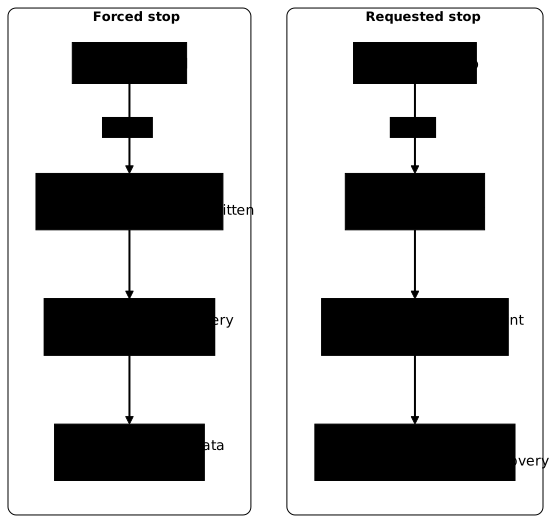
Recreate the service, then start the two clients again.
docker rm -fv carnet-pg carnet-cli carnet-txdocker run -d --name carnet-pg --network carnet-net --user 999:999 --read-only \ --tmpfs "$T" --stop-timeout 20 \ -v carnet-donnees:/var/lib/postgresql \ -e POSTGRES_HOST_AUTH_METHOD=trust "$IMG"until docker exec carnet-pg pg_isready -q; do sleep 1; doneThe first client must insert from the identifier that follows the last one already present, otherwise it would fail on a duplicate key. Compute that identifier in NEXT, then start the two clients again, the first with _ "$NEXT" in place of _ 1.
NEXT=$(( $(docker exec carnet-pg psql -U postgres -tA -c "select max(id) from journal") + 1 ))docker run -d --name carnet-cli --network carnet-net --entrypoint bash "$IMG" -c \ 'i=$1; while psql -h carnet-pg -U postgres -qtA -c "insert into journal(id, note) values ($i, '"'"'valide'"'"')" >/dev/null 2>/tmp/err; do echo "ack $i"; i=$((i+1)); done; echo "fin client apres ack $((i-1)) : $(cat /tmp/err)"' _ "$NEXT"docker run -d --name carnet-tx --network carnet-net --entrypoint bash "$IMG" -c \ 'psql -h carnet-pg -U postgres -qtA -c "begin; insert into journal(id, note) values (999999, '"'"'non validee'"'"'); select pg_sleep(600); commit;" ; echo "sortie client tx rc=$?"'Let the clients work for four seconds, then force the stop, restart the service and read the log. The 422 values in the output below come from the measurement: yours will differ, only the equality between the last ack and the database matters.
sleep 4time docker kill carnet-pgdocker inspect carnet-pg --format 'exit={{.State.ExitCode}} oom={{.State.OOMKilled}}'docker rm -f carnet-pgdocker run -d --name carnet-pg --network carnet-net --user 999:999 --read-only \ --tmpfs "$T" --stop-timeout 20 \ -v carnet-donnees:/var/lib/postgresql \ -e POSTGRES_HOST_AUTH_METHOD=trust "$IMG"until docker exec carnet-pg pg_isready -q; do sleep 1; donedocker logs carnet-pg 2>&1 | grep -E 'interrupted|not properly|redo|invalid record|checkpoint starting|ready'The command took 0.183 s according to time and the exit code is 137, that is 128 plus the number 9 of the SIGKILL signal. The looping client stops on Connection refused after its last ack. At restart on the same volume, PostgreSQL notices that it did not shut down cleanly, reads its write-ahead log again and replays what it contains: this is the automatic recovery. The restart log looks like this, timestamps removed.
LOG: database system was interrupted; last known up at ...LOG: database system was not properly shut down; automatic recovery in progressLOG: redo starts at 0/17B00C0LOG: invalid record length at 0/17BCBA0: expected at least 24, got 0LOG: redo done at 0/17BCB78 ...LOG: checkpoint starting: end-of-recovery immediate waitLOG: checkpoint complete: ...LOG: database system is ready to accept connectionsThe invalid record length line is not a corruption. It marks the end of the log: the server replayed what it could and stopped at the first empty entry, then started. Now read the data again, try a write and check that the hardening did not move.
docker exec carnet-pg psql -U postgres -tA -c "select count(*), max(id), bool_and(note='valide') from journal where id>0"docker exec carnet-pg psql -U postgres -tA -c "select count(*) from journal where id=999999"docker logs carnet-cli 2>&1 | grep '^ack' | tail -1docker exec carnet-pg psql -U postgres -tA -c "insert into journal values (7777777, 'apres'); select count(*) from journal where id=7777777"docker inspect carnet-pg --format 'user={{.Config.User}} ro={{.HostConfig.ReadonlyRootfs}}'docker diff carnet-pgThe database then held 422|422|t, for a last client ack of 422, and transaction 999999 is absent. The next write succeeds (the last query returns 1). The service resumed with user=999:999 ro=true: no step made the root filesystem writable or put the service back to root, and docker diff stays empty.
Remember what this guarantees. In the measured case, a committed transaction survives the forced stop, because the log is written before the commit. The guide Transactions: what ACID and BASE promise details this durability guarantee. An uncommitted transaction is lost, and its client receives a connection error.
This guarantee has a limit: docker kill kills the process, not the machine. The host kernel keeps running and keeps the writes already handed to its cache. A power cut is another case, where the guarantee depends on the fsync and synchronous_commit settings of PostgreSQL, described in its documentation. This lesson did not measure it.
This guarantee does not extend to an exact count: the client may not have received the acknowledgement of a transaction that the server had already committed, so the database contains at least all the acknowledged rows, not necessarily exactly the same ones. A forced stop keeps the data, but it imposes a recovery and cuts the clients without warning; a clean stop avoids both.
When do hardening or the signal prevent the fast shutdown?
A wrong stop signal makes the grace period useless. With --stop-signal SIGTERM, PostgreSQL starts a "smart" shutdown: it refuses new connections but waits for open sessions to end. The next block starts a second service with that signal, on a new volume, opens a select pg_sleep(600) session and times the shutdown with a 10-second period.
docker run -d --name carnet-smart --network carnet-net --user 999:999 --read-only \ --tmpfs "$T" --stop-signal SIGTERM --stop-timeout 10 \ -v carnet-smart:/var/lib/postgresql \ -e POSTGRES_HOST_AUTH_METHOD=trust "$IMG"until docker exec carnet-smart pg_isready -q; do sleep 1; donedocker run -d --name carnet-idle --network carnet-net --entrypoint bash "$IMG" -c \ 'psql -h carnet-smart -U postgres -qtA -c "select pg_sleep(600)"'sleep 2time docker stop carnet-smartdocker inspect carnet-smart --format 'exit={{.State.ExitCode}}'docker logs carnet-smart 2>&1 | tail -1docker rm -fv carnet-smart carnet-idledocker volume rm carnet-smartIn the same series of measurements, the shutdown with SIGINT took 0.232 s, whereas this one took 10.182 s and returned code 137: at the end of the period, Docker had to send SIGKILL. The log stops on received smart shutdown request, without a single shutdown line.
The stop signal therefore matters more than the period: read Config.StopSignal first, then adjust --stop-timeout. Hardening can also break shutdown in other ways. A service started as root with capabilities dropped fails at startup (seen above), and a tmpfs that is too small or an unprepared volume makes the service exit with an error before any shutdown. In both cases, the exit code and the log point to the cause.
Cleanup
Remove the containers, the volumes and the network of the workshop. -fv also removes any anonymous volumes left by the image.
docker rm -fv carnet-pg carnet-cli carnet-tx carnet-u carnet-temoin carnet-zone carnet-mem carnet-smart carnet-idledocker compose -f compose.yaml down -vdocker volume rm carnet-donnees carnet-neuf carnet-garni carnet-smartdocker network rm carnet-netrm -f compose.yamlcd ~ && rmdir ~/atelier-lecture-seuledocker rm -f silently ignores a container name that does not exist, whereas docker volume rm and docker network rm report a missing resource: the no such volume messages that appear concern volumes already removed by the previous sections, and they are harmless. docker volume ls must no longer show any volume, named or anonymous, and docker ps -a no carnet-* container.
Practice
The first lab has you freeze the root filesystem of an existing service that writes to a runtime directory. You declare that directory as a tmpfs with a size, noexec and nosuid, without breaking the service. The lab then tries a write at the root to find Read-only file system, and verifies that the runtime directory stays writable and that the service keeps working. For the tmpfs, it reads the system rather than the declaration: mount and df inside the container must show a bounded tmpfs, mounted noexec and nosuid. Both the short form (--tmpfs or Compose's tmpfs:) and Compose's long form therefore pass.
The second lab asks you to repair the launch and shutdown of a service that records writes, so that it receives its stop signal and finishes the write in progress within the grace period with code 0. You read the data back after a recreation on the same volume, then compare with a forced stop: the client fails, the old rows stay readable and the next write succeeds, while the row of the killed write does not appear. The lab also checks that the service runs as non-root, with a read-only root filesystem, on a private volume prepared for it, that the existing files have the right owner, and that another user cannot access them. Finally, it checks the configuration: by changing a single environment variable of the same image, the behavior of the service changes without the data already recorded disappearing.
Key points
--read-onlymakes only the container's own layer non-writable: volumes andtmpfsmounts stay writable.- You list the writes with
docker diffon a control container before freezing;docker diffsees neither volumes nortmpfsmounts. - Every directory written outside a volume becomes a bounded
tmpfs(size,noexec,nosuid); it consumes the container's memory and disappears at shutdown. In Compose, the short form oftmpfs:keeps these options; the long form, as measured, sets neitheruidnorgid. - What must last goes in a named volume; an anonymous volume from the image survives
docker rm -fif you forget-v. - A volume mounted outside the image's path belongs to root: you prepare it once with a throwaway root container, then the service runs with
--user. - Read the stop signal in
Config.StopSignalbefore setting--stop-timeout: a wrong signal makes you wait the whole period, thenSIGKILL(code 137). - A committed transaction survives
docker killthanks to automatic recovery; an uncommitted transaction is lost. trustis only a demonstration setting: a real service passes a secret.
Knowledge check
The questions cover what the lesson measured: what --read-only freezes and what it leaves writable, listing writes with docker diff, sizing a tmpfs, preparing a volume for a non-root service and choosing the stop signal. A wrong answer points you back to the section that explains it.
Knowledge check
Check what you have learned with this interactive quiz
How it works
- The timer starts when you click Start
- Multiple choice, true/false and short answer questions
- You can move between questions
- Detailed results are shown at the end
Starts the quiz and the timer
Review
(0/0)Score by domain
A domain groups several guides and gets several questions, so its score is more reliable than a per-topic score, which often rests on a single question.
Summary
Strengths
No topic passed at 80% on at least two questions yet.
Weak areas
No topic below the pass mark.
Recommended next
Hints before you try again?
Continue the course: Diagnose Docker network and firewall issues
A new full quiz with random questions
Work again only on the questions you missed