You type docker run, a container starts, and if someone asks who launched that process, the spontaneous answer is "Docker". It is incomplete, and knowing so changes the way you diagnose. The day the daemon stops answering while the containers keep running, or the other way round, it is the chain linking the command to the process that you need to have in mind.
This page walks up the chain from the host with ps and docker container inspect, then measures what becomes of a container when the daemon restarts. It assumes you already know that a container is a process (see the lifecycle and PID 1). It teaches what happens between the command and that process. In the examples, the containers are named veilleur (French for "watcher").
What you will learn
- Name the intermediate programs between
docker runand the container's process - Find a container's intermediate process and its real parent
- Read the runtime in use and understand that it can be replaced
- Predict what becomes of a container when the daemon restarts
Prerequisites
An installed engine (installing Docker), sudo access on the host to restart the daemon, and the reading of a container with docker container inspect (inspecting a container). The commands are written for Docker Engine 29.9.2 and the alpine:3.24 image. The kernel's own isolations (namespaces, cgroups) are covered in Namespaces and cgroups: measure a container's isolation, and the split of roles between runtime, engine and orchestrator in Runtime, engine, orchestrator (in French).
Which programs sit between docker run and the container's process?
At least four, and the container's process is not the child of any of those you would think. The docker client only talks to the API of the dockerd daemon (the program that stays active in the background on the machine), which manages images, networks and volumes, and delegates the containers' lifecycle to containerd. The latter starts for each container an intermediate process, the shim (containerd-shim-runc-v2). The shim calls the runtime (runc by default) to actually create the container, then stays around to supervise it. The runtime does not stay: once the container's process is created, runc exits, and you will not find it in the process list.
The diagram shows the chain of requests in solid lines. The two dotted lines are the indirect relationships: the call to the runtime, which is short-lived, and the surprise of this page, the real parent of the shims.
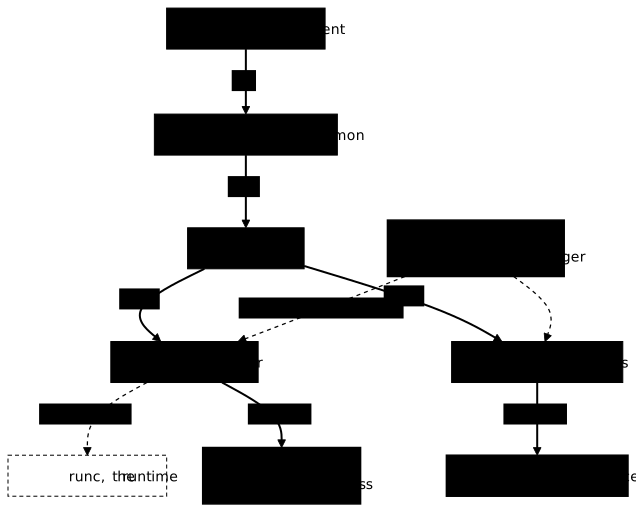
Each intermediate has a reason. The shim exists so that the container depends on neither the daemon nor containerd while it runs: it holds the input and output streams, collects the exit code and can be detached from its creators. The runtime is a program that knows how to apply a configuration in the OCI format (the standardized container format, which describes namespaces, cgroups and mounts) and create the process; the engine does not create containers itself.
How do you walk up the chain from the host?
You start from the container's process, whose number on the host side the engine gives (the PID, the identifier that the kernel assigns to each process), and you walk up from parent to parent. The veilleur container runs tail -f /dev/null, a command that does nothing and never ends: you only need a living process to walk up from.
docker run -d --name veilleur alpine:3.24@sha256:be2656061b536c1883c4034790e21d0a09c5aaaf51968b89368a3c0371ea2c9a tail -f /dev/nullPID=$(docker container inspect veilleur --format '{{.State.Pid}}')SHIM=$(ps -o ppid= -p "$PID" | tr -d ' ')PARENT=$(ps -o ppid= -p "$SHIM" | tr -d ' ')ps -o pid,ppid,args -p "$PID,$SHIM,$PARENT"The command ps -o ppid= -p N returns the number of process N's parent, without a header. Three lines should be displayed: the tail, its parent and the parent of that parent. ps sorts them by increasing number, so the shim's parent comes first and the tail last.
PID PPID COMMAND 1 0 /sbin/init 5257 1 /usr/bin/containerd-shim-runc-v2 -namespace moby -id 5de653b80403d6cff66eaa0d7ff9bc823ff707280d7d14df9c2f1b9ccbc24520 -address /run/containerd/containerd.sock 5281 5257 tail -f /dev/nullReread the shim's line before concluding that you made a mistake: its PPID is 1. The shim's parent is neither dockerd nor containerd: it is the machine's PID 1, the service manager (systemd on most distributions). The shim has been detached from the program that created it, deliberately. Check that the daemon and containerd are indeed separate services, with numbers distinct from this parent:
systemctl show --property=MainPID docker.service containerd.serviceMainPID=3660
MainPID=3511The two values follow the requested order (docker.service, then containerd.service) and are separated by an empty line. They differ from each other, and neither is 1, the number of the shim's parent.
To find the shim by another path, look for the container's identifier in the process list: a shim carries this identifier in its arguments.
ID=$(docker container inspect veilleur --format '{{.Id}}')ps -eo pid,ppid,args | grep "$ID" | grep -v grepThe line displayed is the shim's, with the -id option followed by the container's identifier, as in the previous output.
Why is there one shim per container?
Because with a single shim, its failure would take down all the containers. Start a second container and compare: it should have its own shim, with a different number, but the same parent.
docker run -d --name veilleur-bis alpine:3.24@sha256:be2656061b536c1883c4034790e21d0a09c5aaaf51968b89368a3c0371ea2c9a tail -f /dev/nullPID2=$(docker container inspect veilleur-bis --format '{{.State.Pid}}')SHIM2=$(ps -o ppid= -p "$PID2" | tr -d ' ')echo "veilleur shim = $SHIM, veilleur-bis shim = $SHIM2"ps -o ppid= -p "$SHIM2"veilleur shim = 5257, veilleur-bis shim = 53481This detachment is what makes the containers independent of the daemon that started them. What remains of them when the daemon stops is measured further down, after one last link in the chain: the runtime.
Which runtime actually creates the container?
The engine declares a default runtime and each container declares its own. The two coincide on a simple installation and differ as soon as you install several, for example a runtime that isolates the container more strongly from the host's kernel. Only the container's one tells the truth about that container.
docker info --format '{{.DefaultRuntime}}'docker container inspect veilleur --format '{{.HostConfig.Runtime}}'runcruncThis split into several intermediates makes it possible to replace the runtime without touching the rest of the chain: the shim, containerd and the daemon do not change.
Putting it into practice
The lab has you walk up the chain on a container that is already running: you note in an answers file the intermediate process that carries it, the parent of that intermediate and the runtime in use, then you start a second container to show that its intermediate is distinct. The validation queries the system at grading time: no number is written in the checks, it finds the intermediate through the container's identifier, reads the parent with ps and the runtime in the container's inspection. It expects the lab's container to be running, so do not restart the daemon before having validated the lab. The next section, which restarts it, comes after the lab.
Does a container survive a daemon restart?
Not by default, and the intuitive conclusion is wrong here. The shim's detachment makes survival possible, it does not produce it: without the live-restore setting, the daemon stops its containers when it stops. When it comes back, it restarts those whose restart policy (the container's --restart option) allows it, always and unless-stopped, with a new process number; the documentation specifies that on-failure does not restart a container when the daemon restarts. The "live-restore": true setting of the /etc/docker/daemon.json file asks on the contrary to keep the containers running while the daemon is stopped; it is presented in the daemon configuration (in French).
The measurement compares the process number and the start date before and after a restart. Do it on a test machine, never on a host that carries services. If you follow the lab in its VM, wait until you have validated the lab: its container, created without a restart policy, would fall with the daemon, and the validation would fail.
docker container inspect veilleur --format 'pid={{.State.Pid}} started={{.State.StartedAt}}'sudo systemctl restart dockerdocker container inspect veilleur --format 'pid={{.State.Pid}} started={{.State.StartedAt}}'pid=5281 started=2026-11-01T23:02:43.446341174Zpid=0 started=2026-11-01T23:02:43.446341174ZThe veilleur container was created without a restart policy: the daemon stopped it when stopping itself (exit code 137), and it did not come back. Its process number is therefore 0, and its start date has not changed since it did not restart. Wait a few seconds after the daemon restarts before reading the state again.
The restart policy (--restart, described in Read a Docker startup failure: exit codes and loops) decides whether a container stopped with the daemon is restarted on its return. With --restart unless-stopped, the same measurement gives a different result.
One precaution before redoing it: this second restart closely follows the first, and on Engine 29.9.2 the docker.service unit accepts only three starts per minute. On the fourth, systemctl answers "Job for docker.service failed because start of the service was attempted too often" and the unit goes into failure (start-limit-hit). The command sudo systemctl reset-failed docker lifts this limit, after which you can restart the daemon. The two restarts on this page, a few seconds apart, stay under the limit.
docker run -d --name veilleur-ur --restart unless-stopped alpine:3.24@sha256:be2656061b536c1883c4034790e21d0a09c5aaaf51968b89368a3c0371ea2c9a tail -f /dev/nulldocker container inspect veilleur-ur --format 'pid={{.State.Pid}} started={{.State.StartedAt}}'sudo systemctl restart dockerdocker container inspect veilleur-ur --format 'pid={{.State.Pid}} started={{.State.StartedAt}}'pid=5787 started=2026-11-01T23:03:00.023174869Zpid=6099 started=2026-11-01T23:03:11.137331998ZThe container is running again (state running), but with a new process number and a new start date: it was restarted, it did not survive.
How do you clean up after the measurements?
The three containers on the page each hold a process that never stops: delete them once the measurements are done. The -f option stops the container if it is running, which also covers veilleur, already down with the daemon.
docker rm -f veilleur veilleur-bis veilleur-urThe command prints the three names, one per line. docker ps -a --filter name=veilleur should list nothing anymore.
Key takeaways
-
A container's process is not a child of Docker: it descends from a shim (
containerd-shim-runc-v2), itself started through containerd at the request of thedockerddaemon. -
The shim's real parent is the machine's PID 1, the service manager, not the daemon nor containerd. The detachment is deliberate.
-
There is one shim per container, all attached to the same parent: the fall of one does not bring down the others.
-
The runtime is read per container (
.HostConfig.Runtime) and is replaced without changing the rest of the chain. Once the container is created,runcdoes not stay in memory. -
Detachment makes survival possible, it does not produce it: without
live-restore, a daemon restart stops the containers, and those that are restarted come back with a new process number.
Knowledge check
Check that you have grasped the essentials of this guide. The questions cover only what has just been explained here.
Knowledge check
Check what you have learned with this interactive quiz
How it works
- The timer starts when you click Start
- Multiple choice, true/false and short answer questions
- You can move between questions
- Detailed results are shown at the end
Starts the quiz and the timer
Review
(0/0)Score by domain
A domain groups several guides and gets several questions, so its score is more reliable than a per-topic score, which often rests on a single question.
Summary
Strengths
No topic passed at 80% on at least two questions yet.
Weak areas
No topic below the pass mark.
Recommended next
Hints before you try again?
Continue the course: Cap a container: CPU, ulimits and shared memory
A new full quiz with random questions
Work again only on the questions you missed