Your CI (continuous integration, which runs your checks on every change to the code) builds an image, but nobody knows whether it was tested before being published, or which commit it corresponds to. This lesson shows how to write a CI script that answers both questions: it builds the image of the commit, starts the service, waits for it to be healthy, runs the tests in a container, then publishes a docker save archive with a provenance file, and only if the tests passed. The script cleans up its containers on success and on failure. The outputs come from Docker Engine 29.9.2 with Compose v5.6.1, on Debian 13.7, with git 2.47.3. No registry receives the image: the archive stays in a local folder, but the FROM of the Dockerfile pulls alpine from Docker Hub at the first build.
Several names in this lesson are French because the commands and outputs are the ones that were run: phare-vitrine ("lighthouse storefront"), the services vitrine ("storefront") and verif ("check"), the files etat.txt ("state"), attendu.txt ("expected") and repondre.sh ("answer"), the variables COURT ("short") and SORTIE ("output"), the value balise-nord-17 ("north beacon"), and the messages printed by the scripts (valeur observee, valeur attendue, arbre de travail modifie, publie). They are identifiers and outputs, so they stay as they are. The comments in the code are in English.
What you will learn
- Write a script whose exit code decides the result of the CI
- Refuse a modified working tree and link the image to its commit
- Wait for the health of the service with
docker compose up --wait, then run the tests withdocker compose run --rm --no-deps - Clean up with a
trapset before the build, without a globalprune - Publish an archive with a provenance file, and reload it with the same
Id - Recognize the common failures (modified tree, failed test, unhealthy service, missing variable) by their code and their message
- Name what remains specific to the CI provider
Prerequisites
- Test the contract of an image: the health probe (
healthcheck) and the tests run from the outside, which the CI waits for and then runs. - Pin a base image, and deliver it offline:
docker save -o, thesha256sumreceipt and the identity of an image reloaded bydocker load. - Describe an application with Compose: a first stack: the Compose project, its life cycle and
docker compose down. - Robust Bash scripts: set -euo pipefail, trap and shellcheck:
set -euo pipefailandtrap, which the script of the lesson uses without explaining them again. - The basics of Git (in French):
git init,git add,git commitandgit status. - A host with Docker Engine 29.9.2 and git, and network access to Docker Hub to pull the
alpineimage at the first build. No knowledge of a CI provider is needed.
Publishing to a registry is not part of this lesson: it belongs to Publish and pull an image in a controlled way and Serve a trusted registry, and log in to it. Here, publishing means dropping an archive and its two companion files into a folder.
What is a CI, and what must its script do?
A CI (continuous integration) is a process that the provider launches on every change to the code, and its exit code decides the result: zero means everything is fine, a non-zero value means the chain failed. The provider (GitHub Actions, GitLab CI or another) only triggers the script and reads that code. All the logic, that is, what to build, what to test, when to publish, lives in a script of the repository that you can also run by hand.
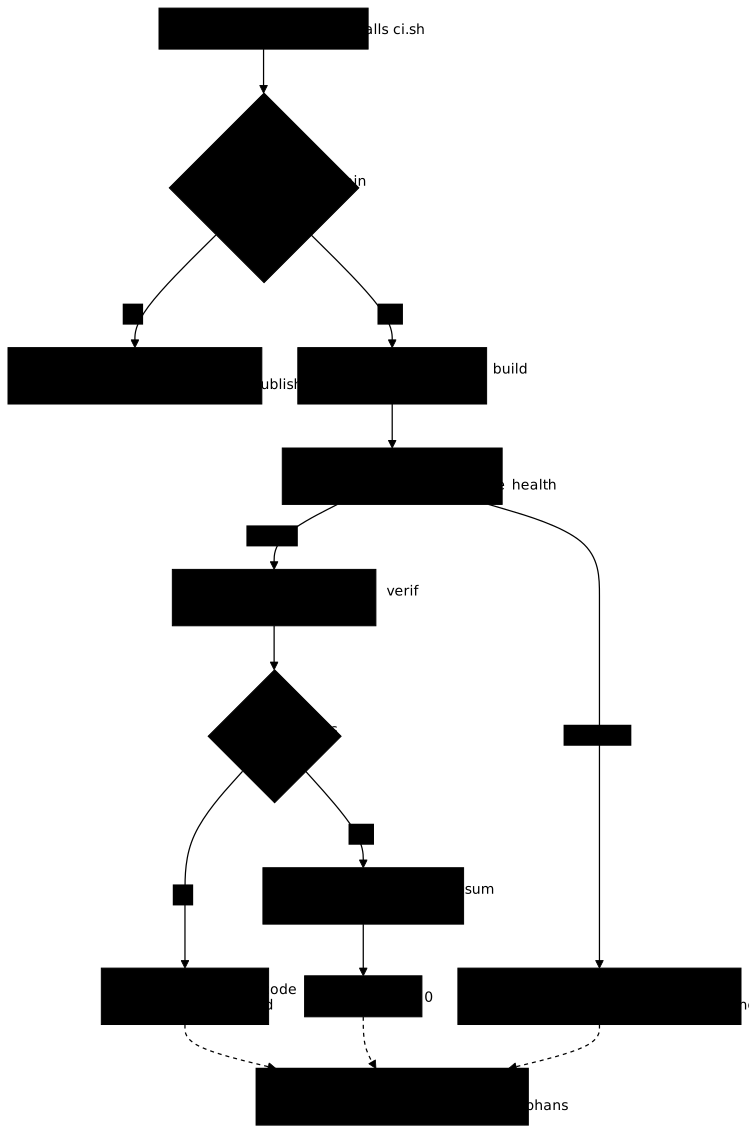
This separation has a concrete advantage: the script can be tested on your workstation before it is handed to a provider. The following diagram shows the decisions of the script of the lesson. Look at where each failure branch leads: none reaches the publication, and the three outcomes that started containers (unhealthy service, failed test, success) converge on the same cleanup.
Which application and repository serve as the example?
The application is called phare-vitrine. It is a tiny service that answers over HTTP with the content of the file site/etat.txt, here the value balise-nord-17. The image starts from alpine:3.24.3, whose digest is pinned. This version of Alpine has no httpd server: the container therefore runs nc (the BusyBox netcat), which executes the script site/repondre.sh on every connection.
FROM alpine:3.24.3@sha256:be2656061b536c1883c4034790e21d0a09c5aaaf51968b89368a3c0371ea2c9aARG REVISION=inconnueLABEL org.opencontainers.image.revision=$REVISIONWORKDIR /appCOPY . /appUSER 10001EXPOSE 8080CMD ["nc", "-lk", "-p", "8080", "-e", "sh", "/app/site/repondre.sh"]Two lines serve the CI. ARG REVISION receives the commit at build time, and LABEL org.opencontainers.image.revision engraves it in the image: it can be read back without consulting the CI. The .dockerignore file keeps everything else out of the image, in particular .git, because a Git repository in a published image exposes the whole history.
.git.gitignore.dockerignoreci.shcompose.yamlDockerfileThe compose.yaml file describes two services. vitrine is the application, with a health probe. verif is the test container: it belongs to the tests profile, so Compose starts it only when it is named explicitly. Both use the same image, tagged with the short commit supplied by the COURT variable.
services: vitrine: build: context: . image: phare-vitrine:${COURT:?} healthcheck: test: ["CMD", "wget", "-q", "-O", "/dev/null", "http://127.0.0.1:8080/etat.txt"] interval: 2s timeout: 2s retries: 10 verif: image: phare-vitrine:${COURT:?} profiles: ["tests"] command: ["sh", "/app/tests/verifier.sh"] depends_on: vitrine: condition: service_healthyThe ${COURT:?} syntax tells Compose to refuse to start if the variable is missing or empty: an image without a commit tag has no business in this chain. Compose then stops with code 1 and the message required variable COURT is missing a value, preceded by the path of the field concerned; docker compose config returns the same error. The test itself is a seven-line script, shebang included, that queries the service by its Compose name, vitrine, and compares the answer with the content of tests/attendu.txt.
#!/bin/shset -euobserve=$(wget -q -O - http://vitrine:8080/etat.txt)attendu=$(cat /app/tests/attendu.txt)echo "valeur observee : $observe"echo "valeur attendue : $attendu"[ "$observe" = "$attendu" ]The last line gives the verdict: if the two values differ, the script returns a non-zero code, and that is the code the CI will report.
How is the ci.sh script built?
The script follows the order of the diagram, and each choice answers a specific defect. Read it in full first, then the table that follows explains the lines that cannot be guessed.
#!/usr/bin/env bashset -euo pipefailcd "$(dirname "$0")"
if [ -n "$(git status --porcelain)" ]; then  echo "ci.sh : arbre de travail modifie, commitez ou annulez avant de lancer la CI" >&2  git status --short >&2  exit 2fi
REVISION=$(git rev-parse HEAD)export REVISIONcourt=${REVISION:0:12}export COURT=$courtprojet="phare-ci-${court}-$$"sortie=${SORTIE:-../publication}
dc() { docker compose -p "$projet" "$@"; }
trap 'dc down --volumes --remove-orphans' EXIT
dc build --quiet --build-arg REVISION="$REVISION"dc up --wait --detachdc run --rm --no-deps verif
image="phare-vitrine:${court}"mkdir -p "$sortie"archive="phare-vitrine-${court}.tar"docker save -o "${sortie}/${archive}" "$image"(cd "$sortie" && sha256sum "$archive" > "${archive}.sha256"){  echo "commit=${REVISION}"  echo "image_id=$(docker image inspect --format '{{.Id}}' "$image")"  echo "archive=${archive}"  echo "archive_sha256=$(cut -d' ' -f1 "${sortie}/${archive}.sha256")"} > "${sortie}/${archive}.provenance"echo "publie : ${sortie}/${archive}"
The script passed shellcheck 0.11.0 and the Dockerfile passed hadolint 2.15.1 without a single remark. The table links each line to its role; the protections set -euo pipefail and trap in general are those of the guide Robust Bash scripts: set -euo pipefail, trap and shellcheck.
| Line | What it guarantees |
|---|---|
set -euo pipefail | The first command that fails stops the script, and its code becomes the code of the script. |
git status --porcelain | The output is empty if and only if the tree is clean. Otherwise the script stops with code 2, before any build. |
git rev-parse HEAD | The full commit identifies the source. The first twelve characters name the tag and the project. |
projet="phare-ci-${court}-$$" | The name of the Compose project contains the commit and the process number ($$): two simultaneous runs on the same host share neither containers nor network. $$ is unique only within one PID namespace: two jobs launched in separate containers can get the same number, which is why the identifier of the job of your CI is preferable on a shared runner. |
trap '…' EXIT | The cleanup runs when the script exits, except on kill -9. It is set before the build, so that it also covers a build that fails. |
up --wait --detach | Compose returns when the service is healthy, instead of letting the tests start against a service that is still starting. |
run --rm --no-deps verif | The test container runs once, then disappears. --no-deps does not start the services that verif depends on, because vitrine is already running. |
If the health probe does not succeed, up --wait prints container <name> is unhealthy and returns code 1. With set -e, this code 1 makes the CI fail before the tests even start, and the trap removes the project. Run by hand, the same failure leaves the container in place: docker compose ps -a shows it as Up … (unhealthy), and a docker compose down is needed.
A detail on depends_on: with run --no-deps, Compose ignores the dependency declared in compose.yaml, and the real guard of the script is up --wait, which has already waited for the health of vitrine. The declaration remains useful for a docker compose run verif launched by hand without --no-deps, a case where Compose applies depends_on, health conditions included, according to its source code; that case was not replayed for this lesson.
No publication line comes before run … verif. A test that fails stops the script at that point: the archive is therefore never written for an image whose test failed. The rest of the script runs only after a success.
What happens when everything succeeds?
You first need a Git repository whose first commit contains all the files above, because the script reads the commit and refuses a modified tree. Here is the full tree of the demonstration repository.
Répertoirephare/
- .dockerignore
- ci.sh
- compose.yaml
- Dockerfile
Répertoiresite/
- etat.txt
- repondre.sh
Répertoiretests/
- attendu.txt
- verifier.sh
Three files have not been shown yet. site/repondre.sh is launched by nc on every connection: it reads and discards the headers of the request up to the empty line, then answers with an HTTP header and the content of etat.txt.
#!/bin/shcr=$(printf '\r')while read -r ligne && [ "$ligne" != "$cr" ] && [ -n "$ligne" ]; do :; doneprintf 'HTTP/1.0 200 OK\r\nContent-Type: text/plain\r\n\r\n'cat /app/site/etat.txtThe two other files contain a single line each: site/etat.txt holds balise-nord-17, the value served, and tests/attendu.txt also holds balise-nord-17, the value the test requires. The test succeeds as long as these two files say the same thing.
The following commands create the folder of the repository, put the files of the tree in it, make the first commit, then run the script.
mkdir phare && cd phare# create the files of the tree above heregit init -q -b main .git config user.name demo && git config user.email demo@example.invalidchmod +x ci.shgit add -A && git commit -q -m "etat initial balise-nord-17"./ci.sh; echo "CODE=$?"The script then returns its exit code. The lines that matter are the health of the service, the verdict of the test, then the publication message. Compose also prints every creation and removal of a container: the output below is abridged.
Container phare-ci-3bf77d26ee65-686742-vitrine-1 Waiting Container phare-ci-3bf77d26ee65-686742-vitrine-1 Healthy Container phare-ci-3bf77d26ee65-686742-verif-run-66b5e8d1fbac Creatingvaleur observee : balise-nord-17valeur attendue : balise-nord-17publie : ../publication/phare-vitrine-3bf77d26ee65.tar Container phare-ci-3bf77d26ee65-686742-vitrine-1 Stopping Network phare-ci-3bf77d26ee65-686742_default RemovedCODE=0Look at three things. The name of the project carries the commit (3bf77d26ee65) and a process number (686742). The Healthy state appears before the creation of the test container. And the cleanup (Stopping, then the removal of the network) is printed after the publication message, which shows that the cleanup comes after the publication, as the trap intends.
It remains to check the state of the host. No phare-ci container or network is left: docker ps -a --filter name=phare-ci and docker network ls --filter name=phare-ci list nothing, and neither does docker volume ls -q --filter name=phare-ci.
What does the published output contain?
The publication folder contains three files: the archive (3,871,744 bytes), its sha256sum receipt and the provenance file. The provenance links the three identities that an auditor will want to cross-check: the commit, the Id of the image and the digest of the archive.
commit=3bf77d26ee65cebd2f323f989d35e3a11875811bimage_id=sha256:c61ab8aace934594f0493d034cdfb0c930037862368019c6c2864dfe3c249b2earchive=phare-vitrine-3bf77d26ee65.tararchive_sha256=b301d194a5b34d40b1fa31942268b220a6e6ac3f4410cdcffdb68a30186ef0fbThis provenance file is written by hand by ci.sh. It must not be confused with the provenance attestation that Buildx adds by default (level mode=min) when the driver supports it, which is the case of the docker driver with the containerd image store, installed by default on a fresh installation since Docker 29: the detailed output of a build measured on Docker 29.9.2 shows the lines exporting attestation manifest and resolving provenance. The two are distinct; attestations and their verification belong to From SLSA provenance to decision: blocking non-compliant artifacts.
The commit in this file must be the one the image itself declares. It is read in the label, and you check that the Git repository is not in the image:
HEAD=$(git rev-parse HEAD)docker image inspect --format '{{ index .Config.Labels "org.opencontainers.image.revision" }}' phare-vitrine:${HEAD:0:12}docker run --rm phare-vitrine:${HEAD:0:12} test ! -d /app/.git; echo "test-no-git CODE=$?"3bf77d26ee65cebd2f323f989d35e3a11875811btest-no-git CODE=0The label returns the full commit, identical to HEAD, and /app/.git does not exist. An ls -A /app in the image shows only site and tests, because the .dockerignore kept out the rest.
Does the reloaded archive have the same identity?
To find out, first verify the archive with its receipt, as the lesson on offline delivery does: you do not load an archive whose checksum you have not verified. Then delete the image from the daemon, reload the archive, and compare the resulting Id with the one in the provenance. The receipt is verified from the publication folder, because it cites the file name without a path.
(cd ../publication && sha256sum -c phare-vitrine-${HEAD:0:12}.tar.sha256)docker rmi phare-vitrine:${HEAD:0:12}docker load -i ../publication/phare-vitrine-${HEAD:0:12}.tardocker image inspect --format 'Id charge: {{.Id}}' phare-vitrine:${HEAD:0:12}grep '^image_id=' ../publication/phare-vitrine-${HEAD:0:12}.tar.provenancephare-vitrine-3bf77d26ee65.tar: OKUntagged: phare-vitrine:3bf77d26ee65Deleted: sha256:c61ab8aace934594f0493d034cdfb0c930037862368019c6c2864dfe3c249b2eLoaded image: phare-vitrine:3bf77d26ee65Id charge: sha256:c61ab8aace934594f0493d034cdfb0c930037862368019c6c2864dfe3c249b2eimage_id=sha256:c61ab8aace934594f0493d034cdfb0c930037862368019c6c2864dfe3c249b2esha256sum -c answers OK before any loading. The loaded Id is sha256:c61ab8aace93…, identical to the image_id line of the provenance. The provenance file therefore does link the commit to the image that someone else will reload. It does not prove who wrote it: for that you need a signature, covered in Check what an image contains, and who signed it.
What happens when a test fails?
To provoke the failure, you make the expected value diverge from the served value, and you commit that change, since the script refuses a modified tree.
echo "balise-nord-18" > tests/attendu.txt && git commit -qam "attendu casse"./ci.sh; echo "CODE=$?"Compose also prints the container creations, which the output below abridges.
valeur observee : balise-nord-17valeur attendue : balise-nord-18
 Container phare-ci-4ff1dbf7688b-687385-vitrine-1 Stopping Network phare-ci-4ff1dbf7688b-687385_default RemovedCODE=1
The exit code is 1, that of the test, and not an expired timeout or a command not found. The publication folder still contains the three files of the previous commit: nothing was written for 4ff1dbf7688b. And the cleanup took place despite the failure: docker ps -a, docker network ls and docker volume ls -q filtered on phare-ci list nothing. That is the role of the trap EXIT.
Why does the CI refuse a modified working tree?
An image built from uncommitted files would carry a commit that does not describe its content. The label and the provenance would lie. The script therefore refuses to start. You modify a file without committing it to see this:
echo "balise-nord-99" >> site/etat.txt./ci.sh; echo "CODE=$?"ci.sh : arbre de travail modifie, commitez ou annulez avant de lancer la CI M site/etat.txtCODE=2The message names the offending file (M site/etat.txt), the code is 2, and the publication folder is unchanged. To continue, undo the modification with git checkout -- site/etat.txt: git status --porcelain becomes empty again.
How can you be sure the CI tests the source of the last commit?
The CI must never test a stale version. To check this, you commit a new served value, run the script again, and look at the value the test observes. The broken test of the section on the failure of a test expected balise-nord-18: you therefore commit that value in site/etat.txt, then run the script again.
echo "balise-nord-18" > site/etat.txt && git commit -qam "etat balise-nord-18"./ci.sh; echo "CODE=$?"The script returns this, again abridged of the container creation and removal lines:
valeur observee : balise-nord-18valeur attendue : balise-nord-18publie : ../publication/phare-vitrine-01ad98252dc6.tarCODE=0A following commit sets site/etat.txt and tests/attendu.txt to balise-nord-21.
echo "balise-nord-21" > site/etat.txt; echo "balise-nord-21" > tests/attendu.txtgit commit -qam "etat balise-nord-21"./ci.sh; echo "CODE=$?"The test observes balise-nord-21. Three archives then coexist in the publication folder, one per successful commit, never one for the commit whose test failed. Each run rebuilds the source it is given: dc build rebuilds the image from the working tree on every call, and the tag per commit guarantees that up and run use that image.
What is left to the CI provider?
To hand this script to a provider, the job is short: it fetches the repository, calls ./ci.sh, then keeps the publication folder as an artifact. A shallow clone (a single commit, without history) is enough, because the script needs only git rev-parse HEAD. The exit code of ci.sh becomes that of the job. Here is this job for GitHub Actions.
name: cion: push: pull_request:permissions: {}jobs: ci: runs-on: ubuntu-24.04 permissions: contents: read steps: - uses: actions/checkout@3d3c42e5aac5ba805825da76410c181273ba90b1 # v7.0.1 with: persist-credentials: false - name: Build, test, publish run: ./ci.sh env: SORTIE: ${{ runner.temp }}/publication - uses: actions/upload-artifact@cf430e030ddbb5b0abf93d22962f4752f3646cd9 # v7.0.2 with: name: publication path: ${{ runner.temp }}/publication if-no-files-found: errorThis job was not run for this lesson: only the script was, on a Debian 13.7 host with Docker Engine 29.9.2. Each action is pinned on the SHA of its commit, read on 2026-11-04, with its version in a comment, as the guide Pinning actions by SHA explains. The Docker version installed on the hosted runner may also differ from the 29.9.2 of the lesson, and the outputs with it.
Three choices of the job deserve an explanation. permissions: {} at the workflow level removes all the rights of the token, and the job gives back only contents: read, which is enough for actions/checkout. persist-credentials: false prevents the checkout from leaving the token in the Git configuration of the repository, where the following steps could read it. Finally, a pull_request event checks out a merge commit by default: the HEAD that ci.sh reads is then that of this ephemeral commit, not the last commit of the branch, and the label and the provenance carry a commit that nobody will find in the history. Two remedies: publish only on the push event, or check out the commit of the branch with github.event.pull_request.head.sha.
The SORTIE variable sets the publication folder. By default, ci.sh writes to ../publication, outside the repository. A publication folder created in the working tree and not ignored by Git would make git status --porcelain non-empty at the next run, and ci.sh would stop with code 2. In CI, SORTIE=${{ runner.temp }}/publication puts the publication in the temporary folder of the runner (it is the same path as $RUNNER_TEMP in a shell), and the upload step reads that path. On GitLab CI, the paths of artifacts:paths are relative to the project folder ($CI_PROJECT_DIR) and cannot point directly outside it. If a job downloads into the tree the artifact of a previous job, that untracked file makes git status --porcelain non-empty: ignore it through Git, or put the publication outside the tree with SORTIE.
What does not come from the script remains specific to the provider, and it is taught in the dedicated courses. There are four such items:
- the trigger, that is, the event that launches the job (push, merge request, tag);
- the permissions of the token the job receives, to be reduced to the minimum: this script writes to no registry, so it only needs to read the repository;
- the secrets, which this script does not need as long as it does not publish to a registry;
- the remote cache of the build layers, which speeds up runs on fresh machines.
For GitHub, see the course GitHub Actions: securing your CI/CD, whose first reflex is Pinning actions by SHA. For GitLab, see GitLab CI/CD course: from first pipeline to secure production and Writing a .gitlab-ci.yml file. The remote layer cache (--cache-from and --cache-to), the min and max modes and the promotion of an image from one registry to another without rebuilding it are measured in BuildKit cache in CI and image promotion between registries. You will know a job is well designed if you can say, line by line, which one comes from the provider and which one comes from ci.sh.
How do you troubleshoot a failing CI?
This table starts from the symptom that the CI displays. The first four rows reproduce outputs measured on Docker 29.9.2 and Compose 5.6.1; the following ones describe plausible causes for this type of script, without having been replayed. Two failures return code 1: read the message to tell them apart, because one comes from the test and the other from the service.
| Symptom | Likely cause | Fix |
|---|---|---|
Code 2 and arbre de travail modifie | A tracked file is modified, or an untracked file is not ignored by Git | Commit or undo the change, re-read git status --porcelain |
Code 1 and valeur observee different from valeur attendue | The test detects a real difference | Fix the source or the expected value, then commit |
Code 1 and container <name> is unhealthy during up --wait, with no valeur observee line | The health probe never turns green: the service does not start, or the probe command targets a wrong port or path. The container stays in place, docker compose ps -a shows it as Up … (unhealthy) | Read the docker compose logs of the service, fix the service or the probe. Run by hand, remove the project with docker compose down; ci.sh does it through its trap |
Code 1 and required variable COURT is missing a value | COURT is missing or empty: Compose launched by hand without going through ci.sh | Export COURT with the first twelve characters of the commit |
phare-ci-… containers still listed by docker ps -a | The script was killed without the trap running, for example by kill -9 | Remove them with docker compose -p <project> down --volumes --remove-orphans, naming the project; COURT is not needed for down |
| The test fails although the service seems to work | The test starts before the service is healthy | Check that a healthcheck probe exists, and that the script waits for up --wait before run --no-deps; depends_on alone is ignored with --no-deps |
| One run overwrites the containers of another | Identical project name between two jobs | Add $$ or the job identifier to the project name |
Practice
The lab gives you the source, the Dockerfile, the Compose stack and the test, and a supplied ci.sh that for now refuses to start: it is up to you to make it work. Its input contract (environment variables) and the names of the published files are those of the lab, not those of the lesson; the principles are the same. The validation runs your script on real jobs: it forces a test failure, modifies the source, then checks the exit codes, the absence of an archive after a failure or a refusal, the identity of the published image and the cleanup of the project.
How do you clean up after the experiments?
The experiments leave phare-vitrine images in the daemon, a publication folder and the demonstration repository. Remove them by name: a global docker system prune would also remove objects that do not belong to you.
docker image ls --filter reference='phare-vitrine' --format '{{.Repository}}:{{.Tag}}'docker rmi phare-vitrine:<short-commit>rm -rf ../publicationReplace <short-commit> with a tag listed by the first command and repeat docker rmi for each one, then delete the folder of the demonstration repository, the one that contains ci.sh.
Key points
- The exit code of the script decides the CI: the provider only reads it.
- A modified tree is refused before any build, because the commit must describe the image.
- The commit travels in the image through
ARG REVISIONand the labelorg.opencontainers.image.revision, and the.dockerignorekeeps.gitout of the image. up --waitwaits for health and returns code 1 if the service stays unhealthy,run --rm --no-depsruns the tests, and their code becomes that of the CI.- The
trap EXITset before the build cleans up on success and on failure, with a unique project name per run and without a globalprune. - You publish after the tests succeed, never before: an archive, its
sha256sumreceipt and a provenance file that links commit,Idand digest. - The archive reloaded by
docker loadhas theIdof the provenance; a signature remains necessary to prove the author.
Knowledge check
Check that the essentials of this guide have stuck. The questions cover only what has just been explained here.
Knowledge check
Check what you have learned with this interactive quiz
How it works
- The timer starts when you click Start
- Multiple choice, true/false and short answer questions
- You can move between questions
- Detailed results are shown at the end
Starts the quiz and the timer
Review
(0/0)Score by domain
A domain groups several guides and gets several questions, so its score is more reliable than a per-topic score, which often rests on a single question.
Summary
Strengths
No topic passed at 80% on at least two questions yet.
Weak areas
No topic below the pass mark.
Recommended next
Hints before you try again?
Continue the course: Check what an image contains, and who signed it
A new full quiz with random questions
Work again only on the questions you missed