Your compose.yaml works, but it contains values that change from one machine to another: a port, a database name, a demo password. Writing them in the file forces you to edit it at every change, and to version them along with it. Compose can fetch them from elsewhere, from two clearly distinct places that this lesson teaches you not to mix up.
This lesson is for a beginner who can write a compose.yaml and read docker compose config. You replace hard-coded values with variables, you store those values in a .env file, then you follow a value all the way into a container. At each step, docker compose config shows what Compose understood before anything starts.
What you will learn
- Write a variable value with
${VAR}, give it a default value with${VAR:-default}or make it required with${VAR:?message}. - Store values in a
.envfile or in a file given with--env-file, and predict which source wins when the shell,--env-fileand.envdefine the same variable. - Tell the
.envfile, which fills in thecompose.yaml, apart fromenv_file:andenvironment:, which fill in the container. - Check the result with
docker compose config, then withprintenvin the container. - Write a
$meant for the container with$$. - Name what does not belong in a
.envthat goes into Git.
Prerequisites
You need the previous lesson, Describe an application with Compose, and what it assumes: a Linux host with Docker Engine 29.9.2 and the Compose 5.6.1 plugin, installed as shown in the lesson on installing Docker. You know how to write a compose.yaml, start it with docker compose up -d, read docker compose config and name a project.
You reuse the same two images, pinned by their SHA-256 digest, in a new ~/vitrine folder. The values in the lesson (passwords included) are demo values: do not reuse any of them on a real project.
How do you put a variable value in a compose.yaml?
You replace the value with ${NAME}. Before even reading the file, Compose replaces each ${NAME} with the value of the variable NAME: this is interpolation. The text ${NAME} no longer exists when Compose decides what to run.
Create the folder and a first file with a single service. The port published on the machine is no longer written in the file.
mkdir ~/vitrine && cd ~/vitrineservices: site: image: nginx:1.30.6-alpine@sha256:0e52bd054126cdc040b1276c0af347aeb02a41b9cfe305d6094767ac30e97949 ports: - "127.0.0.1:${PORT_SITE}:80"A variable has a name made of letters, digits and underscores, written in capitals by habit. Here, it still needs a value. The most direct way is to put it in front of the command, which makes it visible for that single command only.
PORT_SITE=18420 docker compose configname: vitrineservices: site: image: nginx:1.30.6-alpine@sha256:0e52bd054126cdc040b1276c0af347aeb02a41b9cfe305d6094767ac30e97949 networks: default: null ports: - mode: ingress host_ip: 127.0.0.1 target: 80 published: "18420" protocol: tcpnetworks: default: name: vitrine_defaultLook at the published line: it contains 18420, the value you set, and no trace of ${PORT_SITE} is left. This is what Compose would run. This command creates nothing, so you can replay it as often as needed.
What happens when a variable is not defined?
Compose does not stop: it prints a warning and treats the variable as an empty string. Run the same command without giving a value.
docker compose configWARN[0000] The "PORT_SITE" variable is not set. Defaulting to a blank string.The warning names the missing variable, but the command still succeeds (exit code 0). In the configuration it then prints, the published line has disappeared: ports: boils down to 127.0.0.1::80, which no longer fixes any port on the machine side. At startup, Docker picks one itself, an ephemeral port such as 32768 that docker compose port site 80 prints. This is not what you meant to write, and a warning is easily lost in a terminal. Two notations avoid the problem: give a default value, or refuse to continue.
${NAME:-default} uses default when the variable is unset or empty. ${NAME:?message} stops everything with your message when it is unset or empty. The table summarizes these two forms and their variants without a colon, which only handle the "unset" case.
| Notation | Variable unset | Variable empty (NAME=) | Variable defined |
|---|---|---|---|
${NAME} | empty string, with a warning | empty string | its value |
${NAME:-default} | default | default | its value |
${NAME-default} | default | empty string | its value |
${NAME:?message} | error with the message | error with the message | its value |
${NAME?message} | error with the message | empty string | its value |
Remember mostly the two forms with a colon: the default value for what may be missing, the error message for what the application cannot make sense without. Edit the file to use both.
services: site: image: nginx:1.30.6-alpine@sha256:0e52bd054126cdc040b1276c0af347aeb02a41b9cfe305d6094767ac30e97949 ports: - "127.0.0.1:${PORT_SITE:-18420}:80" environment: SITE_TITLE: ${SITE_TITLE:?SITE_TITLE est obligatoire}The port now has a default value, and the site title is required. With nothing defined, docker compose config stops on an error instead of going on with an empty value.
docker compose configerror while interpolating services.site.environment.SITE_TITLE: required variable SITE_TITLE is missing a value: SITE_TITLE est obligatoireThe message names the missing value, then repeats your text. Supply the value and watch the port take its default value.
SITE_TITLE=Vitrine docker compose config | grep -E 'SITE_TITLE|published' SITE_TITLE: Vitrine published: "18420"The title comes from the shell, the port from the default value.
How do you store values in a .env file?
You write them in a file named .env, placed in the project folder, next to the compose.yaml. Compose reads it by itself on every command and uses it to fill in the ${...}. You have nothing to declare in the compose.yaml.
Each line has the form NAME=value. A line that starts with # is a comment. Quotes are used when the value contains spaces or an apostrophe.
cat > .env <<'EOF'PORT_SITE=18430SITE_TITLE="Vitrine d'été"EOFThe name starts with a dot: only ls -a shows it. The double quotes around SITE_TITLE let you write the apostrophe without protecting it. Read the result again.
docker compose config | grep -E 'SITE_TITLE|published' SITE_TITLE: Vitrine d'été published: "18430"Both values come from the .env, and the port from the .env (18430) has taken the place of the default one (18420). The .env file only serves to fill in the compose.yaml. It gives no variable directly to the containers: that is the topic of the section "How do you give variables to the container itself?".
Quotes also change the meaning of the $ sign in a value. Between single quotes, the text is kept as is. Without quotes or between double quotes, Compose replaces $NAME with the matching variable, taken from the shell or from higher up in the file. To write a literal dollar sign outside single quotes, double it ($$) or, between double quotes, precede it with a backslash (\$).
.env line | Value received |
|---|---|
NAME='a$HOME b' | a$HOME b |
NAME="a$HOME b" | a, the value of HOME, then b |
NAME=pw$$x | pw$x |
NAME="p\$x" | p$x |
Do not be surprised to read $$ in the output of docker compose config for values that contain a literal dollar sign: the command doubles every dollar sign so that its output can be read again by Compose. The value a container really receives is the one in the right-hand column.
Which value source wins?
When the same variable is defined in several places, Compose keeps the highest-priority source. To fill in a ${...}, the order is the following, from strongest to weakest.
| Priority | Source | Example |
|---|---|---|
| 1 | The shell variable | PORT_SITE=18440 docker compose config |
| 2 | The file given with --env-file | docker compose --env-file recette.env config |
| 3 | The project's .env file, read when no --env-file is given (or when you pass it yourself) | the file created above |
| 4 | The default value of ${NAME:-default} | ${PORT_SITE:-18420} |
Check the first two rows of the table. A shell variable against the .env:
PORT_SITE=18440 docker compose config | grep published published: "18440"The .env says 18430, the shell says 18440, and the shell wins. Now create a second values file, recette.env, that only defines the port, then give it with --env-file.
echo 'PORT_SITE=18450' > recette.envdocker compose --env-file recette.env configerror while interpolating services.site.environment.SITE_TITLE: required variable SITE_TITLE is missing a value: SITE_TITLE est obligatoireThe error is instructive. SITE_TITLE is defined in .env, and Compose does not find it: when you give a single --env-file, the project's .env is no longer read. The given file replaces the .env, it does not complete it. There is a way to keep both, presented further down in this section. Add SITE_TITLE to recette.env so that the command succeeds, then combine the three sources.
echo 'SITE_TITLE=Recette' >> recette.envPORT_SITE=18460 docker compose --env-file recette.env config | grep -E 'SITE_TITLE|published' SITE_TITLE: Recette published: "18460"The title comes from recette.env, because the shell does not define it. The port comes from the shell, because it wins over recette.env. Each variable is resolved separately: the winning source can differ from one variable to another.
To keep the .env and override only a few values, give both files, in order: docker compose --env-file .env --env-file recette.env config. Both are read, and the last one wins for a variable defined in both. A variable present only in .env stays available.
To see at a glance the values Compose kept, docker compose config --environment lists them in the form NAME=value. The list also contains your whole shell environment: filter it, for example with grep -E 'PORT_SITE|SITE_TITLE'.
The shell wins, even when you have forgotten about it. A variable exported earlier in your session (export PORT_SITE=…) wins over the .env with nothing to show it. If a value from the .env seems ignored, run env | grep NAME before looking elsewhere.
How do you give variables to the container itself?
You give them with environment: and env_file:, which have nothing to do with the .env file. These two fields describe the variables the program inside the container will receive, whereas .env and --env-file only fill in the ${...} of the compose.yaml. The diagram puts the two circuits side by side.
In the left-hand column, Compose looks for the value of each ${...} in the shell, then in --env-file (otherwise in .env), then in the default value: the first source that defines the variable wins. In the right-hand column, the container's program receives its variables from environment:, then from env_file:, then from the image's ENV. No arrow links the two columns: the .env only feeds the left-hand one.
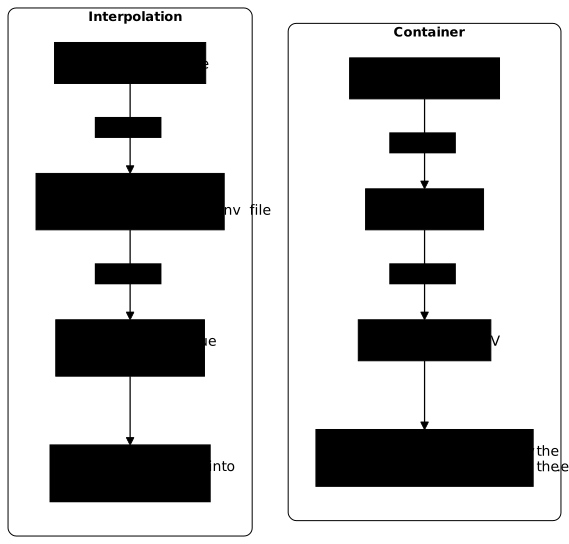
The .env reaches the container only through a detour: an environment: line that contains a ${...}, like SITE_TITLE above. The container then receives the value Compose found while interpolating, not the file itself.
Add a base service that receives its password from a file, and whose database name comes from a variable. The base.env file deliberately contains an old database name.
cat > base.env <<'EOF'POSTGRES_PASSWORD=demo-seulementPOSTGRES_DB=ancienne_baseEOFservices: site: image: nginx:1.30.6-alpine@sha256:0e52bd054126cdc040b1276c0af347aeb02a41b9cfe305d6094767ac30e97949 ports: - "127.0.0.1:${PORT_SITE:-18420}:80" environment: SITE_TITLE: ${SITE_TITLE:?SITE_TITLE est obligatoire}
base: image: postgres:18.6-alpine3.24@sha256:10a5c69a83035ab5239f5620d708520e8b28f5aa1f2b20143e6024532edadfb5 env_file: - base.env environment: POSTGRES_DB: ${DB_NAME:-vitrine}The base service receives all of base.env through env_file:, then environment: sets POSTGRES_DB to the value of DB_NAME, or to vitrine if it is missing. The database name therefore appears twice, with two different values. Start, then ask the container what it received.
docker compose up -ddocker compose exec base printenv POSTGRES_DB[+] up 3/3 ✔ Network vitrine_default Created 0.0s ✔ Container vitrine-site-1 Started 0.3s ✔ Container vitrine-base-1 Started 0.4svitrineThe last line is the answer from printenv: the container received vitrine, not ancienne_base. environment: wins over env_file: when both define the same variable.
The image's variables come last. They are set by the Dockerfile's ENV instruction and only apply if neither environment: nor env_file: defines them. The postgres image sets PG_MAJOR to 18, for example. An env_file: that sets it to 99 makes the container read 99, and an environment: that sets it to 55 makes it read 55.
Now check that the .env does not give its variables to the container. The title is received, because environment: declares it. The port, on the other hand, is declared in no container field: it only appears in the .env and in an interpolation.
docker compose exec site printenv SITE_TITLEdocker compose exec site printenv PORT_SITE; echo "code=$?"Vitrine d'étécode=1printenv prints Vitrine d'été for the title. For PORT_SITE, it prints nothing and returns code 1, which means "variable not set". The port was used to build the ports: line, then it disappeared: a ${...} is replaced before startup, and the variable does not travel to the container.
docker compose config tells you what Compose is going to do. printenv tells you what the program received. When an application misbehaves, ask both questions.
To pass a variable from your shell without writing it, list its name alone in environment: (a list entry, - NAME, without =): Compose copies the value from the shell. When the shell does not define the variable, nothing is passed: docker compose config shows it as null, and printenv NAME returns code 1 in the container, as for an unset variable. To get a variable that is present but empty, write - NAME=.
Beware of mixing: an environment: block is written as a list or as a dictionary, never both. As soon as you add a - NAME line, rewrite the whole block as a list (- NAME=value) instead of NAME: value. A mixed block is rejected as invalid YAML.
After changing a value, run docker compose up -d again. Compose recreates only the service whose configuration changed. A container that is already running never rereads its variables: without recreation, it keeps the old value. So docker compose restart is not enough: it restarts the same container, with the same variables.
The change can come from the shell (SITE_TITLE=Autre docker compose up -d), from the .env (another port) or from the contents of an env_file:. A line added to base.env recreates base and leaves site in place. Going back to the old value then recreates the service a second time, and an up -d with no change at all prints Running for each container.
How do you write a dollar sign meant for the container?
Double it: $$. A single $ is always taken by Compose as the start of a variable to replace, even in the middle of a command meant for the container. For Compose to let the dollar sign through, you must write $$: the container then receives a single $.
Make site write a small file that contains its own host name. The HOSTNAME variable exists only in the container: Docker defines it at startup. The command: field replaces the image's startup command: here, a shell writes the file, then runs nginx in the foreground. Add these lines to the site service, next to environment:.
command: - sh - -c - echo "machine=$$HOSTNAME" > /usr/share/nginx/html/identite.txt && exec nginx -g 'daemon off;'Apply the change, then read the file through the published port and compare it with the name the container gives itself.
docker compose up -dcurl -sS http://127.0.0.1:18430/identite.txtdocker compose exec site hostnamemachine=3110cee8118a3110cee8118aThe published port assumes PORT_SITE=18430, read from the .env. If curl reports a refused connection, nginx is not listening yet: wait a second, then run the command again. Both lines must carry the same identifier, which changes each time the container is recreated. The container's shell expanded $HOSTNAME at startup, because Compose left the $ untouched.
With a single $, Compose would have looked for a HOSTNAME variable in your shell or in the .env, and would have replaced it before startup. If HOSTNAME is defined nowhere, Compose prints the usual warning and the file contains machine= with nothing after it. With HOSTNAME=hote-vm docker compose up -d, it contains machine=hote-vm. In both cases, it is not the container's name.
What should never go in a versioned .env?
Nothing that is secret, and nothing that depends on one particular machine. A .env pushed to Git is copied to every workstation, kept in the history and visible to everyone with access to the repository. A password stays in the history, even if you remove it in the next commit, as the lesson on Docker secrets (in French) points out.
A versioned .env can contain settings shared by the whole team and harmless, such as an image tag or the project name. Passwords, tokens, keys and values specific to one workstation (a local port, a personal path) stay out of the repository. In the lesson, base.env holds a password: it would not go into Git.
The usual practice is to ignore the real files and to version a template with no sensitive value. Write the names of the files to ignore in .gitignore, and keep an example next to them, for instance a base.env.example file whose values are placeholders to replace.
.envbase.envrecette.envThese rules only protect a file that Git does not track yet. If you have already added a .env to the index, .gitignore does not remove it from there, as the lesson on the .gitignore file (in French) explains.
Two other places show your values in clear text: the output of docker compose config, which prints everything that was interpolated, and docker inspect, which lists a container's variables. Do not paste their output into a ticket without rereading it. For the passwords of a real application, the right answer is elsewhere: Compose secrets, covered in the module "Make a stack reliable".
What to do when a value is not the expected one?
Start with docker compose config, which shows the value kept, then with printenv in the container, which shows the value received. The table links the most frequent symptoms to their cause.
| What you see | Probable cause | What you do |
|---|---|---|
The "NAME" variable is not set. Defaulting to a blank string. | The variable exists neither in the shell nor in the file read | Define it, or write ${NAME:-default} |
required variable NAME is missing a value | The variable is required (:?) and unset or empty | Supply it through the shell, --env-file or .env |
A value from the .env is ignored | A shell variable masks it, or --env-file replaced the .env | env | grep NAME, then reread the command you ran |
The container does not see a variable from the .env | The .env only fills in the compose.yaml | Add the variable to environment: or to an env_file: |
| The container keeps the old value | It was not recreated, or only restarted by restart | Run docker compose up -d again |
A $ in your command disappears | Compose took it for a variable | Double it: $$ |
How do you clean everything up after the demo?
The demo leaves containers, a network, an anonymous volume created by the postgres image, the ~/vitrine folder and two images. The -v option of docker compose down removes this anonymous volume along with the containers and the network. Then remove the images, then the folder.
cd ~/vitrinedocker compose down -vdocker rmi nginx:1.30.6-alpine@sha256:0e52bd054126cdc040b1276c0af347aeb02a41b9cfe305d6094767ac30e97949 \ postgres:18.6-alpine3.24@sha256:10a5c69a83035ab5239f5620d708520e8b28f5aa1f2b20143e6024532edadfb5cd ~ && rm -f vitrine/compose.yaml vitrine/.env vitrine/base.env vitrine/recette.env \ vitrine/.gitignore vitrine/base.env.example && rmdir vitrineAfter that, docker ps -a, docker volume ls and docker images show nothing left from the lesson. Also check that no variable from the lesson lingers in your session with env | grep -E 'PORT_SITE|SITE_TITLE|DB_NAME': the command must print nothing.
One case is an exception. -v only removes the volume of the containers that exist at that moment. If you ran docker compose down without -v, then a new up -d, the volume of the first set of containers stays behind, orphaned. Spot it with docker volume ls -f dangling=true and remove it with docker volume rm.
Practice
The lab gives you a Compose declaration that mixes up the values used to build the file with those the container receives. You do not modify the values files: you only repair the compose.yaml, so that each value arrives by the right path, and you start a service under an imposed project name.
The check looks at what runs, not at what you typed. It reads the configuration Compose resolves, the container's real variables and the file the container writes at startup, which also grades your use of $$. It then changes a value in the shell, recreates the service, and requires that this value wins over the one in the file; finally it recreates the original deployment. A container tweaked by hand does not survive this recreation: only the file counts.
Key points
-
${NAME}is replaced by Compose before startup, and by an empty string if the variable is missing.${NAME:-default}gives a default value,${NAME:?message}stops the command with your message. -
The
.envfile in the project folder is read by itself and fills in the${...}.--env-filegives another file, which replaces the.envinstead of completing it. To keep both, pass--env-file .env --env-file recette.env: the last one wins. -
For an interpolation, the shell wins over
--env-file, which wins over.env(read only without--env-file, or passed in addition), which wins over the default value. Each variable is resolved separately. -
The
.envgives no variable directly to the container.environment:andenv_file:do, andenvironment:wins overenv_file:, which wins over the image'sENV. -
docker compose configshows what Compose is going to do,printenvin the container shows what it received. After a change of value,docker compose up -drecreates the service. -
A
$meant for the container is written$$. -
A versioned
.envcontains no secret and no workstation-specific setting: the real files are ignored in.gitignoreand an example is versioned.
Knowledge check
Check that the essentials of this lesson have stuck. The questions cover only what has just been explained here.
Knowledge check
Check what you have learned with this interactive quiz
How it works
- The timer starts when you click Start
- Multiple choice, true/false and short answer questions
- You can move between questions
- Detailed results are shown at the end
Starts the quiz and the timer
Review
(0/0)Score by domain
A domain groups several guides and gets several questions, so its score is more reliable than a per-topic score, which often rests on a single question.
Summary
Strengths
No topic passed at 80% on at least two questions yet.
Weak areas
No topic below the pass mark.
Recommended next
Hints before you try again?
Continue the course: Organize the networks of a Compose stack
A new full quiz with random questions
Work again only on the questions you missed