The base image, or base, is the FROM line of your Dockerfile: it provides the C library (the libc, the system code on which almost every program relies), the shell, the certificates and the package manager that your application uses without ever declaring them. This lesson is for people who already write Dockerfiles and now have to arbitrate a base and track it over time. You will see four things: what a base really provides, measured on two real bases; why changing the FROM line breaks execution and on which message; what a minimal image takes away from diagnosis; and how to keep a base that goes out of support or changes under its tag.
What you will learn
- Read the contract of a base: libc, shell, certificates, time zones, accounts
- Decide between musl and glibc on what your binary demands, not on a reputation
- Diagnose the misleading message that follows a change of
FROM - Price the two ways to repair a migration: rewrite or reinstall
- Weigh a minimal image (
scratch, distroless, Wolfi): what it removes, what it costs in diagnosis - Track the support window of the base and notice that it has moved under its tag
Prerequisites
- A working Docker (Install Docker Engine 29 and prove it works); the measurements on this page come from Docker 29.9.2
- Knowing how to write a Dockerfile and run a build (Write a Dockerfile and control its build context)
- Knowing how to read the layered structure of an image (Understanding container images, in French)
Size reduction proper is covered elsewhere: optimizing image size (in French) covers multi-stage builds, .dockerignore, cache cleanup, and a measured comparison of base images. This lesson is about choosing the base, what a minimal image changes for diagnosis, and maintaining the base; it does not repeat that comparison.
Several names and strings in this page are French because the commands are the ones that were run: releve is a "reading" script, temperatures.txt its input, /entrees/ means "inputs", cumul "running total", pluies "rainfall", mesures "measurements". In the echo strings, absent and absents mean missing, certificats certificates, fuseaux time zones, and plus de means "no more". They are identifiers and program output, so they stay as they are.
What does a base image really provide?
A base is not a decoration, it is an execution contract: the set of files your program assumes are present without having declared them. Querying this contract takes one command, and you should do it before adopting a base. Here is the survey of two common bases, measured on November 1, 2026 on Docker 29.9.2, amd64 architecture. They differ first by their libc: musl is Alpine's lightweight libc, glibc is that of Debian, Ubuntu and many other distributions. Both play the same role and are not interchangeable at the binary level.
| What the base provides | alpine:3.24 | debian:13-slim |
|---|---|---|
| C library | musl 1.2.6 | glibc 2.41 |
/bin/sh | yes (BusyBox, a minimal suite of tools) | yes |
/bin/bash | missing | present, 1.3 MB |
| Package manager | apk | apt-get |
| Root certificate package | present, 118 certificates | missing, no /etc/ssl/certs |
| Time zone database | missing | /usr/share/zoneinfo |
Accounts in /etc/passwd | 17 | 18 |
Two rows of this table are surprising, and they are the ones that matter: neither base is a superset of the other. Alpine ships a real root certificate store, which debian:13-slim lost when it was slimmed down; Debian ships the time zones, which Alpine does not know. An application that calls an API over HTTPS therefore starts with nothing to install on Alpine, and an application that converts dates to local time starts with nothing to install on Debian. Repeat the measurement on your own bases rather than copying this table: it describes two images on one date.
The command that produced it fits in a throwaway container, and you can replay it on any base.
docker run --rm alpine:3.24@sha256:be2656061b536c1883c4034790e21d0a09c5aaaf51968b89368a3c0371ea2c9a \ sh -c 'ls /lib/libc.musl-x86_64.so.1 2>/dev/null && echo musl || echo glibc; \ command -v bash || echo "bash absent"; \ ls /etc/ssl/certs/ca-certificates.crt 2>/dev/null || echo "certificats absents"; \ ls -d /usr/share/zoneinfo 2>/dev/null || echo "fuseaux absents"'/lib/libc.musl-x86_64.so.1muslbash absent/etc/ssl/certs/ca-certificates.crtfuseaux absentsThe Debian column is measured with the same command, applied to the pinned debian:13-slim image. The /usr/bin/bash path appears because, on Debian, /bin is a link to /usr/bin.
docker run --rm debian:13-slim@sha256:f6b08b09a05725f9431502d3b5714f5c4576e82c1a84fa1debe0c24a7e0c3ec4 \ sh -c 'ls /lib/libc.musl-x86_64.so.1 2>/dev/null && echo musl || echo glibc; \ command -v bash || echo "bash absent"; \ ls /etc/ssl/certs/ca-certificates.crt 2>/dev/null || echo "certificats absents"; \ ls -d /usr/share/zoneinfo 2>/dev/null || echo "fuseaux absents"'glibc/usr/bin/bashcertificats absents/usr/share/zoneinfoThis command answers yes or no. The numeric values of the table (libc version, number of accounts, number of certificates, size of bash) are read with a second command, run on each of the two images:
for image in \ alpine:3.24@sha256:be2656061b536c1883c4034790e21d0a09c5aaaf51968b89368a3c0371ea2c9a \ debian:13-slim@sha256:f6b08b09a05725f9431502d3b5714f5c4576e82c1a84fa1debe0c24a7e0c3ec4; do echo "== $image" docker run --rm "$image" sh -c 'ldd --version 2>&1 | head -2; wc -l < /etc/passwd; \ grep -c "BEGIN CERT" /etc/ssl/certs/ca-certificates.crt 2>/dev/null || echo 0; \ ls -lh /bin/bash 2>/dev/null || echo "pas de bash"'done== alpine:3.24@sha256:be2656061b536c1883c4034790e21d0a09c5aaaf51968b89368a3c0371ea2c9amusl libc (x86_64)Version 1.2.617118pas de bash== debian:13-slim@sha256:f6b08b09a05725f9431502d3b5714f5c4576e82c1a84fa1debe0c24a7e0c3ec4ldd (Debian GLIBC 2.41-12+deb13u4) 2.41Copyright (C) 2024 Free Software Foundation, Inc.180-rwxr-xr-x 1 root root 1.3M Jul 12 16:58 /bin/bashldd --version names the libc and its version, wc -l counts the lines of /etc/passwd, so the accounts, and grep -c counts the certificates in the root file, 0 meaning here that the file is missing. These values are those of the table.
The base is pinned by its digest, the cryptographic fingerprint of its content: without it, the measurement would apply to a content that changes under the tag, and the section on maintenance comes back to this. If your application needs one of the elements reported missing, you have just found a migration task, before having built anything.
Why does changing the FROM line break execution?
Because the kernel never directly runs a script or a dynamic binary: it runs the interpreter that the file asks for. A script asks for the program named in its shebang, the first #! line that designates the interpreter. An ELF binary (the format of Linux executables) asks for its dynamic linker, the program that loads the libc at startup. If that path does not exist on the new base, the call fails, and the engine reports the error under the name of the file you asked for, not under the one that is missing. That is the whole trap: the message accuses a file that is in fact there.
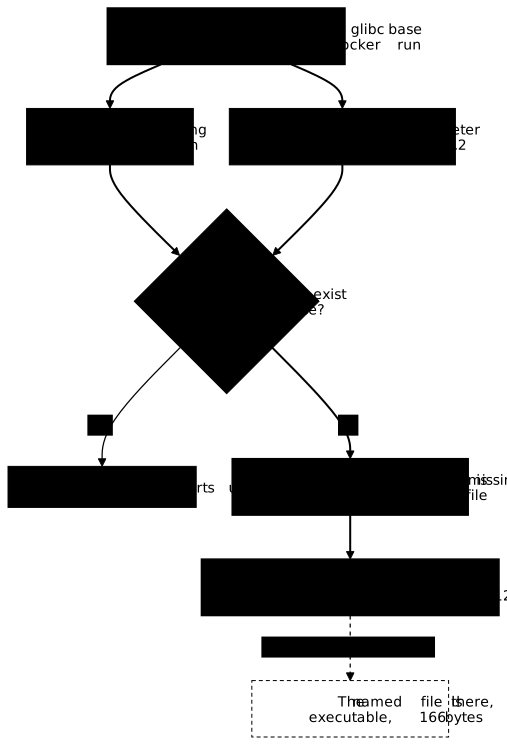
The script case: a shebang that asks for bash
Take a tiny application, so that nothing hides the mechanism: a script that reads temperature readings from /entrees/temperatures.txt (one value per line: 12, 15 and 11), counts them and prints the total. It is written in bash:
#!/bin/bashmapfile -t mesures < /entrees/temperatures.txttotal=0for m in "${mesures[@]}"; do total=$((total + m)); doneecho "releves=${#mesures[@]} total=$total"A Dockerfile is the recipe that builds the image: FROM names the base, COPY drops files into it, CMD sets the command run by default. This one ships the script on a Debian base, where it works. The script must be executable on the host before the build, and the readings file must exist next to it. Work in an empty folder created for the occasion, mkdir -p ~/choix-socle && cd ~/choix-socle: all the files of this page live there, and the cleanup section deletes it.
FROM debian:13-slim@sha256:f6b08b09a05725f9431502d3b5714f5c4576e82c1a84fa1debe0c24a7e0c3ec4COPY releve /usr/local/bin/releveCOPY temperatures.txt /entrees/temperatures.txtCMD ["/usr/local/bin/releve"]printf '12\n15\n11\n' > temperatures.txtchmod +x relevedocker build -t releve:debian .docker run --rm releve:debianreleves=3 total=38Change only the FROM line to the Alpine base (alpine:3.24@sha256:be2656061b536c1883c4034790e21d0a09c5aaaf51968b89368a3c0371ea2c9a), rebuild under the name releve:alpine, run again: the container no longer starts. Nothing else moved, neither the script, nor the data, nor the COPY instructions.
docker build -t releve:alpine .docker run --rm releve:alpineexec /usr/local/bin/releve: no such file or directoryThe engine returns code 255, and the named file exists. The proof is taken inside the container itself, by bypassing the entrypoint, the command that the image runs by default.
docker run --rm --entrypoint sh releve:alpine -c \ 'ls -l /usr/local/bin/releve; head -1 /usr/local/bin/releve; ls /bin/bash'-rwxr-xr-x 1 root root 166 Nov 1 23:17 /usr/local/bin/releve#!/bin/bashls: /bin/bash: No such file or directoryThe script is there, executable, 166 bytes, and its shebang asks for /bin/bash, which the Alpine base does not provide. COPY keeps the mode of the file from the host: -rwxr-xr-x corresponds to a umask of 022 (the mask that sets the default permissions of created files), and a host set to 002 shows -rwxrwxr-x, without changing anything about the demonstration. Run from a shell in the container, the same script produces a clearer diagnosis, with the classic exit code for not found, which echo $? prints.
docker run --rm --entrypoint sh releve:alpine -c '/usr/local/bin/releve; echo "rc=$?"'sh: /usr/local/bin/releve: not foundrc=127The binary case: an ELF interpreter that does not exist
The mechanism is identical for a compiled executable, the form that also affects third-party programs you do not control. Let us compile a minimal C program, cumul.c, which adds up four rainfall measurements and prints the total, on a glibc toolchain, then run the same file on both bases. Here is its full source.
#include <stdio.h>
int main(void) {    int pluies[] = {4, 9, 3, 17};    int cumul = 0;    for (int i = 0; i < 4; i++) {        cumul += pluies[i];    }    printf("cumul=%d\n", cumul);    return 0;}
The build container writes its result in your folder, mounted under /src. By default, a container runs as root: the cumul binary would then not belong to you, and you could no longer delete it without sudo. The --user "$(id -u):$(id -g)" option runs the compilation under your identity, and the produced file is yours.
docker run --rm --user "$(id -u):$(id -g)" -v "$PWD":/src -w /src \ gcc:14@sha256:435c3cbc2ad1c25fbc1684c367808ff0ca2035a1bed56734a40165ab5cd7e3bd \ sh -c 'gcc -O2 -o cumul cumul.c && file cumul && ldd cumul'cumul: ELF 64-bit LSB executable, x86-64, version 1 (SYSV), dynamically linked,interpreter /lib64/ld-linux-x86-64.so.2, for GNU/Linux 3.2.0, not stripped linux-vdso.so.1 (0x00007fb4d30d5000) libc.so.6 => /lib/x86_64-linux-gnu/libc.so.6 (0x00007fb4d2ed3000) /lib64/ld-linux-x86-64.so.2 (0x00007fb4d30d7000)The interpreter /lib64/ld-linux-x86-64.so.2 line is the contract this binary imposes on its base. The produced file is indeed yours, which ls -l confirms (the name shown is that of your account, student on the measurement machine):
ls -l cumul-rwxr-xr-x 1 student student 15688 Nov 1 23:58 cumulNow let us see what each of the two bases does with it.
docker run --rm -v "$PWD":/src:ro \ debian:13-slim@sha256:f6b08b09a05725f9431502d3b5714f5c4576e82c1a84fa1debe0c24a7e0c3ec4 /src/cumuldocker run --rm -v "$PWD":/src:ro \ alpine:3.24@sha256:be2656061b536c1883c4034790e21d0a09c5aaaf51968b89368a3c0371ea2c9a /src/cumulcumul=33exec /src/cumul: no such file or directoryThe same file, the same 15,688 bytes, and two opposite outcomes: Alpine has no /lib64 directory, its linker is called /lib/ld-musl-x86_64.so.1. The message is exactly the same as for the script, and the exit code from the shell is again 127. That is what "musl is not glibc" means: not a distant API incompatibility, but a path that does not exist.
How do you choose a base: three questions before the FROM line
The right base is not the smallest, it is the one that provides your program's contract and that you will be able to keep up during the life of the application. Three questions settle it, in this order.
First, against which libc is your deliverable linked? The answer is read, not guessed: file my-binary prints its interpreter, ldd my-binary its shared libraries. A static binary (statically linked, typically Go with CGO_ENABLED=0) imposes nothing and accepts any base. A dynamic glibc binary requires a glibc base, or a compatibility fix. For an interpreted language, the question moves to the native extensions of your dependencies: pure code runs anywhere, a compiled extension inherits the constraint of the binary.
Second, what must you be able to do on this container in operation? A base without a shell denies as much to the attacker as to you: if your diagnostic procedure relies on sh, decide it now, not during the incident. The elements of the table above answer the same question: certificates to call an API over HTTPS, time zones to display a local time.
Third, who maintains this base and until when? It is a question that is easy to forget, and its answer changes by itself over time. The section on maintaining a base, further down, is devoted to it.
A mechanical check completes these three questions: does the base image exist for the target architecture? The surveys on this page are in amd64. If your machines are arm64, docker buildx imagetools inspect <image> (used further down) lists one Platform: line per published architecture: a base that publishes only one does not start natively on the other. Without architecture emulation (QEMU, registered in the kernel by binfmt_misc), the process stops on exec format error, with code 255. The engine adds the warning The requested image's platform (linux/arm64) does not match the detected host platform (linux/amd64/v3) and no specific platform was requested when the image is run without --platform; with an explicit --platform linux/arm64, the warning disappears and the error remains (measured on Docker 29.9.2, amd64 host).
To see the error on an amd64 host without emulation, ask for the arm64 variant of the base already used in this page, keeping its digest:
docker run --rm --platform linux/arm64 alpine:3.24@sha256:be2656061b536c1883c4034790e21d0a09c5aaaf51968b89368a3c0371ea2c9a uname -mexec /bin/uname: exec format errorThe engine returns code 255. The digest designates the index of the base, which groups the variants of all its architectures: --platform chooses the one that will be run, and the measurement VM had no emulation registered in binfmt_misc, hence the failure on /bin/uname, the first program launched. On a machine where QEMU is registered, the same command would print aarch64, a case not measured here.
How do you migrate a base: rewrite or reinstall, and what each way costs
Once the cause is identified, there are only two ways, and they are opposed. The first rewrites what depended on the old base, the second reinstalls on the new one what was missing. Both make the container start, and the measurement arbitrates.
Our script uses two constructs specific to bash, mapfile and arrays (${mesures[@]}, ${#mesures[@]}), which a POSIX-compliant /bin/sh (the standard that defines the common core of shells) does not know. You can see it by forcing interpretation by the base's shell, which moves the error from launch to syntax.
docker run --rm releve:alpine sh /usr/local/bin/releve/usr/local/bin/releve: line 2: mapfile: not found/usr/local/bin/releve: line 5: syntax error: bad substitutionThe POSIX rewrite replaces the array with a read loop that adds up as it goes:
#!/bin/shtotal=0n=0while read -r m; do total=$((total + m)) n=$((n + 1))done < /entrees/temperatures.txtecho "releves=$n total=$total"It changes nothing about the result: the number of readings and the total are the same on both sides, and the base no longer has to provide anything in particular. Reinstalling, conversely, can be priced. Here is the cost of two frequent fixes, measured with docker history on an alpine:3.24 base whose root layer weighs 9.08 MB.
| Fix | What it repairs | Size added |
|---|---|---|
apk add --no-cache bash | the shebang of a bash script | 2.45 MB |
apk add --no-cache gcompat | the interpreter of a glibc binary | 225 kB |
gcompat, a compatibility layer that gives a glibc binary the interpreter it asks for, is worth knowing: 225 kB are enough to run our glibc binary on Alpine, verified, and it is a way out for a third-party executable you do not recompile. For code you control, the rewrite remains preferable: adding a 2.45 MB interpreter for two constructs, one of which is replaced by a loop, amounts to paying again for part of the base you wanted to leave.
The command lists the layer fingerprints of the base, then those of the image: the first ones must be found identically at the head of the second ones. This reading depends on no distribution convention. It names the base by its tag, so the image must have been pulled with docker pull alpine:3.24; if you pulled it by its digest alone, inspect it under the reference used at pull time (alpine:3.24@sha256:…).
When should you choose a minimal image: scratch, distroless or Wolfi?
Choose a minimal image when your deliverable needs next to nothing around it, and accept in exchange that you can no longer open a shell in the container. Alpine and Debian ship a shell, a package manager and dozens of utilities. A minimal image removes all or part of this contract: fewer files to patch when a flaw is published, and fewer tools within reach of an attacker who gets into the container. The measured comparison and the corresponding multi-stage Dockerfiles are in optimizing image size (in French), section "Choisissez la bonne image de base"; this section settles on diagnosis and on the contract.
Three families stand out, from the barest to the most furnished. scratch is an empty image: no libc, no shell, no certificates, no /etc/passwd. It only suits a static binary (Go with CGO_ENABLED=0, Rust compiled statically), and everything this binary reads, root certificates or time zones, is copied by hand from the build stage. Distroless images, published by Google, keep only what the execution of a program or a language requires (libc, certificates, time zones, depending on the variant) and remove the shell and the package manager. The Wolfi and Chainguard images (cgr.dev/chainguard/…) follow the same idea on a glibc base; the wolfi-base image, for its part, keeps a shell and apk, and is therefore diagnosed like an Alpine or Debian image.
The cost is paid at diagnosis. Without a shell in the image, docker exec -it <container> sh fails, the engine answering that the sh executable is not found in the $PATH, and there is no ls, no head, no file to carry out the diagnosis of the previous section. Three workarounds exist: reading the logs with docker logs and copying a file with docker cp, which need no shell; running alongside a container of a well-equipped image that shares the namespaces of the first (--pid container:<name> and --network container:<name>); or using, when the provider publishes one, the debug variant of the image. They are prepared before the incident.
The same mechanism as above applies to the letter. A dynamic binary run on scratch does not find its linker there and fails on no such file or directory, and an entry script in shell (ENTRYPOINT ["./demarrer.sh"], where demarrer means "start") does not run on an image without a shell: same message, same false lead. The choice boils down to this: a static binary with no need for diagnosis in operation goes on scratch or a static distroless image; an application runtime (Java, Python, Node.js) on a distroless or Chainguard image of its language; a compiled glibc dependency on Wolfi or debian:13-slim. If your team diagnoses by getting into containers, keep Alpine or Debian and handle the attack surface differently.
How do you maintain a base over time?
A base has an end-of-support date, and it is a property of your Dockerfile that degrades without anyone touching it. Beyond that date, the branch no longer receives security fixes: the image still builds and runs, silently, with its vulnerabilities. The windows below, noted for a few branches, come from the Alpine releases page (alpinelinux.org/releases) and the Debian 13 page (debian.org/releases/trixie), consulted on November 1, 2026.
| Base | Release | End of support |
|---|---|---|
alpine:3.20 | 2024-05-22 | 2026-04-01, passed |
alpine:3.21 | 2024-12-05 | 2026-11-01, reached at the consultation date |
alpine:3.22 | 2025-05-30 | 2027-05-01 |
alpine:3.24 | 2026-06-09 | 2028-06-01 |
debian:13 (trixie) | 2025-08-09 | 2028-08-09, then LTS until 2030 |
The rhythm can be read in this table and it decides your cadence: Alpine publishes a branch every six months and supports it for two years, Debian publishes every two years and supports for three years, with an LTS extension beyond. An application on Alpine therefore changes branch much more often, and each branch change is an occasion for a library break: that is the price of the lightweight base, and it must be budgeted.
The base moves under its tag
The second movement, less visible: alpine:3.24 does not designate the same thing from one month to the next. The tag follows the fixes of the branch, and the registry answers a different content without the FROM line changing by a single character. You can query the registry without pulling the image. The full output has 16 entries (one per published architecture, each followed by its attestation); the block below keeps the header and the first entry, linux/amd64, and marks the cut on its last line.
docker buildx imagetools inspect alpine:3.24Name: docker.io/library/alpine:3.24MediaType: application/vnd.oci.image.index.v1+jsonDigest: sha256:be2656061b536c1883c4034790e21d0a09c5aaaf51968b89368a3c0371ea2c9a
Manifests: Name: docker.io/library/alpine:3.24@sha256:c26612752c78b18faacd63c7d50f4592c2e7b0f25e0e20e82bd74e465c57ab0d MediaType: application/vnd.oci.image.manifest.v1+json Platform: linux/amd64 Annotations: org.opencontainers.image.source: https://github.com/alpinelinux/docker-alpine.git#5aec467fb81238bae9441eea2edb000655d7044f:x86_64 org.opencontainers.image.url: https://hub.docker.com/_/alpine org.opencontainers.image.version: 3.24.3 com.docker.official-images.bashbrew.arch: amd64 org.opencontainers.image.base.name: scratch org.opencontainers.image.created: 2026-10-21T22:37:09Z org.opencontainers.image.revision: 5aec467fb81238bae9441eea2edb000655d7044f
[... 15 entries cut: the attestation of this manifest, then arm/v6, arm/v7, arm64/v8, 386, ppc64le, riscv64 and s390x, each followed by its own ...]Three pieces of information serve the tracking. The digest identifies the exact content: compare it with the one you built to know whether the base has moved. The org.opencontainers.image.created annotation gives the upstream publication date, here October 21, 2026, eleven days before this measurement, and org.opencontainers.image.version the exact fix level of the branch, here 3.24.3. And on debian:13-slim, the same command adds org.opencontainers.image.version: trixie-slim, which names the branch without inferring it from a tag.
The local digest is read again on the image pulled by its tag (same remark as above: without a local tag, inspect it by its pull reference):
docker image inspect alpine:3.24 --format '{{index .RepoDigests 0}}'alpine@sha256:be2656061b536c1883c4034790e21d0a09c5aaaf51968b89368a3c0371ea2c9aPinning this digest in the FROM line makes the build reproducible, but does not suspend the problem: it makes it visible. A pinned base ages, and that is precisely why you pin it, to decide when you move up instead of suffering it. The practice that holds over time comes down to three gestures: rebuild periodically even without a code change, so that the base's fixes enter the image; move the branch up before its end-of-support date, not after; and replay the application's checks at each upgrade, because a branch change can move a libc version or remove a package.
Troubleshooting
The symptoms of a badly chosen base all look alike, and none of them names its cause.
| Symptom | Likely cause | Check |
|---|---|---|
exec /path: no such file or directory, code 255 | interpreter of the shebang or of the ELF missing | head -1 /path and file /path in the container |
sh: /path: not found, code 127 | same cause, seen from the shell | ls -l /path, which shows the file is there |
mapfile: not found, bad substitution | bash script played by a POSIX /bin/sh | rewrite in POSIX or install bash |
x509: certificate signed by unknown authority | no root certificate store | ls /etc/ssl/certs/ca-certificates.crt |
| Times shown in UTC despite the configuration | time zone database missing from the base | ls -d /usr/share/zoneinfo |
| The container starts, but the base did not change | FROM modified without rebuilding, or cache | compare the layers of the base and of the image |
How do you clean up after the measurements?
The measurements on this page leave two built images, a heavy build image and a working folder. The gcc:14 image takes about 2.2 GB, and it only serves to produce a binary: it is the first thing to remove. The following commands delete the two releve images, the gcc image by its digest, then the working folder, whose files belong to you thanks to the --user option of the compilation.
docker rmi releve:debian releve:alpinedocker rmi gcc:14@sha256:435c3cbc2ad1c25fbc1684c367808ff0ca2035a1bed56734a40165ab5cd7e3bdcd ~/choix-socle && rm cumul cumul.c releve temperatures.txt Dockerfilecd ~ && rmdir ~/choix-socleTo check, list the remaining images: no releve or gcc should remain, and ls must answer No such file or directory for the folder.
docker images --format '{{.Repository}}:{{.Tag}}' | grep -E '^(releve|gcc)' || echo "plus de releve ni gcc"ls -d ~/choix-socleThe alpine:3.24 and debian:13-slim images stay on the machine: they serve as the base for other lessons, and removing them would only force another download.
Practice
The lab puts you in front of a 79 MB image whose useful content is three hundred bytes, with an Alpine base already on the machine. The validation covers the state of the system, at four places that do not overlap: the result produced on the repository's data, the base actually used read in the image's layers, the weight compared with the reference image, and the result on data that the image has never seen, injected through a mount. This last check exists because the other three would pass on an application that recited a frozen result. No threshold is written in the repository: the data is drawn on each run and the weight threshold is derived from the reference image.
Key points
-
A base is an execution contract, not a decoration: it provides the libc, the shell, the certificates and the time zones your application depends on without declaring it.
-
No base is a superset of another: measured on November 1, 2026,
alpine:3.24provides 118 root certificates thatdebian:13-slimdoes not have, and ignores the time zones that Debian provides. -
The kernel runs the interpreter, not the file: a missing
#!/bin/bashshebang or a missinginterpreter /lib64/ld-linux-x86-64.so.2producesno such file or directoryunder the name of the requested file, and code 127 from the shell. -
Choosing is decided on a reading:
fileandlddtell which libc your deliverable is linked against; a static binary imposes nothing, a dynamic glibc binary requires a glibc base orgcompat. -
For code you control, rewriting costs less than reinstalling: on Alpine,
bashadds 2.45 MB andgcompat225 kB, whereas a POSIX rewrite gives the same result without adding anything. -
A base has an end-of-support date: two years per Alpine branch, three years for a stable Debian. Beyond it, the image still builds and no longer receives fixes.
-
A minimal image removes the shell, so diagnosis:
scratchonly accepts a static binary, distroless and Chainguard remove the shell and the package manager, and the workarounds (docker logs,docker cp, a neighboring debug container) are prepared before the incident. -
The same tag does not designate the same content:
docker buildx imagetools inspectgives the digest and the upstream publication date without pulling the image, and the comparison tells whether the base has moved. -
Starting is not having migrated: the base actually used is read in the image's layers, of which those of the base must be the prefix.
Knowledge check
Check that you have the essentials of this guide. The questions cover only what has just been explained here.
Knowledge check
Check what you have learned with this interactive quiz
How it works
- The timer starts when you click Start
- Multiple choice, true/false and short answer questions
- You can move between questions
- Detailed results are shown at the end
Starts the quiz and the timer
Review
(0/0)Score by domain
A domain groups several guides and gets several questions, so its score is more reliable than a per-topic score, which often rests on a single question.
Summary
Strengths
No topic passed at 80% on at least two questions yet.
Weak areas
No topic below the pass mark.
Recommended next
Hints before you try again?
Continue the course: Docker USER: run an image as non-root without breaking it
A new full quiz with random questions
Work again only on the questions you missed