A multi-architecture image is an index: a single tag behind which Docker picks the variant that matches the machine (amd64 on a PC, arm64 on an ARM server). This lesson builds such an index with Docker Buildx, publishes it to a local registry, then runs each variant to check that the program it contains is the one for its platform.
A build that succeeds does not prove the image works: an arm64 variant may very well contain an amd64 binary, and only running it shows it. You will also learn to recognize the exec format error, to choose between emulation and cross-compilation, and to declare what you did not replay. All the measurements come from Docker Engine 29.9.2, Buildx 0.38.1 and BuildKit v0.34.0, with the containerd image store, on a Debian 13 amd64 VM.
Several names in this lesson are French because the commands and outputs are the ones that were run: plateformes ("platforms") is the name of the example module, program and images (demo/plateformes), semrofetalp is that word read backwards, piege ("trap") appears in Dockerfile.piege, demo/plateformes:piege and out-piege-arm64, and entrees: ("entries") is printed by the digests.py script. They are identifiers, so they stay as they are.
The cache shared between CI runs is covered in BuildKit cache in CI and image promotion between registries. This lesson registers the QEMU emulator by hand, on the measurement VM; registering it on a CI runner was not measured.
What you will learn
- Read the platforms of a builder and create a
docker-containerbuilder, then remove it - Recognize
exec format errorand register QEMU emulation - Build two platforms with emulation then with cross-compilation, and compare the durations
- Spot the trap of a binary of the wrong architecture inside an otherwise correct index
- Read a published index without counting its entries, and run each variant by its digest
- Predict what
docker run --platformdoes depending on what is already local - Declare what was not replayed on real hardware
Prerequisites
- Having read BuildKit: build secrets and private access and Separate build from runtime: the multi-stage build
- Knowing how to read a tag and a digest (Read an OCI image and its identity)
- A working Docker 29.9.2 (Docker installation), the right to run a
--privilegedcontainer (the section on emulation needs it), and thecurl,fileandpython3commands
Which builder and which platforms do you have without any configuration?
A builder is the component that runs your builds: it runs BuildKit, Docker's build engine, and its driver says where BuildKit runs. The builder used by default is called default and works with the docker driver: BuildKit is then built into the engine.
First check the image store, that is, the place where Docker keeps images and their layers, because multi-platform building depends on it.
docker info | grep -Ei "storage|snapshotter|Server Version|Architecture" Server Version: 29.9.2 Storage Driver: overlayfs driver-type: io.containerd.snapshotter.v1 Architecture: x86_64The driver-type: io.containerd.snapshotter.v1 line indicates the containerd image store, the one Docker picks by itself on a fresh installation of Docker Engine 29 or later (an upgrade keeps the old store; docker info tells you which one you use). It is the one that can keep several platforms side by side under a single tag. The measurements in this lesson do not hold for the old classic store, which the lesson did not test. Now list the builders.
docker buildx lsNAME/NODE DRIVER/ENDPOINT STATUS BUILDKIT PLATFORMSdefault* docker \_ default \_ default running v0.34.0 linux/amd64 (+3)The star marks the active builder. The PLATFORMS column is abbreviated: (+3) means three more platforms. The docker buildx inspect --bootstrap command gives the full list; the output below is cut down to its first lines.
docker buildx inspect --bootstrapName: defaultDriver: docker
Nodes:Name: defaultEndpoint: defaultStatus: runningBuildKit version: v0.34.0Platforms: linux/amd64, linux/amd64/v2, linux/amd64/v3With no configuration, the builder only knows the variants of your processor. To run arm64 instructions during a build, an emulator is missing, which the section on emulation adds.
What does a docker-container builder change, and how do you remove it?
A docker-container builder runs BuildKit in a separate container, instead of using Docker's own: you create it to get a distinct BuildKit. Create a builder named multi with a BuildKit image pinned by version and digest, and start it.
docker buildx create --name multi --driver docker-container \ --driver-opt image=moby/buildkit:v0.34.0@sha256:b059f8d7226d0b326bc871af489a5dddf65e36af4d20d14251b072974d9ee87c --usedocker buildx inspect --bootstrap multimulti#1 [internal] booting buildkit#1 pulling image moby/buildkit:v0.34.0@sha256:b059f8d7226d0b326bc871af489a5dddf65e36af4d20d14251b072974d9ee87c#1 pulling image moby/buildkit:v0.34.0@sha256:b059f8d7226d0b326bc871af489a5dddf65e36af4d20d14251b072974d9ee87c 9.1s done#1 creating container buildx_buildkit_multi0#1 creating container buildx_buildkit_multi0 0.9s done#1 DONE 10.0sName: multiDriver: docker-container[...]Nodes:Name: multi0Endpoint: unix:///var/run/docker.sockDriver Options: image="moby/buildkit:v0.34.0@sha256:b059f8d7226d0b326bc871af489a5dddf65e36af4d20d14251b072974d9ee87c"Status: runningBuildKit daemon flags: --allow-insecure-entitlement=network.hostBuildKit version: v0.34.0Platforms: linux/amd64, linux/amd64/v2, linux/amd64/v3, linux/386[...]Read three things in the buildx inspect output. Docker pulls the pinned BuildKit image, then creates the buildx_buildkit_multi0 container. With this image, the BuildKit version line must show v0.34.0, the same version as the default builder. Without the --driver-opt image=… option, Buildx pulls moby/buildkit:buildx-stable-1, a moving tag: when the lesson was measured, it gave BuildKit v0.33.1, while the default builder ran v0.34.0. Finally, the Platforms line lists what the builder handles: with the pinned image, these are the platforms of your processor and linux/386, without arm64.
The Docker documentation on multi-platform builds states that the official BuildKit images embed user-mode QEMU emulators. The lesson did not check that these emulators work: the Platforms list above did not contain arm64, and that list is what counts. All the emulation measurements in the lesson are on Docker's default builder, with the emulation registered by binfmt; only the publication to a local registry, further down, goes through a docker-container builder.
A docker-container builder keeps its results in its own container. To find an image in docker image ls, you have to ask for it with --load; --push sends it to the registry without loading anything locally. Another difference, the network, shows up when you publish to a local registry; the section on the published index covers it. Switch back to the default builder, remove multi, then check that neither a builder nor a container is left.
docker buildx use defaultdocker buildx rm multidocker buildx lsdocker ps -a --format "{{.Names}} {{.Image}}"multi removedNAME/NODE DRIVER/ENDPOINT STATUS BUILDKIT PLATFORMSdefault* docker \_ default \_ default running v0.34.0 linux/amd64 (+3)The multi removed message confirms the removal, and docker ps -a shows no buildx_buildkit_multi0 line: the builder's container disappeared with it. The BuildKit image, however, stays in docker image ls; the cleanup section deletes it.
Why does an arm64 program fail with exec format error?
An amd64 processor cannot run a program compiled for arm64. Docker can pull the arm64 image without difficulty, because downloading files requires no execution. The test uses Alpine 3.24.3, pinned by digest.
docker pull --platform linux/arm64 alpine:3.24.3@sha256:be2656061b536c1883c4034790e21d0a09c5aaaf51968b89368a3c0371ea2c9adocker run --rm --platform linux/arm64 alpine:3.24.3@sha256:be2656061b536c1883c4034790e21d0a09c5aaaf51968b89368a3c0371ea2c9a uname -mecho "code=$?"docker.io/library/alpine@sha256:be2656061b536c1883c4034790e21d0a09c5aaaf51968b89368a3c0371ea2c9a: Pulling from library/alpined3531b7a4f21: Pulling fs layerd3531b7a4f21: Download complete2a02c517eb64: Download complete4f276f238bfa: Download completed3531b7a4f21: Pull completeDigest: sha256:be2656061b536c1883c4034790e21d0a09c5aaaf51968b89368a3c0371ea2c9aStatus: Image is up to date for alpine@sha256:be2656061b536c1883c4034790e21d0a09c5aaaf51968b89368a3c0371ea2c9adocker.io/library/alpine:3.24.3@sha256:be2656061b536c1883c4034790e21d0a09c5aaaf51968b89368a3c0371ea2c9aexec /bin/uname: exec format errorcode=255The pull succeeds (on the measurement machine, Alpine's index was already present, hence the Image is up to date line: it does not mean the arm64 variant is missing). The run fails with exec format error and code 255: the kernel reads a file of another architecture and cannot run it. The same error appears in a build as soon as a RUN instruction has to run a program of the target platform. Here is the test Dockerfile, which contains only a RUN.
mkdir -p ~/multiarch && cd ~/multiarchFROM alpine:3.24.3@sha256:be2656061b536c1883c4034790e21d0a09c5aaaf51968b89368a3c0371ea2c9aRUN uname -m > /archCMD ["cat", "/arch"]docker buildx build --platform linux/arm64 -f Dockerfile.run -t demo/plateformes:run-arm64 --load .echo "build-exit=$?"#5 [2/2] RUN uname -m > /arch#5 0.186 exec /bin/sh: exec format error#5 ERROR: process "/bin/sh -c uname -m > /arch" did not complete successfully: exit code: 255[...]ERROR: failed to build: failed to solve: process "/bin/sh -c uname -m > /arch" did not complete successfully: exit code: 255build-exit=1The output is abridged. The FROM instruction of the previous step finished without error: loading and unpacking the layers of an arm64 image runs nothing. It is the RUN, which launches the image's /bin/sh, that fails. A COPY instruction, which only copies files, does not run any program either. Remember the rule: only RUN instructions require emulation.
How do you register QEMU emulation, and how do you remove it?
Emulation means having QEMU, a piece of software that imitates that processor, run an arm64 program. It goes through binfmt_misc, a Linux kernel mechanism that associates a file format with the interpreter in charge of running it. If QEMU is registered for arm64, the kernel hands it the arm64 binaries and the container runs. First look at what is registered on the machine.
ls /proc/sys/fs/binfmt_miscpython3.13registerstatusThere is no qemu-* entry: only the Python interpreter is declared. Note the
list you get on your machine: the cleanup at the end of the lesson refers to it so
as not to remove an emulation that already existed.
The tonistiigi/binfmt image registers the emulators. Its latest tag moves with every release: the lesson therefore pins the version tag qemu-v10.2.3-68 and its digest. Started with no option, it changes nothing and lists what the kernel accepts.
docker run --privileged --rm tonistiigi/binfmt:qemu-v10.2.3-68@sha256:400a4873b838d1b89194d982c45e5fb3cda4593fbfd7e08a02e76b03b21166f0{ "supported": [ "linux/amd64", "linux/amd64/v2", "linux/amd64/v3", "linux/386" ], "emulators": [ "python3.13" ]}On the first run, Docker pulls the image first: Pulling from tonistiigi/binfmt lines precede the JSON, not reproduced here. The --privileged option is needed because this container writes into the host's kernel configuration, shared by all containers. That is also why the image is pinned by digest: a privileged container must not be able to change without your knowing. Now register the arm64 emulator.
docker run --privileged --rm tonistiigi/binfmt:qemu-v10.2.3-68@sha256:400a4873b838d1b89194d982c45e5fb3cda4593fbfd7e08a02e76b03b21166f0 --install arm64installing: arm64 OK{ "supported": [ "linux/amd64", "linux/amd64/v2", "linux/amd64/v3", "linux/arm64", "linux/386" ], "emulators": [ "python3.13", "qemu-aarch64" ]}The linux/arm64 platform appears in supported and qemu-aarch64 in emulators. The kernel now has an entry that you can read.
cat /proc/sys/fs/binfmt_misc/qemu-aarch64enabledinterpreter /usr/bin/qemu-aarch64flags: POCFoffset 0magic 7f454c460201010000000000000000000200b700mask ffffffffffffff00fffffffffffffffffeffffffThe magic field is the signature of an arm64 executable in ELF format (the format of Linux executables), and interpreter designates the emulator in charge of running it. Rerun the command that failed, then the build.
docker run --rm --platform linux/arm64 alpine:3.24.3@sha256:be2656061b536c1883c4034790e21d0a09c5aaaf51968b89368a3c0371ea2c9a uname -mcd ~/multiarch && docker buildx build --platform linux/arm64 -f Dockerfile.run -t demo/plateformes:run-arm64 --load .docker run --rm demo/plateformes:run-arm64aarch64WARNING: The requested image's platform (linux/arm64) does not match the detected host platform (linux/amd64/v3) and no specific platform was requestedaarch64The first line, aarch64, is the answer of the arm64 container (aarch64 is the name uname gives to this architecture): the 255 error is gone. The build prints its progress, not reproduced here, and takes less than a second on the measurement machine; docker run then answers aarch64, preceded by a warning.
That warning does not signal a failure: the tag designates an arm64 image on an amd64 machine, and Docker says so because you did not specify --platform.
To remove the emulation, pass --uninstall with the name of the kernel entry.
docker run --privileged --rm tonistiigi/binfmt:qemu-v10.2.3-68@sha256:400a4873b838d1b89194d982c45e5fb3cda4593fbfd7e08a02e76b03b21166f0 --uninstall qemu-aarch64uninstalling: qemu-aarch64 OK{ "supported": [ "linux/amd64", "linux/amd64/v2", "linux/amd64/v3", "linux/386" ], "emulators": [ "python3.13" ]}The list is back to its initial state. Register the emulation again with the same --install arm64 command, and keep it until the cleanup section, which removes it.
docker run --privileged --rm tonistiigi/binfmt:qemu-v10.2.3-68@sha256:400a4873b838d1b89194d982c45e5fb3cda4593fbfd7e08a02e76b03b21166f0 --install arm64The output is that of the first installation: installing: arm64 OK, then the list showing linux/arm64 and qemu-aarch64.
How do you build an image for two platforms?
Save each file of this lesson in ~/multiarch, under the name given in the title of the block. The --platform option accepts a list, and --load brings the result back into the local store. With the containerd image store, these two options work together with the default builder, without an extra builder. The test program is a small Go binary that prints the architecture it was compiled for, and a word written backwards so that it is recognizable.
package main
import (  "fmt"  "runtime")
func reverse(s string) string {  r := []rune(s)  for i, j := 0, len(r)-1; i < j; i, j = i+1, j-1 {    r[i], r[j] = r[j], r[i]  }  return string(r)}
func main() { fmt.Printf("GOOS=%s GOARCH=%s app=%s\n", runtime.GOOS, runtime.GOARCH, reverse("plateformes"))}module demo/plateformes
go 1.27The first Dockerfile compiles inside the golang image of the target platform: under arm64, the compiler itself is an arm64 program, hence emulated. The Go image is pinned by the digest of its index.
FROM golang:1.27-alpine@sha256:d200d2dd76b03a99b52651fd1325aff7dcd35422c35c01bac56571b0507f3deb AS buildWORKDIR /srcCOPY go.mod main.go ./RUN CGO_ENABLED=0 go build -o /out/app .
FROM alpine:3.24.3@sha256:be2656061b536c1883c4034790e21d0a09c5aaaf51968b89368a3c0371ea2c9aCOPY --from=build /out/app /appENTRYPOINT ["/app"]
First pull the Go image for both platforms, so that the download does not count in the duration. The --no-cache option then forces the compilation to run: without it, an already filled cache would skew the measurement.
docker pull --platform linux/amd64 golang:1.27-alpine@sha256:d200d2dd76b03a99b52651fd1325aff7dcd35422c35c01bac56571b0507f3deb | tail -2docker pull --platform linux/arm64 golang:1.27-alpine@sha256:d200d2dd76b03a99b52651fd1325aff7dcd35422c35c01bac56571b0507f3deb | tail -2time docker buildx build --no-cache --platform linux/amd64,linux/arm64 -f Dockerfile.emul -t demo/plateformes:emul --load --progress=plain . 2>&1 | tail -25[...]#18 [linux/amd64 stage-1 2/2] COPY --from=build /out/app /app#18 DONE 0.1s
#17 [linux/arm64 build 4/4] RUN CGO_ENABLED=0 go build -o /out/app .#17 DONE 51.2s
#19 [linux/arm64 stage-1 2/2] COPY --from=build /out/app /app#19 DONE 0.1s
#20 exporting to image#20 exporting layers#20 exporting layers 0.3s done#20 exporting manifest sha256:47eabc785aa6062c7586bf0d0f1ce418872bf936d76cd9845dccb68c86a87b2c#20 exporting manifest sha256:47eabc785aa6062c7586bf0d0f1ce418872bf936d76cd9845dccb68c86a87b2c 0.0s done#20 exporting config sha256:48f1a928b8e92d4358ac4f7cb83b06848580009f8fef7f0a3c83f0221e9a80b6 0.0s done#20 exporting attestation manifest sha256:b08516758cca3cb0805adf6cc8efec81d790cdad081267fd98aca3f1f7e7e478 0.0s done#20 exporting manifest sha256:ff6c1d79dadae09bd2037f3bb02364d335125f93b84587c6eb63251f1049b269 0.0s done#20 exporting config sha256:06478064ef7e28675e51f48ddb7ab6e6b9e9c4dc3f347533d83dcc41db4bcac4 0.0s done#20 exporting attestation manifest sha256:f2fd51c8dcefeeb8713fb17b2670b1f7891dc8c001d5270cb29d97928f7d1b10 0.0s done#20 exporting manifest list sha256:870f4914b947c2e5656e723ab9eb4d416ff2fc2e30c695c0b07220bd981cccc4#20 exporting manifest list sha256:870f4914b947c2e5656e723ab9eb4d416ff2fc2e30c695c0b07220bd981cccc4 0.0s done#20 naming to docker.io/demo/plateformes:emul done#20 unpacking to docker.io/demo/plateformes:emul 0.0s done#20 DONE 0.6s
real 0m56.805suser 0m0.097ssys 0m0.027sLook for two landmarks. The [linux/arm64 build 4/4] step, the compilation under QEMU, takes 51.2 s; the whole build takes 56.8 s (the real line).
The exporting lines show what a single build produces. A manifest is the record card of one variant: it lists its layers and its configuration. The build writes one per platform, then an index, which Docker also calls a manifest list (manifest list), that gathers them under a single tag. The attestation manifest lines are explained along with the published index, in the section devoted to it. Read the index with --tree.
docker image ls --treeIMAGE ID DISK USAGE CONTENT SIZE EXTRAdemo/plateformes:emul 870f4914b947 22.3MB 10.8MB├─ linux/amd64 47eabc785aa6 16.8MB 5.3MB└─ linux/arm64 ff6c1d79dada 5.54MB 5.54MBThe --tree option is marked experimental in the Docker 29.9.2 client: its display may change. The output is limited to the image of this test: the full list also contains the base images. The top line is the index, the two lines below are the variants. The ID field of a variant is the identifier of its manifest. To examine one of them, add --platform to docker image inspect, then run it with the same option.
docker image inspect --platform linux/arm64 --format '{{.Os}}/{{.Architecture}} id={{.Id}}' demo/plateformes:emuldocker run --rm --platform linux/arm64 demo/plateformes:emuldocker image inspect --platform linux/amd64 --format '{{.Os}}/{{.Architecture}} id={{.Id}}' demo/plateformes:emuldocker run --rm --platform linux/amd64 demo/plateformes:emullinux/arm64 id=sha256:ff6c1d79dadae09bd2037f3bb02364d335125f93b84587c6eb63251f1049b269GOOS=linux GOARCH=arm64 app=semrofetalplinux/amd64 id=sha256:47eabc785aa6062c7586bf0d0f1ce418872bf936d76cd9845dccb68c86a87b2cGOOS=linux GOARCH=amd64 app=semrofetalpEach variant answers with its architecture: GOARCH=arm64 for one, GOARCH=amd64 for the other. This is the test to remember, because the program reports what it was compiled for, not what docker image inspect declares in the manifest.
Should you emulate or cross-compile?
Compiling under emulation works with any Dockerfile, but the compiler runs slowly under QEMU. Cross-compilation avoids that slowness: the compiler runs natively on your machine, and it produces a binary for another architecture. Go allows this with two variables, GOOS and GOARCH. This section compares the two methods, then shows how the second one goes wrong.
The diagram sets the two paths side by side. In both, the final image only does a COPY, and only the place where the compiler runs changes. The highlighted box is the step that goes through QEMU.
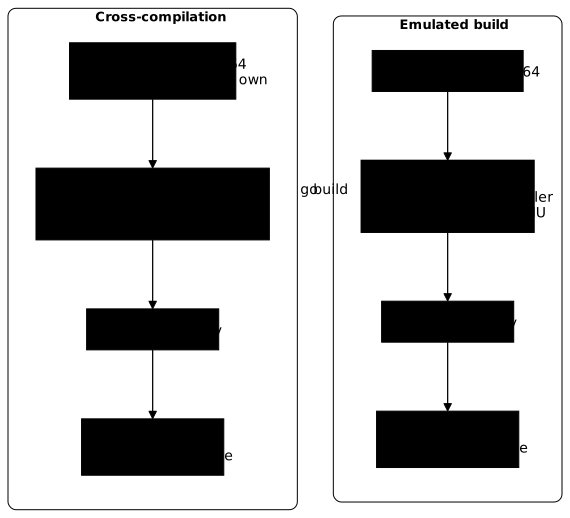
How do you cross-compile with TARGETARCH?
BuildKit provides build variables to each platform. BUILDPLATFORM is the platform of the machine that builds, TARGETOS and TARGETARCH those of the targeted image. They are available in a stage only once declared with ARG. The FROM --platform=$BUILDPLATFORM instruction asks for the compiler image of the machine that builds, not of the target.
FROM --platform=$BUILDPLATFORM golang:1.27-alpine@sha256:d200d2dd76b03a99b52651fd1325aff7dcd35422c35c01bac56571b0507f3deb AS buildARG TARGETOSARG TARGETARCHWORKDIR /srcCOPY go.mod main.go ./RUN CGO_ENABLED=0 GOOS=$TARGETOS GOARCH=$TARGETARCH go build -o /out/app .
FROM alpine:3.24.3@sha256:be2656061b536c1883c4034790e21d0a09c5aaaf51968b89368a3c0371ea2c9aCOPY --from=build /out/app /appENTRYPOINT ["/app"]
The final stage contains only a COPY: it runs no program, so it does not need emulation, even for arm64. Measure the duration under the same conditions, with --no-cache.
time docker buildx build --no-cache --platform linux/amd64,linux/arm64 -f Dockerfile -t demo/plateformes:cross --load --progress=plain . 2>&1 | tail -28[...]#12 [linux/amd64->arm64 build 4/4] RUN CGO_ENABLED=0 GOOS=linux GOARCH=arm64 go build -o /out/app .#12 DONE 7.4s
#13 [linux/amd64 build 4/4] RUN CGO_ENABLED=0 GOOS=linux GOARCH=amd64 go build -o /out/app .#13 DONE 7.4s
#14 [linux/arm64 stage-1 2/2] COPY --from=build /out/app /app#14 DONE 0.1s
#15 [linux/amd64 stage-1 2/2] COPY --from=build /out/app /app#15 DONE 0.1s
#16 exporting to image#16 exporting layers#16 exporting layers 0.3s done#16 exporting manifest sha256:25ae59cb20b1fb92a8e54f6581127b2a477814c6ecb923e1dec3bb53a10c46e6#16 exporting manifest sha256:25ae59cb20b1fb92a8e54f6581127b2a477814c6ecb923e1dec3bb53a10c46e6 0.0s done#16 exporting config sha256:2214fa5559caa4831b35d8c492b0e5b4ecda73153c84278b5b3c9d85d6a85439 0.0s done#16 exporting attestation manifest sha256:1f0afc1a68003ff2ce02582b366c9326c3e476aaabcdaa830d3a86a57d95bbd9#16 exporting attestation manifest sha256:1f0afc1a68003ff2ce02582b366c9326c3e476aaabcdaa830d3a86a57d95bbd9 0.0s done#16 exporting manifest sha256:ed2301bb69730e8ae287004665f0db8f615f06aa99fc9146675104ed25bda0fd 0.0s done#16 exporting config sha256:883c4afb1ea39ce5086851996f7623f65b85a45a033831a84cb43f5c3d445f28 0.0s done#16 exporting attestation manifest sha256:28a4fe35311bb6f077576a1173d4a8d8d3d99da2294e6979ae78a1752206b200 0.1s done#16 exporting manifest list sha256:7d0d83dd21f32f33fd5990d2877007719464fd75331d76d38f62e27e40b7be26#16 exporting manifest list sha256:7d0d83dd21f32f33fd5990d2877007719464fd75331d76d38f62e27e40b7be26 0.0s done#16 naming to docker.io/demo/plateformes:cross done#16 unpacking to docker.io/demo/plateformes:cross 0.0s done#16 DONE 0.6s
real 0m8.883suser 0m0.044ssys 0m0.035sThe compilation step is now called [linux/amd64->arm64 build 4/4]: the arrow shows that it runs on amd64 to target arm64. It takes 7.4 s and the whole build 8.9 s. The output also shows the compilation for amd64, [linux/amd64 build 4/4], with no arrow since it targets the machine itself: 7.4 s as well.
| Method | arm64 compilation | Build of both platforms |
|---|---|---|
Emulated (Dockerfile.emul) | 51.2 s | 56.8 s |
Cross-compiled (Dockerfile) | 7.4 s | 8.9 s |
These durations come from a single run on the measurement Debian 13 amd64 VM, each build being run with --no-cache: read them as an order of magnitude and measure your own. To know whether the two methods give the same program, copy the binaries out of the images and compare their checksums.
mkdir -p out-cross-arm64 && docker create --platform linux/arm64 --name x-cross-arm64 demo/plateformes:cross >/dev/null && docker cp x-cross-arm64:/app out-cross-arm64/app && docker rm x-cross-arm64 >/dev/null && file out-cross-arm64/app && sha256sum out-cross-arm64/appmkdir -p out-emul-arm64 && docker create --platform linux/arm64 --name x-emul-arm64 demo/plateformes:emul >/dev/null && docker cp x-emul-arm64:/app out-emul-arm64/app && docker rm x-emul-arm64 >/dev/null && file out-emul-arm64/app && sha256sum out-emul-arm64/appout-cross-arm64/app: ELF 64-bit LSB executable, ARM aarch64, version 1 (SYSV), statically linked, Go BuildID=fRa4Z91i4F52WwsekNq2/BXCI_4KDnM1hvHaxGZBI/nrGeYniJwRRWDvAWaSZ4/q3m2sBdQv68dkukXKbLW, BuildID[sha1]=4df9c0d5dcf12b43ebc850eb2dea127d64d7fc9f, with debug_info, not strippedc0947d04b45aca0bd756ad70b45fad837d8a40e87c55343f769dd4fff618624d out-cross-arm64/appout-emul-arm64/app: ELF 64-bit LSB executable, ARM aarch64, version 1 (SYSV), statically linked, Go BuildID=fRa4Z91i4F52WwsekNq2/BXCI_4KDnM1hvHaxGZBI/nrGeYniJwRRWDvAWaSZ4/q3m2sBdQv68dkukXKbLW, BuildID[sha1]=4df9c0d5dcf12b43ebc850eb2dea127d64d7fc9f, with debug_info, not strippedc0947d04b45aca0bd756ad70b45fad837d8a40e87c55343f769dd4fff618624d out-emul-arm64/appThe file command reads the file header: ARM aarch64 confirms the architecture without running the program. The two checksums are identical (c0947d04…): on this program, emulated compilation and cross-compilation give the same binary, byte for byte. Cross-compilation therefore does not degrade the result here; it says nothing about a program that would depend on C libraries or whose final RUN would run code of the target, cases the lesson did not measure.
A third strategy exists: compile each platform on a native node (an arm64 machine for arm64), then assemble the index with docker buildx imagetools create. The lesson did not measure it, for lack of an arm64 machine: to implement it, follow the Docker documentation on multi-platform builds. The page BuildKit cache in CI and image promotion between registries does use imagetools create, but to copy an existing index from one registry to another, not to assemble native builds.
Why does BUILDPLATFORM alone produce a wrong binary?
The trap comes from an oversight: keeping FROM --platform=$BUILDPLATFORM without passing GOOS and GOARCH to go build. Go then compiles for the machine that builds, that is, for amd64, whatever the targeted platform.
FROM --platform=$BUILDPLATFORM golang:1.27-alpine@sha256:d200d2dd76b03a99b52651fd1325aff7dcd35422c35c01bac56571b0507f3deb AS buildWORKDIR /srcCOPY go.mod main.go ./RUN CGO_ENABLED=0 go build -o /out/app .
FROM alpine:3.24.3@sha256:be2656061b536c1883c4034790e21d0a09c5aaaf51968b89368a3c0371ea2c9aCOPY --from=build /out/app /appENTRYPOINT ["/app"]time docker buildx build --no-cache --platform linux/amd64,linux/arm64 -f Dockerfile.piege -t demo/plateformes:piege --load --progress=plain . 2>&1 | tail -25[...]#12 [linux/amd64 build 4/4] RUN CGO_ENABLED=0 go build -o /out/app .#12 DONE 4.1s[...]#15 DONE 0.7s
real 0m5.485sThe build succeeds, faster than the other two (a single compilation, amd64, serves both platforms: the step is called [linux/amd64 build 4/4], with no arrow). The index is correct: docker image inspect does announce linux/arm64 for the second variant. It is its content that is wrong.
docker image inspect --platform linux/arm64 --format '{{.Os}}/{{.Architecture}} id={{.Id}}' demo/plateformes:piegedocker run --rm --platform linux/arm64 demo/plateformes:piegemkdir -p out-piege-arm64 && docker create --platform linux/arm64 --name x-piege-arm64 demo/plateformes:piege >/dev/null && docker cp x-piege-arm64:/app out-piege-arm64/app && docker rm x-piege-arm64 >/dev/null && file out-piege-arm64/app && sha256sum out-piege-arm64/applinux/arm64 id=sha256:da09e9ebf5a8f6434dbd90e7691851e597358a682995e3139263d5a58d2c31c9GOOS=linux GOARCH=amd64 app=semrofetalpout-piege-arm64/app: ELF 64-bit LSB executable, x86-64, version 1 (SYSV), statically linked, Go BuildID=8Hx6toIjGIVVZhE10x0l/yS1TKDtgP0hFNYOpW5iN/6pFQZ3Qn0lvYNzYf84bn/joVmo_R_xxFaEsEbCtzM, BuildID[sha1]=0eecf3c551407a2c4e8bd2386769f1de3d8aa2a5, with debug_info, not strippedf8e3629bcece470fd063e4fafe7ba50ed7de31b52babc68166781a7efd011c43 out-piege-arm64/appRead the three outputs together. The manifest says linux/arm64, but the program answers GOARCH=amd64, and file identifies an x86-64 executable.
On this amd64 VM, the "arm64" variant starts without error, because the host runs the amd64 binary it contains directly. On an arm64 host, the behavior was not measured. Only running each variant, or a file on each binary, reveals the defect; no build message mentions it.
What does the index published in a registry contain?
An index is published with --push, which sends the result to a registry instead of loading it locally. For the test, start a local registry that listens only on the machine, on port 5055. The registry:3 image is pinned by digest.
docker run -d --name demo-registry -p 127.0.0.1:5055:5000 registry:3@sha256:d4032d4cc323c1731c707931ecada07a53076eac38e3b61ae57533f170f2c6c3 | cut -c1-12sleep 2curl -s -o /dev/null -w '%{http_code}\n' http://127.0.0.1:5055/v2/edf8c2d24450200On the first run, the pull lines of the registry image are displayed before the identifier. The truncated identifier and the 200 code of the /v2/ address show that the registry answers. Then publish the index, with the cross-compilation Dockerfile (the build progress is not reproduced), and read it. The digests in this lesson will be different on your machine: use your own, read from the index.
docker buildx build --platform linux/amd64,linux/arm64 -f Dockerfile -t 127.0.0.1:5055/demo/plateformes:1.0 --push --progress=plain . 2>&1 | tail -12docker buildx imagetools inspect 127.0.0.1:5055/demo/plateformes:1.0Name: 127.0.0.1:5055/demo/plateformes:1.0MediaType: application/vnd.oci.image.index.v1+jsonDigest: sha256:c436d1a51d9234e3a0e81a8f9d7ad8aefd86ea3bf325a9ab6e5850addb409352
Manifests: Name: 127.0.0.1:5055/demo/plateformes:1.0@sha256:d75b98894278e727eb1752efc3677cb3f242c13191d427acb33323b4493c4202 MediaType: application/vnd.oci.image.manifest.v1+json Platform: linux/amd64
Name: 127.0.0.1:5055/demo/plateformes:1.0@sha256:c833aa8b36441c1ecdc60a928aef3f2520442958e7d5195d71e3c8b0459a5e5f MediaType: application/vnd.oci.image.manifest.v1+json Platform: linux/arm64
Name: 127.0.0.1:5055/demo/plateformes:1.0@sha256:4e7ae54f13010e50cc1e768c6f0b871808a1ed6a278db43fb72bcbd32b1a24b7 MediaType: application/vnd.oci.image.manifest.v1+json Platform: unknown/unknown Annotations: vnd.docker.reference.digest: sha256:d75b98894278e727eb1752efc3677cb3f242c13191d427acb33323b4493c4202 vnd.docker.reference.type: attestation-manifest
Name: 127.0.0.1:5055/demo/plateformes:1.0@sha256:5b14946bee721bd75564a61ef3ae4fcc1ece8a7c565ff1cee1ccf93dc28d9367 MediaType: application/vnd.oci.image.manifest.v1+json Platform: unknown/unknown Annotations: vnd.docker.reference.type: attestation-manifest vnd.docker.reference.digest: sha256:c833aa8b36441c1ecdc60a928aef3f2520442958e7d5195d71e3c8b0459a5e5fTwo platforms, four manifests. The first two are the real variants. The other two, with the unknown/unknown platform, are provenance attestations, documents that describe how the image was built. Buildx requests them by default and BuildKit produces them (the --provenance=false option, seen below, removes them). The vnd.docker.reference.digest annotation designates the manifest being described, and vnd.docker.reference.type is attestation-manifest.
The diagram shows this structure. Follow the solid lines, which lead to what runs, then the dotted lines, which link each attestation to the manifest it describes.
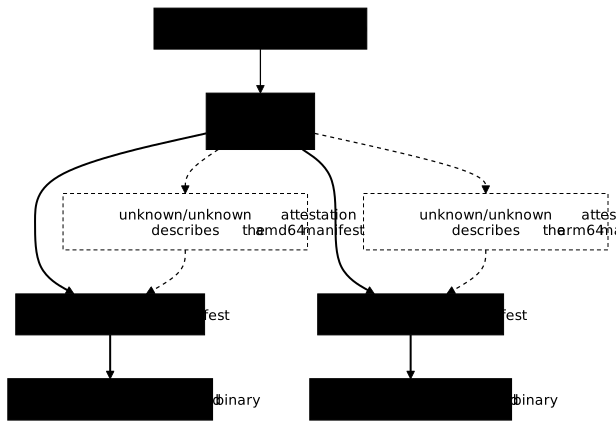
A short script separates the variants from the attestations. It reads the raw index and prints, for each entry, its digest, its platform and its type.
import json, sys# usage: digests.py [os/arch] (stdin = raw index) ; with no argument, list everythingidx = json.load(sys.stdin)want = sys.argv[1] if len(sys.argv) > 1 else Noneprint("entrees:", len(idx["manifests"]), file=sys.stderr)for m in idx["manifests"]: p = m.get("platform", {}) plat = p.get("os", "?") + "/" + p.get("architecture", "?") ann = m.get("annotations", {}) if want: if plat == want: print(m["digest"]) else: print(m["digest"], plat, ann.get("vnd.docker.reference.type", "-"), ann.get("vnd.docker.reference.digest", "-")[:19])docker buildx imagetools inspect --raw 127.0.0.1:5055/demo/plateformes:1.0 | python3 digests.pyentrees: 4sha256:d75b98894278e727eb1752efc3677cb3f242c13191d427acb33323b4493c4202 linux/amd64 - -sha256:c833aa8b36441c1ecdc60a928aef3f2520442958e7d5195d71e3c8b0459a5e5f linux/arm64 - -sha256:4e7ae54f13010e50cc1e768c6f0b871808a1ed6a278db43fb72bcbd32b1a24b7 unknown/unknown attestation-manifest sha256:d75b98894278sha256:5b14946bee721bd75564a61ef3ae4fcc1ece8a7c565ff1cee1ccf93dc28d9367 unknown/unknown attestation-manifest sha256:c833aa8b3644Never count the entries of an index to count the platforms: here 4 entries for 2 platforms. Read the platform of each entry. To get an index that contains only the variants, turn off provenance with --provenance=false.
docker buildx build --platform linux/amd64,linux/arm64 -f Dockerfile -t 127.0.0.1:5055/demo/plateformes:1.0-nop --provenance=false --push --progress=plain . 2>&1 | tail -6docker buildx imagetools inspect --raw 127.0.0.1:5055/demo/plateformes:1.0-nop | python3 digests.pyentrees: 2sha256:d75b98894278e727eb1752efc3677cb3f242c13191d427acb33323b4493c4202 linux/amd64 - -sha256:c833aa8b36441c1ecdc60a928aef3f2520442958e7d5195d71e3c8b0459a5e5f linux/arm64 - -The two variants have the same digests as in the previous index: only the index changes. The registry now lists both tags.
curl -s http://127.0.0.1:5055/v2/demo/plateformes/tags/list{"name":"demo/plateformes","tags":["1.0","1.0-nop"]}Turning provenance off removes information that is useful for auditing the build chain. Do it when a consuming tool does not understand the unknown/unknown entries, not by default.
Why can't a docker-container builder reach 127.0.0.1?
The default builder published to 127.0.0.1:5055 without difficulty. A docker-container builder fails on the same address. Recreate the multi builder and try the same publication.
docker buildx create --name multi --driver docker-container \ --driver-opt image=moby/buildkit:v0.34.0@sha256:b059f8d7226d0b326bc871af489a5dddf65e36af4d20d14251b072974d9ee87c --usedocker buildx build --builder multi --platform linux/amd64,linux/arm64 -f Dockerfile -t 127.0.0.1:5055/demo/plateformes:cont --push . 2>&1 | tail -3multi > exporting to image:------ERROR: failed to build: failed to solve: failed to push 127.0.0.1:5055/demo/plateformes:cont: failed to do request: Head "http://127.0.0.1:5055/v2/demo/plateformes/blobs/sha256:6f4ccdb83c2f8f3bde1bc6328322cb52da372ec2260b9ee8a5295f42e2155bff": dial tcp 127.0.0.1:5055: connect: connection refusedThe connection refused message on 127.0.0.1:5055 comes from the fact that the builder runs in a container, on Docker's bridge network. For it, 127.0.0.1 is its own container, where nobody listens on that port, and not your machine. You have to recreate the builder, giving it the host network with --driver-opt network=host. The option cannot be changed on an existing builder.
docker buildx use defaultdocker buildx rm multidocker buildx create --name multi --driver docker-container \ --driver-opt network=host --driver-opt image=moby/buildkit:v0.34.0@sha256:b059f8d7226d0b326bc871af489a5dddf65e36af4d20d14251b072974d9ee87c --usedocker buildx build --builder multi --platform linux/amd64,linux/arm64 -f Dockerfile -t 127.0.0.1:5055/demo/plateformes:cont --push . 2>&1 | tail -3multi removedmulti#17 pushing manifest for 127.0.0.1:5055/demo/plateformes:cont@sha256:39ce05f2618949d78e22273cde8dd205bc40599a60070009c054fb3137c388c0#17 pushing manifest for 127.0.0.1:5055/demo/plateformes:cont@sha256:39ce05f2618949d78e22273cde8dd205bc40599a60070009c054fb3137c388c0 0.1s done#17 DONE 0.9sThe publication succeeds. In exchange, this builder shares the machine's network and can reach its local services: keep this option for tests, and remove the builder afterwards.
docker buildx use defaultdocker buildx rm multiThe rm command answers multi removed.
How do you run each variant of the index?
An index tag is not proof: it can hide a wrong variant. The proof is to pull each variant by the digest of its manifest, read from the index, then run it. First read the two digests from the published index, with digests.py and its platform argument, and store them in two variables: no digest is typed by hand.
cd ~/multiarchAMD=$(docker buildx imagetools inspect --raw 127.0.0.1:5055/demo/plateformes:1.0 | python3 digests.py linux/amd64)ARM=$(docker buildx imagetools inspect --raw 127.0.0.1:5055/demo/plateformes:1.0 | python3 digests.py linux/arm64)echo "AMD=$AMD ARM=$ARM"entrees: 4entrees: 4AMD=sha256:d75b98894278e727eb1752efc3677cb3f242c13191d427acb33323b4493c4202 ARM=sha256:c833aa8b36441c1ecdc60a928aef3f2520442958e7d5195d71e3c8b0459a5e5fThe digests in the outputs that follow are those of the measurement: yours differ, and the variables carry them for you. The entrees: 4 line goes to the error output, so it is displayed but does not enter the variable. The variables exist only in this terminal: if you close it, replay this block while the registry is running.
Then delete the local copies, so that the test starts from the registry.
docker image rm demo/plateformes:cross demo/plateformes:emul demo/plateformes:piege demo/plateformes:run-arm64 127.0.0.1:5055/demo/plateformes:1.0 127.0.0.1:5055/demo/plateformes:1.0-nopThe command prints one Untagged: line per image removed. Then pull and run the amd64 variant, then the arm64 variant.
docker pull 127.0.0.1:5055/demo/plateformes@$AMD | tail -3docker run --rm --platform linux/amd64 127.0.0.1:5055/demo/plateformes@$AMDdocker image inspect --format '{{.Architecture}}' 127.0.0.1:5055/demo/plateformes@$AMDDigest: sha256:d75b98894278e727eb1752efc3677cb3f242c13191d427acb33323b4493c4202Status: Downloaded newer image for 127.0.0.1:5055/demo/plateformes@sha256:d75b98894278e727eb1752efc3677cb3f242c13191d427acb33323b4493c4202127.0.0.1:5055/demo/plateformes@sha256:d75b98894278e727eb1752efc3677cb3f242c13191d427acb33323b4493c4202GOOS=linux GOARCH=amd64 app=semrofetalpamd64docker pull 127.0.0.1:5055/demo/plateformes@$ARM | tail -3docker run --rm --platform linux/arm64 127.0.0.1:5055/demo/plateformes@$ARMdocker image inspect --format '{{.Architecture}}' 127.0.0.1:5055/demo/plateformes@$ARMDigest: sha256:c833aa8b36441c1ecdc60a928aef3f2520442958e7d5195d71e3c8b0459a5e5fStatus: Downloaded newer image for 127.0.0.1:5055/demo/plateformes@sha256:c833aa8b36441c1ecdc60a928aef3f2520442958e7d5195d71e3c8b0459a5e5f127.0.0.1:5055/demo/plateformes@sha256:c833aa8b36441c1ecdc60a928aef3f2520442958e7d5195d71e3c8b0459a5e5fGOOS=linux GOARCH=arm64 app=semrofetalparm64Each run returns a GOARCH equal to the architecture announced by docker image inspect: the program of the variant is the one for its platform. If either GOARCH line had been wrong, as in the trap variant, you would have seen it here.
What does docker run --platform do depending on what is already local?
The docker run --platform command does not behave the same way depending on what Docker already has locally for that image. Three situations were measured, with Docker 29.9.2 and the containerd image store.
In the first, you pulled an index tag with a single platform. Delete the copies by digest, then pull only the amd64 variant of the index without attestations.
docker image rm 127.0.0.1:5055/demo/plateformes@$ARM 127.0.0.1:5055/demo/plateformes@$AMDdocker pull --platform linux/amd64 127.0.0.1:5055/demo/plateformes:1.0-nopdocker image ls --tree | sed -n '1p;/plateformes/,+3p'The tree is read with docker image ls --tree: the arm64 variant appears there with 0B, that is, declared by the index but absent from the disk.
IMAGE ID DISK USAGE CONTENT SIZE EXTRA127.0.0.1:5055/demo/plateformes:1.0-nop e804613147cb 16.8MB 5.3MB├─ linux/amd64 d75b98894278 16.8MB 5.3MB└─ linux/arm64 c833aa8b3644 0B 0BNow run the arm64 variant, which is not local.
docker run --rm --platform linux/arm64 127.0.0.1:5055/demo/plateformes:1.0-nopUnable to find image '127.0.0.1:5055/demo/plateformes:1.0-nop' locally1.0-nop: Pulling from demo/plateformese5c2b96a0c80: Pulling fs layerd3531b7a4f21: Pulling fs layere5c2b96a0c80: Already existsd3531b7a4f21: Already existse5c2b96a0c80: Pull completeDigest: sha256:e804613147cb4fb45c7ef6f9619df1abd15a2b184e923469f2dc5569e4722b61Status: Image is up to date for 127.0.0.1:5055/demo/plateformes:1.0-nopGOOS=linux GOARCH=arm64 app=semrofetalpDocker pulled the missing layer of the arm64 variant and ran it. The message is misleading: Status: Image is up to date designates the index, already present, and not the variant, which has just been downloaded (the e5c2b96a0c80: Pull complete line shows it). Running without --platform stays on the machine's platform.
docker run --rm 127.0.0.1:5055/demo/plateformes:1.0-nopGOOS=linux GOARCH=amd64 app=semrofetalpIn the second situation, the local image is a single manifest, pulled by its digest. No index lets Docker find another variant. Delete the index tag, pull the amd64 variant by digest and ask for arm64.
docker image rm 127.0.0.1:5055/demo/plateformes:1.0-nopdocker pull 127.0.0.1:5055/demo/plateformes@$AMD | tail -2docker run --rm --platform linux/arm64 127.0.0.1:5055/demo/plateformes@$AMDecho "code=$?"Status: Downloaded newer image for 127.0.0.1:5055/demo/plateformes@sha256:d75b98894278e727eb1752efc3677cb3f242c13191d427acb33323b4493c4202127.0.0.1:5055/demo/plateformes@sha256:d75b98894278e727eb1752efc3677cb3f242c13191d427acb33323b4493c4202Unable to find image '127.0.0.1:5055/demo/plateformes@sha256:d75b98894278e727eb1752efc3677cb3f242c13191d427acb33323b4493c4202' locally127.0.0.1:5055/demo/plateformes@sha256:d75b98894278e727eb1752efc3677cb3f242c13191d427acb33323b4493c4202: Pulling from demo/plateformesDigest: sha256:d75b98894278e727eb1752efc3677cb3f242c13191d427acb33323b4493c4202Status: Image is up to date for 127.0.0.1:5055/demo/plateformes@sha256:d75b98894278e727eb1752efc3677cb3f242c13191d427acb33323b4493c4202docker: Error response from daemon: image with reference 127.0.0.1:5055/demo/plateformes@sha256:d75b98894278e727eb1752efc3677cb3f242c13191d427acb33323b4493c4202 was found but does not provide the specified platform (linux/arm64)
Run 'docker run --help' for more informationcode=125This time Docker fails with code 125 and the message was found but does not provide the specified platform (linux/arm64). A manifest digest designates a single platform: there is no variant to go and fetch. The same message is seen, with --pull=never, on a local single-manifest image: measured on the Alpine image pulled for amd64 only.
In the third situation, the image has just been built locally for a single platform, under a tag that matches no registry.
docker buildx build --platform linux/amd64 -f Dockerfile -t demo/plateformes:amd64only --load . 2>&1 | tail -3docker run --rm --platform linux/arm64 demo/plateformes:amd64onlyecho "code=$?"#12 naming to docker.io/demo/plateformes:amd64only done#12 unpacking to docker.io/demo/plateformes:amd64only 0.0s done#12 DONE 0.1sUnable to find image 'demo/plateformes:amd64only' locallydocker: Error response from daemon: pull access denied for demo/plateformes, repository does not exist or may require 'docker login'
Run 'docker run --help' for more informationcode=125Docker does not find the requested platform locally, tries to pull it from the registry that the name designates (Docker Hub, for demo/plateformes) and gets pull access denied. Code 125 is again Docker's own, not the program's. The table sums up the three cases.
| What is local | What docker run --platform linux/arm64 does | What you read |
|---|---|---|
Index tag pulled for amd64 only | Pulls the arm64 variant and runs it | Image is up to date, then GOARCH=arm64 |
Single amd64 manifest, referenced by digest | Fails: the image does not provide that platform | Code 125, was found but does not provide the specified platform |
Image built locally for amd64 only | Looks for the platform in a registry that does not have it | Code 125, pull access denied |
For the first two cases, the remedy takes two steps: pull the wanted platform with docker pull --platform, then check the architecture with docker image inspect --platform and by running it, rather than trusting the Image is up to date message. For the third, build the wanted platform, or publish the index and pull it.
How do you declare the platforms you have not replayed?
Everything this lesson ran was run on a single amd64 machine, with arm64 emulated by QEMU. Running the image under emulation proves that the arm64 binary starts and answers; it does not prove its behavior on a real arm64 processor, which the lesson did not measure. An honest publication says, platform by platform, what was built, what was run and where.
| Platform | Built | Run | Where | What it proves |
|---|---|---|---|---|
linux/amd64 | yes | yes | natively, on the measurement VM | the x86-64 binary answers GOARCH=amd64 |
linux/arm64 | yes | yes | under QEMU, on the same VM | the ARM aarch64 binary starts and answers GOARCH=arm64; nothing about an arm64 host |
others (386, s390x) | no | no | nothing |
A platform that you announce in the index without having run it must appear as such in this table, or not be published. The build of linux/s390x with Dockerfile.run or Dockerfile.emul, which run a RUN under the target platform, does fail on this machine, because only the arm64 emulator is registered there (see the troubleshooting table). To qualify a platform, run it on hardware of that architecture, for example from a CI that has arm64 machines. This lesson did not replay that case.
Two guides extend this lesson. For a cluster that mixes both architectures, see Mix ARM and AMD64 nodes in a k3s cluster; to orchestrate several builds from a single file, see Docker Bake.
What to do when a multi-platform build or run fails?
Each error in the table was provoked during the measurements, with Docker 29.9.2 and Buildx 0.38.1. Read the left column as the symptom you see, and the last one as the action that fixes it.
| Symptom | Cause | Solution |
|---|---|---|
exec /bin/uname: exec format error, code 255, on docker run --platform linux/arm64 | No arm64 emulator registered in binfmt_misc | Register the emulation with tonistiigi/binfmt and --install arm64 |
exec /bin/sh: exec format error and exit code: 255 at a RUN step of a build | The RUN runs a program of the target platform, with no emulator | Register the emulation, or cross-compile and keep only COPY in the final stage |
The --platform linux/s390x build of a Dockerfile that runs a RUN under the target platform fails with 255 while arm64 works | Only qemu-aarch64 is registered | Register the emulator of that architecture, or do not target it |
failed to push 127.0.0.1:5055/…: connection refused with a docker-container builder | The builder runs on the bridge network: 127.0.0.1 is its own container | Recreate the builder with --driver-opt network=host |
Status: Image is up to date although the arm64 variant has just been downloaded | The message is about the index, already local, not the variant | Check with docker image ls --tree and docker image inspect --platform |
was found but does not provide the specified platform (linux/arm64), code 125 | The local image is a single manifest of another platform | Pull the index with docker pull --platform linux/arm64, or the digest of the right variant |
pull access denied for demo/plateformes, code 125, on a docker run --platform | The local image does not have the platform and Docker looks in a registry that does not contain it | Build the wanted platform, or publish the index and pull it |
Both variants answer GOARCH=amd64, file announces x86-64 everywhere | FROM --platform=$BUILDPLATFORM without GOOS=$TARGETOS GOARCH=$TARGETARCH in go build | Pass TARGETOS and TARGETARCH to the compilation, then run each variant |
| 4 entries in the index for 2 platforms | Two provenance attestations, with the unknown/unknown platform | Read the platform of each entry; --provenance=false if a tool rejects them |
How do you clean everything up?
The demonstration leaves a registry, images, an emulation, possibly a builder, files and cache. Remove them in this order, without rm -r: each deletion names what it removes. The AMD variable is used to delete an image further down: if you changed terminals, recompute it before stopping the registry. Start with the registry and the builder.
docker buildx lsdocker volume lsdocker rm -f -v demo-registrydocker image rm registry@sha256:d4032d4cc323c1731c707931ecada07a53076eac38e3b61ae57533f170f2c6c3docker volume lsNAME/NODE DRIVER/ENDPOINT STATUS BUILDKIT PLATFORMSdefault* docker \_ default \_ default running v0.34.0 linux/amd64 (+3), linux/arm64DRIVER VOLUME NAMElocal f7ca5e2a38bef88fa3326fea36e7e4e3c573b507460c1127ecae2d5489df1916demo-registryUntagged: registry@sha256:d4032d4cc323c1731c707931ecada07a53076eac38e3b61ae57533f170f2c6c3Deleted: sha256:d4032d4cc323c1731c707931ecada07a53076eac38e3b61ae57533f170f2c6c3DRIVER VOLUME NAMEThe registry:3 image declares an anonymous volume, which docker rm -f alone leaves in place. The -v option removes it with the container: compare the two docker volume ls lists, the registry's volume disappears from the second one and your other volumes stay. If docker buildx ls still shows the multi builder, remove it; if it no longer exists, docker buildx rm answers no builder "multi" found, which is harmless.
docker buildx use defaultdocker buildx rm multiThen remove the emulation, then the lesson's images. Run the first command only if the list noted at the start (the ls of /proc/sys/fs/binfmt_misc) did not already contain qemu-aarch64: otherwise, you would remove an emulation that existed before the lesson.
docker run --privileged --rm tonistiigi/binfmt:qemu-v10.2.3-68@sha256:400a4873b838d1b89194d982c45e5fb3cda4593fbfd7e08a02e76b03b21166f0 --uninstall qemu-aarch64ls /proc/sys/fs/binfmt_miscdocker image rm demo/plateformes:amd64only 127.0.0.1:5055/demo/plateformes@$AMD tonistiigi/binfmt:qemu-v10.2.3-68@sha256:400a4873b838d1b89194d982c45e5fb3cda4593fbfd7e08a02e76b03b21166f0 moby/buildkit:v0.34.0@sha256:b059f8d7226d0b326bc871af489a5dddf65e36af4d20d14251b072974d9ee87c golang@sha256:d200d2dd76b03a99b52651fd1325aff7dcd35422c35c01bac56571b0507f3debuninstalling: qemu-aarch64 OK{ "supported": [ "linux/amd64", "linux/amd64/v2", "linux/amd64/v3", "linux/386" ], "emulators": [ "python3.13" ]}python3.13registerstatusUntagged: demo/plateformes:amd64onlyDeleted: sha256:f8dd24ec566157b5199cf2be50e75e782e8f4f58342249ba4684ac552dde2e99Untagged: 127.0.0.1:5055/demo/plateformes@sha256:d75b98894278e727eb1752efc3677cb3f242c13191d427acb33323b4493c4202Deleted: sha256:d75b98894278e727eb1752efc3677cb3f242c13191d427acb33323b4493c4202Untagged: tonistiigi/binfmt@sha256:400a4873b838d1b89194d982c45e5fb3cda4593fbfd7e08a02e76b03b21166f0Deleted: sha256:400a4873b838d1b89194d982c45e5fb3cda4593fbfd7e08a02e76b03b21166f0Untagged: moby/buildkit@sha256:b059f8d7226d0b326bc871af489a5dddf65e36af4d20d14251b072974d9ee87cDeleted: sha256:b059f8d7226d0b326bc871af489a5dddf65e36af4d20d14251b072974d9ee87cUntagged: golang@sha256:d200d2dd76b03a99b52651fd1325aff7dcd35422c35c01bac56571b0507f3debDeleted: sha256:d200d2dd76b03a99b52651fd1325aff7dcd35422c35c01bac56571b0507f3debCheck the state of the kernel with ls /proc/sys/fs/binfmt_misc, which must no longer list qemu-aarch64. Do not rely on docker buildx ls for this: after the removal, the default builder still showed linux/arm64 there in the measurements. That list stayed cached until the engine restarted; after sudo systemctl restart docker, it went back to linux/amd64, linux/amd64/v2 and linux/amd64/v3. The real check remains /proc/sys/fs/binfmt_misc.
Warning: docker builder prune -af empties the whole build cache of the builder, not only that of this lesson. Skip this command if other projects depend on it.
docker builder prune -afdocker image lsID RECLAIMABLE SIZE LAST ACCESSEDqqfegccgz1itogk5io3szu2lf* true 36.43MB About a minute ago2e807td3hxxvpgioms1xqm33l* true 36.4MB About a minute ago[...]Total: 959.4MBIMAGE ID DISK USAGE CONTENT SIZE EXTRAalpine:latest be2656061b53 26.6MB 8.22MBalpine@sha256:be2656061b536c1883c4034790e21d0a09c5aaaf51968b89368a3c0371ea2c9a be2656061b53 26.6MB 8.22MBThe alpine:latest line belongs to the starting state of the measurement machine: it was not created by the lesson, and yours may differ.
Finally delete the lesson's files, one by one, then the empty folder.
cd ~/multiarch && for d in out-*; do rm $d/app; rmdir $d; done; rm Dockerfile Dockerfile.emul Dockerfile.piege Dockerfile.run go.mod main.go digests.py; cd ~; rmdir multiarchThe Alpine image can stay: it serves other lessons, and it keeps the arm64 variant pulled at the start of this one. If you also want to remove it, docker image rm followed by its reference is enough.
Practice
The lab starts from a small program to ship for two architectures. You publish to a local registry an index that references two real variants, then you run both. Only the state of the system is checked, with dsoxlab check, never the commands typed: the validation reads the published index, checks that it does contain the two requested platforms, and verifies at run time that the binary of each variant is the one for its architecture.
Key points
-
In a Dockerfile, only
RUNinstructions launch a program of the target platform: they are the ones that require emulation.FROMandCOPYlaunch no program. Without QEMU registered, aRUNof another architecture fails withexec format errorand code 255. -
Emulation is registered and removed with
docker run --privileged --rm tonistiigi/binfmt:qemu-v10.2.3-68@sha256:… --install arm64then--uninstall qemu-aarch64, and is checked in/proc/sys/fs/binfmt_misc. -
A
docker-containerbuilder is added and removed (docker buildx create,docker buildx rm, thendocker image rmof the pinned BuildKit image). On thebridgenetwork, it cannot reach the host's127.0.0.1: add--driver-opt network=host. -
On the containerd image store, the default builder builds two platforms with
--platform linux/amd64,linux/arm64 --load;docker image ls --treeanddocker image inspect --platformread each variant. -
Cross-compilation is faster than emulation: 8.9 s against 56.8 s on the measurement VM, with
FROM --platform=$BUILDPLATFORM,TARGETOSandTARGETARCH.BUILDPLATFORMwithoutGOARCHgives a correct index and a wrong binary. -
Never count the entries of an index: 4 entries for 2 platforms, 2 of them
unknown/unknownattestations. Pull each variant by the digest of its manifest and run it. -
docker run --platformdepends on what is local: a partial index pulls the missing variant under a misleadingImage is up to datemessage, a single manifest gives code 125. Pull withdocker pull --platform, then check at run time. -
A test under emulation is not a qualification on native hardware: declare, platform by platform, what was built, run, and where.
Knowledge check
Check that the essentials of this lesson have stuck. The questions cover only what has just been explained here.
Knowledge check
Check what you have learned with this interactive quiz
How it works
- The timer starts when you click Start
- Multiple choice, true/false and short answer questions
- You can move between questions
- Detailed results are shown at the end
Starts the quiz and the timer
Review
(0/0)Score by domain
A domain groups several guides and gets several questions, so its score is more reliable than a per-topic score, which often rests on a single question.
Summary
Strengths
No topic passed at 80% on at least two questions yet.
Weak areas
No topic below the pass mark.
Recommended next
Hints before you try again?
Continue the course: Exam: rebuild an image for two architectures
A new full quiz with random questions
Work again only on the questions you missed