
Docker Bake describes all the images of a project in a single file, then
builds them in parallel with a single command: docker buildx bake.
This guide is for readers who chain several docker build commands in a
script and want a file versioned with the code instead. It starts from a
project of four images (a Node.js API, a Python site, a base image and a
worker) and covers four topics: writing the file (targets, groups, variables,
inheritance), changing a value without editing it (overrides and file
merging), deciding where the result of a build goes (local image, registry,
attestations), then reusing a cache. It also covers contexts, matrices,
reading a Compose file, platforms and continuous integration. The outputs were
recorded with Docker Engine 29.9.2, Buildx 0.38.1 and BuildKit v0.34.0.
What you will learn
- Write a
docker-bake.hclwith variables, an inherited common target and groups. - Preview what Bake is going to build with
--print,--listand--check. - Change a value without editing the file, with
--var, an environment variable or--set. - Share a base image between targets (contexts), generate targets with a matrix, combine several files and have Bake read a Compose file.
- Choose the output of a build (
--load,--push,output), read its attestations and declare platforms. - Reuse a local or registry cache, in
mode=minormode=max, and run Bake in continuous integration.
Prerequisites
- A working Docker Engine, installed as in Install Docker Engine 29 and prove it works, with access to Docker Hub (the base images are pulled from there).
- Know how to read a Dockerfile, as explained in Write a Dockerfile and control its build context.
- A Linux terminal (the measurements come from a Debian 13) and 1 to 2 GB of free disk space.
wget, to query a local registry, andmoreutils, which provides thetscommand used to measure parallelism (sudo apt install moreutils).- The containerd image store, which the next command lets you check.
The image store is the place where the engine keeps the images it builds.
On the measurement machine, it relies on containerd, and this is the store
that accepts a multi-platform image loaded with --load, as well as the cache
export with the docker driver. Ask the engine.
docker info -f '{{ .DriverStatus }}'[[driver-type io.containerd.snapshotter.v1]]Look at the value io.containerd.snapshotter.v1: it shows that the engine
uses the containerd store, the one behind the measurements in this guide. If
you do not see it, your engine keeps the old store. That case was not measured
here. According to Docker's documentation, you enable the containerd store with
the containerd-snapshotter option in /etc/docker/daemon.json, or you create
a builder with the docker-container driver, which does not depend on this
store. Images in the old store are not migrated.
What is Docker Bake, and when does it replace your scripts?
Docker Bake is the Buildx command that reads a build definition from a file
and runs the corresponding builds. A script that repeats docker build -t … ./api then docker build -t … ./web does the same thing, less
readably: the options are copied from one line to the next, the order is
sequential, and every workstation or pipeline ends up with its own variant.
With Bake, each image becomes a target, that is, a build described by its context, its Dockerfile, its arguments and its tags. A group gathers several targets to build them together. The file is written in HCL, the configuration syntax Terraform also uses, but Bake also reads JSON and Compose files, as shown below.
Bake becomes useful as soon as two images share arguments, labels or a
registry, or as soon as the same build must be replayed identically on a
workstation and in continuous integration. For a single image with no
variant, docker build is enough.
Is Bake already installed with Docker?
Bake ships with Buildx: there is nothing more to install. On the measurement
machine, the command comes from the docker-buildx-plugin package
(0.38.1-1debian.13trixie), which drops /usr/libexec/docker/cli-plugins/docker-buildx.
Check your version with the next command.
docker buildx versiongithub.com/docker/buildx v0.38.1 0dbe87f36ed472fe36b6796c3f70b4210a731fc5The version of Bake is that of Buildx: docker buildx bake has no
--version option.
docker buildx bake --versionunknown flag: --version
Usage: docker buildx bake [OPTIONS] [TARGET...]
Run 'docker buildx bake --help' for more informationThe command returns exit code 125. To find out which build engine is in use, list the builders.
docker buildx lsNAME/NODE DRIVER/ENDPOINT STATUS BUILDKIT PLATFORMSdefault* docker \_ default \_ default running v0.34.0 linux/amd64 (+3)The default builder uses the docker driver, that is, the BuildKit built
into the engine (v0.34.0 here). It is the one behind all the measurements in
this guide. To understand BuildKit itself, see
BuildKit: build secrets and private access.
Which example project is the running thread?
The project has five folders, each with its Dockerfile, and the
docker-bake.hcl file that you will write at the root.
- docker-bake.hcl
Répertoireapi/
- Dockerfile
- server.js
Répertoireweb/
- Dockerfile
- index.html
Répertoirebase/
- Dockerfile
Répertoireworker/
- Dockerfile
Répertoirestatic/
- Dockerfile
- hello.txt
The first two images are a Node.js API and a site served by Python. Each
RUN contains a deliberate sleep 3: it makes visible, further down, the
fact that Bake builds both images at the same time.
# api/DockerfileFROM node:26.13.0-slim@sha256:e4db4c914bf8ad241bd24804fc25d272d89bad97e68cdc8a1414862790a02c39ARG VERSION=devWORKDIR /appCOPY server.js .RUN sleep 3 && echo "$VERSION" > /app/versionCMD ["node", "server.js"]# web/DockerfileFROM python:3.15.2-slim@sha256:8c13a3f37a6a5b71498228e902c4b9f51c1f7900d49fabf71f9a650c6120e0d0ARG VERSION=devWORKDIR /srvCOPY index.html .RUN sleep 3 && echo "$VERSION" > /srv/versionCMD ["python", "-m", "http.server", "8080"]The file api/server.js contains console.log("api up"); and
web/index.html contains <h1>web</h1>. The base images are pinned by
digest: the build gives the same result as long as that digest does not change.
The other three folders serve the sections on contexts and multi-platform builds. Their files are given at the point where they are used.
How do you write a docker-bake.hcl?
The file is built in three steps: variables, a common target the others
inherit from, then targets and groups. At the end of each section, add the
block to the docker-bake.hcl file. The following sections add other targets
(base, worker, static, app).
Variables: a registry, a tag, a number
A variable is declared with a variable block. Its default value is used as
long as nobody changes it. The type is optional; here REPLICAS is typed
number, so a value that is not a number is refused.
variable "REGISTRY" {  default = "demo"}
variable "TAG" {  default = "dev"}
variable "REPLICAS" {  type    = number  default = 2}
In an expression, you write the variable name as is (TAG), never
var.TAG as in Terraform. A string that contains one is written
"${REGISTRY}/api:${TAG}".
A common target and inheritance
Several images share the same arguments and the same labels. You write them
once in a _common target, which the others take over with inherits. By
convention the name starts with an underscore, to signal a target that is not
meant to be built on its own.
target "_common" {  args = {    VERSION = TAG  }  labels = {    "org.opencontainers.image.version" = TAG    "demo.replicas"                    = "${add(REPLICAS, 1)}"    "demo.tag-upper"                   = upper(TAG)  }}
target "api" {  inherits = ["_common"]  context  = "./api"  tags     = [TAG == "dev" ? "${REGISTRY}/api:dev" : "${REGISTRY}/api:${TAG}"]}
target "web" {  inherits = ["_common"]  context  = "./web"  tags     = ["${REGISTRY}/web:${TAG}"]}
This block shows three tools of the language. The functions add() and
upper() compute values (here, REPLICAS plus one, and the tag in capitals).
The condition ? a : b operator picks a value, here with no real effect
since both branches give the same tag for dev. A build argument (args)
reaches the Dockerfile through ARG VERSION.
Groups: what docker buildx bake builds with no argument
With no target name, Bake builds the target or group named default. So you
define it explicitly, and you add an all group for when you want to build
everything.
group "default" {  targets = ["api", "web"]}
group "all" {  targets = ["api", "web", "worker"]}
A file with no default group answers ERROR: failed to find target default when you run docker buildx bake with no argument. The
troubleshooting section covers this case.
How do you see what Bake will build before building?
The --print option displays the final definition of each target, in JSON
format, without starting a build. It is the verification tool of this whole
guide: you see the values after inheritance, after the expressions are
computed and after the overrides.
docker buildx bake api --print#1 [internal] load local bake definitions#1 reading docker-bake.hcl 720B / 720B done#1 DONE 0.0s{ "group": { "default": { "targets": [ "api" ] } }, "target": { "api": { "context": "api", "dockerfile": "Dockerfile", "args": { "VERSION": "dev" }, "labels": { "demo.replicas": "3", "demo.tag-upper": "DEV", "org.opencontainers.image.version": "dev" }, "tags": [ "demo/api:dev" ] } }}The three #1 lines show which file Bake read; they are omitted from the
following outputs. Look at the fields inherited from _common: args.VERSION
is dev because TAG is dev, demo.replicas is 3 (REPLICAS is 2,
plus one) and demo.tag-upper is DEV. The default group contains only
api because you named that target on the command line.
How do you build the images, and in parallel?
docker buildx bake with no argument builds the default group, that is,
api and web. Run it, then list the project's images, filtering on the
demo/ prefix so as not to see the other images on the machine.
docker buildx bakedocker image ls 'demo/*'IMAGE ID DISK USAGE CONTENT SIZE EXTRAdemo/api:dev 47792d6e4a53 353MB 85.7MBdemo/web:dev 981ff38ba49f 182MB 44.3MBThe two lines are the ones Bake has just produced, with the tag computed by
the file. The first build is the longest, because it downloads the base
images, which lengthens the FROM steps of web and api.
To build a single target, name it. Since api has just been built, BuildKit
reuses its cache: the output shows CACHED in place of the three seconds of
sleep 3.
docker buildx bake api --progress=plain 2>&1 | grep -E 'CACHED|RUN sleep|naming'#7 CACHED#8 CACHED#9 [4/4] RUN sleep 3 && echo "dev" > /app/version#9 CACHED#10 naming to docker.io/demo/api:dev doneThe --progress=plain option produces a flat log, easier to filter. The
images are named docker.io/demo/…: with no registry name, Docker completes
it with docker.io.
Are targets really built in parallel?
Yes, and the timestamps prove it. To see them, pipe the log through ts,
the moreutils command that prepends the time to each line. The format
'%H:%M:%.S' gives hours, minutes and seconds with six decimals. The command
below forces a rebuild (--no-cache) so that sleep 3 runs, lets Bake
decide on its own, and keeps only the RUN step and the end of each
three-second step.
docker buildx bake api web --no-cache --progress=plain 2>&1 | ts '%H:%M:%.S' | grep -E 'RUN sleep|DONE 3\.'11:56:48.561360 #16 [api 4/4] RUN sleep 3 && echo "dev" > /app/version11:56:51.697887 #16 DONE 3.3s11:56:51.697945 #17 [web 4/4] RUN sleep 3 && echo "dev" > /srv/version11:56:51.892037 #17 DONE 3.3sDo not read the time of the [web 4/4] header as the start time of the
step: in this output it appears at 51.698, at the same time as the end of
api, whereas the web step lasts 3.3 s and ends at 51.892. The header of
a concurrent step therefore does not mark its start. Compute the end time
minus the duration instead. The api step ends at 51.698 after 3.3 s, so it
starts around 48.40. The web step ends at 51.892 after 3.3 s, so it starts
around 48.59. The two three-second slices overlap almost entirely: the two
steps ran at the same time.
With --jobs 1, Bake runs only one build at a time. The same calculation
then shows slices that follow each other.
time docker buildx bake --no-cache --jobs 1 --progress=plain 2>&1 | ts '%H:%M:%.S' | grep -E 'RUN sleep|DONE 3\.'11:56:53.370082 #9 [api 4/4] RUN sleep 3 && echo "dev" > /app/version11:56:56.593726 #9 DONE 3.2s11:56:57.546641 #18 [web 4/4] RUN sleep 3 && echo "dev" > /srv/version11:57:00.631899 #18 DONE 3.2s
real 0m8.222suser 0m0.071ssys 0m0.036sThe api step ends at 56.594 (it started around 53.39) and the web step
ends at 00.632 (it started around 57.43): they do not overlap, and the total
reaches 8.2 seconds. In parallel, the first and last lines of the previous
output are about 3.3 seconds apart. Parallelism is therefore the default
behavior, and --jobs is for limiting it on a modest machine. The
--jobs option dates from Buildx 0.38; without it, Bake does not limit the
number of targets built at the same time.
Each duration comes from a single measurement on a single machine: keep the
order (the steps overlap or not), not the exact seconds. A ts command placed
in front of CACHED measures nothing, because Bake writes those lines in
bursts.
How do you change a value without editing the file?
There are two families of overrides, and they are easily confused. A
variable (TAG) is changed with an environment variable or with --var.
A target attribute (tags, args, platforms) is changed with --set.
Overriding a variable: environment and --var
An environment variable with the same name as the HCL variable replaces the default value.
TAG=1.2 docker buildx bake api --print{ "group": { "default": { "targets": [ "api" ] } }, "target": { "api": { "context": "api", "dockerfile": "Dockerfile", "args": { "VERSION": "1.2" }, "labels": { "demo.replicas": "3", "demo.tag-upper": "1.2", "org.opencontainers.image.version": "1.2" }, "tags": [ "demo/api:1.2" ] } }}All the values computed from TAG have changed: the argument, the version
label and the tag. The --var option, available since Buildx 0.31, does the
same thing without touching the shell environment.
docker buildx bake api --var TAG=3.0 --print | grep -E 'api:|VERSION|version' "VERSION": "3.0" "org.opencontainers.image.version": "3.0" "demo/api:3.0"If both are present, --var wins over the environment.
TAG=env docker buildx bake api --var TAG=var --print | grep -E 'api:' "demo/api:var"A type is checked on reading. REPLICAS is a number: a value that is not
one stops Bake, however it is supplied.
REPLICAS=abc docker buildx bake api --printdocker-bake.hcl:9-------------------- 7 | } 8 | 9 | >>> variable "REPLICAS" { 10 | type = number 11 | default = 2--------------------ERROR: docker-bake.hcl:9,21-21: Invalid value; failed to parse REPLICAS as number: strconv.ParseFloat: parsing "abc": invalid syntaxWhat happens if you write var.TAG?
In an expression, a variable is written without a prefix. Writing var.TAG,
as in Terraform, gives an error. To see it, copy this guide's file, replacing
upper(TAG) with upper(var.TAG).
sed 's/upper(TAG)/upper(var.TAG)/' docker-bake.hcl > varname.hcldocker buildx bake -f varname.hcl api --printvarname.hcl:21-------------------- 19 | "org.opencontainers.image.version" = TAG 20 | "demo.replicas" = "${add(REPLICAS, 1)}" 21 | >>> "demo.tag-upper" = upper(var.TAG) 22 | } 23 | }--------------------ERROR: varname.hcl:21,48-51: Unknown variable; There is no variable named "var"., and 1 other diagnostic(s)The fix is to write upper(TAG), as in this guide's file. The varname.hcl
copy is no longer needed afterwards.
Overriding a target attribute: --set
--set takes the form target.attribute=value. The target can be a name
(api) or * for all those that are built. The Buildx 0.38 documentation
writes the keys in the singular (tag, arg, platform); the plural forms
used here are still accepted.
docker buildx bake api --set api.tags=demo/custom:x --print | grep -A2 tags "tags": [ "demo/custom:x" ]docker buildx bake --set '*.platforms=linux/arm64' --print | grep -B1 -A3 platforms ], "platforms": [ "linux/arm64" ] },-- ], "platforms": [ "linux/arm64" ] }The two blocks of the second output are api and web: the star touched
both of them. For a build argument, the path continues after the attribute
name.
docker buildx bake api --set api.args.VERSION=9 --print | grep -A2 args "args": { "VERSION": "9" },--set target.tags=… replaces the whole list. To add a value to the existing
list, write +=.
docker buildx bake api --set 'api.tags+=demo/api:extra' --print | grep -A4 '"tags"' "tags": [ "demo/api:dev", "demo/api:extra" ] }With = instead of +=, the same command keeps only demo/api:extra.
The += also works on a target that comes from a Compose file.
--set never targets a variable. Bake answers with one of these two
errors, depending on the form of the key.
docker buildx bake api --set version=2.0 --printdocker buildx bake api --set '*.TAG=v1' --printdocker buildx bake api --set api.TAG=v2 --printERROR: invalid override key version, expected target.nameERROR: unknown key: TAGERROR: unknown key: TAGIn all these cases, the fix is the same: change TAG through the environment
or with --var TAG=….
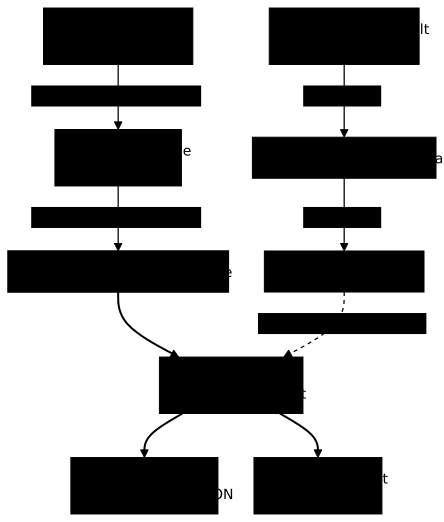
Which value wins?
The diagram below separates the two families. A first chain covers the
attributes of a target: the base file is merged with the override file, which
has priority, then --set has priority over both. The second covers
variables: the environment replaces the default value, and --var replaces
the environment. Both chains end at the same final definition, the one that
--print displays and that the build uses.
How do you share a base image between targets: contexts?
A named context replaces, in a Dockerfile, an image reference with something else. The common case: build a base image once, and reuse it in a second build without publishing it to a registry.
Here are the two Dockerfiles. The worker writes FROM base, a name that Bake
will resolve itself; the hadolint ignore comment avoids the alert of a
Dockerfile linter about an image with no tag, since base is not an image
from the registry.
# base/DockerfileFROM alpine:3.24.3@sha256:be2656061b536c1883c4034790e21d0a09c5aaaf51968b89368a3c0371ea2c9aRUN echo "base-layer" > /base.txt# worker/Dockerfile# hadolint ignore=DL3006FROM baseRUN cat /base.txt > /worker.txt && echo "worker" >> /worker.txtIn the Bake file, the worker target declares base as a context, with the
target: prefix to designate another target of the file. Add these two
blocks.
target "base" {  context = "./base"}
target "worker" {  context  = "./worker"  contexts = {    base = "target:base"  }  tags = ["${REGISTRY}/worker:${TAG}"]}
The final definition shows what Bake deduced. Note that base, which nobody
asked to publish, automatically receives a cacheonly output: Bake builds it
to serve as a context, not to put it in your image stock.
docker buildx bake worker --print{ "group": { "default": { "targets": [ "worker" ] } }, "target": { "base": { "context": "base", "dockerfile": "Dockerfile", "output": [ { "type": "cacheonly" } ] }, "worker": { "context": "worker", "contexts": { "base": "target:base" }, "dockerfile": "Dockerfile", "tags": [ "demo/worker:dev" ] } }}Build the worker, then read the file that its Dockerfile produced from the
base layer.
docker buildx bake workerdocker run --rm demo/worker:dev cat /worker.txtbase-layerworkerThe first line comes from the /base.txt of the base target, copied by the
worker: the proof that FROM base did point at the target. The other form of
context, docker-image://, replaces the name with an image from the registry.
Add a target that points at the worker's Dockerfile.
target "ctximg" { context = "./worker" contexts = { base = "docker-image://alpine:3.24.3@sha256:be2656061b536c1883c4034790e21d0a09c5aaaf51968b89368a3c0371ea2c9a" }}docker buildx bake ctximg --load --progress=plain 2>&1 | tail -8Dockerfile:3-------------------- 1 | # hadolint ignore=DL3006 2 | FROM base 3 | >>> RUN cat /base.txt > /worker.txt && echo "worker" >> /worker.txt 4 |--------------------ERROR: failed to solve: process "/bin/sh -c cat /base.txt > /worker.txt && echo \"worker\" >> /worker.txt" did not complete successfully: exit code: 1This failure is expected. This time base designates the registry's
alpine:3.24.3 image, which does not contain the /base.txt file created by
the base target. The context was indeed replaced, but the worker's cat
looks for a file that no longer exists. Now remove this ctximg target from
docker-bake.hcl: it only serves to provoke the error and it would fail if
you built it again.
To see the replacement work, you need a Dockerfile that uses only what
alpine:3.24.3 contains. The dockerfile-inline attribute writes that
Dockerfile directly in the target. Put the target in a separate file,
ctx.hcl, so as not to burden the main file.
target "ctximg" { dockerfile-inline = "FROM base\nRUN cat /etc/alpine-release" contexts = { base = "docker-image://alpine:3.24.3@sha256:be2656061b536c1883c4034790e21d0a09c5aaaf51968b89368a3c0371ea2c9a" }}docker buildx bake -f ctx.hcl ctximg --progress=plain 2>&1 | grep -E 'RUN|3\.24|ERROR|naming' | head#3 [context base] load metadata for alpine:3.24.3@sha256:be2656061b536c1883c4034790e21d0a09c5aaaf51968b89368a3c0371ea2c9a#5 [context base] alpine:3.24.3@sha256:be2656061b536c1883c4034790e21d0a09c5aaaf51968b89368a3c0371ea2c9a#5 resolve docker.io/library/alpine:3.24.3@sha256:be2656061b536c1883c4034790e21d0a09c5aaaf51968b89368a3c0371ea2c9a#5 resolve docker.io/library/alpine:3.24.3@sha256:be2656061b536c1883c4034790e21d0a09c5aaaf51968b89368a3c0371ea2c9a 0.0s done#6 [1/2] RUN cat /etc/alpine-release#6 0.168 3.24.3#7 naming to moby-dangling@sha256:c7e02ee9d6942d0a42e12e34f1ebfb91d3f474352a874f9b8151f443763562ed doneThe [context base] lines show that base designates alpine:3.24.3, and
the 3.24.3 line is the output of cat: the step ran in that image. The
target has no tag, so the image carries a temporary name moby-dangling@….
How do you generate several targets with a matrix?
When two targets differ by only one value, a matrix produces them from a
single definition. The matrix block lists the values, and the name
attribute gives each combination a unique name. Add the app target, which
takes over api and web.
target "app" { name = "app-${svc}" matrix = { svc = ["api", "web"] } inherits = ["_common"] context = "./${svc}" tags = ["${REGISTRY}/app-${svc}:${TAG}"]}docker buildx bake app --print{ "group": { "app": { "targets": [ "app-api", "app-web" ] }, "default": { "targets": [ "app" ] } }, "target": { "app-api": { "context": "api", "dockerfile": "Dockerfile", "args": { "VERSION": "dev" }, "labels": { "demo.replicas": "3", "demo.tag-upper": "DEV", "org.opencontainers.image.version": "dev" }, "tags": [ "demo/app-api:dev" ] }, "app-web": { "context": "web", "dockerfile": "Dockerfile", "args": { "VERSION": "dev" }, "labels": { "demo.replicas": "3", "demo.tag-upper": "DEV", "org.opencontainers.image.version": "dev" }, "tags": [ "demo/app-web:dev" ] } }}Bake produced two targets, app-api and app-web, and an app group that
gathers them: naming app is enough to build both. Each target keeps the
inheritance from _common.
How do you combine several files and predict which one wins?
Bake reads three formats: HCL (docker-bake.hcl), JSON (docker-bake.json)
and Compose (compose.yaml). With no -f option, it looks in the current
folder for a list of precise names and reads all those that exist.
The next output comes from a folder that contains all these names, plus
compose.override.yaml and docker-compose.override.yml files. Each file
defines only one empty target (FROM scratch), named after its origin, such
as from_hcl or from_compose_yaml. The sizes shown are those of these tiny
files. To reproduce it, create a separate folder (for example bake-disc/):
docker-bake.* or compose.* files placed next to your project would be
silently read by every bake command run without -f.
docker buildx bake --print#1 [internal] load local bake definitions#1 reading compose.yaml 80B / 80B done#1 reading compose.yml 79B / 79B done#1 reading docker-compose.yml 86B / 86B done#1 reading docker-compose.yaml 87B / 87B done#1 reading docker-bake.json 62B / 62B done#1 reading docker-bake.hcl 59B / 59B done#1 reading docker-bake.override.json 71B / 71B done#1 reading docker-bake.override.hcl 68B / 68B done#1 DONE 0.0sThis excerpt keeps only the reading lines. Look at the reading order: the
Compose files first, then the JSON, then the HCL, then the
docker-bake.override.* files last. The compose.override.yaml and
docker-compose.override.yml files are not in the list: Bake never reads them
automatically (it reads them if you pass them with -f).
The targets of all these files are merged, which --list targets shows.
Compose services join the default group, whereas HCL and JSON targets belong
to it only if you add them to a group or name them.
docker buildx bake --list targetsTARGET DESCRIPTIONdefault from_compose_yaml, from_compose_yml, from_docker_compose_yaml, from_docker_compose_ymlfrom_compose_yamlfrom_compose_ymlfrom_docker_compose_yamlfrom_docker_compose_ymlfrom_hclfrom_jsonfrom_override_hclfrom_override_jsonNote that from_hcl and from_json exist, but are not part of default.
The same observation holds in a smaller folder, with a compose.yaml and a
docker-bake.json: the definition displayed by --print contains only the
target of the Compose service (c), because the JSON one (j) belongs to no
group.
The automatic override file
A docker-bake.override.hcl file placed next to docker-bake.hcl is read
automatically and completes the first one. It is the right place for local
settings that you do not commit. Here are the base file and its override.
Work in a separate folder (for example bake-ovr/) for this demonstration
docker-bake.hcl, for docker-bake.override.hcl and for the a.hcl and
b.hcl files that follow. An override placed next to your project would be
silently read by every command run without -f, and would change their
results without anything showing it.
target "api" { dockerfile-inline = "FROM scratch" tags = ["demo/api:base"] args = { A = "base" B = "base" }}target "api" { tags = ["demo/api:override"] args = { B = "override" }}docker buildx bake api --print{ "group": { "default": { "targets": [ "api" ] } }, "target": { "api": { "context": ".", "dockerfile": "Dockerfile", "dockerfile-inline": "FROM scratch", "args": { "A": "base", "B": "override" }, "tags": [ "demo/api:override" ] } }}Arguments are merged key by key (A stays, B is replaced), whereas the
tags list is replaced as a whole. As soon as you give a -f, even
pointing at the base file, the automatic override is no longer read.
docker buildx bake -f docker-bake.hcl api --print | grep -A2 -E 'tags|"B"' "B": "base" }, "tags": [ "demo/api:base" ]The result is that of the base file alone. To keep the override with -f,
name it yourself: -f docker-bake.hcl -f docker-bake.override.hcl gives
demo/api:override again.
Several -f: the last one wins
With several -f, the files are merged in the order you give them, and the
last one wins over the previous ones. Here are two files that define the
same target t.
target "t" { dockerfile-inline = "FROM scratch" tags = ["demo/t:a"] args = { X = "a" Y = "a" }}target "t" { tags = ["demo/t:b"] args = { Y = "b" }}docker buildx bake -f a.hcl -f b.hcl t --print | grep -A8 '"args"'docker buildx bake -f b.hcl -f a.hcl t --print | grep -A8 '"args"' "args": { "X": "a", "Y": "b" }, "tags": [ "demo/t:b" ] "args": { "X": "a", "Y": "a" }, "tags": [ "demo/t:a" ]In the first order, b.hcl wins: Y and the tag come from b. With the
files swapped, a.hcl wins everywhere. Finally --set goes ahead of
everything, even ahead of the last file.
docker buildx bake -f a.hcl -f b.hcl --set t.tags=demo/t:set t --print | grep -A2 tags "tags": [ "demo/t:set" ]Now leave the bake-ovr/ demonstration folder and go back to the project
root for what follows.
How does Bake read a Compose file?
If your project already has a compose.yaml with build: blocks, Bake can
use it as a definition: each service that has a build: block becomes a
target, and the default group contains all these services. To try it,
create a separate folder (otherwise Bake also reads your docker-bake.hcl)
with this compose.yaml.
services: app: image: demo/app:compose build: context: ./app dockerfile: Dockerfile.custom args: VERSION: "1.0" labels: demo.team: ops tags: - demo/app:extra platforms: - linux/amd64 - linux/arm64docker buildx bake --print{ "group": { "default": { "targets": [ "app" ] } }, "target": { "app": { "context": "app", "dockerfile": "Dockerfile.custom", "args": { "VERSION": "1.0" }, "labels": { "demo.team": "ops" }, "tags": [ "demo/app:extra" ], "platforms": [ "linux/amd64", "linux/arm64" ] } }}The mapping reads key by key: build.context, build.dockerfile,
build.args, build.labels, build.tags and build.platforms give the
attributes context, dockerfile, args, labels, tags and platforms.
Compose writes cache_from and cache_to with an underscore, Bake names them
cache-from and cache-to with a hyphen.
Look at the tags field of the output: it contains only demo/app:extra.
When build.tags is present, Bake does not add the value of image:, and
demo/app:compose is lost. In a second trial, a service that has only
image: and build: ./app does keep its image: tag. If you use
build.tags, repeat the image: name in the list.
A target that comes from Compose is overridden like the others. The += adds
a tag to those in the file.
docker buildx bake --set 'app.tags+=demo/app:cli' --print | grep -A5 '"tags"' "tags": [ "demo/app:extra", "demo/app:cli" ], "platforms": [ "linux/amd64",How do you inspect a definition: --list, --check and --call outline?
Go to the project root. Before starting a build, three options give
information about the file without building anything. --list exists since
Buildx 0.20, --check and --call since 0.16. --list targets enumerates
the targets of this guide's file, groups included. The static target in the
output comes from the section on platforms, further on in this guide: if you
have not added it yet, it does not appear on your side.
docker buildx bake --list targetsTARGET DESCRIPTIONall api, web, workerapiapp app-api, app-webapp-apiapp-webbasedefault api, webstaticwebworker--list variables does the same for variables, with their type and default
value.
docker buildx bake --list variablesVARIABLE TYPE VALUE DESCRIPTIONREGISTRY demoREPLICAS number 2TAG dev--call outline reads the target's Dockerfile and displays its build
arguments. It loads the metadata of the base images, so it queries the
registry.
docker buildx bake api --call outlineapi
BUILD ARG VALUE DESCRIPTIONVERSION devThe value dev is the one Bake would actually pass. Finally --check
applies Buildx's quality rules to the target's Dockerfile.
docker buildx bake api --checkapi
Check complete, no warnings found.The command reads the Dockerfile, returns the list of warnings if any, and
does not build the image. In both cases, the intermediate progress (lines #0
to #4) is omitted.
How do you build for several platforms?
A target declares its platforms with the platforms attribute. The static
target copies a single file into an Alpine image: with no RUN instruction,
it requires no foreign program to run. It declares two platforms,
linux/amd64 and linux/arm64.
# static/DockerfileFROM alpine:3.24.3@sha256:be2656061b536c1883c4034790e21d0a09c5aaaf51968b89368a3c0371ea2c9aCOPY hello.txt /hello.txttarget "static" { context = "./static" platforms = ["linux/amd64", "linux/arm64"] tags = ["${REGISTRY}/static:${TAG}"]}The static/hello.txt file contains hello. You have already seen that
--set '*.platforms=…' changes the platform of all the targets at once. On
the measurement machine, the builder knew only the amd64 platforms.
docker buildx inspect | grep -i platformsPlatforms: linux/amd64, linux/amd64/v2, linux/amd64/v3Despite that, static builds for both platforms, since COPY runs no
program. The containerd store, checked in the prerequisites, keeps both
variants under a single tag.
docker buildx bake static --loaddocker image ls --tree demo/static:devIMAGE ID DISK USAGE CONTENT SIZE EXTRAdemo/static:dev 9168c7e8c962 17.1MB 8.05MB├─ linux/amd64 fbc715bd1ca3 12.9MB 3.85MB└─ linux/arm64 250774da2020 4.19MB 4.19MBLook at the tree: a single label demo/static:dev carries two variants, one
per platform. To read which one you run, query each of them.
docker image inspect --platform linux/arm64 demo/static:dev --format '{{.Architecture}} {{.Os}}'docker image inspect --platform linux/amd64 demo/static:dev --format '{{.Architecture}} {{.Os}}'arm64 linuxamd64 linuxWithout --platform, docker image inspect answers amd64 linux, the
machine's platform. Having built the arm64 image is not enough to run
it: on an amd64 machine with no emulation, it fails.
docker run --rm --platform linux/arm64 demo/static:dev cat /hello.txtexec /bin/cat: exec format errorThe exec format error error means that the kernel cannot run a binary of the
other architecture. The same failure happens at build time as soon as a RUN
targets another architecture: without emulation, the build stops on
exec format error, because the step has to run a program of an architecture
the machine does not understand.
What is specific to Bake stops there: the platforms attribute and its
replacement with --set. To register emulation (QEMU and binfmt), compile
for the other architecture without emulation, or publish a multi-architecture
index, follow the lesson
Build an image for several architectures.
Where does a build's result go: --load, --push, output and attest?
Each target has an output: the place where Bake puts the image once it is built. The measurements in this section use a local registry, which you start once and which the cache section reuses.
docker run -d --name bake-reg -p 127.0.0.1:5000:5000 registry:3@sha256:d4032d4cc323c1731c707931ecada07a53076eac38e3b61ae57533f170f2c6c3The 127.0.0.1: prefix limits access to your machine. With the default
builder (docker driver), Bake loads the image into the local store without
being asked, as seen with docker image ls. --load makes that choice
explicit.
docker buildx bake api --load --progress=quiet; docker image ls demo/apiIMAGE ID DISK USAGE CONTENT SIZE EXTRAdemo/api:dev 5df2becbfbb2 353MB 85.7MBThe image is in the local store and nothing has left the machine. According
to the Buildx documentation, with a builder of the docker-container driver,
the result stays in the build cache without --load (not measured here).
--push sends the image to the registry given by the tag, instead of loading
it. We change the tag with --set to aim at the local registry, then list the
repository's tags with wget.
docker buildx bake api --push --set 'api.tags=127.0.0.1:5000/demo/api:push' --progress=plain 2>&1 | grep -E 'pushing|naming|ERROR' | head; wget -qO- 127.0.0.1:5000/v2/demo/api/tags/list#10 naming to 127.0.0.1:5000/demo/api:push done#10 pushing layers#10 pushing layers 0.5s done#10 pushing manifest for 127.0.0.1:5000/demo/api:push@sha256:210794571d6734686d3a5b7fa9282dbcc922cdf18e2bb72b49696f39b5de6999#10 pushing manifest for 127.0.0.1:5000/demo/api:push@sha256:210794571d6734686d3a5b7fa9282dbcc922cdf18e2bb72b49696f39b5de6999 0.1s donePrepended http:// to '127.0.0.1:5000/v2/demo/api/tags/list'{"name":"demo/api","tags":["push"]}The pushing manifest lines confirm the push, and the last line shows that
the registry now contains the push tag. The same result is obtained without
--push, by declaring it in the file with the output attribute. Write this
file next to the main one, under the name out.hcl.
target "api" { tags = ["127.0.0.1:5000/demo/api:out"] output = ["type=registry"]}docker buildx bake -f docker-bake.hcl -f out.hcl api --print | grep -A3 -E 'output|tags'docker buildx bake -f docker-bake.hcl -f out.hcl api --progress=plain 2>&1 | grep -E 'pushing|naming|ERROR' | head; wget -qO- 127.0.0.1:5000/v2/demo/api/tags/list "tags": [ "127.0.0.1:5000/demo/api:out" ], "output": [ { "type": "registry" }#10 naming to 127.0.0.1:5000/demo/api:out done#10 pushing layers 0.1s done#10 pushing manifest for 127.0.0.1:5000/demo/api:out@sha256:673157e0e500c2a3c9155169adf00fb4ee78532606dc11a68f221fc78cc06ab4#10 pushing manifest for 127.0.0.1:5000/demo/api:out@sha256:673157e0e500c2a3c9155169adf00fb4ee78532606dc11a68f221fc78cc06ab4 0.1s donePrepended http:// to '127.0.0.1:5000/v2/demo/api/tags/list'{"name":"demo/api","tags":["out","push"]}The build pushed without --push: "type": "registry" in the definition is
enough, and the registry tags are now out and push. The three #1 lines
at the start of the first command are omitted.
What does an image pushed by Bake contain?
Read the pushed image with docker buildx imagetools inspect, which queries
a registry and displays the image's index.
docker buildx imagetools inspect 127.0.0.1:5000/demo/api:pushName: 127.0.0.1:5000/demo/api:pushMediaType: application/vnd.oci.image.index.v1+jsonDigest: sha256:210794571d6734686d3a5b7fa9282dbcc922cdf18e2bb72b49696f39b5de6999
Manifests: Name: 127.0.0.1:5000/demo/api:push@sha256:b184e8ced2409937a5628c6b624848dc50de4eeda3f5262c6674b2df0e50bca0 MediaType: application/vnd.oci.image.manifest.v1+json Platform: linux/amd64
Name: 127.0.0.1:5000/demo/api:push@sha256:3f836ec11e8af96a190235cd1e6f3a5165e038b6297a2fc470030fb055ca94de MediaType: application/vnd.oci.image.manifest.v1+json Platform: unknown/unknown Annotations: vnd.docker.reference.digest: sha256:b184e8ced2409937a5628c6b624848dc50de4eeda3f5262c6674b2df0e50bca0 vnd.docker.reference.type: attestation-manifestLook at the Manifests list: the linux/amd64 image, and a second platform
manifest unknown/unknown. It is not an architecture, but the image's
attestation, as the lesson
Read an OCI image and its identity explains.
You asked for nothing, yet under the containerd store, Bake adds a minimal
provenance by itself. docker buildx imagetools inspect --format '{{ json .Provenance }}' renders it as a provenance document in SLSA format,
without the args block that max mode adds.
To request attestations explicitly, declare them with the attest attribute.
Provenance says how the image was built, and the SBOM (the list of the
components it contains) says what it embeds.
target "api" { tags = ["127.0.0.1:5000/demo/api:att"] output = ["type=registry"] attest = ["type=provenance,mode=max", "type=sbom"]}docker buildx bake -f docker-bake.hcl -f att.hcl api --no-cache --progress=plain 2>&1 | grep -E 'sbom|attestation'#12 [linux/amd64] generating sbom using docker.io/docker/buildkit-syft-scanner:stable-1#13 exporting attestation manifest sha256:2d521dc3bbece4d84bad003f1bebac2598e446b69b1eda82decb20a37a7f55b3#13 exporting attestation manifest sha256:2d521dc3bbece4d84bad003f1bebac2598e446b69b1eda82decb20a37a7f55b3 0.0s doneLook at the first line: to make the SBOM, Bake downloads and runs the
docker/buildkit-syft-scanner:stable-1 image, a moving tag that no digest
pins, without you having written anything. This step took 3.4 s in the
measurement. Pinning what the build downloads, like this image, is the topic of
the lesson
Pin a base image, and deliver it offline.
Then checking the image produced, its content and its signer, is the topic of
the lesson
Check what an image contains, and who signed it.
The index of the :att image has the same shape as :push (a linux/amd64
image, an unknown/unknown attestation manifest). With mode=max, the
provenance additionally contains the build arguments. Both formats are read
with --format.
docker buildx imagetools inspect 127.0.0.1:5000/demo/api:att --format '{{ json .SBOM }}' | head -c 900; echo{ "SPDX": { "SPDXID": "SPDXRef-DOCUMENT", "creationInfo": { "created": "2026-11-03T11:57:35Z", "creators": [ "Organization: Anchore, Inc", "Tool: syft-v1.51.0", "Tool: buildkit-v0.34.0" ], "licenseListVersion": "3.28" }, "dataLicense": "CC0-1.0", "documentNamespace": "https://anchore.com/syft/dir/sbom-7b72d9a9-3f12-44d3-801e-53b1755e5e52", "files": [ { "SPDXID": "SPDXRef-File-etc-adduser.conf-844cf69da2b4d07f", "checksums": [ { "algorithm": "SHA256", "checksumValue": "854e57e61a6592500fae89e9224faed4ea7299918fcd1786d2ef1494bfca44e8" } ], "comment": "layerID: sha256:9429b0e9bd8936506b878826c07e964170380317331ecfd7a2a2739bd6215a5b", "copyrightText": "NOASSERTION", "fileName": "etc/adduser.conf", "fileTypes": [The document is in SPDX format, a standard format for lists of components,
produced by Anchore's Syft tool. The
--format '{{ json .Provenance }}' command gives, for :att, a provenance
whose request.args contains "build-arg:VERSION": "dev", the image labels
and "no-cache": "". That is the visible difference with the minimal
provenance of :push.
How do you reuse the cache between two builds?
A build's cache lives in the engine and disappears with a docker builder prune, or on another workstation. Bake can export this cache to a folder or
a registry (cache-to), then read it back on the next build (cache-from).
The following measurements were all made with the default builder, docker
driver, on the containerd store.
Writing the cache to a local folder
Buildx's authorizations are called entitlements. By default, Bake lets a
build file write only into the working folder, the one you run the command
from. The reason is the following threat: a Bake file coming from a third-party
repository could otherwise write anywhere on your disk. Writing the cache
elsewhere, here in /tmp, therefore requires an explicit authorization,
and Bake stops with a message that proposes the command to run.
docker buildx bake api --no-cache --set 'api.cache-to=type=local,dest=/tmp/bake-cache,mode=max' --progress=plain 2>&1 | tail -8Your full command with requested privileges:
docker buildx bake --allow=fs.write=/tmp api --no-cache --set api.cache-to=type=local,dest=/tmp/bake-cache,mode=max --progress=plain
To disable filesystem entitlements checks, you can set BUILDX_BAKE_ENTITLEMENTS_FS=0 .
ERROR: additional privileges requestedThis safeguard has been an error by default since Buildx 0.20. Bake proposes
to authorize all of /tmp, which is broader than necessary. Disabling it
with BUILDX_BAKE_ENTITLEMENTS_FS=0 removes the protection: prefer the
targeted authorization. First create the folder, because if /tmp/bake-cache
does not exist, Buildx asks for its parent folder /tmp and refuses the
narrower authorization (this is what was measured). Then grant the
authorization for that folder alone with --allow fs.write=….
mkdir /tmp/bake-cachedocker buildx bake api --no-cache --allow fs.write=/tmp/bake-cache --set 'api.cache-to=type=local,dest=/tmp/bake-cache,mode=max' --progress=plain 2>&1 | tail -1; ls /tmp/bake-cache#11 DONE 0.3sblobscache.lockindex.jsoningestoci-layoutThe folder contains a cache in OCI format. A folder inside the working folder requires no authorization.
docker buildx bake api --no-cache --set 'api.cache-to=type=local,dest=./cache-api,mode=max' --progress=quiet; ls cache-api; du -sh cache-apiblobscache.lockindex.jsoningestoci-layout82M cache-apiWith node:26.13.0-slim, this cache weighs about 82 MB: max mode also stores
the layers of the base image.
Add cache-api/ to your .gitignore. The local cache is then read back with
cache-from=type=local,src=./cache-api.
Sharing the cache through a registry
In a team or in continuous integration, a local folder is not enough: each run
often starts from a blank machine. The cache can then live in a registry, like
an image, here the bake-reg registry started in the previous section. To
measure the effect, you need a build long enough for a cache to be noticeable.
The multi/Dockerfile has two stages: the first generates a 20 MB file, the
second keeps only a few bytes of it.
# multi/DockerfileFROM alpine:3.24.3@sha256:be2656061b536c1883c4034790e21d0a09c5aaaf51968b89368a3c0371ea2c9a AS buildRUN sleep 3 && head -c 20000000 /dev/urandom > /big && echo small > /smallFROM alpine:3.24.3@sha256:be2656061b536c1883c4034790e21d0a09c5aaaf51968b89368a3c0371ea2c9aCOPY --from=build /small /smallRUN echo final > /finalThe cache-min.hcl file sends the cache to the registry and reads it back on
the next build. The cache-max.hcl file is identical, with max in place of
min everywhere.
target "multi" { context = "./multi" tags = ["demo/multi:dev"] cache-to = ["type=registry,ref=127.0.0.1:5000/cache/multi:min,mode=min"] cache-from = ["type=registry,ref=127.0.0.1:5000/cache/multi:min"]}To see the cache at work, you must start from a build with no cache. docker builder prune -af empties the current builder's cache, all projects
combined: the next builds of your other projects will also start from zero.
Do this measurement on a test machine. On a workstation you depend on, skip
it and just observe the CACHED lines of a second build. docker image rm demo/multi:dev removes the image that was built.
docker builder prune -af > /dev/nulldocker buildx bake -f cache-min.hcl multi --progress=quietdocker builder prune -af > /dev/nulldocker image rm demo/multi:devtime docker buildx bake -f cache-min.hcl multi --progress=plain 2>&1 | grep -E 'importing cache|CACHED'Untagged: demo/multi:devDeleted: sha256:88b699217187ae525a38f62dcbbd912049fb010a437d4a9b76044ff9b22f0283#5 importing cache manifest from 127.0.0.1:5000/cache/multi:min#7 CACHED#8 CACHED#9 CACHED
real 0m0.917suser 0m0.044ssys 0m0.020sThe first build is run in quiet mode (--progress=quiet): the registry is
still empty, and BuildKit reports a cache import error (not found) without
interrupting the build, then it exports the cache.
Look at the three CACHED lines: the two RUN and the COPY are taken from
the cache imported from the registry (importing cache manifest), and the
whole build lasts 0.9 s whereas the sleep 3 alone would have cost 3 seconds.
What does mode=min change compared to mode=max?
The mode decides what is exported in cache-to. With mode=min (the
default value), only the layers of the final image go into the cache. With
mode=max, the layers of the intermediate stages go too. For a multi-stage
build, this is what lets you resume an intermediate stage. Here are the
measurements on multi, with the local registry.
| Measurement | min | max |
|---|---|---|
| Layers in the exported cache | 3 | 4 |
| Sum of the blobs | 3,853,317 bytes | 23,859,696 bytes |
Export (exporting cache to registry) | 0.0 s | 0.8 s |
| Whole image unchanged, after a reset | all CACHED, 0.917 s | all CACHED, 0.961 s |
Rebuild the build stage alone (--set multi.target=build) | RUN sleep 3 && head … executed, 5.082 s | #7 CACHED, 1.070 s |
Read the last row. On a whole image that is unchanged, min and max give
the same result, everything is CACHED. The difference appears when you
rebuild an intermediate stage alone: with min its RUN runs again (5.1 s),
with max it comes from the cache (1.1 s). The price of max is a cache
six times bigger here (23.9 MB against 3.9 MB). Choosing the mode in a
pipeline is detailed in
BuildKit cache in CI and image promotion between registries.
The measurements are isolated runs: they show that the cache is read, not a
guaranteed gain. The duration of a cold build also depends on whether the base
image is in the store. A docker buildx bake api measured right after a
docker builder prune -af took 7.6 s in all. The prune empties the build
cache but not the layers already downloaded: on a machine that has never
pulled the base image, the download adds to that duration.
Then stop the registry and its volume so as to leave nothing behind.
docker rm -f -v bake-regAlso remove the images built during the guide, the registry image and the
build cache (docker builder prune -af empties the cache of all your
projects, as above). Then delete the /tmp/bake-cache folder and the project
folder if you no longer need them.
docker image rm demo/api:dev demo/web:dev demo/worker:dev demo/static:dev demo/multi:devdocker image rm 127.0.0.1:5000/demo/api:push 127.0.0.1:5000/demo/api:out 127.0.0.1:5000/demo/api:attdocker image rm registry:3@sha256:d4032d4cc323c1731c707931ecada07a53076eac38e3b61ae57533f170f2c6c3docker builder prune -afAfter these commands, docker image ls may still show alpine:latest and an
image with no name. They do not come from this guide's commands: one was
already on the measurement machine, the other is a layer of the base images.
For a registry protected by authentication, add docker login before the
build. Sharing the cache between CI runners is measured in
BuildKit cache in CI and image promotion between registries,
and Distribution (in French)
explains how to deploy a private registry.
How do you run Bake in continuous integration?
In continuous integration, the command does not change: it is the same file,
the same docker buildx bake line, with a TAG value supplied by the
pipeline. That is what makes the file useful: a developer's workstation and
the pipeline build the same way. For GitHub Actions, Docker publishes two
actions, docker/setup-buildx-action (which installs and configures Buildx)
and docker/bake-action (which runs Bake). They are not used in the example
below and were not measured for this guide: read their documentation before
adopting them.
The workflow below builds the images on every pull request and names the
image with the commit. It was not executed for this guide: check it on
your repository before relying on it. It assumes that a docker buildx is
present on the runner, which the first command lets you verify.
name: imageson:  pull_request:
permissions: {}
jobs:  build:    runs-on: ubuntu-24.04    permissions:      contents: read    steps:      - uses: actions/checkout@3d3c42e5aac5ba805825da76410c181273ba90b1 # v7.0.1        with:          persist-credentials: false      - name: Check Buildx        run: docker buildx version      - name: Validate the Dockerfiles        run: docker buildx bake --check      - name: Build the images        env:          TAG: ${{ github.sha }}        run: docker buildx bake
The workflow builds without publishing. To push, add a registry login and the
--push option, described in the section on outputs. The explicit tag goes
through TAG, never through a latest tag. Two pages cover what comes next:
Pin a base image, and deliver it offline
for tags and digests, and
BuildKit cache in CI and image promotion between registries
for promotion without rebuilding.
To add a registry cache on the command line, use --set with cache-from and
cache-to as above, and the += (--set '*.tags+=…') when the pipeline must
add a tag without overwriting those in the file.
Troubleshooting
The messages below are the ones Bake displays, copied as is.
| Symptom | Cause | Solution |
|---|---|---|
ERROR: failed to find target nope | The name given does not exist in the files read. | List the names with docker buildx bake --list targets. |
ERROR: failed to find target default | The file has no default group and you did not name a target. | Add a group "default" or name the target. |
ERROR: couldn't find a bake definition | None of the known file names exists in the current folder. | Go to the right folder or pass -f. |
ERROR: open errors/nofile.hcl: no such file or directory | The path given to -f is wrong. | Fix the path, relative to the current folder. |
Missing item separator; Expected a comma to mark the beginning of the next item. | An HCL list is badly closed, for example tags = ["a" with no closing bracket. | Read the line number that Bake displays with the piece of code. |
Invalid value; invalid type number for variable N default value: a number is required | The default value does not respect the variable's type. | Fix the default value. |
Invalid value; failed to parse N as number | The value received from the environment or from --var is not a number. | Supply a value of the right type. |
ERROR: failed to find target absent (named inheriting target) | inherits designates a target that does not exist. | Fix the name in inherits. |
ERROR: unknown key: TAG or invalid override key version, expected target.name | --set targets a variable. | Use --var TAG=… or the environment. |
Unknown variable; There is no variable named "var". | An expression writes var.TAG. | Write TAG. |
ERROR: additional privileges requested | The build wants to write outside the working folder. | Create the folder, then add --allow fs.write=<folder>. |
exec format error | The requested platform is not the kernel's and no emulation is registered. | Follow the lesson Build an image for several architectures. |
An unknown/unknown platform in imagetools inspect | It is the attestation manifest (provenance, SBOM), not an architecture. | Nothing to fix: read it with --format '{{ json .Provenance }}' or .SBOM. |
unknown flag: --version | bake has no version option. | Use docker buildx version. |
A tricky case: when a target inherits from an absent target and you name no
target, Bake answers failed to find target default and not the inheritance
error. Name the target to get the original message.
Key takeaways
- Bake ships with Buildx, and its version is that of
docker buildx version. A file describes targets, groups and variables;docker buildx bakebuilds thedefaultgroup in parallel, and--jobslimits that parallelism. --printdisplays the final definition without building: use it before every unusual build.- A variable is changed through the environment or
--var(--varwins), a target attribute through--set(+=appends to a list);--setnever targets a variable. - With several
-f, the last one wins; a-fdisables the automatic override, andcompose.override.*is never read automatically. - A
target:context shares an image built by another target, anddocker-image://replaces it with an image from the registry. A Compose service withbuild:becomes a target, butbuild.tagsmakes theimage:tag be lost. --loadloads the image locally,--pushoroutput = ["type=registry"]sends it to the registry. Even withoutattest, a minimal provenance is added, andattestwith an SBOM makes Bake pull a scanning image with a moving tag.- A multi-platform build with no
RUNgoes through without emulation; as soon as aRUNstep targets another architecture with no emulation registered, the build fails onexec format error. - The cache is exported with
cache-toand read back withcache-from, andmode=maxalso exports the intermediate stages. Outside the working folder, writing requires--allow fs.write=…on an existing folder.
FAQ: frequently asked questions
The questions below cover what comes up most often around Docker Bake: choosing between it and scripts or Compose, overrides, files read by default, several platforms, cache and checking a definition.
A file in place of a chain of commands
A script that repeatsdocker build -t … ./api then docker build -t … ./web copies the options from one line to the next, builds in sequence and ends up with one variant per workstation or pipeline. With Bake, each image becomes a target, described by its context, its Dockerfile, its arguments and its tags. A group gathers targets to build them together. The file is written in HCL, Terraform's syntax; Bake also reads JSON and Compose files.target "web" {
inherits = ["_common"]
context = "./web"
tags = ["${REGISTRY}/web:${TAG}"]
}
group "default" {
targets = ["api", "web"]
}
_common is a common target written once; docker buildx bake with no argument builds the default group, and the targets start in parallel. --jobs limits that parallelism on a modest machine (an option introduced with Buildx 0.38). The command is part of Buildx, so there is nothing more to install.Bake becomes useful as soon as two images share arguments, labels or a registry, or as soon as the same build must be replayed identically on a workstation and in continuous integration. For a single image with no variant, docker build is enough.See the Bake guide.Bake can read a compose.yaml
If your project already has acompose.yaml with build: blocks, Bake uses it as a definition: each service that has a build: block becomes a target, and the default group contains all these services. The mapping reads key by key: build.context, build.dockerfile, build.args, build.labels, build.tags and build.platforms give context, dockerfile, args, labels, tags and platforms. Compose writes cache_from and cache_to with an underscore, Bake names them cache-from and cache-to with a hyphen.A target that comes from Compose is overridden like the others, for example to add a tag to those in the file:docker buildx bake --set 'app.tags+=demo/app:cli' --print
-f option, Bake reads compose.yaml, compose.yml, docker-compose.yml and docker-compose.yaml from the current folder, then the Bake files. Compose services join the default group, whereas HCL and JSON targets belong to it only if you add them to a group or name them. The compose.override.yaml and docker-compose.override.yml files are never read automatically: you have to pass them with -f.See reading a Compose file and the files read by default.Two families, two options
A variable (TAG) is changed with an environment variable of the same name or with --var, available since Buildx 0.31. If both are present, --var wins. A target attribute (tags, args, platforms) is changed with --set, in the form target.attribute=value.TAG=1.2 docker buildx bake api --print
docker buildx bake api --var TAG=3.0 --print
docker buildx bake api --set api.tags=demo/custom:x --print
docker buildx bake api --set 'api.tags+=demo/api:extra' --print
docker buildx bake --set '*.platforms=linux/arm64' --print
* targets all the targets that are built. --set target.tags=… replaces the whole list, += appends to the existing list. A declared type is checked on reading: REPLICAS=abc on a number variable stops Bake with failed to parse REPLICAS as number.--set never targets a variable. Aiming at TAG with --set '*.TAG=v1' gives ERROR: unknown key: TAG, and --set version=2.0 gives invalid override key version, expected target.name. In an HCL expression, you write TAG, not var.TAG as in Terraform, otherwise Bake answers There is no variable named "var".Add --print to see the final definition without building, after inheritance and overrides.See the section on overrides and the order of priority.Reading order and priorities
With no-f option, Bake looks in the current folder for a list of precise names and reads all those that exist: compose.yaml, compose.yml, docker-compose.yml, docker-compose.yaml, then docker-bake.json, docker-bake.hcl, and finally docker-bake.override.json and docker-bake.override.hcl. The targets of all these files are merged; docker buildx bake --list targets enumerates them.A docker-bake.override.hcl file placed next to the base file completes it: it is the right place for local settings that you do not commit. Arguments are merged key by key, whereas the tags list is replaced as a whole.Three rules to remember:- as soon as you give a
-f, even pointing at the base file, the automatic override is no longer read; name it yourself with-f docker-bake.hcl -f docker-bake.override.hcl; - with several
-f, the files are merged in the order given and the last one wins; --setgoes ahead of everything, even ahead of the last file.
docker buildx bake -f a.hcl -f b.hcl t --print
docker buildx bake -f b.hcl -f a.hcl t --print
The platforms attribute, and its limits
A target declares its platforms with theplatforms attribute. The guide's static target copies a single file into an Alpine image, with no RUN instruction:target "static" {
context = "./static"
platforms = ["linux/amd64", "linux/arm64"]
tags = ["${REGISTRY}/static:${TAG}"]
}
--set '*.platforms=linux/arm64' changes the platform of all the targets at once. On the containerd image store, docker buildx bake static --load keeps both variants under a single tag, as docker image ls --tree demo/static:dev shows.Building for another architecture is not enough to run it. Without registered emulation, docker run --rm --platform linux/arm64 demo/static:dev cat /hello.txt answers exec format error, and the same failure happens at build time as soon as a RUN targets another architecture.What is specific to Bake stops at platforms and its replacement with --set. Registering QEMU emulation, cross-compilation and publishing a multi-architecture index belong to the lesson Build an image for several architectures.See the platforms section of the Bake guide.Export, then read back the cache
A build's cache lives in the engine and disappears with adocker builder prune, or on another workstation. Bake can export it to a folder or a registry (cache-to), then read it back on the next build (cache-from). In a team or in continuous integration, where each run often starts from a blank machine, the registry is the natural choice:target "multi" {
context = "./multi"
tags = ["demo/multi:dev"]
cache-to = ["type=registry,ref=127.0.0.1:5000/cache/multi:min,mode=min"]
cache-from = ["type=registry,ref=127.0.0.1:5000/cache/multi:min"]
}
importing cache manifest from … then CACHED lines for the steps that are reused.The mode decides what is exported. With mode=min, the default, only the layers of the final image go into the cache. With mode=max, the layers of the intermediate stages go too: on a multi-stage build, this is what lets you resume an intermediate stage, at the price of a bigger cache.To test the effect, start again from an empty cache, but know that docker builder prune -af empties the current builder's cache, all projects combined. Do it on a test machine.See the cache section, the min and max modes and, for pipelines, BuildKit cache in CI and image promotion between registries.Entitlements limit what a Bake file can do
Buildx's authorizations are called entitlements. By default, Bake lets a build file write only into the working folder, the one you run the command from, because a Bake file coming from a third-party repository could otherwise write anywhere on your disk. Exporting the cache to/tmp therefore stops with:Your full command with requested privileges:
docker buildx bake --allow=fs.write=/tmp api --no-cache --set api.cache-to=type=local,dest=/tmp/bake-cache,mode=max --progress=plain
To disable filesystem entitlements checks, you can set BUILDX_BAKE_ENTITLEMENTS_FS=0 .
ERROR: additional privileges requested
/tmp, which is broader than necessary. The fix is to create the target folder, then authorize only it with --allow fs.write=<folder>. If the folder does not exist, Buildx asks for its parent folder and refuses the narrower authorization.Disabling the check with BUILDX_BAKE_ENTITLEMENTS_FS=0 removes the protection: prefer the targeted authorization.See the section on the local cache.Five commands that build nothing
Before an unusual build, these options give information about the file without producing an image:| Command | What it displays |
|---|---|
docker buildx bake api --print |
The target's final definition as JSON, after inheritance, expressions and overrides |
docker buildx bake --list targets |
The targets and groups of the file |
docker buildx bake --list variables |
The variables, with their type and default value |
docker buildx bake api --call outline |
The build arguments of the target's Dockerfile and the value Bake would pass |
docker buildx bake api --check |
The warnings from Buildx's quality rules on the Dockerfile |
--print is the basic verification tool: an overridden TAG changes the tag, the argument and the label computed from it, and the default group contains only the target you named. --check answers Check complete, no warnings found. when there is nothing to report.--call outline loads the metadata of the base images, so it queries the registry. --list exists since Buildx 0.20, --check and --call since 0.16.See the --print section and the inspection section.Next steps
The cards below extend this guide: build secrets, the multi-stage build, the cache and promotion in CI, multiple platforms, checking the content of an image and reading its identity.