
A fresh CI runner, that is, the machine that executes your pipeline, has no cache: every build redoes all the steps, including the installation of the dependencies. BuildKit's remote cache solves this problem: the first build stores its cache in a registry, and the next runner fetches it with --cache-from. The --cache-to setting has two modes: min exports only the layers of the final image, max also exports those of the intermediate stages. This page measures what each one costs and what it brings.
It then covers promotion: sending to the production registry the image that was tested, without rebuilding it, with docker buildx imagetools create, skopeo copy --all or crane copy. It is written for whoever writes or maintains an image build pipeline, and already knows docker build and the principle of a registry.
A few pages complete this one. The lesson Automate the build, tests and publication of an image shows a ci.sh script that builds, tests, then publishes an archive together with its provenance, but it measures neither the remote cache nor promotion between registries. The copy tools have their own guides, Crane and Skopeo. The format of tags, digests and indexes is explained in Understanding OCI, and their use in Publish and pull an image in a controlled way and in Pin a base image and deliver offline. Multi-platform images are covered in Build an image for several architectures.
What you will learn
- Export the build cache to a registry and re-import it on an empty machine.
- Fix the
connection refusedfailure of adocker-containerbuilder that targets a local registry. - Compare
mode=minandmode=maxin cache size, export time and rebuild time. - Copy an image from one registry to another while keeping the digest of its index, then check it.
- Spot the two copies that lose platforms while succeeding:
skopeo copywithout--all, and thedocker pull,docker tag,docker pushsequence. - Choose between
imagetools, Skopeo and crane according to the tool already present in the pipeline.
In which environment were these measurements made?
All the outputs come from a Debian 13 virtual machine with Docker Engine 29.9.2, Buildx 0.38.1 and the containerd image store, which is the store of new Docker 29 installations. The test registries are registry:3.1.2@sha256:d4032d4cc323c1731c707931ecada07a53076eac38e3b61ae57533f170f2c6c3, reached over HTTP on 127.0.0.1.
Two words come back throughout the page. A builder is the BuildKit instance that runs your builds, and its driver decides where it runs. The default builder uses the docker driver, with BuildKit v0.34.0. The docker-container builder, created for the measurements, starts BuildKit v0.34.2 in a dedicated container, from the image moby/buildkit:v0.34.2@sha256:c5f8862f52499773af85bc07695b2379ef08e8002352b0df2c4864c91d78dabe. The @sha256:… is the digest of the image, the fingerprint of its content: pinning it guarantees that you get exactly this image, even if the tag is moved. v0.34.2 is the latest version of moby/buildkit published on Docker Hub on 2026-11-04, and its digest is also the one of the latest and buildx-stable-1 tags on that date.
If your version differs, what is measured here only holds for this combination. The durations and sizes are single measurements, to be read as orders of magnitude: take your own on your runners and your registry. Docker's former image store was not tested, and nothing is claimed about its behavior.
How do you share the build cache between two CI runs?
Two options of docker buildx build are enough: --cache-to type=registry,ref=<cache image> writes the cache to a registry at the end of the build, and --cache-from type=registry,ref=<cache image> reads it back at the start of the next one. The cache is published like an ordinary image, in a dedicated repository, for example cache/app. The measurements on this page rely on this Dockerfile, whose sleep commands make the durations readable without changing what is cached:
FROM alpine:3.24.3@sha256:be2656061b536c1883c4034790e21d0a09c5aaaf51968b89368a3c0371ea2c9a AS depsRUN apk add --no-cache build-base python3 && sleep 3FROM deps AS buildCOPY app.c /src/app.cRUN sleep 3 && gcc -o /app /src/app.cFROM alpine:3.24.3@sha256:be2656061b536c1883c4034790e21d0a09c5aaaf51968b89368a3c0371ea2c9aCOPY --from=build /app /appRUN sleep 2 && echo final > /etc/finalCMD ["/app"]It has three stages: deps installs a compiler, build compiles app.c, and the final image keeps only the binary. Only the build stage depends on the source code, which makes it possible to measure what a code change restarts.
To reproduce, work in an empty folder, ~/refcache/app, where you save the Dockerfile above. Then create the app.c file next to it, and start the registry that will receive the cache, published on the machine's local address:
mkdir -p ~/refcache/app && cd ~/refcache/appprintf '#include <stdio.h>\nint main(){puts("hello");return 0;}\n' > app.cdocker run -d --name reg-cache -p 127.0.0.1:5080:5000 \ registry:3.1.2@sha256:d4032d4cc323c1731c707931ecada07a53076eac38e3b61ae57533f170f2c6c3According to the Docker Build documentation, the docker driver supports the registry backend only if the containerd image store is enabled. With that store on Docker 29.9.2, the default builder exports the cache to a registry without error.
The first export below uses mode=min, the default value according to the cache backends documentation. The section on min and max further down compares the two modes:
docker buildx build \ --cache-to type=registry,ref=127.0.0.1:5080/cache/app:y,mode=min \ -t app:t .The command returns code 0, and the last block of the output announces writing cache image manifest. Importing with --cache-from through this driver is measured in the Docker Bake guide, section "How do you reuse the cache between two builds?", with the default builder. The comparisons below use a docker-container builder, because its cache is isolated: docker buildx prune --builder empties it without touching the default builder.
Why does a docker-container builder fail with connection refused?
Because BuildKit then runs in its own container, and the address 127.0.0.1 designates that container there, not your machine. A builder created without options exports the layers, then fails when writing to the local registry:
docker buildx create --driver docker-container \ --driver-opt image=moby/buildkit:v0.34.2@sha256:c5f8862f52499773af85bc07695b2379ef08e8002352b0df2c4864c91d78dabe \ --name bk1docker buildx build --builder bk1 --progress=plain \ --cache-to type=registry,ref=127.0.0.1:5080/cache/app:min,mode=min \ -o type=cacheonly .ERROR: failed to build: failed to solve: error writing layer blob: failed to do request: Head "http://127.0.0.1:5080/v2/cache/app/blobs/sha256:7b229517ed222597277036d94892173207d01a731ab3a88eeb1de2e963a2c788": dial tcp 127.0.0.1:5080: connect: connection refusedLook at the end of the message: dial tcp 127.0.0.1:5080: connect: connection refused says that the connection is refused on the address 127.0.0.1 as seen from the builder. The message does not tell a stopped registry apart from a builder that cannot see the machine's network.
To tell them apart, run curl -sS -i http://127.0.0.1:5080/v2/ from the machine itself. If the registry answers, it is running and the builder's network is the problem. If it does not answer, start or repair the registry first. Here are the two measured answers, headers abridged:
# registry runningHTTP/1.1 200 OKContent-Type: application/jsonDocker-Distribution-Api-Version: registry/2.0
{}
# registry stopped (exit code 7)curl: (7) Failed to connect to 127.0.0.1 port 5080 after 0 ms: Could not connect to server
In our case the registry was running, and the --driver-opt network=host option makes this container share the machine's network, which fixes the failure:
docker buildx create --driver docker-container \ --driver-opt network=host \ --driver-opt image=moby/buildkit:v0.34.2@sha256:c5f8862f52499773af85bc07695b2379ef08e8002352b0df2c4864c91d78dabe \ --name bk2docker buildx inspect bk2 --bootstrapinspect must display Status: running, BuildKit version: v0.34.2 and Driver Options with the values image="moby/buildkit:v0.34.2@sha256:c5f8862f52499773af85bc07695b2379ef08e8002352b0df2c4864c91d78dabe" and network="host". The measurement covers only a local registry. Against a remote registry, reachable by name, this workaround was not tested.
network=host is a workaround for a local test bench: it exposes the machine's network to a privileged BuildKit container. Do not set it by default on a shared CI runner.
What is the difference between mode=min and mode=max?
The min mode exports only the layers of the final image, the max mode also exports those of the intermediate stages. The cache of an image is described by a cache manifest, the list of the layers it contains. On the Dockerfile above, the min manifest contains 3 layers for 3.9 MB, and the max manifest contains 6 for 117.5 MB (the same 3,267-byte layer appears twice in it).
The diagram follows the three stages of the Dockerfile. The solid arrows show the order of the stages; the thick arrow goes from the final image to what min exports, and the dotted arrows show that max exports the three stages.
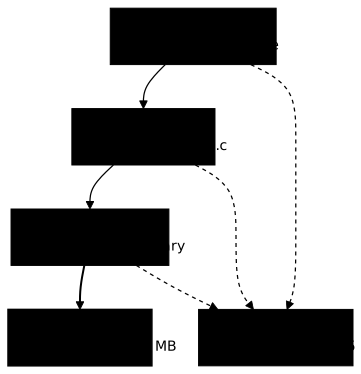
The 113.6 MB layer, which exists only in max, corresponds to the deps stage, where the installation of build-base weighs the most. This is what makes the size difference between the two modes.
The table summarizes four measurements. Before each read-back, the local cache was emptied with docker buildx prune -af --builder bk2. The export is done with --cache-to type=registry,ref=127.0.0.1:5080/cache/app:<mode>,mode=<mode> -o type=cacheonly, and the read-back with --cache-from type=registry,ref=127.0.0.1:5080/cache/app:<mode>.
For the last row, the source code is modified with echo '/* v2 */' >> app.c, which adds a comment at the end of app.c. Before moving to the other mode, app.c is restored with the initial printf command (printf '#include <stdio.h>\nint main(){puts("hello");return 0;}\n' > app.c), so that both modes start from the same source.
The durations and the size of min come from a builder created with the image moby/buildkit:buildx-stable-1, which has the same digest c5f8862f… as v0.34.2. Those of max come from --builder bk2, pinned on v0.34.2.
| Situation | min | max |
|---|---|---|
| Cold build with export (total duration) | 18.3 s | 28.0 s |
| Cache export step alone | 0.2 s | 9.4 s |
| Local cache emptied, identical source | 955 ms, everything CACHED | 942 ms, everything CACHED |
Local cache emptied, app.c modified | 16.0 s, deps stage replayed (11.3 s) | 6.6 s, deps stage CACHED |
The two duration rows do not measure the same thing. For min, 0.2 s is the whole export step. For max, 9.4 s is the preparing build cache for export sub-step, which prepares the cache before it is written to the registry.
The last row is the important one. As long as the code does not change, both modes give the same result. As soon as a stage upstream of the final image has to be replayed, min has nothing to offer for it and the runner reinstalls the compiler, whereas max takes it back from the registry. In the output of max, the line of the deps stage shows CACHED followed by a duration of 2.0 s. It is probably the time needed to fetch the layer, but this point was not checked separately.
The price of max can be read in the first two rows: it writes 117.5 MB instead of 3.9 MB and adds about 9 s to every export. On this Dockerfile, these 9 s are of the same order as what max saves at read-back (16.0 s against 6.6 s), and the registry is local.
max is worth it when a heavy stage rarely changes: the longer that stage is to replay, the more the cache of max pays off. If almost all the stages change on every commit, min may be enough. The criterion is therefore the weight of the intermediate stages that your commits do not touch, which you measure on your runners.
How do you promote an image from one registry to another without rebuilding it?
You have to copy the index of the image as it is, with all its platforms. A manifest describes an image for one platform: its layers and its configuration. An index is the list of the manifests of a multi-platform image, together with its attestations, metadata about how the image was built. It is identified by a digest, its SHA-256 fingerprint.
If the copy keeps the index, the image in production has the same digest as the one that passed the tests, and a check made on that digest remains valid. This guarantee assumes that the copy starts from the right index. A tag such as 1.0 is mutable: if someone pushes it again between the tests and the promotion, the copy sends a different image from the one that was tested. So record the digest at the time of the tests, with docker buildx imagetools inspect <image> --format '{{.Manifest.Digest}}', and promote from that digest rather than from the tag, as the section "Promotion by digest in CI/CD" of Understanding OCI shows.
An external signature (for example one made with cosign) also remains valid for this digest, but it is stored separately, as a referrer, an object attached to the image by its digest. It must therefore be copied as well, or the image must be signed again: this case was not measured.
A real promotion uses two authenticated registries, with read access on the source and write access on the target. The measurements below use local registries without credentials: authentication was not measured.
The diagram starts from a single point: a development index that contains the linux/amd64 and linux/arm64 variants and two attestations. On the left, the three copy tools reproduce the index identically. On the right, the docker pull, docker tag, docker push sequence ends with a single manifest, with a different digest.
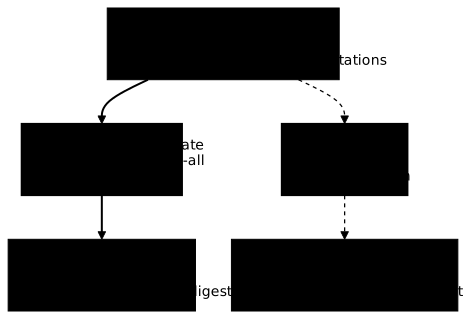
To reproduce, work in a second empty folder, ~/refcache/promo, so as not to overwrite the cache Dockerfile. Start two registries with the registry:3.1.2 image pinned above, published on 127.0.0.1:5081 and 127.0.0.1:5082. Then write the promotion Dockerfile, an alpine base and a copied file, and publish it to the first registry for two platforms:
mkdir -p ~/refcache/promo && cd ~/refcache/promoREG=registry:3.1.2@sha256:d4032d4cc323c1731c707931ecada07a53076eac38e3b61ae57533f170f2c6c3docker run -d --name reg5081 -p 127.0.0.1:5081:5000 $REGdocker run -d --name reg5082 -p 127.0.0.1:5082:5000 $REG
echo hi > hello.txtcat > Dockerfile <<'EOF'FROM alpine:3.24.3@sha256:be2656061b536c1883c4034790e21d0a09c5aaaf51968b89368a3c0371ea2c9aCOPY hello.txt /hello.txtEOF
docker buildx build --platform linux/amd64,linux/arm64 \  -t 127.0.0.1:5081/app:1.0 --push .
This multi-platform build does not need QEMU emulation, because the Dockerfile contains no RUN instruction: nothing is executed for arm64, a file is only copied.
The published index contains four entries: linux/amd64, linux/arm64 and two attestations (unknown/unknown). These attestations change on every build: the same Dockerfile built several times gave indexes with different digests (07b8f23c…, d8a0b216…, 3b1eee7c… in our trials). The digest of the main measurement is sha256:07b8f23c637bdcb7679fdc30b5590e1e9d74e5a0b925b982aabd8220581dbc3f, and yours will be different.
The three commands below copy 127.0.0.1:5081/app:1.0 to 127.0.0.1:5082/app:1.0 and each keeps the digest of the original index, whatever it is. They start from the tag, as in the measurement. In a pipeline, the source is rather written 127.0.0.1:5081/app@sha256:<digest recorded during the tests>, a form that these measurements did not replay.
Skopeo's --src-tls-verify=false and --dest-tls-verify=false options are only there to reach the test registries over HTTP. Remove them against real HTTPS registries. For imagetools and crane, no option is needed: they reach 127.0.0.1 over HTTP because the loopback address is treated as insecure, which is not the case for a host name. The guide Serve a trusted registry details this point.
# Buildx: copies the index and its manifestsdocker buildx imagetools create \  --tag 127.0.0.1:5082/app:1.0 127.0.0.1:5081/app:1.0
# Skopeo 1.22.3: --all copies every platformSKO=quay.io/skopeo/stable:v1.22.3@sha256:2681eccb8b02c495b013c2669cbf7f41d5c0b0b0e644e7c69bd3ea9bcb20641fdocker run --rm --network host $SKO copy --all \  --src-tls-verify=false --dest-tls-verify=false \  docker://127.0.0.1:5081/app:1.0 docker://127.0.0.1:5082/app:1.0
# crane: copies the indexCRA=gcr.io/go-containerregistry/crane:v0.22.1@sha256:1f968817b95790bed063f71175aa6b8ff879fa17064020415f3e18bb6e6a36e1docker run --rm --network host $CRA copy \  127.0.0.1:5081/app:1.0 127.0.0.1:5082/app:1.0
The crane image is pinned by its tag and its index digest. The optional box below details the crane versions that were tested.
A runner without Docker does not need these images: it installs Skopeo from its distribution's package and crane from the archive of its releases, as for the other tools of the chain, and runs the same command. This path was not measured here. Debian 13 provides Skopeo 1.18.0+ds1-1+b5 (measured on 2026-11-03 for the lesson Export an image without a daemon with Skopeo): this version differs from the 1.22.3 measured here, and the outputs may differ.
To check the result, compare the digests on both sides. This check proves only the fidelity of the copy: if the 1.0 tag was pushed again between the tests and the promotion, both sides stay equal even though the image is no longer the one that was tested. So compare the production digest with the digest recorded at the time of the tests, with the same command run at that moment:
# at test time: record the digest of the tested imagedocker buildx imagetools inspect 127.0.0.1:5081/app:1.0 --format '{{.Manifest.Digest}}'# after the promotion: record the digest received by productiondocker buildx imagetools inspect 127.0.0.1:5082/app:1.0 --format '{{.Manifest.Digest}}'Both lines must display the same digest: sha256:07b8f23c… in our measurement, another one in yours. This is what happened with the three tools: the index digest is identical. imagetools and Skopeo left in the production registry exactly the 13 blobs of the development registry, and crane those 13 plus two. A blob is a file stored in the registry, for example a layer or a configuration. The three tools therefore also copy the two attestations of the index.
The difference comes from crane. With crane copy, the production registry contains 15 blobs. On this test registry, which offers no referrers API, crane additionally writes two small indexes stored under fallback tags of the form sha256-<digest of a variant>, which its output announces with updating fallback tag … with new referrer. The digest of the index does not change, but the production repository contains two more objects than with the other tools. The copy of an external signature was not measured, with any of the three tools.
What happens if you forget --all, or use docker pull then push?
In both cases the command succeeds, and production receives an image that is no longer the one that was tested. The trap is quiet: nothing fails.
Without --all, skopeo copy keeps only the platform of the machine that runs the command. In the measurement, production received a single manifest with digest sha256:c7ca751a…, which is the amd64 variant, and not the index sha256:07b8f23c…. The digests c7ca751a… and b4810a9d… of this section are specific to this build: you will get other values, but the same finding.
The following counter-example is to be avoided. It was played after deleting the local images, as on a fresh runner:
# ❌ to avoid: does not promote the tested imagedocker pull 127.0.0.1:5081/app:1.0docker tag 127.0.0.1:5081/app:1.0 127.0.0.1:5082/app:1.0docker push 127.0.0.1:5082/app:1.01.0: digest: sha256:c7ca751ac09f7569bbf4ebfaa58739e8a77f050f402bacec0f6c2541489a24f6 size: 668
Info -> Not all multiplatform-content is present and only the available single-platform image was pushed sha256:07b8f23c637bdcb7679fdc30b5590e1e9d74e5a0b925b982aabd8220581dbc3f -> sha256:c7ca751ac09f7569bbf4ebfaa58739e8a77f050f402bacec0f6c2541489a24f6The return code is 0. The only trace of the loss is the Info line, which gives the old index digest then the new one. The arm64 variant and the attestations have disappeared from production, and the digest has changed: a signature or a check made on sha256:07b8f23c… no longer applies. With docker pull --platform linux/arm64, the same sequence published the arm64 manifest alone, sha256:b4810a9d….
A first trial, made on the machine that had built the image, gave the same index digest: its local store still contained all the platforms. This result does not carry over to a runner that starts from zero.
On a single-platform image, the same sequence also kept the digest in the measurement, but that measurement was made on the machine that had built the image, after deleting the local copy; do not count on it.
Do not promote with pull, tag and push, and always compare the digests after the copy.
How do you choose between imagetools, skopeo and crane?
All three keep the index digest, so the choice depends on the tool already present in your pipeline and on what else you want from it. If you already build with Buildx, imagetools create needs nothing more. Skopeo and crane do not need the Docker daemon to copy; here, they run in their own image, for convenience.
| Tool | Point to remember |
|---|---|
docker buildx imagetools create | Already present with Buildx: no extra image or installation in a pipeline that builds with Buildx. |
skopeo copy --all | Standalone tool, run here in its pinned image. The --all option is indispensable: without it, a single platform is sent. |
crane copy | Additionally writes two fallback-tag indexes (updating fallback tag … with new referrer) on a registry without a referrers API. |
None of the three was measured on the copy of an external signature. The guides Skopeo and Crane detail each tool, and Skopeo also has a page to export an image without a daemon: Export an image without a daemon with Skopeo.
How do you clean up after the experiments?
The experiments leave two builders, three registries, local images and build cache: remove them so as not to leave anything running on the machine. The names below are the ones used above.
docker buildx rm bk1 bk2 -fdocker rm -fv reg-cache reg5081 reg5082docker rmi app:t 127.0.0.1:5081/app:1.0 127.0.0.1:5082/app:1.0docker buildx prune -afrm -r ~/refcacheIf a command answers No such image or "builder not found", it does not matter: the object was not created on your side, so there is nothing to remove. docker rm -fv also deletes the anonymous volume of each registry. docker buildx prune -af empties the whole build cache of the machine, not only that of these experiments: skip that line if other projects depend on it.
The images downloaded for the experiments (alpine, registry, moby/buildkit, Skopeo and crane) also stay in the local store. List them with docker images and remove with docker rmi the ones you no longer need. The working folders (app.c, the Dockerfiles and hello.txt) went away with rm -r ~/refcache. Check with docker ps -a and docker buildx ls that only the default builder remains.
Key points
The points below summarize the measurements of this page, on Docker 29.9.2 and Buildx 0.38.1.
- BuildKit's remote cache is shared through a registry with
--cache-to type=registry,ref=…and--cache-from type=registry,ref=…. - A
docker-containerbuilder does not reach a registry on127.0.0.1without--driver-opt network=host, it fails withconnection refused. Acurl http://127.0.0.1:5080/v2/from the machine tells whether the registry is running. - In the measurement,
maxweighs 117.5 MB against 3.9 MB forminand adds about 9 s to the export. - Without a code change,
minandmaxgive the same result; when the code changes,maxtook the dependencies stage back from the registry (6.6 s) whereminreplayed it (16.0 s). - Promoting an image means copying its index:
imagetools create,skopeo copy --allandcrane copykeep the same digest. skopeo copywithout--allanddocker pull,docker tag,docker pushsucceed, but lose platforms and change the digest.- Compare the production digest with the digest recorded at the time of the tests, and promote from that digest: a mutable tag can be pushed again between the tests and the promotion, and comparing the two registries would not see it.
Next steps
The cards below extend this page: the CI chain that publishes the image, the copy tools, and the deployment of the same artifact from one environment to the next.