
A container built with namespaces sees a smaller world, but it remains free to consume everything and to try almost anything. This lesson is for anyone who has followed the previous lesson (in French) and wants to understand the two barriers that are still missing: cgroups v2, which cap memory, the number of processes and CPU, and capabilities, which remove privileges from the container's root. You replay the measurements on the hand-made container: a process killed at 64 MiB, a refused fork, a CPU limited to 20 %, a hostname forbidden to root.
What you will learn
- Explain why a namespace prevents neither saturation nor abuse of privileges.
- Create a cgroup v2 and cap memory, processes and CPU in it.
- Read the kernel counters that prove a limit kicked in.
- Drop capabilities from the container's root with
setpriv. - Map these manual settings to the options of a container engine.
Prerequisites
- The lesson A container by hand with unshare and nsenter (in French): you have an Alpine 3.24.2 rootfs in
/srv/alpineand you know how to rununshare --pid --fork --mount-proc --uts --mount --ipc --net --root=/srv/alpine. - Root access on a disposable Linux machine (the measurements were taken on a Debian 13 VM, kernel 6.12, util-linux 2.41.5).
- Knowing that a namespace hides part of the system from a process; no other notion is assumed.
Why do namespaces not limit a container?
Namespaces limit what the process sees (its processes, its filesystem, its hostname, its network), but neither what it consumes nor what it is allowed to do. A process that only sees its rootfs can still devour all the host's RAM, because memory is a resource of the shared kernel, not an object you can hide. It can also exercise every root privilege over what it sees: in the hand-made container, root keeps all 41 capabilities this kernel knows.
Two kernel mechanisms fill these gaps. A cgroup (control group) is a group of processes to which the kernel applies resource ceilings. A capability is a slice of root's powers that can be removed one by one. The diagram below shows the container's process surrounded by its three barriers: read each group from left to right, from the limit that is set to the effect observed when the process crosses it (for namespaces, to the reduced view they leave it).
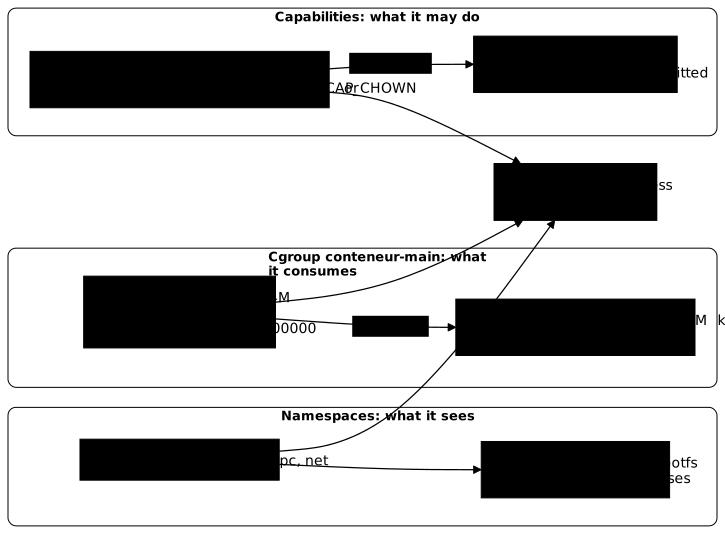
The namespaces were already set in the previous lesson. The other two barriers are set now, in this order: the cgroup, then the capabilities. For the full detail of each mechanism, the site has two reference guides: Linux cgroups and Linux capabilities. This lesson sticks to the minimal gesture, replayed on the hand-made container.
How do you check that cgroups v2 are available?
Cgroups v2 are available if the filesystem mounted on /sys/fs/cgroup is of type cgroup2fs. Cgroups v2 form a single tree: you create a directory, the kernel makes settings files appear in it, and a process joins the group by writing its number into cgroup.procs. Three reads are enough to check the ground.
stat -fc %T /sys/fs/cgroupcat /sys/fs/cgroup/cgroup.controllerscat /sys/fs/cgroup/cgroup.subtree_controlThe output replayed on the reference VM:
cgroup2fscpuset cpu io memory hugetlb pids rdma misccpuset cpu io memory hugetlb pids rdma miscThe first line confirms version 2. The second lists the available controllers (a controller is the kernel module that manages one resource: memory, pids, cpu). The third lists those the parent passes down to its children, and memory, pids and cpu are in it, so a subgroup will be able to use them. This third list varies from one machine to another, depending on what systemd or a container engine has already enabled: only the presence of these three controllers matters.
Before the measurements, you also need to fix a trap left by the previous lesson: the rootfs's /dev directory is empty, and a > /dev/null run in the container then creates an ordinary file there. In the measurements, null weighed 115 MB. You delete it and create the real device nodes with mknod (c for a character device, then two major and minor numbers).
rm -f /srv/alpine/dev/nullmknod -m 666 /srv/alpine/dev/null c 1 3mknod -m 666 /srv/alpine/dev/zero c 1 5mknod -m 666 /srv/alpine/dev/random c 1 8mknod -m 666 /srv/alpine/dev/urandom c 1 9ls -la /srv/alpine/devThe output must show four lines starting with crw-rw-rw-, with the numbers 1, 3, 1, 5, 1, 8 and 1, 9. If random and urandom already exist, mknod fails on them without consequence.
How do you create a cgroup for the container?
You create a cgroup with a plain mkdir in /sys/fs/cgroup: the kernel fills the directory with settings files. This is the particularity of cgroups v2, which makes this interface a filesystem you handle with echo and cat.
CG=/sys/fs/cgroup/conteneur-mainmkdir "$CG"echo "memory.max=$(cat $CG/memory.max) cpu.max=$(cat $CG/cpu.max) pids.max=$(cat $CG/pids.max)"The output must show memory.max=max cpu.max=max 100000 pids.max=max. max means no limit: a new cgroup caps nothing, you have to write each value. The directory contained 78 files in the last replay (this number depends on the controllers passed down by the parent), among them memory.max, memory.events, memory.peak, pids.max, pids.events, cpu.max and cpu.stat, which this lesson uses.
A frank warning: writing directly under /sys/fs/cgroup is here to build understanding. On a host managed by systemd, systemd owns the tree. In production, you must go through it, or through a container engine configured with the systemd driver. The section systemd is the real owner of cgroups of the cgroups guide explains why and how.
How do you cap the container's memory?
You cap memory by writing a size into memory.max: if the group reaches this ceiling and the kernel can no longer reclaim memory, it kills a process of the group (the OOM killer). With memory.swap.max at 0, the process cannot spill over into swap either, which makes the measurement clean.
echo 64M > "$CG/memory.max"echo 0 > "$CG/memory.swap.max"cat "$CG/memory.max"The output must show 67108864 (64 MiB in bytes). Next you put the container in the group. You run a bash -c that writes its own number ($$) into cgroup.procs, then replaces itself (exec) with unshare: the container is thus born inside the cgroup, and everything it launches inherits it. In this command, tail /dev/zero tries to read endlessly a stream of null bytes and grows in memory.
bash -c "echo \$\$ > $CG/cgroup.procs; exec unshare --pid --fork --mount-proc --uts --mount --ipc --net --root=/srv/alpine /bin/sh -c 'echo \"cgroup vu de dedans: \$(cat /proc/self/cgroup)\"; tail /dev/zero; echo \"code retour tail: \$?\"'"The replayed command prints, as an excerpt:
cgroup vu de dedans: 0::/conteneur-maincode retour tail: 137KilledCode 137 is 128 plus 9: the process died of the KILL signal, sent by the kernel and not by tail. The counters confirm it:
cat "$CG/memory.events"cat "$CG/memory.peak"dmesg | grep -iE "memory cgroup out of memory" | tail -1After the run, memory.events showed oom 1 and oom_kill 1, memory.peak was 67108864, and the kernel log contained Memory cgroup out of memory: Killed process 5236 (tail) (the process number changes on every attempt). The ceiling therefore kicked in at exactly 64 MiB, without touching the rest of the machine.
A remark on the first line: the container reads 0::/conteneur-main, that is, its real path in the host's tree. The unshare command used did not ask for a cgroup namespace (the --cgroup option), which would have hidden this path. It is not a flaw here, just one more isolation that the command does not request.
How do you limit the number of processes?
You limit the number of processes by writing an integer into pids.max: beyond it, the kernel refuses the fork, the system call that creates a process. This is the remedy against the fork bomb, a program that duplicates itself endlessly until the machine freezes.
echo 20 > "$CG/pids.max"bash -c "echo \$\$ > $CG/cgroup.procs; exec unshare --pid --fork --mount-proc --uts --mount --ipc --net --root=/srv/alpine /bin/sh -c 'for i in \$(seq 1 30); do sleep 30 & done'"The loop tries to start thirty sleep in the background. The replayed output (excerpt):
/bin/sh: can't fork: Resource temporarily unavailableThe message is the EAGAIN system error: the shell is not broken, the kernel is refusing any process creation beyond 20. The counters say so too, after the container ends: pids.peak was 20 and pids.events showed max 1, a single refused attempt. The fork bomb is contained in its cgroup: the rest of the machine keeps working, and the end of the container takes the remaining sleep with it. Remember that pids.max counts all the tasks of the group (processes and threads), not only direct children.
How do you limit the container's CPU?
The CPU ceiling is written into cpu.max in the form quota period, in microseconds: 20000 100000 allows 20,000 µs of CPU per 100,000 µs period, that is 20 % of one core. When the group has used up its quota, the kernel pauses it until the next period: this is throttling.
echo "20000 100000" > "$CG/cpu.max"bash -c "echo \$\$ > $CG/cgroup.procs; exec unshare --pid --fork --mount-proc --uts --mount --ipc --net --root=/srv/alpine /bin/sh -c 'yes > /dev/null'" &sleep 3U1=$(awk '/usage_usec/{print $2}' "$CG/cpu.stat"); sleep 5; U2=$(awk '/usage_usec/{print $2}' "$CG/cpu.stat")echo "CPU consomme sur 5 s: $(( (U2-U1)/1000 )) ms soit $(( (U2-U1)/50000 )) %"grep -E "nr_periods|nr_throttled|throttled_usec" "$CG/cpu.stat"The yes command loops at full speed. The script measures the CPU time consumed (usage_usec) five seconds apart. The replayed output:
CPU consomme sur 5 s: 1001 ms soit 20 %nr_periods 80nr_throttled 80throttled_usec 6354875The process consumed 1001 ms over 5 s, that is 20 %, exactly the 20 % requested (from one replay to the next, 19 to 20 % is measured). Of the 80 periods of 100 ms that elapsed, 80 were interrupted by throttling, and the group stayed blocked 6.3 s in total. These values vary slightly on each attempt. top -b -n 1 confirms the effect: the yes line shows a %CPU close to 20 (18.2 on our snapshot). This ceiling limits CPU time, not speed: a throttled process stays slow but does not die, unlike with the OOM kill.
You finish and clean up. A cgroup can only be removed when it is empty (no processes); rmdir on a group that is still busy fails.
pkill -KILL -x yescat "$CG/cgroup.procs"rmdir "$CG" && echo "cgroup supprime"The output must show cgroup supprime, after an empty cgroup.procs.
How do you drop privileges from the container's root?
You remove privileges from root by reducing its bounding set, the maximum list of capabilities a process can obtain when it executes a program. Being uid=0 inside a container does not yet say what root can do: it is the set of its capabilities that says it. A capability is one of the distinct powers the kernel carves out of root's rights (CAP_CHOWN to change an owner, CAP_SYS_ADMIN for a whole series of administration operations, including changing the hostname).
In the hand-made container, root has everything. Let us read its capabilities, then try two privileged actions.
unshare --pid --fork --mount-proc --uts --mount --ipc --net --root=/srv/alpine \ /bin/sh -c 'grep -E "CapEff|CapBnd" /proc/self/status; hostname essai && echo "hostname OK: $(hostname)"; touch /tmp/f && chown 1000 /tmp/f && echo "chown OK"'The replayed output:
CapEff: 000001ffffffffffCapBnd: 000001ffffffffffhostname OK: essaichown OKCapEff is the set of effective capabilities (the ones that count at this moment), CapBnd the bounding set. The mask 000001ffffffffff means that all the capabilities of the kernel are active: the hostname and the chown succeed. This container therefore has no privilege barrier at all.
To remove some, you insert setpriv (a util-linux tool) between unshare and the chroot. It removes CAP_SYS_ADMIN and CAP_CHOWN from the bounding set and from the inheritable set, then launches the shell in the rootfs.
unshare --pid --fork --uts --mount --ipc --net --mount-proc=/srv/alpine/proc \ setpriv --bounding-set=-sys_admin,-chown --inh-caps=-sys_admin,-chown \ chroot /srv/alpine /bin/sh -c 'grep -E "CapEff|CapBnd" /proc/self/status; hostname essai || echo "hostname refuse"; touch /tmp/g; chown 1000 /tmp/g || echo "chown refuse"; id'The replayed output:
CapEff: 000001ffffdffffeCapBnd: 000001ffffdffffehostname: sethostname: Operation not permittedhostname refusechown: /tmp/g: Operation not permittedchown refuseuid=0(root) gid=0(root)The mask lost two bits, and both actions are refused, while id still shows uid=0. That is the lesson: root is no longer all-powerful. To decode a mask into names, the command capsh --decode=<mask> exists.
Order matters. unshare needs CAP_SYS_ADMIN to create the namespaces, so you remove the capabilities after creating the namespaces, just before entering the rootfs. This is exactly the order of a container runtime: it creates the isolation with all the rights, then reduces them before launching the application's process. As an order of magnitude, the configuration generated by runc spec keeps by default only 3 capabilities (CAP_AUDIT_WRITE, CAP_KILL, CAP_NET_BIND_SERVICE) and sets noNewPrivileges to true, which forbids the process from regaining any. How the runtime works is the subject of the lesson Running an OCI bundle with runc (in French). To go further on setcap and ambient capabilities, see the guide Linux capabilities.
What does a container engine do for you?
An engine such as Docker or Podman writes these same settings for you, translated into run options. The table below sets what you just wrote by hand against the matching option. This is a documented correspondence in the site's pages, not a measurement of this lesson.
| Written by hand | Engine option |
|---|---|
memory.max | docker run --memory / podman run --memory |
memory.swap.max at 0 | --memory-swap equal to --memory (without it, Docker and Podman both allow up to twice --memory in memory plus swap, if the host has swap) |
pids.max | --pids-limit |
cpu.max | --cpus |
capabilities removed with setpriv | --cap-drop and --cap-add |
These options are described in Securing Docker in production for Docker, and in Podman run avancé (in French) for Podman. The Docker page also covers seccomp (the filter of allowed system calls) and security modules such as AppArmor or SELinux, additional barriers that remain outside the scope of this lesson.
Troubleshooting
Almost all the errors in this lesson come from the state of the cgroup or from the limits themselves. The table links each symptom actually observed to its cause and its fix.
| Symptom | Cause | Fix |
|---|---|---|
/srv/alpine/dev/null weighs several MB | The rootfs's /dev was empty: > /dev/null created an ordinary file | rm -f then mknod -m 666 … c 1 3 |
tail stops with Killed and code 137 | The kernel killed the process that exceeded memory.max | Expected here; read memory.events (oom_kill) and dmesg |
/bin/sh: can't fork: Resource temporarily unavailable | The group reached pids.max | Expected here; read pids.events; raise the limit if it is too low |
rmdir: failed to remove '/sys/fs/cgroup/conteneur-main': Device or resource busy | Processes are still in the group | Stop them, check that cgroup.procs is empty, rerun rmdir |
hostname: sethostname: Operation not permitted | CAP_SYS_ADMIN missing from the bounding set | Intended here; give the capability back only if needed |
One last reflex: if a limit seems ignored, first check that the process is actually in the cgroup, with cat /proc/<pid>/cgroup from the host. It is the first thing to check: a process left outside the group is subject to no ceiling.
Key points
- Namespaces limit what a process sees, not what it consumes nor what it is allowed to do.
- A cgroup v2 is created with
mkdirunder/sys/fs/cgroup; a process joins it by writing its number intocgroup.procs. memory.maxat 64M gottailkilled (code 137,oom_kill 1);pids.maxat 20 refused thefork;cpu.maxat20000 100000throttledyesto 20 %.- The files
memory.events,pids.eventsandcpu.statprove that a limit kicked in. - Root in the hand-made container has all the capabilities;
setpriv --bounding-setremoves some, whileidstill showsuid=0. - Capabilities are removed after the namespaces are created, like a runtime does.
- On a systemd host, writing under
/sys/fs/cgroupis for understanding: in production, systemd or the engine owns the tree. - An engine writes these settings for you:
--memory,--pids-limit,--cpus,--cap-drop.
Knowledge check
Ten questions to check that you can tell seeing, consuming and being allowed apart, and that you can read a cgroup's counters.
Knowledge check
Check what you have learned with this interactive quiz
How it works
- The timer starts when you click Start
- Multiple choice, true/false and short answer questions
- You can move between questions
- Detailed results are shown at the end
Starts the quiz and the timer
Review
(0/0)Score by domain
A domain groups several guides and gets several questions, so its score is more reliable than a per-topic score, which often rests on a single question.
Summary
Strengths
No topic passed at 80% on at least two questions yet.
Weak areas
No topic below the pass mark.
Recommended next
Hints before you try again?
A new full quiz with random questions
Work again only on the questions you missed