You have just built an image: it exists on your machine, and nowhere else. To run it on another server, you must put it in a registry, a service that stores images and serves them to anyone who knows their name. This lesson is for a beginner who can already build an image. You learn to name the image for a registry, to publish it with docker push, to pull it with docker pull, and above all to designate it so that you get back exactly the published content, even if someone republishes the same name in the meantime. Publishing and pulling can be replayed without an account, on a registry that you start yourself; only logging in to Docker Hub requires an account.
What you will learn
- Name an image for a registry (registry, namespace, repository, tag) with
docker tag - Publish an image with
docker push, pull it withdocker pull, and know what that pull proves and what it does not prove - Explain why a tag can point to other content tomorrow, and why a digest cannot
- Find the digest served by the registry, then pull and run the image by that digest
- Log in to a registry with an access token that has limited rights, and know where Docker stores that token
Prerequisites
- A working Docker Engine (Install Docker Engine 29 and prove it works). The outputs of this lesson come from Docker 29.9.2 on Debian 13.
- Knowing how to write a Dockerfile and build an image (Write a Dockerfile and control its build context).
- Having seen why a tag such as
3.24can change content and what a digest is (Choose and maintain a Docker base image), and where an image comes from (Images, containers and registries: the anatomy).
How is an image named for a registry?
The name of an image tells Docker where it is: registry/namespace/repository:tag. The registry is the address of the service. The namespace groups the repositories of a person or a team. The repository gathers the versions of one image. The tag, after the colon, designates one of those versions. When you do not write a registry, Docker uses Docker Hub, the public registry it knows by default.
| What you write | What Docker understands |
|---|---|
alpine:3.24 | the library/alpine repository on Docker Hub, tag 3.24 |
monequipe/api:1.4 | the api repository of the monequipe namespace, on Docker Hub |
127.0.0.1:5050/ateliers/bulletin:1.0 | the ateliers/bulletin repository of a registry listening on 127.0.0.1, port 5050 |
A name that starts with a host, with or without a port, designates a registry other than Docker Hub. That is what makes a docker push precise: it sends the image to the registry written in its name, nowhere else. An image called only bulletin:1.0 would go to Docker Hub, where you have neither a namespace nor rights.
A name written without a tag designates the latest tag. If you name an image 127.0.0.1:5050/ateliers/sanstag, docker image ls displays it as 127.0.0.1:5050/ateliers/sanstag:latest. Always write the tag, because latest does not say which version hides behind it, and it can designate other content from one day to the next.
The docker tag command copies nothing. It adds a second name to an image that already exists, which lets you give it the full name the registry expects without rebuilding it.
How can you practice without an account, using a local registry?
Docker Hub requires an account to publish. To learn the gestures without an account, you start your own registry: the official image of Distribution, the CNCF registry software, fits in a container. It listens on port 5000 of the container, which you publish on port 5050 of your machine's loopback interface (127.0.0.1), so it is not reachable from the network. The images are pinned by digest, as everywhere in this training.
The names in this workshop are French, because the commands and outputs shown are the ones that were run. atelier-registre is the workshop registry container and registre-atelier its volume. ateliers/bulletin is the repository of the "bulletin" image in the "workshops" namespace, atelier-bulletin the working directory, and digest-lundi.txt the file that holds Monday's digest. The text "Bulletin du lundi" is "Monday's bulletin" (and "Bulletin du mardi" Tuesday's). They are identifiers and program output, so they stay as they are.
docker run -d --name atelier-registre \ -p 127.0.0.1:5050:5000 \ -v registre-atelier:/var/lib/registry \ registry:3.1.2@sha256:d4032d4cc323c1731c707931ecada07a53076eac38e3b61ae57533f170f2c6c3The named volume registre-atelier keeps the published images if you recreate the container. It is also needed for another reason: the registry image itself declares a volume on /var/lib/registry, and without the -v option Docker would create an anonymous one, which docker rm -f leaves behind.
To check that the registry answers, query its API root:
curl -s http://127.0.0.1:5050/v2/{}A live registry answers {}: an empty JSON object, which means "I am here and I speak the registry protocol". That protocol is the one of the OCI (Open Container Initiative), which describes how a registry stores and serves images; a registry that follows it is called an OCI registry. For the full model of a registry, the reference page Container registries explains it; this lesson, for its part, makes you practice. If curl -s prints nothing and returns exit code 7 (connection refused), the container did not start: docker logs atelier-registre gives the reason.
This registry speaks plain HTTP, without encryption. Docker usually refuses a registry without TLS, but it accepts loopback addresses (127.0.0.0/8) and localhost without any setting. That is why this workshop works as it is, and why you must not copy this setup for a registry reachable over the network: a shared registry is protected by TLS and authentication, which the lesson on the trusted registry teaches.
How do you publish an image with docker push?
You first need an image to publish. Create a small build context with a text file that plays the role of the "product":
mkdir ~/atelier-bulletin && cd ~/atelier-bulletinecho "Bulletin du lundi" > bulletin.txtThe Dockerfile copies this file into the image and prints it at startup:
FROM alpine:3.24@sha256:be2656061b536c1883c4034790e21d0a09c5aaaf51968b89368a3c0371ea2c9aCOPY bulletin.txt /bulletin.txtCMD ["cat", "/bulletin.txt"]Build the image under a local name, then give it its registry name with docker tag:
docker build -t bulletin:1.0 .docker tag bulletin:1.0 127.0.0.1:5050/ateliers/bulletin:1.0These two names now designate the same image. docker push sends the one that carries the registry name:
docker push 127.0.0.1:5050/ateliers/bulletin:1.0The push refers to repository [127.0.0.1:5050/ateliers/bulletin]f7a6ae557409: Pushed44136fa355b3: Pushed7b229517ed22: Pushed99963307ce5d: Pushed1.0: digest: sha256:a50cb2f4cd3b249689f4ecda77f908a0a31595ae3b8a52cd942a4aca2c6427b7 size: 855Look at the last line: it gives the published tag, then the digest that the registry computed on the content it received. The lines above are the elements that were sent. Each one says whether the element was sent (Pushed) or already existed in the registry (Layer already exists or Already exists). A second push of the same image therefore sends almost nothing, because the registry stores each element only once.
There are four lines, although the image has only 2 layers (docker image inspect --format '{{len .RootFS.Layers}}' 127.0.0.1:5050/ateliers/bulletin:1.0 answers 2). The two layers of the image are 7b229517ed22 (Alpine) and 99963307ce5d (your COPY). The other two lines come from the provenance attestation, a small document about how the image was built, which BuildKit (Docker's build engine) adds to the image: the document itself (f7a6ae557409) and an empty 2-byte configuration (44136fa355b3). You have nothing to do with them in this lesson.
To find this digest again without rereading the push output, ask Docker. The RepoDigests field lists the repository@digest references of the image. It holds two here: 127.0.0.1:5050/ateliers/bulletin@sha256:…, which the registry knows, and bulletin@sha256:…, a local reference that no registry knows. Since the order of the list is not guaranteed, the following command keeps only the line that starts with the registry address, and saves it in the digest-lundi.txt file, which you will reuse:
docker image inspect 127.0.0.1:5050/ateliers/bulletin:1.0 \ --format '{{range .RepoDigests}}{{println .}}{{end}}' \ | grep '^127.0.0.1:5050/' | tee digest-lundi.txt127.0.0.1:5050/ateliers/bulletin@sha256:a50cb2f4cd3b249689f4ecda77f908a0a31595ae3b8a52cd942a4aca2c6427b7This reference is complete: registry, repository, @ and digest, without a tag. It is the digest displayed by the push, and Docker knows how to pull it as it is, which you will do below, once the tag has moved.
Is a tag a reliable reference?
A tag is a label that the owner of the repository can move. By default, nothing prevents republishing bulletin:1.0 with different content: the registry accepts, the tag now points to the new content, and the old content no longer has a name (Docker Hub lets you make the tags of a repository immutable, but this option is disabled by default). You can see it on the workshop registry. Change the file, rebuild, rename and republish under the same tag:
echo "Bulletin du mardi" > bulletin.txtdocker build -t bulletin:1.0 .docker tag bulletin:1.0 127.0.0.1:5050/ateliers/bulletin:1.0docker push 127.0.0.1:5050/ateliers/bulletin:1.0The push succeeds without a warning. Now query the registry about this tag. The docker buildx imagetools inspect command reads the registry directly, without downloading the image:
docker buildx imagetools inspect 127.0.0.1:5050/ateliers/bulletin:1.0Name: 127.0.0.1:5050/ateliers/bulletin:1.0MediaType: application/vnd.oci.image.index.v1+jsonDigest: sha256:0868faa87caa7d755b9a2d0a512d3a11065f28f9ead83b71cfff3580539c3825…The MediaType line says that the registry serves an OCI index, a list of manifests (the sheets that describe an image). This one has two entries: the image for linux/amd64 and the provenance attestation seen above. The lines that … replaces are not needed here. Look at the Digest line: it no longer matches the one in digest-lundi.txt, so the 1.0 tag now designates Tuesday's content. Someone who wrote bulletin:1.0 in a deployment file on Monday gets another product on Tuesday, without a single line of their file having changed.
The digest (sha256: followed by 64 hexadecimal characters) is the fingerprint of the content: the registry computes it from what it received. Two different contents never share the same fingerprint, and a given content keeps its own. A repository@sha256:… reference therefore designates an exact content, not the place where a tag points today. The price to pay: a digest cannot be read and does not signal anything new. You keep the tag to talk (1.0) and the digest to deploy.
The diagram sums up the two pushes. At the top, after Monday's push, the 1.0 tag designates Monday's content. At the bottom, after Tuesday's push, the tag designates Tuesday's content. Look at the box outlined in red, "Monday's content, digest L, no tag": Monday's content no longer has a tag, but the reference by its digest still designates it. The next section checks this by pulling the image by its digest.
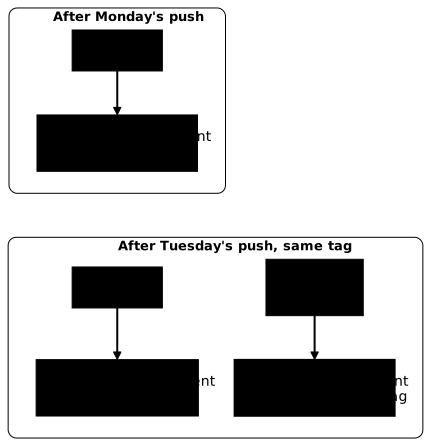
A trap lurks here. docker image inspect also offers an Id field, a local identifier of the image. With the default image store of Docker 29.9.2 (containerd), this Id equals the digest that the push displayed, which can make you think you may keep the Id in place of the digest. This is not a Docker guarantee: depending on the image store used, the local identifier can be another value that the registry does not know. The value to keep is the one from RepoDigests, or the one on the last line of the push.
How do you pull the image by its digest, and what does that pull prove?
After a push, you want to know whether the registry really serves the image. On your machine, docker run would succeed anyway, since the image is in Docker's local storage. So start by removing the local names of the image:
docker image rm 127.0.0.1:5050/ateliers/bulletin:1.0 bulletin:1.0This command removes both names, but Docker keeps in its storage the layers it already had. A docker pull must therefore still resolve the reference with the registry: Docker asks it for the manifest (the sheet that lists the layers) and the digest, then downloads only the layers it lacks. Pull Monday's image by its digest, using the file kept above:
docker pull "$(cat digest-lundi.txt)"docker run --rm "$(cat digest-lundi.txt)"127.0.0.1:5050/ateliers/bulletin@sha256:a50cb2f4cd3b249689f4ecda77f908a0a31595ae3b8a52cd942a4aca2c6427b7: Pulling from ateliers/bulletinDigest: sha256:a50cb2f4cd3b249689f4ecda77f908a0a31595ae3b8a52cd942a4aca2c6427b7Status: Downloaded newer image for 127.0.0.1:5050/ateliers/bulletin@sha256:a50cb2f4cd3b249689f4ecda77f908a0a31595ae3b8a52cd942a4aca2c6427b7127.0.0.1:5050/ateliers/bulletin@sha256:a50cb2f4cd3b249689f4ecda77f908a0a31595ae3b8a52cd942a4aca2c6427b7Bulletin du lundiThe first four lines are those of docker pull (the fourth repeats the pulled reference), the last one is the text printed by the image. No layer line appears: Docker already had them, it only obtained the manifest of this digest from the registry. The registry returned Monday's content, while the 1.0 tag designates Tuesday's. This is the result to remember: the digest finds content that no tag designates anymore.
This content remains available as long as the registry does not delete it. The workshop registry deletes nothing by itself; a hosted registry can have a cleanup policy for untagged content.
To compare, now pull by the tag:
docker run --rm 127.0.0.1:5050/ateliers/bulletin:1.0Unable to find image '127.0.0.1:5050/ateliers/bulletin:1.0' locally1.0: Pulling from ateliers/bulletin4eb0cfdf4d3b: Pulling fs layer7b229517ed22: Pulling fs layer44136fa355b3: Already exists4eb0cfdf4d3b: Already exists7b229517ed22: Already exists0ae92b53cefc: Download complete4eb0cfdf4d3b: Pull completeDigest: sha256:0868faa87caa7d755b9a2d0a512d3a11065f28f9ead83b71cfff3580539c3825Status: Downloaded newer image for 127.0.0.1:5050/ateliers/bulletin:1.0Bulletin du mardiNo local image carries this name anymore, so docker run first does an implicit docker pull, then prints the content that the tag designates now. The same registry therefore served two different products under two different names, and only the name containing the digest guaranteed which one. Notice the Already exists lines: Docker did not download again what it already had, such as Alpine's layer. The Download complete and Pull complete lines concern the elements specific to Tuesday's content.
A practical consequence: for another machine to pull the image you tested, give it the digest, not only the tag. A tag is fine to announce a version, the digest to find it again.
One limit remains. Monday's pull proves that the registry knows the reference and serves its manifest, not that all the layers are published: Docker did not need to ask for them again. To prove it, you need a client that never had the image, for example another machine: if its docker pull succeeds, the registry really serves all the layers. This proof holds for a registry that the other machine can reach over the network. The workshop registry listens only on 127.0.0.1: you would first have to publish it on a network address, which requires TLS, and in practice authentication. The following box makes the same proof on your machine.
How do you log in to Docker Hub without exposing your password?
The workshop registry asks for no identity, which is not the case for Docker Hub: publishing in your namespace requires authenticating with docker login. There are two ways to do it, and only one is reasonable. The account password opens everything: settings, billing, deletion of repositories. A personal access token is a second password, created for a precise use, which you can limit and revoke without touching the account.
The token is created in the account settings (Account settings), under the Personal access tokens heading, with the Generate new token button. Docker displays the token only once, so copy it right away. Docker Hub offers several levels of rights on repositories: read-only on public repositories (the default choice), read-only on public and private repositories, read and write, and read, write and delete. Choose the lowest level that is enough.
A machine that only pulls images does not need the right to write: with a read-only token, a docker push is refused by the registry. This limit is the point of the token: if the machine is compromised, the attacker cannot publish a booby-trapped image under your name.
So that the token stays neither in the shell history nor readable by other accounts, first store it in a file reserved for you. The first command creates the ~/.secrets directory, accessible to you alone (rights 700). The second creates the file with umask 077, which gives it rights 600; the cat command waits for you to paste the token, then to type Ctrl-D on an empty line to end the input:
install -d -m 700 ~/.secrets(umask 077; cat > ~/.secrets/docker-hub-jeton)The token pasted into cat appears in no command line, therefore in no history. Check the rights with stat -c '%a %n' ~/.secrets ~/.secrets/docker-hub-jeton: you must read 700 for the directory and 600 for the file.
The login is then done by passing the file through standard input, never the token as an argument of the command:
docker login --username <your-username> --password-stdin < ~/.secrets/docker-hub-jetonThe --password-stdin option avoids two leaks. A token written on the command line stays in the shell history and appears in the process list. Read from a file reserved to its owner, like the one created above, it leaves no trace of that kind.
After a successful login, Docker displays Login Succeeded, and no longer needs to ask for the token. Then delete the file with rm ~/.secrets/docker-hub-jeton: the token is now stored elsewhere, and one file fewer to protect reduces the risk of a leak. The ~/.docker/config.json file says where Docker stored it. Open it and look for one of these two forms:
- a
credsStorekey: Docker handed the token to a credential helper, a small program that stores it, encrypted, in the system keychain. The file then contains only the name of the helper; - an entry under
authswith anauthfield: no helper is configured, and Docker wrote the token in the file, simply encoded in base64. This encoding can be decoded with one command: it protects nothing.
On a Linux machine without an installed helper, you are in the second case. Then keep ~/.docker/config.json readable by you alone, never copy it into an image or a Git repository, and prefer a limited token: if it leaks, it opens fewer doors than the password. To erase the stored identity at the end of a session on a shared machine, run docker logout.
One last point concerns downloads. Docker Hub limits the number of pulls, and this ceiling depends on the identity (anonymous or logged-in client), the plan of the account and the period. No figure is given here: read the page Docker Hub usage and limits before building a procedure that depends on a threshold. Remember the symptom: beyond the limit, Docker Hub answers with an HTTP 429 error and a You have reached your pull rate limit message. Logging in, even with a read-only token, changes the identity seen by Docker Hub and therefore the ceiling that applies.
What to do when the push or the pull fails?
Five messages come back for a beginner, and each one points to a precise cause. First read the first word of the message: it says whether the registry refused your rights, did not find what you asked for, or did not answer at all.
| Symptom | Probable cause | What to do |
|---|---|---|
denied or unauthorized on push | You are not logged in, the token is read-only, or the name targets a namespace that is not yours | docker login, then reread the name: the namespace must be the one of the logged-in account |
denied although the image is called bulletin:1.0 | Without a registry name, the push goes to Docker Hub | Add the registry to the name with docker tag, then push that name |
connection refused on 127.0.0.1 | The local registry is not started, or listens on another port | docker ps -a to see the container, even stopped, docker logs atelier-registre for its reason for stopping |
not found on pull (failed to resolve reference …: not found) | This tag or digest does not exist in this repository | List the tags with curl -s http://127.0.0.1:5050/v2/ateliers/bulletin/tags/list and fix the typo |
You have reached your pull rate limit (HTTP 429) on a pull from Docker Hub | The download limit is reached | Log in with a token, or wait for the limit to reset |
When the registry is stopped, the full message of the push is failed to do request: Head "https://127.0.0.1:5050/v2/…": dial tcp 127.0.0.1:5050: connect: connection refused. For a registry other than the loopback one, an error that talks about an HTTP response received by an HTTPS client signals a registry without TLS that Docker refuses. The right answer is to protect the registry, not to tell Docker to accept it.
How do you clean up after the experiments?
When the workshop of the lesson is no longer useful, remove what you created: the registry container, its named volume, the images, the working directory (which also contains the copy made with skopeo, if you tried it) and the token file if one remains. The volume is deleted by its name, which avoids leaving an orphan.
docker rm -f atelier-registredocker volume rm registre-atelierdocker image rm "$(cat ~/atelier-bulletin/digest-lundi.txt)" 127.0.0.1:5050/ateliers/bulletin:1.0 bulletin:1.0 2>/dev/nulldocker image rm quay.io/skopeo/stable:v1.22.3@sha256:87a0dd8d9a093c87681706a2cb8ae51757af8c12340f04ab024c85badc6dcc07 2>/dev/nullrm -rf ~/atelier-bulletinThe registry image stays on the machine: other lessons use it. The Alpine image, pulled by the build, does not appear in docker images: it lives in the build cache.
Practice
The two labs replay these gestures on a lab registry. The first asks you to publish an image built locally, then to pull the image from the registry and check its result. The validation is not satisfied with a local docker run: it reads the manifest on the registry side and downloads the image with an independent client, without going through your Docker's storage. The second puts you in front of a tag that was moved to another product: the validation checks that the container runs on the original content, started by its digest reference, and that the tag was left as it was found.
Key points
The name of an image reads from left to right: registry, namespace, repository, tag. Without a registry in the name, Docker targets Docker Hub, and a docker push always goes to the registry written in the name you give it. Without a tag, the name designates latest, which does not say which version it covers.
docker tag adds a name to an existing image without copying it, and it is the step that prepares a push. A local registry started on 127.0.0.1 lets you practice without an account, but, by default (without insecure-registries), only a loopback address (or localhost) is accepted without TLS.
A tag can be republished with other content, and the registry gives no warning. The digest, computed on the content, always designates the same content. To deploy or share a tested image, you keep the digest read after the push, through RepoDigests or the last line of the push, and not the local Id field.
A docker pull after removing the local names proves that the registry serves the reference, not that all the layers are published, since Docker keeps those it already has. The complete proof comes from a client without a cache: another machine, or skopeo run in a container.
An access token with limited rights replaces the account password. You pass it with --password-stdin. Docker hands it to a credential helper if there is one, which stores it encrypted in the system keychain; otherwise, it writes it in ~/.docker/config.json, simply encoded.
The download limit of Docker Hub varies, its values are read in Docker's documentation, and its symptom is an HTTP 429 error with the message You have reached your pull rate limit.
Automating publication, signing images, the trusted registry with TLS, promotion from one environment to another and multi-architecture are topics for separate lessons.
Knowledge check
Check that you have the essentials of this lesson. The questions cover only what has just been explained here.
Knowledge check
Check what you have learned with this interactive quiz
How it works
- The timer starts when you click Start
- Multiple choice, true/false and short answer questions
- You can move between questions
- Detailed results are shown at the end
Starts the quiz and the timer
Review
(0/0)Score by domain
A domain groups several guides and gets several questions, so its score is more reliable than a per-topic score, which often rests on a single question.
Summary
Strengths
No topic passed at 80% on at least two questions yet.
Weak areas
No topic below the pass mark.
Recommended next
Hints before you try again?
Continue the course: Exam: ship a first image
A new full quiz with random questions
Work again only on the questions you missed