Your Dockerfile starts with FROM alpine:3.24.3, and nothing guarantees that this tag will designate tomorrow the content it designates today. This lesson, for readers who already know how to read the identity of an image and publish to a registry, shows how to write the exact digest of the base in the FROM line, how to know that a newer version has been released, then how to deliver the finished image to a machine that reaches no public registry. Two routes are measured: the archive, produced by docker save, and a registry whose volume is transported. The outputs come from Docker Engine 29.9.2 with Buildx 0.38.1, on Debian 13 and the containerd image store.
Several names in this lesson are French because the commands and outputs are the ones that were run: menteur/ ("liar"), socle-maison ("home-made base"), livraison-vol and registre-livraison ("delivery" volume and registry), verifie-socle.sh ("check base"), machine-isolee ("isolated machine"), registre-data.tar, alteree.tar ("tampered"), deux.tar ("two"), transfert.sha256 ("transfer"), miroir, miroir-nu, miroir-connecte and miroir-cache ("mirror", "bare", "connected" and "cache"). The messages printed by the verifie-socle.sh script are French for the same reason. They are identifiers and outputs, so they stay as they are. The comments in the code are in English.
What you will learn
- Read the index digest of a tag and write it in a
FROM name:tag@sha256:…line - Prove that a pinned build stays on the old base when the tag is moved
- Detect with a script that a newer base has been published
- Export an image with
docker save, know what--platformchanges to the identity of the loaded image, and verify the archive withsha256sumbefore loading it - Deliver an image through a registry whose volume is transported, and pull it by digest without a network
- Explain why a pull-through mirror is not enough offline, and diagnose a failed delivery
Prerequisites
- Read an OCI image and its identity: tag, index, manifest and digest. The lesson does not define them again.
- Choose a base image: why the tag of a base is mutable and how to follow a base over time.
- Publish and pull an image in a controlled way:
docker push,docker pulland the local registry over HTTP on127.0.0.1. - Serve a trusted registry, and log in to it: the previous lesson sets up a registry with TLS and a password. Here the registry stays in HTTP on the loopback interface: that is enough for the demonstration, not for a registry that other machines reach.
- A Docker Engine 29.9.2 with Buildx (shipped with it) on an
amd64host, and the ability to start a privileged container to simulate the machine with no network. The sizes and manifest digests in the lesson are those of anamd64host. python3, which the lesson uses to read a token and to tamper with an archive on purpose.
The FROM lines of the lesson carry their digest, and so do the commands that run alpine:3.24.3 or busybox:1.37, in the form image:tag@sha256:…. Only the commands that prove the absence of an image keep the bare tag: the block concerned carries a # ❌ comment, because those commands must fail. The digests displayed are those of the measurement: those of an image that you build yourself differ from ours, which is normal.
Three behaviors are not guaranteed, because the measurement did not replay them: automatic updates by Renovate, loading a multi-architecture archive, and an image store other than containerd. The lesson points them out in passing. Copying a complete index to a registry with skopeo copy --all is not replayed in this lesson: the page BuildKit cache in CI and image promotion between registries measures it, and the Skopeo guide measures --all towards an archive.
How do you read the digest of a tag?
To pin a base, you first have to read its digest. The command to remember is docker buildx imagetools inspect: it queries the registry without pulling the image and, without options, displays the digest of the index, the list of the variants per architecture.
docker buildx imagetools inspect alpine:3.24.3 | head -12Name: docker.io/library/alpine:3.24.3MediaType: application/vnd.oci.image.index.v1+jsonDigest: sha256:be2656061b536c1883c4034790e21d0a09c5aaaf51968b89368a3c0371ea2c9a
Manifests: Name: docker.io/library/alpine:3.24.3@sha256:c26612752c78b18faacd63c7d50f4592c2e7b0f25e0e20e82bd74e465c57ab0d MediaType: application/vnd.oci.image.manifest.v1+json Platform: linux/amd64 Annotations: org.opencontainers.image.source: https://github.com/alpinelinux/docker-alpine.git#5aec467fb81238bae9441eea2edb000655d7044f:x86_64 org.opencontainers.image.url: https://hub.docker.com/_/alpine org.opencontainers.image.version: 3.24.3Look at the Digest line at the top: it is the one of the index, and it is the one you pin, not the one of the first Name entry, which is the linux/amd64 manifest. Pinning the index keeps the build portable from one architecture to another.
To print only the digest, use --format. The output has no final line break, which suits a variable assignment.
docker buildx imagetools inspect alpine:3.24.3 --format '{{.Manifest.Digest}}'sha256:be2656061b536c1883c4034790e21d0a09c5aaaf51968b89368a3c0371ea2c9aAt the time of the measurement, alpine:3.24.3 and alpine:latest returned the same digest, and alpine:3.22 another one (sha256:2e0b81d6…). Another command, docker manifest inspect, still exists, but it lists the manifests of the index without displaying the digest of the index itself: it is not suited to reading the digest to pin.
How do you find that digest through the registry API?
This subsection is optional. The registry API answers the same question as imagetools: Docker Hub requires a token, even an anonymous one, then you query the manifest of the tag with an Accept header that asks for the index. The docker-content-digest header of the response carries the digest. The dialogue with an authenticated registry is detailed in the lesson on the trusted registry.
TOK=$(curl -s "https://auth.docker.io/token?service=registry.docker.io&scope=repository:library/alpine:pull" | python3 -c 'import sys,json;print(json.load(sys.stdin)["token"])')curl -sI -H "Authorization: Bearer $TOK" \ -H 'Accept: application/vnd.oci.image.index.v1+json' \ https://registry-1.docker.io/v2/library/alpine/manifests/3.24.3 \ | grep -i -E 'docker-content-digest|^HTTP'HTTP/2 200docker-content-digest: sha256:be2656061b536c1883c4034790e21d0a09c5aaaf51968b89368a3c0371ea2c9aThe digest is the same as the one from imagetools. Do not run these commands with set -x: the shell would display the Bearer token.
How do you pin a base in the FROM line?
The form to write is FROM name:tag@sha256:<index digest>. Docker then builds on the content designated by the digest. The tag only serves the human who reads the file: it says which version is meant.
FROM alpine:3.24.3@sha256:be2656061b536c1883c4034790e21d0a09c5aaaf51968b89368a3c0371ea2c9aRUN cat /etc/alpine-releaseA trap hides in this form: when a digest is present, Docker ignores the tag, and it does not warn you. To see it, write a wrong tag, 3.22, in front of the digest of 3.24.3:
FROM alpine:3.22@sha256:be2656061b536c1883c4034790e21d0a09c5aaaf51968b89368a3c0371ea2c9aRUN cat /etc/alpine-releasePut this Dockerfile in a menteur/ folder, like the others in the lesson, and build it by designating that folder.
docker build --progress=plain --no-cache -t t:menteur menteur#4 [1/2] FROM docker.io/library/alpine:3.22@sha256:be2656061b536c1883c4034790e21d0a09c5aaaf51968b89368a3c0371ea2c9a#4 resolve docker.io/library/alpine:3.22@sha256:be2656061b536c1883c4034790e21d0a09c5aaaf51968b89368a3c0371ea2c9a 0.0s done#5 [2/2] RUN cat /etc/alpine-release#5 0.151 3.24.3The build succeeds, and the RUN line displays 3.24.3: the digest decided. The file, for its part, keeps announcing 3.22. A tag that does not match the digest misleads the next reader without any tool flagging it. After each pinning, check that the tag you wrote is indeed the one whose digest you read.
A digest that does not exist is not ignored, on the other hand. Docker stops the build and says so:
ERROR: failed to build: failed to solve: alpine@sha256:0000000000000000000000000000000000000000000000000000000000000000: failed to resolve source metadata for docker.io/library/alpine@sha256:0000000000000000000000000000000000000000000000000000000000000000: docker.io/library/alpine@sha256:0000000000000000000000000000000000000000000000000000000000000000: not foundThe message reads from right to left: not found is the answer of the registry, failed to resolve source metadata says that the base could not be resolved, and the build error follows from it. A typo in the digest is therefore spotted right away.
What does a pinned build keep when the tag is moved?
A pinned build stays on the old content, even if the tag now designates something else. To prove it without waiting for a public registry to move, you need a tag that you move yourself. A local registry on the loopback interface is enough, as in the lesson on Docker Hub: the address 127.0.0.1 is accepted in HTTP without any setting.
docker volume create livraison-voldocker run -d --name registre-livraison -p 127.0.0.1:5001:5000 -v livraison-vol:/var/lib/registry registry:3.1.2@sha256:d4032d4cc323c1731c707931ecada07a53076eac38e3b61ae57533f170f2c6c3Build a first home-made base, named socle-maison:2026-11, that adds a file /v containing version-1. Put this Dockerfile in a v1/ folder, the next one in v2/ and the one of the application in app/. Push the base, then read its digest into the OLD variable.
FROM alpine:3.24.3@sha256:be2656061b536c1883c4034790e21d0a09c5aaaf51968b89368a3c0371ea2c9aRUN echo version-1 > /vdocker build -q -t 127.0.0.1:5001/socle-maison:2026-11 v1 >/dev/null && docker push 127.0.0.1:5001/socle-maison:2026-11 | tail -2OLD=$(docker buildx imagetools inspect 127.0.0.1:5001/socle-maison:2026-11 --format '{{.Manifest.Digest}}'); echo "OLD=$OLD"f27d9101980d: Pushed2026-11: digest: sha256:68dc2aea13813b3242bdff68332dd2e6c9dc136b15298d22a461e48b6ca112fe size: 855OLD=sha256:68dc2aea13813b3242bdff68332dd2e6c9dc136b15298d22a461e48b6ca112feDo the same again with a second Dockerfile, in v2/, that writes version-2 in /v, under the same tag: that is the move. The registry accepts the push, and the tag now points to another digest, which you read into NEW.
docker build -q -t 127.0.0.1:5001/socle-maison:2026-11 v2 >/dev/null && docker push 127.0.0.1:5001/socle-maison:2026-11 | tail -2NEW=$(docker buildx imagetools inspect 127.0.0.1:5001/socle-maison:2026-11 --format '{{.Manifest.Digest}}'); echo "NEW=$NEW"7b229517ed22: Layer already exists2026-11: digest: sha256:6e8876d4f66de01da0b1744bfc0878f8993c858f115f6f4fe84fe42a0fe98772 size: 855NEW=sha256:6e8876d4f66de01da0b1744bfc0878f8993c858f115f6f4fe84fe42a0fe98772Now write the application on the base, with the digest of the old content, delete the local image of the base to force the resolution, then build while asking the engine to check the registry again (--pull) and to reuse nothing (--no-cache).
FROM 127.0.0.1:5001/socle-maison:2026-11@sha256:68dc2aea13813b3242bdff68332dd2e6c9dc136b15298d22a461e48b6ca112feRUN cat /v > /vuCMD ["cat","/vu"]docker image rm 127.0.0.1:5001/socle-maison:2026-11docker build --pull --no-cache -t demo-web:1.0 app 2>&1 | grep -E 'FROM|ERROR|resolve'docker run --rm demo-web:1.0#4 [1/2] FROM 127.0.0.1:5001/socle-maison:2026-11@sha256:68dc2aea13813b3242bdff68332dd2e6c9dc136b15298d22a461e48b6ca112fe#4 resolve 127.0.0.1:5001/socle-maison:2026-11@sha256:68dc2aea13813b3242bdff68332dd2e6c9dc136b15298d22a461e48b6ca112fe 0.0s doneversion-1Look at the last line: the container displays version-1, although the tag designates version-2. The build stayed on the pinned base. The registry still serves the old digest: a request on manifests/<old digest> answers 200. Pinning guarantees the content, not its availability: if the registry ever stops serving this digest, the build fails with the not found error seen above, and that is preferable to content that changes silently.
How do you know a newer base has been published?
A pinned base ages, and that is intended: you decide when to move up. You only need something to warn you that moving up is possible. A script of a few lines compares the digest pinned in the Dockerfile with the digest that the registry now serves for the tag, with no third-party tool. Save it under the name verifie-socle.sh.
#!/usr/bin/env bash# Compare the digest pinned in the Dockerfile with the digest the registry serves for the tag.set -euo pipefailref=$(awk '/^FROM /{print $2; exit}' "$1")name=${ref%@*}; pinned=${ref#*@}served=$(docker buildx imagetools inspect "$name" --format '{{.Manifest.Digest}}')if [ "$served" = "$pinned" ]; then echo "à jour : $name"; else echo "SOCLE PLUS RÉCENT : $name sert $served, épinglé $pinned"; exit 1; fiThe script reads the first FROM line of the file passed as an argument. It splits the reference in two with ${ref%@*}, which keeps the name and the tag, and ${ref#*@}, which keeps the digest. Then it asks the registry which digest it serves for name:tag.
That is the reason to keep the tag in the FROM: without it, the script would have no name to query, and the pinned digest would say nothing about what comes next on the branch.
The script has limits. It reads only the first FROM line: a multi-stage Dockerfile needs one script per base. A FROM --platform=... makes it read the option instead of the reference. And an unreachable registry, or a pull limit reached, also returns rc=1: that code says "the check failed", not necessarily "a newer base exists". Read the message before concluding.
Applied to the application of the previous section, whose tag has been moved:
bash verifie-socle.sh app/Dockerfile; echo "rc=$?"SOCLE PLUS RÉCENT : 127.0.0.1:5001/socle-maison:2026-11 sert sha256:6e8876d4f66de01da0b1744bfc0878f8993c858f115f6f4fe84fe42a0fe98772, épinglé sha256:68dc2aea13813b3242bdff68332dd2e6c9dc136b15298d22a461e48b6ca112ferc=1The message names the two digests, and the exit code is 1. It is the code that makes a pipeline step fail: a scheduled task that runs the script stops being green as soon as a newer base is published, and nobody needs to read a log to know it.
The script does not say whether the new version is good for you, it only says that the base has moved; the decision to move up, with the checks of the application, is the one covered by the lesson on choosing a base.
Tools automate the same watch and open the update request for you. The guide on Renovate and the page on maintaining pinned references at scale cover them. According to its documentation, Renovate pins by digest: it keeps the tag in the FROM line and proposes an update when the content of the tag changes.
A frozen digest receives no security fix: the pinned image keeps its vulnerabilities as long as you do not move the base up. Pinning makes the update deliberate, it does not remove it, and the detection script above is there so that no base ages without someone having decided it.
Archive or registry: which route to deliver offline?
A machine with no access to the Internet cannot run docker pull against Docker Hub. The image must therefore be brought to it by another path, physical or internal. The transfer medium (USB stick, internal network share) changes from one site to another; the lesson is interested in what you transport. Two routes exist, and they differ on that point.
The diagram below shows the two chains side by side. Look at the two boxes marked sha256sum -c: in both routes, the checksum is verified before any loading, and the receipt travels by a channel separate from the archives. The left route transports one file that docker load consumes, produced by docker save. The right route transports a whole registry, its image and its volume, which you restart on the isolated machine before pulling the image there by its digest.
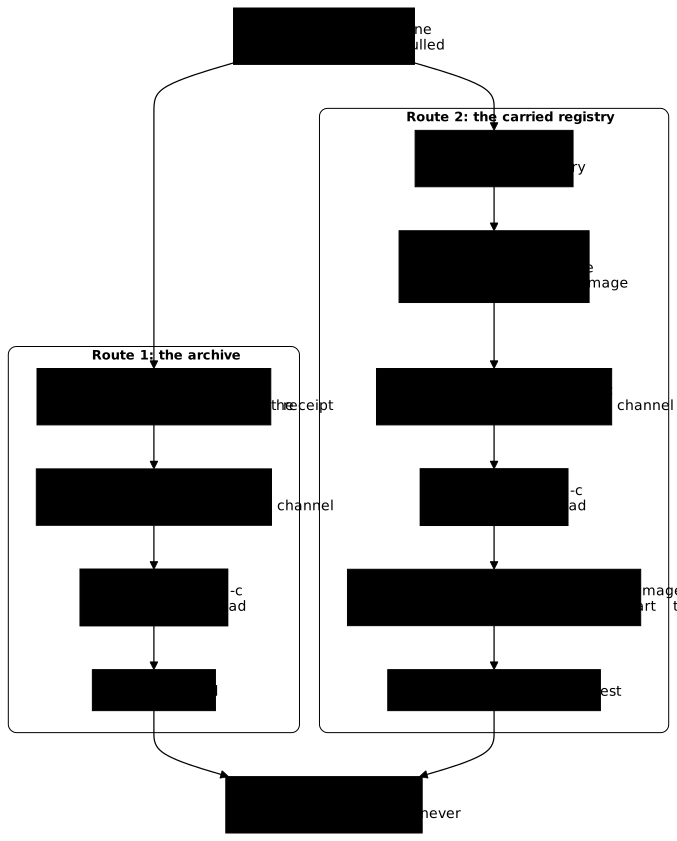
The archive is the shortest route when you deliver one or two images to a machine. The transported registry takes more steps, and it suits the case where several isolated machines pull the same images, or where a tool expects a registry reference rather than a file.
How do you simulate a machine with no network?
To verify a delivery, you need a machine that truly cannot reach anything. If you have none at hand, a Docker-in-Docker container started with --network none plays the part. It is a demonstration device, not a delivery method: the --privileged option gives this container almost all the rights over the host machine, and it is only set on a test workstation.
mkdir -p xferdocker run -d --name machine-isolee --privileged --network none \ -e DOCKER_TLS_CERTDIR= -v "$PWD/xfer:/xfer:ro" \ docker:dind@sha256:9e79b879b177fbd72c34376a3dd3d91747da5db49e1f560f76aea59561471977until docker exec machine-isolee docker info >/dev/null 2>&1; do sleep 2; donedocker exec machine-isolee docker version --format 'server {{.Server.Version}}'docker exec machine-isolee docker info --format 'driver={{.Driver}} status={{.DriverStatus}} images={{.Images}}'server 29.9.2driver=overlayfs status=[[driver-type io.containerd.snapshotter.v1]] images=0The until loop waits for the inner daemon to answer: it needs about 18 seconds after the container starts, and a docker exec … docker version launched right away fails with failed to connect to the docker API. The -e DOCKER_TLS_CERTDIR= option disables TLS between the client and the inner daemon: harmless here, since --network none shuts the container off from the network, and it avoids managing certificates. The xfer folder of the host is mounted read-only: it plays the transfer medium. The inner daemon is also a Docker 29.9.2 on the containerd store, with zero images.
Now check that the isolation is real, by asking this container to reach Docker Hub:
# ❌ By tag, on purpose: these three commands prove the absence of the image, not its identitydocker exec machine-isolee wget -T 3 -qO- https://registry-1.docker.io/v2/docker exec machine-isolee docker pull alpine:3.24.3docker exec machine-isolee docker run --pull never --rm alpine:3.24.3 truewget: bad address 'registry-1.docker.io'Error response from daemon: failed to resolve reference "docker.io/library/alpine:3.24.3": failed to do request: Head "https://registry-1.docker.io/v2/library/alpine/manifests/3.24.3": dial tcp: lookup registry-1.docker.io on 10.10.114.1:53: dial udp 10.10.114.1:53: connect: network is unreachabledocker: Error response from daemon: No such image: alpine:3.24.3
Run 'docker run --help' for more informationThree messages can be read here. bad address says that the name of the registry does not even resolve. The error of the pull ends with network is unreachable: it is the expected failure offline, the same by tag and by digest.
The third one changes the nature of the failure. With --pull never, Docker no longer looks for a registry and answers No such image, because the image is not in the local store. This command serves as proof: if it works after the loading, the image has indeed arrived.
For the rest of the lesson, the commands prefixed with docker exec machine-isolee run on the isolated machine. On a real machine, remove this prefix.
How do you export an image with docker save?
docker save writes a tar archive of the image, with its layers and its metadata. Pull the image by its digest, give it back its tag with docker tag, then export it: -o names the output file. The docker tag is not decorative, because a pull by digest does not set the tag, and the section on docker pull tag@digest shows further down what happens without it.
docker pull alpine:3.24.3@sha256:be2656061b536c1883c4034790e21d0a09c5aaaf51968b89368a3c0371ea2c9adocker tag alpine@sha256:be2656061b536c1883c4034790e21d0a09c5aaaf51968b89368a3c0371ea2c9a alpine:3.24.3docker save -o xfer/alpine.tar alpine:3.24.3ls -l xfer/alpine.tartar tf xfer/alpine.tar-rw------- 1 ansible ansible 3961856 Nov 3 19:03 xfer/alpine.tarblobs/blobs/sha256/blobs/sha256/3da1513d2124248e6e2a526d532ff365833915ce1abe0813bfc5344190827406blobs/sha256/3ec36f3670df56d1b1d4323910cf6747576cb31e5e5d32c64715339876d86f20blobs/sha256/7b229517ed222597277036d94892173207d01a731ab3a88eeb1de2e963a2c788blobs/sha256/964745728d174226819257152a79b34561fe7321472eb9c8e32f461cbc7969c2blobs/sha256/b92841763c5c2140a20eeb2a44e94ebb0e80fd51d9d6b5895ea72fa999525d68blobs/sha256/bcd0699075b7694fe6061b0cf0bc8134b3f900f8d7456021c06b7cbbef460f8bblobs/sha256/be2656061b536c1883c4034790e21d0a09c5aaaf51968b89368a3c0371ea2c9ablobs/sha256/c26612752c78b18faacd63c7d50f4592c2e7b0f25e0e20e82bd74e465c57ab0dindex.jsonmanifest.jsonoci-layoutThe archive weighs about 4 MB, and two things can be read in this output. The permissions are -rw-------: only the account that created the archive can read it, so another account in charge of the transfer will first have to obtain the rights. The blobs/sha256/ folder contains files named after their digest, among them be2656…, the index, and c26612…, the amd64 manifest: the archive embeds the same structure as the registry.
To deliver several images at once, docker save accepts several names in the same command. The next section does it with alpine:3.24.3 and busybox:1.37, once busybox:1.37 is pulled: the deux.tar archive weighs 6,192,640 bytes, roughly the sum of the two separate archives, and it loads in a single command on the isolated machine.
Why does docker pull tag@digest not set the tag?
If you pull an image by tag and by digest (docker pull busybox:1.37@sha256:…), Docker fetches the content but does not create the tag in the local store. The tag is ignored, exactly as in a FROM: only the digest counts. The trap shows up at export time.
docker pull -q busybox:1.37@sha256:a7dbc319b1438115a207e11930dc4bb3e643dcb3ec0bdd694bb36cd8fad289ecdocker images --digests busyboxdocker save -o xfer/bb.tar busybox:1.37docker.io/library/busybox:1.37@sha256:a7dbc319b1438115a207e11930dc4bb3e643dcb3ec0bdd694bb36cd8fad289ecREPOSITORY TAG DIGEST IMAGE ID CREATED SIZEbusybox <none> sha256:a7dbc319b1438115a207e11930dc4bb3e643dcb3ec0bdd694bb36cd8fad289ec a7dbc319b143 2 years ago 6.77MBError response from daemon: No such image: busybox:1.37The TAG column displays <none>: the image is there, but without a name. docker save busybox:1.37 therefore fails with No such image, which is surprising when you have just pulled it. The remedy takes one command, which sets the tag on the image already present:
docker tag busybox@sha256:a7dbc319b1438115a207e11930dc4bb3e643dcb3ec0bdd694bb36cd8fad289ec busybox:1.37docker save -o xfer/deux.tar alpine:3.24.3 busybox:1.37docker save -o xfer/bb.tar busybox:1.37The bb.tar archive contains only busybox:1.37: the section on the receipt uses it. The same reflex applies to the registry image of the registry route: pulled by digest, it must be tagged again before being exported.
Which platform does docker save export?
docker save without options exports all the platforms whose content is present in the local store, not all those that the index announces. This behavior is the one described by the documentation of docker image save. On an amd64 host, a docker pull busybox:1.37@sha256:… downloads only the amd64 variant: the archive from docker save -o xfer/bb.tar busybox:1.37 then weighs 2,235,392 bytes, and its index.json describes the whole index although only the amd64 manifest is in the archive.
Next, pull the other variant, then export to a file distinct from bb.tar, which the section on the receipt reuses.
docker pull -q --platform linux/arm64 busybox@sha256:a7dbc319b1438115a207e11930dc4bb3e643dcb3ec0bdd694bb36cd8fad289ecdocker save -o xfer/bb-multi.tar busybox:1.37ls -l xfer/bb-multi.tarThe same command then produces 4,144,640 bytes, with the amd64 and arm64 manifests, whether you export the tag or the busybox@sha256:… reference.
The --platform option changes what is exported, and it also changes the identity of the loaded image. Without it, the archive keeps the index: its index.json designates the index (be2656… for alpine:3.24.3), exactly as in the archive of the previous section. With --platform, the archive is reduced to a single manifest: its index.json designates the c26612… manifest, and the blob of the be2656… index is no longer in it.
docker save --platform linux/amd64 -o xfer/alpine-amd64.tar alpine:3.24.3docker save --platform linux/arm64 -o xfer/alpine-arm64.tar alpine:3.24.3Error response from daemon: no suitable export target found: image with reference alpine:3.24.3 was found but does not provide the specified platform (linux/arm64)The first command succeeds (3,952,640 bytes, against 3,961,856 for the archive without options). The second fails because the arm64 variant of alpine has never been downloaded on this machine: --platform chooses among what the local store holds, it does not go and fetch it. After a docker pull --platform linux/arm64 of busybox, docker save --platform linux/arm64 -o xfer/bb-arm.tar busybox:1.37 works and produces an archive of 1,915,392 bytes.
An archive made with --platform therefore resembles what a registry receives after a docker push of a single platform: an image whose digest is the one of the manifest, not the one of the index. The next section shows what this changes on the isolated machine.
Keep the consequence for a delivery in mind. Know which architecture the isolated machine is, and export without --platform if you pin your FROM lines on the index digest: the archive keeps the index, and exports the platforms present in the store. An archive that covers several architectures is obtained by pulling each variant before the export. Export with --platform only to shrink the archive, and accept then that the loaded image carries the digest of the manifest. The shrinking is worthwhile only if the local store holds several platforms: with only the amd64 platform of alpine, the difference is just 9,216 bytes (3,952,640 against 3,961,856). Loading a multi-architecture archive was not replayed in this lesson. Building the variants is covered by the lesson on multi-architecture.
What does docker load preserve on the isolated machine?
On the isolated machine, you first compare the checksum of the archive with the one that left, then you load it. In the measurement, sha256sum xfer/alpine.tar on the connected machine and sha256sum /xfer/alpine.tar on the isolated machine give the same checksum, 6fdb2c195eee3b0c1ccf5198c506c3c1ec8a360529c374849d6cc655404b191c. Here the comparison is done by eye; the section on verifying the archive automates it with a receipt and sha256sum -c.
docker exec machine-isolee sha256sum /xfer/alpine.tardocker exec machine-isolee docker load -i /xfer/alpine.tardocker exec machine-isolee docker images --digestsdocker exec machine-isolee docker image inspect alpine:3.24.3 --format 'Id={{.Id}} RepoDigests={{.RepoDigests}}'docker exec machine-isolee docker run --rm --pull never alpine:3.24.3@sha256:be2656061b536c1883c4034790e21d0a09c5aaaf51968b89368a3c0371ea2c9a cat /etc/alpine-releasedocker exec machine-isolee docker run --rm --pull never alpine@sha256:be2656061b536c1883c4034790e21d0a09c5aaaf51968b89368a3c0371ea2c9a cat /etc/alpine-release6fdb2c195eee3b0c1ccf5198c506c3c1ec8a360529c374849d6cc655404b191c /xfer/alpine.tarLoaded image: alpine:3.24.3REPOSITORY TAG DIGEST IMAGE ID CREATED SIZEalpine 3.24.3 sha256:be2656061b536c1883c4034790e21d0a09c5aaaf51968b89368a3c0371ea2c9a be2656061b53 12 days ago 13MBId=sha256:be2656061b536c1883c4034790e21d0a09c5aaaf51968b89368a3c0371ea2c9a RepoDigests=[alpine@sha256:be2656061b536c1883c4034790e21d0a09c5aaaf51968b89368a3c0371ea2c9a]3.24.33.24.3Look at three points. The tag arrives with the image: Loaded image names it. The Id is the digest of the index, the one you had pinned, and RepoDigests confirms it: on this containerd store, loading an archive made without --platform does not change the identity. Finally, the image runs with --pull never, so with no network access at all, by its pinned tag (tag@sha256:…) as well as by its digest alone.
A locally built image behaves the same: its Id, its RepoDigests and its layers (RootFS.Layers) are identical before docker save and after docker load. This preserved identity holds for the containerd store of the lesson, and for an archive made without --platform. The lesson on exporting without a daemon with Skopeo shows a route that changes this identity.
What becomes of the identity of an archive made with --platform?
Load the alpine-amd64.tar archive of the previous section on the isolated machine, on top of the image from alpine.tar already loaded: both carry the name alpine:3.24.3, so the new archive replaces the existing image (behavior measured with a Skopeo archive in the lesson on exporting without a daemon with Skopeo; the output below comes from an empty machine). Then read the identity of the image and try to run it by the index digest.
docker exec machine-isolee docker load -i /xfer/alpine-amd64.tardocker exec machine-isolee docker image inspect alpine:3.24.3 --format 'Id={{.Id}} RepoDigests={{.RepoDigests}}'docker exec machine-isolee docker run --rm --pull never alpine@sha256:be2656061b536c1883c4034790e21d0a09c5aaaf51968b89368a3c0371ea2c9a cat /etc/alpine-releasedocker exec machine-isolee docker run --rm --pull never alpine:3.24.3@sha256:be2656061b536c1883c4034790e21d0a09c5aaaf51968b89368a3c0371ea2c9a cat /etc/alpine-releaseLoaded image: alpine:3.24.3Id=sha256:c26612752c78b18faacd63c7d50f4592c2e7b0f25e0e20e82bd74e465c57ab0d RepoDigests=[alpine@sha256:c26612752c78b18faacd63c7d50f4592c2e7b0f25e0e20e82bd74e465c57ab0d]docker: Error response from daemon: No such image: alpine@sha256:be2656061b536c1883c4034790e21d0a09c5aaaf51968b89368a3c0371ea2c9a
Run 'docker run --help' for more informationdocker: Error response from daemon: No such image: alpine:3.24.3@sha256:be2656061b536c1883c4034790e21d0a09c5aaaf51968b89368a3c0371ea2c9a
Run 'docker run --help' for more informationLook at the Id: it is the digest of the amd64 manifest (c26612…), not the one of the index (be2656…). Both launches by the index digest fail with No such image (code 125), although the image is indeed loaded: it simply carries another digest.
A build whose FROM is pinned on the index fails the same way, with an error that looks like a network outage, because Docker then looks for the index digest on the registry:
#2 ERROR: failed to do request: Head "https://registry-1.docker.io/v2/library/alpine/manifests/sha256:be2656061b536c1883c4034790e21d0a09c5aaaf51968b89368a3c0371ea2c9a": dial tcp: lookup registry-1.docker.io on 10.10.114.1:53: dial udp 10.10.114.1:53: connect: network is unreachableWith an archive made without --platform (alpine.tar), the same build succeeds, like the two --pull never launches. The choice therefore boils down to this: without --platform, the FROM pinned on the index resolves; with --platform, you must pin the FROM on the manifest digest, the one that the first Name entry of docker buildx imagetools inspect displays, and whose content the archive carries.
Loading the --platform archive therefore replaced the image that came from alpine.tar: an archive loaded under a name already present takes the place of the one that carried it. The sections that follow rely on the index digest: remove this image and load the archive made without options again.
docker exec machine-isolee docker rmi -f alpine:3.24.3docker exec machine-isolee docker load -i /xfer/alpine.tarUntagged: alpine:3.24.3Deleted: sha256:c26612752c78b18faacd63c7d50f4592c2e7b0f25e0e20e82bd74e465c57ab0dLoaded image: alpine:3.24.3How do you verify the archive before loading it?
The exit code of docker load does not prove that the archive is intact. An archive tampered with by a single byte, of the same size, loads with code 0, and the image appears in docker images. The documentation of docker image load describes no integrity check: the checksum, computed before departure and verified before loading, is the reliable control against a damaged archive (its limit against deliberate tampering is given further down).
On the connected machine, write the receipt: here in xfer, for the demonstration. On the isolated machine, verify it before any docker load.
(cd xfer && sha256sum bb.tar > bb.tar.sha256 && sha256sum -c bb.tar.sha256)bb.tar: OKTo see what the verification catches, change one byte of a layer in a copy of the archive. The script extracts the archive, changes byte 1000 of a layer, then archives again. The extracted folder is read-only, hence the chmod. Since busybox is pulled by digest, the modified layer (68fe9bff…) carries the same name on your machine as in the measurement.
mkdir -p alt && cd alt && tar xf ../xfer/bb.tar && cd ..chmod -R u+w altpython3 - <<'PY'p="alt/blobs/sha256/68fe9bff2ad4ad46da3e58db03faa64eb73c0ff16d546b0c42539eaa9854cb7f"b=bytearray(open(p,"rb").read()); b[1000]^=0xff; open(p,"wb").write(b)PY(cd alt && tar cf ../xfer/alteree.tar .)(cd xfer && cp bb.tar.sha256 alteree.tar.sha256 && sed -i 's/ bb.tar/ alteree.tar/' alteree.tar.sha256 && sha256sum -c alteree.tar.sha256; echo rc=$?)alteree.tar: FAILEDsha256sum: WARNING: 1 computed checksum did NOT matchrc=1The checksum rejects the archive. Now see what docker load does on the isolated machine if you give it this archive anyway. The output shown assumes that busybox:1.37 has not yet been loaded on this machine, which is the case at this stage of the lesson, where only alpine has been loaded there; with busybox already present, the result was not measured.
docker exec machine-isolee docker load -i /xfer/alteree.tar; echo rc=$?docker exec machine-isolee docker run --rm --pull never busybox:1.37@sha256:a7dbc319b1438115a207e11930dc4bb3e643dcb3ec0bdd694bb36cd8fad289ec echo okLoaded image: busybox:1.37Error unpacking image busybox:1.37: apply layer error for "docker.io/library/busybox:1.37": failed to extract layer sha256:5a9bfd996c6d49c6c3cb4ddfb76e8d09cf16b6b7cf6601d1f2dffbdbc3edb5d4: NotFound: failed to get reader from content store: content digest sha256:68fe9bff2ad4ad46da3e58db03faa64eb73c0ff16d546b0c42539eaa9854cb7f: not foundrc=0docker: Error response from daemon: apply layer error for "": failed to extract layer sha256:5a9bfd996c6d49c6c3cb4ddfb76e8d09cf16b6b7cf6601d1f2dffbdbc3edb5d4: NotFound: failed to get reader from content store: content digest sha256:68fe9bff2ad4ad46da3e58db03faa64eb73c0ff16d546b0c42539eaa9854cb7f: not found
Run 'docker run --help' for more informationThe loading displays Loaded image then an extraction error, and returns rc=0. The image is listed, but docker run fails. The content digest … not found message shows that the store refused the tampered blob: a digest-based check does exist, but its failure does not reach the exit code of docker load. The receipt is therefore still necessary, and it would have avoided discovering the problem on the production machine.
The receipt protects against a damaged archive. Against deliberate tampering, it has value only if it travels by a channel other than the archive itself: an attacker who changes the archive also changes a receipt stored next to it. For a guarantee of origin, signing the image goes further, as shown by the guide on Cosign.
Two other failures are recognized by their message. A truncated archive (here 2,000,000 bytes of an archive that was larger) is clearly refused, with a non-zero code:
failed to ingest "blobs/sha256/7b229517ed222597277036d94892173207d01a731ab3a88eeb1de2e963a2c788": short read: expected 3853109 bytes but got 1911424: unexpected EOFAnd an archive of the wrong architecture loads without error. The failure comes at launch: docker run warns that the platform of the image (linux/arm64/v8) does not match that of the host (linux/amd64/v3), then the first program launched fails.
WARNING: The requested image's platform (linux/arm64/v8) does not match the detected host platform (linux/amd64/v3) and no specific platform was requestedexec /bin/uname: exec format errorexec format error means that the kernel does not know how to run this binary: go back to the exported platform.
How do you deliver through a transported registry?
The registry route transports a registry from the connected machine to the isolated machine: the image of the registry, and its volume, the folder where it stores the pushed images. Once restarted on the isolated machine, it serves the images like an ordinary registry, and you pull them by digest.
Start by feeding the registry of the connected machine. A docker push of an image of which only the local platform is present sends only that platform, and the registry then receives the digest of the amd64 manifest, not the one of the index. Push the copy of the base and the application, and read the digests received:
docker tag alpine:3.24.3 127.0.0.1:5001/reference/alpine:3.24.3docker push 127.0.0.1:5001/reference/alpine:3.24.3 | tail -1docker tag demo-web:1.0 127.0.0.1:5001/demo-web:1.0docker push 127.0.0.1:5001/demo-web:1.0 | tail -1curl -s http://127.0.0.1:5001/v2/_catalog sha256:be2656061b536c1883c4034790e21d0a09c5aaaf51968b89368a3c0371ea2c9a -> sha256:c26612752c78b18faacd63c7d50f4592c2e7b0f25e0e20e82bd74e465c57ab0d1.0: digest: sha256:afba17b4f22057ebb22ee737fb4ff0c6b3dfad0434ec348ea003bad9525fc9c5 size: 855{"repositories":["demo-web","reference/alpine","socle-maison"]}The first line says that the be26… index became the c266… manifest: the digest pinned on Docker Hub therefore does not exist in this registry, which knows only the amd64 manifest. A FROM pinned on the Hub index will not resolve on this copy. The locally built image, for its part, keeps its index (afba17b4…). To copy a complete index to a registry, skopeo copy --all copies the index and all its variants, whereas without it only the platform of the machine is copied. The page BuildKit cache in CI and image promotion between registries measures this copy to a registry; the Skopeo guide measures --all towards an archive.
Then transport the registry. Stop it first, so that its volume does not move during the copy. Archive the volume with a throwaway container, export the registry image, and write a receipt for both files.
docker stop registre-livraisonumask 077docker run --rm -v livraison-vol:/v:ro alpine:3.24.3@sha256:be2656061b536c1883c4034790e21d0a09c5aaaf51968b89368a3c0371ea2c9a tar cf - -C /v . > xfer/registre-data.tardocker tag registry@sha256:d4032d4cc323c1731c707931ecada07a53076eac38e3b61ae57533f170f2c6c3 registry:3.1.2docker save -o xfer/registry-image.tar registry:3.1.2(cd xfer && sha256sum registre-data.tar registry-image.tar > transfert.sha256 && cat transfert.sha256)The volume weighs about 4 MB and the image of the registry about 21 MB. After the docker stop, docker ps -a shows registre-livraison as Exited (2): that is the exit code of the registry stopped by the signal, not a failure. The docker tag answers the pull tag@digest trap seen above: the registry image was pulled by digest, so without a tag.
The shell redirection > creates registre-data.tar with the permissions of your umask, often readable by the other accounts: the umask 077 placed just before the command reserves the file for your account, like the archive from docker save. It stays active in this terminal until it is closed. The transfert.sha256 receipt is stored in xfer for the demonstration, but it is transmitted apart from the archives, by another channel, otherwise it does not protect against deliberate tampering.
On the isolated machine, verify the checksums, load the registry image, restore the volume, then restart the registry. The container that restores the volume uses the alpine image: it must already be loaded on the isolated machine, which is the case after the docker load of alpine.tar above, since no pull is possible.
docker exec machine-isolee sh -c 'cd /xfer && sha256sum -c transfert.sha256'docker exec machine-isolee docker load -i /xfer/registry-image.tardocker exec machine-isolee docker volume create regvoldocker exec machine-isolee docker run --rm -v regvol:/v -v /xfer:/xfer:ro alpine:3.24.3@sha256:be2656061b536c1883c4034790e21d0a09c5aaaf51968b89368a3c0371ea2c9a tar xf /xfer/registre-data.tar -C /vdocker exec machine-isolee docker run -d --name registre-livraison -p 127.0.0.1:5000:5000 -v regvol:/var/lib/registry registry:3.1.2@sha256:d4032d4cc323c1731c707931ecada07a53076eac38e3b61ae57533f170f2c6c3docker exec machine-isolee wget -qO- http://127.0.0.1:5000/v2/_catalogdocker exec machine-isolee wget -qO- http://127.0.0.1:5000/v2/demo-web/tags/listregistre-data.tar: OKregistry-image.tar: OKLoaded image: registry:3.1.2{"repositories":["demo-web","reference/alpine","socle-maison"]}
{"name":"demo-web","tags":["1.0"]}The catalog is identical to that of the connected machine: the registry did pick up its content. All that remains is to pull the image by its digest and run it without a network. The --pull never is the proof here: it forbids any access, and the image must already be there.
docker exec machine-isolee docker pull 127.0.0.1:5000/demo-web@sha256:afba17b4f22057ebb22ee737fb4ff0c6b3dfad0434ec348ea003bad9525fc9c5 | tail -2docker exec machine-isolee docker run --rm --network none --pull never 127.0.0.1:5000/demo-web@sha256:afba17b4f22057ebb22ee737fb4ff0c6b3dfad0434ec348ea003bad9525fc9c5Status: Downloaded newer image for 127.0.0.1:5000/demo-web@sha256:afba17b4f22057ebb22ee737fb4ff0c6b3dfad0434ec348ea003bad9525fc9c5127.0.0.1:5000/demo-web@sha256:afba17b4f22057ebb22ee737fb4ff0c6b3dfad0434ec348ea003bad9525fc9c5version-1The version-1 output comes from the container launched without a network, from an image pulled from a registry that did not exist on this machine before the volume was loaded. Two errors are recognized by their message. A digest that the registry does not have, or a repository that does not exist, answer not found:
Error response from daemon: failed to resolve reference "127.0.0.1:5000/demo-web@sha256:0000000000000000000000000000000000000000000000000000000000000000": 127.0.0.1:5000/demo-web@sha256:0000000000000000000000000000000000000000000000000000000000000000: not foundError response from daemon: failed to resolve reference "127.0.0.1:5000/inconnu:1.0": 127.0.0.1:5000/inconnu:1.0: not foundThis registry stays in HTTP on the loopback interface. Served to other machines, it must move to TLS with authentication, as in the lesson on the trusted registry.
Why is a pull-through mirror not an offline solution?
A pull-through mirror is a registry that relays an upstream registry and keeps a copy of what is asked of it. Starting it with REGISTRY_PROXY_REMOTEURL=https://registry-1.docker.io gives a mirror of Docker Hub. Online, it works: a docker pull of an image by digest succeeds, and its cache grows. But offline it does not stay up: with registry 3.1.2, it contacts the upstream at startup and stops with a panic.
docker exec machine-isolee docker volume create miroirdocker exec machine-isolee docker run -d --name miroir -p 127.0.0.1:5001:5000 -v miroir:/var/lib/registry -e REGISTRY_PROXY_REMOTEURL=https://registry-1.docker.io registry:3.1.2@sha256:d4032d4cc323c1731c707931ecada07a53076eac38e3b61ae57533f170f2c6c3sleep 15docker exec machine-isolee docker logs miroir 2>&1 | grep '^panic'docker exec machine-isolee docker pull 127.0.0.1:5001/library/busybox:1.37panic: Get "https://registry-1.docker.io/v2/": dial tcp: lookup registry-1.docker.io on 10.10.114.1:53: read udp 172.17.0.4:45198->10.10.114.1:53: i/o timeoutError response from daemon: failed to resolve reference "127.0.0.1:5001/library/busybox:1.37": failed to do request: Head "https://127.0.0.1:5001/v2/library/busybox/manifests/1.37": dial tcp 127.0.0.1:5001: connect: connection refusedThe first line is the panic message of the mirror: it contacts the upstream at its startup, gets no answer (timeout on the name resolution), panics and stops. A few seconds after the launch, the container goes from Up to Exited (2).
The pull therefore fails in two ways. While the container is Up, it answers connection reset by peer; once stopped, it answers connection refused, since nothing listens on the port anymore. The second error is the one shown by the output above, read after the sleep 15. A pull-through mirror speeds up pulls and reduces calls to the Hub as long as the network works, but it does not replace an offline delivery.
Its cache, on the other hand, is a simple registry volume. The steps below can be reproduced as an exercise, on the model of the previous section (the output shown further down comes from this run):
- start the same mirror on the connected side, in a
miroir-connectecontainer published with-p 127.0.0.1:5003:5000, whosemiroir-cachevolume is mounted on/var/lib/registry; - pull the image into it by its digest, with
docker pull 127.0.0.1:5003/library/hello-world@sha256:c567b231f65614688711a75f31518a064258a51d442117a3e771a3a8fdba78ef: the mirror downloads it from Docker Hub and keeps it in its volume; - stop it, then archive its volume like the one in the previous section;
- restore the archive into the
miroirvolume of the isolated machine; - remove on the connected side the
miroir-connectecontainer, itsmiroir-cachevolume and the image pulled in step 2, which the final cleanup also handles.
Served by an ordinary registry, without the REGISTRY_PROXY_REMOTEURL variable, this volume answers:
docker exec machine-isolee docker rm -f miroirdocker exec machine-isolee docker run -d --name miroir-nu -p 127.0.0.1:5002:5000 -v miroir:/var/lib/registry registry:3.1.2@sha256:d4032d4cc323c1731c707931ecada07a53076eac38e3b61ae57533f170f2c6c3docker exec machine-isolee docker pull 127.0.0.1:5002/library/hello-world@sha256:c567b231f65614688711a75f31518a064258a51d442117a3e771a3a8fdba78efdocker exec machine-isolee docker run --rm --pull never --network none 127.0.0.1:5002/library/hello-world@sha256:c567b231f65614688711a75f31518a064258a51d442117a3e771a3a8fdba78efStatus: Downloaded newer image for 127.0.0.1:5002/library/hello-world@sha256:c567b231f65614688711a75f31518a064258a51d442117a3e771a3a8fdba78ef127.0.0.1:5002/library/hello-world@sha256:c567b231f65614688711a75f31518a064258a51d442117a3e771a3a8fdba78ef
Hello from Docker!The cache of a mirror therefore travels like any registry volume. It contains only the images already requested from this mirror: what you never pulled online is not in it. The Distribution documentation also states that the mirror periodically deletes old content from its cache: a volume copied long after the last pull may have lost images.
What to do when the offline delivery fails?
Every failure in the lesson has a message that designates it. Look for yours in the first column.
| Message or symptom | Cause | Action |
|---|---|---|
failed to resolve source metadata … not found in a build, on a machine that reaches the registry | The registry answers, but it does not have the digest of the FROM | Read the index digest with docker buildx imagetools inspect --format '{{.Manifest.Digest}}' |
The RUN cat /etc/alpine-release line displays a version other than the tag of the FROM | The tag is ignored when a digest is present | Fix the tag so that it matches the pinned digest |
docker save busybox:1.37: No such image after a pull by digest | pull tag@digest does not set the tag | docker tag busybox@sha256:… busybox:1.37, then docker save |
no suitable export target found … does not provide the specified platform | The platform requested with --platform is not in the local store | Pull it first with docker pull --platform |
failed to ingest … short read … unexpected EOF at docker load | Archive truncated during the transfer | Redo the transfer, then sha256sum -c |
Error unpacking image … content digest … not found with rc=0 | Tampered archive: docker load does not signal it through its code | Verify the sha256sum -c receipt before any loading |
No such image: alpine@sha256:<index digest> after loading an archive made with --platform | The archive carries only the manifest: the loaded image has the manifest digest, not the index digest | Redo the archive without --platform, or pin the FROM on the manifest digest |
failed to do request: Head "…/manifests/sha256:<index digest>" … network is unreachable when building a FROM pinned on the index, after loading an archive made with --platform | The loaded image carries the manifest digest: the engine does not find the index locally and looks for it on the unreachable registry | Redo the archive without --platform, or pin the FROM on the manifest digest |
exec format error when launching a delivered image | Archive of an architecture other than the machine's | Export the right platform (pull that variant, then --platform) |
network is unreachable at docker pull (for a build, see the row on the index digest) | The machine has no network, which is expected | Deliver by archive or registry, and run with --pull never |
No such image with --pull never | The image has not been loaded | docker load, or docker pull from the delivered registry |
panic: Get "https://registry-1.docker.io/v2/" in the logs of a registry, then connection reset by peer or connection refused at docker pull | A pull-through mirror contacts the upstream at startup, panics and stops (Exited (2)) | Serve the cache volume with an ordinary registry |
You have reached your pull rate limit (HTTP 429) at docker pull or in the verifie-socle.sh script | Docker Hub limits the pulls of an address or an account | Authenticate or wait, see Publish and pull an image in a controlled way |
failed to resolve reference … : not found on the delivered registry | Digest or repository absent from the transported registry | Read _catalog and tags/list to see what it contains |
A failure at the docker pull by digest step, after a delivery by registry, may come from a digest copied from Docker Hub: remember that docker push of a local image sends only the manifest of the local platform, whose digest differs from the one of the index.
How do you clean up after the experiments?
The lesson leaves on your workstation a privileged container, a registry, a volume, images and archives. Remove the isolated machine first: its regvol and miroir volumes, its registre-livraison and miroir-nu containers and the images it loaded all live in the daemon it contains. The -v option of docker rm -fv matters here: the docker:dind image declares /var/lib/docker as a volume, and Docker creates an anonymous volume for it that carries the whole inner daemon and the delivery data. Without -v, the anonymous volume of the daemon stays on your workstation.
Then remove the registry of the connected machine and its livraison-vol volume, then the images of the lesson and the transfer folders. If a docker image rm command answers that an image does not exist, it has already disappeared: the other names in the list are still processed, but the command exits with code 1. If it answers that an image is used by a container, delete that container first with docker rm -f.
docker rm -fv machine-isoleedocker rm -f registre-livraisondocker volume rm livraison-vol# only if you did the mirror exercise on the connected sidedocker rm -f miroir-connectedocker volume rm miroir-cachedocker image rm 127.0.0.1:5003/library/hello-world@sha256:c567b231f65614688711a75f31518a064258a51d442117a3e771a3a8fdba78efdocker image rm t:menteur demo-web:1.0 127.0.0.1:5001/demo-web:1.0 127.0.0.1:5001/reference/alpine:3.24.3docker image rm busybox:1.37 registry:3.1.2 alpine:3.24.3docker image rm docker:dind@sha256:9e79b879b177fbd72c34376a3dd3d91747da5db49e1f560f76aea59561471977rm -rf xfer alt v1 v2 app menteur verifie-socle.shThe alpine, busybox and registry images may serve other uses on your machine: keep them if so. Check with docker image ls that no <none> image from the lesson remains: an image pulled by digest without a tag, or the version-1 base that became orphaned when you rebuilt it under the same tag. Delete it then by its identifier. The 127.0.0.1:5001/socle-maison:2026-11 image does not appear in the list: the section on the moved tag has already deleted it.
The last rm -rf also removes the v1/, v2/, app/ and menteur/ folders and the verifie-socle.sh script, written along the sections. The -f option avoids an error for a folder that you did not create, alt/ for example if you skipped the tampering demonstration. Re-read the list before running the command: it asks for no confirmation.
Practice
The first lab asks you to keep a build on the intended base while the tag of that base changes in a local registry: the validation rebuilds the image after a source change and checks the base actually delivered. The second asks you to prepare a published image for a machine with no network, with its integrity checksum: the validation checks that the image can be retrieved offline without depending on the local Docker cache.
Key points
The index digest of a tag is read with docker buildx imagetools inspect <tag> --format '{{.Manifest.Digest}}', without pulling the image, and is written in the FROM in the form name:tag@sha256:…. When a digest is present, Docker ignores the tag without warning: a tag that does not match the digest misleads the reader, not the build.
A pinned build stays on the old content when the tag is moved, as long as the registry still serves that digest. To know that a newer base exists, compare the pinned digest with the one the registry serves for the tag, which requires keeping the tag in the FROM, and make the task fail through a non-zero exit code.
docker pull tag@digest does not set the tag: without docker tag, a docker save by name fails. docker save without options keeps the index and exports the platforms present in the local store. --platform chooses only among them and reduces the archive to a manifest: the loaded image then carries the manifest digest, and a FROM pinned on the index no longer resolves there. To keep the index digest, export without --platform. The archive is created as -rw-------.
The exit code of docker load does not prove integrity: a tampered archive loads with code 0. You write a sha256sum receipt before the transfer and verify it with sha256sum -c before loading. This receipt protects against a damaged archive; against deliberate tampering, it must travel by a channel other than the archive.
Delivering through a registry amounts to transporting the registry image and its volume, stopped during the copy, then pulling the image by digest on the isolated machine. A docker push of a local image sends only the local platform, whose digest is not the one of the index. --pull never proves that the execution does not need the network.
A pull-through mirror does not replace an offline delivery: it stops with a panic shortly after its launch when its upstream is unreachable. Its cache, served by an ordinary registry, answers, but it contains only what had been requested online. The --privileged --network none container that simulates the isolated machine is a demonstration device, not a delivery method.
Knowledge check
Check that the essentials of this lesson have stuck. The questions cover only what has just been explained here.
Knowledge check
Check what you have learned with this interactive quiz
How it works
- The timer starts when you click Start
- Multiple choice, true/false and short answer questions
- You can move between questions
- Detailed results are shown at the end
Starts the quiz and the timer
Review
(0/0)Score by domain
A domain groups several guides and gets several questions, so its score is more reliable than a per-topic score, which often rests on a single question.
Summary
Strengths
No topic passed at 80% on at least two questions yet.
Weak areas
No topic below the pass mark.
Recommended next
Hints before you try again?
Continue the course: Export an image without a daemon with Skopeo
A new full quiz with random questions
Work again only on the questions you missed