An image built in a single stage keeps everything that was used to make it: the compiler, the sources, the dependency cache. For a small Go program, that means more than a gigabyte to store, transfer and monitor, while the program itself weighs 9 MB. A multi-stage build solves this by splitting the Dockerfile into stages: one compiles, another tests, and the final image receives only the result.
This lesson goes further than copying a binary. An almost empty final image breaks in specific ways: the program does not start, an HTTPS connection fails, the Paris time returns an error, the user does not exist. You will learn to predict these failures and fix them, to make the build fail when a test fails (a naive Dockerfile does not guarantee it), to check that no tool is left, and to debug an image that does not even have a shell. All measurements come from Docker 29.9.2, with the golang:1.27 image (Go 1.27.3), on amd64.
Several names in this lesson are French because the commands and outputs are the ones that were run: pointage ("time clock") is the example program, verifier ("check") its subcommand, /sante ("health") and /heure ("time") its routes, and ~/pointage the work folder. They are identifiers, so they stay as they are.
The lesson Change base without breaking the application already showed a minimal multi-stage build, with a smoke test in the build; here, the multi-stage build is the subject. Choosing the base image is discussed in Choose and maintain a Docker base image, and size reduction in the broad sense in Optimiser la taille des images (in French): this lesson deals with what the final image must contain in order to work, not with the race for the last megabyte.
What you will learn
- Build a single-layer final image and compare it with the image of a single-stage build
- List what a fully empty
scratchimage must receive: a static binary, certificates, time zones, a user - Recognize the four errors that occur when the image receives too little
- Choose a distroless image when
scratchrequires too many copies - Place the tests in a stage so that a broken test blocks the build, then test the final image itself
- Check that no tool is left in an image with no shell
- Debug without adding anything to the shipped image
Prerequisites
- Knowing how to write a Dockerfile (Write a Dockerfile) and the effect of
USER(Run an image as non-root) - Having read about layer order and the cache (Organize layers and use the cache)
- Knowing how to read the identity of an image, tag and digest (Read an OCI image and its identity)
- A working Docker 29.9.2 (Docker installation), the
curlcommand, andopensslfor the section on certificates
What example application is used, and how much does it weigh built in one stage?
The example is a small Go program named pointage. Go produces a single executable file, which makes the gap between "with" and "without a compiler" very visible. The program answers on /sante, displays on /heure the Paris time (always the same fixed instant, so that the output is reproducible) and on /uid the identifier of the user who runs it. With the verifier URL subcommand, it queries an address over HTTP or HTTPS.
Create a work folder that the cleanup section deletes, then the three files of the program.
mkdir -p ~/pointage && cd ~/pointagepackage main
import ( "fmt" "net/http" "os" "time")
func main() { if len(os.Args) > 2 && os.Args[1] == "verifier" { r, err := http.Get(os.Args[2]) if err != nil { fmt.Println("erreur:", err) os.Exit(1) } fmt.Println("statut:", r.Status) return } http.HandleFunc("/sante", func(w http.ResponseWriter, _ *http.Request) { fmt.Fprintln(w, "ok") }) http.HandleFunc("/heure", func(w http.ResponseWriter, _ *http.Request) { loc, err := time.LoadLocation("Europe/Paris") if err != nil { http.Error(w, err.Error(), 500) return } fmt.Fprintln(w, time.Date(2026, 7, 1, 12, 0, 0, 0, time.UTC).In(loc).Format("15:04 MST")) }) http.HandleFunc("/uid", func(w http.ResponseWriter, _ *http.Request) { fmt.Fprintln(w, os.Getuid()) }) fmt.Println("ecoute sur :8080") http.ListenAndServe(":8080", nil)}package main
import "testing"
func TestAddition(t *testing.T) { if 1+1 != 2 { t.Fatal("arithmetique") }}module pointage
go 1.27The first Dockerfile builds everything in the same image: it starts from the official golang image, which contains the compiler, copies the sources and compiles. The CGO_ENABLED=0 option asks Go for a static binary, that is, one that needs no library from the system; the reason is given below.
FROM golang:1.27@sha256:2920bb124f1a2e12a1d39f0cab756ae0068441ee1da7655dec7f5e374944095bWORKDIR /srcCOPY . .RUN CGO_ENABLED=0 go build -o /usr/local/bin/pointage .CMD ["pointage"]docker build -q -f mono.Dockerfile -t pointage:mono .The -q option prints only the identifier of the built image. Keep it for now: the detail of a build is only useful in the section on tests.
sha256:ca42c20c8c0ef6beb19354cae2ca052810f524550d3b8dbb47ca6533658c57a2The identifier displayed will be different on your machine. On to the second Dockerfile, which is the subject of the lesson.
How do you separate build from runtime?
A multi-stage Dockerfile contains several FROM instructions. Each one opens a stage, which AS name lets you name. Only the last stage gives the shipped image; the others are used to prepare files, and COPY --from=name fetches from an earlier stage exactly what you designate. What is not copied does not reach the final image.
FROM golang:1.27@sha256:2920bb124f1a2e12a1d39f0cab756ae0068441ee1da7655dec7f5e374944095b AS buildWORKDIR /srcCOPY . .RUN CGO_ENABLED=0 go build -o /pointage .
FROM scratchCOPY --from=build /pointage /pointageENTRYPOINT ["/pointage"]
The first stage, build, is identical to the single-stage build. The second starts from scratch, which is not a real image but a completely empty starting point: no shell, no libraries, no files. It receives only the binary, and ENTRYPOINT designates the program that docker run launches. Build this second image and compare the two.
docker build -q -f multi.Dockerfile -t pointage:multi .docker image ls pointageIMAGE ID DISK USAGE CONTENT SIZE EXTRApointage:mono ca42c20c8c0e 1.43GB 344MBpointage:multi 9c59c1812f36 14.7MB 5.34MBLook at the DISK USAGE column, the one this lesson compares: 1.43 GB for the single-stage build, 14.7 MB for the multi-stage one, about a hundred times less. The exact layer count is read with docker image inspect.
for t in mono multi; do echo "--- $t"; docker image inspect --format '{{.Size}} octets, couches={{len .RootFS.Layers}}' pointage:$t; done--- mono1429170290 octets, couches=10--- multi14708917 octets, couches=1The single-stage image has 10 layers, several of them over 200 MB inherited from the golang image itself. The multi-stage image has only one, the one from the COPY of the binary, as docker history confirms.
docker history pointage:multiIMAGE CREATED CREATED BY SIZE COMMENT9c59c1812f36 1 second ago ENTRYPOINT ["/pointage"] 0B buildkit.dockerfile.v0<missing> 1 second ago COPY /pointage /pointage # buildkit 9.37MB buildkit.dockerfile.v0The second line is the only layer that weighs anything: 9.37 MB, the binary. The ENTRYPOINT line creates no file (0 bytes). The gain does not come from a compression option: it comes from the fact that the compiler and the sources stayed in the build stage, which Docker does not ship.
What must the final image receive for the application to run?
A scratch image contains only what you copy into it, so everything the program reads along the way must be copied too. Four things are missing in this example, and each one is recognized by a specific message. The four subsections below trigger them one by one, with the fix.
Why does a dynamic binary fail in scratch?
A dynamic binary does not contain the C library of its system (the libc). At startup, it relies on a program of the system, the loader, which loads it, and this loader must exist in the image.
Go produces such a binary when cgo, the bridge between Go and C code, is active and a package of the program uses it, like net for name resolution. In a native build, cgo is active by default if a C compiler is present, which is the case in the golang image. CGO_ENABLED=0 turns it off and gives a static binary. The page Compiler et versionner un binaire Go (in French) details Go compilation; here, you check the result with ldd, which lists the libraries requested.
docker run --rm --entrypoint sh pointage:mono -c 'CGO_ENABLED=1 go build -o /tmp/dyn /src && ldd /tmp/dyn; CGO_ENABLED=0 go build -o /tmp/st /src && (ldd /tmp/st; echo code=$?)' linux-vdso.so.1 (0x00007fe300d1f000) libc.so.6 => /lib/x86_64-linux-gnu/libc.so.6 (0x00007fe300b22000) /lib64/ld-linux-x86-64.so.2 (0x00007fe300d21000) not a dynamic executablecode=1The first three lines are the binary compiled with cgo: it asks for libc.so.6 and the ld-linux loader. The last two are the binary compiled without cgo: ldd answers not a dynamic executable (with code 1, which is not an error here, it is the expected answer for a static binary). Now build the image with the dynamic binary, to see the failure.
FROM golang:1.27@sha256:2920bb124f1a2e12a1d39f0cab756ae0068441ee1da7655dec7f5e374944095b AS buildWORKDIR /srcCOPY . .RUN CGO_ENABLED=1 go build -o /pointage .
FROM scratchCOPY --from=build /pointage /pointageENTRYPOINT ["/pointage"]docker build -q -f dyn.Dockerfile -t pointage:dyn .docker run --rm pointage:dyn verifier https://172.17.0.1:8443/echo "code=$?"sha256:7408993347e6b2d9c46495965d521bb000fcf35f0e1c8e984ecf83a5b25bff3cexec /pointage: no such file or directorycode=255The build succeeds, nothing warns you. At launch, the message says no such file or directory although /pointage does exist: it is the loader, absent from scratch, that is missing, and the message quotes the requested file instead of explaining. The fix is in the Dockerfile, CGO_ENABLED=0, as in multi.Dockerfile. The address https://172.17.0.1:8443/ is not used yet: the program fails before querying it.
Why does an HTTPS connection fail without certificates?
To verify an HTTPS server, a client must know the certificate authorities (CAs) it trusts, that is, the organizations whose signature proves the identity of a server. On Debian and its derivatives, they are gathered in the /etc/ssl/certs/ca-certificates.crt file. A scratch image does not have it.
To trigger the error without depending on the Internet, the demonstration uses a local private authority, created with openssl, and a small HTTPS test server that presents a certificate signed by it. This is not a public site: it is the way to reproduce the "unknown authority" error without a network. The first three commands create the authority, the server certificate (valid for the address 172.17.0.1, that of the host seen from a container on the default Docker network) and sign it; the last one starts the server in the background.
openssl req -x509 -newkey rsa:2048 -nodes -keyout ca.key -out ca.pem -days 2 -subj "/CN=ca-locale" 2>/dev/nullopenssl req -newkey rsa:2048 -nodes -keyout srv.key -out srv.csr -subj "/CN=srv" 2>/dev/nullprintf 'subjectAltName=IP:172.17.0.1\n' > san.extopenssl x509 -req -in srv.csr -CA ca.pem -CAkey ca.key -CAcreateserial -out srv.pem -days 2 -extfile san.ext 2>&1 | tail -1nohup openssl s_server -accept 8443 -cert srv.pem -key srv.key -www > s_server.log 2>&1 &The server listens on all interfaces of the host, and the container reaches it through the address of the Docker gateway. First check that this address exists, otherwise the tests that follow fail for a reason other than certificates.
ip -4 addr show docker03: docker0: <NO-CARRIER,BROADCAST,MULTICAST,UP> mtu 1500 qdisc noqueue state DOWN group default inet 172.17.0.1/16 brd 172.17.255.255 scope global docker0 valid_lft forever preferred_lft foreverThe DOWN state is normal as long as no container is plugged into this bridge. Look for the line inet 172.17.0.1/16: it is the address expected on the default Docker network. If it differs, adapt san.ext and the URLs accordingly. If the address is right but the tests end with an i/o timeout message instead of a certificate error, a firewall on the host is probably blocking port 8443 from the Docker network.
The openssl commands also dropped ca.key and srv.key in the folder. The Dockerfiles of this lesson run COPY . . in the build stage: these demonstration keys are copied there, but never into the final image, which copies only the binary and what it designates. To avoid sending them to the engine at all, a .dockerignore file would exclude them (see Write a Dockerfile); ca.pem must not appear in it, because the Dockerfiles that follow copy it.
Now query this server from the multi-stage image, which has no certificate.
docker run --rm pointage:multi verifier https://172.17.0.1:8443/echo "code=$?"erreur: Get "https://172.17.0.1:8443/": tls: failed to verify certificate: x509: certificate signed by unknown authoritycode=1The message x509: certificate signed by unknown authority is the signature of this problem: the client did receive a certificate, but it knows nobody who vouches for it. The fix is to copy a certificate file into the image. For this demonstration, the file is that of the private authority; one more COPY instruction, in the final stage, takes it from the work folder and puts it where Go looks for it.
FROM golang:1.27@sha256:2920bb124f1a2e12a1d39f0cab756ae0068441ee1da7655dec7f5e374944095b AS buildWORKDIR /srcCOPY . .RUN CGO_ENABLED=0 go build -o /pointage .
FROM scratchCOPY --from=build /pointage /pointageCOPY ca.pem /etc/ssl/certs/ca-certificates.crtENTRYPOINT ["/pointage"]docker build -q -f ca.Dockerfile -t pointage:ca .docker run --rm pointage:ca verifier https://172.17.0.1:8443/sha256:9d00876ae1c3eac76a2e0e7111cf2cf3ee6a352a5be54e0810771f80433b92c7statut: 200 okThe 200 ok answer shows that, with the file in place, verification passes. For a public HTTPS site, the expected fix is to copy the certificate bundle from the build stage rather than a private authority:
COPY --from=build /etc/ssl/certs/ca-certificates.crt /etc/ssl/certs/The lesson does not run this line against a public HTTPS site. The demonstration above proves the mechanism (a file at this location is enough for Go), not the content of the bundle of the golang image.
Why does the Paris time return a 500 error?
A program that converts a time to Europe/Paris reads the time zone database, a set of files (/usr/share/zoneinfo) that scratch does not provide. Start the multi-stage image and query /heure.
docker run -d --name pointage-test -p 8080:8080 pointage:multi >/dev/nullcurl -s -i http://127.0.0.1:8080/heureHTTP/1.1 500 Internal Server ErrorContent-Type: text/plain; charset=utf-8X-Content-Type-Options: nosniffDate: Tue, 03 Nov 2026 13:56:07 GMTContent-Length: 31
unknown time zone Europe/ParisRead the first and the last line: the program is alive (it answers), but it refuses the conversion with unknown time zone Europe/Paris. The other two addresses work, which shows that the error is local to this route.
curl -s http://127.0.0.1:8080/santecurl -s http://127.0.0.1:8080/uiddocker rm -f pointage-testok0pointage-testThe second answer, 0, will be useful further down: without an instruction to the contrary, the program runs as the root user, whose numeric identifier (uid) is 0. For time zones, there are two fixes. The first copies the time zone archive that Go ships with its compiler and declares it through the ZONEINFO environment variable.
FROM golang:1.27@sha256:2920bb124f1a2e12a1d39f0cab756ae0068441ee1da7655dec7f5e374944095b AS buildWORKDIR /srcCOPY . .RUN CGO_ENABLED=0 go build -o /pointage .
FROM scratchCOPY --from=build /pointage /pointageCOPY --from=build /usr/local/go/lib/time/zoneinfo.zip /zoneinfo.zipENV ZONEINFO=/zoneinfo.zipENTRYPOINT ["/pointage"]
The second fix adds no file: the -tags timetzdata build flag makes Go embed the time zone database in the binary. It goes in the RUN instruction of the build stage, the rest of the Dockerfile does not change.
FROM golang:1.27@sha256:2920bb124f1a2e12a1d39f0cab756ae0068441ee1da7655dec7f5e374944095b AS buildWORKDIR /srcCOPY . .RUN CGO_ENABLED=0 go build -tags timetzdata -o /pointage .
FROM scratchCOPY --from=build /pointage /pointageENTRYPOINT ["/pointage"]for v in tz tzdata; do docker build -q -f $v.Dockerfile -t pointage:$v . docker run -d --name pointage-test -p 8080:8080 pointage:$v >/dev/null sleep 1 curl -s http://127.0.0.1:8080/heure docker rm -f pointage-test >/dev/nulldonedocker image inspect --format '{{.Size}}' pointage:multi pointage:tzdata pointage:tz pointage:casha256:a3108f9aeba1e2d537578027d61d3ed64215880e95c4c4e8d8aa03f151898e1414:00 CESTsha256:0e89f69a95b51257b8c53c828254903deaabbaede369ca3d1d27f332abb9241314:00 CEST14708917152206461522013914730809Both fixes give 14:00 CEST (noon UTC on July 1, that is 2 p.m. in Paris in summer time). The cost is read in the last four numbers, in the order of the images requested: multi weighs 14.71 MB, tzdata 15.22 MB, tz 15.22 MB, ca 14.73 MB. Each time zone fix therefore adds about 0.5 MB; the private certificate fix about 22 KB, almost nothing.
Why does USER nobody fail in scratch?
The classic advice is not to let the application run as root: you add USER nobody. In scratch, there is no /etc/passwd file, so no user named nobody. The Dockerfile builds without error nonetheless; it breaks at launch.
FROM golang:1.27@sha256:2920bb124f1a2e12a1d39f0cab756ae0068441ee1da7655dec7f5e374944095b AS buildWORKDIR /srcCOPY . .RUN CGO_ENABLED=0 go build -o /pointage .
FROM scratchCOPY --from=build /pointage /pointageUSER nobodyENTRYPOINT ["/pointage"]docker build -q -f usern.Dockerfile -t pointage:usern .docker run --rm pointage:usern verifier http://xecho "code=$?"sha256:7bf0241777a2790c7ecb8ce9fd3501964cd81a7ffcb3d15ba1b4a68ee85939a9docker: Error response from daemon: unable to find user nobody: no matching entries in passwd file
Run 'docker run --help' for more informationcode=125The build succeeds, nothing signals the problem. The error arrives at docker run, with code 125: Docker itself could not start the container (the program did not fail). The fix is to give a numeric identifier, which does not need /etc/passwd: USER 65532:65532 (the identifier of the user and that of its group, the value that the distroless nonroot images, presented further down, also use).
FROM golang:1.27@sha256:2920bb124f1a2e12a1d39f0cab756ae0068441ee1da7655dec7f5e374944095b AS buildWORKDIR /srcCOPY . .RUN CGO_ENABLED=0 go build -o /pointage .
FROM scratchCOPY --from=build /pointage /pointageUSER 65532:65532ENTRYPOINT ["/pointage"]docker build -q -f usernum.Dockerfile -t pointage:usernum .docker run -d --name pointage-test -p 8080:8080 pointage:usernum >/dev/nullsleep 1curl -s http://127.0.0.1:8080/uiddocker inspect --format '{{.Config.User}}' pointage-testdocker rm -f pointage-test >/dev/nullsha256:b5dceedcc0c588f02e4e64dae49f8e65a934212213e35260e74461321c93ae846553265532:65532The program itself answers 65532 on /uid, and docker inspect confirms the Config.User field of the image. The lesson Run an image as non-root explains why a numeric uid is safer than a name, and what USER does not change in file permissions.
What does the image that receives all this look like?
Gather the four fixes in a single Dockerfile: static binary, certificates, time zones, numeric user.
FROM golang:1.27@sha256:2920bb124f1a2e12a1d39f0cab756ae0068441ee1da7655dec7f5e374944095b AS buildWORKDIR /srcCOPY . .RUN CGO_ENABLED=0 go build -o /pointage .RUN cat /etc/ssl/certs/ca-certificates.crt ca.pem > /bundle.crt
FROM scratchCOPY --from=build /pointage /pointageCOPY --from=build /bundle.crt /etc/ssl/certs/ca-certificates.crtCOPY --from=build /usr/local/go/lib/time/zoneinfo.zip /zoneinfo.zipENV ZONEINFO=/zoneinfo.zipUSER 65532:65532ENTRYPOINT ["/pointage"]docker build -q -f tout.Dockerfile -t pointage:tout .docker run --rm pointage:tout verifier https://172.17.0.1:8443/docker run -d --name pointage-test -p 8080:8080 pointage:tout >/dev/nullsleep 1curl -s http://127.0.0.1:8080/heurecurl -s http://127.0.0.1:8080/uiddocker image inspect --format '{{.Size}}' pointage:toutsha256:c5f72f3b45d44f51a16e9791eb7f61ad10945ea9cadc53a29bdd3324afbc243bstatut: 200 ok14:00 CEST6553215591377The three behaviors (statut: 200 ok, 14:00 CEST, 65532) are back, and the last line gives the weight of the image: 15,591,377 bytes, or 15.6 MB. That is 0.9 MB more than the multi image, the price of the certificate bundle and the time zone archive.
The bundle from the build stage is concatenated here with the private authority: the cat instruction of the build stage produces a file that contains the public authorities and the private one. In production, you ship the public bundle, completed if needed with the company's private authorities. Copying the private authority alone at this location would replace the public bundle and break connections to public sites.
The pointage-test container is still running: the section on distroless removes it before starting over. The following table gathers the four failures, their cause and their fix.
| Symptom | Cause in an empty image | Fix |
|---|---|---|
exec /pointage: no such file or directory, code 255, although the file exists | Dynamic binary, loader missing | CGO_ENABLED=0, or an image that provides the libc |
x509: certificate signed by unknown authority | No certificate authority in the image | Copy a bundle to /etc/ssl/certs/ca-certificates.crt |
unknown time zone Europe/Paris (HTTP 500) | No time zone database | ZONEINFO with Go's archive, or -tags timetzdata |
unable to find user nobody, code 125, at docker run | No /etc/passwd | USER with a numeric uid:gid |
These four failures are those of this example, not a complete list: another program would meet others, for example a write to /tmp, a folder that scratch does not contain either.
What if you started from a distroless image instead of scratch?
Copying certificates and time zones by hand quickly becomes repetitive. Google's distroless images are minimal images with no shell and no package manager, but they already provide what is needed to run a program. The static-debian13 variant suits static binaries; for the whole family (Wolfi, Chainguard, Alpine), see Choose and maintain a Docker base image.
FROM golang:1.27@sha256:2920bb124f1a2e12a1d39f0cab756ae0068441ee1da7655dec7f5e374944095b AS buildWORKDIR /srcCOPY . .RUN CGO_ENABLED=0 go build -o /pointage .
FROM gcr.io/distroless/static-debian13@sha256:448810357cc8e67b7208988abdba0f5ec3d3aebee0a5b13eb624979792cffc0fCOPY --from=build /pointage /pointageENTRYPOINT ["/pointage"]docker rm -f pointage-testdocker build -q -f distroless.Dockerfile -t pointage:distroless .docker image inspect --format '{{.Size}} octets couches={{len .RootFS.Layers}}' pointage:distrolessdocker run -d --name pointage-test -p 8080:8080 pointage:distroless >/dev/nullsleep 1curl -s http://127.0.0.1:8080/heurecurl -s http://127.0.0.1:8080/uiddocker rm -f pointage-test >/dev/nulldocker run --rm pointage:distroless verifier https://172.17.0.1:8443/pointage-testsha256:5f076b3534ec043e6ac70f4f7ac8c68f76fc23f3c6da859cbf68d6eebb5a5c3321361649 octets couches=1414:00 CEST0erreur: Get "https://172.17.0.1:8443/": tls: failed to verify certificate: x509: certificate signed by unknown authorityThree observations. The time zones work without copying anything (14:00 CEST): the image provides them. The image weighs 21.4 MB in 14 layers, against 14.7 MB in one layer for scratch: that is the price of what it provides. The program still runs as root (0), because the default image does not change the user.
The last line does not contradict the image: it embeds the public authorities, and the private authority of the demonstration is not among them. To add it, do not copy ca.pem onto /etc/ssl/certs/ca-certificates.crt, because that would replace the public bundle and remove the public authorities. Concatenate the two in the build stage, then copy the result. In the complete Dockerfile that follows, the two useful lines are those that touch /bundle.crt.
FROM golang:1.27@sha256:2920bb124f1a2e12a1d39f0cab756ae0068441ee1da7655dec7f5e374944095b AS buildWORKDIR /srcCOPY . .RUN CGO_ENABLED=0 go build -o /pointage .RUN cat /etc/ssl/certs/ca-certificates.crt ca.pem > /bundle.crt
FROM gcr.io/distroless/static-debian13@sha256:448810357cc8e67b7208988abdba0f5ec3d3aebee0a5b13eb624979792cffc0fCOPY --from=build /pointage /pointageCOPY --from=build /bundle.crt /etc/ssl/certs/ca-certificates.crtENTRYPOINT ["/pointage"]docker build -q -f distroless-ca.Dockerfile -t pointage:distroless-ca .With this Dockerfile, the distroless image accepts the private authority: docker run --rm pointage:distroless-ca verifier https://172.17.0.1:8443/ prints statut: 200 ok. A request to a public HTTPS site also passes verification, without an x509 error, since the public authorities stayed in the bundle.
The digest is the only reference here: the repository does not publish a version tag for this variant, and a moving tag like latest does not always designate the same image. For the user, distroless publishes a nonroot variant, which sets the user in the image: gcr.io/distroless/static-debian13:nonroot@sha256:25ac8f0c3b2334a9eb05452266bd4697864a8c8ef0ef71e5e6480d7f92868329. A third variant, debug, adds a shell (busybox) and is used for debugging, further down. A digest designates a single image: when you change variant, change the tag and the digest together.
How do you make the build fail when a test fails?
Unit tests need the compiler and the sources, exactly what the final image does not have. The multi-stage build gives them a place: a test stage that starts again from the build stage (FROM build AS test) and runs go test. If the test fails, the RUN command fails, so the build does too. At least in theory.
FROM golang:1.27@sha256:2920bb124f1a2e12a1d39f0cab756ae0068441ee1da7655dec7f5e374944095b AS buildWORKDIR /srcCOPY . .RUN CGO_ENABLED=0 go build -o /pointage .
FROM build AS testRUN go test ./...
FROM scratch AS finalCOPY --from=build /pointage /pointageENTRYPOINT ["/pointage"]
First ask explicitly for the test stage with --target, which stops the build at the named stage. The --progress=plain option displays each instruction and its output.
docker build --target test -f test.Dockerfile -t pointage:test --progress=plain .#8 [build 4/4] RUN CGO_ENABLED=0 go build -o /pointage .#8 CACHED
#9 [test 1/1] RUN go test ./...#9 6.717 ok pointage 0.002s#9 DONE 6.8sThe output is shortened to the useful steps. First notice #8 CACHED: the build stage of this Dockerfile is identical to that of multi.Dockerfile, built above, so Docker reuses its result instead of compiling again. Then read the line #9 6.717 ok pointage 0.002s: the test ran and passed. Now run the normal build, without --target, as your continuous integration will.
docker build -f test.Dockerfile -t pointage:final --progress=plain .#8 [build 4/4] RUN CGO_ENABLED=0 go build -o /pointage .#8 CACHED
#9 [final 1/1] COPY --from=build /pointage /pointage#9 CACHEDLook for the [test 1/1] line: it does not exist. The test stage was not executed. BuildKit, the build engine, builds only the stages the final stage depends on, and final copies only from build. No stage asks it for test, so it is skipped. To measure the danger, deliberately break the test (the program stays unchanged) and rebuild.
sed -i 's/1+1 != 2/1+1 != 3/' main_test.godocker build -f test.Dockerfile -t pointage:final2 --progress=plain .echo "code=$?"docker image ls pointage:final2#10 DONE 0.1scode=0IMAGE ID DISK USAGE CONTENT SIZE EXTRApointage:final2 afcfc4947f37 14.7MB 5.34MBThe build succeeds (code=0) and produces a 14.7 MB image, although the test is broken. That is the trap: a go test placed in a stage that nothing depends on protects nothing. The fix is to make the final stage depend on the test stage. The simplest way is to copy the binary from the test stage instead of the build stage: the binary is there, since test starts again from build.
FROM golang:1.27@sha256:2920bb124f1a2e12a1d39f0cab756ae0068441ee1da7655dec7f5e374944095b AS buildWORKDIR /srcCOPY . .RUN CGO_ENABLED=0 go build -o /pointage .
FROM build AS testRUN go test ./...
FROM scratch AS finalCOPY --from=test /pointage /pointageENTRYPOINT ["/pointage"]docker build -f dep.Dockerfile -t pointage:dep-ko --progress=plain .echo "code=$?"docker image ls pointage:dep-ko#9 [test 1/1] RUN go test ./...#9 6.783 --- FAIL: TestAddition (0.00s)#9 6.783 main_test.go:7: arithmetique#9 6.783 FAIL#9 6.783 FAIL pointage 0.002s#9 6.783 FAIL#9 ERROR: process "/bin/sh -c go test ./..." did not complete successfully: exit code: 1ERROR: failed to build: failed to solve: process "/bin/sh -c go test ./..." did not complete successfully: exit code: 1code=1IMAGE ID DISK USAGE CONTENT SIZE EXTRAThis time the test stage runs, the test fails, the build stops with code 1 and no image is created (the list is empty). Put the test back in order and rebuild.
sed -i 's/1+1 != 3/1+1 != 2/' main_test.godocker build -q -f dep.Dockerfile -t pointage:dep .docker image inspect --format '{{.Size}} couches={{len .RootFS.Layers}}' pointage:depsha256:ebaa00002ac6a9ec3ede3289ad0071d8931c4b85aad0d386f4fb303a9f21f3a414708917 couches=1The image is identical to pointage:multi: 14,708,917 bytes, one layer. The test stage left the result intact, it changes only the condition of the build. Another way to hold the same guarantee is to run docker build --target test as a separate step in your pipeline before the final build, but it assumes that someone always remembers to add it. The dependency in the Dockerfile does not have this flaw: it also protects a docker build typed by hand.
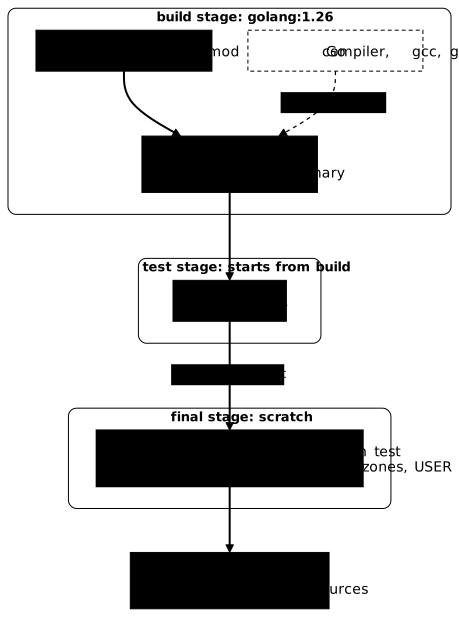
The diagram summarizes the path. Follow the solid arrows: the sources give the binary in the build stage, which passes it to the test stage, then test passes it to the final stage through COPY --from=test. The compiler and the other tools, in gray, are only used to compile: they stay in build and do not cross over.
How do you test the final image itself?
The test of the test stage checks the code, not the shipped image: it says nothing about the loader, the certificates, the time zones or the user, the four failures of the empty image. The test that catches them consists in running the final image and asking it questions, as a client would.
The test is put in a script, verifier-image.sh, which takes the image as an argument and manages the pointage-test container itself: it removes the old one if it exists, then starts the new one. Four precautions make it reliable.
set -estops the script at the first command that fails.curl -fsSreturns a non-zero code on an HTTP 500 response, whichcurl -salone does not.- Each output is compared with its expected value using
test, because a route can answer with code 0 and the wrong value:/uidalways answers with code 0, even when the program runs as root. - A short loop waits for
/santeto answer, for at most five seconds, instead of asleep 1that creates a race between startup and the request.
#!/usr/bin/env bashset -eimage="${1:-pointage:tout}"docker rm -f pointage-test >/dev/null 2>&1 || truedocker run -d --name pointage-test -p 8080:8080 "$image" >/dev/nullfor _ in $(seq 1 10); do curl -fsS http://127.0.0.1:8080/sante >/dev/null 2>&1 && break sleep 0.5donesante=$(curl -fsS http://127.0.0.1:8080/sante)test "$sante" = "ok"heure=$(curl -fsS http://127.0.0.1:8080/heure)test "$heure" = "14:00 CEST"uid=$(curl -fsS http://127.0.0.1:8080/uid)test "$uid" != 0https=$(docker run --rm "$image" verifier https://172.17.0.1:8443/)test "$https" = "statut: 200 ok"echo "image conforme"Run it first on the image without time zones, pointage:multi, to check that it really blocks.
bash verifier-image.sh pointage:multiecho "code=$?"curl: (22) The requested URL returned error: 500code=22The script stops on the /heure route with code 22: curl -fsS reports the 500 error that the image without time zones returns, 22 being the code curl returns for an HTTP error response. The image conforme line does not appear.
What stops the script is the exit code of curl, which the assignment heure=$(curl …) passes on to set -e. That is why each check is done in two lines, the assignment then the test. Written as test "$(curl …/uid)" != 0, the check of /uid would not be enough: set -e ignores the code of a substitution placed as an argument of a command, and only the code of test counts. A failing curl would return an empty string, different from 0, and the test would pass on a broken route.
Now run the script on the fixed image.
bash verifier-image.sh pointage:toutecho "code=$?"image conformecode=0Each comparison answers a failure: ok proves that the binary starts (loader), 14:00 CEST that the time zones are there, a uid other than 0 that the user is not root, statut: 200 ok that the certificates are read. In a pipeline, you call this script after the build: if a comparison fails, the script returns a non-zero code and the image does not leave. The pointage-test container is still running for the debugging section.
How do you check that no build tool is left in the image?
The image is smaller, but you still have to prove that it contains neither go, nor gcc, nor git. The reflex is to enter the container and ask. This reflex has a trap with the command -v command, which prints the path of a program if it exists. Try it on the single-stage image, where the three tools are present.
echo 'command -v go gcc git; echo code=$?' | docker run --rm -i pointage:mono sh/usr/local/go/bin/gocode=0Only one path is printed, although gcc and git are in the image. The reason: sh here is dash, which looks only at the first name given to command -v. On an image that contained gcc without go, this command would print nothing, and you would wrongly conclude that no tool is present. The workaround is a loop, which asks the question name by name. It is run on an image that contains the tools to see the right output; the image of the build stage is obtained with --target build.
docker build --target build -f test.Dockerfile -t pointage:build .echo 'for t in go gcc git; do command -v $t; done' | docker run --rm -i pointage:build bash/usr/local/go/bin/go/usr/bin/gcc/usr/bin/gitThe loop finds the three tools. But this check assumes a shell in the image, and the final image has none. Try to open one with --entrypoint, which replaces the program launched.
docker run --rm --entrypoint sh pointage:multiecho "code=$?"docker: Error response from daemon: failed to create task for container: failed to create shim task: OCI runtime create failed: runc create failed: unable to start container process: error during container init: exec: "sh": executable file not found in $PATH
Run 'docker run --help' for more informationcode=127The error executable file not found in $PATH with code 127 says there is no sh, which is exactly what you expected from an image with no tools. Do not confuse it with a command that looks simpler: docker run pointage:multi sh does not look for a shell. Everything that follows the image name is passed as an argument to the ENTRYPOINT, so sh becomes an argument of /pointage.
docker run --rm --name pointage-sh pointage:multi shecoute sur :8080The program starts, prints ecoute sur :8080 and does not return control. The terminal stays busy without any error: it is a trap, because nothing indicates that sh was ignored. From another terminal, docker stop pointage-sh stops the container, which exits with code 143, that is 128 plus 15, the number of the SIGTERM signal that docker stop sends (measured on this example).
To check an image with no shell, you do not ask it anything: you read its content. docker create prepares a container without starting it, docker export outputs its file system as an archive, and tar -t lists the content.
docker create --name pointage-export pointage:multi >/dev/nulldocker export pointage-export | tar -tdocker rm pointage-export.dockerenvdev/dev/consoledev/pts/dev/shm/etc/etc/hostnameetc/hostsetc/mtabetc/resolv.confpointageproc/sys/pointage-exportA single entry comes from the application, pointage; the rest is what Docker creates in every container (.dockerenv, dev, etc, proc, sys). No go, no gcc, no git, no source file. For comparison, the same command on the single-stage image, filtered on the three tools, finds them all:
docker create --name pointage-export pointage:mono >/dev/nulldocker export pointage-export | tar -t | grep -E 'bin/(go|gcc|git)$'docker export pointage-export | tar -t | wc -ldocker rm pointage-exportusr/bin/gccusr/bin/gitusr/local/go/bin/go38248Three tools present among 38,248 entries, against a single application entry in the multi-stage image. Absence is therefore proved by reading the content, and not by a program run inside the image. For a distroless image, docker export gives 1,403 entries (measured on the image built above), including etc/passwd and etc/os-release, which scratch does not have.
How do you debug an image that has no shell and no tools?
When a container with no shell misbehaves, docker exec can do nothing: the image has no program to launch. The logs remain available, they do not depend on the image. The commands in this section target the pointage-test container, started on pointage:tout by verifier-image.sh, in the section "How do you test the final image itself?".
docker logs pointage-testecoute sur :8080The docker debug command exists in some editions of Docker, but not in the engine used here.
docker debug pointage:depecho "code=$?"docker: unknown command: docker debug
Run 'docker --help' for more informationcode=1The engine answers unknown command: this lesson does not rely on docker debug. The gestures that follow need only Docker 29.9.2. First try the obvious, docker exec.
docker exec pointage-test shecho "code=$?"OCI runtime exec failed: exec failed: unable to start container process: exec: "sh": executable file not found in $PATHcode=127The simplest solution is to start alongside a tools container that shares those of the container under study. A container normally sees its own processes and its own network. --pid=container:pointage-test makes it see the processes of the container under study, --network=container:pointage-test its network; the busybox image provides a shell and the basic commands. It is not in the application image: it lives for the duration of the diagnosis.
docker run --rm --pid=container:pointage-test --network=container:pointage-test \ busybox:1.37@sha256:a7dbc319b1438115a207e11930dc4bb3e643dcb3ec0bdd694bb36cd8fad289ec \ sh -c 'ps; echo ---; netstat -tln; echo ---; wget -qO- http://127.0.0.1:8080/sante; echo ---; ls /proc/1/root/; echo ---; ls -l /proc/1/exe'PID USER TIME COMMAND 1 65532 0:00 /pointage 16 root 0:00 sh -c ps; echo ---; netstat -tln; echo ---; wget -qO- http://127.0.0.1:8080/sante; echo ---; ls /proc/1/root/; echo ---; ls -l /proc/1/exe 23 root 0:00 ps---Active Internet connections (only servers)Proto Recv-Q Send-Q Local Address Foreign Address Statetcp 0 0 :::8080 :::* LISTEN---ok---ls: /proc/1/root/: Permission denied---lrwxrwxrwx 1 65532 65532 0 Nov 3 14:02 /proc/1/exels: /proc/1/exe: cannot read link: Permission deniedRead this block in pieces. ps shows process 1, /pointage, running under uid 65532, next to the processes of the tool. netstat confirms that port 8080 is listening. wget reaches the application from inside the network of the container and receives ok. However, the last two commands, which try to read the file system of process 1, answer Permission denied.
The tools container runs as root, but Docker does not give it all the capabilities of root, those precise kernel rights: it does not have the one needed to trace another process. The --cap-add=SYS_PTRACE option adds this capability for the duration of the diagnosis. It is needed here because the process under study belongs to another user (65532): it is not a general rule, a target running under the same uid as the tools container would not necessarily require it.
docker run --rm --pid=container:pointage-test --network=container:pointage-test --cap-add=SYS_PTRACE \ busybox:1.37@sha256:a7dbc319b1438115a207e11930dc4bb3e643dcb3ec0bdd694bb36cd8fad289ec \ sh -c 'ls /proc/1/root/; ls -l /proc/1/exe; cat /proc/1/cmdline | tr "\0" " "; echo'devetcpointageprocsyszoneinfo.ziplrwxrwxrwx 1 65532 65532 0 Nov 3 14:02 /proc/1/exe -> /pointage/pointageThis time /proc/1/root/ lists the file system of the container under study (the pointage binary and zoneinfo.zip), and /proc/1/exe does designate /pointage. You see what the application sees, without having added anything to its image. The same principle, on the orchestrator side, is called an ephemeral container; it is presented in Débugger une application Kubernetes (in French).
Two other gestures need no shell. docker cp copies a file out of the container, even if it is based on scratch: you retrieve the binary to examine it on your machine.
docker cp pointage-test:/pointage /tmp/pointage-copiels -l /tmp/pointage-copierm -f /tmp/pointage-copie-rwxr-xr-x 1 ansible ansible 9366534 Nov 3 13:55 /tmp/pointage-copieWhen you need a shell in the image itself, two solutions avoid degrading the shipped image. The first is the distroless debug image, which adds busybox to the base image; used as --entrypoint sh, it gives a shell and the commands of /busybox.
docker run --rm --entrypoint sh \ gcr.io/distroless/static-debian13:debug@sha256:63b4c0065ff7bd68753510400b2d5cedd5d5571d15eac4be0b6b0dd236a2d148 \ -c 'echo je suis le shell busybox; ls /busybox | head -3'je suis le shell busybox[[[acpidThe second is the build stage itself. With --target build, you keep a debug image: same compiler, same sources, usable to reproduce a code or compilation problem, without ever publishing it. It does not reproduce the environment failures of the final image: the golang image has certificates, a time zone database and runs as root. For the runtime environment, use the neighbouring tools container described above, attached to the final image. You already built pointage:build in the previous section; docker run --rm -it --entrypoint bash pointage:build opens a shell in it.
How do you clean up after the measurements?
The demonstration left an HTTPS test server, a container, pointage:* images and the work folder. Stop the server, remove the container, the images, then the folder. The || true prevents an already missing image from making the following commands fail.
pkill -f 's_server -accept 8443'docker rm -f pointage-test pointage-export 2>/dev/null || truedocker image ls --format '{{.Repository}}:{{.Tag}}' | grep '^pointage:' | xargs -r docker rmicd ~ && rm -f ~/pointage/* && rmdir ~/pointageThe base images used by FROM (golang and gcr.io/distroless/static-debian13) live in the build cache, not in the docker image ls list; busybox and the distroless debug image, started by docker run, do appear in it. Remove those two with docker rmi and their reference read from docker image ls, then empty the cache with docker builder prune -af. This last command erases the whole build cache of the machine, not only that of this lesson.
Practice
The lab starts from an application built in a single stage, whose image embeds its fabrication tools. You produce a final image that runs it without these tools, neither in its files nor in its weight, on a base image designed for execution, and whose product is made at each build instead of being copied in. Two constraints are added: the fabrication tool refuses to run without its tools, and only the product must pass from one stage to the other. Only the state of the system is checked, with dsoxlab check, never the commands typed.
Key points
-
A multi-stage build ships only the last stage: on this example, 1.43 GB in 10 layers with a single stage, 14.7 MB in one layer with two; what is not copied by
COPY --fromdoes not leave. -
A
scratchimage receives only what you copy: a static binary (CGO_ENABLED=0for Go), certificates in/etc/ssl/certs/ca-certificates.crt, time zones, a numeric user. -
Each omission has its message:
exec … no such file or directoryfor a dynamic binary,x509: certificate signed by unknown authoritywithout certificates,unknown time zonewithout time zones,unable to find user nobodyatdocker run(code 125) for aUSERby name. -
Distroless provides time zones and public certificates, weighs more than
scratch(21.4 MB against 14.7 MB here), runs as root by default, and comes innonrootanddebugvariants, the latter with a shell. -
Without
--target, BuildKit skips a stage that nothing depends on: a broken test lets the build through. Forgo testto block, have the binary copied from the test stage (COPY --from=test). -
To check an image with no tools, do not launch a shell that is not there. Under
dash,command -v go gcc gitlooks only at the first name: ask the question with a loop.docker run image shpassesshas an argument to theENTRYPOINTwithout opening a shell, whereas--entrypoint shlooks for one and answers 127 if there is none. To read the content, usedocker create,docker exportandtar -t. -
Test the final image with a script, not only the code:
verifier-image.shstarts the image, queries/sante,/heure,/uidand the HTTPS connection, and stops with a non-zero code as soon as an answer differs. Eachcurl -fsSgoes through an assignment (heure=$(curl …)) before thetest, otherwiseset -edoes not see its failure. -
Debug without making the image heavier: a tools container with
--pid=container:and--network=container:(plus--cap-add=SYS_PTRACEto read/proc/1/root),docker cp, the distrolessdebugimage, or the--target buildstage.
Knowledge check
Check that the essentials of this lesson have stuck. The questions cover only what has just been explained here.
Knowledge check
Check what you have learned with this interactive quiz
How it works
- The timer starts when you click Start
- Multiple choice, true/false and short answer questions
- You can move between questions
- Detailed results are shown at the end
Starts the quiz and the timer
Review
(0/0)Score by domain
A domain groups several guides and gets several questions, so its score is more reliable than a per-topic score, which often rests on a single question.
Summary
Strengths
No topic passed at 80% on at least two questions yet.
Weak areas
No topic below the pass mark.
Recommended next
Hints before you try again?
Continue the course: BuildKit: build secrets and private access
A new full quiz with random questions
Work again only on the questions you missed