Promoting an artifact means installing in production exactly the bytes already tried in staging, without ever rebuilding them. What changes from one environment to another is not in the artifact but in its configuration, read at startup. A deployment checks the fingerprint of the file before installing it, then a smoke test confirms that the environment serves the right version. A rollback consists of redeploying the previous version, which is still in the registry.
What you will learn
- Explain what an environment is and why configuration stays outside the artifact.
- Read a deployment script that checks the fingerprint before installing.
- Distinguish a deployment on a person's request from an automatic deployment.
- Promote a version from staging to production, then roll back.
- Diagnose a failing deployment from the pipeline log.
Prerequisites
You know the make steps of the running example and the triggers of a
pipeline (Steps and triggers),
as well as the artifact published with its fingerprint
(Artifacts). No GitHub or GitLab
account is needed: the lab runs on a local forge.
What is an environment, and why have two?
An environment is a place where the software runs, with its own configuration and its own data. Staging (also called pre-production) is used to check a version under conditions close to the real ones, with no customers behind it. Production is the one that users really consume: a mistake there costs a lot.
Two environments are enough to learn the gesture, and the running example
has two on the same machine: recette (staging) listens on port 8081 and
production on 8082. Each is an instance of the same systemd service,
inventaire@recette and inventaire@production. In real life, these are often
separate machines; the principle does not change.
This lesson covers application environments: where the service runs, and which version. The separation of infrastructure environments (directories, workspaces, variable files) is another subject, covered by the infrastructure-as-code course (guide not yet translated). The strategies that limit risk during the switch (blue-green, canary) have their own page: Deployment strategies.
Why does configuration stay outside the artifact?
If staging and production each had their own binary, what is tested would no longer be what is delivered. Configuration is everything that varies from one environment to another: listening port, database address, environment name. The rule, formulated by the Twelve-Factor method (twelve principles for designing an application that is easy to deploy, factor III "Config"), is to store it in the environment and never in the code. The artifact is the same everywhere; at startup it reads variables that the environment provides to it. The cloud-native principles guide (not yet translated) places this factor among the twelve.
On the lab machine, each environment has its own variables file, and the service code is installed separately:
Répertoireetc/
Répertoireinventaire/
- recette.env
- production.env
- serveurs.json
Répertoireopt/
Répertoireinventaire/
Répertoirerecette/
- inventaire.pyz
Répertoireproduction/
- inventaire.pyz
The recette.env file contains INVENTAIRE_ENV=recette,
INVENTAIRE_PORT=8081 and the data path; production.env contains
INVENTAIRE_ENV=production and INVENTAIRE_PORT=8082. The systemd unit
inventaire@.service is a template: the name after the @ chooses the file
to load.
[Service]User=nobodyEnvironmentFile=/etc/inventaire/%i.envExecStart=/usr/bin/python3 /opt/inventaire/%i/inventaire.pyzThe lab measurement shows it: the same .pyz file, installed in both
directories, answers {"version": "1.1.0", "environnement": "recette"} on the
staging port. Production, which then carries version 1.0.0, answers
{"version": "1.0.0", "environnement": "production"}. Only the file
/etc/inventaire/<env>.env makes the difference in behaviour.
The sensitive values of an environment (passwords, tokens) follow the same logic, with one more precaution: each environment must have its own secrets, and those of production must not be readable by the jobs that target staging (the lab, with its single runner, does not achieve this separation). The management of these secrets in a pipeline is covered in Secrets in CI/CD pipelines.
How do you deploy an already published version?
A deployment builds nothing. It takes a version published in the registry (see the lesson on artifacts) and installs it. The repository's Makefile exposes this gesture as one target, whose script carries the logic:
# Installe une version DÉJÀ publiée ; ne construit rien. Les valeurs arrivent# par l'ENVIRONNEMENT, jamais sur la ligne de commande de make.# DEPLOI_ENV=recette DEPLOI_VERSION=1.1.0 make deployer# DEPLOI_ENV=production DEPLOI_VERSION=1.1.0 DEPLOI_EMPREINTE=<empreinte relevée en recette> make deployer.PHONY: deployerdeployer: ./scripts/deployer.sh "$$DEPLOI_ENV" "$$DEPLOI_VERSION" "$$DEPLOI_EMPREINTE"The target takes no argument: the three values arrive through environment
variables, which the shell reads ($$ is the escape of $ in a Makefile).
The reason appears below, with command injection. The fingerprint is
optional; it serves for promotion.
The scripts/deployer.sh script starts by refusing any unexpected value:
the environment must be recette or production, the version must follow the
X.Y.Z form, the optional fingerprint must have 64 hexadecimal characters. Then
it chains four gestures, in this order. First it downloads the .pyz and
the fingerprint file of the requested version. It then compares the
computed fingerprint with the published one. It installs and then restarts
the service. Finally, a smoke test queries the environment. The
verification comes before any installation:
curl -fsS -o "$tmp/inventaire.pyz" "$REGISTRE/$VERSION/inventaire-$VERSION.pyz"attendu=$(curl -fsS "$REGISTRE/$VERSION/inventaire-$VERSION.pyz.sha256" | cut -d' ' -f1)obtenu=$(sha256sum "$tmp/inventaire.pyz" | cut -d' ' -f1)if [ "$attendu" != "$obtenu" ]; then echo "Empreinte inattendue : $obtenu au lieu de $attendu" >&2 exit 1fiif [ -n "$EMPREINTE" ] && [ "$EMPREINTE" != "$obtenu" ]; then echo "Ce n'est pas l'artefact attendu : $obtenu au lieu de $EMPREINTE" >&2 exit 1fiIf the fingerprint differs, the script stops with code 1 before having
touched the environment: a file corrupted in transit is not installed. This
first check compares the file with the fingerprint that the registry publishes
today; the second, when a fingerprint is enforced, compares it with the one
noted in staging, which also protects against a version republished in the
meantime. The -f option of curl makes the command fail on an HTTP error
response, and set -euo pipefail at the start of the script stops everything at
the first failing command.
The smoke test is the shortest possible check that a deployment did take
place. Here, the script reads the port in the environment's file, queries
/version up to ten times, once per second, and succeeds only if the
response contains the requested version. A smoke test does not prove that
everything works, only that the service starts and answers.
Only a successful deployment writes a line in the log
/var/log/inventaire/deploiements.log: date, environment, version, installed
fingerprint and, if it was enforced, the mention empreinte-imposee. This
log is the proof of what runs where.
Who is allowed to install, and how do you limit it?
The /opt/inventaire/<env> directory belongs to the runner system account,
the one under which the forge runner executes jobs on the machine. The
service itself runs with the nobody user (an unprivileged account), with no
write access to its own code: if it were compromised, it could not modify
itself. Restarting a system service requires root rights, which the runner
does not have. It therefore borrows them through sudo, and a sudoers file
(the list of what sudo allows, for each user) restricts this right to two
exact commands:
runner ALL=(root) NOPASSWD: /usr/bin/systemctl restart inventaire@recette.service, /usr/bin/systemctl restart inventaire@production.serviceThis is least privilege (granting only the strictly necessary rights)
applied to sudo: the runner account can restart these two services, and
not administer the machine. Nobody deploys by hand; you deploy through the
pipeline, which leaves a trace in the log and in the history of the
forge.
You must also see the limit of this setup. The lab has only one runner,
which also executes the jobs of merge requests: anyone who can propose a
modified workflow can therefore write in /opt/inventaire/production and
restart the service, without going through the approval. In this lab, the
identity of the runner amounts to a right to deploy to production. In a real
situation, the remedy is a runner dedicated to production (or a reserved
label), which never executes merge request jobs, and production secrets that no
other job receives. The guide
Configure sudoers and delegate Linux rights
details the syntax of these rules.
How do you deploy to production only on a person's decision?
An approval is the moment when a person decides "this version may go to
production". Staging can be deployed without ceremony; production cannot. In
this lab, the approval takes the simplest form: a workflow (the file that
describes the pipeline) that starts only on manual trigger, with the
workflow_dispatch event. Nobody launches it for you, and the person who
launches it fills in three inputs: the target environment, the version and,
for a promotion, the fingerprint.
name: deployer
on:  workflow_dispatch:    inputs:      environnement:        description: "Environnement cible"        type: choice        options: [recette, production]        required: true      version:        description: "Version publiée à déployer, par exemple 1.1.0"        type: string        required: true      empreinte:        description: "Empreinte SHA-256 relevée en recette, à imposer pour une promotion"        type: string        required: false
jobs:  deployer:    runs-on: debian    steps:      - uses: https://data.forgejo.org/actions/checkout@3d3c42e5aac5ba805825da76410c181273ba90b1 # v7.0.1        with:          persist-credentials: false      - run: make deployer        env:          DEPLOI_ENV: ${{ inputs.environnement }}          DEPLOI_VERSION: ${{ inputs.version }}          DEPLOI_EMPREINTE: ${{ inputs.empreinte }}
The syntax is close to that of GitHub Actions; its details belong to the
GitHub Actions course. The persist-credentials: false option of the checkout step prevents leaving the forge token in the
cloned repository, as explained in
Steps and triggers. Two
things matter here. First, the file just calls the make deployer target,
like the rest of the chain. Second, the inputs are never written into the
command: they go through environment variables (env:), which make passes
on without touching them and which the shell reads between quotes.
The reason is command injection: making the shell execute text that a user
entered as mere data. The expression ${{ inputs.version }} is replaced by
its value before the shell reads the line. Here is what happens if you
write it directly in the run::
# ❌ À éviter : l'entrée est collée dans la commande avant lecture par le shell- run: make deployer ENV=recette VERSION=${{ inputs.version }}# Version saisie : 1.1.0; rm -rf /opt/inventaire# Ligne lue par le shell : make deployer ENV=recette VERSION=1.1.0; rm -rf /opt/inventaireThe ; separates two commands, and the second erases the installed
code. Passing the value through env: settles this first layer, but a
value can be reinterpreted at each layer: the workflow expression, then
make, then the shell. Writing run: make deployer VERSION="$VERSION_CIBLE"
seems prudent, and is not: a variable passed on the make command line is
expanded by make, and an input such as $(shell touch /tmp/INJECTION)1.1.0
runs even before the script. Measured on the lab VM (GNU Make 4.4.1): passed as
an argument to make, the file /tmp/INJECTION is created; passed through the
environment, the script receives the raw string.
Hence the two defences of the repository: the deployer target takes its values
only from the environment, and the script accepts only the X.Y.Z form.
The lab verified it by launching the workflow with the version
$(shell touch /tmp/INJECTION)1.1.0. The job fails without executing
anything else, and the file /tmp/INJECTION does not exist:
Version invalide : $(shell touch /tmp/INJECTION)1.1.0 (attendu : X.Y.Z)make: *** [Makefile:53: deployer] Error 2Job failedThe guide Supply chain attacks on GitHub Actions develops this attack vector on the GitHub Actions side, with its variants.
This approval remains minimal: the gesture is that of the person who launches the workflow, and nothing requires a second person to validate. The Forgejo documentation describes no environment protection rule comparable to GitHub's: neither required reviewers nor wait timers configured per environment. On GitHub, these safeguards exist; they are presented in Deploying with GitHub Actions and in the page on protection rules.
Forgejo can launch this workflow from its web interface (the declared inputs
appear there as a form) or through its API. In the lab, the measurement was
made through the API: a POST request on
.../actions/workflows/deployer.yml/dispatches answers HTTP 204 when the
request is accepted.
How do you promote, then roll back?
Promotion is the move of a version from one environment to the next. You rebuild nothing: you redeploy the same version, therefore the same file, therefore the same fingerprint. The next diagram shows the registry in the centre, which holds both versions, and the two environments that differ only by their configuration file. The three arrows are, in order, the deployment to staging, the promotion to production, then the rollback.
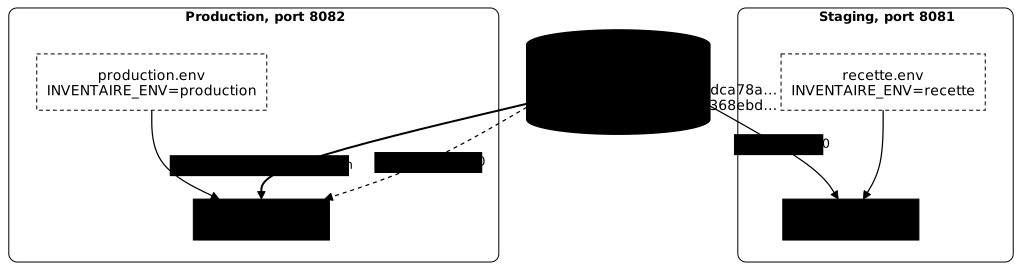
Promoting by version is not enough: between staging and production, version
1.1.0 could have been deleted then republished in the registry with other
content. Promotion is therefore done by fingerprint: you note, in the log,
the fingerprint installed in staging, and you pass it in the empreinte input
of the production deployment. The script then refuses any other file.
The lab log proves the three gestures. The first two lines carry the same
fingerprint, and the second the mention empreinte-imposee: this is a
controlled promotion without rebuilding. The third, two seconds after the
previous one, is the rollback.
2026-10-13T18:52:12Z recette 1.1.0 0da3f2d7f9cbef8db5990624a9c11a3f0c8c05340971305b66c8db6191850f132026-10-13T18:52:16Z production 1.1.0 0da3f2d7f9cbef8db5990624a9c11a3f0c8c05340971305b66c8db6191850f13 empreinte-imposee2026-10-13T18:52:18Z production 1.0.0 2cb57f35df58e7fedb4b55eee99cd2ca9e3737d796b7c457ed56fb63ec1aa2bdThese fingerprints are not those of the lesson on artifacts: each launch of
the lab republishes both versions through a new pipeline, which gives new
files. Within a single run, however, the fingerprint never changes from one
environment to another. The lab also tried to enforce the fingerprint of 1.0.0
while deploying 1.1.0: the script refuses, Ce n'est pas l'artefact attendu : 0da3f2d7… au lieu de 2cb57f35….
The rollback needs no special mechanism: it is an ordinary deployment of
the previous version, with its original fingerprint 2cb57f35…, the one the
registry keeps for 1.0.0. It is possible because published versions are
immutable and kept in the registry. Without a stored artifact, going back
would force a rebuild, with the risk of getting a different binary.
The rollback does not undo everything. It restores the previous code, but not the data that a new version would already have modified, for example a database schema: that case has its own strategy, outside the scope of this lesson. For the GitHub mechanics, see Promoting an artifact and Rollback.
What happens when the deployment fails?
A good deployment fails loudly and without damage. The lab requests
version 9.9.9, which was never published. The script finds nothing to
download, curl exits with an error, and make propagates the failure:
curl: (22) The requested URL returned error: 404make: *** [Makefile:53: deployer] Error 22Job failedThe job is red, and production still answers 1.0.0: the failure
occurred before installation, so nothing was replaced. This is the same
principle of stopping at the first failure as in the lesson on
steps and triggers: the
exit code of a command decides what follows, and the pipeline log says which
one failed.
Troubleshooting
Each message below comes from the script or from the pipeline log. The table starts from the symptom, because that is what the log shows you first.
| Symptom | Probable cause | Fix |
|---|---|---|
curl: (22) ... returned error: 404, Error 22 | The requested version is not published in the registry | Check the version in the forge registry, publish the matching tag first |
Empreinte inattendue : ... au lieu de ... | The downloaded file does not match the published fingerprint | Force nothing: download again, then compare with the registry |
L'environnement ... ne sert pas la version ... | The service did not restart or answers with another version | Read the instance state with systemctl status inventaire@<env> and its log |
Environnement inconnu : ..., code 2 | The value is neither recette nor production | Choose one of the two values offered by the workflow |
Version invalide : ... (attendu : X.Y.Z), Error 2 | The entered version does not have the X.Y.Z form (space, semicolon, v prefix) | Enter the number alone, for example 1.1.0 |
Ce n'est pas l'artefact attendu : ... au lieu de ... | The enforced fingerprint is not that of this version in the registry | Reread the fingerprint of the recette line of the log, and the version that goes with it |
The trigger request does not answer 204 right after pushing the workflow | The forge has not yet taken the new file into account | Wait a few seconds and send the request again |
Hands-on practice
The lab "Promote the same artifact from staging to production, then roll back"
has you write the deployer.yml workflow, then chain three deployments:
version 1.1.0 to staging, the same to production enforcing the fingerprint
noted in staging, and the return to 1.0.0 in production. The validation covers
the state of the forge and of the machine (workflow present, deployment log,
artifacts installed by the runner, version served by each environment), never
the commands you typed.
The lab is started with dsoxlab run environnements-promotion, after
dsoxlab provision. The installation of DSOXLab is described in
the DSOXLab documentation.
Key takeaways
- An environment is an execution place with its configuration; staging comes before production.
- Configuration lives outside the artifact (Twelve-Factor, factor III): the same file behaves according to
/etc/inventaire/<env>.env. - A deployment builds nothing: it installs a published version and checks its fingerprint before installing.
- A smoke test confirms that the environment serves the requested version.
- Promotion redeploys the same file: you enforce the fingerprint noted in staging, not only the version number.
- Rollback is a deployment of the previous version, possible because published versions are immutable.
- The approval of production is here a manual trigger (
workflow_dispatch); required reviewers belong to other forges. - The inputs of a workflow go through
env:, never inrun:nor on themakecommand line, and the script validates their form: each layer (workflow,make, shell) could otherwise reinterpret them and open a command injection. - The runner only has the right to restart the two services, but the deploying account amounts to a production right: a runner dedicated to production, closed to merge requests, is the real remedy.
Knowledge check
Check that the essentials of this lesson are in place. The questions only cover what has just been explained here.
Knowledge check
Check what you have learned with this interactive quiz
How it works
- The timer starts when you click Start
- Multiple choice, true/false and short answer questions
- You can move between questions
- Detailed results are shown at the end
Starts the quiz and the timer
Review
(0/0)Score by domain
A domain groups several guides and gets several questions, so its score is more reliable than a per-topic score, which often rests on a single question.
Summary
Strengths
No topic passed at 80% on at least two questions yet.
Weak areas
No topic below the pass mark.
Recommended next
Hints before you try again?
Continue the course: Deployment strategies: blue-green, canary, rolling
A new full quiz with random questions
Work again only on the questions you missed