Delegating means allowing a person to run a precise command with elevated
privileges, and nothing else. The /etc/sudoers file is where this
boundary is written: a developer who must restart nginx needs neither the
root password, nor a shared account, nor access to rm. You will learn to
write a correct rule, validate it with visudo before it locks the
machine, keep it in /etc/sudoers.d/ and then check who can really do
what.
This page deals with configuration. If you simply want to run a
privileged command on your workstation, open a root shell or
understand the sudo group, start with Use sudo: run a command as
root.
What you will learn
- Write a sudoers rule (
user host=(target) commands) - Edit sudoers with
visudowithout locking yourself out of the system - Group rules with
User_Alias,Cmnd_AliasandRunas_Alias - Delegate a command without a password thanks to
NOPASSWD, and know its cost - Audit real rights with
sudo -lU <user>and the system logs
The sudo delegation model
Without sudo, there are only two states: you are root, or you are not. This binary pushes towards the worst practices, the shared root password in a team manager, or the service account used by five people. Nobody knows who ran what any more, and the departure of one team member forces changing everything.
sudo breaks this binary by introducing a third state: a named identity that receives a subset of privileges. The principle is least privilege: only grant what is strictly needed for the task, to reduce the attack surface as much as the error surface. A compromised account then only exposes the handful of commands delegated to it.
This model rests on three questions every rule answers: who is allowed, under which identity the command runs, and which commands exactly are permitted. The rest of this page is about answering these three questions properly.
Edit sudoers without locking yourself out
A syntax error in /etc/sudoers is not a minor incident: sudo then
refuses the whole file and nobody can elevate their privileges any more,
including you. On a remote server without console access, it becomes a
production incident. That is the reason visudo exists: it opens a
working copy, locks the file against concurrent edits and above all
checks the syntax before replacing the original.
sudo visudo # edit /etc/sudoerssudo visudo -f /etc/sudoers.d/webops # edit a dedicated fileDrop the habit of nano /etc/sudoers, even "just for one line". To
check a file without editing it, for instance after an automated
deployment, visudo -c validates the whole configuration:
sudo visudo -c/etc/sudoers: parsed OK/etc/sudoers.d/README: parsed OK/etc/sudoers.d/webops: parsed OKEvery file must answer parsed OK. As long as this command returns an
error, consider your configuration broken and absolutely keep a root
terminal already open next to it to repair.
Anatomy of a sudoers rule
A sudoers rule fits on one line and reads in four pieces. Understanding it means being able to write any delegation without copying an example at random from a forum.
marc ALL = (root) /usr/bin/systemctl restart nginx | | | | | | | +-- the allowed commands | | +------------------------ the target identity ("as whom") | +------------------------------- the host where the rule applies +--------------------------------------- who is allowedThe first field always designates who: a user (marc), a
group prefixed with % (%webops), or a User_Alias defined higher
up in the file. The host field is almost always ALL: it only matters if
you distribute a common sudoers to several machines. The target
identity in parentheses says under which account the command will run,
(root) in the vast majority of cases, and can specify a group with
(root:root). Then come the commands, as absolute paths.
Two founding rules follow, to engrave before writing anything:
- The path must be absolute.
systemctlalone matches nothing; you need/usr/bin/systemctl. Check the real path withcommand -v systemctl, it varies between distributions. - The last rule that matches wins. Unlike the "first match" reflex of firewalls, sudo applies the last match. A permissive rule placed after a restrictive rule cancels the latter.
Group rules with aliases
Past three users and five commands, writing one line per person becomes
unmanageable. sudoers offers aliases for that, labels you define and
reuse. It is the format's only grouping mechanism, along with system
groups (%webops).
Three types of aliases cover real needs. They are defined at the top of the file, before the rules that use them:
| Alias | Groups | Example |
|---|---|---|
User_Alias | Allowed users | User_Alias WEBOPS = marc, sophie |
Cmnd_Alias | Commands (absolute paths) | Cmnd_Alias NGINX_OPS = /usr/bin/systemctl reload nginx |
Runas_Alias | Target identities | Runas_Alias DEPLOYER = deploy |
Here is a complete and consistent delegation: the web team can reload and
restart nginx, read the service's logs, and run rsync under the technical
identity deploy. Nobody gets root.
User_Alias  WEBOPS    = marc, sophieRunas_Alias DEPLOYER  = deployCmnd_Alias  NGINX_OPS = /usr/bin/systemctl reload nginx, /usr/bin/systemctl restart nginxCmnd_Alias  LOGS      = /usr/bin/journalctl -u nginx *
WEBOPS ALL=(root) NOPASSWD: NGINX_OPS, LOGSWEBOPS ALL=(DEPLOYER) NOPASSWD: /usr/bin/rsyncValidate, then check what the system really understood of your intentions, which is not always what you believe you wrote:
sudo visudo -c -f /etc/sudoers.d/delegationsudo -lU marc/etc/sudoers.d/delegation: parsed OK
User marc may run the following commands on serveur: (root) NOPASSWD: /usr/bin/systemctl reload nginx, /usr/bin/systemctl restart nginx, /usr/bin/journalctl -u nginx * (deploy) NOPASSWD: /usr/bin/rsyncThe aliases have been resolved: sudo shows the real commands, not the
labels. A system %group often remains preferable to a User_Alias when
members change often: you add the team member to the group with
usermod -aG without ever reopening sudoers.
Delegate without a password with NOPASSWD
By default, a sudoers rule asks for the caller's password. The
NOPASSWD: tag lifts this prompt for the commands that follow. It is
essential for scripts and CI agents that have no terminal to type a
password, and handy for a command run fifty times a day.
%webops ALL=(root) NOPASSWD: /usr/bin/systemctl restart nginxThe group member then runs the command with no typing at all, and only that one:
sudo -n systemctl restart nginx # allowed, no passwordsudo -n systemctl stop nginx # not delegatedSorry, user marc is not allowed to execute '/usr/bin/systemctl stop nginx' as root on serveur.The refusal is clear and logged. It is exactly the expected behaviour:
restart is allowed, stop is not, while the two commands differ by one
word.
The target identity trap
The target identity in parentheses is not decorative, and that is where the most frequent mistake hides. You often come across a rule like this one, meant to let a developer restart the web server "under the web server's account":
# Rule that does not work: do not copy itweb_admin ALL=(www-data) /usr/bin/systemctl restart nginxIt fails for two distinct reasons. First, it does not carry the
NOPASSWD: tag: the password will be asked, contrary to what many
tutorials copying this example claim. Second and above all, systemctl restart talks to systemd via D-Bus, and systemd requires the caller
to be root or to go through a polkit authorisation. Run under
www-data, the command is rejected:
Failed to restart nginx.service: Interactive authentication required.The correct target to drive a service is therefore (root). A target
identity other than root keeps all its meaning for other uses, for
instance running a deployment script under a dedicated technical
account, like the (DEPLOYER) of the previous example.
Keep rules in /etc/sudoers.d/
Editing /etc/sudoers directly raises a practical problem: the file belongs to
the distribution's package and each major update can ask you a
conflict question. Good practice is to leave this file alone and to put
your rules in dedicated files, one per use, under /etc/sudoers.d/.
The last line of the main sudoers includes them:
@includedir /etc/sudoers.dThe modern directive is @includedir; the #includedir and #include
forms are historical aliases from before sudo 1.9.1 and still work. sudo
reads every file in the directory, in lexical order, which explains the
numeric prefix convention (10-webops, 20-dba) to control the order of
application; remember that the last rule that matches wins.
Two non-negotiable constraints weigh on these files, and they cause almost every "my rule does nothing":
-
The rights must be
0440 root:root. That is the target, but two misconceptions need correcting, measured on AlmaLinux 10 with sudo 1.9.17p2. On the one hand,visudo -fdoes not set these rights: on a new file in/etc/sudoers.d/, it leaves0640, while/etc/sudoersitself is indeed0440. On the other hand, a "too permissive" file is not necessarily ignored, it all depends on how: at0660, sudo applies the rule and onlyvisudo -ccomplains; you must reach0666, so writable by everyone, for sudo to refuse and say so (is world writable), and that message is immediate, not delayed to login. So set the rights explicitly after editing:Terminal window sudo visudo -f /etc/sudoers.d/webopssudo chmod 0440 /etc/sudoers.d/webops -
The name must contain neither a dot nor a trailing tilde. sudo silently skips any file whose name contains a
.or ends with~. A drop-in named10-webops.confis never read, and nothing warns you.
The second trap deserves a systematic test. After putting a file in
place, do not assume it is active: ask sudo what it thinks with
sudo -lU <user>. If the output has not changed, the file is ignored.
How sudo makes its decision
Understanding the order of checks lets you diagnose a refusal without
guesswork. When a user types a command prefixed with sudo, the following
diagram runs at every call.
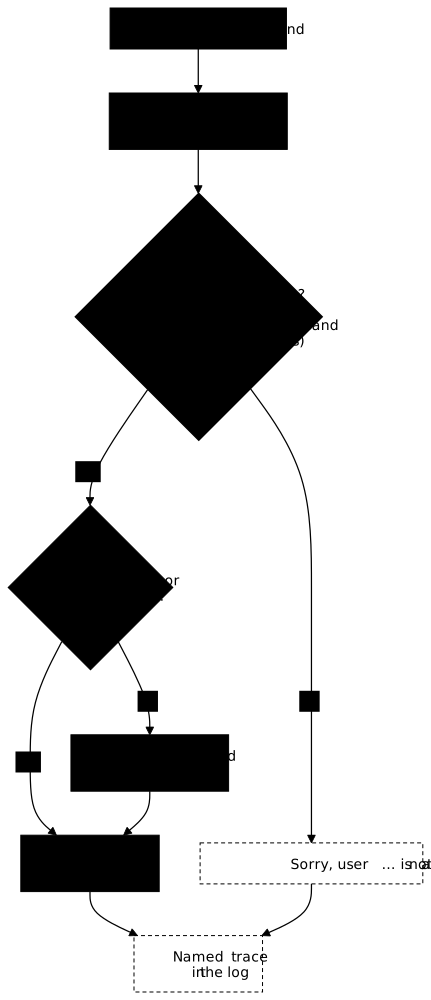
sudo reads sudoers and its includes, then looks for a rule that matches
four criteria at once: the calling user (directly, via a %group or a
User_Alias), the current host, the target identity requested with
-u (root by default), and the command with its arguments. If several
rules match, the last one wins.
The decision that comes out is binary. Allowed: sudo asks for the password
if NOPASSWD: is absent and the session timestamp has expired, then runs
the command under the target identity. Refused: sudo shows Sorry, user ... is not allowed to execute ... and logs the attempt. Both outcomes
leave a named trace, which makes sudo a tool of accountability as much as
of delegation.
Audit who can do what
This is where the most widespread misconception gets corrected: sudo -l
only lists the rights of the user who calls it. This command gives no
overview of the system and does not answer the question "who has sudo
rights on this machine?".
To inspect the account of another user, you need the -U option, run
with administration privileges:
sudo -lU marcMatching Defaults entries for marc on serveur: env_reset, mail_badpass, secure_path=/usr/local/sbin\:/usr/local/bin\:/usr/sbin\:/usr/bin\:/sbin\:/bin, use_pty
User marc may run the following commands on serveur: (root) NOPASSWD: /usr/bin/systemctl reload nginx, /usr/bin/systemctl restart nginxTo get the machine's full map, no magic option exists: you must
iterate sudo -lU over the human accounts. The following loop walks
the UIDs of real accounts and shows each one's situation:
getent passwd | awk -F: '$3>=1000 && $3<65534 {print $1}' | while read -r u; do echo "--- $u" sudo -lU "$u" | grep -E "may run|not allowed"done--- ubuntuUser ubuntu may run the following commands on serveur:--- web_adminUser web_admin is not allowed to run sudo on serveur.--- marcUser marc may run the following commands on serveur:This loop gives the picture of the configured state. For the real state, in other words what was actually run, the logs take over. sudo logs every call, allowed as well as refused:
journalctl -t sudo --no-pager | tail -5Jul 12 08:39:12 serveur sudo[3594]: marc : PWD=/ ; USER=root ; COMMAND=/usr/bin/systemctl restart nginxJul 12 08:41:22 serveur sudo[3870]: marc : command not allowed ; PWD=/ ; USER=root ; COMMAND=/usr/bin/systemctl stop nginxEach line names the caller (marc), the target identity
(USER=root), the full command and the verdict: a refused attempt
shows up explicitly as command not allowed. On distributions that still use
a text file, the same lines land in /var/log/auth.log (Debian/Ubuntu) or
/var/log/secure (RHEL). A burst of refusals on an account is a signal to
handle immediately.
Delegation good practices
A badly written delegation offers a path of escalation to root while giving the illusion of restriction. These reflexes cost little and avoid the flaw.
Avoid wildcards in paths. A rule
%devs ALL=(root) /usr/bin/systemctl restart * actually allows restarting
any service, including those your security depends on. A * in a command
path is almost always a flaw. Enumerate the commands, even if the list is
long.
Beware of binaries that can launch other programs. Delegating vim,
less, find, awk or tar with root privileges amounts to delegating
all of root: they all allow opening a shell from their interface. The
GTFOBins (in French) project lists these
binaries and the exact way an attacker uses them to escape the
restriction. Look it up before adding a binary to a rule: an innocent
sudo tar is a disguised root shell.
Prefer sudoedit to sudo vim when it comes to modifying a file: the
editing then happens with your privileges on a copy, and only the final
replacement is privileged. Delegate to groups rather than to people, so
that a team member arriving or leaving never requires reopening sudoers.
Finally, review delegations periodically: a rule set "to help out" on a
Tuesday evening survives for years.
Troubleshooting
The symptoms below cover the overwhelming majority of sudoers incidents. What most of them share: the rule exists, but sudo does not read it or does not match it.
| Symptom | Likely cause | Fix |
|---|---|---|
user is not in the sudoers file | The user is in no rule nor in %sudo/%wheel | usermod -aG sudo <user> (Debian) or wheel (RHEL), then check with sudo -lU <user> |
No sudo works any more after an edit | Syntax error written without visudo | Repair from a root console or pkexec visudo, then validate with visudo -c |
A file in /etc/sudoers.d/ has no effect | Name containing a . or ending with ~, or rights ≠ 0440 | Rename without a dot, chmod 0440, chown root:root |
visudo -c exits with rc=1 on bad permissions, should be mode 0440 while the delegation works | visudo -f left the file at 0640 | sudo chmod 0440 /etc/sudoers.d/<file>: the check passes, sudo's behaviour does not change |
sudo: <file> is world writable, the rule is ignored | File at 0666: writable by everyone | chmod 0440; note that the message is immediate, not delayed to login |
Sorry, user … is not allowed expected, but you get sudo: a password is required | sudo authenticates first, it does not say right away that the command is not delegated | Diagnose on the rule (sudo -l), not on this message |
| The command is refused while the rule looks right | Relative path, or different from the binary's real path | Compare with command -v <binary>, write the absolute path |
Interactive authentication required | systemctl command run under a target identity other than root | Target (root) in the rule |
| A restrictive rule is ignored | A more permissive rule matches after it (the last one wins) | Reorder: put the permissive before the restrictive |
Where sudo comes from
Knowing the origin of the tool helps understand why its configuration file has such a particular look: it is older than most of the distributions that ship it.
sudo was written around 1980 by Bob Coggeshall and Cliff Spencer
at the computer science department of SUNY/Buffalo, for a VAX-11/750
running BSD. The name means "superuser do"; the "substitute user do"
reading, often repeated, is a later back-formation. The first public
release dates from 1985, and the project has been maintained by Todd C.
Miller since 1994, today under the ISC licence. This longevity explains the
stubborn backward compatibility of the sudoers format, and therefore the
coexistence of modern directives (@includedir) with their old aliases
(#includedir).
Put it into practice
Writing a sudoers rule on paper is not enough: you need to see it refuse what is not delegated. The lab has you write a drop-in in /etc/sudoers.d/, validate it with visudo, then prove with sudo -lU that the user can only run the intended command, and nothing else.
Key points
- sudo delegates without sharing root: a named identity receives a subset of commands.
- Format of a rule:
user host=(target) commands, with absolute paths mandatory. - The first field is a user, a
%groupor aUser_Alias: there is no role in sudoers. - Always
visudo: an error written directly into sudoers locks all of sudo. - Drop-ins in
/etc/sudoers.d/as0440 root:root; a name with a.or ending with~is silently ignored. - The last rule that matches wins: order matters, the opposite of the "first match" reflex.
- To drive a service, the target is
(root): under another account, systemd returnsInteractive authentication required. sudo -lonly shows your rights; auditing goes throughsudo -lU <user>and the logs.
Knowledge check
Check that the essentials of this guide are acquired. The questions only cover what has just been explained here.
Knowledge check
Check what you have learned with this interactive quiz
How it works
- The timer starts when you click Start
- Multiple choice, true/false and short answer questions
- You can move between questions
- Detailed results are shown at the end
Starts the quiz and the timer
Review
(0/0)Score by domain
A domain groups several guides and gets several questions, so its score is more reliable than a per-topic score, which often rests on a single question.
Summary
Strengths
No topic passed at 80% on at least two questions yet.
Weak areas
No topic below the pass mark.
Recommended next
Hints before you try again?
Continue the course: Refine permissions with ACLs
A new full quiz with random questions
Work again only on the questions you missed