A reliable pipeline does not contain its commands: it calls steps that live
in the repository. The same make targets then run on your machine and in
the CI (continuous integration), and a failure can be replayed at home with
the same exit code. This lesson, for admins, ops and developers who have never
designed a chain, shows on a small Python service how to arrange the steps,
write the file that orchestrates them, choose what triggers it and read a
red log. It relies on Forgejo, a forge (a platform that hosts Git
repositories and runs pipelines) installed locally, with no GitHub or GitLab
account.
What you will learn
- Place lint, tests and build in the repository as
maketargets - Write a pipeline that only calls these targets, in order
- Choose the triggers of a pipeline and predict what starts it
- Explain why a pipeline stops at the first failing step
- Reproduce locally a failure read in a CI log
Prerequisites
- Know how to create a commit, a branch and merge with Git
- Know how to run a command in a terminal and read its exit code
(
0means success, any other number a failure) - Know how to read a YAML file: indentation, lists, key-value pairs
The basic vocabulary (job, runner, step) is set out in What is a CI/CD pipeline?. No knowledge of GitHub Actions or GitLab CI is required: the syntax of a given engine is learned in its own course, and this lesson keeps only what helps to understand the model.
Why do the steps live in the repository?
The steps of a chain must live in the repository, next to the code, as named commands that anyone can run by hand. If the commands are written only in the pipeline file, the only way to test them is to push a commit (send it to the forge) and wait for the result. A broken step is then discovered a minute later, on a server you do not control.
The running example of the course is called inventaire: a Python
program with no external dependency that counts servers by role. Its
repository contains the code, its tests and a Makefile, the file that names
the project's commands.
Répertoireinventaire/
- Makefile
- README.md
Répertoiresrc/
Répertoireinventaire/
- init .py
- main .py
- donnees.py
Répertoiretests/
- test_donnees.py
Répertoire.forgejo/
Répertoireworkflows/
- ci.yml
The Makefile defines one target per step. make lint detects code errors
with pyflakes, without running the program, make test runs the unit
tests of the unittest module, make build packages the service into an
executable archive.
VERSION := $(shell sed -n 's/^__version__ = "\(.*\)"/\1/p' src/inventaire/__init__.py)ARTEFACT := dist/inventaire-$(VERSION).pyz
.PHONY: lint test build
lint:  python3 -m pyflakes src tests
test:  python3 -m unittest discover -s tests -v
build:  mkdir -p dist  python3 -m zipapp src -m 'inventaire.__main__:main' -p '/usr/bin/env python3' -o $(ARTEFACT)  cd dist && sha256sum inventaire-$(VERSION).pyz > inventaire-$(VERSION).pyz.sha256  @cat dist/inventaire-$(VERSION).pyz.sha256
The two variables at the top are computed once: VERSION reads the number
written in src/inventaire/__init__.py, ARTEFACT derives the name of the
produced file from it. The .PHONY line declares targets that are not
files, so that make always runs them. In the lab, the supplied Makefile does
not yet have a lint target: you write it yourself, following the model
above.
The build target produces the archive dist/inventaire-1.0.0.pyz and its
SHA-256 fingerprint, a checksum that identifies the file uniquely. Run
on the lab workstation, it prints:
ae59c4255d59e41f95c81484174a471ed190ff86d9e0977fc291386a86ec1cc0 inventaire-1.0.0.pyzTo run these targets on your own machine, you need the same tools as the
runner: GNU make, Python 3 and pyflakes (package python3-pyflakes
on Debian and Ubuntu). The lab machine already has them; this is, by the way,
the limit of the model, which the pre-commit section below takes up.
Make is not mandatory. A task runner such as Task plays the same role
with a YAML file, and a versioned bash script does too. What matters is
the principle: a stable command name, in the repository, identical locally
and in CI.
How does the pipeline orchestrate these steps?
The pipeline file contains no logic: it chooses when the chain starts,
where it runs, then calls the targets in order. On Forgejo, it is
stored in .forgejo/workflows/. Its syntax is close to that of GitHub
Actions, which makes the lesson transferable; for the full syntax, the
GitHub Actions course is the reference.
name: ci
on:  push:    branches: [main]  pull_request:
jobs:  integrer:    runs-on: debian    steps:      - uses: https://data.forgejo.org/actions/checkout@3d3c42e5aac5ba805825da76410c181273ba90b1 # v7.0.1        with:          persist-credentials: false      - run: make lint      - run: make test      - run: make build
Three blocks are enough to read this file. The on block lists the
triggers, studied in the next section. The jobs block defines a job
named integrer, which runs on a runner, the machine that executes the job
(here a Debian machine of the lab VM). A runner declares labels, names that
say what it can do: runs-on: debian asks for a runner carrying the debian
label. The steps block lists the steps of the job, in order; a step is a
command or an action, not to be confused with the stage of the vocabulary
lesson.
The first step, uses, downloads the repository code. It is indispensable,
because the runner starts with an empty directory: the measured log shows
that it empties the working folder, initializes a Git repository then
fetches the requested commit. This action is pinned by its commit SHA
(3d3c42e5…), with the version in a comment: a tag (a name placed on a
commit) such as v7 can be moved by its author, a SHA cannot.
The persist-credentials: false parameter asks the action not to leave
the repository access token in the Git configuration of the working
directory. Without it, this token would stay readable by all the following
steps, including a third-party script. This chain pushes no code: better not
to leave it lying around.
The three run steps contain only make lint, make test and make build,
in a single job: they run one after the other on the same runner. A larger
pipeline often spreads them over parallel jobs, as the vocabulary lesson
shows; the principle stays the same, each job calling its targets. The
pipeline invents nothing: it runs what you already launch on your machine.
A change of command is made in the Makefile, therefore in a reviewed
commit like the rest of the code, and the pipeline file does not change.
Which events trigger a pipeline?
A pipeline starts when a forge event matches a rule of the on block. The
event is not the commit itself: it is the action that makes it visible to
the forge: a push, the opening of a merge request (the proposal to merge
one branch into another, reviewed before being accepted; pull request on
GitHub, merge request on GitLab), the placing of a version tag, the clock
or a click. The choice of triggers therefore decides when you learn that a
change is broken.
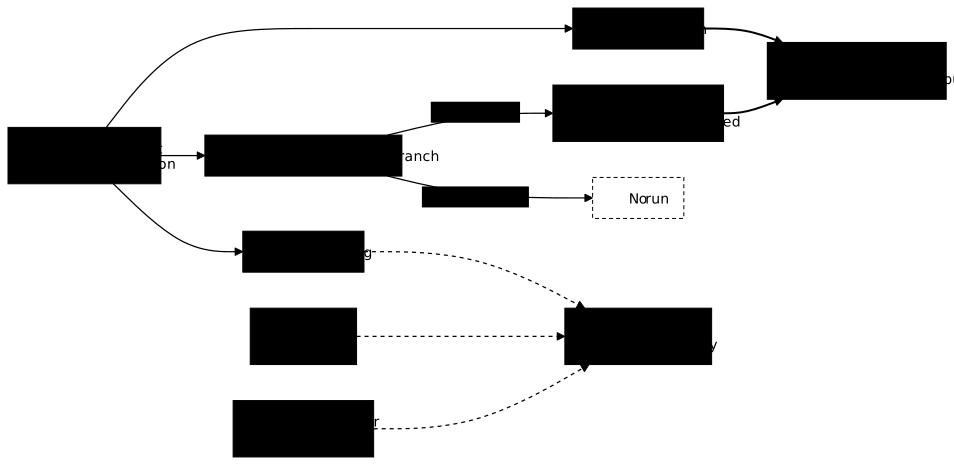
The diagram follows a commit from its push to the pipelines. Look at the path in
thick line, which leads to the ci pipeline: only two events take it, a
push to main and a merge request. A push to another branch, on the other
hand, leads nowhere as long as no merge request exists. The dotted lines
go to other pipelines (publish, deploy) covered in the following lessons.
The main triggers each have a use and a consequence.
| Trigger | What fires it | What it implies |
|---|---|---|
push filtered by branch | a push to main | checks the real state of the main branch, after the merge |
pull_request | opening or updating a merge request | judges the change before it is merged |
| tag | pushing a version tag | used to publish a specific version |
schedule | a cron-type clock (periodic schedule) | replays the chain with no commit, useful to detect what drifts |
workflow_dispatch | a click in the interface, or a request to the forge API | starts the chain at the request of a person or another system |
This lab plays push and pull_request; the lessons
artifacts and
environments and promotion
play the tag and the manual trigger. The schedule trigger, which takes
a clock in cron format (UTC by default) and is ignored on other branches and in
merge requests, is not played by this lab. The
GitHub Actions triggers guide
gives the syntax for that tool.
Why does a push to a branch start nothing?
A push to a branch other than main triggers no pipeline as long as no
merge request is open. The lab measured it: after pushing the test-casse
branch alone, the forge started no run. The push rule of the file names
only main, so nothing matches this event.
This behaviour is intended. It avoids consuming runners for every draft, but
it has a downside: one may wrongly believe a branch is validated when no
check took place. Hence the second trigger, pull_request: as soon as merge
request #1 is opened, the forge starts a run for the pull_request event, which
fetches the branch commit (refs/remotes/pull/1/head in the log) and runs
the chain on it.
The two rules complement each other. The merge request judges the change
before the merge, the push to main checks the result after. Removing
either leaves a hole: without the first, you merge without having
tested; without the second, a merge that breaks the whole goes unnoticed.
What happens when a step fails?
A step that returns an exit code other than zero stops the job: the
following steps do not run, and the run is marked as failed. This behaviour is
called fail fast. It is made possible by the exit code convention, which
make and the runner both respect: 0 to continue, anything else to stop.
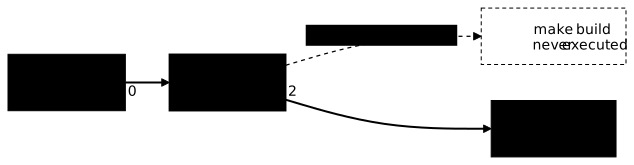
The diagram shows the ci chain on the broken commit of the merge
request. make lint returns 0 and the chain continues; make test
returns 2, this is the stopping point; make build is never launched, and
the job ends in failure.
The run log confirms it. In merge request #1, a test expected three
servers with the web role while the code counted two. Here is the
measured excerpt, from the end of the test to the end of the job:
FAIL: test_compte_par_role (test_donnees.TestCompter.test_compte_par_role)...AssertionError: {'web': 2, 'base': 1} != {'web': 3, 'base': 1}...FAILED (failures=1)make: *** [Makefile:14: test] Error 1⚙️ [runner]: RUN exit status 2...Job failedAfter FAILED (failures=1), no mkdir -p dist line appears: the build target
was not run. The merge request status shows
ci / integrer (pull_request) as failed. The previous run, on main, had
shown ci / integrer (push) as successful.
One detail puzzles beginners: the error says Error 1 and the runner says
exit status 2. The recipe of the target returned 1, make then reports
the failure by returning 2 itself, and it is this code that the runner
reports. For the job, only the non-zero value matters.
The order of the steps follows from this: put first the fastest one and
the one most likely to fail. make lint takes a second and catches a typo
before the tests run; the build, more expensive and useless on faulty code,
comes last.
This immediate stop has two reasons. It saves compute time: no point building an archive that you know will not be published. It keeps the useful message at the bottom of the log: the last failure is the cause to examine, not an error drowned among ten others. The best practices page places fail fast among the invariants of a reliable pipeline.
How do you read a failure and reproduce it locally?
To diagnose a red run, read the log from the end: the last step
executed is the culprit, and its message contains the cause. In our case,
three lines are enough: the FAIL: line names the test, the
AssertionError gives the expected value and the obtained value, the make: *** line points at the target, test, and the Makefile line.
The next reflex is to replay the failure at home. Since the step is a make
target, it is enough to switch to the faulty commit and run the same
command:
git switch test-cassemake testecho "code de sortie : $?"The lab output ends with FAILED (failures=1), and the exit code is 2, as
in the CI. The failure reproduces identically, you fix it on your machine,
and you push a commit for which you know make test passes.
If the failure does not reproduce locally, the problem is no longer in the code but in the difference between the two environments: tool version, environment variable, file missing from the repository. This difference is precisely what the course teaches you to reduce. A chain that calls versioned targets already limits it to the execution environment.
How is this different from pre-commit?
The two approaches coexist, and they do not compete. The pre-commit tool runs checks before the commit, on your machine, to catch a style fault before it leaves. The pipeline replays them after the push, on a neutral server, because a local check can be bypassed or forgotten.
The make targets of this lesson bring the two closer: the same command
runs on the workstation and on the runner, and the pipeline only calls
it. It is the simplest form of a portable pipeline, which is enough as long
as the runner offers the right tools. The notions of job, runner, cache and
artifact are detailed in the page
what is a pipeline.
Troubleshooting
The three symptoms below were met during the lab.
| Symptom | Cause | Fix |
|---|---|---|
| No pipeline after a push to a working branch | the push rule names only main, and no merge request is open | open a merge request: the pull_request event starts the chain |
make: *** [Makefile:14: test] Error 1 then RUN exit status 2 and Job failed | a test fails, make test returns a non-zero code and the job stops | read the FAIL: line, run make test locally on the same commit, fix |
The fingerprint built by the CI (3d87b1d0…) differs from the one on the workstation (ae59c425…) for the same source | probable cause: the .pyz archive is a zip file, which records the modification date of each embedded file, and these dates differ between the CI clone and your copy | do not rebuild to compare; see the lesson artifacts |
The third row does not report a breakdown: it warns that "same source, same result" takes particular work, which the artifacts lesson covers.
Hands-on practice
The lab takes you from the bare repository to a running chain: you add the
lint target to the Makefile, then write the pipeline file that calls
the make targets, triggered by a push to main and by a merge
request. You see it go green, then push a broken test in a merge request
to see it fail, and reproduce the failure locally. The merge request is opened
from the forge web interface (ssh -L 3000:localhost:3000 forge-1.lab, then
http://localhost:3000) or through its API. The validation reads the state
of the forge and of the machine (lint target, pipeline file, run statuses,
merge request, saved output of make test), never the commands you typed.
The lab is started with dsoxlab run etapes-et-declencheurs, after
dsoxlab provision which prepares the VM. The installation of
DSOXLab is described in the DSOXLab documentation.
Key takeaways
- The steps (lint, test, build) live in the repository, as named targets: a Makefile, a Taskfile or versioned scripts.
- The pipeline invents nothing: it calls these targets in order, which guarantees the same command locally and in CI.
- A third-party action is pinned by its commit SHA, with the version in a comment.
- A trigger is a rule on an event: push filtered by branch, merge request, tag, schedule, manual or API trigger.
- A push to a branch other than
mainstarts nothing as long as no merge request is open: the merge request judges before the merge, the push tomainchecks after. - A non-zero exit code stops the job (fail fast): the following steps do not run.
- A log is read from the end and the step is replayed locally with the same
maketarget, to get the same exit code. - A failure that does not reproduce locally points to an environment difference, not a code fault.
Knowledge check
Check that the essentials of this lesson are in place. The questions only cover what has just been explained here.
Knowledge check
Check what you have learned with this interactive quiz
How it works
- The timer starts when you click Start
- Multiple choice, true/false and short answer questions
- You can move between questions
- Detailed results are shown at the end
Starts the quiz and the timer
Review
(0/0)Score by domain
A domain groups several guides and gets several questions, so its score is more reliable than a per-topic score, which often rests on a single question.
Summary
Strengths
No topic passed at 80% on at least two questions yet.
Weak areas
No topic below the pass mark.
Recommended next
Hints before you try again?
Continue the course: Testing strategies: the safety net of DevOps
A new full quiz with random questions
Work again only on the questions you missed