
Mixing arm64 (Raspberry Pi) and amd64 (x86) machines in a single k3s cluster works: the agent detects its architecture and the kubernetes.io/arch label is set on its own. This tutorial starts from a single-architecture k3s cluster, joins an arm64 node to it, checks that it is ready, deploys a multi-architecture image and then a single-architecture one, and finally places each workload with nodeSelector, nodeAffinity, a taint (a mark set on a node to repel pods) and a toleration (the matching permission, on the pod side). It is aimed at readers comfortable with kubectl and Deployments. The whole scenario uses k3s v1.36.5+k3s1, pinned on both nodes. For a complete k3s installation (config.yaml, high availability, registries), see the K3s guide (in French).
What you will learn
- Join an arm64 node to an amd64 k3s cluster and check that it is ready
- Read the architecture of each node with
kubernetes.io/arch - Understand how the runtime picks the variant of a multi-arch image
- Diagnose a single-architecture image on the wrong node
- Place a workload with
nodeSelector,nodeAffinity, taint and toleration
Prerequisites
You need two Linux machines that can reach each other over the network: an amd64 server and an arm64 agent, SSH access with sudo on each, and kubectl (the one that ships with k3s is enough, see below).
The following ports must be open between the nodes: 6443/TCP (Kubernetes API, to the server), 8472/UDP (pod network: flannel, the k3s network plugin, wraps their traffic in UDP packets, which is VXLAN, between all nodes) and 10250/TCP (kubelet, from the server to the agents). These are the ports seen listening in the scenario; the firewall of the Ubuntu image used was inactive, and the case of closed rules was not replayed.
Machine names must be unique: two Raspberry Pi both named raspberrypi conflict. k3s offers --node-name (or the K3S_NODE_NAME variable) and --with-node-id to tell them apart; that case was not replayed here, so read the k3s documentation before relying on it. In the scenario, the machines are called k3s-amd64 and k3s-arm64.
Start from a single-architecture k3s cluster
The starting point is a lone amd64 k3s server. The get.k3s.io installation script is downloaded to a file, read if you wish, then run: never curl | sh. The INSTALL_K3S_VERSION variable pins the version, which guarantees that server and agent will have the same one.
curl -sfL https://get.k3s.io -o k3s-install.shsudo env INSTALL_K3S_VERSION=v1.36.5+k3s1 sh k3s-install.shOn the test machine, the server installation took about 9 seconds. Check the node: k3s embeds its own kubectl, and since the kubeconfig file (the credentials to access the cluster) is readable by root only, you go through sudo. From here on, commands are written kubectl ... for brevity: on the server, run them as sudo k3s kubectl ..., or define alias kubectl='sudo k3s kubectl' once.
sudo k3s kubectl get nodes -o wideThe output should show k3s-amd64 as Ready. Right after startup, the ROLES column may display <none> for a few minutes before switching to control-plane.
Join the arm64 node
An agent proves it is allowed to join the cluster with a token, a secret shared by the server. Get it on the server:
sudo cat /var/lib/rancher/k3s/server/node-tokenIt looks like K10<fingerprint>::server:<secret>. On the arm64 machine, download the same script, then run it with the server URL, the token and the same version:
curl -sfL https://get.k3s.io -o k3s-install.shsudo env INSTALL_K3S_VERSION=v1.36.5+k3s1 \ K3S_URL=https://<server-ip>:6443 \ K3S_TOKEN='<token>' sh k3s-install.shIf your server already exists (for example the one from the K3s guide (in French)), do not copy v1.36.5+k3s1: run k3s --version on the server and reuse its version in INSTALL_K3S_VERSION. The skew rule (version skew) applies to the minor version: an agent must not be newer than the server. The scenario of this tutorial keeps v1.36.5+k3s1 on both nodes.
No architecture parameter has to be passed: the script downloads the k3s-arm64 binary matching the machine. In the scenario, the agent installation took 2 min 02 s under emulation. The br_netfilter and overlay kernel modules are loaded by the service, with no extra package. The script returns once the k3s-agent service is started; the node is only Ready on the server side a little later (about 2 min 40 after launch, under emulation).
Check that the node is ready
On the arm64 node, first check the service, then the installed version:
sudo systemctl status k3s-agentk3s --versionThe status must show active (running), and the version k3s version v1.36.5+k3s1. If not, see troubleshooting. On the server, then compare the two nodes with the architecture column (-L adds the value of a label as a column):
kubectl get nodes -L kubernetes.io/archNAME STATUS ROLES AGE VERSION ARCHk3s-amd64 Ready control-plane 4m5s v1.36.5+k3s1 amd64k3s-arm64 Ready <none> 77s v1.36.5+k3s1 arm64You succeeded if both nodes are Ready and ARCH shows amd64 then arm64. The kubelet (the agent of each node) sets the kubernetes.io/arch and kubernetes.io/os labels without you doing anything: it is the only criterion you will need to place pods. Also check that the VERSION column is identical on both lines (an agent must not exceed the server version). The old beta.kubernetes.io/arch label is deprecated: use only kubernetes.io/arch, with values such as amd64, arm64 or arm (other architectures exist).
With kubectl get nodes -o wide, the KERNEL-VERSION column shows (amd64) or (arm64) and CONTAINER-RUNTIME reads containerd://2.3.4-k3s1.36 everywhere: containerd is the runtime of both nodes, and it is the one that will sort the images.
How does a node choose the right image?
A multi-architecture image is not a single image: it is an OCI index (also called a manifest list) that references one variant per platform. When the kubelet asks for the image, it is the runtime (containerd), on each node, that reads the index and downloads the variant matching its platform. Kubernetes itself chooses nothing. For the format, see the OCI standard.
Look at the diagram: a single index digest on the registry side, but two different variants on the node side, each with its own IMAGE ID.
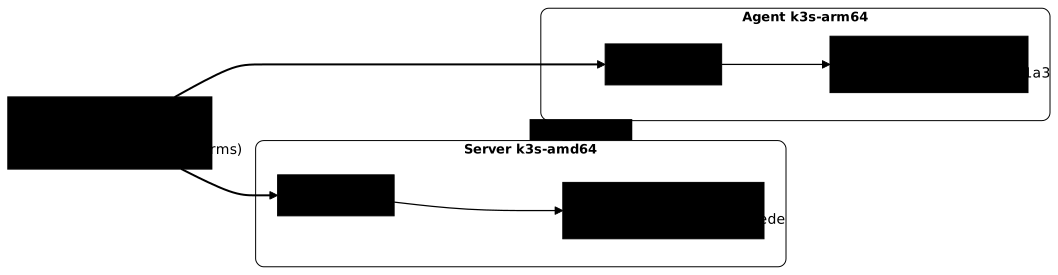
As a consequence, with a multi-arch image, the same Deployment runs on all your nodes, without a nodeSelector. To build your own multi-arch images, see Build an image for several architectures or, on the Podman side, multi-arch manifests (in French).
Deploy a multi-arch image on both architectures
Save this Deployment as web-multiarch.yaml. The image is pinned by the digest of the index (the one of nginx:stable-alpine, which contains 8 platforms including amd64 and arm64). The tag is kept for readability, the digest is authoritative.
apiVersion: apps/v1kind: Deploymentmetadata: name: web-multiarchspec: replicas: 4 selector: matchLabels: app: web-multiarch template: metadata: labels: app: web-multiarch spec: containers: - name: nginx image: nginx:stable-alpine@sha256:ed84151ed2d47ef93c0939eb9b9754c6990db6092cd2081e11988a47a83d47ea ports: - containerPort: 80kubectl apply -f web-multiarch.yamlkubectl rollout status deployment/web-multiarchkubectl get pods -l app=web-multiarch -o wideThe rollout finished in about 40 seconds. The 4 replicas spread over the two nodes (excerpt of kubectl get pods -o wide, reduced columns). The scheduler does not guarantee a 2/2 split: if no pod lands on k3s-arm64, increase replicas.
NAME READY STATUS NODEweb-multiarch-544b555d84-d27mp 1/1 Running k3s-amd64web-multiarch-544b555d84-ds6gd 1/1 Running k3s-amd64web-multiarch-544b555d84-j64zh 1/1 Running k3s-arm64web-multiarch-544b555d84-m7wqk 1/1 Running k3s-arm64To check that the nodes did pull two different variants, query the architecture seen by a pod on each node (replace with your pod names):
kubectl exec web-multiarch-544b555d84-d27mp -- uname -mkubectl exec web-multiarch-544b555d84-j64zh -- uname -mYou get x86_64 then aarch64, while nginx -v answers nginx/1.30.6 on both sides: the same software, with a binary compiled for each architecture.
On the runtime side, sudo k3s crictl images --digests (run on each node) shows the same index digest (ed84151ed2d47) but different IMAGE IDs: 0d831f5435ede (28.5 MB) on amd64, 173d8f54401a3 (28.8 MB) on arm64. This is what the diagram above represents. To inspect an image in detail, reference it by its digest: sudo k3s crictl inspecti docker.io/library/nginx@sha256:<digest> shows "architecture": "arm64" and "variant": "v8" on the agent. The tag is not kept when you pull by digest, hence the no such image error if you query nginx:stable-alpine.
What happens with a single-architecture image?
A single-architecture image has no index: it is built for one platform only. Deploy one, here httpbin compiled for amd64, with no placement constraint at all. Save api-amd64only.yaml:
apiVersion: apps/v1kind: Deploymentmetadata: name: api-amd64onlyspec: replicas: 4 selector: matchLabels: app: api-amd64only template: metadata: labels: app: api-amd64only spec: containers: - name: httpbin # ❌ counter-example: :latest tag and single-architecture image image: kennethreitz/httpbin:latest@sha256:599fe5e5073102dbb0ee3dbb65f049dab44fa9fc251f6835c9990f8fb196a72b ports: - containerPort: 80The :latest is a deliberate counter-example (the digest remains the safeguard): this old image only serves as a single-arch guinea pig.
kubectl apply -f api-amd64only.yamlkubectl get pods -l app=api-amd64only -o wideTwo pods land on k3s-amd64 and go Running. The other two, on k3s-arm64 (again, a 2/2 split is not guaranteed: with no pod on arm64, increase replicas), stay in ContainerCreating (about 3 min 50 s here, the 214 MB pull being emulated), then go to Error with restarts (excerpt of kubectl get pods -o wide, reduced columns):
NAME READY STATUS RESTARTS AGE IP NODEapi-amd64only-688759bbf7-ptg5h 0/1 Error 3 (41s ago) 5m27s 10.42.1.5 k3s-arm64The rising RESTARTS column shows that Kubernetes restarts the container, which fails every time. Kubernetes may then display CrashLoopBackOff (the wait between two restarts) for the same pod: that status was not observed in the scenario, it is the same defect. Read the container's message:
kubectl logs api-amd64only-688759bbf7-ptg5hexec /usr/local/bin/gunicorn: exec format errorThe diagnosis takes three clues. First kubectl logs: exec format error means the kernel refuses to run a binary compiled for another architecture. Then kubectl describe pod: State: Terminated, Reason: Error, Exit Code: 255, and above all events Successfully pulled image followed by Created, Started then Back-off restarting failed container. Finally, this is not an ImagePullBackOff: on this node, containerd pulled the single-arch image without any platform error. The error only shows up at execution time.
Fix it with nodeSelector
The immediate remedy, when you cannot change the image, is to reserve the pod for compatible nodes. A nodeSelector is a hard constraint that only accepts an equality on a label. Add it to the pod template of the same Deployment:
spec: nodeSelector: kubernetes.io/arch: amd64 containers: - name: httpbin # ❌ counter-example: :latest tag and single-architecture image image: kennethreitz/httpbin:latest@sha256:599fe5e5073102dbb0ee3dbb65f049dab44fa9fc251f6835c9990f8fb196a72bkubectl apply -f api-amd64only.yamlkubectl rollout status deployment/api-amd64onlykubectl get pods -l app=api-amd64only -o wideThe rollout replaces the pods: the four new ones are on k3s-amd64, and the old ones, including those on k3s-arm64, go to Terminating. You succeeded when the NODE column shows only k3s-amd64 for the Running pods, with no pod in Error anymore.
Fix it with nodeAffinity
nodeAffinity expresses the same constraint with more flexibility: the In operator accepts several values (for example amd64 and arm64), and the preferred... variant only expresses a preference. Replace the nodeSelector with:
spec: affinity: nodeAffinity: requiredDuringSchedulingIgnoredDuringExecution: nodeSelectorTerms: - matchExpressions: - key: kubernetes.io/arch operator: In values: - amd64Be sure to remove the nodeSelector from the manifest before reapplying (otherwise the two constraints add up): after kubectl apply, the 4 pods ended up on k3s-amd64, which kubectl get pods -l app=api-amd64only -o wide confirms. With required..., a pod for which no node matches stays Pending; for that case, see Pending pods (in French). For the detail of these mechanisms, see affinities, tolerations and taints (in French) and advanced scheduling (in French).
Reserve the arm64 node with a taint
ARM nodes are often more modest: sometimes you want them to host only chosen workloads. A taint repels every pod that does not tolerate it, whereas nodeSelector and nodeAffinity attract a pod. This taint expresses a reservation of the node (the "Dedicated Nodes" pattern of the Kubernetes documentation), which is distinct from the kubernetes.io/arch label, which only describes the machine. Its key is prefixed (homelab.lan/dedicated): the prefix is a domain you control, because kubernetes.io/ and k8s.io/ are reserved for Kubernetes. Here the value is arm64 and the effect NoSchedule.
kubectl taint nodes k3s-arm64 homelab.lan/dedicated=arm64:NoSchedulekubectl describe node k3s-arm64 | grep -A2 TaintsTaints: homelab.lan/dedicated=arm64:NoScheduleThe behavior was observed in the lab with another taint key; the Taints: line above reproduces the real format of kubectl describe node with this tutorial's key, it is not copied word for word from the log.
Two observations. First, NoSchedule does not evict pods already placed: the two web-multiarch pods on the arm64 node stayed Running more than seven minutes later. Only NoExecute would evict pods already in place (an effect mentioned here, not replayed; a NoExecute toleration with tolerationSeconds leaves the pod in place for that delay). Second, a new Deployment web-new, with no toleration, placed its 4 replicas on k3s-amd64. To reproduce it, copy web-multiarch.yaml to web-new.yaml, changing the name and the value of the app label (in selector and in the template labels) to web-new, then apply it and read the NODE column.
To allow a workload on the tainted node, add a toleration. Make the same copy, named web-tol, with this tolerations block in the pod template:
spec: tolerations: - key: homelab.lan/dedicated operator: Equal value: arm64 effect: NoScheduleObserved result: 2 pods on amd64 and 2 on arm64. The toleration allows scheduling on the tainted node, it does not attract: to run only on arm64, combine it with a nodeSelector or a nodeAffinity on kubernetes.io/arch: arm64. Always check the result with kubectl get pods -o wide.
Clean up the scenario
Delete the Deployments, remove the taint (the trailing - cancels it), drain the node (kubectl drain evicts its pods and forbids scheduling new ones) then delete it from the cluster, and finally uninstall the agent on the arm64 machine.
kubectl delete deployment web-multiarch web-new web-tol api-amd64onlykubectl taint nodes k3s-arm64 homelab.lan/dedicated=arm64:NoSchedule-kubectl drain k3s-arm64 --ignore-daemonsets --delete-emptydir-datakubectl delete node k3s-arm64drain evicted the remaining pods and left the node as Ready,SchedulingDisabled; the warning about the svclb DaemonSet is normal (a drain does not evict those pods, hence the --ignore-daemonsets option). On the arm64 machine:
sudo /usr/local/bin/k3s-agent-uninstall.shThe uninstallation took 1 min 40 s under emulation. Afterwards, k3s-agent is inactive, the flannel.1 interface is gone and the server lists only k3s-amd64, with its kube-system pods Running or Completed. The server stays installed. To remove it too, run sudo /usr/local/bin/k3s-uninstall.sh on the amd64 machine (a step not replayed in this scenario).
Troubleshooting
The common reflex: kubectl get pods -o wide (on which node?), then kubectl describe pod (events), then kubectl logs.
| Symptom | Cause | Approach and solution |
|---|---|---|
Pod in Error, logs exec format error | image built for another architecture | kubectl logs then kubectl describe pod; rebuild as multi-arch, or add nodeSelector/nodeAffinity |
ImagePullBackOff, message no match for platform in manifest (containerd) or no matching manifest for linux/arm64 (Docker) | possible case, not replayed here, the exact wording depends on the runtime: the image index has no entry for the node's architecture | kubectl describe pod, read the event; choose an image that publishes your platform |
Pod Pending | nodeSelector/affinity toward an absent architecture, or untolerated taint | kubectl describe pod: the scheduler event cites the selector or the taint; kubectl get nodes -L kubernetes.io/arch |
Agent not listed or NotReady | port 6443, 8472/UDP or 10250 closed, wrong token, distant versions | on the agent sudo journalctl -u k3s-agent -e; check ports, token and VERSION |
| Image works on a Mac, breaks on the cluster | an Apple Silicon Mac is native arm64: the image it builds by default is arm64 and does not start on an amd64 node; conversely, an amd64 image runs on the Mac through emulation, which hides that it will fail on an arm64 node | publish a multi-arch image, and test on the real architecture of the nodes |
| arm64 image failing on a Pi | the Pi's OS is 32-bit (arm) | reinstall a 64-bit OS |
Key takeaways
- The k3s agent detects its architecture; the
kubernetes.io/archlabel is set on its own. - Join the agent with the same version as the server (
INSTALL_K3S_VERSION) and a script downloaded then run, nevercurl | sh. - It is the runtime (containerd) that chooses the variant in the OCI index; pin the digest of the index, never that of a platform.
- A single-architecture image on the wrong node was pulled without error by containerd in the scenario, then failed at execution:
exec format error, statusError. nodeSelectorornodeAffinityplace a pod; a taint repels, a toleration allows without attracting.NoScheduledoes not evict pods already placed.