In Kubernetes, every Pod gets its own IP address and can reach every other Pod of the cluster directly, on the same node or on another one, with no address translation and no published port. This lesson makes you check that promise on a four-node kind cluster. You read the addresses, you read the routes that carry a packet from one node to another, then you cause three failures to learn where to look first. It is for readers who can already create a Pod and a Service and want to understand what happens underneath.
What you will learn
- State the guarantees of the Kubernetes network model
- Read the address of a Pod, the cluster range and the range of the node that hosts it
- Say who assigns Pod addresses and what
kube-proxydoes - Test the connection from one Pod to another with
wgetandping - Diagnose three failures: a Pod that cannot reach another one, a Pod stuck in
ContainerCreating, and a communication that fails between two nodes - Explain why
nslookup kubernetes.defaultfails from a busybox Pod while DNS works
Prerequisites
You have read Kubernetes Services: you know what a Service and a selector are. The commands of the lesson assume kind 0.33.0, kubectl 1.37.0 and nodes in v1.37.0, on a cluster with one control plane and three workers. Create it with this file, named kind-multi.yaml:
kind: ClusterapiVersion: kind.x-k8s.io/v1alpha4nodes: - role: control-plane - role: worker labels: topology.kubernetes.io/zone: zone-a - role: worker labels: topology.kubernetes.io/zone: zone-b - role: worker labels: topology.kubernetes.io/zone: zone-ckind create cluster --name demo-reseau --image kindest/node:v1.37.0@sha256:a1ed56cfb0e7b93589bdf97c8cd566405a265939e3620fc4f5de89adff580ae5 --config kind-multi.yamlkubectl wait --for=condition=Ready nodes --all --timeout=120skubectl create namespace ws-podnetThe four nodes become Ready in about fifteen seconds. On kind, a node is a Docker container: to run a command on a node, this lesson uses docker exec demo-reseau-worker <command>. On a virtual machine, this would be an SSH connection to the node.
Some names in this lesson are in French on purpose, so that the commands and outputs stay those of the tested cluster: demo-reseau means "network-demo", cli-meme-noeud "cli-same-node", cli-autre-noeud "cli-other-node", pas-de-reseau "no-network", 10-kindnet.conflist.sauve "10-kindnet.conflist.saved", IP du client "client IP", and rc_meme_noeud and rc_autre_noeud "rc_same_node" and "rc_other_node".
What guarantees does the Kubernetes network model give?
The network model is a contract: it says what must be true of the network, not how to get it. Every network plugin, called a CNI plugin (see CNI, CSI and CRI), must respect it. This is why your applications behave the same way from one cluster to another, even when the technologies underneath differ.
The guarantees of the model
Three rules apply to every compliant plugin:
- Every Pod gets its own IP address.
- Two Pods reach each other through these addresses, whatever node hosts them, without publishing a port and without address translation (NAT).
- The address a Pod sees for itself is the one the other Pods see for it: there is no translation of the source address between Pods.
The third rule has a concrete consequence: an address found in an access log really designates the sending Pod, not its node.
Every Pod also has its own network namespace, so its own network stack and its 65,535 ports, with no conflict with the other Pods of the node. Unlike Docker, you do not publish a port to reach a Pod from another Pod.
Kubernetes distinguishes four kinds of communication. This lesson covers the first two; the other two go through Services and HTTP exposure.
| Communication | How it goes through |
|---|---|
| Container to container, in the same Pod | localhost |
| Pod to Pod | the Pod network, the subject of this lesson |
| Pod to Service | kube-proxy and DNS, see Services |
| Outside to Service | NodePort, LoadBalancer or Ingress |
How do you find a Pod's address and reach another Pod?
The simplest way to believe a guarantee is to test it. You create three Pods: an nginx server srv and a client cli-meme-noeud on the same node, and a client cli-autre-noeud on another node. The nodeSelector field places each Pod on the node you want. Save this file as pods.yaml:
apiVersion: v1kind: Podmetadata: name: srv namespace: ws-podnetspec: nodeSelector: kubernetes.io/hostname: demo-reseau-worker containers: - name: nginx image: nginx:1.30.5@sha256:9bf97bd7714f5e24c1ccd545ecb9eb5435cb6d109c97cebb15e7e455e0239edb ports: - containerPort: 80---apiVersion: v1kind: Podmetadata: name: cli-autre-noeud namespace: ws-podnetspec: nodeSelector: kubernetes.io/hostname: demo-reseau-worker2 containers: - name: busybox image: busybox:1.38.0@sha256:a46257e06c82ad85242d0d38077d0a52d9896389ca60a1a59d3463db586e5fa4 command: ["sleep", "3600"]---apiVersion: v1kind: Podmetadata: name: cli-meme-noeud namespace: ws-podnetspec: nodeSelector: kubernetes.io/hostname: demo-reseau-worker containers: - name: busybox image: busybox:1.38.0@sha256:a46257e06c82ad85242d0d38077d0a52d9896389ca60a1a59d3463db586e5fa4 command: ["sleep", "3600"]See a Pod's IP
The address does not appear in the default output of kubectl get pods: you have to add -o wide, a jsonpath or custom columns.
kubectl apply -f pods.yamlkubectl -n ws-podnet wait --for=condition=Ready pod --all --timeout=90skubectl -n ws-podnet get pods -o wideNAME READY STATUS RESTARTS AGE IP NODE NOMINATED NODE READINESS GATEScli-autre-noeud 1/1 Running 0 3s 10.244.3.3 demo-reseau-worker2 <none> <none>cli-meme-noeud 1/1 Running 0 3s 10.244.1.4 demo-reseau-worker <none> <none>srv 1/1 Running 0 3s 10.244.1.3 demo-reseau-worker <none> <none>Look at the IP and NODE columns. srv and cli-meme-noeud are on the node demo-reseau-worker and carry addresses in 10.244.1.x. cli-autre-noeud is on demo-reseau-worker2 and carries 10.244.3.3. The address of a Pod therefore starts with the prefix of its node: the next section explains where that prefix comes from. For a three-column output that you can paste into a script, ask for the columns yourself:
kubectl -n ws-podnet get pods -o custom-columns=NAME:.metadata.name,IP:.status.podIP,NODE:.spec.nodeNameNAME IP NODEcli-autre-noeud 10.244.3.3 demo-reseau-worker2cli-meme-noeud 10.244.1.4 demo-reseau-workersrv 10.244.1.3 demo-reseau-workerFor a single address, kubectl get pod <name> -o jsonpath='{.status.podIP}' is enough. The value is empty until the network plugin has answered, which is normal for a Pod that is starting.
Test with wget/curl
From cli-autre-noeud, reach nginx through the address of srv, without going through a Service:
SRV=$(kubectl -n ws-podnet get pod srv -o jsonpath='{.status.podIP}'); kubectl -n ws-podnet exec cli-autre-noeud -- wget -qO- -T 3 http://$SRV; echo "rc=$?"<!DOCTYPE html><html><head><title>Welcome to nginx!</title>[...]</html>rc=0The nginx welcome page arrives and rc=0 confirms success: two Pods on two different nodes reach each other through their address. Now look at the log of srv to see who talked to it:
CLI=$(kubectl -n ws-podnet get pod cli-autre-noeud -o jsonpath='{.status.podIP}'); echo "IP du client: $CLI"; kubectl -n ws-podnet logs srv --tail=3IP du client: 10.244.3.32026/11/12 05:59:10 [notice] 1#1: start worker process 362026/11/12 05:59:10 [notice] 1#1: start worker process 3710.244.3.3 - - [12/Nov/2026:05:59:13 +0000] "GET / HTTP/1.1" 200 896 "-" "Wget" "-"The last line is the access: nginx saw 10.244.3.3, the address of the client Pod, not the address of its node. The two lines above are nginx start-up messages. This is the third guarantee, observed. The same test from cli-meme-noeud also returns rc=0, and a ping gives the same result:
SRV=$(kubectl -n ws-podnet get pod srv -o jsonpath='{.status.podIP}'); kubectl -n ws-podnet exec cli-autre-noeud -- ping -c 3 $SRV; echo "rc=$?"PING 10.244.1.3 (10.244.1.3): 56 data bytes64 bytes from 10.244.1.3: seq=0 ttl=62 time=0.107 ms64 bytes from 10.244.1.3: seq=1 ttl=62 time=0.094 ms64 bytes from 10.244.1.3: seq=2 ttl=62 time=0.130 ms
--- 10.244.1.3 ping statistics ---3 packets transmitted, 3 packets received, 0% packet lossround-trip min/avg/max = 0.094/0.110/0.130 msrc=0The ttl=62 is two below the starting value of 64: the packet went through two routing steps, the client's node then the server's node. Still, prefer wget or curl to ping to judge a result. An HTTP exchange goes through the same TCP stack as your applications and escapes ICMP filters, whereas a ping can fail for other reasons: an image without ping, a network policy that filters ICMP.
Where do Pod addresses come from?
Pod addresses come from a range reserved for the cluster, cut into subnets handed out node by node. This split makes it possible to route without a central directory: the prefix of an address designates the destination node. A range that is badly sized, or that overlaps the company network, is hard to fix afterwards.
Cluster CIDR
A CIDR (Classless Inter-Domain Routing) is an address range written address/length, such as 10.244.0.0/16. The cluster receives it as an argument of the kube-controller-manager, which you read like this:
kubectl cluster-info dump | grep -m1 cluster-cidr "--cluster-cidr=10.244.0.0/16",The Pod range is 10.244.0.0/16. Services have their own range, 10.96.0.0/16 on this cluster, which you read the same way with grep -m1 service-cluster-ip-range: the kubernetes Service is 10.96.0.1, outside the Pod range. This command reads the arguments as kind sets them; if your distribution sets them differently, look for the range in its documentation. The same move works on a kubeadm cluster, where these ranges can also be read in the kubeadm-config ConfigMap of the kube-system namespace. If your shell enables pipefail, these commands can return code 141 although nothing is broken: grep -m1 closes the pipe after the first line.
CIDR per node
Each node receives a subnet of this range, which the spec.podCIDR field of the node shows:
kubectl get nodes -o jsonpath='{range .items[*]}{.metadata.name}{"\t"}{.spec.podCIDR}{"\n"}{end}'demo-reseau-control-plane 10.244.0.0/24demo-reseau-worker 10.244.1.0/24demo-reseau-worker2 10.244.3.0/24demo-reseau-worker3 10.244.2.0/24Two things to read. The control plane also receives a subnet, even though it does not host your Pods: allocation is done per node, before any scheduling.
Next, the subnet number does not follow the worker number: worker2 carries 10.244.3.0/24. So find the subnet of a node with this command, never by guessing. Subnets do not overlap, which lets you read the node of a Pod in its address: 10.244.3.3 belongs to worker2.
This reading holds for kindnet. With Calico, Pod addresses come from /26 blocks of the 10.244.0.0/16 pool and do not follow the podCIDR of the node: on a node with podCIDR 10.244.1.0/24, a Pod can receive 10.244.38.92.
A /24 offers 254 usable addresses, but a node does not accept that many Pods:
kubectl get node demo-reseau-worker -o jsonpath='{.status.capacity.pods}{"\n"}'110The node announces a capacity of 110 Pods, which is the default value of the kubelet maxPods. Size the cluster on that figure, not on the one of the subnet.
Who assigns the IPs?
Assignment is the job of the CNI plugin, through its IPAM (IP Address Management) component, which keeps the register of taken and free addresses of the node range. Neither the API server nor the kubelet chooses the address: they receive it from the plugin, and the kubelet publishes it in status.podIP. The plugin configuration file, placed on every node, shows it:
docker exec demo-reseau-worker cat /etc/cni/net.d/10-kindnet.conflist{ "cniVersion": "0.3.1", "name": "kindnet", "plugins": [ { "type": "ptp", "ipMasq": false, "ipam": { "type": "host-local", "dataDir": "/run/cni-ipam-state", "routes": [ { "dst": "0.0.0.0/0" } ], "ranges": [ [ { "subnet": "10.244.1.0/24" } ] ] } , "mtu": 1500 }, { "type": "portmap", "capabilities": { "portMappings": true } } ]}The output is shortened by its empty lines. Read three blocks. ipam of type host-local assigns addresses in 10.244.1.0/24, the subnet of this node. ptp connects each Pod through a pair of point-to-point virtual interfaces, without going through a bridge: the next section checks it. portmap handles hostPort. The file is named 10-kindnet.conflist: this is what the runtime looks for in /etc/cni/net.d/ to know which plugin to call.
Which path does a packet take between two Pods?
The model imposes the result, not the path: each plugin chooses its own. On kind, the plugin is kindnet. Two DaemonSets of kube-system show it, since each one runs on every node:
kubectl -n kube-system get daemonsetNAME DESIRED CURRENT READY UP-TO-DATE AVAILABLE NODE SELECTOR AGEkindnet 4 4 4 4 4 kubernetes.io/os=linux 3m54skube-proxy 4 4 4 4 4 kubernetes.io/os=linux 3m55skindnet is the network plugin and kube-proxy is the implementation of Services, four Pods each, one per node. The next subsections read their work on the node demo-reseau-worker.
On the same node
Two containers of the same Pod talk through localhost, because they share the same network namespace. Between two Pods of the same node, the packet does not leave the machine. To see how each Pod is connected, list the interfaces of the node:
docker exec demo-reseau-worker ip -br linklo UNKNOWN 00:00:00:00:00:00 <LOOPBACK,UP,LOWER_UP>eth0@if33 UP a6:94:7c:59:9f:c8 <BROADCAST,MULTICAST,UP,LOWER_UP>veth2a032149@if2 UP 8e:ff:38:aa:88:f0 <BROADCAST,MULTICAST,UP,LOWER_UP>veth988a09e0@if2 UP ae:e6:21:ce:e5:c2 <BROADCAST,MULTICAST,UP,LOWER_UP>A veth pair is a virtual cable with one end in the Pod and the other on the node. Count the veth interfaces of the node: there are two, one per Pod (srv and cli-meme-noeud). Also look for what is missing: there is no bridge interface, neither cni0 nor docker0. In fact, docker exec demo-reseau-worker ip -d link show type bridge returns no line at all.
With kindnet, each Pod therefore has its own veth pair, and the node routes between these pairs. Other plugins connect Pods differently, through a local bridge or through eBPF (see Cilium (in French)): the contract stays the same.
The routing table of the node is what links the veth pairs:
docker exec demo-reseau-worker ip routedefault via 172.18.0.1 dev eth010.244.0.0/24 via 172.18.0.2 dev eth010.244.1.3 dev veth2a032149 scope host10.244.1.4 dev veth988a09e0 scope host10.244.2.0/24 via 172.18.0.3 dev eth010.244.3.0/24 via 172.18.0.5 dev eth0172.18.0.0/16 dev eth0 proto kernel scope link src 172.18.0.4Read the two veth lines: the node has one /32 route per local Pod, 10.244.1.3 to veth2a032149 (srv) and 10.244.1.4 to veth988a09e0 (cli-meme-noeud). There is no line for the local subnet 10.244.1.0/24: each Pod is reached through its own route. The other three 10.244.x.0/24 lines are used to reach the other nodes.
Between different nodes
To reach a Pod on another node, the node follows one of the 10.244.x.0/24 via <address> lines of the previous table. The one for worker2 says: everything going to 10.244.3.0/24 leaves directly for 172.18.0.5, the address of the node demo-reseau-worker2. The packet is neither encapsulated nor translated. The diagram follows a packet from srv to cli-autre-noeud: look at the three steps and at the note that recalls that the Pod address stays intact from start to finish. On the worker2 side, the diagram only shows the result, the delivery to the Pod, which the previous wget and ping already showed.
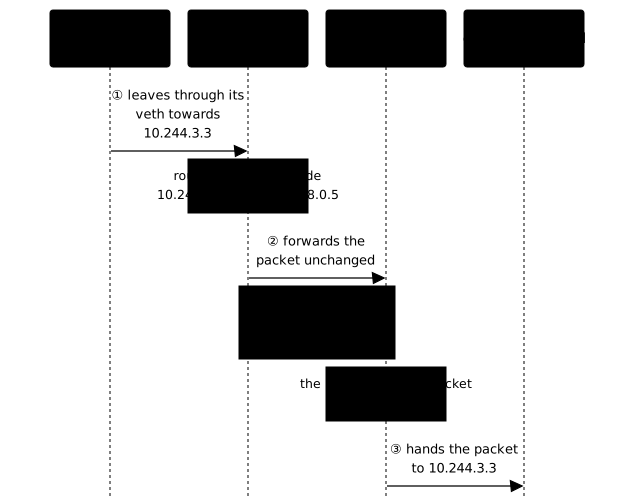
This direct route assumes that the network between nodes can carry the packet to a neighboring node. On kind, the four nodes are on the same Docker network, so it can. When the network between nodes cannot carry Pod addresses, other plugins take another path. These three modes cannot be observed on kind; they are described in the documentation of the plugins (see CNI, CSI and CRI):
| Mode | Principle | Example plugins |
|---|---|---|
| Overlay with VXLAN | the Pod packet is encapsulated in a UDP packet, port 4789 (RFC 7348) | Flannel, Calico, Cilium |
| IP-in-IP | the Pod packet is encapsulated in another IP packet, protocol 4 | Calico |
| Native routing with BGP | each node announces its subnet to the network routers, without encapsulation | Calico, Cilium |
Native routing avoids the cost of encapsulation but needs a network that speaks BGP. Encapsulated modes work on almost any network, at the price of one more header per packet.
The role of kube-proxy
kube-proxy does not handle direct communication between Pods: the CNI plugin does, as you have just seen. Its role is to implement Services, that is, to redirect a Service address (ClusterIP) to the address of a Pod behind it. To do so, it writes rules on every node (see How worker nodes work). Create a Service in front of srv and query it by name from the client:
kubectl -n ws-podnet expose pod srv --port=80 --name=srvkubectl -n ws-podnet exec cli-autre-noeud -- wget -qO- -T 3 http://srv >/dev/null; echo "rc=$?"kubectl -n ws-podnet logs srv --tail=1service/srv exposedrc=010.244.3.3 - - [12/Nov/2026:05:59:18 +0000] "GET / HTTP/1.1" 200 896 "-" "Wget" "-"Look at the last line: the nginx log still carries 10.244.3.3. The translation done by kube-proxy replaces the destination (the Service address by the Pod address), and here the source stays the Pod address: this is the case of a Pod calling a ClusterIP with kube-proxy in iptables mode. For access from outside through NodePort or LoadBalancer, kube-proxy can also replace the source address (SNAT). The externalTrafficPolicy field of the Service changes this behavior: with Cluster (the default), the client address can be lost; with Local, it is kept, but only the Pods on the contacted node answer. The Using source IP tutorial covers these cases. The rules can be read in the KUBE-SERVICES chain of the nat table of the node:
docker exec demo-reseau-worker sh -c 'iptables -t nat -S KUBE-SERVICES | head -10'-N KUBE-SERVICES-A KUBE-SERVICES -d 10.96.0.1/32 -p tcp -m comment --comment "default/kubernetes:https cluster IP" -m tcp --dport 443 -j KUBE-SVC-NPX46M4PTMTKRN6Y-A KUBE-SERVICES -d 10.96.0.10/32 -p tcp -m comment --comment "kube-system/kube-dns:metrics cluster IP" -m tcp --dport 9153 -j KUBE-SVC-JD5MR3NA4I4DYORP-A KUBE-SERVICES -d 10.96.0.10/32 -p udp -m comment --comment "kube-system/kube-dns:dns cluster IP" -m udp --dport 53 -j KUBE-SVC-TCOU7JCQXEZGVUNU-A KUBE-SERVICES -d 10.96.0.10/32 -p tcp -m comment --comment "kube-system/kube-dns:dns-tcp cluster IP" -m tcp --dport 53 -j KUBE-SVC-ERIFXISQEP7F7OF4-A KUBE-SERVICES -m comment --comment "kubernetes service nodeports; NOTE: this must be the last rule in this chain" -m addrtype --dst-type LOCAL -j KUBE-NODEPORTSEach -j KUBE-SVC-* rule matches one Service port: the kubernetes Service on port 443, and kube-dns on 53 over UDP, 53 over TCP and 9153. The kube-proxy mode changes the way these rules are read. Check it rather than assume it:
kubectl -n kube-system get configmap kube-proxy -o yaml | grep -E '^\s+mode:'kubectl -n kube-system logs -l k8s-app=kube-proxy --tail=-1 | grep -i proxier mode: iptablesI1112 05:55:35.080667 1 server_linux.go:144] "Using iptables Proxier"[...]The ConfigMap declares mode: iptables and the logs confirm it with Using iptables Proxier (one pair of lines per kube-proxy Pod, four here). The log is the reference if the ConfigMap was changed without restarting the Pods.
According to the official documentation on Services, three modes exist on Linux: iptables, nftables and ipvs, deprecated since 1.35. The nftables mode has been stable since 1.33, and iptables remains the default mode in 1.37.
What do you do when two Pods cannot reach each other?
Most network failures come down to three situations: a Pod that cannot reach another one, a Pod stuck in ContainerCreating because the CNI plugin has not prepared its network, and traffic that fails between two nodes. Each one is recognized by a distinct symptom. The first subsection gives the reading tools, the next three replay one failure each. The plugin comes first in the order of checks: if it does not run, the other tests tell you nothing.
Advanced diagnosis
When an exchange fails, first ask whether the Pod received an interface and a default route. The ip addr and ip route commands assume an image that contains ip: busybox has it, nginx does not.
kubectl -n ws-podnet exec srv -- ip addr; echo "rc=$?"error: Internal error occurred: Internal error occurred: error executing command in container: failed to exec in container: failed to start exec "52c3e3753fffb32dd53ac8152fcc0b48b1f894085d0f0fbfc675e424c44773ad": OCI runtime exec failed: exec failed: unable to start container process: exec: "ip": executable file not found in $PATHrc=1The message says executable file not found in $PATH: the fault comes from the image, not from the network. In nginx, cat /proc/net/fib_trie still works and contains the Pod address, 10.244.1.3, on a /32 host LOCAL line. From the busybox Pod:
kubectl -n ws-podnet exec cli-autre-noeud -- ip addrkubectl -n ws-podnet exec cli-autre-noeud -- ip route1: lo: <LOOPBACK,UP,LOWER_UP> mtu 65536 qdisc noqueue qlen 1000 link/loopback 00:00:00:00:00:00 brd 00:00:00:00:00:00 inet 127.0.0.1/8 scope host lo valid_lft forever preferred_lft forever inet6 ::1/128 scope host valid_lft forever preferred_lft forever2: eth0@if4: <BROADCAST,MULTICAST,UP,LOWER_UP,M-DOWN> mtu 1500 qdisc noqueue qlen 1000 link/ether a2:e9:1a:c8:bc:f9 brd ff:ff:ff:ff:ff:ff inet 10.244.3.3/24 brd 10.244.3.255 scope global eth0 valid_lft forever preferred_lft forever inet6 fe80::a0e9:1aff:fec8:bcf9/64 scope link valid_lft forever preferred_lft foreverdefault via 10.244.3.1 dev eth010.244.3.0/24 via 10.244.3.1 dev eth0 src 10.244.3.310.244.3.1 dev eth0 scope link src 10.244.3.3Look at eth0@if4: this is the Pod interface, with its address 10.244.3.3/24, and the @if4 suffix designates the other end of the veth pair, on the node side. The default route goes through 10.244.3.1, the first address of the node subnet. A Pod with no eth0 and no default route has not received its network: go to the ContainerCreating failure.
A Pod cannot reach another Pod
The first thing to observe is the shape of the failure, because it tells you where to look. The Pod srv only listens on port 80; query a closed port of srv, then an address that no Pod carries:
SRV=$(kubectl -n ws-podnet get pod srv -o jsonpath='{.status.podIP}'); time kubectl -n ws-podnet exec cli-autre-noeud -- wget -qO- -T 3 http://$SRV:8081; echo "rc=$?"time kubectl -n ws-podnet exec cli-autre-noeud -- wget -qO- -T 3 http://10.244.99.99; echo "rc=$?"wget: can't connect to remote host (10.244.1.3): Connection refusedcommand terminated with exit code 1
real 0m0.067src=1wget: download timed outcommand terminated with exit code 1
real 0m3.065src=1The first failure lasts 0.07 s and says Connection refused: the packet arrived, and the Pod answered that no program listens on this port. Look on the application side or the Service side.
The second lasts 3.07 s, the requested timeout, and says download timed out: nobody answered, the packet was lost on the way. Look on the network side: CNI plugin, route, NetworkPolicy. The address 10.244.99.99 is in the 10.244.0.0/16 range but outside the four node subnets, so no node routes it.
To check the network plugin, do not look for it by name. A grep -E 'calico|cilium|flannel' finds nothing on a cluster that works with kindnet, and would wrongly conclude that there is no CNI. Two checks depend on no name: the configuration placed on the node, and the DaemonSets of kube-system, where every network plugin appears since it must run on every node.
docker exec demo-reseau-worker ls /etc/cni/net.d/kubectl -n kube-system get daemonset10-kindnet.conflistThe first command must list a file: this is the configuration the runtime uses. The second gives the name of the plugin, already seen above. Once you know this name, read its logs with kubectl -n kube-system logs -l app=<plugin-name> (the label is app=kindnet on kind), then check the routes of the node with ip route.
The Pod is stuck in ContainerCreating
A Pod stuck in ContainerCreating is waiting for a step to finish, and the assignment of the address by the plugin is one of them. Reproduce the failure by removing the plugin configuration file on the node demo-reseau-worker3 (this deliberately breaks that node), then create a Pod on it. Save this Pod as pas-de-reseau.yaml:
apiVersion: v1kind: Podmetadata: name: pas-de-reseau namespace: ws-podnetspec: nodeSelector: kubernetes.io/hostname: demo-reseau-worker3 containers: - name: busybox image: busybox:1.38.0@sha256:a46257e06c82ad85242d0d38077d0a52d9896389ca60a1a59d3463db586e5fa4 command: ["sleep", "3600"]docker exec demo-reseau-worker3 sh -c 'mv /etc/cni/net.d/10-kindnet.conflist /root/10-kindnet.conflist.sauve'kubectl apply -f pas-de-reseau.yamlsleep 20kubectl -n ws-podnet get pod pas-de-reseaupod/pas-de-reseau createdNAME READY STATUS RESTARTS AGEpas-de-reseau 0/1 ContainerCreating 0 20sThe Pod stays in ContainerCreating: the events give the exact message of the plugin.
kubectl -n ws-podnet describe pod pas-de-reseau | sed -n '/Events:/,$p'Events: Type Reason Age From Message ---- ------ ---- ---- ------- Normal Scheduled 20s default-scheduler Successfully assigned ws-podnet/pas-de-reseau to demo-reseau-worker3 Warning FailedCreatePodSandBox 19s kubelet Failed to create pod sandbox: rpc error: code = Unknown desc = failed to setup network for sandbox "3183dc20253bc4cd008968e593e54387e29a719cf8daa3c5539e19cd336800ab": cni plugin not initialized Warning NetworkNotReady 2s (x4 over 8s) kubelet network is not ready: container runtime network not ready: NetworkReady=false reason:NetworkPluginNotReady message:Network plugin returns error: cni plugin not initializedRead the end of the two Warning messages: cni plugin not initialized. The runtime no longer finds a network configuration, so it cannot prepare the Pod. The node itself is NotReady: kubectl get node demo-reseau-worker3 shows it twenty seconds after the file is removed.
Putting the file back is the obvious move, and it repairs nothing:
docker exec demo-reseau-worker3 sh -c 'mv /root/10-kindnet.conflist.sauve /etc/cni/net.d/10-kindnet.conflist'kubectl -n ws-podnet wait --for=condition=Ready pod/pas-de-reseau --timeout=120serror: timed out waiting for the condition on pods/pas-de-reseauThe file is back and the Pod is still not ready after 120 seconds, and the node stays NotReady. The containerd log on the node shows that it saw the file disappear (fs change event(RENAME), but no event when it came back: it never reloaded the configuration.
The move that repairs it is to delete the kindnet Pod of that node: the recreated Pod rewrites the file in a way that containerd detects.
kubectl -n kube-system delete pod -l app=kindnet --field-selector spec.nodeName=demo-reseau-worker3kubectl wait --for=condition=Ready node/demo-reseau-worker3 --timeout=120spod "kindnet-h4l7q" deleted from kube-system namespacenode/demo-reseau-worker3 condition metThe node is Ready again in 14 seconds. Remember the rule: after repairing the configuration of a network plugin, restart its Pod on the affected node instead of waiting.
With Calico, the move is the same: delete the plugin Pod (calico-node) on the affected node, because Calico does not rewrite the CNI file by itself.
Node-to-node communication is down
When two Pods reach each other on the same node but not across nodes, the node does not know where to send the packet. Simulate it by deleting, on demo-reseau-worker, the route to the subnet of worker2:
docker exec demo-reseau-worker ip route show | grep "$(kubectl get node demo-reseau-worker2 -o jsonpath='{.spec.podCIDR}')"docker exec demo-reseau-worker ip route del 10.244.3.0/2410.244.3.0/24 via 172.18.0.5 dev eth0The first command reads the route (10.244.3.0/24 via 172.18.0.5), the second deletes it. Now test both clients toward srv:
SRV=$(kubectl -n ws-podnet get pod srv -o jsonpath='{.status.podIP}'); kubectl -n ws-podnet exec cli-meme-noeud -- wget -qO- -T 3 http://$SRV >/dev/null; echo "rc_meme_noeud=$?"; kubectl -n ws-podnet exec cli-autre-noeud -- wget -qO- -T 3 http://$SRV >/dev/null; echo "rc_autre_noeud=$?"docker exec demo-reseau-worker ip route get 10.244.3.1rc_meme_noeud=0wget: download timed outcommand terminated with exit code 1rc_autre_noeud=110.244.3.1 via 172.18.0.1 dev eth0 src 172.18.0.4 uid 0 cacheThe pair of tests isolates the path between nodes: the client on the same node succeeds (rc_meme_noeud=0), the one on the other node fails with a timeout. ip route get gives the reason: without the route, the node sends the packet to its default gateway 172.18.0.1 instead of worker2. Success on the same node and failure toward the other point to a missing route or a blocked path between nodes.
Here, kindnet puts the route back by itself: it was back four seconds after its deletion, and both clients succeed again. For a failure that does not repair itself, check in order that the nodes see each other (kubectl get nodes), that spec.podCIDR is allocated, then that ip route get <Pod address> picks the right node.
On a plugin that encapsulates, the cause is most often outside Kubernetes, according to the plugin documentation: UDP port 4789 filtered for VXLAN, IP protocol 4 filtered for IP-in-IP, BGP session not established.
Why nslookup kubernetes.default fails from a busybox Pod
The short name kubernetes.default is the one everyone types, and with busybox it returns NXDOMAIN, although the cluster DNS works.
kubectl -n ws-podnet exec cli-autre-noeud -- nslookup kubernetes.default; echo "rc=$?"kubectl -n ws-podnet exec cli-autre-noeud -- nslookup kubernetes.default.svc.cluster.local; echo "rc=$?"Server: 10.96.0.10Address: 10.96.0.10:53
** server can't find kubernetes.default: NXDOMAIN
** server can't find kubernetes.default: NXDOMAIN
command terminated with exit code 1rc=1Server: 10.96.0.10Address: 10.96.0.10:53
Name: kubernetes.default.svc.cluster.localAddress: 10.96.0.1
rc=0The short name fails (rc=1), the full name resolves to 10.96.0.1 (rc=0). The cluster is not at fault: from the same Pod, wget -T 3 -S -O- --no-check-certificate https://kubernetes.default prints Connecting to kubernetes.default (10.96.0.1:443) then HTTP/1.1 403 Forbidden. The name resolved, the TLS connection was established, and the API server refuses anonymous access. The tool differs, not the DNS.
The /etc/resolv.conf of the Pod explains the difference:
kubectl -n ws-podnet exec cli-autre-noeud -- cat /etc/resolv.confsearch ws-podnet.svc.cluster.local svc.cluster.local cluster.localnameserver 10.96.0.10options ndots:5The search line lists the suffixes to try to complete an incomplete name. Tools that go through the C library, like wget, apply them. With busybox 1.38.0, nslookup only applies the search list to a name with no dot at all: kubernetes.default contains one, so it is queried as is and nobody serves it.
When diagnosing, use the full name <service>.<namespace>.svc.cluster.local, which depends on no search list. On a short name with no dot, such as web, busybox also prints the NXDOMAIN answers of the suffixes that fail and exits with rc=1 even when it found the address: so do not trust the return code of this nslookup. The next lesson details name resolution.
Which network commands to remember for the CKA?
In the CKA exam, which is timed and taken at the terminal, jsonpath expressions are the slowest to rebuild. Practice typing them without help: these commands cover most of the Pod network questions.
kubectl get pod <name> -o widekubectl get nodes -o jsonpath='{range .items[*]}{.metadata.name}{"\t"}{.spec.podCIDR}{"\n"}{end}'kubectl exec <pod> -- ip addrkubectl exec <pod> -- wget -qO- -T 3 http://<pod-ip>kubectl -n kube-system get daemonsetkubectl describe pod <name> | grep -A5 EventsPut it into practice
The guided lab repeats the moves of this lesson on a real cluster. A worker has lost the network of its Pods. You first record the address ranges of the cluster and the address of a Pod, then you repair the node whose CNI file has disappeared. You then prove that one Pod reaches another from one node to the other, and you say which of two Services refuses right away and which one makes you wait. The validation reads six states of the cluster: the recorded ranges, the address of the target Pod, the worker Ready again, the target Pod placed on that worker, the traffic from one node to the other, and the distinction between an immediate refusal and a timeout.
This lab runs on a kubeadm virtual machine with Calico, not on kind. The nodes are machines: the docker exec command of this lesson does not exist there. The lesson Services is a useful support.
How do you clean up the lesson's cluster?
Delete the namespace, then the cluster. Deleting the namespace takes about forty seconds, the time for the sleep Pods to stop.
kubectl delete namespace ws-podnetkind delete cluster --name demo-reseauKey takeaways
- Every Pod has its own IP address, and two Pods reach each other through these addresses with no port to publish and no address translation.
- The network model is a contract: Kubernetes sets the guarantees, the CNI plugin chooses the path.
- The cluster reserves a range (
--cluster-cidr), cut into one subnet per node (spec.podCIDR), control plane included; the CNI plugin assigns the addresses and the kubelet publishes them instatus.podIP. - With kindnet, each Pod has its routed
vethpair, with no bridge, and the nodes route the subnets to each other directly. kube-proxyimplements Services; it does not handle direct traffic between Pods and does not change the source address of a Pod calling a ClusterIP (external access through NodePort or LoadBalancer can replace it, depending onexternalTrafficPolicy).- An immediate refusal (
Connection refused) does not have the same cause as a silence (timed out): the first is on the application side, the second on the network side. - After repairing the CNI configuration of a node, restart the plugin Pod on that node instead of waiting.
- To test a name from busybox, use the full name
<service>.<namespace>.svc.cluster.local.
Test your knowledge
This quiz covers the points of the lesson in the format of the CKA questions. The pass mark is set at 80%, stricter than the 66% of the CKA exam.
Knowledge check
Check what you have learned with this interactive quiz
How it works
- The timer starts when you click Start
- Multiple choice, true/false and short answer questions
- You can move between questions
- Detailed results are shown at the end
Starts the quiz and the timer
Review
(0/0)Score by domain
A domain groups several guides and gets several questions, so its score is more reliable than a per-topic score, which often rests on a single question.
Summary
Strengths
No topic passed at 80% on at least two questions yet.
Weak areas
No topic below the pass mark.
Recommended next
Hints before you try again?
Continue the course: CoreDNS, the internal DNS of Kubernetes
A new full quiz with random questions
Work again only on the questions you missed