A Service gives a group of Pods an IP address that does not change and a DNS name. Pods disappear and come back with another address: callers therefore talk to the Service, which spreads their requests between the healthy Pods. In this lesson, you expose three Pods that each answer with their own name, you prove from a client Pod that all three receive traffic, you break then repair the selector, you reach the Service by its name from another namespace, and you switch traffic from one version to the other.
Prerequisites: the demo cluster from First cluster (created with the kind-multi file) and the lesson Deployments. All commands are typed in the default namespace, unless stated otherwise.
What you will learn
- Create a Service with
kubectl exposeand read its YAML equivalent - Tell
portfromtargetPortwhen the application does not listen on the port of the Service - Read the endpoints of a Service and diagnose a Service that has none
- Prove the traffic spreading between several Pods from a client Pod
- Reach a Service by its DNS name, in the same namespace and from another one
- Choose between ClusterIP, NodePort, LoadBalancer and Headless
- Switch traffic between two Deployments by changing the selector
Why is a Pod not enough as an access point?
Each Pod receives its own IP address, but this address is not a service address: it changes when the Pod is recreated, for example after an update or the failure of a node. A caller that noted the address of a Pod would therefore lose its target at each replacement.
The Service solves this problem in two ways. It keeps an address (the ClusterIP) and a DNS name for its whole life, and it keeps up to date the list of Pods that can answer. This list is called the endpoints: the Service computes it by looking for the Pods whose labels match its selector, and only the ready Pods (complete READY column) receive traffic.
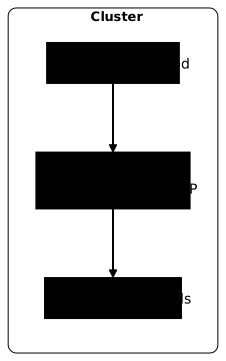
The diagram shows a caller that only knows the name of the Service: the Service picks one Pod among those that match its selector. The rest of the lesson checks each arrow with a command.
How do you expose three Pods through a Service?
The starting point is a Deployment of three replicas where each Pod answers with its own name. The busybox image is enough: its httpd HTTP server listens on port 8080 and serves a page that contains the name of the Pod, written at startup. Port 8080 matters for what follows, because the Service will listen on another port.
kubectl apply -f - <<'EOF'apiVersion: apps/v1kind: Deploymentmetadata: name: reponsespec: replicas: 3 selector: matchLabels: app: reponse template: metadata: labels: app: reponse spec: containers: - name: reponse image: busybox:1.38.0@sha256:a46257e06c82ad85242d0d38077d0a52d9896389ca60a1a59d3463db586e5fa4 command: ["sh", "-c"] args: - mkdir -p /www && echo "Je suis $(hostname)" > /www/index.html && httpd -f -p 8080 -h /www ports: - containerPort: 8080EOFkubectl rollout status deployment/reponsekubectl get pods -l app=reponse -o widedeployment.apps/reponse createdWaiting for deployment "reponse" rollout to finish: 0 out of 3 new replicas have been updated...Waiting for deployment "reponse" rollout to finish: 0 of 3 updated replicas are available...Waiting for deployment "reponse" rollout to finish: 1 of 3 updated replicas are available...Waiting for deployment "reponse" rollout to finish: 2 of 3 updated replicas are available...deployment "reponse" successfully rolled outNAME READY STATUS RESTARTS AGE IP NODE NOMINATED NODE READINESS GATESreponse-f5d59fc45-2dsbn 1/1 Running 0 3s 10.244.2.2 demo-worker2 <none> <none>reponse-f5d59fc45-nxfvg 1/1 Running 0 3s 10.244.1.2 demo-worker <none> <none>reponse-f5d59fc45-szvtl 1/1 Running 0 3s 10.244.4.2 demo-worker3 <none> <none>Note the three IP addresses of the IP column (here 10.244.2.2, 10.244.1.2 and 10.244.4.2, yours will be different): they are used further down to compare with the endpoints of the Service. The names of the Pods carry a random suffix, which changes at each creation.
Now create the Service. The kubectl expose command reads the selector of the Deployment and reuses it for the Service. Here, the Service listens on port 80 (--port) and sends traffic to port 8080 of the Pods (--target-port):
kubectl expose deployment reponse --name=reponse --port=80 --target-port=8080kubectl get svc reponse -o wideservice/reponse exposedNAME TYPE CLUSTER-IP EXTERNAL-IP PORT(S) AGE SELECTORreponse ClusterIP 10.96.7.43 <none> 80/TCP 0s app=reponseThe SELECTOR column says which labels the Service looks for, and PORT(S) recalls that it listens on 80/TCP. The next command prints the equivalent YAML manifest, without creating anything, to see where the selector, port and targetPort fields sit:
kubectl expose deployment reponse --name=reponse --port=80 --target-port=8080 --dry-run=client -o yamlapiVersion: v1kind: Servicemetadata: name: reponsespec: ports: - port: 80 protocol: TCP targetPort: 8080 selector: app: reponsestatus: loadBalancer: {}| Field | Role |
|---|---|
selector | The labels of the Pods to target: every Pod that carries them becomes an endpoint |
port | The port the Service listens on, the one the caller uses |
targetPort | The port the container actually listens on |
type | The exposure mode, ClusterIP when absent |
The Service listens on 80 and the application on 8080, and this is exactly why targetPort exists: without it, the Service would send requests to port 80 of the Pods, where nobody listens.
How do you see the Pods behind a Service?
A Service that exists is not necessarily a Service that is useful. The check is done in the endpoints, which Kubernetes stores in an EndpointSlice object:
kubectl get endpointslice -l kubernetes.io/service-name=reponsekubectl describe svc reponseNAME ADDRESSTYPE PORTS ENDPOINTS AGEreponse-fzsrv IPv4 8080 10.244.2.2,10.244.1.2,10.244.4.2 0sName: reponseNamespace: defaultLabels: <none>Annotations: <none>Selector: app=reponseType: ClusterIPIP Family Policy: SingleStackIP Families: IPv4IP: 10.96.7.43IPs: 10.96.7.43Port: <unset> 80/TCPTargetPort: 8080/TCPEndpoints: 10.244.2.2:8080,10.244.1.2:8080,10.244.4.2:8080Session Affinity: NoneInternal Traffic Policy: ClusterEvents: <none>Compare the ENDPOINTS column with the addresses noted above: they are the same, on port 8080 (the order may differ). The random suffix of the EndpointSlice name will be different on your side. In describe, the Endpoints line does the same job; if it is empty, the Service sends traffic to nobody.
You will see in old tutorials the kubectl get endpoints command: it still works, but prints a deprecation warning (v1 Endpoints is deprecated in v1.33+). Get into the habit of querying endpointslice.
How do you prove that the Service spreads requests?
To call a ClusterIP Service, you have to be inside the cluster. Start a client Pod that stays alive, wait until it is ready, then send twelve requests to the name of the Service:
kubectl run client --image=busybox:1.38.0@sha256:a46257e06c82ad85242d0d38077d0a52d9896389ca60a1a59d3463db586e5fa4 --restart=Never -- sleep 3600kubectl wait --for=condition=Ready pod/client --timeout=60sfor i in $(seq 1 12); do kubectl exec client -- wget -qO- http://reponse; done | sort | uniq -cpod/client createdpod/client condition met 3 Je suis reponse-f5d59fc45-2dsbn 7 Je suis reponse-f5d59fc45-nxfvg 2 Je suis reponse-f5d59fc45-szvtlLook at how many different lines are displayed: each line is a Pod that answered, and the number in front of it says how many requests it received. Here, the three Pods answer, with 3, 7 and 2 requests out of 12.
The Service picks a Pod at random for each connection, so the counters are not equal (on your side, they will be different). What matters is that the traffic does not go to a single Pod. The client used only one name, reponse, and never the address of a Pod.
What happens when the selector finds no Pod?
This is a classic mistake: the selector of the Service matches no Pod label, for example after a typo. Kubernetes accepts this Service without any error. Trigger it on purpose by changing the selector to a value that no Pod carries:
kubectl patch svc reponse -p '{"spec":{"selector":{"app":"reponses"}}}'kubectl get endpointslice -l kubernetes.io/service-name=reponsekubectl exec client -- wget -qO- -T 3 http://reponseservice/reponse patchedNAME ADDRESSTYPE PORTS ENDPOINTS AGEreponse-fzsrv IPv4 <unset> <unset> 3swget: can't connect to remote host (10.96.7.43): Connection refusedcommand terminated with exit code 1The last command fails with Connection refused, and this is the expected result. The Service exists, its name resolves to its ClusterIP, but the ENDPOINTS column of the EndpointSlice shows <unset>: nobody receives the connection. The failure is only visible in the endpoints, never in the creation of the Service. Compare the labels of the Pods with the selector to find the gap, then restore the right selector:
kubectl get pods --show-labelskubectl get svc reponse -o jsonpath='{.spec.selector}'kubectl patch svc reponse -p '{"spec":{"selector":{"app":"reponse"}}}'kubectl get endpointslice -l kubernetes.io/service-name=reponsekubectl exec client -- wget -qO- http://reponseNAME READY STATUS RESTARTS AGE LABELSclient 1/1 Running 0 4s run=client,topology.kubernetes.io/zone=zone-areponse-f5d59fc45-2dsbn 1/1 Running 0 7s app=reponse,pod-template-hash=f5d59fc45,topology.kubernetes.io/zone=zone-breponse-f5d59fc45-nxfvg 1/1 Running 0 7s app=reponse,pod-template-hash=f5d59fc45,topology.kubernetes.io/zone=zone-areponse-f5d59fc45-szvtl 1/1 Running 0 7s app=reponse,pod-template-hash=f5d59fc45,topology.kubernetes.io/zone=zone-c{"app":"reponses"}service/reponse patchedNAME ADDRESSTYPE PORTS ENDPOINTS AGEreponse-fzsrv IPv4 8080 10.244.1.2,10.244.2.2,10.244.4.2 4sJe suis reponse-f5d59fc45-2dsbnThe JSONPath of kubectl get svc does not add a line break: the output {"app":"reponses"} sticks to the next line. It confirms the gap, because the Pods carry app=reponse and the selector says reponses. After the repair, the three endpoints come back and the client receives an answer.
A selector with no match is not the only cause of traffic that does not arrive: Pods that are selected but not ready receive no traffic. The EndpointSlice keeps them with the condition ready: false, and the ENDPOINTS column of kubectl get endpointslice shows their address. The Endpoints line of kubectl describe service, for its part, lists only the ready endpoints.
This case belongs to the readiness probes, described in the lesson Probes. For a complete diagnostic method, see Debug a Kubernetes application.
How do you reach a Service by its DNS name?
Each Service receives a DNS name that CoreDNS resolves, in the form <service>.<namespace>.svc.cluster.local. From a Pod of the same namespace, the short name reponse is enough. From another namespace, you have to add the namespace: reponse.default. Check it with a second namespace and a second client Pod:
kubectl create namespace essaikubectl run client-essai -n essai --image=busybox:1.38.0@sha256:a46257e06c82ad85242d0d38077d0a52d9896389ca60a1a59d3463db586e5fa4 --restart=Never -- sleep 3600kubectl wait -n essai --for=condition=Ready pod/client-essai --timeout=60skubectl exec -n essai client-essai -- wget -qO- -T 3 http://reponsekubectl exec -n essai client-essai -- wget -qO- http://reponse.defaultnamespace/essai createdpod/client-essai createdpod/client-essai condition metwget: bad address 'reponse'command terminated with exit code 1Je suis reponse-f5d59fc45-nxfvgThe first request fails with bad address 'reponse': in the essai namespace, the short name reponse looks for a Service that does not exist in this namespace. The second succeeds because .default designates the right namespace. Namespaces are detailed in the lesson Namespaces.
Also look at how the resolution is done. The client Pod sends its questions to the DNS service of the cluster, whose address is in /etc/resolv.conf:
kubectl exec client -- cat /etc/resolv.confkubectl exec client -- nslookup reponsesearch default.svc.cluster.local svc.cluster.local cluster.localnameserver 10.96.0.10options ndots:5Server: 10.96.0.10Address: 10.96.0.10:53
** server can't find reponse.cluster.local: NXDOMAIN
Name: reponse.default.svc.cluster.localAddress: 10.96.7.43
** server can't find reponse.cluster.local: NXDOMAIN
** server can't find reponse.svc.cluster.local: NXDOMAIN
** server can't find reponse.svc.cluster.local: NXDOMAIN
command terminated with exit code 1The search line explains why the short name works: the resolver tries reponse.default.svc.cluster.local by completing the name with each search domain.
nslookup shows here a correct answer (reponse.default.svc.cluster.local returns the ClusterIP of the Service), then several NXDOMAIN lines and exit code 1. These lines do not signal a DNS failure: the busybox nslookup also tries the other search domains (reponse.svc.cluster.local, reponse.cluster.local), which do not exist, and reports a global failure while the name of the Service is resolved.
To test that an application reaches a Service, prefer wget or curl over nslookup: they are the tools your application uses. Always write the name of the Service, never its ClusterIP, which changes if you recreate the Service. How CoreDNS works is covered in the lesson CoreDNS.
Which Service type should you choose?
To choose, ask yourself who must reach this Service. A caller located in the cluster only needs a ClusterIP, the default type. The three other types serve to leave the cluster or to change the way DNS answers. Create the three types on the same Deployment to compare their TYPE column:
kubectl expose deployment reponse --name=reponse-nodeport --type=NodePort --port=80 --target-port=8080kubectl expose deployment reponse --name=reponse-lb --type=LoadBalancer --port=80 --target-port=8080kubectl expose deployment reponse --name=reponse-headless --cluster-ip=None --port=80 --target-port=8080kubectl get svcservice/reponse-nodeport exposedservice/reponse-lb exposedservice/reponse-headless exposedNAME TYPE CLUSTER-IP EXTERNAL-IP PORT(S) AGEkubernetes ClusterIP 10.96.0.1 <none> 443/TCP 36sreponse ClusterIP 10.96.7.43 <none> 80/TCP 9sreponse-headless ClusterIP None <none> 80/TCP 0sreponse-lb LoadBalancer 10.96.159.10 <pending> 80:30851/TCP 0sreponse-nodeport NodePort 10.96.11.119 <none> 80:31662/TCP 0s| Type | Who can call it | Use |
|---|---|---|
| ClusterIP (default) | The Pods of the cluster | An internal API, a database, a cache |
| NodePort | Any client that reaches a node, on a port in the 30000-32767 range | A local test, a cluster without a cloud |
| LoadBalancer | Any client, through the address provided by the cloud provider | An application exposed on a cloud |
Headless (clusterIP: None) | The Pods of the cluster, which receive the IPs of the Pods | Applications that choose their own Pod |
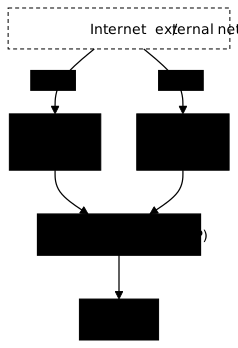
The diagram shows that a NodePort opens the same port on each node and sends traffic back to the same ClusterIP Service. On kind, as on a bare kubeadm cluster, the reponse-lb Service keeps <pending> in EXTERNAL-IP: no cloud provider supplies an address, and this is not a failure. You would have to add a component that plays this role, like MetalLB or cloud-provider-kind.
A headless Service has no ClusterIP: DNS directly returns the addresses of the Pods. Check it by comparing with the addresses of the Pods:
kubectl exec client -- nslookup reponse-headlesskubectl get pods -l app=reponse -o wideServer: 10.96.0.10Address: 10.96.0.10:53
Name: reponse-headless.default.svc.cluster.localAddress: 10.244.1.2Name: reponse-headless.default.svc.cluster.localAddress: 10.244.2.2Name: reponse-headless.default.svc.cluster.localAddress: 10.244.4.2
** server can't find reponse-headless.cluster.local: NXDOMAIN
** server can't find reponse-headless.cluster.local: NXDOMAIN
** server can't find reponse-headless.svc.cluster.local: NXDOMAIN
** server can't find reponse-headless.svc.cluster.local: NXDOMAIN
command terminated with exit code 1NAME READY STATUS RESTARTS AGE IP NODE NOMINATED NODE READINESS GATESreponse-f5d59fc45-2dsbn 1/1 Running 0 12s 10.244.2.2 demo-worker2 <none> <none>reponse-f5d59fc45-nxfvg 1/1 Running 0 12s 10.244.1.2 demo-worker <none> <none>reponse-f5d59fc45-szvtl 1/1 Running 0 12s 10.244.4.2 demo-worker3 <none> <none>The three Address lines are those of the three Pods, and no ClusterIP appears. The NXDOMAIN lines that follow are the attempts on the other search domains, as above. This mode serves applications that must reach a specific Pod, like databases managed by a StatefulSet.
How do you switch traffic from one version to the other?
Changing the selector of a Service redirects all the traffic at once to other Pods: this is the principle of blue-green. Two Deployments run side by side, the current version ("blue") and the new one ("green"). Only one is behind the Service, and the switch consists in changing this selector.
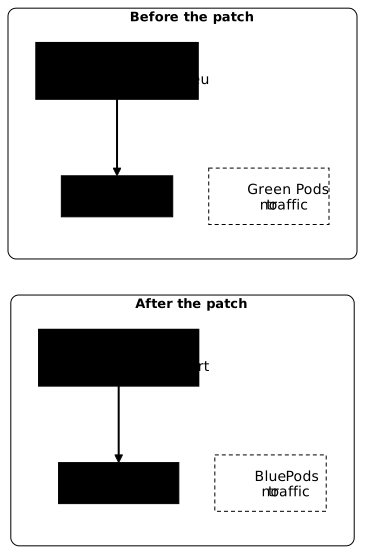
The diagram shows that only the selector of the Service changes: both Deployments stay in place. The notion of deployment strategy, with its variants, is described in deployment strategies; here, you only do the switch and you prove it with the endpoints.
Create the two Deployments. Each one answers with the name of its color, then expose the blue one:
kubectl create deployment bleu --image=busybox:1.38.0@sha256:a46257e06c82ad85242d0d38077d0a52d9896389ca60a1a59d3463db586e5fa4 --replicas=2 --port=8080 -- sh -c 'mkdir -p /www && echo "bleu $(hostname)" > /www/index.html && httpd -f -p 8080 -h /www'kubectl create deployment vert --image=busybox:1.38.0@sha256:a46257e06c82ad85242d0d38077d0a52d9896389ca60a1a59d3463db586e5fa4 --replicas=2 --port=8080 -- sh -c 'mkdir -p /www && echo "vert $(hostname)" > /www/index.html && httpd -f -p 8080 -h /www'kubectl rollout status deployment/bleukubectl rollout status deployment/vertkubectl expose deployment bleu --name=site --port=80 --target-port=8080kubectl get pods -l 'app in (bleu,vert)' -o widekubectl get endpointslice -l kubernetes.io/service-name=sitedeployment.apps/bleu createddeployment.apps/vert createdWaiting for deployment "bleu" rollout to finish: 0 of 2 updated replicas are available...Waiting for deployment "bleu" rollout to finish: 1 of 2 updated replicas are available...deployment "bleu" successfully rolled outWaiting for deployment "vert" rollout to finish: 0 of 2 updated replicas are available...Waiting for deployment "vert" rollout to finish: 1 of 2 updated replicas are available...deployment "vert" successfully rolled outservice/site exposedNAME READY STATUS RESTARTS AGE IP NODE NOMINATED NODE READINESS GATESbleu-569bcfc589-8vhss 1/1 Running 0 1s 10.244.4.4 demo-worker3 <none> <none>bleu-569bcfc589-fg8zx 1/1 Running 0 1s 10.244.2.3 demo-worker2 <none> <none>vert-f8d5c5fc7-glnsd 1/1 Running 0 1s 10.244.1.4 demo-worker <none> <none>vert-f8d5c5fc7-hwv5t 1/1 Running 0 0s 10.244.2.4 demo-worker2 <none> <none>NAME ADDRESSTYPE PORTS ENDPOINTS AGEsite-bqzrc IPv4 8080 10.244.2.3,10.244.4.4 0sThe endpoints of the site Service are the addresses of the two blue Pods. Query it from the client Pod, switch the selector to vert, then start again:
for i in $(seq 1 6); do kubectl exec client -- wget -qO- http://site; done | sort | uniq -ckubectl patch svc site -p '{"spec":{"selector":{"app":"vert"}}}'kubectl get endpointslice -l kubernetes.io/service-name=sitefor i in $(seq 1 6); do kubectl exec client -- wget -qO- http://site; done | sort | uniq -cwget: can't connect to remote host (10.96.51.226): Connection timed outcommand terminated with exit code 1 3 bleu bleu-569bcfc589-8vhss 2 bleu bleu-569bcfc589-fg8zxservice/site patchedNAME ADDRESSTYPE PORTS ENDPOINTS AGEsite-bqzrc IPv4 8080 10.244.1.4,10.244.2.4 2m15s 2 vert vert-f8d5c5fc7-glnsd 4 vert vert-f8d5c5fc7-hwv5tBefore the patch, only "blue" answers arrive; after, only "green" ones. In this run, one of the six requests failed on a timeout (Connection timed out), hence only five answers out of six. This isolated failure does not come from the switch, which has not happened yet; if it happens to you, run the loop again. The endpoints changed at the same time as the selector, without touching the Deployments. To go back, you just put app: bleu back: the blue Deployment stayed in place.
What are the limits of a Service?
A Service works on the TCP and UDP layers: it does not read HTTP requests. Routing by path or by host name and TLS termination are the job of an Ingress. A Service does not filter anything either: any Pod of the cluster can call any Service, in any namespace. Access rules are described with NetworkPolicies.
Clean up what you created before moving on:
kubectl delete svc reponse reponse-nodeport reponse-lb reponse-headless sitekubectl delete deployment reponse bleu vertkubectl delete pod clientkubectl delete namespace essaiservice "reponse" deleted from default namespaceservice "reponse-nodeport" deleted from default namespaceservice "reponse-lb" deleted from default namespaceservice "reponse-headless" deleted from default namespaceservice "site" deleted from default namespacedeployment.apps "reponse" deleted from default namespacedeployment.apps "bleu" deleted from default namespacedeployment.apps "vert" deleted from default namespacepod "client" deleted from default namespacenamespace "essai" deletedPut it into practice
Three labs replay the lesson. The first, expose a Deployment through a ClusterIP Service, asks you to expose busybox Pods that listen on 8080 through a Service on port 80, and the validation checks that several Pods really answer from a client Pod. The second, blue-green, asks you to switch traffic between two Deployments by changing the selector, and the validation reads the endpoints of the Service before and after the switch. The third, repair a NodePort Service, starts from a Service that serves nothing: you find out why and repair it. The validation checks the requested port, the endpoints on the right Pods and a real request to the NodePort from each node.
Key takeaways
- A Service gives a group of Pods a stable address and a DNS name.
- The selector chooses the Pods; a selector with no match gives a Service without endpoints, and no error.
portis the port of the Service,targetPortthat of the container: they can differ.- The endpoints are read with
kubectl get endpointslice -l kubernetes.io/service-name=<service>. - From another namespace, you need the name
<service>.<namespace>. - ClusterIP serves internal use; NodePort opens a port on each node; LoadBalancer asks the cloud provider for an address (
<pending>on kind); Headless returns the addresses of the Pods. - Changing the selector of a Service switches the traffic from one Deployment to the other.
- A Service does no HTTP routing, no TLS and no filtering: these are the roles of the Ingress and of NetworkPolicies.
Test your knowledge
Seven questions to check that the essentials are in place: choice of type, role of the selector, reading EndpointSlices and diagnosing a Service that does not answer.
Knowledge check
Check what you have learned with this interactive quiz
How it works
- The timer starts when you click Start
- Multiple choice, true/false and short answer questions
- You can move between questions
- Detailed results are shown at the end
Starts the quiz and the timer
Review
(0/0)Score by domain
A domain groups several guides and gets several questions, so its score is more reliable than a per-topic score, which often rests on a single question.
Summary
Strengths
No topic passed at 80% on at least two questions yet.
Weak areas
No topic below the pass mark.
Recommended next
Hints before you try again?
Continue the course: Reach a Kubernetes application: expose, port-forward, proxy
A new full quiz with random questions
Work again only on the questions you missed
FAQ: frequently asked questions about Services
These questions come up often when you connect applications in Kubernetes. The answers below take up the key points of the guide, Service types, the choice between ClusterIP, NodePort and LoadBalancer, and the diagnosis of missing endpoints.
- ClusterIP (default): reachable only inside the cluster.
- NodePort: opens the same port on each node, reachable from outside.
- LoadBalancer: asks the cloud for a load balancer with a public IP.
- ExternalName: creates a simple DNS alias to an external service.
clusterIP: None) directly exposes the IPs of the Pods.- ClusterIP stays internal: ideal for communication between microservices.
- NodePort opens the same port on all nodes (range 30000-32767), handy for testing, rarely used directly in production.
- LoadBalancer provisions a cloud-managed load balancer with a stable public IP.
kubectl get endpointslice -l kubernetes.io/service-name=my-service shows no address, it is almost always because the selector and the labels differ (typo, case, missing key). Also check that at least one target Pod is Ready: a Pod that is not ready is excluded from the endpoints.clusterIP: None. Unlike a classic Service, it exposes no virtual IP and does no load balancing. Instead, its DNS resolution returns directly the IP address of each Pod. This is what stateful applications need, such as replicated databases, where the client must reach a specific instance.service-name.namespace.svc.cluster.local. A Pod in the same namespace can settle for the short name (service-name). From another namespace, you have to add the namespace (service-name.other-namespace). It is CoreDNS, the DNS server of the cluster, that handles this resolution.