A DaemonSet makes sure a Pod runs on every eligible node of the cluster, and adds one by itself when a node joins. An eligible node is a node that nothing rules out: neither a taint that the Pod does not tolerate, nor a label filter that it does not satisfy. The DaemonSet is for agents that must be on every machine: log collection, monitoring, networking. A Deployment spreads its replicas where the scheduler decides, whereas a DaemonSet places exactly one Pod per node.
In this lesson, you put an agent on a four-node cluster and see that it is missing on the control plane. You fix it, you target a few nodes, you update the agent, then you learn to diagnose a missing Pod. The lesson ends with the choice between Deployment, StatefulSet and DaemonSet.
What you will learn
- Create a DaemonSet and check that a ready Pod runs on every eligible node.
- Read the columns of
kubectl get dsand spot the one that says a node is missing. - Run the agent on the control plane by tolerating its taint, without removing the taint from the node.
- Target only some nodes with
nodeSelectorornodeAffinity. - Update a DaemonSet with
RollingUpdateorOnDelete. - Diagnose a Pod missing on a node, and choose between DaemonSet, Deployment and StatefulSet.
Prerequisites
This lesson follows StatefulSets, whose four-node cluster it reuses. It also assumes you know Deployments and Pods. The notions of taint, toleration and affinity are covered here as they apply to a DaemonSet; the guide Advanced scheduling: Affinity, Taints, Tolerations and Topology Spread goes into detail.
Find the four-node cluster again
The lesson uses the demo-multi cluster from the previous lesson: one control plane and three workers, in Kubernetes v1.37.0. If it no longer exists, recreate it with the kind-multi.yaml file from First cluster and wait until the nodes are ready.
kind create cluster --name demo-multi --image kindest/node:v1.37.0@sha256:a1ed56cfb0e7b93589bdf97c8cd566405a265939e3620fc4f5de89adff580ae5 --config kind-multi.yamlkubectl wait --for=condition=Ready nodes --all --timeout=120snode/demo-multi-control-plane condition metnode/demo-multi-worker condition metnode/demo-multi-worker2 condition metnode/demo-multi-worker3 condition metThe control plane carries a taint that forbids placing ordinary Pods on it. A taint is a mark set on a node to repel Pods; a toleration is the declaration, on the Pod side, that it accepts this mark. Read the one on the control plane, then create a working directory and a namespace.
kubectl describe node demo-multi-control-plane | grep -A1 Taintsmkdir -p ~/atelier-k8s/workloads/daemonsets && cd ~/atelier-k8s/workloads/daemonsetskubectl create namespace ws-daemonTaints: node-role.kubernetes.io/control-plane:NoScheduleUnschedulable: falsenamespace/ws-daemon createdThe NoSchedule effect forbids scheduling a new Pod on this node, unless it tolerates the taint. Keep this line in mind: it explains what you are about to see.
The names and messages of this lesson are in French on purpose, so that the outputs stay those of the tested cluster: atelier-k8s means "workshop-k8s", battement "heartbeat", materiel "hardware" (so agent-materiel is the "hardware agent" and materiel=gpu a label), en-cours "in progress" in the maintenance=en-cours taint, and tout "all" in daemonset-agent-tout.yaml. In the custom-columns outputs, the headers HEURE, RAISON, NOM and LIBELLES mean "time", "reason", "name" and "labels".
Put an agent on every node
Here is a demonstration agent. It writes a heartbeat in its logs every 5 seconds, with its Pod name and the time. A DaemonSet is written like a Deployment, without replicas: the number of Pods comes from the nodes.
cat > daemonset-agent.yaml <<'EOF'apiVersion: apps/v1kind: DaemonSetmetadata: name: agent namespace: ws-daemonspec: selector: matchLabels: app: agent template: metadata: labels: app: agent spec: containers: - name: agent image: busybox:1.38.0@sha256:a46257e06c82ad85242d0d38077d0a52d9896389ca60a1a59d3463db586e5fa4 command: - sh - -c - 'while true; do echo "battement $(hostname) $(date +%T)"; sleep 5; done'EOFkubectl apply -f daemonset-agent.yaml && kubectl -n ws-daemon rollout status daemonset/agent --timeout=90sdaemonset.apps/agent createdWaiting for daemon set "agent" rollout to finish: 0 of 3 updated pods are available...Waiting for daemon set "agent" rollout to finish: 1 of 3 updated pods are available...Waiting for daemon set "agent" rollout to finish: 2 of 3 updated pods are available...daemon set "agent" successfully rolled outThe rollout waits for "3" Pods, not 4. Compare with the number of nodes and the state of the DaemonSet.
kubectl -n ws-daemon get ds agentkubectl get nodes --no-headers | wc -lNAME DESIRED CURRENT READY UP-TO-DATE AVAILABLE NODE SELECTOR AGEagent 3 3 3 3 3 <none> 3s4The DESIRED column gives the number of nodes where the DaemonSet wants a Pod: 3, while the cluster has 4 nodes. This gap is the sign that a node is ruled out. CURRENT counts the Pods created, READY those that are ready, UP-TO-DATE those that carry the latest version of the template, AVAILABLE those that are available, and NODE SELECTOR reminds you of the node filter if there is one. A CURRENT below DESIRED means that a wanted Pod is not in place yet. Look for the missing node.
kubectl -n ws-daemon get pods -l app=agent -o wideNAME READY STATUS RESTARTS AGE IP NODE NOMINATED NODE READINESS GATESagent-c2ld9 1/1 Running 0 3s 10.244.3.29 demo-multi-worker2 <none> <none>agent-hpq56 1/1 Running 0 3s 10.244.1.19 demo-multi-worker <none> <none>agent-s8jx5 1/1 Running 0 3s 10.244.2.19 demo-multi-worker3 <none> <none>There is one Pod per worker and none on the control plane: its NoSchedule taint rules it out, and the agent does not tolerate it. Now read the heartbeats of all the Pods at once, with the Pod prefix. The Pods are brand new, so each one has written only one line.
kubectl -n ws-daemon logs -l app=agent --prefix --tail=2[pod/agent-c2ld9/agent] battement agent-c2ld9 23:50:25[pod/agent-hpq56/agent] battement agent-hpq56 23:50:28[pod/agent-s8jx5/agent] battement agent-s8jx5 23:50:28Each agent writes its Pod name, which is the hostname of the container. Next, read the update strategy that the server set by default.
kubectl -n ws-daemon get ds agent -o jsonpath='{.spec.updateStrategy}{"\n"}{.spec.revisionHistoryLimit}{"\n"}'{"rollingUpdate":{"maxSurge":0,"maxUnavailable":1},"type":"RollingUpdate"}10By default, the DaemonSet replaces one Pod at a time (maxUnavailable: 1) and never creates an extra Pod (maxSurge: 0): the new Pod is only created once the old one has stopped. The section on updates shows the consequence.
Run the agent on the control plane
For the agent to run on the control plane too, add a toleration to the template, without touching the taint on the node. The toleration repeats the key and the effect that the node shows.
cat > daemonset-agent-cp.yaml <<'EOF'apiVersion: apps/v1kind: DaemonSetmetadata: name: agent namespace: ws-daemonspec: selector: matchLabels: app: agent template: metadata: labels: app: agent spec: tolerations: - key: node-role.kubernetes.io/control-plane operator: Exists effect: NoSchedule containers: - name: agent image: busybox:1.38.0@sha256:a46257e06c82ad85242d0d38077d0a52d9896389ca60a1a59d3463db586e5fa4 command: - sh - -c - 'while true; do echo "battement $(hostname) $(date +%T)"; sleep 5; done'EOFkubectl apply -f daemonset-agent-cp.yaml && kubectl -n ws-daemon rollout status daemonset/agent --timeout=120s && kubectl -n ws-daemon get ds agentdaemonset.apps/agent configuredWaiting for daemon set "agent" rollout to finish: 1 out of 4 new pods have been updated...Waiting for daemon set "agent" rollout to finish: 1 out of 4 new pods have been updated...Waiting for daemon set "agent" rollout to finish: 1 out of 4 new pods have been updated...Waiting for daemon set "agent" rollout to finish: 2 out of 4 new pods have been updated...Waiting for daemon set "agent" rollout to finish: 2 out of 4 new pods have been updated...Waiting for daemon set "agent" rollout to finish: 2 out of 4 new pods have been updated...Waiting for daemon set "agent" rollout to finish: 3 out of 4 new pods have been updated...Waiting for daemon set "agent" rollout to finish: 3 out of 4 new pods have been updated...Waiting for daemon set "agent" rollout to finish: 3 out of 4 new pods have been updated...Waiting for daemon set "agent" rollout to finish: 3 of 4 updated pods are available...daemon set "agent" successfully rolled outNAME DESIRED CURRENT READY UP-TO-DATE AVAILABLE NODE SELECTOR AGEagent 4 4 4 4 4 <none> 98sDESIRED goes to 4: the DaemonSet now counts the control plane. Yet the rollout took 95 seconds, which is surprising for such a simple agent.
The cause is in the agent. Its sh runs as process 1 of the container and ignores the SIGTERM stop signal: Kubernetes waits for the 30-second grace period to end, then kills the Pod. An agent that handles SIGTERM stops right away. And since maxSurge is 0, the node stays without an agent for the whole delay.
Changing the template therefore replaces the three worker Pods one by one, at about 30 seconds each. The 1 out of 4 on the first line comes from the control plane Pod: created at once, it already carries the new template. Check the Pods and the taint.
kubectl -n ws-daemon get pods -l app=agent -o widekubectl describe node demo-multi-control-plane | grep -A1 TaintsNAME READY STATUS RESTARTS AGE IP NODE NOMINATED NODE READINESS GATESagent-6qfhg 1/1 Running 0 0s 10.244.3.30 demo-multi-worker2 <none> <none>agent-h59dp 1/1 Running 0 95s 10.244.0.5 demo-multi-control-plane <none> <none>agent-htmlw 1/1 Running 0 31s 10.244.1.20 demo-multi-worker <none> <none>agent-spsb5 1/1 Running 0 62s 10.244.2.20 demo-multi-worker3 <none> <none>Taints: node-role.kubernetes.io/control-plane:NoScheduleUnschedulable: falseA Pod runs on demo-multi-control-plane (agent-h59dp), and the taint is still there: it is tolerated, not removed. The staggered ages (95, 62, 31 and 0 seconds) show the successive replacements.
Target only some nodes
A DaemonSet is not forced to aim at every node: nodeSelector limits it to the nodes that carry a given label. Here is a second DaemonSet, agent-materiel, meant for nodes labeled materiel=gpu. No node has this label for now.
cat > daemonset-gpu.yaml <<'EOF'apiVersion: apps/v1kind: DaemonSetmetadata: name: agent-materiel namespace: ws-daemonspec: selector: matchLabels: app: agent-materiel template: metadata: labels: app: agent-materiel spec: nodeSelector: materiel: gpu containers: - name: agent image: busybox:1.38.0@sha256:a46257e06c82ad85242d0d38077d0a52d9896389ca60a1a59d3463db586e5fa4 command: ["sleep", "3600"]EOFkubectl apply -f daemonset-gpu.yaml && sleep 5 && kubectl -n ws-daemon get ds agent-materielkubectl -n ws-daemon describe ds agent-materiel | grep -A5 Eventsdaemonset.apps/agent-materiel createdNAME DESIRED CURRENT READY UP-TO-DATE AVAILABLE NODE SELECTOR AGEagent-materiel 0 0 0 0 0 materiel=gpu 5sEvents: <none>DESIRED 0: no node matches, and Kubernetes does not report it. No event, no error: only the zero says so. This is a diagnostic trap that you will meet again below. Label a worker and watch the DaemonSet react.
kubectl label node demo-multi-worker2 materiel=gpu && sleep 5 && kubectl -n ws-daemon get ds agent-materiel && kubectl -n ws-daemon get pods -l app=agent-materiel -o widenode/demo-multi-worker2 labeledNAME DESIRED CURRENT READY UP-TO-DATE AVAILABLE NODE SELECTOR AGEagent-materiel 1 1 1 1 1 materiel=gpu 11sNAME READY STATUS RESTARTS AGE IP NODE NOMINATED NODE READINESS GATESagent-materiel-8t5gr 1/1 Running 0 5s 10.244.3.31 demo-multi-worker2 <none> <none>The Pod appeared on demo-multi-worker2 in under 5 seconds: the DaemonSet watches the labels of the nodes. For finer rules, nodeAffinity replaces nodeSelector and accepts operators such as In. Its long field name, requiredDuringSchedulingIgnoredDuringExecution, reads in two halves: the rule is mandatory at placement time (required), and a Pod that is already placed is not evicted if the node label changes later (IgnoredDuringExecution).
cat > daemonset-affinity.yaml <<'EOF'apiVersion: apps/v1kind: DaemonSetmetadata: name: agent-materiel namespace: ws-daemonspec: selector: matchLabels: app: agent-materiel template: metadata: labels: app: agent-materiel spec: affinity: nodeAffinity: requiredDuringSchedulingIgnoredDuringExecution: nodeSelectorTerms: - matchExpressions: - key: materiel operator: In values: - gpu containers: - name: agent image: busybox:1.38.0@sha256:a46257e06c82ad85242d0d38077d0a52d9896389ca60a1a59d3463db586e5fa4 command: ["sleep", "3600"]EOFkubectl apply -f daemonset-affinity.yaml && sleep 5 && kubectl -n ws-daemon get ds agent-materieldaemonset.apps/agent-materiel configuredNAME DESIRED CURRENT READY UP-TO-DATE AVAILABLE NODE SELECTOR AGEagent-materiel 1 1 1 0 1 <none> 16sTwo details can be read here. The NODE SELECTOR column goes to <none>, because it only shows nodeSelector and not the affinity. UP-TO-DATE is 0: the existing Pod is being replaced, and sleep as process 1 ignores SIGTERM too. Delete this DaemonSet and the label.
kubectl -n ws-daemon delete ds agent-materiel && kubectl label node demo-multi-worker2 materiel-daemonset.apps "agent-materiel" deleted from ws-daemon namespacenode/demo-multi-worker2 unlabeledWhat happens to the agent when a node gets a taint?
A taint has an effect, and the effect decides whether the Pods already in place stay. First set a NoExecute taint on demo-multi-worker3, then look at the DaemonSet after 10 seconds.
kubectl taint node demo-multi-worker3 maintenance=en-cours:NoExecutesleep 10 && kubectl -n ws-daemon get ds agent && kubectl -n ws-daemon get pods -l app=agent -o widenode/demo-multi-worker3 taintedNAME DESIRED CURRENT READY UP-TO-DATE AVAILABLE NODE SELECTOR AGEagent 3 3 3 3 3 <none> 2m4sNAME READY STATUS RESTARTS AGE IP NODE NOMINATED NODE READINESS GATESagent-6qfhg 1/1 Running 0 26s 10.244.3.30 demo-multi-worker2 <none> <none>agent-h59dp 1/1 Running 0 2m1s 10.244.0.5 demo-multi-control-plane <none> <none>agent-htmlw 1/1 Running 0 57s 10.244.1.20 demo-multi-worker <none> <none>agent-spsb5 1/1 Terminating 0 88s 10.244.2.20 demo-multi-worker3 <none> <none>The Pod on the tainted node is Terminating: NoExecute evicts the Pods in place that do not tolerate it, and DESIRED drops back to 3. Remove this taint: the - sign at the end deletes a taint.
kubectl taint node demo-multi-worker3 maintenance=en-cours:NoExecute-node/demo-multi-worker3 untaintedWait until kubectl -n ws-daemon get ds agent shows 4 in READY: the Pod comes back on demo-multi-worker3, with a delay while the old one finishes stopping. Then set a NoSchedule taint on this node, while its Pod is running.
kubectl taint node demo-multi-worker3 maintenance=en-cours:NoSchedule && sleep 20 && kubectl -n ws-daemon get ds agent && kubectl -n ws-daemon get pods -l app=agent -o widenode/demo-multi-worker3 taintedNAME DESIRED CURRENT READY UP-TO-DATE AVAILABLE NODE SELECTOR AGEagent 4 4 4 4 4 <none> 21sNAME READY STATUS RESTARTS AGE IP NODE NOMINATED NODE READINESS GATESagent-9xpch 1/1 Running 0 21s 10.244.2.31 demo-multi-worker3 <none> <none>agent-rvxk9 1/1 Running 0 21s 10.244.1.32 demo-multi-worker <none> <none>agent-w65rv 1/1 Running 0 21s 10.244.3.37 demo-multi-worker2 <none> <none>agent-xj5xp 1/1 Running 0 21s 10.244.0.9 demo-multi-control-plane <none> <none>The names and ages in this block do not continue those of the previous block, because they come from another run: only the presence of the four Pods matters. The Pod on demo-multi-worker3 is still there and DESIRED is 4: a NoSchedule alone does not evict a Pod that is already in place, it only prevents placing a new one. Remove this taint.
kubectl taint node demo-multi-worker3 maintenance=en-cours:NoSchedule- && sleep 10 && kubectl -n ws-daemon get ds agentnode/demo-multi-worker3 untaintedNAME DESIRED CURRENT READY UP-TO-DATE AVAILABLE NODE SELECTOR AGEagent 4 4 4 4 4 <none> 31sNothing moves, as expected. One question remains: does a failing node, or one marked unschedulable, keep its DaemonSet Pod, or can it receive one? Read the tolerations of an agent Pod: the DaemonSet controller adds some on its own.
kubectl -n ws-daemon get pods -l app=agent --field-selector spec.nodeName=demo-multi-worker -o jsonpath='{range .items[0].spec.tolerations[*]}{.key}{" "}{.operator}{" "}{.effect}{"\n"}{end}'node-role.kubernetes.io/control-plane Exists NoSchedulenode.kubernetes.io/not-ready Exists NoExecutenode.kubernetes.io/unreachable Exists NoExecutenode.kubernetes.io/disk-pressure Exists NoSchedulenode.kubernetes.io/memory-pressure Exists NoSchedulenode.kubernetes.io/pid-pressure Exists NoSchedulenode.kubernetes.io/unschedulable Exists NoScheduleThe first line is the one you wrote. The other six are set by the controller: the agent withstands a not-ready or unreachable node, and an unschedulable node.
This last toleration explains the behavior of kubectl cordon, the command that forbids placing new Pods on a node. A cordon evicts no Pod, whatever its controller. Thanks to the unschedulable toleration, the DaemonSet can keep, or recreate, its Pod on a cordoned node. To empty a node, kubectl drain evicts the Pods, but it refuses to go on as long as DaemonSet Pods are there: it asks for the --ignore-daemonsets option. The guide Managing the nodes of a Kubernetes cluster day to day (in French) details cordon and drain.
None of these tolerations covers a custom taint such as maintenance=en-cours:NoExecute. A universal toleration, operator: Exists without a key, covers it.
cat > daemonset-agent-tout.yaml <<'EOF'apiVersion: apps/v1kind: DaemonSetmetadata: name: agent namespace: ws-daemonspec: selector: matchLabels: app: agent template: metadata: labels: app: agent spec: tolerations: - operator: Exists containers: - name: agent image: busybox:1.38.0@sha256:a46257e06c82ad85242d0d38077d0a52d9896389ca60a1a59d3463db586e5fa4 command: - sh - -c - 'while true; do echo "battement $(hostname) $(date +%T)"; sleep 5; done'EOFkubectl apply -f daemonset-agent-tout.yaml && kubectl -n ws-daemon rollout status daemonset/agent --timeout=120s && kubectl taint node demo-multi-worker3 maintenance=en-cours:NoExecute && sleep 10 && kubectl -n ws-daemon get pods -l app=agent -o wide && kubectl taint node demo-multi-worker3 maintenance=en-cours:NoExecute-daemonset.apps/agent configuredWaiting for daemon set "agent" rollout to finish: 0 out of 4 new pods have been updated...Waiting for daemon set "agent" rollout to finish: 1 out of 4 new pods have been updated...Waiting for daemon set "agent" rollout to finish: 1 out of 4 new pods have been updated...Waiting for daemon set "agent" rollout to finish: 2 out of 4 new pods have been updated...Waiting for daemon set "agent" rollout to finish: 2 out of 4 new pods have been updated...Waiting for daemon set "agent" rollout to finish: 3 out of 4 new pods have been updated...Waiting for daemon set "agent" rollout to finish: 3 out of 4 new pods have been updated...Waiting for daemon set "agent" rollout to finish: 3 of 4 updated pods are available...daemon set "agent" successfully rolled outnode/demo-multi-worker3 taintedNAME READY STATUS RESTARTS AGE IP NODE NOMINATED NODE READINESS GATESagent-hd88q 1/1 Running 0 72s 10.244.0.6 demo-multi-control-plane <none> <none>agent-nd4jl 1/1 Running 0 11s 10.244.1.21 demo-multi-worker <none> <none>agent-rmhpt 1/1 Running 0 103s 10.244.2.21 demo-multi-worker3 <none> <none>agent-xlqrj 1/1 Running 0 42s 10.244.3.32 demo-multi-worker2 <none> <none>node/demo-multi-worker3 untaintedThe Pod agent-rmhpt on demo-multi-worker3 stays Running (103 seconds) ten seconds after the NoExecute taint, then the taint is removed. A universal toleration suits an agent that must survive anything, but it also ignores the taints you set to free a node: keep it for agents that the node cannot do without, such as networking or log collection.
Update a DaemonSet
Changing the template of a DaemonSet updates it. Add an environment variable and wait for the rollout to finish. With the agent of this lesson, one replacement lasts about 31 seconds: the 30 seconds of the grace period (the time given to a Pod to stop) plus about 1 second. With four nodes, the update exceeds the 120-second timeout of the command: the error that ends the output is expected.
kubectl -n ws-daemon set env daemonset/agent VERSION=2 && kubectl -n ws-daemon rollout status daemonset/agent --timeout=120s && kubectl -n ws-daemon get pods -l app=agent -o widedaemonset.apps/agent env updatedWaiting for daemon set "agent" rollout to finish: 0 out of 4 new pods have been updated...Waiting for daemon set "agent" rollout to finish: 0 out of 4 new pods have been updated...Waiting for daemon set "agent" rollout to finish: 1 out of 4 new pods have been updated...Waiting for daemon set "agent" rollout to finish: 1 out of 4 new pods have been updated...Waiting for daemon set "agent" rollout to finish: 1 out of 4 new pods have been updated...Waiting for daemon set "agent" rollout to finish: 2 out of 4 new pods have been updated...Waiting for daemon set "agent" rollout to finish: 2 out of 4 new pods have been updated...Waiting for daemon set "agent" rollout to finish: 3 out of 4 new pods have been updated...Waiting for daemon set "agent" rollout to finish: 3 out of 4 new pods have been updated...error: timed out waiting for the conditionThe error comes from kubectl, not from the DaemonSet: after 120 seconds, three Pods out of four were replaced, and the && chain stopped before the get pods. The update goes on by itself.
To wait until the end, run kubectl rollout status again, or give --timeout the number of nodes multiplied by the duration of one replacement, plus a margin for the last Pod to become available. Here, 4 nodes × about 31 seconds give 124 seconds, and 180 seconds leave a comfortable margin. The 31 seconds only hold for this agent: the real remedy is to shorten the stop, because an agent that handles SIGTERM no longer waits for the grace period. To read what happened node by node, look at the events of the DaemonSet.
kubectl -n ws-daemon get events --field-selector involvedObject.kind=DaemonSet,involvedObject.name=agent --sort-by=.lastTimestamp -o custom-columns=HEURE:.lastTimestamp,RAISON:.reason,MESSAGE:.messageHEURE RAISON MESSAGE2026-11-11T23:50:25Z SuccessfulCreate Created pod: agent-hpq562026-11-11T23:50:25Z SuccessfulCreate Created pod: agent-c2ld92026-11-11T23:50:25Z SuccessfulCreate Created pod: agent-s8jx52026-11-11T23:50:28Z SuccessfulCreate Created pod: agent-h59dp2026-11-11T23:50:31Z SuccessfulDelete Deleted pod: agent-s8jx52026-11-11T23:51:01Z SuccessfulCreate Created pod: agent-spsb52026-11-11T23:51:02Z SuccessfulDelete Deleted pod: agent-hpq562026-11-11T23:51:32Z SuccessfulCreate Created pod: agent-htmlw2026-11-11T23:51:32Z SuccessfulDelete Deleted pod: agent-c2ld92026-11-11T23:52:03Z SuccessfulCreate Created pod: agent-6qfhg2026-11-11T23:52:19Z SuccessfulDelete Deleted pod: agent-spsb52026-11-11T23:52:54Z SuccessfulCreate Created pod: agent-xqx542026-11-11T23:52:55Z SuccessfulDelete Deleted pod: agent-xqx542026-11-11T23:52:56Z SuccessfulCreate Created pod: agent-rmhpt2026-11-11T23:52:57Z SuccessfulDelete Deleted pod: agent-h59dp2026-11-11T23:53:27Z SuccessfulDelete Deleted pod: agent-6qfhg2026-11-11T23:53:58Z SuccessfulDelete Deleted pod: agent-htmlw2026-11-11T23:54:39Z SuccessfulDelete Deleted pod: agent-rmhpt2026-11-11T23:55:40Z SuccessfulDelete (combined from similar events): Deleted pod: agent-hd88q2026-11-11T23:56:11Z SuccessfulCreate (combined from similar events): Created pod: agent-vk94lThe list covers the whole life of the DaemonSet since its creation: the first replacements are those of the control plane toleration. Pick one: Deleted pod: agent-s8jx5 at 23:50:31, then Created pod: agent-spsb5 at 23:51:01. With maxSurge: 0, the DaemonSet deletes the old Pod, waits for it to end, then creates the new one: the node stays without an agent for about 30 seconds. For a monitoring agent, this is a measurement gap to plan for on each node. Kubernetes groups the last lines (combined from similar events). Now read the revision history, then roll back.
kubectl -n ws-daemon rollout history daemonset/agentkubectl -n ws-daemon rollout undo daemonset/agent && kubectl -n ws-daemon rollout status daemonset/agent --timeout=120sdaemonset.apps/agentREVISION CHANGE-CAUSE1 <none>2 <none>3 <none>4 <none>
Warning: resource daemonsets/agent was previously managed with 'kubectl apply'. Rolling back will not update the kubectl.kubernetes.io/last-applied-configuration annotation, which may cause unexpected behavior on future 'kubectl apply' operations. Consider using 'kubectl apply' with your previous configuration file instead.daemonset.apps/agent rolled backWaiting for daemon set "agent" rollout to finish: 1 out of 4 new pods have been updated...Waiting for daemon set "agent" rollout to finish: 1 out of 4 new pods have been updated...Waiting for daemon set "agent" rollout to finish: 1 out of 4 new pods have been updated...Waiting for daemon set "agent" rollout to finish: 2 out of 4 new pods have been updated...Waiting for daemon set "agent" rollout to finish: 2 out of 4 new pods have been updated...Waiting for daemon set "agent" rollout to finish: 3 out of 4 new pods have been updated...Waiting for daemon set "agent" rollout to finish: 3 out of 4 new pods have been updated...Waiting for daemon set "agent" rollout to finish: 3 of 4 updated pods are available...daemon set "agent" successfully rolled outThe history has four revisions: the base file, the control plane toleration, the universal toleration and VERSION=2. The rollback restored the previous one, the universal toleration. It took 95 seconds, so under the 120-second timeout: the output starts with 1 out of 4, because one Pod already carried the target revision and three replacements were enough. As with the StatefulSet, kubectl reminds you that the last-applied-configuration annotation is not updated.
The other strategy, OnDelete, replaces no Pod until you delete it. Switch to it, change the template, then look at the Pods.
kubectl -n ws-daemon patch ds agent -p '{"spec":{"updateStrategy":{"type":"OnDelete","rollingUpdate":null}}}' && kubectl -n ws-daemon set env daemonset/agent VERSION=3 && sleep 15 && kubectl -n ws-daemon get pods -l app=agent -L controller-revision-hashkubectl -n ws-daemon get ds agent -o jsonpath='{.spec.updateStrategy}{"\n"}' && kubectl -n ws-daemon get controllerrevision -l app=agentdaemonset.apps/agent patcheddaemonset.apps/agent env updatedNAME READY STATUS RESTARTS AGE CONTROLLER-REVISION-HASHagent-8xrdv 1/1 Running 0 108s 677f79c49bagent-djj9z 1/1 Running 0 77s 677f79c49bagent-jr9z6 1/1 Running 0 46s 677f79c49bagent-w6kmf 1/1 Running 0 16s 677f79c49b{"type":"OnDelete"}NAME CONTROLLER REVISION AGEagent-5d79474d6 daemonset.apps/agent 4 3m50sagent-677f79c49b daemonset.apps/agent 5 5m34sagent-7d8ddff84c daemonset.apps/agent 6 15sagent-8565477f78 daemonset.apps/agent 2 8m1sagent-857f8f5675 daemonset.apps/agent 1 8m4sNo Pod changed in 15 seconds: all four keep the revision 677f79c49b. A DaemonSet does not show its revision in get ds; it is read in the controllerrevision objects, where revision 6 (agent-7d8ddff84c) exists although no Pod carries it yet. Delete the Pod of the node demo-multi-worker so that it is reborn on the new revision.
kubectl -n ws-daemon delete pod -l app=agent --field-selector spec.nodeName=demo-multi-worker && sleep 10 && kubectl -n ws-daemon get pods -l app=agent -L controller-revision-hash -o widepod "agent-djj9z" deleted from ws-daemon namespaceNAME READY STATUS RESTARTS AGE IP NODE NOMINATED NODE READINESS GATES CONTROLLER-REVISION-HASHagent-8xrdv 1/1 Running 0 2m29s 10.244.3.33 demo-multi-worker2 <none> <none> 677f79c49bagent-jr9z6 1/1 Running 0 87s 10.244.0.8 demo-multi-control-plane <none> <none> 677f79c49bagent-td6vs 1/1 Running 0 11s 10.244.1.24 demo-multi-worker <none> <none> 7d8ddff84cagent-w6kmf 1/1 Running 0 57s 10.244.2.23 demo-multi-worker3 <none> <none> 677f79c49bOnly the Pod of demo-multi-worker carries 7d8ddff84c. OnDelete is the right choice when you want to pick the node and the moment, for example outside peak hours.
Diagnose a missing Pod on a node
A DaemonSet does not complain about a node it ignores: describe shows neither the ruled-out node nor the reason, and the only reliable signal is the number. Two of the three cases in the table are recognized by DESIRED, the third by READY.
| What you read | What it means | Where to look |
|---|---|---|
DESIRED below the number of nodes | a node is ruled out, here the control plane and its taint | the taints of the node: kubectl describe node <node>, then the toleration of the template |
DESIRED 0 and Events: <none> | no node matches the nodeSelector or the affinity | kubectl get nodes --show-labels and the expected label |
DESIRED correct, READY lower | the Pod exists but does not start | kubectl describe pod and kubectl logs on the Pod of the node concerned |
The method takes three steps: compare DESIRED with the number of nodes from kubectl get nodes, list the taints of each ruled-out node, then compare the taint with the toleration of the template (key, operator, effect). The guide Diagnose a Pending Pod covers the other causes of a Pod that is not scheduled.
Deployment, StatefulSet or DaemonSet?
The choice rests on two questions. Must the application run on every node? If not, must each instance have a name and a volume of its own? If the answer is no both times, the instances are interchangeable and a Deployment is enough.
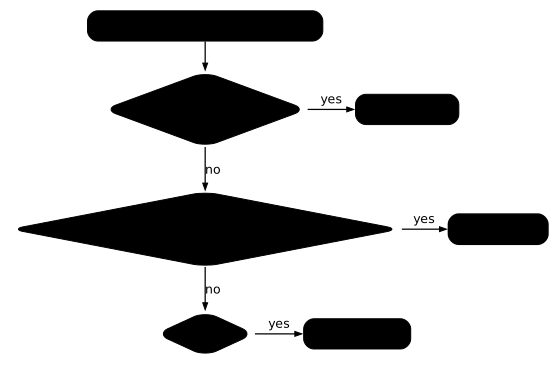
The diagram reads from top to bottom, one question after the other. The table repeats what you measured in the two lessons.
| Deployment | StatefulSet | DaemonSet | |
|---|---|---|---|
| Number of Pods | replicas, your choice | replicas, numbered from 0 to n-1 | one per eligible node |
| Pod names | random suffix | web-0, web-1, stable | random suffix |
| Volume | shared or none | one volume per replica (volumeClaimTemplates) | none by default; you can mount a node directory (hostPath) |
| Creation order | none | OrderedReady by default | none |
| Default update | RollingUpdate with surge | RollingUpdate from last to first | RollingUpdate, one node at a time, no surge |
| Typical case | web server, API | database, message queue | log collection, monitoring, networking |
Clean up the cluster
Delete the namespace: it takes the DaemonSet and its Pods with it. The taints and labels set on the nodes are already removed, but check it.
kubectl delete namespace ws-daemon --wait=true --timeout=120skubectl get nodes -o custom-columns=NOM:.metadata.name,TAINTS:.spec.taints,LIBELLES:.metadata.labels.materielnamespace "ws-daemon" deletedNOM TAINTS LIBELLESdemo-multi-control-plane [map[effect:NoSchedule key:node-role.kubernetes.io/control-plane]] <none>demo-multi-worker <none> <none>demo-multi-worker2 <none> <none>demo-multi-worker3 <none> <none>The deletion takes about 40 seconds, the grace period of the four Pods. Only the control plane taint remains, and no materiel label is left behind. Keep the demo-multi cluster for the next lesson.
Put it into practice
The guided lab repeats the central step of the lesson, for about 10 minutes. In An agent on every node, including the control plane, the monitoring team wants an agent that writes heartbeat in its logs every 60 seconds, on every node of the cluster, the control plane included, without removing its taint. The validation reads the DaemonSet and its status, the node of each Pod, the taint of the control plane and the logs of each agent.
Key takeaways
- A DaemonSet places one Pod per eligible node and adds one when a node joins; it has no
replicas. - The
DESIREDcolumn ofkubectl get dscounts the eligible nodes: a number below that of the nodes signals a ruled-out node, andDESIRED 0a filter that matches nothing, with no event or error. - The control plane is ruled out by its
node-role.kubernetes.io/control-plane:NoScheduletaint: a toleration in the template is enough, without removing the taint. NoExecuteevicts the Pods already in place;NoSchedulealone evicts nobody and only prevents placing a new Pod. A universal toleration (operator: Exists) also protects the Pod from a taint set to free the node.- The controller adds tolerations on its own (
not-ready,unreachable,unschedulable, pressures): a cordoned node still keeps or receives its DaemonSet Pod, becausecordonevicts no Pod.drainasks for--ignore-daemonsets. nodeSelectortargets by label,nodeAffinityaccepts finer rules; theNODE SELECTORcolumn only shows the first.- The default update replaces one node at a time (
maxUnavailable: 1,maxSurge: 0): each node stays without an agent while the old Pod stops, about 30 seconds with an agent that ignores SIGTERM. Arollout statusthat times out does not cancel the update. - With
OnDelete, no Pod changes until you delete it; the revision of a DaemonSet is read withkubectl get controllerrevision.
Test your knowledge
This quiz covers reading kubectl get ds, taints and tolerations, node targeting and updates. Allow five minutes and aim for 80%; below that, go back over "What happens to the agent when a node gets a taint?".
Knowledge check
Check what you have learned with this interactive quiz
How it works
- The timer starts when you click Start
- Multiple choice, true/false and short answer questions
- You can move between questions
- Detailed results are shown at the end
Starts the quiz and the timer
Review
(0/0)Score by domain
A domain groups several guides and gets several questions, so its score is more reliable than a per-topic score, which often rests on a single question.
Summary
Strengths
No topic passed at 80% on at least two questions yet.
Weak areas
No topic below the pass mark.
Recommended next
Hints before you try again?
Continue the course: Kubernetes operators: install one, configure it and read what it creates
A new full quiz with random questions
Work again only on the questions you missed