When a data breach happens in the cloud, who is responsible, you or the provider? The honest answer: it depends on the service model. The cloud runs on a principle of shared responsibility where each party secures part of the stack, and the boundary moves depending on whether you use IaaS, CaaS, PaaS, FaaS or SaaS. This page clarifies exactly what the provider manages and what falls to you on each of the five models, lists the recurring misconfigurations, and dismantles the classic trap of "the cloud is secure by default".
What you will learn
- The principle of shared responsibility and the distinction between security "of" and "in" the cloud
- The 5 XaaS models and their responsibility boundaries (IaaS, CaaS, PaaS, FaaS, SaaS)
- The universal summary table to keep as a reference
- The four misconfigurations that come up often
- An actionable checklist to audit your cloud security posture
Prerequisites: having understood the XaaS grid. If needed, read IaaS, PaaS, SaaS, FaaS, CaaS first.
1. The shared responsibility model
The model defines a clear boundary between what the cloud provider secures and what stays under your control. This boundary moves with the level of abstraction of the service used. Here is how it works visually:
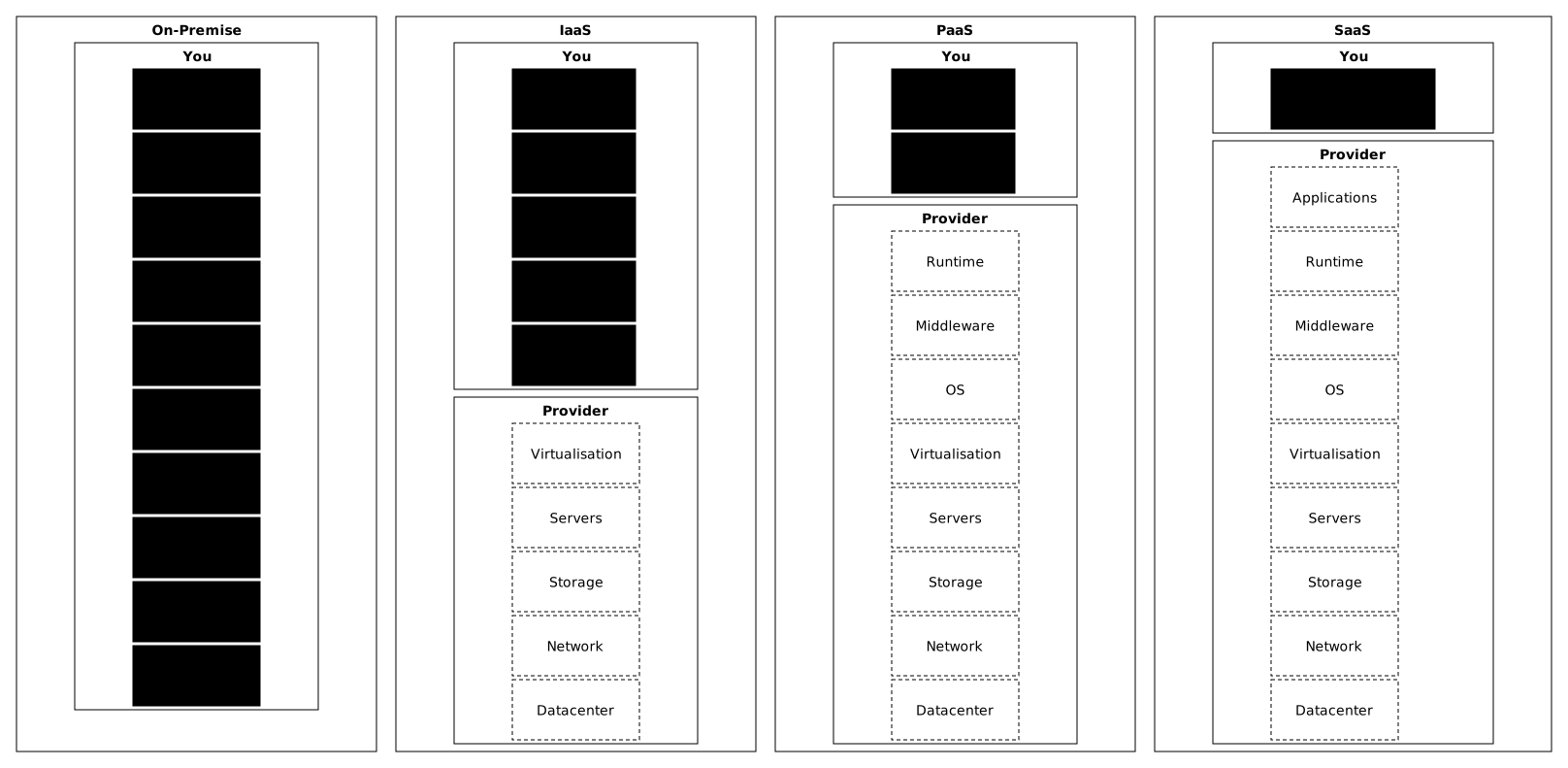
The diagram shows responsibility gradually moving to the provider as you go up in abstraction. On-premise, everything is yours. With IaaS, the provider takes care of the physical infrastructure. With PaaS, it also manages the system and the runtime. With SaaS, you are left with only the configuration and the access.
Fundamental principle, security "of" vs "in" the cloud
The cloud provider is responsible for security OF the cloud. You are responsible for security IN the cloud.
This distinction is not a semantic nuance, it is the key to the model:
| Scope | What it covers | Who |
|---|---|---|
| Security OF the cloud | Physical infrastructure, hypervisors, backbone network, isolation between customers | Provider |
| Security IN the cloud | Data, configurations, access, applications, compliance of your own scope | You |
What the provider secures (always, on every model)
Whatever the XaaS model, the provider manages three common pillars.
The first pillar is physical infrastructure. The provider controls access to the datacenters (physical access, video surveillance, guards), supplies their power and cooling, and protects them against disasters (fire, flood, earthquake).
The second pillar is network infrastructure. The provider runs the backbone network between datacenters, protects the infrastructure against DDoS attacks (saturation attacks), and isolates customers from one another at the hypervisor level.
The third pillar is baseline compliance. The provider obtains certifications (ISO 27001, SOC 2, HDS, and SecNumCloud, the framework of ANSSI, the French cybersecurity agency, depending on the provider), undergoes regular audits and complies with the regulations that apply to its operational scope.
What falls to you (always, on every model)
Whatever the XaaS model, you remain responsible for three areas.
The first area is your data. You classify it (sensitive, confidential, public), encrypt it at rest and in transit, back it up and set its retention, then delete it securely at end of life.
The second area is your access. You manage identities (who has access), permissions (what each one has access to) and authentication (MFA, SSO), and you review access regularly.
The third area is your configurations. You set the security settings of the services you enable, the firewall rules and security groups, the logs and monitoring, and you ensure the compliance of your own scope.
2. Responsibilities by service model
The responsibility boundary varies with the model. The higher you go up the XaaS stack, the more the provider takes on, but you never disappear completely, even with SaaS.
IaaS, you manage almost everything
With IaaS (EC2, Azure VMs, Compute Engine, Outscale FCU, OVH Public Cloud Instances), the provider manages only the base infrastructure. You carry the heaviest operational security burden, because you have the broadest control.
The provider secures the hypervisor and VM isolation, the base physical and virtual network, and the physical storage.
You secure the operating system (patches, hardening), the network configuration (security groups, firewall, NACL), middleware and runtime, applications and data.
CaaS, the OCI image stays with you, the OS depends on the family
CaaS groups two families whose responsibility boundary differs. With serverless containers (Cloud Run, ECS Fargate, Azure Container Apps) and with the Kubernetes modes that have no nodes to manage (EKS with Fargate, GKE Autopilot), the provider manages the host OS and the container engine. You manage the container itself: what is in the OCI image (the standard format of container images), how it is built, what it exposes.
With managed Kubernetes on node groups (EKS, AKS, GKE in Standard mode, OKS), the provider manages the control plane, but the worker nodes are a shared responsibility: it supplies the OS image, and you choose the version, trigger or authorise node updates and monitor CVEs (publicly known vulnerabilities, each listed under an identifier). The detail is in Shared responsibilities on the DevOps side, which classifies nodes as "Shared".
The provider secures everything it manages with IaaS. With serverless containers and Kubernetes without nodes to manage, it also secures the host OS and the container engine (containerd, CRI-O). With Kubernetes on node groups, it secures the control plane and supplies the node images, but it does not apply updates to your nodes on its own.
You secure the content of the OCI image (the image's base OS, installed system packages, application runtime), application dependencies (libraries, frameworks) and your code. You also secure the Kubernetes configurations (RBAC, NetworkPolicy, PodSecurity) and your data. Secrets have no place in the image: you keep them outside.
CaaS introduces an important novelty compared with IaaS: responsibility for the image supply chain. An image whose base distribution (Ubuntu, for example) has not been updated carries all of its unfixed CVEs. You must scan the images, choose minimal bases (distroless, Alpine), sign the images, and track vulnerabilities.
PaaS, you manage the code, the provider manages the platform
With PaaS (App Service, Elastic Beanstalk, Scalingo, Clever Cloud), the provider manages the complete execution platform. You deploy your code, and the provider runs it.
The provider secures everything it manages with CaaS, and in addition the application runtime (Java, Python, Node.js and their CVEs), middleware (web server, managed database), scaling and high availability.
You secure your application code (vulnerabilities found by static and dynamic analysis, SAST and DAST) and your dependencies (CVEs of the libraries you import). You also secure the application configuration (session management, CSRF, security headers), authentication, authorisation and your data.
The security advantage is a smaller attack surface on your side: the provider patches the OS and the runtime without any action from you. You remain responsible, however, for the vulnerabilities in your code and in your application dependencies.
FaaS, the function is the only scope you manage
With FaaS (AWS Lambda, Azure Functions, Cloud Run functions), the provider manages everything around your function. You write code, and it runs it.
The provider secures everything it manages with PaaS, and in addition the complete lifecycle of the execution container (creation, init, execution, idle, destruction), isolation between invocations and the mechanism that applies IAM permissions at runtime. The permissions themselves remain yours.
You secure the function code (its CVEs, its business logic, its data processing) and the embedded dependencies (npm, pip, Maven packages used in the bundle). You also secure the IAM permissions granted to the function: IAM is the management of identities and access rights at the provider, and least privilege is critical because a compromised function inherits all of its rights. Finally, you validate the input events (validation, sanitisation, anti-injection) and you externalise sensitive environment variables and secrets in Secrets Manager or Key Vault.
The classic FaaS trap is the proliferation of over-privileged functions. To go fast, it is tempting to give AdministratorAccess to all your Lambdas, then to never audit those rights. With 200 functions in production, that is 200 privilege-escalation vectors if one of them is compromised.
SaaS, minimal responsibility, but never zero
With SaaS (Gmail, Salesforce, Slack, Datadog, Notion), the provider manages the complete application. But you remain responsible for several essential scopes.
The provider secures the whole technical stack: the application and its updates, the infrastructure that carries it and the platform's compliance.
You secure the service configuration (security settings enabled, default sharing levels, audit logs enabled) and user access management (SSO/SAML, mandatory MFA, timely deactivation of old accounts). You also secure your data in the application (classification, regular exports, GDPR right to erasure), integrations with other systems (API keys, webhooks, OAuth) and the regulatory compliance of the stored data (GDPR, HDS, etc.).
3. Universal summary table, the 5 models
This table summarises the responsibilities across the 5 XaaS models. It is the reference you keep at hand when you assess your security posture.
| Layer | IaaS | CaaS | PaaS | FaaS | SaaS |
|---|---|---|---|---|---|
| Data | You | You | You | You | Shared |
| Application / function | You | You | You | You | Provider |
| Application dependencies | You | You | You | You | Provider |
| OCI image / packaging | You (if containerised) | You | Provider | Provider | Provider |
| Runtime | You | Image | Provider | Provider | Provider |
| OS | You | Provider (serverless) or Shared (Kubernetes nodes) | Provider | Provider | Provider |
| Container engine | You | Provider (serverless) or Shared (Kubernetes nodes) | Provider | Provider | Provider |
| Virtualisation | Provider | Provider | Provider | Provider | Provider |
| Servers / storage / network | Provider | Provider | Provider | Provider | Provider |
| Access / IAM | You | You | You | You | You |
| Security configuration | You | You | You | You | You |
Reading: "You" = your responsibility. "Provider" = its responsibility. "Shared" = depends on the context (typically: the provider guarantees durability, you manage the content and the classification; for Kubernetes nodes, it supplies the image and you apply the updates).
4. Four misconfigurations that come up often
These four mistakes come up often in customer-side security incidents. None is due to the provider: all are internal governance gaps.
Mistake 1, "The cloud is secure by default". The myth says: "My cloud provider is certified, so my data is safe." In reality, the provider secures its infrastructure, but your configurations are often permissive (SSH ports open to 0.0.0.0/0, overly broad IAM policies, unencrypted volumes). Cloud data leaks often come from public S3 buckets or overly open security groups, rather than from a provider flaw.
Some defaults have been hardened: since April 2023, a new S3 bucket blocks public access and disables ACLs, and since 5 January 2023 SSE-S3 encryption applies to every new object (AWS announcements). Leaks then come from a loosened setting or from older buckets. To protect yourself, enable the guardrails (the provider's safeguards) from day 1 (default encryption, public access blocking, IAM Access Analyzer, logs enabled).
Mistake 2, "The provider manages the backups". The myth says: "My data is in the cloud, so it is backed up." In reality, the provider ensures storage durability (your data does not disappear because of a failed disk), but it does not make an application backup. You accidentally delete an RDS database: the automatic backups (retention set by you) disappear with the instance unless you asked for a final snapshot or kept the backups, and the data is then lost. To protect yourself, configure backups explicitly (automated snapshots, cross-region replication, quarterly restore tests).
Mistake 3, "Logs are automatic". The myth says: "The cloud traces everything, I will be able to investigate if needed." In reality, audit logs (AWS CloudTrail, Azure Activity Log, GCP Cloud Audit Logs) are not kept durably by default: at AWS, the CloudTrail management events history is active from the start but covers only 90 days, and long retention (a trail to dedicated storage) as well as data access logs have to be enabled by you. To protect yourself, enable logs from the first day, set the retention period according to your audit and compliance obligations, and centralise them in a SIEM (a tool that collects and analyses security logs).
Mistake 4, "Isolation between customers is perfect". The myth says: "I am in my own environment, nobody can access my data." In reality, technical isolation is handled by the provider (and is generally excellent), but misconfigurations can expose your resources to the Internet or to other accounts. A bucket with an overly permissive policy is accessible by anyone. A publicly exposed Lambda function with AdministratorAccess is a gaping hole. To protect yourself, audit configurations regularly (Trusted Advisor, Defender for Cloud, Security Command Center), describe the infrastructure as code with static analysis (Checkov, Trivy) and use IAM Access Analyzer.
5. Specifics by European sovereign provider
The principles above apply everywhere, but the tools, the default settings and the reference documentation change from one provider to another. The three tabs below give, for each European player, the reference documentation, the verification tools and the points of attention on storage, identities and network. Read the one for your provider as a checklist to run after opening the account.
Documentation: docs.outscale.com (security)
Tools to verify your responsibilities:
- Cockpit: web console to view and manage your resources.
- OAPI API: automate configuration audits via CLI or Terraform.
- Audit logs: traceability of actions on your account.
Points of attention:
- OOS (Object Storage): check bucket policies, never a public bucket by default.
- IAM: use Access Keys with regular rotation, MFA on the admin account.
- Security Groups: allowlist rules (no
0.0.0.0/0on SSH). - Nets (VPC): isolate sensitive environments in separate Nets.
Certification: Outscale is qualified SecNumCloud 3.2 by ANSSI on its cloudgouv-eu-west-1 region.
Documentation: help.ovhcloud.com (security)
Tools to verify your responsibilities:
- OVHcloud Manager: centralised management console.
- OVHcloud API: automation and audit.
- Logs Data Platform: log centralisation.
Points of attention:
- Object Storage: check ACLs and policies, public read disabled by default.
- IAM: user and permission management per project.
- vRack: private network to isolate resources without public exposure.
- Network Firewall: explicit rules, no port open by default.
Certification: OVHcloud is certified ISO 27001, HDS, and qualified SecNumCloud on three offers of the September 2026 ANSSI catalogue: Hosted Private Cloud powered by VMware, Bare Metal Pod and SNC Cloud Platform (the public cloud offer). The other OVHcloud offers are not listed there.
Documentation: scaleway.com/en/docs (security)
Tools to verify your responsibilities:
- Scaleway Console: modern management interface.
- Scaleway API: complete automation.
- Cockpit (Observability): centralised monitoring and logs.
Points of attention:
- Object Storage: bucket policies and ACLs, public bucket scan active.
- IAM: fine-grained permission management per project and per environment.
- Private Networks: isolate critical resources.
- Security Groups: strict network filtering.
Certification: Scaleway is certified ISO 27001 and HDS. Its SecNumCloud qualification can be checked in the catalogue of qualified services published by ANSSI.
6. The often underestimated areas of responsibility
The shared responsibility model is often taught on three columns (IaaS, PaaS, SaaS). The arrival of CaaS and the spread of FaaS introduce two areas of responsibility that teams sometimes discover after the fact.
The OCI image supply chain (CaaS). With CaaS, the provider takes care of the orchestrator (and of the host OS in serverless mode, shared with you on Kubernetes nodes managed in groups), but the OCI image remains the team's responsibility. An image based on a distribution that has not been maintained for several years automatically carries the CVEs accumulated over that period. The platform provider does not fix the content of the image. Three good practices let you hold this responsibility:
- Scan images systematically in CI (for example with a recognised SCA scanner) before publication.
- Update base images regularly, by automating the rebuild.
- Sign the published images to trace their origin and block unsigned images at deployment.
Granular IAM for FaaS functions. With FaaS, security rests largely on the quality of the IAM roles attached to each function. A function that has an overly permissive role and processes insufficiently validated user input exposes, in case of an application vulnerability, all the resources reachable through that role. The principle of least privilege takes on particular importance here: it is often the only barrier between an application vulnerability and a wider compromise.
Cross-cutting good practices. Go through these four points like a checklist, on every cloud account you operate:
- Know the responsibility table for each service you use and share it in the internal documentation.
- Enable the provider's guardrails as soon as the account is opened (default encryption, blocking public resources by default, audit logs, mandatory MFA for human accounts).
- Audit IAM permissions regularly, in particular those of FaaS functions and technical roles.
- Test backup restoration every quarter, an untested backup cannot be considered valid.
Put it into practice
The lab gives the brief of a workload: who maintains the application, who operates the system, what the load depends on. You write a decision.json file that names the service model, the deployment model (in French) and the responsibilities of the provider and of the team, with a short justification. The validation re-reads your file against the brief: the service model must follow the constraints, and the deployment model must not meet a requirement that the brief does not state. The split of responsibilities must match the chosen model: with PaaS, for example, the team keeps the identities and the configuration of its application. No real cloud service is created.
Key points
- Security OF the cloud = provider; security IN the cloud = you.
- Across the 5 XaaS models, the higher you go, the more the provider takes on, but you never disappear (access, configuration, data stay yours).
- CaaS introduces responsibility for the OCI image supply chain, and on Kubernetes with node groups, updating the nodes remains shared.
- FaaS shifts the main weight onto the quality of the functions' IAM roles.
- 4 recurring mistakes: "cloud secure by default", "automatic backups", "automatic logs", "perfect isolation".
- Enabling guardrails from day 1 avoids having to fix things after the fact.
Knowledge check
Check that the essentials of this guide are in place. The questions only cover what has just been explained here.
Knowledge check
Check what you have learned with this interactive quiz
How it works
- The timer starts when you click Start
- Multiple choice, true/false and short answer questions
- You can move between questions
- Detailed results are shown at the end
Starts the quiz and the timer
Review
(0/0)Score by domain
A domain groups several guides and gets several questions, so its score is more reliable than a per-topic score, which often rests on a single question.
Summary
Strengths
No topic passed at 80% on at least two questions yet.
Weak areas
No topic below the pass mark.
Recommended next
Hints before you try again?
Continue the course: Pay-as-you-go: decoding cloud pricing models
A new full quiz with random questions
Work again only on the questions you missed