The historical IaaS / PaaS / SaaS triptych no longer describes the cloud offering in 2026. Between IaaS ("rent a VM, manage everything above it") and SaaS ("open a browser"), two intermediate models have established themselves in recent years: CaaS (Containers as a Service) and FaaS (Functions as a Service). The five together make up what is now called the XaaS grid, Everything as a Service. This page lays out the 5 models, places each one on its level of abstraction, details who manages what in each case, and offers a decision tree to choose the model for a new project in 2026.
What you will learn
- The 5 XaaS models (IaaS, CaaS, PaaS, FaaS, SaaS) and their boundaries
- The level of abstraction of each model, and the workload it takes off your hands
- The responsibility table: who manages the OS, the runtime, the scaling
- How to choose the right model for your context
- The pitfalls and lock-in specific to each model
Prerequisites: know the definition of the cloud and its five characteristics. If needed, start with Definition and promises of the cloud (in French).
1. The XaaS grid: 5 models, 1 axis of abstraction
All cloud models line up on a single axis: the level of abstraction that the provider manages for you. The higher the abstraction, the fewer technical layers you manage, and the more control you lose. The lower it goes, the closer you get to the hardware, and the more operational complexity you carry.
| Model | What you manage | What you no longer manage |
|---|---|---|
| On-premise | Everything: datacenter, power, hardware, network, OS, runtime, code | Nothing |
| IaaS | OS, runtime, middleware, code, data | Datacenter, hardware, virtualisation |
| CaaS | Container image, code, data | + Container engine; the OS with serverless, shared on Kubernetes nodes |
| PaaS | Application code, data | + Runtime, middleware, scaling |
| FaaS | Function code, events | + Lifecycle, scaling to zero |
| SaaS | Configuration, data | + The application itself |
Two words come up in this table. Serverless means you have no server to manage: the provider starts and stops the machines for you. A node is a machine in a Kubernetes cluster, the tool that spreads containers across several machines. The table therefore separates the offerings where you manage those nodes from those where the provider takes care of them.
The term XaaS ("Everything as a Service") refers to this extended grid. It is useful because it forces you to ask, for each service you consume: "at which level of abstraction am I paying, and is it the right one?" This is the first mental grid to anchor before discussing a design or a provider.
2. The table that decides everything: who manages what?
The diagram below stacks nine layers, from the applications down to the physical network, for four models. Look at where the part you manage stops: it sits higher and higher as you go from on-premise to IaaS, to PaaS and then to SaaS. The diagram puts the data on the provider's side with SaaS, whereas the table further down calls it "shared": the provider hosts it, but it remains yours, and it is up to you to configure and export it.
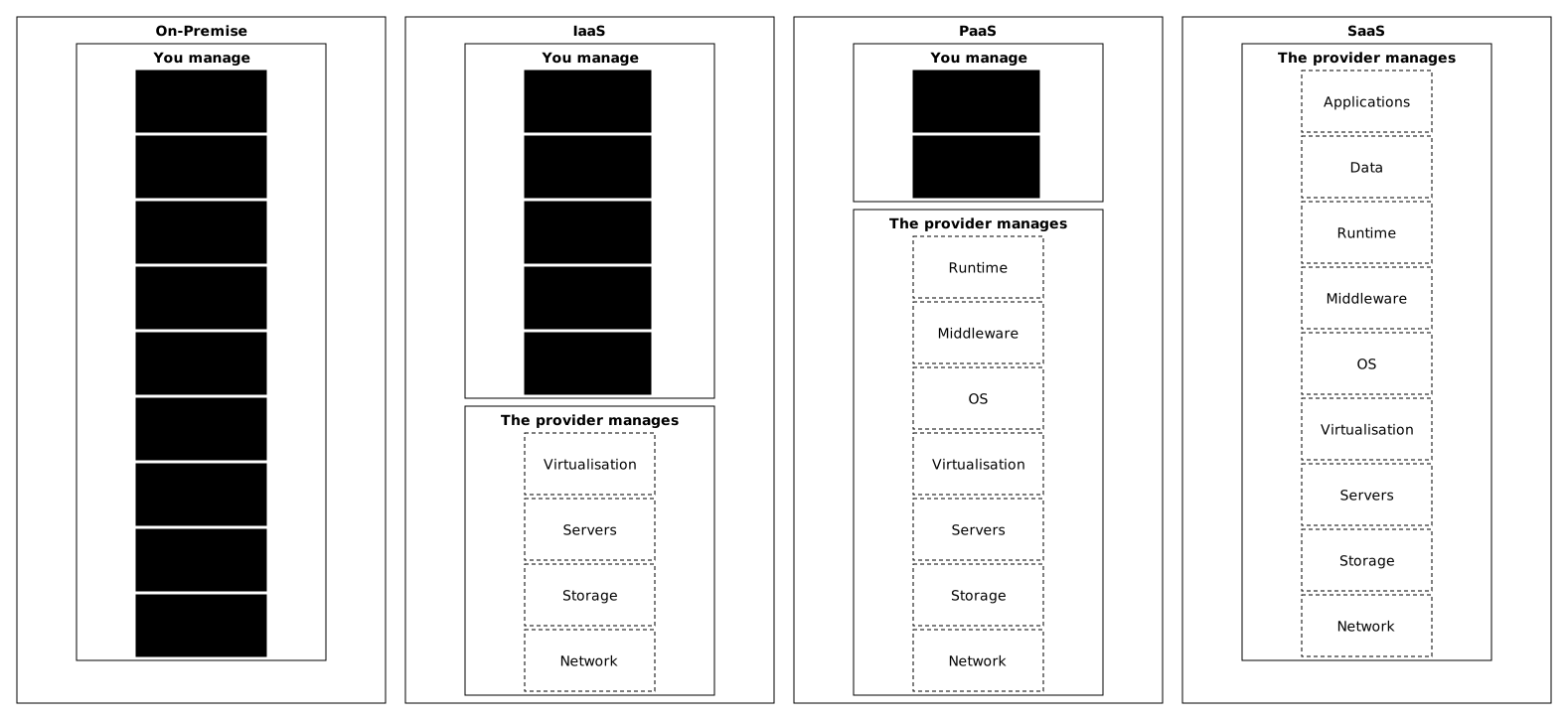
The following table, which adds CaaS and FaaS, is the key to visualising the trade-off. Each row is a technical layer, each column a model. The more cells say "You", the more work and responsibility you carry.
| Layer | On-prem | IaaS | CaaS | PaaS | FaaS | SaaS |
|---|---|---|---|---|---|---|
| Application | You | You | You | You | You | Provider |
| Data | You | You | You | You | You | Shared |
| Runtime | You | You | Image | Provider | Provider | Provider |
| Container engine | You | You | Provider (serverless) or Shared (Kubernetes nodes) | Provider | Provider | Provider |
| OS | You | You | Provider (serverless) or Shared (Kubernetes nodes) | Provider | Provider | Provider |
| Virtualisation | You | Provider | Provider | Provider | Provider | Provider |
| Physical servers | You | Provider | Provider | Provider | Provider | Provider |
| Physical storage | You | Provider | Provider | Provider | Provider | Provider |
| Physical network | You | Provider | Provider | Provider | Provider | Provider |
In practice. Going from IaaS to serverless CaaS, you give up managing the OS and the container engine, and the gain is measured in administration time; on Kubernetes with node groups, this gain is partial because node updates still have to be scheduled. A textbook assumption: with about 1 hour of OS and container engine maintenance per instance per month, 50 instances represent 50 hours per month, or about 0.3 FTE (full-time equivalent, based on 150 hours per month). Measure that hour in your own team before relying on it.
Going from CaaS to PaaS, you also give up the choice of runtime, which simplifies things but reduces your technical freedom. Each step upward trades human time for lock-in to the provider.
3. IaaS, Infrastructure as a Service
IaaS is the historical cloud model. The provider rents the base infrastructure (virtual servers, block storage, virtual network), and you manage everything above it: OS, middleware (the intermediate software, such as a web server or a message queue), applications, data, security.
When you launch a VM at Outscale, AWS, Azure or OVHcloud, you get the equivalent of a virtualised physical server. You choose the power (CPU, RAM) and the storage, and you install whatever you want, exactly as if you had a server in your own datacenter, without managing the hardware or the electricity.
| Provider | Main IaaS service |
|---|---|
| Outscale | FCU (VM), Net, BSU (Block Storage) |
| OVHcloud | Public Cloud Instances, Block Storage |
| Scaleway | Instances, Block Storage, VPC |
| AWS | EC2, EBS, VPC |
| Azure | Virtual Machines, Managed Disks |
| GCP | Compute Engine, Persistent Disk |
Typical use cases: lift and shift migration (moving an existing application to the cloud as it is), a need for full control over the infrastructure (specific GPU driver, exotic OS, kernel tuning), flexible R&D and test environments, complex stateful workloads.
4. CaaS, Containers as a Service
CaaS has become widespread since 2020. You bring a container (an image in the standard OCI format, for example built with Docker or Podman), and the provider runs it. With serverless containers, there is no OS to patch and no runtime to install; with Kubernetes on node groups, the nodes remain a shared responsibility. The container carries its own application stack.
CaaS comes in two families:
CaaS without a visible orchestrator (serverless containers): ECS Fargate, Cloud Run, Azure Container Apps and Azure Container Instances. You hand over an image, the provider launches it with the requested memory and CPU, and the OS is managed by the provider. No need to know Kubernetes. Cloud Run stays classified as CaaS, including for its jobs: Google describes it as a managed platform that runs code, functions or containers without a cluster to administer, and its jobs launch an image for a task that stops by itself. AWS App Runner, historically in this family, is closed to new customers and is no longer an option for a new project.
CaaS with managed Kubernetes: EKS (AWS), AKS (Azure), GKE (GCP), OKS (Outscale). The Kubernetes control plane (the brain that drives the cluster) is managed, and you manage your workloads with kubectl. With node groups (EKS, AKS, GKE Standard), the node OS and its updates are a shared responsibility: the provider publishes the images, you roll them out. Only the modes with no nodes to manage (EKS with Fargate, GKE Autopilot) move the OS to the provider. See Shared responsibility in the cloud. This family brings more complexity, but also more portability, with the whole CNCF ecosystem (the foundation that hosts Kubernetes).
| Provider | CaaS without orchestrator | CaaS with Kubernetes |
|---|---|---|
| AWS | ECS Fargate | EKS |
| Azure | Container Instances, Container Apps | AKS |
| GCP | Cloud Run | GKE |
| Outscale | no offering | OKS |
| OVHcloud | no offering | Managed Kubernetes |
Typical use cases: modern containerised applications, microservices, short batch jobs, DevOps teams with Docker/K8s expertise, a need for multi-cloud portability (the container runs identically everywhere).
The great strength of CaaS is that it keeps portability at the level of the OCI image. An image that runs on Cloud Run can run unchanged on Outscale OKS, ECS Fargate or on-prem Kubernetes. This is a strong argument for reducing lock-in, compared with a proprietary PaaS that constrains the runtime and the structure of the deployment.
5. PaaS, Platform as a Service
PaaS hides even more layers: you no longer manage the runtime or the middleware. You run a git push and your application is online, scaled and patched.
A team that moves from IaaS to PaaS recovers part of the time previously spent on infrastructure maintenance. No source publishes a general percentage: the share depends on the number of machines, the level of automation already in place and what the chosen PaaS does not cover, and it is measured on your own team. That time is reinvested in product development, which is often the right trade-off.
| Provider | PaaS service |
|---|---|
| Scalingo | French PaaS platform |
| Clever Cloud | French PaaS platform |
| OVHcloud | Web PaaS (formerly Platform.sh) |
| Heroku | Heroku Platform |
| Vercel | Vercel Platform |
| AWS | Elastic Beanstalk |
| Azure | App Service |
| GCP | App Engine |
Typical use cases: modern web applications and APIs, teams without infrastructure expertise, fast and frequent deployments, applications with variable load that benefit from automatic scaling.
6. FaaS, Functions as a Service
FaaS pushes abstraction very far for the code you run. You write a function (in Python, Node.js, Go, Java...), and the provider runs it on demand when an event occurs (HTTP request, message in a queue, file dropped in a bucket, cron clock). You pay for the execution time, per millisecond or per 100-millisecond slice depending on the provider, and nothing when the function is not running.
| Provider | FaaS service |
|---|---|
| AWS | Lambda |
| Azure | Functions |
| GCP | Cloud Run functions |
| Outscale | no offering to date |
| Cloudflare | Workers |
Typical use cases: event-driven pipelines (S3 → trigger → processing), lightweight backend APIs, internal automation (cloud cron jobs), webhooks, asynchronous processing, IoT cases.
The pitfalls specific to FaaS are worth knowing before you commit. The cold start adds from under 100 ms to over a second of latency on the first invocation of a new execution environment, according to the AWS Lambda documentation, which adds that it generally affects fewer than 1% of invocations. Vendor lock-in is high because each provider imposes its own event format and SDK. Debugging is hard: no SSH, no continuous stack trace, just CloudWatch / App Insights logs. The maximum execution time is limited (15 min for Lambda).
FaaS deserves its own fundamentals page: see Serverless and FaaS (in French).
7. SaaS, Software as a Service
SaaS is the end of the abstraction chain. You pay a subscription, and you use the application through a browser or an API. No infrastructure, no platform, no code, just configuration and your data.
When you use Gmail, Slack or Salesforce, you are using SaaS. You do not know (and do not need to know) which servers the application runs on, which stack, which architecture.
| Category | SaaS examples |
|---|---|
| Gmail, Microsoft 365 | |
| CRM | Salesforce, HubSpot |
| Communication | Slack, Teams, Zoom |
| Monitoring | Datadog, New Relic |
| CI/CD | GitHub Actions, GitLab SaaS |
| Project management | Jira, Asana, Notion |
| Storage / sync | Dropbox, Google Drive |
The trade-off: you gain enormously in simplicity, and you lose in customisation and in ownership of your data. With SaaS, you use the application as it was designed. If it does not cover 100% of your needs, you adapt or you change tool.
8. How do you choose the right model?
The choice comes down to three criteria: the level of technical control the team needs, the human time it can devote to infrastructure, and the portability it wants. There is no universal answer: team skills, type of application, regulatory constraints, budget and load profile weigh differently from one project to another.
Here is a decision tree that I propose, simplified to fit on this page. The diagram below summarises it: read it from top to bottom, and stop at the first question whose answer is "yes", because its exit on the right gives the model to choose. If all four answers are "no", you end up at PaaS. The four questions are detailed below the diagram.
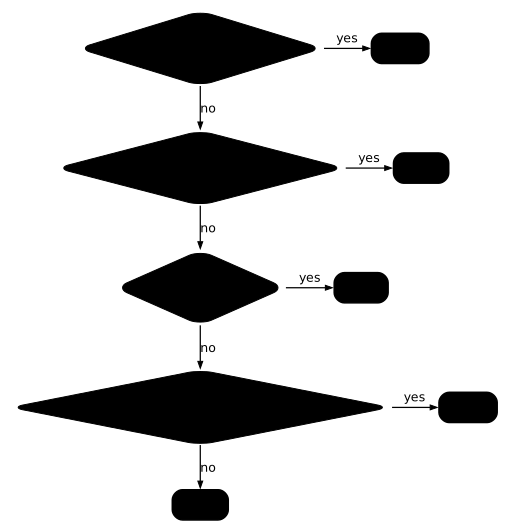
Question 1, Is there a standard SaaS that covers your need?
Yes → look for a SaaS solution first. Email, CRM, monitoring, CI/CD, project management: these needs have long been commoditised, and redeveloping them is rarely justified.
No → go to question 2.
Question 2, Is your load occasional or highly variable?
Yes (event-driven workflows, batch processing, rare automation) → FaaS is probably optimal financially.
No → go to question 3.
Question 3, Do you have specific stack or OS constraints?
Yes (specific GPU, exotic OS, custom kernel, complex binary dependencies) → IaaS gives you the control you need.
No → go to question 4.
Question 4, Do you have an autonomous DevOps team with Docker/K8s?
Yes → CaaS is the modern default. You keep the portability of the image, and you give up managing the OS with serverless (on Kubernetes nodes, it remains shared).
No, the team is all developers with no dedicated DevOps → PaaS frees you from most of the infrastructure.
Quick decision matrix
This matrix is used to shortlist a model among IaaS, CaaS, PaaS, FaaS and SaaS. Start from the criterion that matters most to you (control, deployment speed or lock-in) and look at which columns answer "Yes".
| Criterion | IaaS | CaaS | PaaS | FaaS | SaaS |
|---|---|---|---|---|---|
| Maximum control | Yes | Partial | No | No | No |
| Fast deployment | No | Yes | Yes | Yes | Yes |
| No infrastructure expertise required | No | Partial | Yes | Yes | Yes |
| Full customisation | Yes | Yes | Partial | No | No |
| Multi-cloud portability | Partial | Yes | No | No | No |
| Cost at zero load | No | No | Partial | Yes | Partial |
| Avoiding lock-in | Yes | Yes | Partial | No | No |
The typical profile of each model
The decision tree gives a quick orientation; the descriptions below let you confirm it, by checking that your context matches the profile of the chosen model.
When SaaS fits. The team has a commoditised need (CRM, messaging, file sharing, ticket tracking) and gains nothing by redeveloping it. It accepts paying per user, accepts the provider's roadmap, and favours a quick start over deep customisation.
When FaaS fits. The need is event-driven by nature (processing uploaded images, triggering on a webhook, periodic aggregation). The code is short and runs intermittently, and the team accepts the constraints of the model (cold start, maximum execution time, provider lock-in).
When PaaS fits. The team builds a classic web service (website, API, business application) and has no dedicated DevOps. It wants to deploy in a few minutes without managing the kernel, the runtime or the load balancer. It accepts pushing its code in the format imposed by the provider.
When CaaS fits. The team needs portability (an OCI image that runs elsewhere without rewriting), accepts learning the basics of containers, and wants to industrialise its deployment cycle. It is a model often chosen on new backend projects that want to keep a multi-cloud exit door open.
When IaaS remains relevant. The application has a strong dependency on the system (specific kernel driver, proprietary binary, licence constraint tied to the machine), or the team must reproduce an existing environment identically for compliance or audit reasons.
A team can combine several models: SaaS for messaging, PaaS for the marketing site, CaaS for the business API, FaaS for event-driven processing, IaaS for the legacy component that cannot migrate. This combination is common within a single organisation.
Key points
- The XaaS grid (IaaS, CaaS, PaaS, FaaS, SaaS) lines up all cloud models on an axis of increasing abstraction; each notch trades human time for lock-in.
- The who-manages-what table is the single reading grid: the more "You" cells, the more work and control.
- The choice of model depends on the technical control required, the human time available, and the portability wanted; no answer is universal.
- Lock-in increases from PaaS to FaaS to SaaS; always assess the exit before the entry.
- Each model has its own pitfall: paying for your habit with IaaS, the complexity of Kubernetes with CaaS, the imposed deployment format with PaaS, the cold start and the limited duration with FaaS, and your data sitting with the provider with SaaS.
Knowledge check
Check that the essentials of this guide are in place. The questions only cover what has just been explained here.
Knowledge check
Check what you have learned with this interactive quiz
How it works
- The timer starts when you click Start
- Multiple choice, true/false and short answer questions
- You can move between questions
- Detailed results are shown at the end
Starts the quiz and the timer
Review
(0/0)Score by domain
A domain groups several guides and gets several questions, so its score is more reliable than a per-topic score, which often rests on a single question.
Summary
Strengths
No topic passed at 80% on at least two questions yet.
Weak areas
No topic below the pass mark.
Recommended next
Hints before you try again?
Continue the course: Cloud shared responsibility: who secures what across the 5 models
A new full quiz with random questions
Work again only on the questions you missed