An audit asks that containers no longer run as root. The gesture looks like one line: add a USER to the Dockerfile, rebuild, ship. You do it, and the application stops writing, in a directory that the Dockerfile has just created two lines above. The temptation is then to go back, or to open the directory to everyone; both make the application work again, and both fail the audit.
This lesson shows why, by separating three decisions that USER makes you believe are one, then it settles how the image starts. It only deals with identity, owners and startup. The lesson Organize Dockerfile layers and use the build cache comes after: it deals with the order of the Dockerfile instructions and with the build cache, and it is not a prerequisite. The measurements that follow are on Docker 29.9.2, with an alpine base pinned by digest, the fingerprint that designates its exact content.
What you will learn
- Three distinct decisions: the runtime identity, the file permissions, the declaration the image passes on
- The measured trap:
USERchanges the uid of the process and no permission on what is already copied - The right answer: align the owner at build time, do not widen the mode
- The order of instructions: why
USERis declared last - The startup:
ENTRYPOINT,CMDand the exec form, which decide the process that receives the signals COPY --chown: what it sets, what it leaves untouched, and how it fails silently- The numeric uid: what
docker image inspectpasses on, and why a name is not enough - What is not guaranteed:
--userat launch overrides the image'sUSER - Ports below 1024: the real reason why a non-root can listen on them in a container
Prerequisites
The lesson Writing a Dockerfile is enough as a base: FROM, RUN, COPY and CMD. You also need a running Docker engine, and a throwaway working directory.
The example application, which reads and writes
The example application does two things, and this is deliberate: it tells its identity and it writes a machine load reading. An image that only reads would switch to non-root without anything breaking, and the trap would stay invisible. The script is made executable on the host (chmod +x collecte.sh) before each build.
The names are French because the commands are the ones that were run: collecte means "collection", charge.log is the load log, releves means "readings". The image tags carry a French suffix that names the variant: sans-root is "without root", nom is "name", nominconnu "unknown name", uidseul "uid only", chownnom "chown with a name", ordre "order". They are identifiers, so they stay as they are.
#!/bin/shset -eecho "uid=$(id -u) gid=$(id -g)"cut -d' ' -f1 /proc/loadavg >> /srv/collecte/charge.logecho "releves=$(wc -l < /srv/collecte/charge.log | tr -d ' ')"Three decisions that get confused
Taking an image off root involves three things that are decided separately, at different moments, and that do not replace one another.
The runtime identity is the uid the process takes, that is the number that designates a user for the kernel (the gid, its equivalent for a group). It is set with USER, and that is all USER does.
The file permissions are the owner (a uid and a gid) and the mode (who can read, write or execute) of what the image contains. The lesson Volume permissions reads them in detail. They are engraved in the layers at the moment each instruction runs, and no identity declaration modifies them afterwards.
The declaration of the image is what the image passes on to whoever launches it: the Config.User field, which docker image inspect returns. It is not the effective identity of the container, it is a default value, and the diagram below shows where the command line can contradict it.
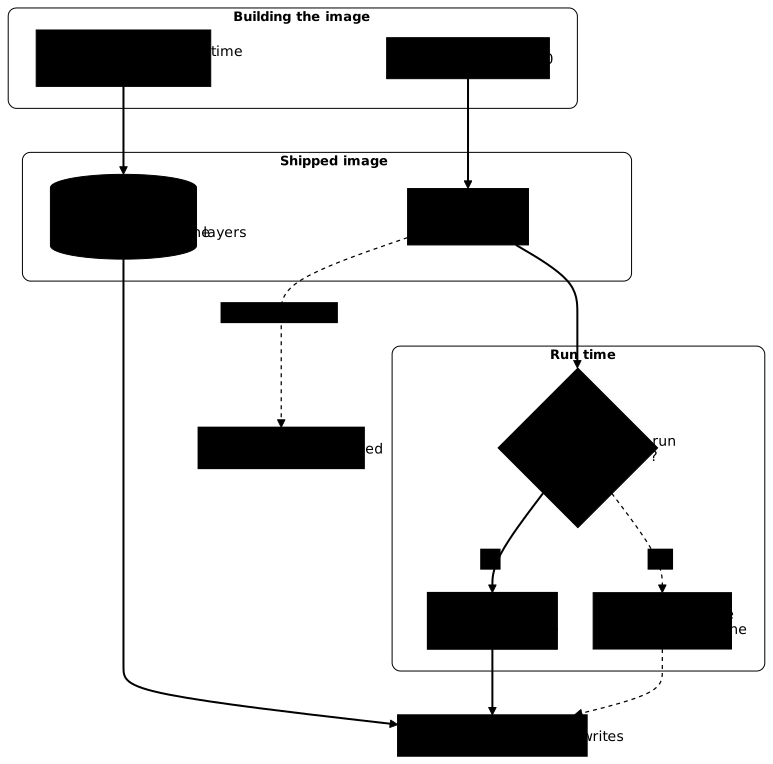
The trap, measured
Here is the starting image. It works, and it runs as root. CMD sets the command that the image runs by default, and the section on startup comes back to it.
FROM alpine:3.24@sha256:be2656061b536c1883c4034790e21d0a09c5aaaf51968b89368a3c0371ea2c9aRUN mkdir -p /srv/collecteCOPY collecte.sh /usr/local/bin/collecteCMD ["/usr/local/bin/collecte"]Let us add a user and the line that changes its identity, without touching anything else:
FROM alpine:3.24@sha256:be2656061b536c1883c4034790e21d0a09c5aaaf51968b89368a3c0371ea2c9aRUN mkdir -p /srv/collecteCOPY collecte.sh /usr/local/bin/collecteRUN adduser -D -u 20500 collecteUSER 20500:20500CMD ["/usr/local/bin/collecte"]Each variant of the Dockerfile is built under its own tag, collecte:root, collecte:user, collecte:sans-root and so on, with docker build -t collecte:root . for the first. That suffix says which one is in play. The same application, under both writings:
docker run --rm collecte:rootuid=0 gid=0releves=1docker run --rm collecte:useruid=20500 gid=20500/usr/local/bin/collecte: line 4: can't create /srv/collecte/charge.log: Permission deniedThe identity did change: the uid goes from 0 to 20500. The write, for its part, is refused. You only have to look at the directory in the image to see why. The --entrypoint stat option replaces the image's command with stat, which prints owner and mode without launching the application:
docker run --rm --entrypoint stat collecte:user -c '%u:%g:%a %U' /srv/collecte0:0:755 rootThe RUN mkdir -p /srv/collecte ran before the USER line, so as root, and the directory belongs to root with a 0755 mode. A process with uid 20500 does not write there, and this is the ordinary rule of the filesystem: USER touches no file, no directory, no permission.
The right answer: give, don't open
Two corrections make the application work again. The first is to give the directory to the user; the second, to open it to everyone with a chmod 777. Both work, and the second undoes exactly what the switch to non-root was looking for: any process in the container, whatever its identity, can then write there.
The install -d command creates a directory and sets in one go its owner (-o), its group (-g) and its mode (-m): the directory never exists in an intermediate state, owned by root.
FROM alpine:3.24@sha256:be2656061b536c1883c4034790e21d0a09c5aaaf51968b89368a3c0371ea2c9aRUN adduser -D -u 20500 collecteRUN install -d -o 20500 -g 20500 -m 0700 /srv/collecteCOPY collecte.sh /usr/local/bin/collecteUSER 20500:20500CMD ["/usr/local/bin/collecte"]docker run --rm collecte:sans-rootdocker run --rm --entrypoint stat collecte:sans-root -c '%u:%g:%a %U' /srv/collecteuid=20500 gid=20500releves=120500:20500:700 collecteThe 0700 mode is not decorative: it says that the right comes from the owner and from no one else. That is what distinguishes a fix from a workaround, and an automated check can tell the difference by reading the last digit of the mode, the one for others, which must remain without write permission.
Two details of form matter in this Dockerfile. Creation and assignment fit in the same instruction, because the directory only exists from there. And the uid is fixed at 20500 rather than left to the base image, so that the value does not change when the base image changes version.
The other tags of the lesson are variants of these two Dockerfiles, of which only the line that each measurement describes is changed. The table gives, for each, the base Dockerfile and the exact difference:
| Tag | Base Dockerfile | What changes |
|---|---|---|
collecte:chown | starting | the COPY line becomes COPY --chown=20500:20500 collecte.sh /usr/local/bin/collecte |
collecte:chownnom | starting | the COPY line becomes COPY --chown=collecte:collecte collecte.sh /usr/local/bin/collecte, with no adduser before |
collecte:nom | corrected | USER 20500:20500 becomes USER collecte |
collecte:nominconnu | corrected | USER collecte in place of USER 20500:20500, and the adduser line removed |
collecte:uidseul | corrected | the adduser line removed, USER 20500:20500 kept |
The order of instructions is not free
Every instruction placed after USER runs under that identity, with no way to create or to give. Moving the line up by three ranks is enough to break the build:
FROM alpine:3.24@sha256:be2656061b536c1883c4034790e21d0a09c5aaaf51968b89368a3c0371ea2c9aRUN adduser -D -u 20500 collecteUSER 20500:20500RUN mkdir -p /srv/collecte && chown collecte:collecte /srv/collectedocker build -t collecte:ordre .[...] > [3/3] RUN mkdir -p /srv/collecte && chown collecte:collecte /srv/collecte:0.130 mkdir: can't create directory '/srv/collecte': Permission denied------Dockerfile:4-------------------- 2 | RUN adduser -D -u 20500 collecte 3 | USER 20500:20500 4 | >>> RUN mkdir -p /srv/collecte && chown collecte:collecte /srv/collecte 5 |--------------------ERROR: failed to build: failed to solve: process "/bin/sh -c mkdir -p /srv/collecte && chown collecte:collecte /srv/collecte" did not complete successfully: exit code: 1The rule fits in one sentence: USER is declared last, right before the start command, once everything that required privileges is done.
How does the image start: ENTRYPOINT, CMD and exec form?
The image starts by launching a single process, the container's PID 1 (process number 1, the one docker stop addresses), and the user declared by USER is the one it runs as. CMD gives the default command, which you replace by typing it after the image name in docker run. ENTRYPOINT, by contrast, fixes the program launched: what you type after the image name becomes its arguments, and CMD only provides the default arguments. Only the --entrypoint option, seen above with stat, replaces it.
Both are written in two forms. The exec form is a JSON list, as in the Dockerfiles of this page: CMD ["/usr/local/bin/collecte"] launches the program directly, and it becomes PID 1. The shell form, CMD /usr/local/bin/collecte, hands the command to /bin/sh -c, and what becomes PID 1 then depends on the image's shell: the busybox shell of Alpine replaces a single command with the application itself, but as soon as the line chains several commands, the shell stays PID 1 and the application is only its child. Yet docker stop sends the stop signal to PID 1, and a shell does not pass it on to the application. The latter then does not stop cleanly, and the engine ends up killing it outright.
The lesson Container lifecycle and signals measures these cases; remember two rules here: write ENTRYPOINT and CMD in exec form, which leaves nothing to the shell's whims, and check that the launched file is executable and readable by the declared uid, since that is the account that starts it.
COPY --chown: what it does, and what it does not
COPY --chown sets the owner on what it copies, at the moment it copies it. It spares a separate RUN chown, and it saves a layer.
COPY --chown=20500:20500 collecte.sh /usr/local/bin/collectedocker run --rm --entrypoint stat collecte:chown -c '%n %u:%g %a' /usr/local/bin/collecte /srv/collecte/usr/local/bin/collecte 20500:20500 755/srv/collecte 0:0 755The copied file does belong to 20500, and its mode stays the one it had in the build context: --chown changes the owner, not the permissions. The /srv/collecte directory, created by a RUN mkdir above, still belongs to root: the application still fails. What COPY --chown does not do is therefore as important as what it does. It touches only its own destinations, it creates no user, and it corrects nothing of what another instruction has deposited.
It has a third behavior that surprises. A user name is resolved in the /etc/passwd of the image as it is at this step. If the name does not exist, the build does not stop: the file is written as 0:0, silently. With COPY --chown=collecte:collecte and no adduser before:
docker build -t collecte:chownnom .docker run --rm --entrypoint stat collecte:chownnom -c '%u:%g' /usr/local/bin/collecte[...]#8 naming to docker.io/library/collecte:chownnom done#8 unpacking to docker.io/library/collecte:chownnom 0.0s done#8 DONE 0.2s0:0With a RUN adduser -D -u 20500 collecte placed before, the same COPY --chown=collecte:collecte does return 20500:20500. The name therefore works, provided it exists at the right moment; the numeric uid, for its part, has nothing to resolve.
The Dockerfile reference nonetheless states that the build fails if /etc/passwd or /etc/group are missing or do not contain the given names. The BuildKit code (solver/llbsolver/ops/user_linux.go) does something else: it leaves the uid and the gid at zero when the name is not found. The behavior measured above is what counts, not the sentence of the documentation.
Declaring the user with a numeric uid
USER accepts a name as well as digits, and the container runs under the right uid in both cases. The difference lies in what the image passes on. Three images, declared with USER collecte, with USER 20500:20500, and without USER, give:
docker image inspect collecte:nom --format '{{.Config.User}}'docker image inspect collecte:sans-root --format '{{.Config.User}}'docker image inspect collecte:root --format '[{{.Config.User}}]'collecte20500:20500[]A name is resolved in the image's /etc/passwd. A tool that refuses root containers does not read that file: it reads the declaration, and it cannot prove that a name is not root. A numeric uid, for its part, can be verified without opening anything. The 20500:20500 form declares the uid and the gid; 20500 alone is also numeric and accepted.
The name has a second defect, a brutal one: it is resolved at launch, and an image that declares a name absent from its /etc/passwd does not start at all. The build, for its part, went through without a word.
docker run --rm collecte:nominconnudocker: Error response from daemon: unable to find user collecte: no matching entries in passwd file
Run 'docker run --help' for more informationA numeric uid has no such breaking point: it starts even if no entry matches it, and id then returns the uid without a name.
docker run --rm --entrypoint id collecte:uidseuluid=20500 gid=20500 groups=20500A chown 20500:20500 accepts the same digits, so that a non-root image holds without any adduser: it runs, it writes, and stat returns 20500:20500:700 UNKNOWN. What the /etc/passwd entry brings in addition is modest but real: a $HOME (otherwise /) and a uid that tools know how to name, where whoami answers unknown uid 20500. That is why the adduser stays in the corrected Dockerfile.
The third case deserves a look: an image without USER declares nothing at all, not even root. It runs as root because that is the engine's default, and an empty string cannot be told apart from an image whose intent is unknown.
What the image does not guarantee
The declaration is a default value, not a guarantee. Whoever launches decides:
docker run --rm --user 0:0 collecte:sans-rootuid=0 gid=0releves=1The non-root image, launched with --user 0:0, runs under uid 0 and writes without difficulty. That is why a check that wants to measure what an image does launches it without any identity option: with the option, it would measure the command. And it is also why the Dockerfile's USER does not replace a policy on the platform side: it states the intent of the image, not what a platform will do with it.
Ports below 1024, and the belief they sustain
You often read that a non-root process cannot listen below port 1024. In a Docker container, it can:
docker run --rm --user 20500:20500 alpine:3.24@sha256:be2656061b536c1883c4034790e21d0a09c5aaaf51968b89368a3c0371ea2c9a sh -c 'nc -l -p 80 & sleep 1; netstat -ltn | grep ":80 "'tcp 0 0 :::80 :::* LISTENThe reason is not a capability granted to the process. A capability is a fragment of root's powers that the kernel grants separately, such as NET_BIND_SERVICE to open a low port; the page Docker security introduces them. A non-root in a container has none:
docker run --rm --user 20500:20500 alpine:3.24@sha256:be2656061b536c1883c4034790e21d0a09c5aaaf51968b89368a3c0371ea2c9a grep -E '^Cap(Prm|Eff|Bnd)' /proc/self/statusCapPrm: 0000000000000000CapEff: 0000000000000000CapBnd: 00000000a80425fbThe effective set (CapEff, what the process can actually exercise) is empty: only the bounding set (CapBnd, the ceiling) keeps the default capabilities, and it only serves to bound what a process could acquire. What makes port 80 accessible lies elsewhere, in a kernel setting, ip_unprivileged_port_start (the first port number open to any process), which the engine sets in the container's network namespace, that is in the network stack specific to that container. In the container, then on the host:
docker run --rm alpine:3.24@sha256:be2656061b536c1883c4034790e21d0a09c5aaaf51968b89368a3c0371ea2c9a cat /proc/sys/net/ipv4/ip_unprivileged_port_startcat /proc/sys/net/ipv4/ip_unprivileged_port_start01024Two measurements complete the demonstration. Dropping all the container's capabilities takes nothing away from listening, and setting the value back to its usual one brings the refusal back, capabilities intact:
docker run --rm --cap-drop ALL --user 20500:20500 alpine:3.24@sha256:be2656061b536c1883c4034790e21d0a09c5aaaf51968b89368a3c0371ea2c9a sh -c 'nc -l -p 80 & sleep 1; netstat -ltn | grep ":80 "'docker run --rm --sysctl net.ipv4.ip_unprivileged_port_start=1024 --user 20500:20500 alpine:3.24@sha256:be2656061b536c1883c4034790e21d0a09c5aaaf51968b89368a3c0371ea2c9a nc -l -p 80tcp 0 0 :::80 :::* LISTENnc: bind: Permission deniedThe setting belongs to the container's network namespace, and a container launched with --network host shares that of the host. It then no longer has its own setting: the non-root falls back to the host's value, here 1024, and the refusal comes back. The engine in addition forbids correcting it from the command line.
docker run --rm --network host --user 20500:20500 alpine:3.24@sha256:be2656061b536c1883c4034790e21d0a09c5aaaf51968b89368a3c0371ea2c9a nc -l -p 80 -w 1docker run --rm --network host --sysctl net.ipv4.ip_unprivileged_port_start=0 alpine:3.24@sha256:be2656061b536c1883c4034790e21d0a09c5aaaf51968b89368a3c0371ea2c9a truenc: bind: Permission denieddocker: Error response from daemon: failed to create task for container: failed to create shim task: OCI runtime create failed: runc create failed: sysctl "net.ipv4.ip_unprivileged_port_start" not allowed in host network namespaceThe practical conclusion is short: in a Docker container as it is shipped and outside --network host, the listening port is not an argument for staying root. The choice of port is decided on readability and publication, not on privileges. The rest of the hardening of an unprivileged container, including the capabilities to drop, is covered in Securing Docker in production.
How do you clean up the images of this lesson?
Each built variant stays in the local image store. This command removes those of the lesson; if you did not build every variant, it reports the missing ones and removes the others.
docker rmi collecte:root collecte:user collecte:sans-root collecte:chown collecte:chownnom collecte:nom collecte:nominconnu collecte:uidseulPractice
The lab puts you back in the starting situation with your own application: an image that runs, that writes, and that is root. You add the USER, you read the Permission denied, then you fix it. The validation covers the state of the system and the means as much as the effect: four checks of equal weight verify that the image runs under a non-zero uid without any option imposing it, that it still writes its log, that the data directory belongs to it without being writable by everyone, and that it declares its user with a numeric uid. A chmod 777 passes the second check and fails the third; a USER by name passes the first three and fails the fourth.
Key points
-
USERchanges the runtime identity and no permission. Directories created before it belong to root, and the non-root application no longer writes there. -
Align the owner, do not widen the mode. Giving the directory to the user at build time, with a mode that opens nothing to others, makes the application write; a
chmod 777does too, and it undoes the benefit of switching to non-root. -
USERis declared last, right before the start command: every instruction that follows it runs without privilege and fails to create or to give. -
Startup is written in exec form.
ENTRYPOINTandCMDas a JSON list make the application PID 1, the one that receives the stop signal, whereas the shell form leaves the image's shell to decide, and keeps it as PID 1 as soon as the line chains several commands. -
COPY --chownonly applies to its own destinations. It creates no user, corrects nothing of what another instruction has deposited, and silently falls back to0:0if the given name does not yet exist in the image. -
Declare the uid in digits. A name is resolved in the image's
/etc/passwd; a numeric uid is read inConfig.Userwithout opening anything. An image withoutUSERdoes not declareroot, it declares nothing. -
The declaration is a default, not a guarantee.
docker run --user 0:0brings the non-root image back under uid 0: measuring an image is done without an identity option. -
Port 80 does not oblige you to stay root. A non-root has no effective capability in a container, and still listens there because the engine lowers
ip_unprivileged_port_startto 0.
Knowledge check
Check that you have the essentials of this guide. The questions cover only what has just been explained here.
Knowledge check
Check what you have learned with this interactive quiz
How it works
- The timer starts when you click Start
- Multiple choice, true/false and short answer questions
- You can move between questions
- Detailed results are shown at the end
Starts the quiz and the timer
Review
(0/0)Score by domain
A domain groups several guides and gets several questions, so its score is more reliable than a per-topic score, which often rests on a single question.
Summary
Strengths
No topic passed at 80% on at least two questions yet.
Weak areas
No topic below the pass mark.
Recommended next
Hints before you try again?
Continue the course: Organize Dockerfile layers and use the build cache
Continue the course: Securing Docker in production
A new full quiz with random questions
Work again only on the questions you missed