Before you put a reverse proxy in front of an application, you need to be able to read what that proxy (an intermediate server that receives requests in place of the application and forwards them to it) is going to relay: a method, an authority, headers, a body, a response code, and to foresee what becomes of a request that is replayed or redirected. This lesson follows What a web service is and what publishing it means and prepares the "Names and exposure" foundation. It does not repeat the whole HTTP mechanism, already detailed in HTTP and HTTPS (in French): it focuses on what, in a request, decides the behaviour of a proxy or of a client that retries, two traps you will meet with every reverse proxy you configure.
What you will learn
- Read the method, authority, path, headers, body and response code in an HTTP exchange
- Predict the effect of a redirect or a retry on a request, depending on whether it is idempotent (can be replayed without changing the state of the service) or not
- Explain why an HTTP status code alone never identifies the component that actually issued it
- Write the gestures of a careful client: read the HTTP code and the exit
code of
curl, and replay a write with an idempotency key
Prerequisites
This lesson assumes the previous one,
What a web service is and what publishing it means.
For the full mechanics of the protocol (all the methods, the detail of the
TLS handshake, reading with curl -v), refer to
HTTP and HTTPS (in French): this
lesson assumes its basics and takes up only what directly conditions the
behaviour of a future reverse proxy.
What does a request contain, and what should you read first?
An HTTP request boils down to five pieces of information that are enough to
predict what a server or a proxy will do with it: the method, the targeted
authority, the path, the headers and the body. The method (GET, POST,
PUT...) states the intent; the path designates the resource; the
headers carry metadata (expected format, body length, session
information); the body, optional, carries the data sent, for example the
JSON of a form.
The authority deserves particular attention: in HTTP/1.1 it is the Host
header (Host: app.exemple.fr); in HTTP/2 and HTTP/3 it is the
:authority pseudo-header, which carries the same information under another
name. In both cases the authority says which service name the request is
addressed to, which becomes decisive as soon as a single entry point receives
several names: it, and not the destination IP address, lets you choose the
right application. The lesson
Publish a web service shows how a
proxy uses it to route, alongside another decision taken earlier in the
connection, the SNI (the server name the client announces during the TLS
negotiation, before sending any HTTP request).
How do you read a complete exchange, header by header?
An HTTP exchange reads like a form: each line of the request asks a
question, each line of the response answers it, and curl -v displays both
side by side. Here is the creation of an order on the lab's API (the small
demonstration API supplied by this lesson's lab). Lines starting with > are
sent by the client, lines starting with < are received from the server;
connection lines (prefixed with *) are removed for readability. Port, date,
versions and durations are the values of my capture of 2026-10-25: my test
runs on port 18412, so adapt the URL to your API's and expect other values. The
first line is a warning from curl: -d is enough to select POST, so the
-X is superfluous here, as long as no redirect comes into play (the section
on redirects explains why we keep it).
curl -sS -v -X POST \ -H 'Content-Type: application/json' \ -H 'Idempotency-Key: cmd-A-100' \ -d '{"ref":"A-100"}' http://127.0.0.1:18412/commandes 2>&1 | grep -v '^\*'Note: Unnecessary use of -X or --request, POST is already inferred.> POST /commandes HTTP/1.1> Host: 127.0.0.1:18412> User-Agent: curl/8.18.0> Accept: */*> Content-Type: application/json> Idempotency-Key: cmd-A-100> Content-Length: 15>} [15 bytes data]< HTTP/1.1 201 Created< Server: BaseHTTP/0.6 Python/3.12.13< Date: Sun, 25 Oct 2026 21:10:01 GMT< Content-Type: application/json< Content-Length: 35<{ [35 bytes data]{"ref": "A-100", "statut": "creee"}Read the request line by line, asking each time what that line decides:
| Line | What it decides |
|---|---|
POST /commandes HTTP/1.1 | The method (create) and the path (the orders collection); HTTP/1.1 is the protocol version |
Host: 127.0.0.1:18412 | The authority: which service name the request is addressed to, hence which application a proxy will choose (here an IP and a port, since we query by address; with a DNS name you would read app.exemple.fr) |
User-Agent, Accept | Who is speaking and which format the client accepts; informative, but valuable in logs |
Content-Type: application/json | How the server must interpret the body; without it, a {"ref":"A-100"} may be read as plain text |
Idempotency-Key: cmd-A-100 | A key chosen by the client: in the lab's API, if the same key comes back, the server answers without redoing the action (an API convention, not an HTTP rule: see below) |
Content-Length: 15 | The body size in bytes: the 15 characters of {"ref":"A-100"}, no more, no less |
On the response side, the 201 Created status line says the resource was
created (a plain 200 would have said "processed"). Server says who
answered, the clue used below to attribute a response to its issuer.
Content-Type and Content-Length: 35 describe the JSON body that
follows, and the last line is that body. A check confirms the state on the
server side:
curl -sS -i http://127.0.0.1:18412/commandes/A-100HTTP/1.1 200 OKServer: BaseHTTP/0.6 Python/3.12.13Date: Sun, 25 Oct 2026 21:10:01 GMTContent-Type: application/jsonContent-Length: 16
{"ref": "A-100"}The order exists: the earlier 201 was not an empty promise. Keep this
reflex, checking with a second request what the first one claimed: it is
used in the last section of this lesson.
How does a method decide whether it can be replayed safely?
A method is idempotent when replaying it several times has the same effect
as replaying it once; GET and HEAD always are, POST never is by
default. This distinction, detailed with its full table in
HTTP and HTTPS (in French), has a
direct consequence once a service is published: clients, and sometimes the
proxies themselves, automatically retry a request whose response was lost
(network cut, timeout exceeded). Retrying a GET does not change the
state of the service: the second call leaves the resource as the first found
it. That does not mean it is free: it consumes computing time, a place in
the server's queue, and it leaves its trace in the logs as in the
counters. Retrying a POST that the server did receive and process, but whose
response never came back to you, replays the business action it describes.
This is the first of the two traps announced in the introduction, to be
understood before publishing a service: replaying a POST can double a
business action, a payment billed twice, a message sent twice, a
record created twice. A production-ready service handles this risk either
by making the operation truly idempotent on the server side (an idempotency
key supplied by the client), or by accepting that the network layer must never
silently replay a POST in its place.
Does a redirect change a request's method?
It depends on the code: 301 and 302 can turn a POST into a GET, while
307 and 308 guarantee that the method is kept. The full table of the five
redirect codes (and their difference from 304) is in
HTTP and HTTPS (in French), in the
section "Famille 3xx : Redirections". What matters here is the use you will
make of them once the proxy is in place: a reverse proxy very often
redirects from port 80 to port 443 with a 301, which poses no problem for a
browser GET, but silently breaks a client that sent a POST over plain
HTTP and does not follow the redirect while keeping its method. For an API,
prefer 307 or 308 whenever the redirect must change nothing in the calling
client's behaviour.
Seeing it rather than believing it
The lab's API accepts a path /redir/<code>/<target> that returns the
code of your choice. Send the same POST twice, changing only the
code, and ask curl to follow the redirect with -L:
# the server answers, then curl follows the redirect (adapt the port to your API)curl -sS -L -X POST -d '{"ref":"A-1"}' http://127.0.0.1:18412/redir/302/commandescurl -sS -L -X POST -d '{"ref":"B-1"}' http://127.0.0.1:18412/redir/307/commandesThe redirect response is short, and it is its Location header that
carries the target:
HTTP/1.1 302 FoundServer: BaseHTTP/0.6 Python/3.12.13Location: /commandesContent-Length: 0But the redirect does not say what the client will send back. To find out, you have to look on the server side: the API logs each request received, method, path and body. Here is what it recorded for these two calls:
POST /redir/302/commandes corps='{"ref":"A-1"}'POST /commandes corps=''POST /redir/307/commandes corps='{"ref":"B-1"}'POST /commandes corps='{"ref":"B-1"}'The diagram follows the path of the two requests: the client receives the same redirect, but what it sends next differs.
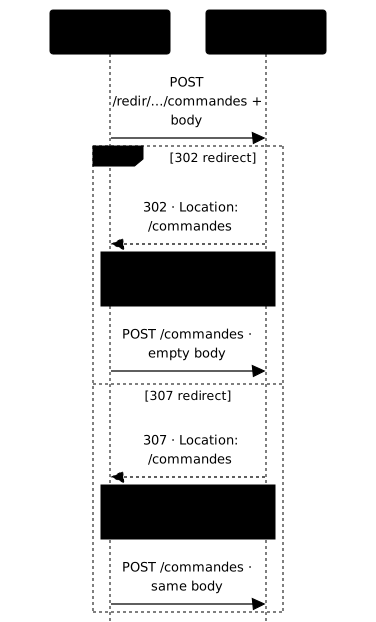
Read the second line of each pair, that is where everything happens. After
the 302, the server does receive a POST on the target (it is -X POST
that forces curl to keep the method, see the note below), but its body has
disappeared: the order A-1 exists nowhere, and yet nothing failed, no error
code came back. After the 307, the POST arrives with its body and the
order B-1 is created.
A client that does not check what it actually sent therefore believes it posted two orders. It posted one. It is this silence that makes the case dangerous in production, far more than the change of method or the loss of the body themselves.
How do content negotiation and compression change what is transmitted?
The Content-Type says how to interpret the body, the Content-Length says
its size in bytes, and content negotiation lets the client ask for a specific
format or compression. The client sends an Accept header ("I prefer
JSON, otherwise XML") and the server answers with the Content-Type actually
chosen: the two do not always coincide, and a strict client must check what
it received rather than what it asked for.
Compression (Accept-Encoding: gzip, then Content-Encoding: gzip in the
response) reduces the size transmitted, but changes the number of bytes
actually put on the wire: a Content-Length read before decompression does
not describe the size of the final content. Once a reverse proxy is in place,
it is often the one that decides whether to compress, and that recomputes this
Content-Length: knowing at which stage compression happens avoids
hunting for a data leak where there is only a misread header.
Why doesn't an HTTP code alone identify the responsible component?
The same code, for example 503, can be returned by the application, by an
intermediate component, or be produced locally by the client without any
server having answered. This point is about diagnosis more than
configuration: the code alone does not say who issued it. Once a reverse proxy
is introduced, this question becomes central, because the proxy can produce
its own responses (502, 503, 504) without ever contacting the backend
(the application behind the proxy), for example when no healthy backend is
available.
Reading an HTTP response correctly therefore means looking, besides the code,
at the source of the response: a Server header different from the
expected one, an error page body that does not look like the application's, or
the total absence of a trace of the request in the application logs are
the three clues that betray a response produced upstream of the backend. This
distinction is developed in more detail in
Publish a web service, which
associates each error code with its most probable origin.
How do you write a client that does not double a write?
A reliable client does not settle for the text displayed: after each send it
reads three things, the HTTP code, the exit code of curl, and what the server
actually recorded. The first two are obtained in a single gesture:
-w '%{http_code}' writes the HTTP code to standard output, and the exit code
remains available in $? right after the command. Here is a small Bash
function that displays both, and its five real results:
lire() { local code code=$(curl -s -o /dev/null --max-time 5 -w '%{http_code}' "$@") echo "curl sorti avec $?, code HTTP vu : $code"}| Situation | curl exit | HTTP code seen |
|---|---|---|
Normal creation (POST on /commandes) | 0 | 201 |
| Unknown route | 0 | 404 |
Unknown route with the -f option | 22 | 404 |
| Response lost: the API wrote, then cut the connection | 52 | 000 |
| Closed port, no server | 7 | 000 |
The table holds three lessons. A 404 is not a failure for curl: it exits
with 0 as long as it received a response, and it is the -f option that turns
an HTTP error code into exit 22. Next, 000 means that no HTTP code
arrived, and the exit code says why: 7 for an impossible connection, 52 for
a connection closed without a response (Empty reply from server). Finally,
the 52 case is the only one where the situation is ambiguous: the client
does not know whether the server processed the request before cutting.
What happens then if you replay without precaution? The lab's fixture
simulates this case: for certain references, the API writes the order then
closes the connection without answering. Without a key, here is the lost
response followed by the naive replay, with the number of writes the API
actually made (read from its state file, here ecritures.jsonl: its location
depends on your installation):
curl -sS -X POST -d '{"ref":"perdue-demo"}' http://127.0.0.1:18412/commandesgrep -c perdue-demo ecritures.jsonl # 1 write already madecurl -sS -X POST -d '{"ref":"perdue-demo"}' http://127.0.0.1:18412/commandesgrep -c perdue-demo ecritures.jsonl # the replay made a second onecurl: (52) Empty reply from server1{"ref": "perdue-demo", "statut": "creee"}2The client believed it had written nothing, it wrote two: this is the
payment billed twice of the section on idempotency. The remedy works on
both sides. On the server side, the lab's API honours the Idempotency-Key
header: a replay with the same key does not redo the action and returns the
original response. Careful, this behaviour (including the 200 instead of the
201) is that of this API, not an HTTP rule: Idempotency-Key is not
defined by RFC 9110, and an IETF draft
(draft-ietf-httpapi-idempotency-key-header, version 07 of October 2025) still
describes it without being a standard. Each API chooses whether it handles it
and how it answers.
Let us take the annotated exchange from above and send it a second time identically:
curl -sS -i -X POST -H 'Content-Type: application/json' \ -H 'Idempotency-Key: cmd-A-100' -d '{"ref":"A-100"}' \ http://127.0.0.1:18412/commandesHTTP/1.1 200 OKServer: BaseHTTP/0.6 Python/3.12.13Date: Sun, 25 Oct 2026 21:10:01 GMTContent-Type: application/jsonContent-Length: 35
{"ref": "A-100", "statut": "creee"}Compare with the initial exchange: the body is identical, but the code is
200 instead of 201, and the state file still counts a single write
for A-100. The server recognised the key. For this mechanism to protect the
client, it must therefore choose its key before the first send and reuse
it unchanged at each replay: a new key on every attempt would make the server
unable to recognise the request.
You now have the four gestures a careful client requires: distinguish three
situations (a response received, an HTTP error, no response) from -w and
the exit code of curl; recognise the ambiguous case (exit 52, code
000); send a stable idempotency key; check with a GET what the
server recorded. Assembling these gestures into a script that decides when to
replay, how many times and which exit code to return is the lab's job.
Practice
The lab has you read a real HTTP exchange and attribute each response to its issuer, with evidence. You observe the behaviour of each redirect code, you note the code returned by several routes, then you write a Bash client that creates an order exactly once, even when the response never comes back. The tests replay the redirects, send fresh references and count the writes actually made by the API.
Key points
- A request is read in five points: method, authority (
Hostor:authority), path, headers, body. - An idempotent method (
GET,HEAD) can be replayed without changing the state of the service, which makes it neither free nor invisible in the logs; replaying aPOSTcan double a business action. 301/302can change the method of a redirected request,307/308always keep it; in this lesson's measurement, a302followed bycurl -X POSTkept the method but lost the body, without any error.Content-Type,Content-Lengthand content negotiation describe what is actually transmitted, not what was asked for.- An exchange is read line by line: each header decides something (
Hostchooses the application,Content-Typethe decoding of the body,Idempotency-Keythe recognition of a replay). curlexits with 0 on a 404 (except with-f, exit 22); a000code with exit 52 is the ambiguous case where the write may have been made.- Replaying with the same idempotency key does not redo the action: the server answers 200 instead of 201.
- An HTTP code alone never identifies the component that issued it: you must look at the source of the response.
Knowledge check
Knowledge check
Check what you have learned with this interactive quiz
How it works
- The timer starts when you click Start
- Multiple choice, true/false and short answer questions
- You can move between questions
- Detailed results are shown at the end
Starts the quiz and the timer
Review
(0/0)Score by domain
A domain groups several guides and gets several questions, so its score is more reliable than a per-topic score, which often rests on a single question.
Summary
Strengths
No topic passed at 80% on at least two questions yet.
Weak areas
No topic below the pass mark.
Recommended next
Hints before you try again?
Continue the course: Prepare DNS names and their cutover
A new full quiz with random questions
Work again only on the questions you missed