
Pangolin publishes an internal service on the Internet through an outbound WireGuard tunnel, without opening a single inbound port on your private network, and you keep the whole control plane. A WireGuard tunnel is an encrypted link between two machines, here set up from the inside toward the outside; the control plane is the part that decides who can connect, issues the certificates and keeps the logs. Pangolin is the self-hosted and sovereign equivalent of the Cloudflare tunnel: the same comfort (nothing to expose on the private network, automatic certificates, an identity layer in front of every service), but the coordination infrastructure belongs to you. This guide builds Pangolin from end to end, exposes a service through the tunnel, protects it with authentication, then deals with the other side of the coin: it is a double-edged tool whose abuse you must know how to detect. Audience: sysadmins and platform teams (advanced level).
This lesson opens the optional module on publishing with no inbound port. The Reverse proxy page introduces this family of tools and places it in the choice of an entry point; here, we install the sovereign option. The next two lessons cover the managed option (cloudflared) and the temporary option for development (ngrok). Pangolin needs a public server and a domain: if you have neither, practice the cloudflared lesson first, without an account or a domain, with its quick tunnel, which fixes the same ideas.
What you will learn
- Understand the Pangolin architecture: a reverse proxy hub plus an outbound Newt tunnel.
- Install the hub on a public server, with automatic Let's Encrypt certificates.
- Connect a private network through the Newt connector, without opening a port.
- Expose a service and protect it (SSO, PIN code, allowlist).
- Detect abuse of this tunnel, in connection with the threat model (in French) (ATT&CK T1090, T1572).
Prerequisites
- A public Linux server (VPS or cloud VM) with a public IP and the 80/443 TCP and 51820/21820 UDP ports open. These ports belong to the hub, not to your private network, which opens none (port 21820 serves the Pangolin clients, which this guide does not use). A VM with 2 vCPU / 4 GB is more than enough.
- A domain name that you control, with a record for the dashboard and a wildcard for the exposed services.
- Docker Engine and the Compose plugin installed (see below, signed repository method).
- A private network to expose: here a homelab behind a router, but it can be a cluster, a corporate LAN or a dev workstation.
How Pangolin exposes a service without opening a port
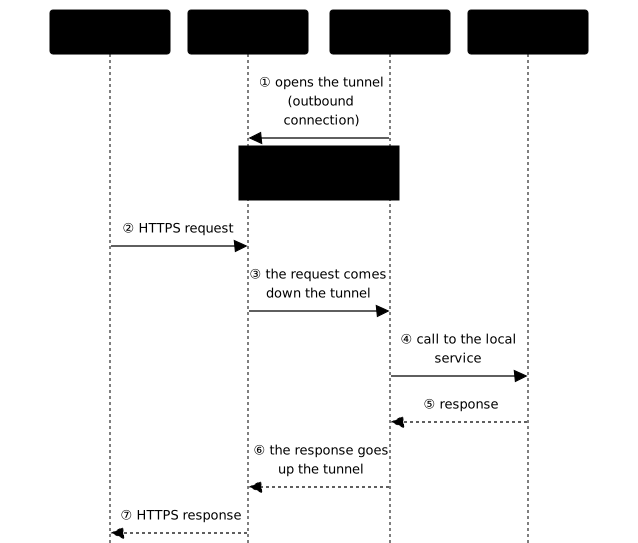
A reverse proxy is the entry point that receives visitors' requests and relays them to the right service. Classically, it waits for inbound connections: you open port 443 on your firewall and public traffic reaches you. Pangolin reverses the direction. A lightweight connector, Newt, installed on your private network, opens an outbound connection to the public Pangolin hub. Visitor traffic enters through the hub, then goes back down to your service through this WireGuard tunnel. Result: no inbound port on your private network, so nothing to scan or brute-force on your IP.
The hub is made of three complementary containers:
- pangolin: the application, the dashboard and the management API.
- gerbil: the WireGuard gateway that terminates the sites' tunnels.
- traefik: the reverse proxy that routes HTTP traffic and handles Let's Encrypt certificates automatically.
The following diagram unrolls the sequence, in the order the messages travel. Look first at message ①, which is outbound and initiated by the connector: it opens the tunnel before any visitor arrives. Then requests and responses (② to ⑦) use this tunnel that is already up, which explains why no inbound port needs to be opened on the private network side. The same sequence holds for cloudflared and ngrok: only the party that operates the public entry point changes.
On the private network side, Newt is therefore the only component to install: it sets up the tunnel and routes traffic to your local services. It is the same "zero inbound port" logic as NetBird (in French) or Tailscale (in French), but oriented toward publishing web services rather than an administration mesh.
Prepare the DNS
Before the installation, point your domain to the server's public IP. Two records are enough: one for the dashboard, one wildcard so that each exposed service gets its own subdomain with a dedicated certificate.
| Type | Name | Value |
|---|---|---|
| A | pangolin.yourdomain.example | public.IP.of.the.server |
| A | *.pangolin.yourdomain.example | public.IP.of.the.server |
The wildcard is the key: it lets Pangolin issue a certificate for app.pangolin.yourdomain.example, git.pangolin.yourdomain.example and so on, without touching the DNS for each new service.
Install Docker properly
Pangolin runs in containers. Install Docker Engine from the official signed repository rather than with a curl | sh script, so you benefit from GPG verification and updates.
# Official Docker GPG key + signed apt repository (Ubuntu/Debian)sudo install -m 0755 -d /etc/apt/keyringssudo curl -fsSL https://download.docker.com/linux/ubuntu/gpg \ -o /etc/apt/keyrings/docker.ascsudo chmod a+r /etc/apt/keyrings/docker.ascecho "deb [arch=$(dpkg --print-architecture) signed-by=/etc/apt/keyrings/docker.asc] \https://download.docker.com/linux/ubuntu $(. /etc/os-release && echo $VERSION_CODENAME) stable" \ | sudo tee /etc/apt/sources.list.d/docker.list > /dev/nullsudo apt-get updatesudo apt-get install -y docker-ce docker-ce-cli containerd.io docker-compose-pluginCheck that everything responds before going on:
docker --version && docker compose version# Must display the versions of Docker Engine and of the Compose pluginDeploy the Pangolin hub
Pangolin provides an installer that generates the configuration and starts the stack. Download the binary from the GitHub releases rather than using the curl | bash suggested by the official documentation. curl | bash fetches and runs a remote script in a single gesture: you only see what it contains afterwards, it has no pinned version, and it leaves no file to keep. With the binary of a dated release, you run a file whose version you choose, that you keep and whose fingerprint you can note. This gain is real but limited, as the paragraph after the code shows.
# Installer binary (Linux amd64): replace 1.19.4 with the current versioncurl -fsSL -o installer \ https://github.com/fosrl/pangolin/releases/download/1.19.4/installer_linux_amd64sha256sum installer # note this value: the vendor publishes nonechmod +x installersudo ./installerThe vendor publishes no digest to compare against. Measured on the GitHub API on 2026-10-25, releases 1.19.4 and 1.25.3 carry only the installer_linux_amd64 and installer_linux_arm64 binaries, with no checksum file and no digest in the notes. sha256sum therefore does not prove the file's authenticity: you run, with sudo, a binary that nothing independent can authenticate, and you must accept the risk (curl | bash would do no better). What remains feasible: note the digest you obtain and compare it between two downloads or two machines (a difference reveals tampering in transit or an incomplete download), check the release URL (fosrl/pangolin repository, expected tag) and the file's size, and keep the binary for a later audit. After the installation, a second safeguard exists: check that the generated docker-compose.yml pins its images by digest, like the excerpt below. The Docker engine then refuses any different content, which freezes the hub in the installed state, but proves nothing about the installer itself.
The installer asks a series of questions. The answers that matter for a standard deployment:
- Base domain:
pangolin.yourdomain.example(the root domain of the services). - Dashboard domain:
pangolin.yourdomain.example(the dashboard). The value is deliberately identical to the previous one: it matches the two DNS records of the previous section, and the exposed services will fall under this same name (app.pangolin.yourdomain.example). - Let's Encrypt email: a valid address, for the certificates.
- Gerbil (tunneled connections): yes, this is what enables the tunnels.
- Enterprise, PostgreSQL, SMTP, MaxMind: no for a lab (SQLite and default settings are enough).
It then generates a docker-compose.yml and a config/ folder, and starts the containers. The deployed stack looks like this:
# docker-compose.yml (excerpt): the three services of the hubservices: pangolin: image: docker.io/fosrl/pangolin:1.19.4@sha256:a9a4b0bd136ef7ccead120cf41f85bd1b751ddcd05f42392437b1792546e402f gerbil: image: docker.io/fosrl/gerbil:1.4.2@sha256:6d640c114be57435b37b5a042872f116b53e984546f351820d6a758436d0f991 cap_add: [NET_ADMIN, SYS_MODULE] ports: - 51820:51820/udp # WireGuard tunnel of the sites - 21820:21820/udp # clients - 443:443 # public HTTPS - 80:80 # HTTP (ACME challenge + redirect) traefik: image: docker.io/traefik:v3.6@sha256:31267173a15b4944e797a76ffd9c419707c8d8b32fe5b610f80cd0cfa05f372d network_mode: service:gerbil # Traefik shares gerbil's networkThese tags and digests are an illustrative snapshot: do not read them as "the versions shipped with Pangolin 1.19.4". The installer writes its own versions into the docker-compose.yml it generates, and that file is authoritative for gerbil and traefik. The Newt tag in the next section is later than this Pangolin version and has not been cross-checked against it: in case of a mismatch, use the one your installation's wizard proposes.
Check the startup and the certificate issuance:
cd /opt/pangolin && docker compose ps # the 3 containers "Up", pangolin "healthy"curl -sS -o /dev/null -w "%{http_code}\n" https://pangolin.yourdomain.example/# 200 or 302: the dashboard answers with a valid Let's Encrypt certificate# (302 = redirect to the authentication page; add -L to follow it)An exposed hub must be updated, and a version upgrade is not replayed blindly. Before any upgrade, back up the config/ folder that the installer generated next to the docker-compose.yml: it is your hub's configuration. With the SQLite choice made above, the database is a simple file, probably stored there too, and that is what a failed update would make you lose. This lesson did not record the exact contents of this folder: list it (ls -l config/) and locate that file before relying on it.
The /opt/pangolin/ path used here is the one from the verification cd above, not an established value: the lesson did not show where the installer writes. The folder that is authoritative is the one that contains your docker-compose.yml, and the docker compose ls command displays its path.
cd /opt/pangolin # replace with the folder of your docker-compose.ymlsudo tar czf ~/pangolin-config-$(date +%F).tar.gz config/ # backup before the upgradesudo chmod 600 ~/pangolin-config-*.tar.gz # the archive may contain secrets# After replacing the image tags in docker-compose.yml with those of the# new version (read the release notes first):docker compose pull && docker compose up -ddocker compose psRead the release notes on the releases page before upgrading: they flag breaking changes. This sequence has not been replayed on the current version; keep the archive until the hub has proven it works.
Create the administrator account
On first start, Pangolin generates a setup token visible in the logs. It protects the page where the first administrator is created.
docker compose logs pangolin | grep -A2 "SETUP TOKEN"# Copy the "Token: ..." valueOpen https://pangolin.yourdomain.example/auth/initial-setup, paste the token, then set the server administrator's email and password. You then reach the dashboard and can create your first organization, which groups your sites and services.
Connect a private network with Newt
A site (called a node in the interface) is an entry point into a private network. From the Nodes view, the Add node button launches the wizard. Choose the Newt site type, name it, and Pangolin displays the tunnel credentials as well as the connector's installation command.
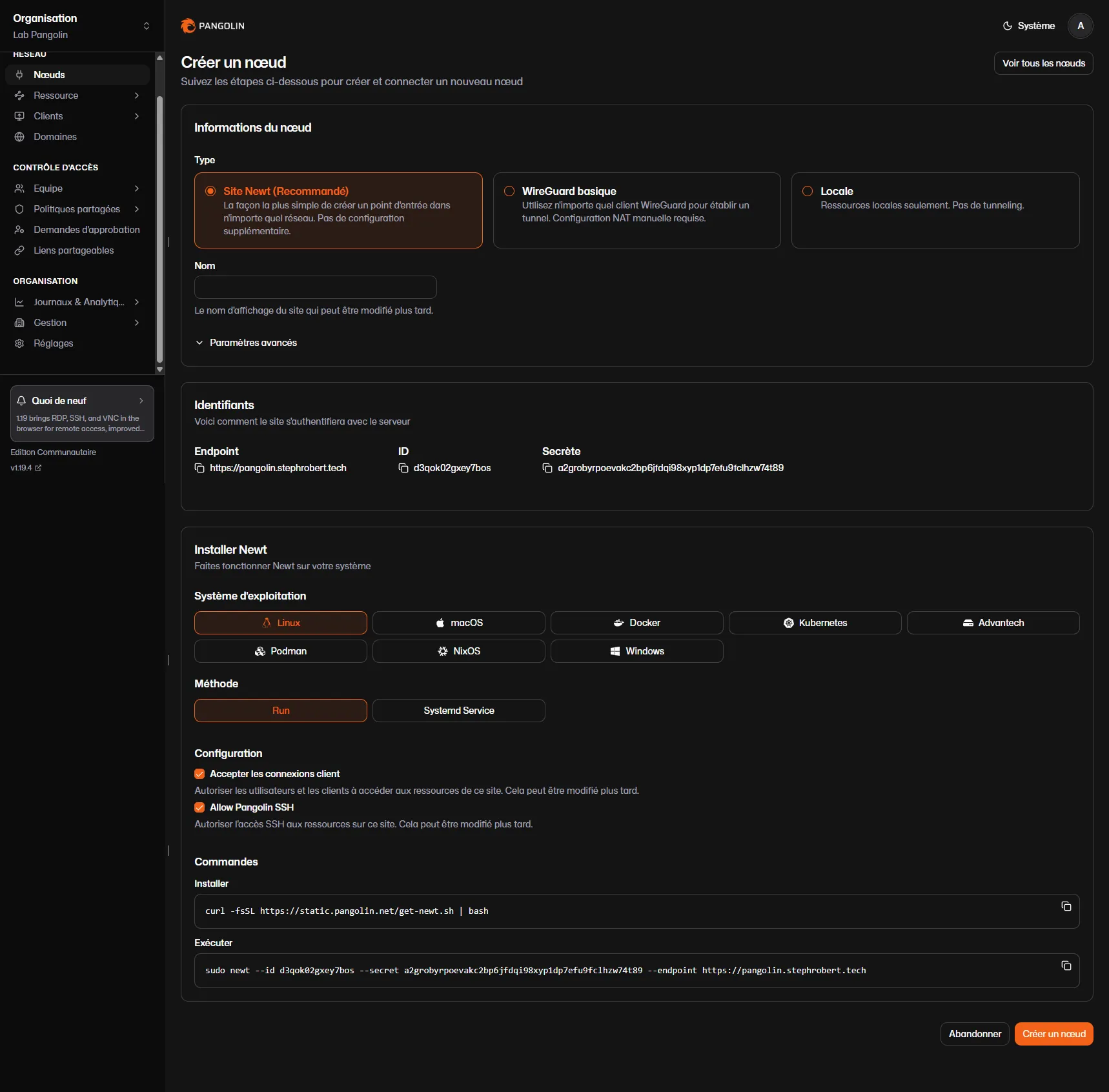
The wizard suggests a curl | bash to install Newt. Prefer the official container, pinned (tag and digest), which avoids the remote script and updates in a controlled way. Run it on a machine of your private network (the homelab), with the credentials displayed. Reminder of the warning above: Newt's 1.14.0 tag is later than the documented Pangolin 1.19.4 and has not been cross-checked against it; if the wizard proposes another, take its own.
Newt's secret is a credential that opens a tunnel into your private network: do not put it on the command line. An argument of docker run is readable in ps by any user of the machine and it is recorded in the shell history. Newt reads its settings from environment variables, which you store in an .env file with restricted permissions, passed to Docker with --env-file. It is the same vigilance as for the cloudflared token. First create the empty file with its permissions, then open it in an editor to paste the values: typing them through a command (echo, redirection) would leave them in the history.
install -d -m 700 ~/newtinstall -m 600 /dev/null ~/newt/newt.envnano ~/newt/newt.envIn the editor, write these three lines with the values displayed by the wizard, then save. The variable names are those of the fosrl/newt repository, taken on 2026-10-25 from its .env.example, its docker-compose.yml and its configuration code; SITE_ID and SITE_SECRET exist as aliases.
PANGOLIN_ENDPOINT=https://pangolin.yourdomain.exampleNEWT_ID=YOUR_NEWT_IDNEWT_SECRET=YOUR_NEWT_SECRETThen start the container. No credential appears on the line anymore:
docker run -d --name newt --restart unless-stopped \ --network host --cap-add NET_ADMIN --device /dev/net/tun \ --env-file ~/newt/newt.env \ fosrl/newt:1.14.0@sha256:60c78391e3b5cb8a260490fb26b8b7329ed5448077629da89a564af80d3a9fadCheck the file's permissions, then verify that the process list shows no secret:
ls -l ~/newt/newt.env # -rw-------: readable by you onlyps -eo args | grep '[n]ewt' # the secret does not appear as an argument (--secret)This check measures only one thing: the absence of the secret as an argument (--secret, an option that exists and must be avoided). It says nothing about environment variables, because ps -eo args never displays them: the secret placed in NEWT_SECRET can be read through /proc/<pid>/environ (restricted to the process owner and to root) and through docker inspect newt. A limit therefore remains: the variable stays readable by anyone who belongs to the docker group, which is already equivalent to root on the machine. Reserve this group for administrators.
Newt then opens an outbound connection to the hub and sets up the tunnel. The logs confirm it:
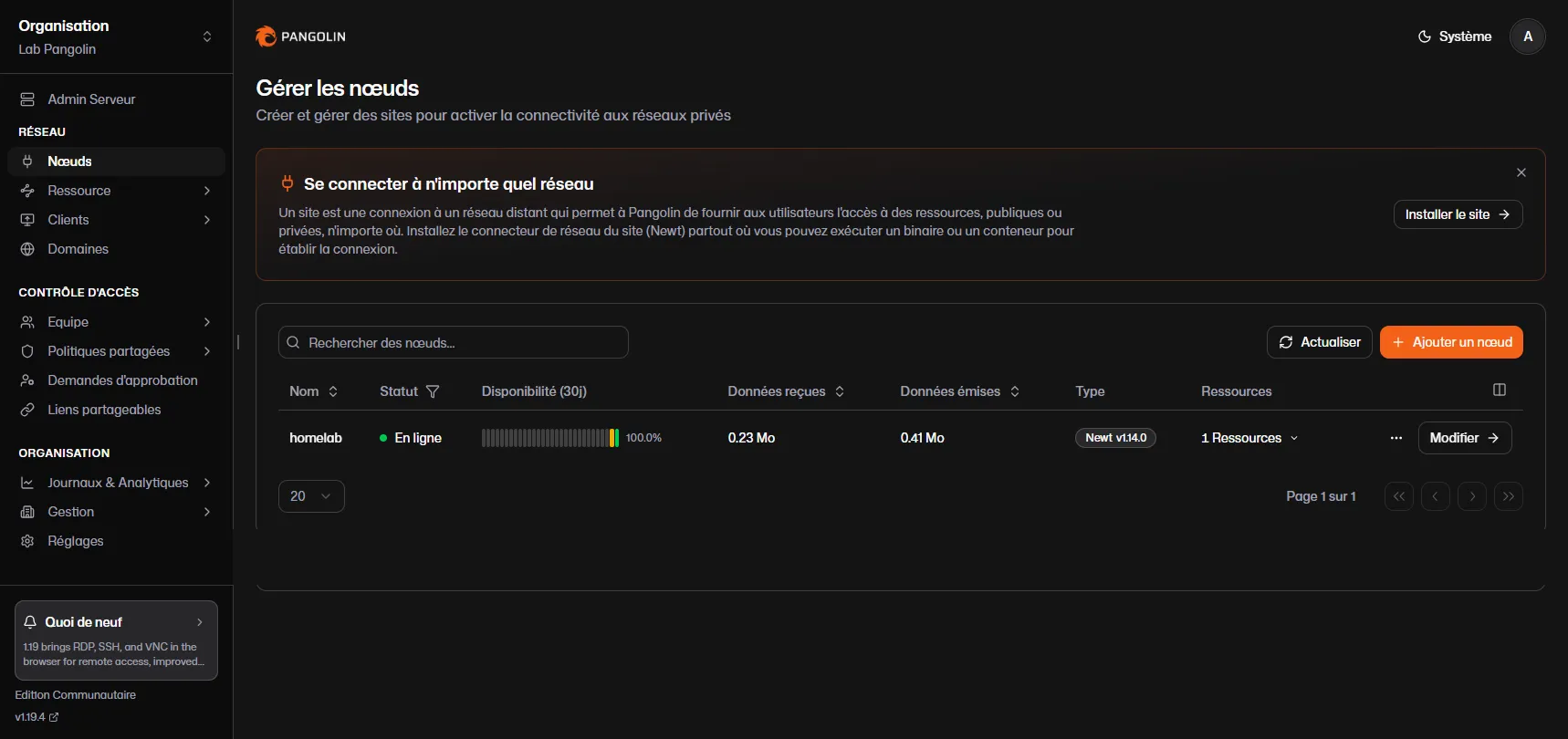
docker logs newt# INFO Websocket connected# INFO Tunnel connection to server established successfully!Back in the Nodes view, the site shows up as Online, with its throughput and connector type. This is the proof that the tunnel is up, while no port was opened on the private network.
Expose a service
A resource publishes a local service on a public subdomain. Create it from the Resource menu, with a subdomain (for example app) and the wildcard domain. Pangolin then assembles the URL app.pangolin.yourdomain.example and issues its certificate automatically. What remains is to specify the backend: the Newt site and the service's internal address (for example 127.0.0.1:8099 for a local web server).
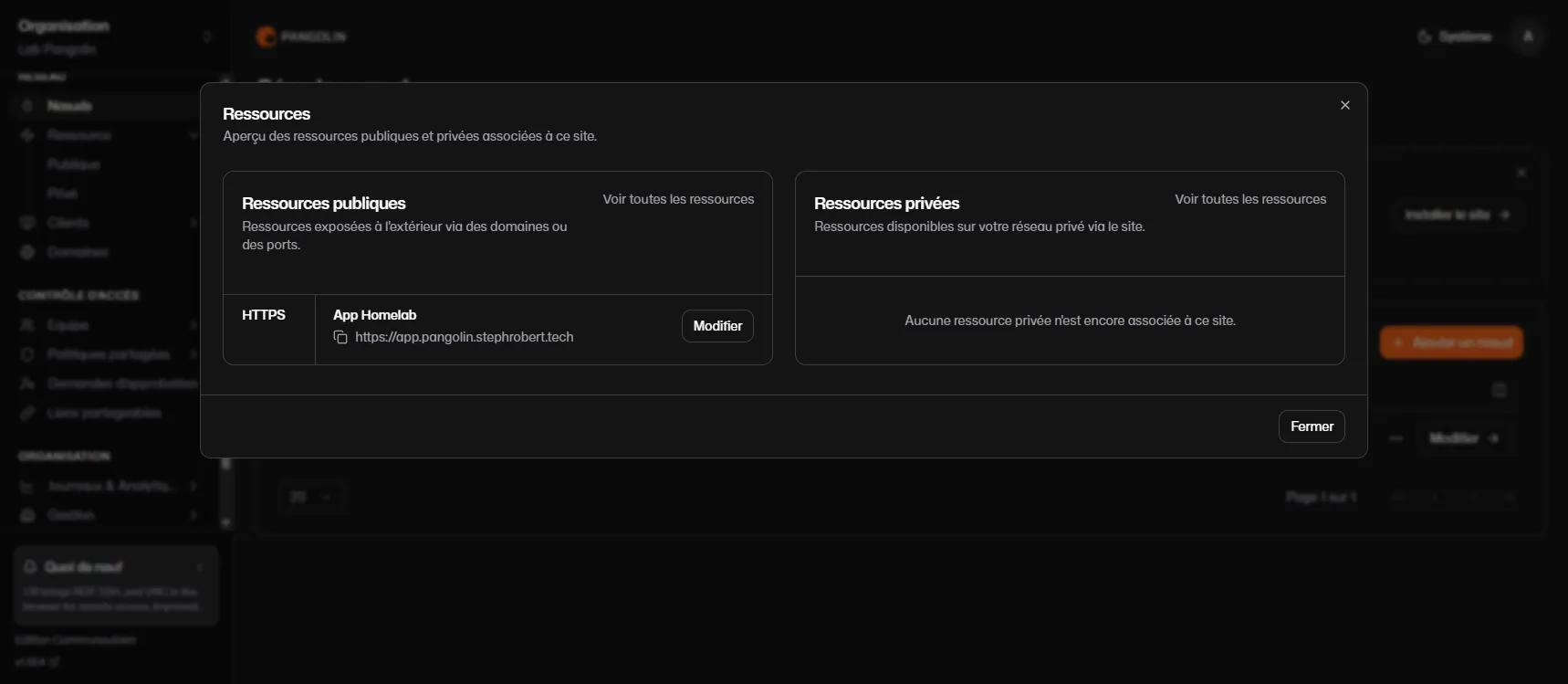
Traffic now follows this path: the visitor's browser reaches the public hub, Traefik routes to the resource, traffic goes down through the Newt tunnel to the internal service, and the response goes back up. The service runs on a machine with no public IP and no open port, yet remains reachable from the Internet.
Protect access
By default, an HTTP resource is protected by Pangolin's SSO (single sign-on): a visitor without a session is redirected to an authentication screen before reaching the service. This is the major difference with simply opening a port: identity is verified at the edge, before the request even reaches your network.
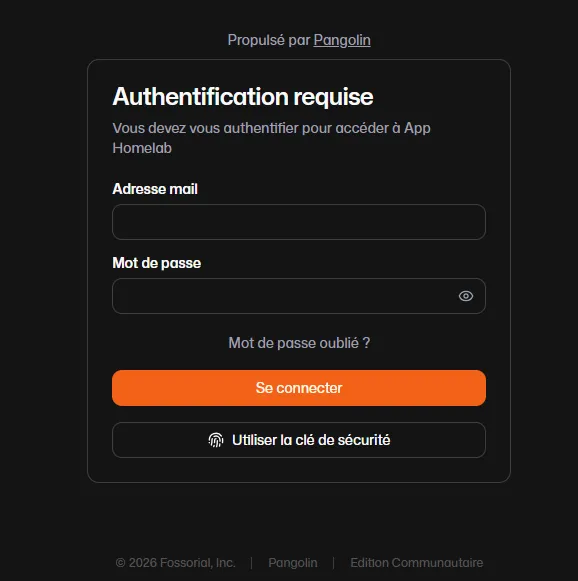
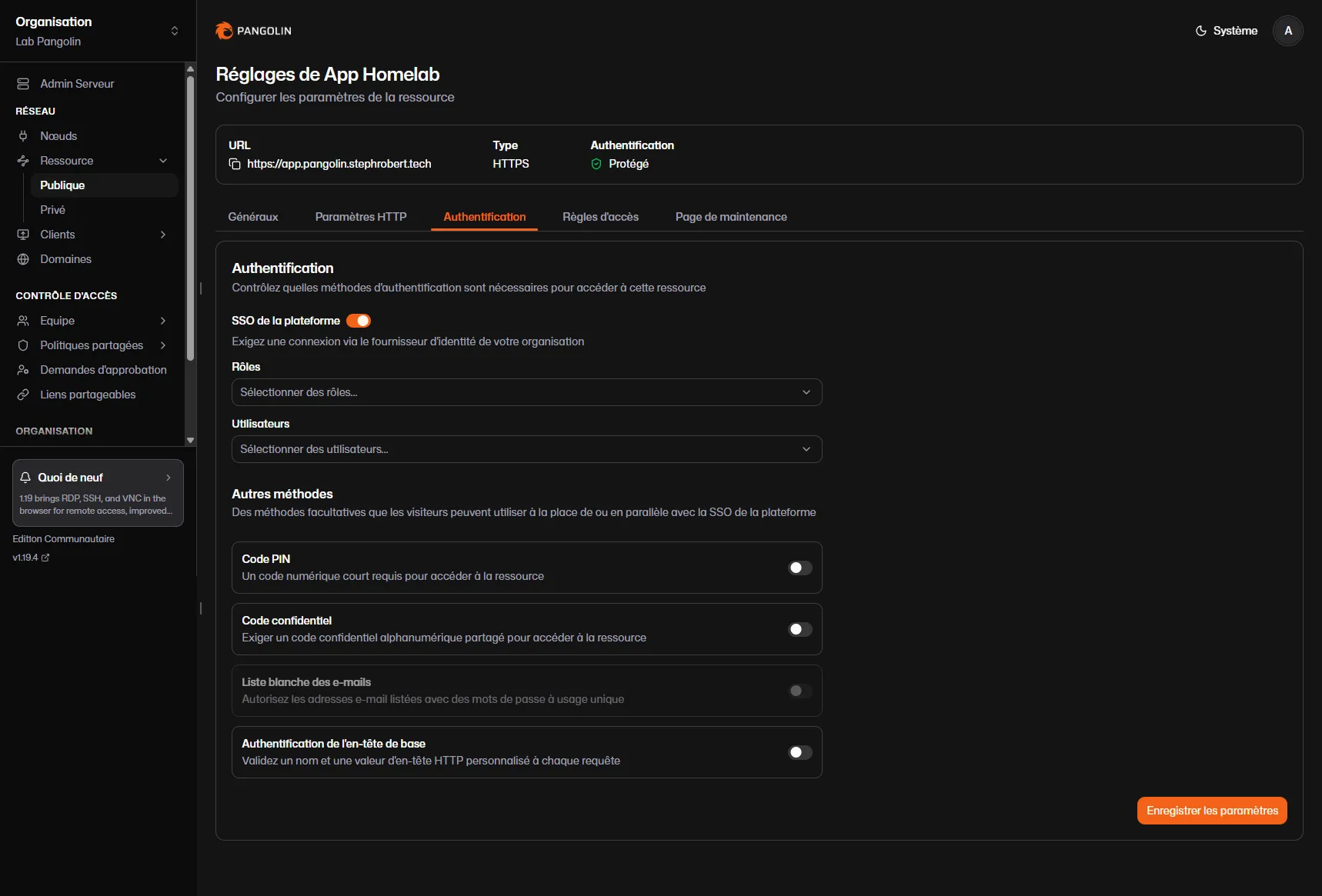
The Authentication tab of the resource finely controls who gets through. You combine the platform SSO (with restriction by roles or users) and complementary methods: PIN code, a shared password, an email allowlist with one-time passwords, or header authentication for machine-to-machine access.
A double-edged tool: detect the abuse
Self-hosting the control plane is a clear defensive advantage over the Cloudflare tunnel: an attacker cannot hijack your hub. But two abuse angles remain, and both must be handled: a hijacked Newt, and a misconfigured resource.
First angle: Newt is a generic outbound tunnel. Like the Cloudflare tunnel, it is a single binary that an attacker already present can drop on a machine and point at their own Pangolin hub, for command and control (remotely driving the compromised machine) or exfiltration. The traffic is encrypted and outbound, so it crosses the firewall without any inbound rule and blends into legitimate traffic. In the language of MITRE ATT&CK (in French), this is T1090 (proxy) and T1572 (tunneling), serving command and control (in French).
Second angle: a misconfigured resource. A resource with SSO disabled publishes an internal service on the Internet without authentication. An attacker who gains access to the dashboard can also deliberately expose a database or an administration application.
Detection is behavioral, since the content is encrypted:
- Execution of a
newtprocess or container that you did not deploy, especially with an endpoint (--endpointor thePANGOLIN_ENDPOINTvariable) pointing to an unknown domain. - Outbound connections to a hub: TCP 443 (websocket control channel) paired with UDP 51820 (WireGuard data) to the same IP.
- Configuration file
~/.config/newt-client/config.jsoncreated on a host that should not be tunneling.
# Spot an unauthorized newt and its outbound tunnelpgrep -a newt ; docker ps --filter ancestor=fosrl/newtsudo ss -tunp | grep -E '51820|newt'The countermeasures that hold: egress filtering, that is, filtering outbound flows (an internal machine should not speak WireGuard to an unknown hub), application allowlisting with fapolicyd (in French) to prevent the execution of a newt dropped by an attacker, an inventory of declared sites and resources, and a regular review of resources whose authentication is disabled.
Pangolin, cloudflared or ngrok: which one to choose?
Pangolin fits when the publication is long-lived and you want to keep control of the certificates, the logs and the identity. The price to pay is a public server to operate (updates, backup of config/, ports 80/443 and UDP open on this server). If you prefer to delegate this operation, cloudflared does the same thing at a third party, at the cost of a dependency. To receive a webhook for the duration of a test, ngrok is enough and is not deployed in production. For administration rather than web publishing, a mesh such as NetBird (in French) is better suited.
Key points
- Pangolin exposes a service without opening a port: an outbound WireGuard tunnel (Newt) replaces opening the firewall.
- You keep the control plane: it is the sovereign alternative to the Cloudflare tunnel, hub and data at your place.
- The hub fits in three containers (pangolin, gerbil, traefik) with automatic Let's Encrypt certificates through a wildcard DNS record.
- Identity is verified at the edge: SSO, PIN code, allowlist; a resource without authentication leaks onto the Internet.
- It is a double-edged tool: Newt is a generic outbound tunnel (T1090/T1572), and a misconfigured resource exposes an internal service.
- The defense is detection: an unexpected
newt, egress 443 + UDP 51820, egress filtering and application allowlisting. - Newt's secret never goes in an argument: a
600.envfile and--env-file, becausepsand the shell history expose the command line. - The hub is exposed, so keep it up to date: back up
config/, read the release notes, take the current Pangolin version, and know that the vendor publishes no digest for the installer: the digest you record does not prove its authenticity.
Knowledge check
Check that the essentials of this guide are mastered. The questions cover only what has just been explained here.
Knowledge check
Check what you have learned with this interactive quiz
How it works
- The timer starts when you click Start
- Multiple choice, true/false and short answer questions
- You can move between questions
- Detailed results are shown at the end
Starts the quiz and the timer
Review
(0/0)Score by domain
A domain groups several guides and gets several questions, so its score is more reliable than a per-topic score, which often rests on a single question.
Summary
Strengths
No topic passed at 80% on at least two questions yet.
Weak areas
No topic below the pass mark.
Recommended next
Hints before you try again?
Continue the course: cloudflared: the Cloudflare tunnel and detecting its abuse
A new full quiz with random questions
Work again only on the questions you missed