
To diagnose an HAProxy failure without knowing which one it is, always read in the same order: the effective configuration, the state of the servers, then the termination code in the log. This lesson is for someone who already runs an HAProxy 3.4 and receives an alert with no explanation. It does not teach five fixes, because you never know in advance which one you will get: it teaches a method, that is, where to start, what to read, and how not to follow a false lead. The common thread is a trap: a 503 points at routing, and the cause is often in TLS trust or in a health check.
What you will learn
The lesson goes from the symptom to the cause, then from the cause to a fix that removes nothing that protects the service.
- Follow a fixed reading order: effective configuration,
show stat, log. - Read a termination code such as
SC--and deduce the side at fault. - Add
ssl_bc_err_strto the log before you need it. - Explain why a 503 with a
UPserver is not a routing problem. - Avoid the readings that lead to a wrong conclusion: version, socket, transition counters.
- Fix the cause without disabling TLS verification or health checks.
Prerequisites
The lesson assumes a running HAProxy 3.4 and an account that can use sudo. The facts were measured on HAProxy 3.4.7, the package of the trixie-backports-3.4 repository on Debian 13, with a client distinct from the machine that hosts the proxy.
- Install HAProxy 3.4 and read its sections: Install HAProxy and read its configuration sections.
- Understand health checks,
inter,fall,riseand theshow statcounters: Choose the load-balancing algorithm and measure health checks. - Query the admin socket: Change HAProxy's state at runtime with limited rights.
Where do you start when you do not know which failure you have?
Start with the effective configuration, then with the state of the servers, and read the HTTP code only third. The return code points the way, it does not conclude: a 503 means "no server available any more", and at least three families of failures produce it (routing, health check, TLS trust towards the backend). A traffic limit rather returns a 429, and a wrong routing can even return a 200 with the wrong content, the only case that no code reveals. Starting from the code therefore means picking a lead before you have a fact. The first two steps are read-only: they change nothing, run from the proxy machine, and rule out several hypotheses before you have touched a single file.
The order below avoids that trap. Look at the highlighted node: a UP server that nevertheless returns a 503, the situation that misleads the most.
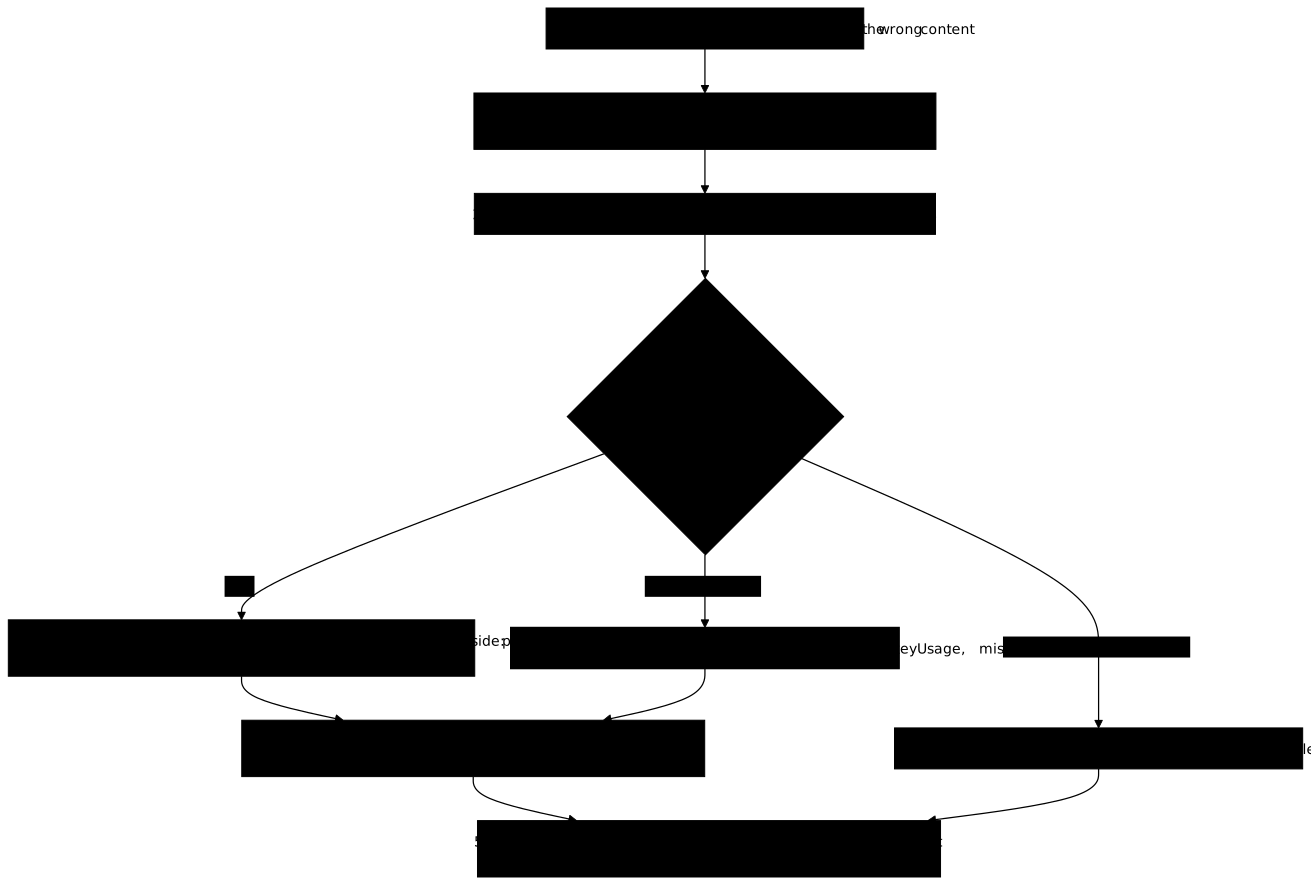
The effective configuration is the one HAProxy has actually loaded, not the one you think you have: haproxy -c -f /etc/haproxy/haproxy.cfg -V validates and comments it. The Debian package also loads the /etc/haproxy/conf.d directory, which explains why a rule that is absent from the main file still takes effect. Then the state of the servers:
echo 'show stat' | sudo socat -t2 stdio /run/haproxy/admin.sockThe output is CSV. Read three columns: the status (UP, DOWN), check_status, which says why the last health check failed, and qcur, the queue. A single glance already separates three families out of five.
What does a termination code like SC-- say?
SC-- means the failure happened while the connection was being established, on the server side. Termination codes are the first two letters of the session end state that HAProxy writes in its log; the option httplog log format carries them. The 3.4 manual (section 8.5) defines the first letter, which says who ended the session and why. S means "the TCP session was unexpectedly aborted by the server, or the server explicitly refused it", and the second letter C says the proxy was waiting for the CONNECTION to be established.
The two letters are read together. S names the side at fault, the server; C names the moment, the establishment. Read this way, SC-- rules out the client, the routing and the application at once: the proxy chose a server, tried to talk to it, and the connection did not succeed, or the server refused it. The remaining causes are reachability, a health check, or a TLS negotiation towards the backend that fails.
Another code is worth knowing: D marks the connections cut by on-marked-down shutdown-sessions, the option that closes a server's sessions at the moment HAProxy declares it DOWN. It is disabled by default, so a D signals a cut wanted by the configuration, not a server failure. The log is in /var/log/haproxy.log, and journalctl -u haproxy gives the startup messages.
How do you read the exact reason for a TLS failure towards the backend?
Add ssl_bc_err_str to the log-format: it writes the exact OpenSSL reason for a TLS failure between HAProxy and the backend. Without it, a negotiation failure looks like a missing server: SC--, then a 503, and nothing says whether the certificate is expired, signed by an unknown authority, or rejected for another reason. This is typically what a troubleshooting lesson must teach you to set up before you need it, because a field added after the failure says nothing about the failure that has just occurred. The log also stays readable by any on-call operator, whereas a manual test means reproducing the conditions of the failure from the right machine.
Here is a fragment that adds it. This fragment is an illustration; only the value read in the field comes from the measurement.
defaults log-format "%ci %ST %tsc %b/%s %[ssl_bc_err_str]"On the trust failure of the lab, the field contained:
error:0A000086: certificate verify failedThe message says the verification of the server's certificate failed, which points at trust (authority, name, certificate usage) and not at routing. The field saves hours of searching: without it, you test the network, the port and the application one after the other, while the answer was available from the first request.
Why is a 503 with a UP server not a routing problem?
A 503 "No server is available" while show stat shows the server UP comes, in both measured cases, from the strict TLS verification of the backend, not from routing. Two causes measured on HAProxy 3.4.7 produce it, and neither is found in the routing rules. In both cases, the server line declares verify required, which forces HAProxy to validate the server's certificate before sending it the request. If the validation fails, the request gets a 503 while the server stays UP.
- A certificate authority without a
keyUsageextension. It passesopenssl verify, but fails strict verification, the one thatverify requireddemands. Bench measurement:openssl verify -x509_strict -purpose sslserverfails without the extension and succeeds with it. TheextendedKeyUsageof the leaf certificate has nothing to do with it, and that is the natural false lead. - A missing
snion theserverline. Without it, averify requiredfails even with a correctca-fileandverifyhost.
The trap is in the diagnosis, not in the configuration. The symptom (a 503) accuses the routing, the state (UP) reassures, and the fault is in the PKI. The right reflex is to test the verification the way HAProxy does it, with openssl verify -x509_strict -purpose sslserver, and not with the bare command, which wrongly answers "OK". This lesson describes these causes so that you can recognize them; how to establish trust belongs to another lesson.
When is routing really at fault, and how do you recognize it?
A routing failure is not read in the return code, but in the decision: which backend was chosen, and why. Four defects keep coming back, and each one misleads in a different way. The first is a frontend without a default_backend: it returns a 503, because no decision was made, which is a configuration defect and not a deliberate rejection.
The other three are silent. A use_backend rule that targets a disabled or unpublished backend is ignored, and evaluation continues with the next rule: the routing "does nothing" with no error at all. A computed use_backend whose name is unknown falls back to default_backend without an error at validation, so haproxy -c does not see it. Finally, the first rule that matches wins: a rule added above makes the ones that follow unreachable, without any of them being wrong.
The only case that no code reveals is a 200 with the wrong marker. The request was served, but by the wrong backend. To find it, compare what the route should return with what it returns, using a marker specific to each backend. Routing and rule order are detailed in Route by names and paths with ACLs and maps.
Which readings lead to a wrong conclusion?
Several signals that look conclusive prove nothing, and the diagnosis goes wrong when it takes them at face value. Each one was measured or established on HAProxy 3.4, and each one makes you fix the wrong element.
- The version is hidden on the statistics page since 3.4 (
stats show-versionis disabled by default). A check that read the version there fails: usehaproxy -v. - HAProxy does not delete its UNIX socket when it stops. A test for the presence of the file wrongly concludes that the service is running; you must query the socket, not look for it on disk.
- A
UP 4/5orDOWN 1/3status appears during a transition. The suffix counts the checks obtained out of those required: comparing the status for strict equality therefore reads a rise in progress as a removal. - A filled-in status does not prove the application answered. On the Nginx side,
$upstream_statuscan be filled in without the application having answered; reading the Nginx logs is detailed in Observe Nginx: logs, stub_status and upstream. - A fully
DOWNbackend is almost always a health check, not a failure.option httpchk GET <path>fails if the path does not exist, and then takes all servers down, the healthy ones included.
The last point refers to the lesson on health checks, which measures the chkfail and chkdown counters. A short outage must increment the first without touching the second: this is how you tell a threshold that holds from a threshold that oscillates.
How do you fix it without removing what protects?
You fix the cause, never the safeguard: removing verify required or the health checks gets the service running again and removes at the same time what was protecting it. This is the temptation of an on-call shift at three in the morning, and it is what the lab measures. verify none on the backend and the removal of the check keywords get the service running again in two of the five variants, which gives the impression of having found the cause when it has only been made invisible.
Two canaries are used to measure it, and they are part of the healthy state. /api-usurpe/ leads to a backend whose certificate is signed by a foreign authority and which bears the same name as the legitimate one: it must stay rejected, because its rejection proves that the TLS verification is strict. sonde-cassee is a live server whose readiness fails permanently: it must stay out of service. After your fix, the healthy routes answer, and the two canaries still play their part.
For a saturation, the approach is the same: look at qcur and scur in show stat. A queue that does not drain points at a stuck client, and show sess names it. End with a record that names the cause and tells it apart from its symptom: "the 503 is the symptom, the cause is the authority without keyUsage".
Practice
The lab randomly draws a failure out of five families (routing, health check, TLS trust towards the backend, traffic limit, saturation) and lays noise on top: a frontend for an abandoned name, a notes file, a server deliberately declared down. You do not know which one you will get, hence a method and not a list. The validation covers four checks: a record that names the cause and tells it apart from its symptom, the service and the healthy routes restored from an independent client, the two canaries that still play their part, and the administration and the backends that stay unreachable from the client. The record is read by a person.
Key points
A reliable diagnosis follows a fixed order and refuses to remove the safeguard that detected the failure.
- Read in order the effective configuration (
haproxy -c -f /etc/haproxy/haproxy.cfg -V), the state of the servers (show stat), then the termination code in the log. - An HTTP code points the way and does not conclude: a 503 comes from several families of failures, and a 200 can come from the wrong backend.
SC--says a failure at establishment, on the server side;Dmarks a cut byon-marked-down shutdown-sessions.- Set
ssl_bc_err_strin thelog-formatbefore the failure: it gives the exact OpenSSL reason, for example "certificate verify failed". - A 503 with a
UPserver comes from strict TLS verification: an authority withoutkeyUsageor a missingsni, not from routing. - A frontend without
default_backendreturns 503, ause_backendto a disabled backend is ignored, andhaproxy -cdoes not see a computeduse_backendwith an unknown name. - Do not compare
UP 4/5for strict equality, do not test for the presence of the socket, and do not read the version on the statistics page in 3.4. - Fix the cause: removing
verify requiredor the health checks restores the service by removing the safeguard, and the two canaries are there to measure it.
Knowledge check
Eight questions check that you can read a termination code, recognize a 503 that is not a routing problem and fix without removing a safeguard, once the lab is played.
Knowledge check
Check what you have learned with this interactive quiz
How it works
- The timer starts when you click Start
- Multiple choice, true/false and short answer questions
- You can move between questions
- Detailed results are shown at the end
Starts the quiz and the timer
Review
(0/0)Score by domain
A domain groups several guides and gets several questions, so its score is more reliable than a per-topic score, which often rests on a single question.
Summary
Strengths
No topic passed at 80% on at least two questions yet.
Weak areas
No topic below the pass mark.
Recommended next
Hints before you try again?
Continue the course: Reload, update and roll back HAProxy
A new full quiz with random questions
Work again only on the questions you missed