To diagnose a published web service whose failure you do not know, you go down the same layers (the stages a request goes through) in the same order, name, port, TLS, route, application, and you stop at the first one that fails, which becomes the layer to examine first. This lesson is for someone who can run a curl and who inherits a service of which someone says "it misbehaves". It teaches a method: which gesture settles each stage, how to rule out a hypothesis instead of confirming it, and how to repair without removing a protection. It configures no particular tool: the reasoning holds for any entry point.
What you will learn
The lesson goes from the symptom to the faulty layer, then from the layer to a repair that removes nothing.
- Go down the five layers of a published service in the order of the request's path.
- Choose the gesture that settles each stage, from an independent client.
- Tell apart a refused connection from a host that does not answer.
- State a hypothesis, test it with a targeted gesture, then declare it confirmed or refuted.
- Set aside an alarming message that has nothing to do with the failure.
- Repair with the smallest fix, then replay an acceptance test that proves no protection has been weakened.
Prerequisites
The lesson assumes that you can run curl in a terminal, read an HTTP response and its status codes, and that you have already seen a published service behind an entry point, for example a reverse proxy.
- Read an HTTP exchange, its codes and its headers: Read HTTP before configuring a proxy.
- Place the entry point on the path of a request: Publish a web service.
- Know that an acceptance test is played from an independent client: Prepare go-live, recovery and rollback.
- The lab provides the machines and the failure: you install nothing.
What does this lesson cover, and what does it leave to tool pages?
This lesson covers the method, which is independent of any product; reading the logs and directives of a specific proxy belongs to the tool pages. An entry point is the machine or process that receives public requests and relays them to the service: it is also called a reverse proxy, an intermediary that talks to the client in place of the service. The backend is the relayed service, the one that produces the real response.
Three pages exist on the tool side and remain the reference once the layer is found. Diagnose HAProxy without hiding the cause reads HAProxy's termination codes. Troubleshoot Nginx reads its error log, and Troubleshoot a Traefik entry point its logs and routes. On the general network side, Network diagnosis methodology (in French) ties each kernel message to its causes. Here, the angle is narrower: a published service, five layers, and the reasoning that avoids repairing in the wrong place.
Why go down the layers rather than read the first message?
An error message names what the client observed, not the layer that failed, whereas a request's path crosses the layers in a fixed order. A 502 code ("Bad Gateway", the entry point did not get a valid response from the backend) can come from a stopped backend, a wrong backend address or a TLS trust refused between the two. Starting from the message means choosing a trail before having a fact.
Going down the layers replaces this intuition with a fixed order. A request first goes through the name (the DNS gives an address), then the port (a TCP connection opens), then TLS (the encryption that authenticates the server through a certificate), then routing (the entry point chooses a route), and finally the application (the backend answers). A request cannot cross a layer if the one before it failed: the first one that fails is the layer to examine first, and the following ones have not said anything yet. This is a method, not a law: if the name returns a wrong address, the name test "succeeds" since an address comes back, the port then fails, and yet the fault is in the name. The gesture of each stage must therefore compare the result with the one you expect, not just note that there is one. The first layer that fails is the starting point of the investigation; the layer really at fault is the one that the hypotheses tested below end up confirming.
This order has another virtue: it costs little. Each test runs from the workstation, changes nothing, and lets you rule out a whole layer in one command. Better to touch no file before having located the failure.
What are the five layers, and which gesture settles each one?
Each layer has a closed question and a gesture that answers it with yes or no, and the descent stops at the first no. The diagram follows the path: look at the solid arrows, which go down as long as the answer is yes, and the dotted arrows, which all lead to the same conclusion, the first layer that fails.
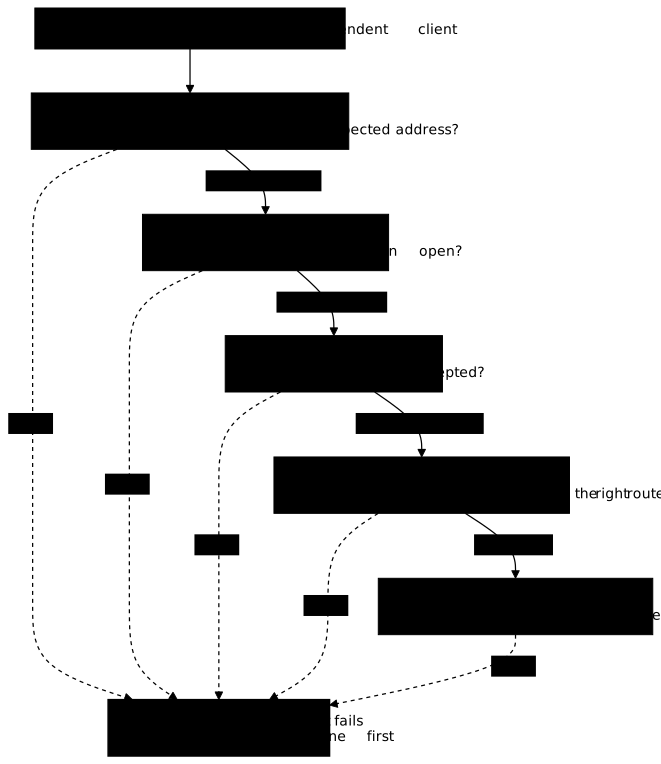
The table gives, for each stage, the gesture that settles it and what a failure suggests. The causes cited are frequent examples, not a complete list.
| Layer | Question | Gesture that settles it | A failure suggests |
|---|---|---|---|
| Name | Does the name give the expected address? | dig service.mes.test A from the client | missing zone, wrong address, stale cache |
| Port | Does the TCP connection open? | a raw connection to the port, with a bounded timeout | nothing listens at this address, firewall, wrong port |
| TLS | Is the certificate accepted? | curl --cacert ca.pem https://… | unknown authority, name missing from the certificate, expired certificate |
| Routing | Does the request reach the right route? | curl and reading the status | missing route, route that targets the wrong port |
| Application | Does the backend answer correctly? | direct request to the backend, from the service's machine | stopped process, application error |
The lesson on the path of a request gives the same logic from the proxy's point of view, with the table of codes 404, 502, 503 and 504. The difference here: we do not start from the code, we start from the layer.
Why observe from an independent client and from the operator?
You need two points of view, because the operator sees the service from the inside, whereas only an independent client goes through all of it. The operator is the person, and the machine, that administers the service. An independent client is another machine, with its own DNS resolver (the server it asks for addresses) and its own list of trusted authorities.
From the service's machine, a test on the local address succeeds even when the name is not declared, or when the service listens only on the loopback address (127.0.0.1, reachable only from the machine itself). The same test from an independent client fails, and the gap between the two is already a clue: what the operator sees and what the client sees do not coincide, so the failure often sits between them, in the name, the port or the firewall.
We recommend opening the diagnosis from the client's point of view, because the client is the one complaining, then going down on the operator side for the layers that only the host sees: process, configuration, logs. The independent client says where it breaks, the operator says why.
How do you test the name, then the port?
You test the name by querying the client's resolver, the port by attempting a connection with a bounded timeout, and the two failures do not look alike. The DNS is the service that translates a name into an IP address. If dig returns no address, or an unexpected one, the failure is in the name layer, and nothing lower is worth testing.
A frequent pitfall: forcing the address with curl --resolve makes the request succeed while teaching nothing about the DNS. This workaround serves to test a route before the name is declared, not to diagnose a name failure. To read a resolution failure in detail, see DNS (in French).
The port is the number that designates a service on a machine: 443 for HTTPS. A TCP connection opens in three exchanges (SYN, SYN-ACK, ACK), and its failure most often takes two forms. A refused connection comes back within a few seconds: someone answered no, immediately. An unreachable host, whose packets are dropped along the way, answers nothing, and the client waits until the connect timeout, the maximum delay it has given itself before giving up.
This difference in waiting is a useful clue: a fast refusal suggests the machine is reachable but nothing listens, or a filter refuses cleanly; a long silence suggests a cut path or a dropped packet. It does not point to a single cause, though, and the page Network diagnosis methodology (in French) shows that the same refusal can come from two opposite situations. Always set a maximum delay on your test, otherwise a silent host freezes the terminal.
How do you test TLS without disabling verification?
You test TLS by explicitly designating the trusted authority, with curl --cacert, and never by disabling verification. TLS encrypts the exchange and authenticates the server through a certificate, a document signed by a certificate authority (CA), the body whose signature attests that a certificate belongs to a name. A client accepts a certificate when its chain goes back to a CA it knows and the requested name appears in the certificate.
In a laboratory, the CA is often a test authority whose certificate is placed on the client: you designate it with --cacert ca.pem. The -k option (--insecure) lets any certificate through, including the wrong one, so it removes the test you wanted to run. A failure of the TLS layer then becomes invisible, and the diagnosis wrongly concludes that the layer is healthy.
A TLS failure has causes that the curl message helps tell apart: unknown authority for the client, name missing from the certificate, expired certificate. An entry point that presents a certificate signed by an authority other than the expected one fails during the negotiation, before any HTTP exchange. That is why TLS comes before routing: as long as the client verifies the certificate and rejects it, it does not send its HTTP request. To read a certificate in detail, see Diagnose TLS.
How do you tell routing from the application?
You tell routing from the application by querying the backend directly, from the service's machine, then comparing its response with the entry point's. Routing is the decision by which the entry point chooses, according to the requested name or path, which backend to relay to. A route is a rule of that choice. A route that targets the wrong port, or that does not exist, gives an error seen from the client while the backend is in perfect health.
The gesture that settles it is the direct request to the backend. If the backend answers correctly when you talk to it without going through the entry point, the application layer is healthy and the fault is most often in the routing: the route targets the wrong destination (or the link between the entry point and the backend, for example a refused TLS trust, is at fault). If the backend does not answer, or refuses the connection, the fault is in the application, or more precisely in the process that was supposed to run it.
This gesture rests on a fact to keep in mind: the entry point sees requests that the application never sees. A request refused by a rule, a missing route, a TLS failure: the backend hears nothing about it, and its log stays empty. An empty log on the application side therefore proves nothing, it only says the request did not arrive that far, which is precisely information about the earlier layers.
Another pitfall touches this boundary: a retry can hide a failure from the client. Some entry points retry a failed request on another backend of the same group (Nginx does it by default on a connection error or a timeout, according to proxy_next_upstream). The client can then receive a 200, and the errors it sees no longer measure the health of each backend. To know whether a backend is healthy, you query it, not through the entry point. The lesson Master timeouts, retries and caching without altering responses details these retries.
How do you eliminate a hypothesis instead of confirming it?
A hypothesis is tested with a gesture that can refute it; the method of this lesson concludes on the one that no test has managed to rule out, not on the most plausible. A hypothesis is a provisional explanation: "the certificate presented is not the expected one". A targeted test is a gesture whose result depends on that explanation: if it is wrong, the result changes. Plausibility can guide the order of the tests, but only surviving the tests allows you to conclude. The common bias is to look for what confirms, and you find it easily.
We recommend keeping an investigation log, that is, a small text file with one line per observation: the time, the hypothesis, the test, the outcome (confirmed or refuted). This is not formalism. In a diagnosis that lasts an hour, this log avoids retesting the same thing twice, and it lets you say exactly what has been ruled out. A refuted hypothesis is progress, not a failure: it removes a layer from the list. Do not confuse it with the service's logs, which are a source of facts and not your trace of reasoning.
Two precautions limit false trails. The first: one change at a time. If you modify two things and then the service answers, you do not know which one fixed it. The second: an alarming message is not a cause until a test has tied it to the failure. A log may carry a worrying warning, for example an almost full cache, with no connection to the failure. The layer test settles it: as long as no gesture from the table fails because of that message, note it as provisional noise and do not deal with it before having located the faulty layer.
You also need to name the trap of silence. When a log or a graph shows nothing, at least three causes hide behind that silence: a real failure, an absence of traffic, or a lost collection, meaning the information did not reach the place where you are looking. Observe a published service details this sorting. Layer-by-layer diagnosis limits the problem, since its locating gestures do not depend on a service log: it generates the test traffic itself and reads the response.
Which repair, and how do you prove no protection was dropped?
The right repair is the smallest one that restores the service, and it is proven by replaying an acceptance test that also checks what must remain denied. A failure is repaired by putting the faulty layer back in its intended state, not by removing the guard that revealed it. Disabling TLS verification makes a false certificate "work", opening the backend directly to the public makes a broken route "work", and both leave the service less safe than before the failure.
The acceptance test is a set of checks replayed from the independent client, once the repair is done. It covers the name, the certificate, the business route, but also three denials: an internal route must keep answering 403 (forbidden), which this lab requires, the backend must not be reachable directly from the client, and the public port must not answer in plain HTTP. An acceptance test that checks only success validates a repair that may have opened a breach.
Replay the acceptance test several times: a 200 obtained once can come from luck, from a cache or from one backend among several. Several identical responses are worth more than a single one, and the lab requires three. The same logic, applied to a go-live, is described in Prepare go-live, recovery and rollback.
Practice
The lab entrusts you with a published service over TLS behind a router, with a protected backend. A failure has been drawn at random among five layers, DNS, transport, TLS, route and backend, and background noise unrelated to it clutters the log. You observe from the independent client and from the service's machine, keep an investigation log, name the faulty layer and component in a diagnosis file, then repair. The lab names the layers dns, transport, tls, route and backend: they correspond, in the order of this lesson, to the name, the port, TLS, routing and the application.
The validation reads your work on the machine: the investigation log must carry at least two timestamped observations, a hypothesis, a test and an outcome, but the test judges only the presence of this trace, not the quality of the reasoning. The layer named must be the layer actually drawn, and the component must name the faulty component without citing those of the other layers. After the repair, the test queries the DNS from the client, requires three 200 in a row, a 403 on the forbidden route, no response from the backend on direct access and no plain response on port 443.
Key points
- A published service is diagnosed by going down five layers in the order of the path: name, port, TLS, route, application. The first one that fails is the layer to examine first: it is a method, not a law.
- An error message names what the client observed, not the layer at fault: the same code occurs at several stages.
- You observe from an independent client to know where it breaks, then from the operator to know why.
- A refused connection comes back within a few seconds, an unreachable host waits for the connect timeout, but neither of them points to a single cause on its own.
- You test TLS with the authority designated by
--cacert, never with-k, which removes the test. - The entry point sees requests that the application never sees, and a retry can hide a failure from the client: you query the backend directly to judge its health.
- A hypothesis is tested with a gesture that can refute it, and you conclude on the one that no test has ruled out, one change at a time. An alarming warning is not a cause until a test has tied it to the failure.
- A silence has at least three causes: real failure, absence of traffic, lost collection.
- You repair with the smallest fix, then replay an acceptance test that also checks the denials: internal route, isolated backend, no plain HTTP.
Knowledge check
These questions check that you can order the layers, choose the gesture that settles each stage and repair without weakening a protection.
Knowledge check
Check what you have learned with this interactive quiz
How it works
- The timer starts when you click Start
- Multiple choice, true/false and short answer questions
- You can move between questions
- Detailed results are shown at the end
Starts the quiz and the timer
Review
(0/0)Score by domain
A domain groups several guides and gets several questions, so its score is more reliable than a per-topic score, which often rests on a single question.
Summary
Strengths
No topic passed at 80% on at least two questions yet.
Weak areas
No topic below the pass mark.
Recommended next
Hints before you try again?
Continue the course: Foundation assessment: design and hand over a service publication
A new full quiz with random questions
Work again only on the questions you missed