
An upstream block spreads requests across several backends (the application servers placed behind the proxy), and open source Nginx removes a failing backend based on your clients' real requests, never by querying it on its own. This lesson is for someone who can already publish an application with proxy_pass: it deepens the upstream block that the previous lesson only introduced. It teaches how to declare a group of servers, how to tune passive detection (max_fails, fail_timeout), why proxy_next_upstream can double an action if badly set, and how to measure the time Nginx takes to remove a failure. The expected result is the same as with Traefik, a sick backend leaving the rotation, but the path differs.
What you will learn
The lesson follows the thread of a failure: declare, detect, replay, measure.
- Declare a group of backends with weights, a backup server and an algorithm.
- Tune
max_failsandfail_timeoutwith values you can justify. - Choose what
proxy_next_upstreamreplays, without doubling a write. - Measure the removal of a faulty backend by the traffic it still receives, not by the errors seen.
- Distinguish the capability of open source Nginx from the commercial features.
Prerequisites
The lesson assumes you can publish a service behind Nginx and read an HTTP exchange.
- Publishing an application with
proxy_pass: Publish an application with Nginx. - The path of a request to the backend: Publish a web service.
- The notion of an idempotent method: Read HTTP before configuring a proxy.
- An account with
sudoon a Debian 13 machine, where Nginx 1.31.8 is installed from the vendor repository (nginx.org): the configuration lives in/etc/nginx/conf.d/.
How does Nginx spread requests across several backends?
An upstream block names a group of servers, and proxy_pass designates that group by its name; without any other setting, Nginx goes round each server in turn. The lesson Publish an application with Nginx showed the principle; here are the settings it did not detail. The group is declared at the http level, next to the server blocks, and each server line of the group takes an address followed by parameters.
upstream applicatif {    server 127.0.0.1:18095 weight=3;    server 127.0.0.1:18096;    server 127.0.0.1:18097 backup;}
server {    listen 80;    server_name app.lab.test;
    location / {        proxy_pass http://applicatif;        proxy_set_header Host $host;    }}
Three parameters of the server line are used every day. weight gives a weight: here the first backend receives three requests for every one sent to the second (the default weight is 1). The backup parameter designates a backup server, used only when all the normal servers are unavailable. The down parameter marks a server removed by hand, useful for planned maintenance.
The choice of algorithm is made by a directive at the head of the group. By default, it is round robin, which serves the servers one after the other taking weights into account. least_conn sends the request to the server with the fewest active connections, which suits cases where processing times vary a lot. ip_hash associates a client address with a server, which gives a rough affinity, but one that breaks down as soon as many users share an address, for example behind a NAT (several machines going out under a single public address).
One last setting changes performance without changing the distribution: persistent connections to the backends. Instead of opening then closing a TCP connection for each request, Nginx keeps idle connections waiting, per worker process (the processes that handle requests). They are active by default (since 1.29.7), 32 per worker, and Nginx speaks HTTP/1.1 to its backends by default: the location needs no extra directive.
The keepalive N directive, placed in the upstream block, changes this ceiling of idle connections. It does not limit the total number of connections open toward the upstream, only those waiting without serving. A local parameter also prevents them from being shared between different location blocks.
upstream applicatif {    server 127.0.0.1:18095;    server 127.0.0.1:18096;    keepalive 64;}
location / {    proxy_pass http://applicatif;}
The example above raises the ceiling to 64 under heavy load. Read the version with nginx -v, or with nginx -V as in the lesson Install Nginx: master, workers and contexts, before copying an example found online: the available directives change from one version to another.
How does Nginx detect a failed backend without a probe?
Open source Nginx has no active probe: it never asks a backend whether it is well, it judges from the requests that clients already send through it. This passive detection relies on two parameters of the server line, max_fails and fail_timeout. The first is the number of failures that trigger the removal, the second is a duration that serves twice: it is the window in which failures add up, then the duration for which the removed backend stays set aside. The default values are max_fails=1 and fail_timeout=10s: with no tuning, a single failure is enough to set a backend aside for ten seconds.
upstream applicatif { server 127.0.0.1:18095 max_fails=3 fail_timeout=15s; server 127.0.0.1:18096 max_fails=3 fail_timeout=15s;}Read these values as follows: if three attempts fail on a backend in less than fifteen seconds, Nginx considers it unavailable for fifteen seconds. When that expires, it sends it a real request to see whether it answers. If it succeeds, the backend takes its share of traffic again; otherwise it goes off for a new period. The diagram below shows this cycle: follow the path of a failing request, up to the removal and the return of the backend.
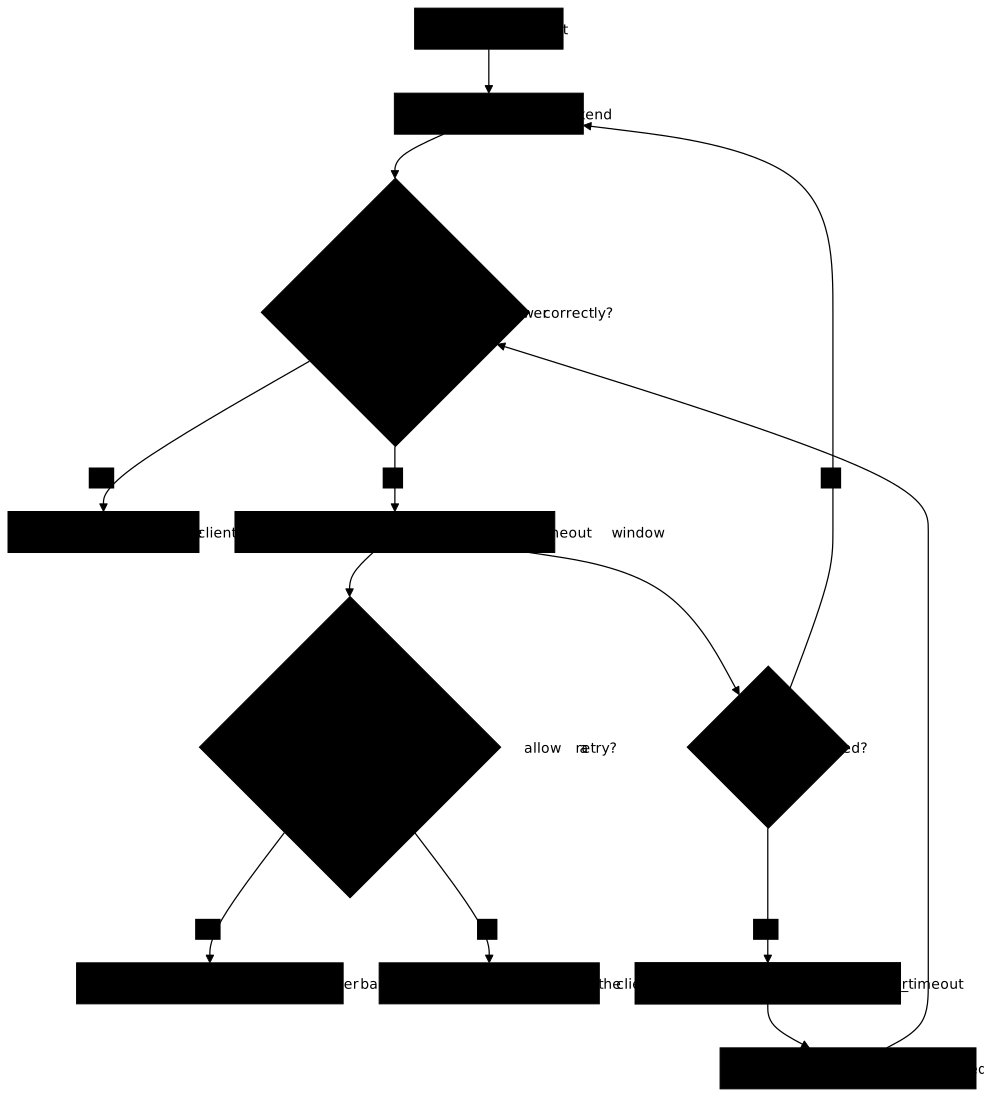
Two values trap beginners. max_fails=0 disables detection: the counter no longer exists, and a backend in error keeps its share of traffic indefinitely. And a group of a single server ignores max_fails and fail_timeout: that server is never declared unavailable, since there is nowhere to send the traffic instead. A configuration with a single backend therefore does not have the same removal effects as a real group.
It remains to know what counts as a failure, and the answer fits in three categories. The cases error (connection or transmission error), timeout (timeout exceeded), denied and invalid_header always count, even if they do not appear in the proxy_next_upstream directive, described just below. The codes 500, 502, 503, 504 and 429 only count if they appear in proxy_next_upstream: a backend that answers 500 without http_500 being listed there therefore accumulates no failure and is never removed. A 404 or 403 code from the application is never counted, whatever the configuration.
The proxy_connect_timeout and proxy_read_timeout timeouts set what "too slow" means. If proxy_read_timeout is longer than the slowness of a slow backend, no timeout occurs and that backend is never counted as failing.
What happens when Nginx replays a request on another backend?
The proxy_next_upstream directive lists the situations in which Nginx replays the request on the next server of the group, and it is what decides whether an action can be done twice. The default is error timeout. People readily add http_502 or http_503 to replay also when a backend answers with a gateway error.
location / { proxy_pass http://applicatif; proxy_next_upstream error timeout http_502 http_503; proxy_next_upstream_tries 2; proxy_next_upstream_timeout 5s;}The two neighboring directives bound the replay: proxy_next_upstream_tries limits the total number of servers tried, and proxy_next_upstream_timeout limits the total duration. Their default value is 0, that is no limit. Without them, a request on a badly degraded group can go through all the servers and wait a long time. In the example above, 2 and 5s bound the replay to two servers tried and five seconds in total.
The critical point is idempotency. A method is idempotent when repeating it gives the same final state: a GET reads, a second GET changes nothing. A POST that creates an order is not idempotent: replaying it creates a second order. By default, Nginx does not replay a non-idempotent request (POST, LOCK, PATCH) once it has been sent to the backend. A connection that fails before anything is sent remains replayable, since nothing reached the backend. The non_idempotent keyword, added to proxy_next_upstream, lifts this protection.
The consequence reads in both directions. With the default setting, a POST whose backend goes down during processing receives the error, with no duplicate: that is the price of safety, and it is up to the client to decide to retry. With non_idempotent, the client has a better chance of getting a response, at the risk of duplication.
The danger comes from the fact that the client and the proxy cannot tell a lost response from an action that did not take place. If a backend records the order then fails before answering, a replay on the other backend records it a second time. The client receives an error in both cases. The page Read HTTP before configuring a proxy explains why methods are classified this way; here, remember the rule: only set non_idempotent if the application handles duplicates itself, for example with an idempotency key.
This directive also has a useful side effect to know: a replay hides the failure from the client. If the first backend returns an error and the second answers, the client sees nothing, whereas the failure was indeed counted for max_fails. Detection and replay therefore work together: one protects the request in progress, the other spares the following ones.
How do you measure that detection works?
You measure detection by the traffic the faulty backend still receives, never by the absence of errors on the client side. Two things must be distinguished: the failures counted by Nginx for max_fails, and the errors seen by the client. With an active replay, the first backend fails, the second answers, and the client sees no error although the failure was indeed counted. The replay can therefore hide errors: Nginx learns of the failure through the requests sent to the backend, not through the errors that reach the client.
The "zero errors" criterion therefore proves nothing. Take the faulty state max_fails=0, which disables all detection: the failing backend stays in the group and receives its share of requests. If proxy_next_upstream replays its 502 errors on the healthy backend, the client nevertheless sees no error, and the measurement is green without detection. This is a methodological lesson that holds beyond Nginx: a criterion that also succeeds when the function under test is absent discriminates nothing. The honest criterion covers what differs between a tuned detection and an absent one: after a small number of requests, the faulty backend no longer receives traffic, and it comes back when it is healthy again.
The measurement is made from a client, with a burst of sequential requests that notes who answered. Do it a first time with both backends healthy, then a second time while one of the two is in error.
for i in $(seq 1 30); do curl -s --max-time 12 "http://${IP_EDGE}/" || echo "failed"done | sort | uniq -c${IP_EDGE} designates the address of the machine that runs Nginx. For each distinct response line, the command prints the number of times it appeared; failed only appears if curl itself fails (timeout exceeded, connection refused), whereas an Nginx error page shows up like any other response. In the lab's test bench, each backend identifies itself in its response body (backend=a or backend=b), which lets you see the distribution. Then split the burst into two halves, and read the right indicator. With an active replay, backend=b alone in the second half is not enough: it is also what you would see with max_fails=0, since a fails and b takes over the request. You must count the requests received by the faulty backend (that backend's counter or log), or read in Nginx's access log the $upstream_addr variable, which lists the servers tried and shows two addresses when a replay took place. Detection took place if, in the second half, the faulty backend is no longer tried at all.
Read $upstream_status with caution too: when set, it does not prove that the application answered. When Nginx gives up on a server, it writes the status itself: 504 on timeout, 502 by default, hence on a refused connection. A 502 in the log can therefore come from a stopped backend, without any application response having existed. If the client has already closed, the request is finalized as 499 before the status is written.
If the burst never removes the backend in error, first look at what it returns: a 5xx code that does not appear in proxy_next_upstream is not counted, and detection does not trigger.
Three quantities let you justify your values. The detection time depends on max_fails and on the pace of requests. A piece of reasoning, not a measurement: with a round robin over two servers of equal weight, one request in two lands on the faulty server, so max_fails=3 takes of the order of six requests. The real figure varies with weights, replay and simultaneous traffic. The return time depends on fail_timeout: a recovered backend only comes back at expiry. Finally, the counting window is fail_timeout too: on low traffic, failures spaced more than that duration apart never add up, and the backend is never removed.
The values are therefore a trade-off, and you must be able to state it. A low max_fails removes quickly, but a brief incident or an isolated request can set a healthy server aside. A long fail_timeout protects users for longer, but delays the return of a repaired server.
What about DNS names and commercial features?
A domain name in a server line is resolved when Nginx starts or reloads, not on every request, and active probes belong to NGINX Plus. These two points are boundaries: ignoring them produces silent failures or rejected configurations.
For resolution, the basic rule is that the address found at startup is memorized. If the backend changes address (recreated container, service behind a name managed by an orchestrator), Nginx keeps sending traffic to the old address. Two paths exist. The first is the resolve parameter of the server line, available in open source since 1.27.3, which requires a zone directive, which places the group in shared memory between workers, and a resolver, which designates the DNS server to query. This resolver can be declared in the upstream block itself. The second path is a proxy_pass that carries a variable, resolved at run time and which also requires a resolver.
For probes, the health_check directive queries backends at regular intervals: it belongs to NGINX Plus, the commercial offer, and does not exist in the open source build. Active probes and Plus's upstream monitoring API are not available either. The open source path to observe the health of a group goes through the logs, the stub_status module and an exporter, covered in the lesson Protect and observe Nginx. Third-party modules exist to add probes; since they are compiled with Nginx and depend on its version, they are not part of what you can assume available.
Conversely, Traefik can do an active probe, as the lesson Traefik: entrypoints, routers, services and middlewares shows. The deliverable is the same, a sick backend leaving the rotation, but with open source Nginx the removal triggers after real requests have failed.
Practice: measure load sharing and passive detection
The lab puts two identifiable backends behind Nginx, which you drive by writing a word into a file (ok, erreur or lent). The distribution works at the start, with two flaws: passive detection is disabled, and the replay allows a POST to be counted twice. You set thresholds you can justify and you fix the replay policy.
The validation measures four things: both backends receive traffic when they are healthy; a backend in error stops receiving traffic over the second half of a burst of thirty requests; it comes back once healthy; and a business counter proves that a submitted order is never counted twice.
Key points
- An
upstreamblock names a group of backends;weight,backupanddownset the share of each,least_connorip_hashchange the algorithm. - Open source Nginx has no active probe: detection is passive and learns from the clients' real requests.
max_failscounts failures andfail_timeoutserves twice, as the counting window and as the delay before retrying the removed backend;max_fails=0disables detection, and a group of a single server is never removed.proxy_next_upstreamiserror timeoutby default:5xxcodes only count if listed,403and404never.- A
POST,LOCKorPATCHalready sent is not replayed by default;non_idempotentcan double an action and is only set if the application handles duplicates. - You measure detection by the traffic the faulty backend still receives, never by the absence of errors: a replay hides them, even with
max_fails=0. - Persistent connections to backends are active by default, 32 per worker, over HTTP/1.1 by default:
keepalive Nadjusts the ceiling of idle ones, without limiting the total. $upstream_statusset does not prove the application answered: Nginx itself writes 504 on timeout and 502 on a refused connection.health_checkbelongs to NGINX Plus;resolveis available in open source since 1.27.3 and requireszone: you check on the installed binary, never on an example found online.
Knowledge check
Check that you have grasped the essentials of this guide. The questions cover only what has just been explained here.
Knowledge check
Check what you have learned with this interactive quiz
How it works
- The timer starts when you click Start
- Multiple choice, true/false and short answer questions
- You can move between questions
- Detailed results are shown at the end
Starts the quiz and the timer
Review
(0/0)Score by domain
A domain groups several guides and gets several questions, so its score is more reliable than a per-topic score, which often rests on a single question.
Summary
Strengths
No topic passed at 80% on at least two questions yet.
Weak areas
No topic below the pass mark.
Recommended next
Hints before you try again?
Continue the course: Nginx TLS: serve and renew a certificate
A new full quiz with random questions
Work again only on the questions you missed