Before you switch a service name to a new origin, you need to tell what a
domain's authority answers apart from what the resolver a client really uses
answers, and to foresee the effect of caches and of a forgotten IPv6
address. This lesson follows
Read HTTP before configuring a proxy
and opens the "Names and exposure" module of this foundation. The complete
DNS mechanism (five-step resolution, record types, dig, NXDOMAIN and SERVFAIL
diagnosis) is already covered by
Understanding DNS, the Internet's directory
(in French): this lesson builds on it and focuses on a single gesture,
preparing a cutover that does not lie about what it proves.
What you will learn
- Check the authoritative answer of a zone and that of the resolver a client really uses, and say what each one proves
- Prepare a name cutover that accounts for caches and for IPv4/IPv6 dual stack
- Explain why DNS never chooses the HTTP path, and why testing with
--resolvedoes not validate a publication
Prerequisites
This lesson assumes Read HTTP before configuring a proxy and the DNS basics covered by Understanding DNS, the Internet's directory (in French) (zone, delegation, authoritative server, recursive resolver, cache, A, AAAA and CNAME records): this lesson does not re-explain them, it only recalls in one sentence the two roles it uses most, just below.
What does an authoritative answer prove, and what does a cached answer not prove?
The answer of an authoritative server says what is really published right now; the answer of a caching resolver says only what it remembered from its last question, which may be stale. A cutover that succeeded from the authority's point of view (the new value appears there) can remain invisible to part of the users as long as their resolvers have not rechecked the zone, which is determined by the record's TTL (Time To Live): the lower it is, the sooner caches come back to query the authority.
A reminder of the two roles: the authoritative server of a zone holds the source of the records (it is the one that is authoritative for that name); the resolver is the server that the client's machine queries on its behalf, and which caches the answers it has already obtained.
Preparing a cutover therefore means checking the two levels separately: the
authority (with dig +trace, detailed in the DNS guide cited above) confirms
that the new value is indeed published; a public resolver, then the resolver
actually configured on a client machine, confirm that this client will see
the new value. A complete cutover plan lowers the TTL, waits for the
old TTL to expire, changes the value, checks the authority, then waits for
the new (short) TTL before considering the cutover done for all clients;
the section "How do you lower the TTL before a cutover" below details this
order. The rollback follows the same logic in reverse: republishing the old
value makes it available to everyone only after a new TTL delay, never
immediately.
What does dig show when you query the authority, then a resolver?
The aa (authoritative answer) flag of the dig response tells the two
cases apart: it is present when the authority answers, absent when a resolver
answers from its cache. The authoritative server is found by querying the
zone's NS records, then asking it the question directly. Real reading of
2026-10-25 on the zone stephane-robert.info:
dig +noall +answer NS stephane-robert.info @1.1.1.1stephane-robert.info. 172800 IN NS ns-1524.awsdns-62.org.stephane-robert.info. 172800 IN NS ns-1661.awsdns-15.co.uk.stephane-robert.info. 172800 IN NS ns-216.awsdns-27.com.stephane-robert.info. 172800 IN NS ns-984.awsdns-59.net.The TTL of 172800 s (48 hours) is that of the delegation (the NS
records, which designate the zone's authoritative servers): it is long, and it
is not that of the A record. You then query the first authoritative
server with @, then compare the flags of the response with those of a
public resolver:
dig @ns-1524.awsdns-62.org. www.stephane-robert.info A | grep '^;; flags'dig @1.1.1.1 www.stephane-robert.info A | grep '^;; flags';; flags: qr aa rd; QUERY: 1, ANSWER: 4, AUTHORITY: 4, ADDITIONAL: 1;; flags: qr rd ra; QUERY: 1, ANSWER: 4, AUTHORITY: 0, ADDITIONAL: 1On the first line, aa signals that the queried server holds the zone; on
the second, ra (recursion available) signals a server that offers
recursion, hence a resolver. Do not confuse it with rd (recursion
desired), which the client sets in its question and which appears in both
responses. The authority publishes a TTL of 60 s for the A record
(resolvers serve an equal or lower one, 39 s in one of my readings), but the
addresses differ: the authority answered 18.165.201.x and the resolvers
18.155.129.x, with an order that changes from one call to the next. Both
ranges belong to Amazon CloudFront (whois reading), but the cause of this
gap was not established: it is an observation, not an explanation. The lesson
still holds: two answers are not compared by address equality, but by what
they say about the publication. The right test is to check that the expected
value appears in the returned set, not that it arrives in first position.
All the values of these captures (addresses, TTL, order of answers,
server names) are those of the reading of 2026-10-25: yours will differ,
and that is normal. What must reproduce on your side is the presence or
absence of the aa and ra flags. To redo the measurement on your own
domain, replace stephane-robert.info and the @ns-... server with yours.
How does the TTL decrease in a resolver?
A resolver that has cached an answer serves it again with a decreasing TTL:
the displayed number is the time remaining before the resolver comes back to
query the authority. Real reading, one question every five seconds to two
resolvers, the local resolver of the machine (127.0.0.53) then the local
network box (192.168.1.1, the router acting as a resolver):
### resolveur 127.0.0.53t=00s TTL 60 18.155.129.9t=05s TTL 54 18.155.129.43t=10s TTL 49 18.155.129.49t=15s TTL 44 18.155.129.43### resolveur 192.168.1.1t=00s TTL 40 18.155.129.9t=05s TTL 35 18.155.129.43t=10s TTL 30 18.155.129.23t=15s TTL 25 18.155.129.49The first resolver started from an empty cache: its first answer came from the authority with the full TTL of 60 s, then the countdown began. The second already had the answer in cache, hence a start at 40 s. At this pace, each would reread the zone at expiry, and a change of value would be visible there only at that moment.
How do you lower the TTL before a cutover, and what do you suffer anyway?
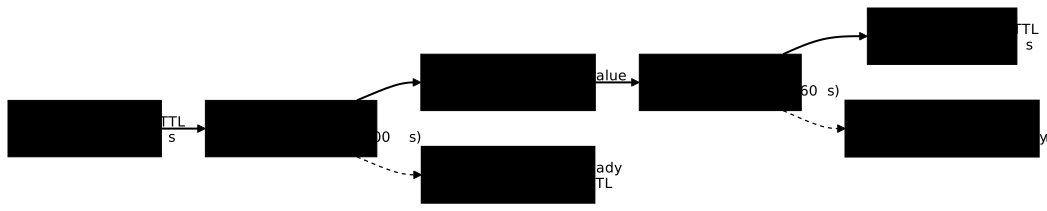
You lower the TTL at least the duration of the old TTL before changing the value, because only the caches that have already reread the zone with the short TTL will expire quickly. RFC 1034 (section 3.6) defines the TTL as the time during which a record may be kept in cache, and states that it can be lowered before a planned change to reduce inconsistency (RFC 1035, section 4.1.3, gives the format of the field): a cache that stored the value with 3600 s will keep it for up to 3600 s, whatever you publish next. Without the wait, the worst case of a cutover is therefore the value of the old TTL; with it, it falls to the new one.
The following diagram shows the timeline. Look at the two waits: the first (②) is the one people forget, yet it is what makes the second (④) short.
What does a cutover with a cache look like, recorded step by step?
With an authoritative server and a test resolver, you see the cache serve the
old value again after the change, then switch at TTL expiry. This bench needs
no special privileges: two dnsmasq instances on the machine, one playing the
authority of the test name boutique.test (TTL of 20 s), the other playing the
caching resolver. It is a scale model to see the TTL mechanism, not a
measurement of the Internet: this before/after reading comes from a local bench
and is not transferable as is to a public cutover (see the next section):
dnsmasq --no-daemon --no-resolv --no-hosts --port=5353 \ --listen-address=127.0.0.1 --bind-interfaces \ --address=/boutique.test/192.0.2.10 --local-ttl=20 &dnsmasq --no-daemon --no-resolv --no-hosts --port=5354 \ --listen-address=127.0.0.1 --bind-interfaces \ --server=127.0.0.1#5353 --cache-size=100 &Port 5353 is the authority, 5354 the caching resolver. Measured
version: dnsmasq 2.90. By default, dnsmasq answers an --address entry
with a TTL of 0; --local-ttl=20 sets the 20 s. --cache-size sets the cache
size (150 names by default, 0 disables it). You query both, change the value on
the authority side (by stopping the first instance with kill %1 in the same
terminal, then restarting it with --address=/boutique.test/192.0.2.20), then
query again. Here is the real reading; the exact durations will vary a
little on your side:
--- t=0 autorite (5353) :boutique.test. 20 IN A 192.0.2.10--- t=0 resolveur (5354), premiere question :boutique.test. 20 IN A 192.0.2.10--- zone modifiee. autorite (5353) :boutique.test. 20 IN A 192.0.2.20--- resolveur (5354), juste apres :boutique.test. 19 IN A 192.0.2.10--- resolveur, +9 s :boutique.test. 11 IN A 192.0.2.10--- resolveur, +23 s :boutique.test. 20 IN A 192.0.2.20Read the lines in order. Right after the change, the authority says
192.0.2.20 and the resolver still says 192.0.2.10 with 19 s remaining: the
new value is published, but invisible to anyone going through this cache. At
+9 s 11 s remain, the value is still the old one. At +23 s the cache has
expired, it has reread the authority and serves 192.0.2.20 with a full TTL
again. The inconsistency window lasted exactly the remaining TTL, not a
second more.
What do you control in a managed cache, and what do you suffer on the Internet?
In a cache you administer, you can flush it; on the Internet, you can only choose the TTL, and wait. The bench above is a managed cache: a purge command would switch immediately, which is useful in testing, but proves nothing about a public cutover. The resolvers of your users' internet providers, companies and browsers escape all control.
| Situation | What you control | What you suffer |
|---|---|---|
| Managed cache (your resolver, a test bench) | Flushing the cache, forcing a reread | Nothing: the cutover is visible on demand |
| Internet resolvers (ISPs, companies, browsers) | The published TTL, and the moment you lower it | The moment each cache rereads the zone, and the caches that keep a value longer than the TTL |
A short TTL therefore does not guarantee an instant cutover for everyone: some equipment keeps a value longer than requested. The remedy is preparation (lower early, keep the old origin working throughout the window), not the promise of a clean cut.
So keep the limit of the bench in mind: it shows how a TTL behaves, not how long a real cutover will take to be seen by all your users. That duration depends on the caches you do not control.
Why can a forgotten AAAA break a cutover that seems to have succeeded?
A client that received an AAAA (IPv6) address for a name will try that address first, even if only the A (IPv4) address was updated to the new origin. Most modern network stacks prefer IPv6 when both families answer: if the old origin keeps an active AAAA record while a new A record points to the new origin, part of the clients keeps reaching the old machine over IPv6, without any error signalling it.
A name published in both A and AAAA is said to be dual stack (IPv4 and
IPv6 together). A complete cutover therefore checks both address families
before and after the change, not only the one you modified first. One query
per family is enough, querying the authority (A then AAAA):
dig +noall +answer @ns-1524.awsdns-62.org. www.stephane-robert.info AAAA | head -2www.stephane-robert.info. 60 IN AAAA 2600:9000:23d3:a000:12:8443:85c0:93a1www.stephane-robert.info. 60 IN AAAA 2600:9000:23d3:d600:12:8443:85c0:93a1The answer held eight IPv6 addresses; only the first two are shown. If
dig ... AAAA returns lines while you prepared only the A, the name remains
reachable over IPv6 towards the old origin. If the service must no longer
be reachable over IPv6 on the old origin, removing the AAAA record is part
of the cutover, just like modifying the A record: forgetting one of the two
amounts to switching only half of the traffic.
Why does DNS never choose the HTTP path?
DNS answers a single question, which IP address corresponds to this name; it
knows nothing about the path the HTTP request will follow next, nor about the
certificate that will be presented, nor about the route chosen behind that
address. This is the first mistake to rule out before preparing a cutover:
changing a DNS record changes the network destination of a request, not the
way a reverse proxy will then choose its certificate through the SNI
(the requested name, announced at the start of the TLS connection) or its route
through the Host header (the requested name, written in the HTTP
request), two decisions detailed in
Read HTTP before configuring a proxy
and in Publish a web service. A
name that resolves to the right address can very well end in a certificate or
routing error once the connection is open: these are two distinct diagnoses,
and confusing them makes you look on the DNS side for a problem that lives one
step further.
A CAA record, which restricts the certificate authorities allowed to issue for a domain, lives in the DNS zone but concerns certificate issuance, not resolution itself: Automatic certificates details how it works and the associated pitfalls.
Why doesn't a test with --resolve validate a publication?
The --resolve option of a client such as curl manually forces the
association between a name and an IP address, completely short-circuiting DNS:
it proves that a machine answers at that address, not that a real client will
reach the right address by resolving the name itself. This is the second
mistake to rule out: a test that passes with --resolve while a DNS record is
not yet published, or still points to the old origin, gives false
confidence. It confirms only that the destination server answers
correctly once you get there, which is useful to isolate a problem, but it says
nothing about the path a real client actually takes, which always starts by
querying its resolver.
The contrast shows with a name that does not exist in any DNS (the
.invalid suffix is reserved by RFC 2606 for this) and a local server
on port 18105. Here is the real reading:
curl -s -o /dev/null -w 'code %{http_code}\n' \ --resolve boutique.invalid:18105:127.0.0.1 http://boutique.invalid:18105/curl -sS -o /dev/null -w 'code %{http_code}\n' http://boutique.invalid:18105/dig @1.1.1.1 boutique.invalid A | grep 'HEADER'code 200curl: (6) Could not resolve host: boutique.invalidcode 000;; ->>HEADER<<- opcode: QUERY, status: NXDOMAIN, id: 52492With --resolve, the test succeeds (200) although the name is published
nowhere; without it, the real client fails (curl code 6, NXDOMAIN on
the resolver side, that is, "this name does not exist"). A test that has only
one of these two lines does not say the same thing as the other. (The id on
the last line changes with every call.)
Validating a cutover therefore requires, at some point in the process, a test
that lets the client resolve the name itself, without --resolve or a
modified hosts file: it is the only way to see what a real user will get,
resolver caches included.
The lab has you diagnose a record, then switch it without interrupting the service, checking what a client that resolves by itself sees.
Key points
- An authoritative answer confirms what is published; a caching resolver answer confirms only what it retained, subject to the TTL.
- A cutover plan lowers the TTL, waits for the old TTL to expire, changes the value, checks the authority, then waits for the new short TTL; the rollback follows the same logic.
- In a cache you administer you can purge; on the Internet you can only choose
the TTL, and wait. The lesson's
dnsmasqbench shows the mechanism, not the duration of a public cutover. - A forgotten AAAA record can let part of the clients reach the old origin over IPv6 while the A record points to the new one.
- DNS chooses an IP address, never an HTTP path, a certificate or a route behind that address.
- A test with
--resolvebypasses DNS: it never proves that a publication is correct for a real client.
Knowledge check
Knowledge check
Check what you have learned with this interactive quiz
How it works
- The timer starts when you click Start
- Multiple choice, true/false and short answer questions
- You can move between questions
- Detailed results are shown at the end
Starts the quiz and the timer
Review
(0/0)Score by domain
A domain groups several guides and gets several questions, so its score is more reliable than a per-topic score, which often rests on a single question.
Summary
Strengths
No topic passed at 80% on at least two questions yet.
Weak areas
No topic below the pass mark.
Recommended next
Hints before you try again?
Continue the course: Link interfaces, ports, firewalls and exposure
A new full quiz with random questions
Work again only on the questions you missed