
Installing HAProxy means getting a load balancer whose running version you can name, whose configuration sections you can read, whose mode on each port you know, and whose exposure to the network you can state. This lesson opens the HAProxy module. It is for someone who has already seen a reverse proxy and has never configured HAProxy. It covers installation from a package, reading global, defaults, frontend and backend, the difference between tcp mode and http mode, then the status page (a web page that lists the backends and their health) and the admin socket (a local access point to query and drive HAProxy live), neither of which should leave the machine.
What you will learn
The lesson goes from the installed package to the proof that nothing is exposed by mistake.
- Install HAProxy and read the version of the binary that systemd really runs.
- Read the sections
global,defaults,frontend,backendandlisten, and how they inherit. - Tell apart
tcpmode, which relays without understanding, fromhttpmode, which reads every request. - Keep the status page and the admin socket on the machine, and measure it.
- Validate a configuration with
haproxy -cand check that it comes back after a restart.
Prerequisites
The lesson assumes you know what a reverse proxy is and can read the output of systemctl or ss.
- Understand the role of a reverse proxy: Reverse proxy: definition, role and which tool to choose.
- Read an HTTP request, its headers and its status: Read HTTP before configuring a proxy.
- An account with
sudoon a Debian 13 (trixie) machine, the one used by the lab. HAProxy 3.4 does not install on Ubuntu 24.04; the next section explains why.
The Linux lesson HAProxy: load balancing and high availability keeps the scope of the LFCS certification. This one is its "publish a service" version: it does not repeat it, it builds on the same base.
How do you install HAProxy: package, repository or build?
Three paths exist, and they are told apart by one question: which HAProxy branch do you want to run, and who keeps it up to date? The distribution package follows the system's calendar and leaves you on the branch frozen at its release; the vendor repository gives the branch of your choice, maintained by the package maintainer; building from source gives total control and the burden of every fix. This lesson installs the second one, because the training teaches the current branch.
The reference branch of this training is HAProxy 3.4 LTS, and it is the one the lab installs: version 3.4.7. An LTS (long-term support) branch receives fixes for several years; 3.4 is maintained until the second quarter of 2031.
The vocabulary of branches has a precise meaning at HAProxy, read on haproxy.org on 2026-10-26. The branch marked "stable" is 3.3, which is not LTS and is maintained until the first quarter of 2027. The other LTS branches are 3.2 and 3.0. 2.8, a former LTS branch, is now only in "critical fixes only": only critical defects are fixed there. Before choosing a branch, read its Status line rather than trusting the word "stable".
The chosen branch dictates the distribution, and this is the counter-intuitive point of this installation. The haproxy package of 3.4 depends on libssl3t64 version 3.5.1 or higher, which Ubuntu 24.04 does not provide: it does not install there, and no apt option changes that. That is why this training runs on Debian 13, where the vendor repository publishes trixie-backports-3.4. On Ubuntu 24.04, the highest reachable branch stays 3.3.
Path replayed on a machine running Debian 13 (trixie), the lab's one: Debian GNU/Linux 13 (trixie) and HAProxy version 3.4.7-1~bpo13+1. The repository is the one of the HAProxy Debian project, described on haproxy.debian.net. Three gestures: fetch its signing key, check its fingerprint, then declare the repository of the wanted branch.
sudo apt-get install -y curl gnupg ca-certificates socatsudo curl -fsSL https://haproxy.debian.net/haproxy-archive-keyring.gpg \ -o /usr/share/keyrings/haproxy.debian.net.gpggpg --show-keys --fingerprint /usr/share/keyrings/haproxy.debian.net.gpgThe last command prints the fingerprint of every key in the file. On 2026-10-26, read on the published file, it contains only one: an RSA 4096 key created in 2012 in the name of Vincent Bernat, the package maintainer, with no expiry date (only its encryption subkey expires, in June 2027, which your output shows). Its fingerprint is AEF2348766F371C689A7360095A42FE8353525F9. Look for it among all those your output prints, without assuming the first is the right one: a keyring can hold several, and nothing guarantees the order in which they come out. If it is missing, stop and do not declare the repository.
This fingerprint and the signature do not prove the same thing. The fingerprint only says that you hold the expected key file. What proves that the packages really come from the vendor is that the repository signature verifies against this key: apt does it at every apt-get update thanks to signed-by, and rejects the repository with a missing public key or invalid signature error if it does not match. Without the keyring, gpg --verify on the repository's InRelease file announces the key AEF2…25F9 but answers No public key; with it, it answers Good signature in the name of Vincent Bernat. An apt-get update that succeeds without warning on this repository is therefore your proof.
Once the fingerprint is accepted, declare the repository of branch 3.4 and install the package:
echo "deb [signed-by=/usr/share/keyrings/haproxy.debian.net.gpg] http://haproxy.debian.net trixie-backports-3.4 main" \ | sudo tee /etc/apt/sources.list.d/haproxy.listsudo apt-get updateapt-cache policy haproxysudo apt-get install -y haproxyapt-cache policy haproxy gives the candidate version before installation: it must start with 3.4. The repository is in http because the signature of the indexes, checked by signed-by, carries the trust, not the transport. The package starts the service with its own configuration. socat is used to talk to the admin socket from a terminal.
The package already sets up the essentials, which saves you from redoing them. The configuration is /etc/haproxy/haproxy.cfg, and the /etc/haproxy/conf.d directory is also loaded: the systemd unit runs /usr/sbin/haproxy -Ws -f $CONFIG -f $CFGDIR, so a fragment dropped in conf.d is read without changing anything in the unit. The package provides the error pages, a chroot in /var/lib/haproxy, the haproxy user and group, an admin socket already declared, and the tools haproxy-reload, haproxy-dump-certs and halog.
Path described from the distributions' documentation, not replayed in the lab: nothing below has been tested on this family. The package is also called haproxy. According to that documentation, it does not start the service at installation, a point that is not verified: enable --now enables and starts it in every case.
sudo dnf install -y haproxy socatsudo systemctl enable --now haproxyTwo traps specific to this family, to check on your machine. SELinux can forbid HAProxy from reaching a backend on a non-standard port: the boolean involved is called haproxy_connect_any, it is disabled by default, and getsebool haproxy_connect_any gives its state on your machine. We could not confirm that it exists under this name on RHEL 9 or 10: check it before enabling it. And the package version varies with the major version of the distribution: read it, do not assume it.
That leaves the third path announced above, building from the official sources. The Linux lesson HAProxy: load balancing and high availability details it step by step, for a 3.2 branch: this lesson does not replay it. It has a real benefit, enabling an option missing from the package, and a cost nobody announces: you become responsible for every security fix, with no apt to warn you. For a first deployment, the vendor repository is enough.
Which version is really running?
The running version is the one of the binary systemd started, read through /proc/<pid>/exe, not the one of the first haproxy your PATH offers. The two can differ as soon as a hand-built version lives alongside the package, and it is a case you only notice afterwards.
The method takes three gestures. You ask systemd for the service's main PID, resolve the binary that carries this PID, then query it with -v.
pid=$(systemctl show -p MainPID --value haproxy)binaire=$(sudo readlink -f /proc/${pid}/exe)sudo "${binaire}" -vThe first line of haproxy -v gives HAProxy version .... The next line, Status, is printed on every branch, LTS or not: it says what type of branch it is and the planned end of support. This is the maintenance data to read before choosing a branch. For the build options and the modules present (TLS, PCRE2, Lua, Prometheus exporter), haproxy -vv lists them: a module missing from the binary cannot be added back by configuration.
The settings, for their part, are read on the live instance: haproxy -v has no idea which configuration is loaded, it describes the binary, not the process. The admin socket answers the show info command, which reports among other things Maxconn and Nbthread:
echo 'show info' | sudo socat -t2 stdio /run/haproxy/admin.sockThis reading matters because a value written in haproxy.cfg and never loaded is not an applied value. The lab's check refuses to read the file for this very reason: it queries the socket. A configuration modified without a reload is exposed here.
How does HAProxy run: processes, threads and systemd?
HAProxy runs as a master process that supervises a worker, which handles connections with several threads; systemd only sees the master process. The master rereads the configuration and starts a fresh worker on a reload. The worker is the one that listens on the ports and serves the traffic.
Two global directives bound this worker. maxconn caps the number of simultaneous connections; beyond it, HAProxy queues connections instead of saturating the machine. nbthread sets the number of threads, that is, of execution flows that share the same process. Without an nbthread directive, HAProxy picks this number itself from the machine: the value actually applied is read with show info, as seen above, and that is what the lab's check does rather than hard-coding it.
To see what the package really launches, systemctl cat haproxy prints the unit. On Debian 13, the ExecStart line is /usr/sbin/haproxy -Ws -f $CONFIG -f $CFGDIR …: -Ws starts in master-worker mode and tells systemd when the service is ready, $CONFIG is haproxy.cfg and $CFGDIR is the conf.d directory. Read it rather than assume it.
How do you read global, defaults, frontend and backend?
An haproxy.cfg file is a series of sections, each opened by a keyword at the start of a line; the indented directives that follow belong to it until the next section. There are five to know.
| Section | What it carries | What it does not do |
|---|---|---|
global | The process: user, chroot, maxconn, nbthread, admin socket, log | It handles no request |
defaults | The shared settings: mode, timeout delays, log | It listens on nothing |
frontend | What listens: one or more bind lines, and the rules that pick a backend | It talks to no server |
backend | The servers of an application, the balancing algorithm, the health checks | It listens on nothing |
listen | A frontend and a backend joined in a single section | It serves simple cases, such as a status page |
Here is an example deliberately different from the lab's: one name, one server, a test port. It is for reading the shape, not for copying a solution.
global    log /dev/log local0    maxconn 2048    stats socket /run/haproxy/admin.sock mode 660 level admin
defaults    mode    http    log     global    timeout connect 5s    timeout client  30s    timeout server  30s
frontend catalogue    bind :8080    default_backend appli
backend appli    server appli1 127.0.0.1:9000
Read this file from top to bottom, like HAProxy does. global sets the process and opens the admin socket in mode 660: only the owner and the group can reach it. defaults sets http mode and the three timeouts, which apply to all the sections that follow. The frontend listens on port 8080 and sends everything to the appli backend, which designates a server.
Inheritance is the point that surprises. A frontend or backend section takes over the settings of the defaults section that precedes it, and can override a single one. A frontend that must work in a different mode from the defaults writes its own mode line. A timeout forgotten in defaults is a timeout that every section inherits without you seeing it.
The Debian 13 package already declares this socket in its haproxy.cfg, and the /run/haproxy directory exists: you have nothing to create. But two sockets coexist, and you must tell them apart. /run/haproxy/admin.sock is the admin one, which answers show info. /run/haproxy-master.sock is the one of the master process, opened by the -S option that the unit passes through EXTRAOPTS. To query the worker, use the first.
A reading trap: HAProxy does not remove its UNIX socket when it stops. After a systemctl stop haproxy, ls -l /run/haproxy/ still shows srw-rw---- 1 root haproxy 0 Oct 26 09:20 admin.sock (read on Debian 13): the file is there, the service is stopped, only an inode remains. This is what made the lab's first run fail, whose precondition tested the presence of the file and wrongly concluded that a service was running. To know whether HAProxy is running, query the socket (echo 'show info' | sudo socat -t2 stdio /run/haproxy/admin.sock): with no process behind it, the connection is refused, which a test -S would not see. Any supervision check you write must ask the question, not look for the file.
What does HAProxy say about a configuration with no listener?
HAProxy refuses to start on a configuration that declares no listening section, and its exit code followed by its message are the first thing to learn to read. A listener is a section that opens a listening port: a frontend or a listen. The lab starts precisely from there: the starting file contains a global and a defaults, and nothing else, hence no listener.
The gesture is to validate before loading, like nginx -t for Nginx, seen in Install Nginx:
sudo haproxy -c -f /etc/haproxy/haproxy.cfgThe exit code is 0 if the configuration is valid, non-zero otherwise, and the message names what is missing or the faulty line. I do not reproduce the exact text: it varies from one version to another, and yours is the one that counts. systemctl status haproxy then journalctl -u haproxy complete the diagnosis when the service refuses to start.
Make it a habit to run haproxy -c before every reload. A reload on an invalid configuration does not cut the running service, but it does not apply what you expected either, and you believe the opposite.
tcp mode or http mode: what is the difference in practice?
In tcp mode, HAProxy relays bytes without interpreting them; in http mode, it reads every request, validates it, can modify it, then picks a backend. The rest of the module follows from this difference.
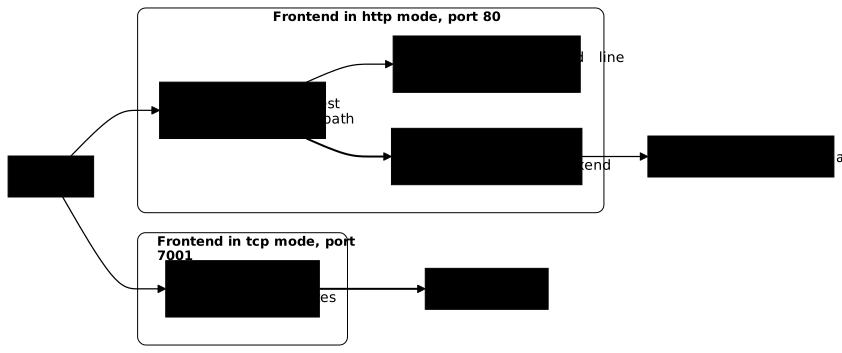
The lab sets up three services on the loopback interface to show it. Two speak HTTP and return their name, the Host received and the address the proxy passed on to them. The third does not speak HTTP: it answers any line by sending it back prefixed, including an HTTP request line. The first two are published on port 80 in http mode, the third on port 7001 in tcp mode.
The test sends the same deliberately invalid line, GET / HTTP/9.9, to both ports. On port 7001, it must come back as an echo: the relay does not read it, it carries it. On port 80, HAProxy rejects it before reaching a backend, with a status that the test accepts as 400 or 505. If both ports behaved the same way, both frontends would be in the same mode, whatever directives are written. It is proof by behavior, not by file.
What http mode allows, tcp mode forbids. In http, HAProxy can route by domain name or by path, add or remove headers, log the request, refuse a method. In tcp, it sees no HTTP name, path or header: it reads no HTTP request and decides mostly on the source address or the port. It can also inspect the start of a TLS stream to read the name requested by the client (the SNI, Server Name Indication) with a tcp-request content rule, but never a path or an HTTP header. tcp mode therefore suits the protocols HAProxy does not understand (a database, a line protocol, a TLS stream you do not want to open) and http mode everything that is web.
One consequence deserves attention: the client's address. In http mode, the backend only sees the proxy, unless HAProxy adds the X-Forwarded-For header with the option forwardfor directive. The lab's check verifies it from the backend's side: the service prints the header it received and the test compares it with the client's real address. A header that the proxy declared to itself would prove nothing; the downstream witness is what counts. In tcp mode, there is no header to add: keeping the source address goes through another mechanism, the PROXY protocol (send-proxy on the server line), which the backend must understand.
How do you keep the status page and the socket off the network?
The status page and the admin socket must exist and answer from the machine, and from it alone: a bind limited to 127.0.0.1 for the page, a UNIX socket with no rights for other accounts. The status page says which backends exist, which have gone down and how much traffic they take. The admin socket, for its part, allows you to disable servers and read the configuration: exposed over TCP, it is a remote shell on the proxy.
For the page, everything hinges on the bind address. bind :8404 listens on all interfaces; bind 127.0.0.1:8404 listens only on the loopback interface. The difference of one prefix is the difference between a public page and a private one. A listen section is enough, with stats enable and stats uri /. The page does not show the HAProxy version, stats show-version being disabled by default in 3.4: do not count on it to read the version. For the socket, stats socket /run/haproxy/admin.sock mode 660 level admin creates a UNIX socket (a file, not a port) whose 660 rights keep out any account that is neither the owner nor in the group.
The lab's check reads no configuration file. It lists the sockets the process really listens on, with ss, and accepts outside the loopback interface only the published ports, 80 and 7001. You can make the same measurement:
sudo ss -ltnpH | grep haproxyEach line gives the listening address in the fourth column. Those starting with 127. or [::1] are private; any other, on a port that is not published, is a leak. The file states the intent, the kernel states what is real: a bind you believe restricted that listens everywhere is only visible here.
The test also requires that the page answer from the machine, with a 200 or a 401 on the loopback interface, and that the remote client get 000, that is, no answer. Both halves are indispensable: "not public" is trivially satisfied by having nothing at all, but "not public" is not "not there". To protect the page with a password, limit the rate or expose metrics to Prometheus, see Protect and observe HAProxy.
How do you apply a change and prove it survives a restart?
A change applied properly follows three steps: validate with haproxy -c, reload with systemctl reload haproxy, then check the behavior; and the service only counts as installed if it comes back after a machine reboot. The reload starts a fresh worker with the new configuration, without refusing the connections that arrive meanwhile.
The lab's last test reboots the machine, then replays the HTTP, TCP and exposure checks. It verifies what a working session hides: a service started by hand answers today and does not come back tomorrow. Two causes dominate. The service is not enabled at boot (systemctl enable haproxy), or the configuration was only applied in memory instead of being written to disk. The lab starts, moreover, from a stopped and non-enabled service, so that this gesture has to be done.
The reload rereads the file: a change made live through the admin socket does not survive it, which Route by names and paths with ACLs and maps measures on a routing table. When a reload is not enough, systemctl restart haproxy cuts the connections in progress: keep it for the cases where the reload does not pick up the change.
Practice
The lab gives you an HAProxy 3.4.7 installed from the vendor repository on Debian 13, three services on the loopback interface and a configuration with no listener. You publish two HTTP names on port 80 and a line protocol as a TCP relay on port 7001, you open the status page and the admin socket, and you keep them off the network. The validation measures: the version, maxconn and nbthread read on the live instance, the routing of the two names with X-Forwarded-For seen from the backend, the TCP relay against the HTTP rejection, and the absence of any unexpected public listening, all replayed after a reboot.
Key points
- The reference branch is HAProxy 3.4 LTS, installed from
haproxy.debian.neton Debian 13: its package does not install on Ubuntu 24.04. "Stable" designates 3.3 at HAProxy, not 3.4. Read the version withhaproxy -von the binary that systemd runs (/proc/<pid>/exe), not on thePATH. The key fingerprint proves you hold the right file; it is the repository signature, checked byaptat every update, that proves the origin of the packages. maxconnandnbthreadare read withshow infoon the admin socket, hence on the live instance, never in the file alone.- Five sections:
globalfor the process,defaultsfor the inherited shared settings,frontendfor listening,backendfor the servers,listenfor the two joined. haproxy -c -f /etc/haproxy/haproxy.cfgis run before every reload; a configuration with no listener is rejected.tcpmode relays without understanding;httpmode reads, validates and can route, which the test proves with an invalid HTTP line relayed on one port and rejected on the other.- The backend only sees the client through
X-Forwarded-Forinhttpmode (option forwardfor); intcpmode, you need the PROXY protocol. - The status page and the socket stay on the machine:
bind 127.0.0.1, UNIX socket inmode 660, verified withss -ltnpand not with the file. - A service is installed only if it is enabled at boot and comes back with the same configuration after a restart.
Knowledge check
Check that you have grasped the essentials of this guide. The questions cover only what has just been explained here.
Knowledge check
Check what you have learned with this interactive quiz
How it works
- The timer starts when you click Start
- Multiple choice, true/false and short answer questions
- You can move between questions
- Detailed results are shown at the end
Starts the quiz and the timer
Review
(0/0)Score by domain
A domain groups several guides and gets several questions, so its score is more reliable than a per-topic score, which often rests on a single question.
Summary
Strengths
No topic passed at 80% on at least two questions yet.
Weak areas
No topic below the pass mark.
Recommended next
Hints before you try again?
Continue the course: Route by names and paths with ACLs and maps
A new full quiz with random questions
Work again only on the questions you missed