
Serving HTTPS with Nginx takes a few lines; the hard part is renewing the certificate without an outage and proving that the new one is the one clients receive. This lesson is for someone who already publishes an application behind Nginx. It teaches a minimal TLS server block, the choice of a stable automation path (an external ACME client, a program that obtains the certificate from the authority) rather than a module still in preview, the passage of the HTTP-01 challenge (the test by which the authority verifies that you control the name) through a redirect, renewal with a reload, then the check of the serial (the certificate's serial number) actually served. 45-day certificates make this cycle indispensable.
What you will learn
The lesson follows the life cycle of a certificate: serve, obtain, renew, check.
- Write a minimal TLS
serverwith the full chain and the key. - Choose an automation path suited to the installed Nginx version.
- Let through the HTTP-01 challenge in clear, despite the redirect to HTTPS.
- Renew with a
reload, without restarting and without a new ACME account. - Check name, chain and served serial with a client that validates.
Prerequisites
The lesson assumes you understand the ACME principle and can publish an application behind Nginx.
- The ACME protocol, challenges and 45-day certificates: Automatic certificates: ACME, HTTP-01, TLS-ALPN-01 and DNS-01 challenges.
- Publishing an application with
proxy_pass: Publish an application with Nginx. - Validating and reloading without a cut: Install Nginx.
- An account with
sudoon a Debian 13 machine where Docker is installed.
How does Nginx serve HTTPS?
A server that listens with listen 443 ssl must receive two files: the certificate chain (ssl_certificate) and the private key (ssl_certificate_key). The certificate associates a name with a public key, signed by a certificate authority (the organization that vouches for this link). The full chain (often called fullchain) contains this certificate followed by the intermediate certificates: a client that does not receive the intermediates cannot climb back to a root it knows.
server {    listen 443 ssl;    server_name app.lab.test api.lab.test;
    ssl_certificate     /etc/nginx/tls/app.fullchain.pem;    ssl_certificate_key /etc/nginx/tls/app.key;    ssl_protocols       TLSv1.2 TLSv1.3;
    location / {        proxy_pass http://127.0.0.1:18097;        proxy_set_header Host $host;        proxy_set_header X-Forwarded-Proto https;    }}
Two details matter. The certificate must carry all the names served in its SANs (Subject Alternative Names, the list of names the certificate covers): a certificate issued for app.lab.test alone fails validation on api.lab.test. And ssl_protocols rules out old versions: TLS 1.2 and 1.3 are enough today.
On the choice of certificate, remember that Nginx picks it from the name requested by the client (SNI, Server Name Indication): several TLS server blocks on the same address coexist, each with its own certificate. The complete path is described in Publish a web service; here, a single certificate covers two names.
Which path should you choose to obtain and renew the certificate?
The main path of this module is an external ACME client: stable, independent of the Nginx version, and replayable in a lab. The client speaks ACME to the authority, drops the files on disk, then Nginx rereads them with a reload. In the lab, this client is lego, supplied as a container image, facing a local authority (Pebble), which avoids any quota and any dependence on the Internet.
Three paths exist, and their status differs.
| Path | Status | What it assumes |
|---|---|---|
| External client (lego, acme.sh) | Stable | A script that renews then reloads Nginx |
| certbot | Stable, very widespread | The certbot package; its Nginx plugin modifies the configuration |
Native module ngx_http_acme_module | Preview | A dynamic module to install, HTTP-01 and TLS-ALPN-01 (no DNS-01) |
The table reads from top to bottom as an order of caution. A reminder on challenges: HTTP-01 drops a token on port 80, TLS-ALPN-01 plays the test inside the TLS negotiation on port 443 (thanks to the ALPN extension, used to choose the protocol), DNS-01 publishes a DNS record and is the only one that allows wildcard certificates; the lesson Automatic certificates compares them. The native module has the advantage of keeping the state in Nginx, but it is in preview: its interface may still change (its versions are 0.x, 0.4.1 dating from May 2026), it only handles the HTTP-01 and TLS-ALPN-01 challenges (the latter since 0.2.0), never DNS-01, and its availability depends on the version and the package. It must never become an implicit dependency of your procedure. certbot remains the proven plan B when a generic client does not fit.
The lab of this lesson does not use the native module: it grades a result (the new serial served), not a tool. The page Publish an application with Nginx presents the module's configuration for those who want to try it; keep its preview status in mind.
How does the HTTP-01 challenge get through a redirect to HTTPS?
The HTTP-01 challenge is played in clear on port 80: the authority fetches a token at the address /.well-known/acme-challenge/, and the good practice is to serve this path in clear, without subjecting it to the redirect to HTTPS. A global redirect (return 301 https://$host$request_uri;) is not forbidden in itself: Let's Encrypt follows redirects, ten at most, only to ports 80 or 443, without verifying the certificate of an HTTPS target. But three reasons justify not relying on it, and the first does not depend on any authority.
- The first issuance cannot go through there. At the time of the first challenge, no certificate exists: the TLS server does not yet listen on port 443, and the redirect sends the authority to a closed port. This reason is structural, it depends neither on the authority nor on the client.
- The challenge depends on what the authority agrees to follow. Let's Encrypt follows redirects, but another authority may not follow them, or follow them under other limits.
- The target must stay within the allowed ports, 80 and 443, and itself serve the token: the HTTPS
serverof the lesson sends everything to the application, which does not know this token.
The costliest risk concerns renewal: if it fails, it does so silently, weeks after the first issuance, when nobody is looking anymore. Do not remove the redirect for all that: it keeps sending visitors to HTTPS. The remedy is to reserve a location for the challenge, served in clear from a directory that the client fills, and to redirect everything else. It is the only part that depends solely on your own configuration.
server {    listen 80;    server_name app.lab.test api.lab.test;
    location /.well-known/acme-challenge/ {        root /var/www/acme;    }
    location / {        return 301 https://$host$request_uri;    }}
The most specific location beats location /: a request on the challenge path receives the file, any other receives the 301 redirect. The root directory is the one where the ACME client writes its tokens; Nginx only has to serve them.
The next diagram shows the whole renewal, challenge included. Follow the arrows from top to bottom: the entry point launches the client, the authority comes to fetch the token on port 80, then the certificate is written to disk and Nginx is reloaded.
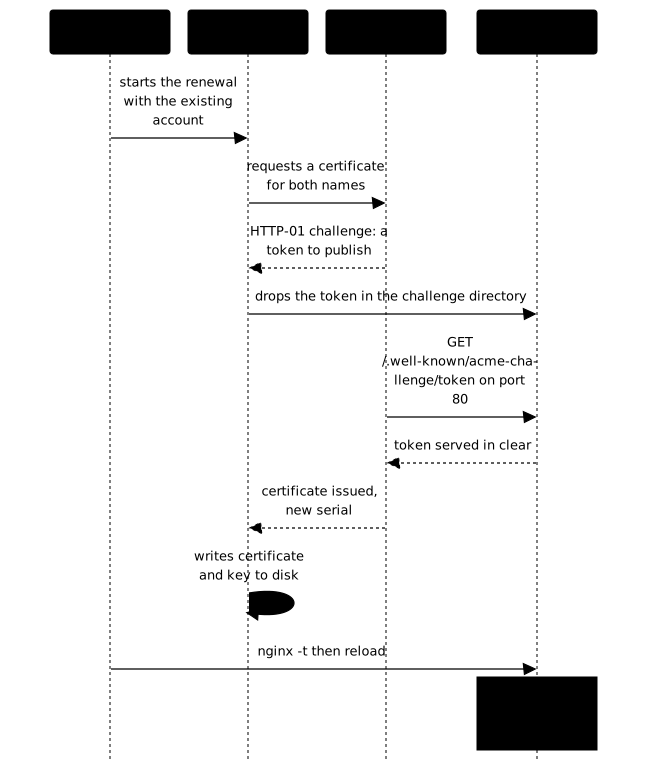
How do you renew without restarting or losing the ACME account?
A renewal is put into service by a reload, which keeps the connections in progress and the same master process (same PID, the process identifier), and it reuses the ACME account already registered. The ACME client writes the new certificate to disk, but Nginx keeps the old one in memory until it has reread its files: without a reload, the renewal took place and nothing changed for visitors. A restart would also work, but it cuts the connections in progress, which the reload avoids.
The ACME account is the identity (a key pair) that the client registers with the authority at the first issuance. Reusing it is the rule: deleting the account to start from scratch works in a lab, and it is exactly what you must not do. Against a real authority, each registration consumes a quota and loses the issuance history.
The gesture is stored in a single entry point, an executable script that chains the three steps. The following skeleton shows the sequence; the exact command line of the client depends on the tool and its version, and you write it from its documentation.
#!/usr/bin/env bashset -euo pipefail
# 1. Renew with the existing account: your ACME client's command.#    (If nothing needs renewing, the client says so and does nothing.)
# 2. Validate before reloading: an error here does not interrupt the service.nginx -t
# 3. Put into service with a reload, never a restart.systemctl reload nginx
A script does not trigger itself. The mechanism is free: a systemd timer, a cron job or a hook of the client. The timer has the advantage of logging through journalctl and of a random delay that prevents all servers from hitting the authority at the same instant.
[Timer]OnCalendar=dailyRandomizedDelaySec=1hPersistent=true
[Install]WantedBy=timers.target
This timer, linked to a service that runs the script, triggers it every day; the script only renews if the certificate nears its end of life. With 45-day certificates, Let's Encrypt recommends renewing at two thirds of the lifetime, around the thirtieth day, as the lesson on ACME explains. A daily run therefore leaves a margin of fifteen days to absorb an authority outage or a configuration error.
How do you protect the private key and what should you do about HSTS?
The private key must only be readable by those who need it: whoever reads it can impersonate your service. Nginx reads the key with root rights at startup and at reload, then its worker processes (workers), which run without those rights, no longer need it: the key therefore does not have to be readable by everyone. Apply the simple rule: owner root, mode 0600 for the key and for the client's account file, mode 0700 for their directory.
sudo find /chemin/du/client -type f \( -name '*.key' -o -name '*.json' \) -perm -o=rThis command lists the key or account files readable by everyone; an empty output is the expected result. Run it after each first issuance: a client launched in a container sometimes creates its files with wider permissions than planned. Tightening the permissions must not break the service, which is why you must also check that HTTPS still answers.
The HSTS header (Strict-Transport-Security) asks the browser to use only HTTPS for this name for a given duration. It reinforces the redirect, but it has a hard-to-undo consequence: as long as the duration has not elapsed, the browser will refuse HTTP, even if you later fix the configuration.
add_header Strict-Transport-Security "max-age=300" always;Start with a short duration (max-age=300, five minutes), then lengthen. The includeSubDomains parameter extends the rule to all subdomains: only add it after checking that each one serves a valid HTTPS, otherwise a forgotten internal service becomes unreachable. The preload parameter is an even stronger commitment, which is entered in browser lists and cannot be withdrawn at will.
How do you check the certificate actually served?
Check with a client that validates the chain, never with curl -k: -k disables validation, so it proves nothing of what you want to measure. Three pieces of information are checked: the chain climbs back to the authority, the requested name appears in the SANs, and the serial (the certificate's serial number) has changed after the renewal.
In a lab, the Pebble authority has a trap: its root changes at every startup. It is fetched from Pebble's management interface at the time of measurement, never hard-coded in a script or a procedure.
curl -sk https://127.0.0.1:15000/roots/0 -o racine.pemcurl -sS --cacert racine.pem --resolve app.lab.test:443:127.0.0.1 \ -o /dev/null -w '%{http_code}\n' https://app.lab.test/echo | openssl s_client -connect 127.0.0.1:443 -servername app.lab.test \ -CAfile racine.pem 2>/dev/null | openssl x509 -noout -serial -enddateThe first command downloads the root: the -k is only used there to reach Pebble's management interface, not to validate the service. The second validates the chain without -k and must return the 200 code. The third prints the serial and the end date of the certificate actually presented; run it again after a renewal and compare: the serial must have changed. An expiry calculation also lends itself to monitoring.
echo | openssl s_client -connect 127.0.0.1:443 -servername app.lab.test 2>/dev/null \ | openssl x509 -noout -checkend 1209600The -checkend option takes a number of seconds (1,209,600 corresponds to fourteen days) and returns a non-zero exit code if the certificate expires before then. Wiring this code to an alert gives the safety net that is missing today: Let's Encrypt no longer sends expiry emails.
Finally, check what must survive. A reload must break nothing; a reboot of the machine neither: the certificate and the configuration must be on disk, and the service enabled at boot (systemctl is-enabled nginx). These are the four non-regression tests to replay after each change: valid chain and SANs, new serial without restart or new account, protected keys, correct TLS after reload then reboot. To test a change without dipping into a real authority's quota, use its staging environment, presented in the lesson on ACME.
Practice: renew and serve an Nginx certificate
The lab starts from a running local ACME authority, an ACME client available as an image and two names to serve, app.lab.test and api.lab.test. No certificate exists: Nginx publishes the application in clear and already serves the challenge path. You obtain the certificates, serve the two names over HTTPS, protect the keys, and provide /usr/local/bin/renouveler-certificats, an entry point that the validation will call without knowing your mechanism.
The validation grades the state and not the commands typed: the client validates the chain of both names without -k, a new serial is served after the renewal without restarting Nginx or changing the ACME account, the keys are not readable by everyone, and TLS stays correct after a reload then after a reboot.
Key points
- A TLS
serverreceives the full chain (ssl_certificate) and the key (ssl_certificate_key), and the certificate must carry all the names served in its SANs. - The main path is an external ACME client: stable and independent of the version; certbot remains plan B.
- The native module
ngx_http_acme_moduleis in preview (HTTP-01 and TLS-ALPN-01, no DNS-01): it is never an implicit dependency of a production procedure. - The HTTP-01 challenge is served in clear: a global redirect to HTTPS fails at the first issuance (nothing listens on 443 yet) and depends on what the authority follows; reserve a
locationfor the challenge path, served in clear, even if Let's Encrypt follows redirects. - A renewal is put into service by a reload, never a restart, and reuses the existing ACME account: registering again consumes a quota.
- With 45-day certificates, renew around the thirtieth day, monitor expiry (
openssl x509 -checkend) and do not count on emails. - Check with a client that validates the chain (never
-k), compare the serial before and after, protect the keys (0600) and replay the test after reload and reboot. - HSTS's
includeSubDomainsrequires having checked all the subdomains concerned: start with a shortmax-age.
Knowledge check
Check that you have grasped the essentials of this guide. The questions cover only what has just been explained here.
Knowledge check
Check what you have learned with this interactive quiz
How it works
- The timer starts when you click Start
- Multiple choice, true/false and short answer questions
- You can move between questions
- Detailed results are shown at the end
Starts the quiz and the timer
Review
(0/0)Score by domain
A domain groups several guides and gets several questions, so its score is more reliable than a per-topic score, which often rests on a single question.
Summary
Strengths
No topic passed at 80% on at least two questions yet.
Weak areas
No topic below the pass mark.
Recommended next
Hints before you try again?
Continue the course: Protect and observe Nginx: limit_req, authentication, headers, JSON logs and stub_status
A new full quiz with random questions
Work again only on the questions you missed