An application placed behind an entry point no longer sees the real scheme, host name or identity of the client: it has to learn them from the proxy, or it guesses them wrong. The entry point is the service that receives requests in place of the application, most often a reverse proxy. This lesson is for anyone publishing an application they did not write, or one they wrote without thinking about the proxy. It covers the common failures: a login that loops, a cookie the browser does not send back, a session lost from one copy of the application to the next, an origin policy that is too broad, and an identity header copied from the client.
What you will learn
- Tell the application the scheme, the host name and the path the client sees.
- Choose the attributes of a session cookie and recognize a cookie the browser rejects.
- Place session state without hiding it behind session affinity.
- Explain what CORS allows, and what it does not forbid.
- Tell authentication, authorization, CORS and CSRF protection apart.
- Decide identity on the server side and refuse the identity a client injects.
Prerequisites
This lesson assumes you can read an HTTP exchange and have already published a service behind a proxy. It does not re-explain TLS termination, the X-Forwarded-* headers, or the trust granted to a header:
- Reading an HTTP exchange: headers, status codes, redirections.
- Publishing a web service: the path of a request: TLS termination,
X-Forwarded-For,X-Forwarded-ProtoandX-Forwarded-Host. - Define an entry point security policy: authentication, authorization and the trust granted to a header.
Why does a correct application break behind a proxy?
Because the application trusts what it receives, and the proxy changes three things: the scheme, the host name and the origin of the connection. On its own, the application receives HTTPS directly, with the name the client typed. Behind a proxy that terminates TLS, it receives plain HTTP, coming from an internal address, sometimes with a replaced Host. Everything it infers from the request ("am I on HTTPS?", "what is my public name?") becomes wrong without anything crashing.
Four questions come out of this, and the lesson takes them in this order. Which URL does the application believe in and generate? What happens to the session cookie? Where does the session state live when several copies of the application answer? Who decides to allow an origin and to know the identity?
| What the application infers | What is true behind the proxy | Consequence |
|---|---|---|
| The client speaks HTTP | The client speaks HTTPS, the proxy speaks HTTP to the application | Redirect loop to HTTPS |
| My name is the one in the request | The public name is the one the client typed | Links and redirections to an internal name |
| I am at the root of the site | The proxy publishes the application under a prefix | Links that leave the prefix |
| The caller is whoever reaches me | The caller is the proxy | Identity and address must be read from headers |
Which URL should the application believe and generate?
The application must know the public scheme, name and prefix, through the proxy's headers or an explicit setting, and trust those headers only from the proxy. The page Publishing a web service already set the trust rule for the X-Forwarded-* headers (X-Forwarded-Proto for the scheme, X-Forwarded-Host for the name), along with the list of trusted proxies. It is not repeated here. What it lacks is the consequence on the application side: the URL the application generates.
An application produces URLs in several places: the Location header of a redirection (the address to which the response sends the browser), the links of a page, the callback URLs of a login flow, the links in an email. For each one it chooses a scheme, a name and a path. If it believes it is on HTTP, it writes http://. If it redirects to HTTPS when it thinks it is on HTTP, and the proxy still talks HTTP to it, the loop is certain: the browser receives a redirection, follows it, and lands on the same response again until it gives up. The details of redirection codes are in Reading an HTTP exchange.
The base path is the prefix under which the proxy publishes the application, for example /compte/ for an application that, on its own, lives at the root. If the proxy strips the prefix before forwarding, the application never sees it and generates links to /login instead of /compte/login. The browser then follows a link that leaves the prefix and lands on another route, or on a 404.
Adding headers at the proxy therefore does not fix every generated URL. A header only helps if the application reads it. Many frameworks require a setting (trusted proxies, public URL, prefix) before they use it, and some URLs go through no request at all: a link in an email, a callback URL registered with an identity provider, a value hard-coded in the configuration. The exact name of these settings depends on the framework: read its documentation, which this lesson cannot do for you.
To see what the application generates, look at the redirection without following it:
curl -ski https://app.exemple.fr/compte | grep -i '^location'The options -s (silent), -k (accept a self-signed certificate, reserve this for a trial) and -i (print the headers) reveal the raw Location. If it starts with http:// or with an internal name while you are on HTTPS on the public name, the application has learned its URL wrongly, and it is the application you must configure.
What is a session cookie, and which attributes do you set?
A cookie is a small value the server asks the browser to remember and send back with every request to it; a session cookie carries the identifier of the user's login. The server sets it with the Set-Cookie response header, and the browser sends it back in the Cookie request header. A session is the state the application keeps for a logged-in user (who they are, what they did) between two requests: since HTTP has no memory, the cookie is the thread that ties together the requests of one person.
Five attributes control what the browser does with it. The definitions come from the Set-Cookie page on MDN.
| Attribute | What it decides | Pitfall |
|---|---|---|
Secure | The cookie is only sent over https: (except on localhost) | Set by a response received over http:, it is rejected: a possible cause of "login succeeded, then anonymous" |
HttpOnly | The page's JavaScript cannot read it, for example through document.cookie | The cookie is still sent with requests made by fetch() |
SameSite | Whether the cookie is sent when the request comes from another site: Strict, Lax or None | None requires Secure |
Domain | Which host names the cookie is sent back to | A value that is neither the sender's name nor a parent of it is ignored |
Path | Which paths receive the cookie | It is not a security measure |
Two attributes need a few more words, Domain then SameSite. Without Domain, the cookie is limited to the exact host that set it (MDN calls it a host-only cookie): this is stricter than stating the name, because subdomains do not receive it. With Domain=exemple.fr, all subdomains receive it.
SameSite decides on a cross-site send (a site is a registrable domain: app.exemple.fr and api.exemple.fr belong to the same site exemple.fr). With Strict, the cookie is only sent for requests from the same site; with Lax, it is also sent for a top-level navigation using a method that changes nothing (GET), such as a click on a link; with None, it is always sent, provided it is Secure. Chromium browsers (Chrome, Edge, Opera) apply Lax when the attribute is absent, with one exception: the cookie is also sent with a cross-site navigation POST during the two minutes after it is set. According to MDN's compatibility data, Firefox and Safari do not apply this default. So write the attribute rather than count on it.
Here is a reasonable session cookie for an application served on a single name:
Set-Cookie: session=a1b2c3; Path=/; Secure; HttpOnly; SameSite=LaxIt has no Domain, so it stays bound to the host that set it. Unless the proxy is explicitly configured to do so, it does not modify these attributes: it is the application that issues the cookie.
Why does a cookie with the wrong Domain vanish without an error?
Because the browser silently ignores a cookie whose Domain is neither the name of the responder nor one of its parents. MDN puts it this way: a response from api.exemple.fr can set Domain=api.exemple.fr or Domain=exemple.fr, but not Domain=autre.exemple.fr nor Domain=fr (a public suffix), and cookies that break these rules are ignored.
The symptom is confusing: the login succeeds (the server answers 302 with its Set-Cookie), then the next page treats you as anonymous. Nothing in the response signals the error, and curl does not show it: without a cookie file, it does not evaluate the cookie and simply prints the header. It is the browser that rejects it, and its developer tools are where to look. A login that "works" in curl and fails in the browser should therefore make you inspect the attributes of the Set-Cookie, starting with Domain. The safest fix is usually to not set Domain: the cookie goes back to the host that issued it.
Where does the session live when several copies of the application answer?
Session state must live somewhere other than in the memory of one instance, otherwise the user is logged out as soon as another instance answers. Behind a proxy that spreads the load, two requests from the same person can reach two instances. If the session is kept in the memory of the first, the second does not know it: the user is logged out "at random".
There are three places, and the choice is an architecture choice, not a proxy choice:
| Where the state lives | What it takes | Trade-off |
|---|---|---|
| Shared storage (a common database or cache) | All instances read the same store | One more component to keep available |
| In the cookie itself, signed by the server | A signing key shared by the instances | The cookie grows; the key becomes a secret to protect |
| Instance memory | The proxy must always send the client back to the same instance | This is session affinity, see below |
Session affinity (a sticky session) glues a client to an instance, often through a cookie that the proxy sets itself. It works, and the lesson Bound time, queues and long-lived flows with HAProxy shows how far it holds. But it hides misplaced state instead of fixing it: when the instance restarts or fails, the sessions it carried disappear, and load distribution becomes uneven. Choose affinity knowingly, never to mask a session that was forgotten in memory.
What does CORS do, and what does it not do?
CORS (Cross-Origin Resource Sharing) is a browser mechanism by which a server states which other origins may send it certain requests and read its responses; it prevents no client from reaching the server. An origin is the triplet scheme, host name and port: https://app.exemple.fr and http://app.exemple.fr:8080 are two different origins. By default, a browser forbids a page's JavaScript from reading the response of another origin (the same-origin policy). CORS is the controlled exception: the API server answers with the Access-Control-Allow-Origin header to say which origin is admitted.
The preflight is the preliminary request the browser sends, with the OPTIONS method, before certain requests. It skips it for a simple request: a GET, HEAD or POST method, a limited set of headers, and for the body a type of application/x-www-form-urlencoded, multipart/form-data or text/plain. A POST with an application/json body is not simple: the browser first asks the API with OPTIONS, announcing the planned method and headers, then sends the real request only if the response allows it.
Read the diagram from left to right and top to bottom. The first four exchanges show an allowed origin A: preflight, POST, readable response. The last two show an origin C for which the response does not carry Access-Control-Allow-Origin: the API did answer, but it is the browser that gives up on what follows. It does not send the POST, and it hands nothing to page C.
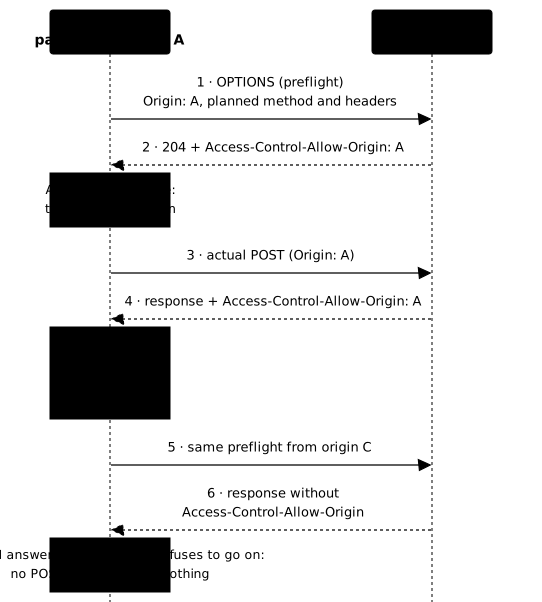
Two points avoid misunderstandings. First, a server that answers Access-Control-Allow-Origin: * allows any origin for requests without credentials. With credentials (the cookie), the page must ask for them (the credentials: "include" option of fetch()), the response must carry Access-Control-Allow-Credentials: true, and MDN specifies that the wildcard is forbidden: the server must name one explicit origin, otherwise the browser rejects the response for the page and reports a CORS error. Second, when the server returns a specific origin, which may vary with the request, rather than *, MDN states that the response should carry Vary: Origin, so that a cache does not serve to one origin the response meant for another. The syntax of the settings on the entry point side is in Protecting the Traefik entry point.
Does CORS stop a non-browser client from reaching the API?
No: CORS is not an access control, it only instructs a browser. A client that is not a browser, such as curl, a script or a server application, applies no same-origin policy. It sends its request, reads the response, and ignores Access-Control-Allow-Origin. The Origin header that the browser adds is, moreover, written by the client: another client puts in whatever it wants.
The difference can be measured with a command. It plays the role of a hostile script, announces an invented origin, and reaches the API whatever the origin policy:
curl -sk -o /dev/null -w '%{http_code}\n' -X POST \ -H 'Origin: https://site-hostile.test' \ -H 'Content-Type: application/json' -d '{}' \ https://app.exemple.fr/api/questionThe command prints the code the API chose to return (200, or 401 if it requires authentication): the request arrived, and no CORS error can appear, since only a browser produces one. The same call, made by the JavaScript of a page at https://site-hostile.test, is stopped by the browser if the API does not allow that origin: the body being JSON, the preflight fails and the POST is not sent. Even a browser sometimes sends the request before knowing: MDN notes that a simple request goes out without a preflight, because an HTML form can already target any origin. CORS therefore decides what a third-party page can send and read from a browser, it does not protect the API. What protects the API is authentication (who is calling?) and authorization (are they allowed?), as set out by the entry point policy.
What does SameSite protect, and what is CSRF?
CSRF (Cross-Site Request Forgery) is an attack in which a third-party site makes a victim's browser send a request that carries their session cookie; SameSite reduces the risk by holding the cookie back. If you are logged in to a bank and another page triggers a transfer to it, the browser attaches your cookie, and the bank believes the request is yours. With SameSite=Lax or Strict, the cookie is not sent for a form request coming from another site with a method that modifies data, such as a POST.
Do not confuse these four notions, which answer different questions:
| Notion | Question it answers | Who decides |
|---|---|---|
| Authentication | Who is this caller? | The server |
| Authorization | Is it allowed to do this? | The server |
| CORS | Which origin may, from a browser, send this request and read the response? | The browser, on the server's indication |
| CSRF protection | Does a request carrying my cookie really come from me? | The server, helped by SameSite |
Which identity header can the server trust?
An identity header is only worth something if the entry point decides it itself, from proof it has verified, and never by copying it from the client. A common architecture has the proxy recognize the user, then pass their name to the application in a header (call it X-Utilisateur). It is convenient, and dangerous as soon as the proxy copies an X-Utilisateur already present in the request: a header is text, and any client can write it.
The remedy has two steps. The entry point removes the identity header received from the client, whatever its value. Then it sets a new one only if it has validated a proof, for example a session cookie that only it knows how to verify, because it is signed with a server secret or because it points to an entry in a session store. Without a valid proof, the application receives no header, and treats the caller as anonymous.
This rule is the same as in two other lessons of the course: the entry point policy sets that an identity header is only believed when set by a trusted proxy, and client and backend identities tell an identity from an authorization. The two defenses complement each other: the policy says from which addresses the application believes the header, and the remedy above guarantees that the trusted proxy never relays one written by the client. Keep the distinction: the entry point establishes who is calling; what that caller is allowed to do remains an authorization decision, made afterwards.
To check it, send a request without a session, with an identity header you wrote yourself:
curl -sk -H 'X-Utilisateur: etudiant' https://app.exemple.fr/api/identiteThe response must present the caller as anonymous. If it presents them as etudiant, the entry point believes a header the client wrote.
Which errors will you see, and what do they tell you?
Each failure in this lesson has a precise symptom, which points to the faulty attribute or setting.
| Symptom | Probable cause | Where to look |
|---|---|---|
| The browser gives up after too many redirections | The application thinks it is on HTTP and redirects to HTTPS | Raw Location with curl -i, the application's scheme setting |
| Login succeeded, then an "anonymous" page | Cookie rejected: invalid Domain, or a Secure cookie on an http: connection | Browser developer tools, Set-Cookie header |
| Links leading to a 404 | Prefix stripped by the proxy and unknown to the application | URLs generated in the page, base path setting |
CORS error in the console, while curl answers | The origin is not allowed, or * is used with credentials | Preflight response, Access-Control-Allow-Origin header |
| Random logouts with several instances | Session kept in the memory of one instance | Where the session is stored |
How do you prove the repair in a real browser?
Two of these failures can only be seen in a browser: the rejection of a cookie and the CORS refusal are decisions of the browser, not of the server. A test made with curl sees the Set-Cookie and a 200 code, and concludes everything is fine, while the browser has rejected the cookie and kept the page from calling the API. The lab for this lesson therefore drives a real browser under automation (Chromium, driven by a supplied script), which plays the journey in place of a human. This changes the nature of the proof: you observe what the user would experience, not what a header says.
Practice
The lab brings together four of the lesson's failures on a small application behind a TLS entry point: a login that loops, a session cookie restricted to a domain no browser will accept, an origin policy that says yes to everything, and an identity header that the entry point repeats from the client. You fix a single policy file and observe each effect with the supplied browser. The validation measures, in that browser, that the login succeeds over HTTPS without a loop and that the account page shows the session; that the partner origin reads the API's response while the intruder origin cannot; and that a forged identity header, without a session, is not recognized as an identity by the API. The Secure and SameSite attributes are taught above but are not measured by this lab.
Key points
- The application learns its public URL from the proxy or from a setting: a header does not fix the URLs it generates outside a request, nor those of a prefix it does not know.
- A redirect loop comes from an application that thinks it is on HTTP while the client is on HTTPS.
- A cookie whose
Domainis invalid is silently ignored by the browser: you see it in its developer tools. Secure,HttpOnlyandSameSiteare set explicitly, andSameSitereduces the risk of CSRF; withoutDomain, the cookie stays bound to the issuing host.- Session state goes in shared storage or in a signed cookie; affinity only hides misplaced state.
- CORS is not an access control: it governs what a page from another origin can send and read, and
curlreaches the API without regard for it. - Identity is decided on the server side: the entry point removes the header received from the client and sets one only after validating a proof.
Knowledge check
These eight questions cover the skills of the lesson: reading a generated URL, choosing a cookie attribute, placing a session, interpreting CORS and refusing a forged identity.
Knowledge check
Check what you have learned with this interactive quiz
How it works
- The timer starts when you click Start
- Multiple choice, true/false and short answer questions
- You can move between questions
- Detailed results are shown at the end
Starts the quiz and the timer
Review
(0/0)Score by domain
A domain groups several guides and gets several questions, so its score is more reliable than a per-topic score, which often rests on a single question.
Summary
Strengths
No topic passed at 80% on at least two questions yet.
Weak areas
No topic below the pass mark.
Recommended next
Hints before you try again?
Continue the course: TLS diagnostics: debug SSL errors with openssl
A new full quiz with random questions
Work again only on the questions you missed