
A long-lived stream (WebSocket, SSE, gRPC) is not published like a page: Nginx must forward the handshake, buffer nothing, speak the right protocol to the backend and wait longer, on these routes only. This lesson is aimed at someone who already publishes an application behind Nginx and sees a real-time connection get cut, arrive late or never get established. It teaches the directives of each transport, the backend-side timeouts and the way to prove that a stream works. The timeouts for reading the request from the client, client_body_timeout and client_header_timeout, belong to the lesson Nginx limits.
What you will learn
The lesson covers the three transports one by one, then the timeouts they share.
- Forward a WebSocket handshake with
UpgradeandConnection. - Deliver SSE events at the pace the backend emits them, with
proxy_buffering. - Publish a gRPC service with
grpc_passand read its status without confusing it with the HTTP status. - Extend the read and send timeouts toward the backend, route by route.
- Prove that a stream works with a pacing measurement and an exchange in both directions.
Prerequisites
The lesson assumes you already know how to relay a request to a backend and read an HTTP exchange.
- Publishing an application with
proxy_pass: Publish an application with Nginx. - Reading a request, a response and their headers: Read HTTP before configuring a proxy.
- Validating and reloading a configuration (
nginx -t,systemctl reload nginx): Install Nginx. - A Debian 13 machine with
sudo, where Nginx 1.31.8 is installed from the vendor repository (nginx.org): the configuration lives in/etc/nginx/conf.d/and the workers run as thenginxuser.
Why does an ordinary HTTP proxy break long-lived streams?
A proxy configured for pages assumes a short request, a response that ends, and an exchange that fits in a few seconds; a long-lived stream violates all three assumptions. A WebSocket is a connection that, after a handshake (an ordinary first HTTP exchange where the client asks to change protocol), becomes a two-way channel where both sides send messages whenever they want. SSE (Server-Sent Events) is an HTTP response that never ends: the server writes events into it over time. gRPC is a remote procedure call protocol that runs over HTTP/2.
Each one demands something different from the proxy, and that is what makes diagnosis confusing: the same Nginx can serve the site's pages perfectly well and fail on these three routes, each for its own reason.
| Transport | What it demands from Nginx | Symptom when it is missing |
|---|---|---|
| WebSocket | Forward Upgrade and Connection to the backend | The handshake fails, or succeeds without anything flowing |
| SSE | Buffer nothing | Events all arrive together at the end |
| gRPC | HTTP/2 on the client side (http2 on;), grpc_pass to the backend | The call fails at the transport level |
| All three | A read timeout longer than the stream's normal silence | The connection is cut in the middle of the conversation |
The last row of the table is the most insidious. Nginx does not close a connection because it lasts, but because no data has flowed during the timeout. A stream that stays silent for ten seconds, under a read timeout set to ten seconds, is cut even though nothing is broken.
How do you pass a WebSocket with Upgrade and Connection?
For a WebSocket, Nginx must retransmit the client's Upgrade and Connection headers, which it otherwise drops. These two headers are called hop-by-hop: they describe the connection between two neighboring links, not the end-to-end request, so a proxy does not propagate them on its own. Yet it is precisely Upgrade: websocket that asks the backend to switch protocol. Without it, the backend answers as to an ordinary request.
Here is a WebSocket location for a fictional real-time application listening on port 9000.
# In the http context, outside any server blockmap $http_upgrade $connexion_upgrade {    default upgrade;    ''      close;}
server {    listen 80;    server_name temps-reel.lab.test;
    location /live/ {        proxy_pass http://127.0.0.1:9000;        proxy_set_header Upgrade $http_upgrade;        proxy_set_header Connection $connexion_upgrade;        proxy_set_header Host $host;    }}
The map block computes the value of Connection from Upgrade. If the client sends an Upgrade, Nginx forwards Connection: upgrade; if it sends none, it forwards Connection: close. This is the answer to the classic pitfall: writing proxy_set_header Connection "upgrade"; as a fixed value, as found everywhere, forces the protocol switch on every request that goes through this location, including those that ask for none. It works as long as the route only serves WebSocket, but it is not a universal pattern.
No proxy_http_version directive is needed: Nginx 1.31.8 speaks HTTP/1.1 to its backends by default, and that protocol version is the one that knows the Upgrade mechanism. On this route, the map above alone decides the value of the Connection header sent. Persistent connections to backends are active by default, but they do not concern this route: once the switch is done, the connection becomes a tunnel dedicated to a single client. They are detailed in the lesson Spread the load with upstream.
If the site is served over HTTPS, the client uses wss:// and it is the server in listen 443 ssl described in Nginx TLS that decrypts the traffic before this location (the TLS termination): the configuration above does not change.
How do you check that a WebSocket really works?
A successful handshake is half the proof; the other half is a message that comes back. A 101 Switching Protocols shows that the backend accepted the switch, not that frames flow afterwards. An established connection that carries nothing is the hardest version of this defect to diagnose, because everything looks fine on the client and server sides, and only the exchange is missing.
For the handshake alone, curl is enough: it sends the switch headers and prints the response.
curl -i -N --max-time 5 \ -H 'Connection: Upgrade' \ -H 'Upgrade: websocket' \ -H 'Sec-WebSocket-Version: 13' \ -H 'Sec-WebSocket-Key: dGhlIHNhbXBsZSBub25jZQ==' \ http://temps-reel.lab.test/live/The first line of the response must be HTTP/1.1 101 Switching Protocols. A 400, a 200 or a page response means the Upgrade did not reach the backend. The lab test goes further: it sends a text frame (a WebSocket message) after the handshake and requires the backend to send it back, which curl cannot do. A real WebSocket client, or a short script, then becomes necessary for the second half.
How do you deliver an SSE stream without Nginx holding it back?
An SSE stream requires proxy_buffering off; on its route: with buffering active, all the events arrive, but together and too late. Buffering is Nginx's default behavior: it reads the backend's response as fast as possible, stores it in memory, then hands it to the client at the client's pace. That is excellent for a page, because the backend is freed right away. It is fatal for a stream, because Nginx waits until it has enough data before writing to the client.
Look at the diagram from top to bottom. In the first case, the backend emits three events one second apart and the client receives nothing until Nginx decides to flush its buffer. In the second case, each event comes out as soon as it comes in.
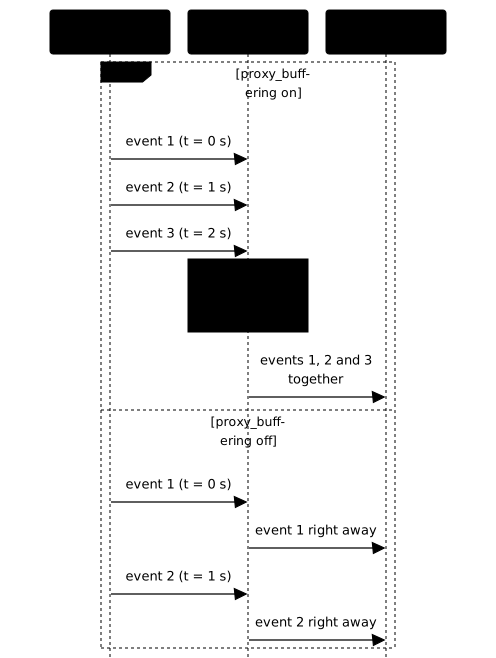
The fix takes a single directive, set in the stream's location and not at the server or http level.
location /evenements/ { proxy_pass http://127.0.0.1:9001; proxy_buffering off;}The choice of context matters as much as the directive. Buffering remains useful for all the other routes, which serve pages and free their backend quickly: disabling it globally degrades everything else to repair a single route. An alternative exists on the application side: a backend that answers with the X-Accel-Buffering: no header asks Nginx not to buffer that response, which leaves the decision to the application. The two combine.
Why does this defect pass naive tests?
A test that counts the events received turns green with a proxy that holds everything back, because the events do eventually arrive. What distinguishes a stream from a batch is the pacing. The lab validation therefore measures an arrival delay: the backend emits six events, one per second, and it clocks the time needed to receive sixty bytes of them, that is the first two, which must stay under four seconds. Without a buffer that time is about two seconds: one for the backend's pacing, one more for curl to notice that head has gone. With a buffer, nothing arrives before the end of the stream, so six seconds.
The four-second threshold therefore separates the two cases, and the lab is right to use that command for its own backend: with its thirty-six-byte events, two seconds and six seconds fall on either side of the threshold. That is as far as the setting goes. With events half as long, the command would report four seconds with no buffer at all, the threshold would be reached, and the verdict would flip to the wrong side.
You can measure the same thing by hand, and better: rather than waiting for a number of bytes, aim at the first byte. %{time_starttransfer} reports it directly, without depending on the size of the events. The three other options are there so that nothing else is measured: -s silences the progress bar, -o /dev/null throws the body away since all we want is the stopwatch, and --max-time 20 bounds the wait, an event stream never ending by itself.
curl -sN --max-time 20 -o /dev/null \ -w 'first byte: %{time_starttransfer}s\n' \ http://temps-reel.lab.test/evenements/Without a buffer on Nginx, the value stays under one second; with a buffer, it climbs to about six seconds for this stream of six events, the time the backend needs to finish emitting.
Do not use time curl … | head -c 60 for this measurement, however common the idiom: time clocks the whole pipeline, and curl only stops at its first write after head has exited. The reason fits in one sentence: head waits for sixty bytes, so several events, and curl only learns about it at the next event. What that command reports therefore depends on the size of the events and not on the proxy: with the lab's thirty-six bytes, about two seconds; with events half as long, four seconds, measured on a test bench, although the first byte had arrived at once, and you conclude there is a buffer that does not exist.
A word on -N: with -o /dev/null it does not change the value measured, since the body is never displayed. It becomes necessary again as soon as you drop -o /dev/null to watch the events arrive, because curl then buffers its own output.
One last point on SSE: an absence of data is not a closure. An event stream can stay silent for a long time between two state changes, and it is the read timeout, seen below, that decides whether Nginx cuts this silence. SSE servers often emit a comment line (a line starting with :, which the client ignores) at a regular interval, so that the connection never looks idle.
How do you pass gRPC with grpc_pass?
gRPC is published with grpc_pass and not proxy_pass, on a server where http2 on; enables HTTP/2. gRPC carries its calls over HTTP/2, the protocol version that multiplexes several exchanges over a single connection and can send trailers, headers placed after the body. gRPC puts its status there. An HTTP/1 proxy can do neither, hence the failure.
HTTP/2 is enabled with the http2 on; directive (http and server contexts, default off, available since 1.25.1); the http2 parameter of listen is deprecated. Here is a fictional gRPC service listening in clear text on port 50052, published on its own port.
server {    listen 50051;    http2 on;    server_name grpc.lab.test;
    location /catalogue.Stock/ {        grpc_pass grpc://127.0.0.1:50052;    }}
Two choices can be read in this example. The grpc:// prefix indicates a clear-text backend (HTTP/2 without TLS, often called h2c); grpcs:// would designate an encrypted one. And the service has its own server on its own port: mixing it into the HTTP/1 site would force a choice, on a single listen, between two protocols that do not talk the same way. The location path is that of the gRPC method, in the form /package.Service/Method.
How do you read a gRPC status without confusing it with the HTTP status?
A gRPC call returned by an application-level refusal carries an HTTP 200 code, and it is a gRPC status, placed in the trailers, that says what happened. The two statuses are distinct: the first says the HTTP request went well, the second says what the application did with it. Even a successful call answers :status 200 and carries its grpc-status in the trailers. INVALID_ARGUMENT means the request is refused because its content is invalid, UNAVAILABLE that the service cannot answer for now.
The difference has a strong practical consequence. A gRPC client has no retry policy by default: it is the client's configuration that lists the codes to replay, and UNAVAILABLE, which may succeed the next time, typically figures there; an INVALID_ARGUMENT, which will always fail, has no reason to figure there. If the proxy turns the second into the first, a client configured that way may replay a request that will never succeed, and load the backend for nothing. The lab therefore measures it from both sides: a normal call must succeed, and a call whose payload triggers an application-level refusal must come back as a refusal, not as a transport failure. The client supplied by the lab, client-grpc, prints ok, erreur or transport depending on what it observes, which makes the distinction readable without reading a single byte of trailer.
Which timeouts should you extend, and for which routes only?
Backend timeouts are set route by route: a long-lived stream needs a larger proxy_read_timeout than a page, and granting it to the whole site lets dead connections pile up. Two timeouts govern what Nginx waits for from the backend: proxy_read_timeout bounds the waiting time between two consecutive reads on the connection to the backend, and proxy_send_timeout the one between two writes. Their default value is 60 seconds. For gRPC, the equivalent directives are called grpc_read_timeout and grpc_send_timeout.
The decisive words are "between two". This timeout does not limit the total duration of the connection: it resets on every piece of data received. A stream that emits an event every thirty seconds is never cut under a sixty-second timeout, whereas a WebSocket that is silent for one minute is closed. The Nginx documentation says so for WebSocket: by default, the connection is closed if the backend transmits no data for 60 seconds.
location /live/ {    proxy_pass http://127.0.0.1:9000;    proxy_set_header Upgrade $http_upgrade;    proxy_set_header Connection $connexion_upgrade;
    # Values specific to this route: an exchange may go quiet for a while    proxy_read_timeout 1h;    proxy_send_timeout 1h;}
To choose the value, start from the stream's longest normal silence: the interval between two messages, or the heartbeat (ping) that the application imposes on itself, plus a margin. One hour is not a universal figure, it is an example for an application that can stay quiet for a long time. A huge figure "to be safe" turns a protection into a risk.
The reason for this caution is the opposite effect. When a backend closes the connection cleanly, Nginx notices right away and frees the client, whatever the timeout value. But when the backend disappears without warning (machine switched off, cable cut), Nginx has no closing signal to read. By default it is then left with only two outcomes: a write to the backend that fails, or the timeout that expires. Indeed, proxy_socket_keepalive, which enables TCP keepalive toward the backend (periodic probes that detect a vanished peer), is off by default.
With a timeout set to twenty-four hours, the connection to a dead backend can therefore stay open for up to twenty-four hours, if no write has made it fail before. Multiplied by every client, this orphan connection can end up exhausting the proxy, and the symptom appears weeks later as "the site is slow". This behavior depends on when and how the backend disappears: do not take it for granted before observing it. The gesture that observes it is a count of established connections, ss -tn state established '( sport = :80 )': their number must not stay inflated. That is not what the lab measures. Its last test takes the problem from the other end, silence: a stream goes quiet for fifteen seconds where the starting setting cuts at ten, and it must survive. It is the same nuance as in the previous paragraph, a chatty stream never triggering proxy_read_timeout, so the fault stays invisible until the day the conversation has nothing to say.
When it is the client that leaves, the situation is the reverse: proxy_ignore_client_abort is off by default, and Nginx then closes its connection to the backend. The backend can thus be warned that an SSE subscriber has disappeared and stop emitting for it, but this remains to be observed: the documentation describes the client leaving without waiting for a response, whereas an SSE subscriber leaves in the middle of a response, and it is your backend's behavior that says whether it stops.
What is the difference between client-side and backend-side timeouts?
Client-side timeouts protect Nginx from a slow client; backend-side timeouts decide how long Nginx waits for a silent server. They are different directives, for different threats, and confusing them leads to tuning the wrong one.
| Question | Directive | Where is it set |
|---|---|---|
| Is a client sending its body too slowly? | client_body_timeout | Nginx limits |
| Is a client reading the response too slowly? | send_timeout (60 seconds by default) | Outside the scope of this lesson and of Nginx limits |
| Is the backend silent for too long? | proxy_read_timeout, grpc_read_timeout | This lesson |
| Is Nginx writing too slowly to the backend? | proxy_send_timeout, grpc_send_timeout | This lesson |
This lesson sets neither the request size nor the rate: these limits belong to the lesson Nginx limits, which details the load limits to set on a route.
Which symptom points to which cause?
Each transport fails in a recognizable way: read the symptom before changing anything. The table crosses what you observe with the most probable cause within the scope of this lesson, and the check that confirms it.
| Symptom | Probable cause | Check |
|---|---|---|
| The WebSocket client fails at opening | Upgrade or Connection not forwarded to the backend | The curl with switch headers must return a 101 |
| The WebSocket opens then nothing flows | Frames do not come back: silent backend, or connection cut by a timeout that is too short | Send a frame and wait for its return, not just the 101 |
| SSE events all arrive together | proxy_buffering active on this route | curl -sN -w '%{time_starttransfer}': several seconds |
| The stream is cut at a fixed interval | proxy_read_timeout lower than the normal silence | Compare the cut interval with the timeout value |
| The gRPC call fails with a transport error | proxy_pass instead of grpc_pass, or http2 on; missing | nginx -t, then the lab client must print ok |
| An application-level refusal comes back as an outage | Going through an ordinary HTTP proxy | The lab client must print erreur on the refusal payload |
| The proxy slows down weeks later | Orphan connections, timeouts too long | Count established connections before and after a backend cut |
A symptom often has only one cause in this table, but two defects can coexist: a fixed WebSocket is not protected from a timeout that is too short for all that. Fix one thing, check, then move on to the next, as the lab validation does.
Practice
The lab sets up three transports behind an Nginx that treats them all as pages: a WebSocket, an SSE stream of six events one second apart, and a gRPC service on a dedicated port. You fix the configuration until the WebSocket handshake succeeds and a frame comes back, the first SSE events arrive in under four seconds, a gRPC call goes through and an application-level refusal stays a refusal, then a stream left silent for fifteen seconds survives the read timeout.
The validation scores these four measurements on the proxy's behavior, not on the directives you typed: you can therefore replay it after every change.
One detail of the lab's brief asks for grpc_pass on a server whose listen carries http2, the deprecated form. It is still accepted, at the cost of a warning that nginx -t prints, and the lab validates it like the other since it measures the behavior of the service: write http2 on;, which is the form of this lesson.
Key points
- A long-lived stream violates the assumptions of a page proxy: short request, response that ends, quick exchange. Each transport demands something else.
- WebSocket:
UpgradeandConnectionretransmitted, because they are hop-by-hop headers that Nginx otherwise drops. HTTP/1.1 to the backend is the default. - A
mapon$http_upgradeavoids forcingConnection: upgradeon every request, which is not a universal pattern. - SSE:
proxy_buffering off;in the stream'slocationonly. The buffer loses no event, it destroys their pacing. - gRPC:
grpc_passandhttp2 on;on its ownserver. An application-level refusal must never become a transport failure, otherwise a client configured to retry replays a request doomed to fail. - The
proxy_read_timeoutandgrpc_read_timeouttimeouts measure the silence between two reads, not the duration of the connection. Set them per route, from the longest normal silence. - An excessive timeout can keep open the connections to a backend that vanished without warning: measure the established connections before and after a cut.
- Proof of a stream is taken on the pacing and on the exchange in both directions, never on the mere number of events or the mere handshake.
Knowledge check
Check that you have grasped the essentials of this guide. The questions cover only what has just been explained here.
Knowledge check
Check what you have learned with this interactive quiz
How it works
- The timer starts when you click Start
- Multiple choice, true/false and short answer questions
- You can move between questions
- Detailed results are shown at the end
Starts the quiz and the timer
Review
(0/0)Score by domain
A domain groups several guides and gets several questions, so its score is more reliable than a per-topic score, which often rests on a single question.
Summary
Strengths
No topic passed at 80% on at least two questions yet.
Weak areas
No topic below the pass mark.
Recommended next
Hints before you try again?
Continue the course: Nginx cache: prove that no private response leaks
A new full quiz with random questions
Work again only on the questions you missed