cloudflared is the open source client of Cloudflare Tunnel: it exposes a local service on the Internet through an encrypted outbound tunnel, without opening a single inbound port or touching the firewall. Handy for a developer, formidable in the wrong hands: it is a double-edged tool that attacker groups hijack for command and control (remotely driving a compromised machine), persistence and exfiltration. This guide shows the legitimate use, the real exploits carried out with this tool, and above all how to detect its abuse. Audience: sysadmins and security teams (intermediate to advanced level).
This lesson covers the managed option of the module on publishing without an inbound port: a third party operates the public entry point for you. Choosing the family of tools is discussed in the Reverse proxy page. The self-hosted option is Pangolin, and the temporary option for development is ngrok.
What you will learn
- Understand what a Cloudflare tunnel is and why it bypasses the firewall by design.
- Expose a local service in 30 seconds with a quick tunnel.
- Recognize the real attacks carried out with cloudflared and why attackers love it.
- Detect the abuse: network, process and file indicators.
- Measure what you delegate to Cloudflare in exchange for simplicity, including TLS termination at the provider.
- Place the technique in the threat model (in French) (ATT&CK T1090 proxy, T1572 tunneling).
Prerequisites
- A Linux workstation with outbound Internet access (the tunnel is an outbound connection) and, for the demonstration, Python 3.
- Docker installed, only for the section on the named tunnel with a token (see install Docker (in French)).
- For the named tunnel only: a Cloudflare account and a DNS zone hosted at Cloudflare, that is, a domain name whose name servers are Cloudflare's. Without it, the public hostname cannot be created, except with a partial setup reserved for the Business and Enterprise plans (see the note under the table further down).
- For the named tunnel again: access to Cloudflare's Zero Trust dashboard (free sign-up to be checked depending on your plan).
The quick tunnel of the demonstration requires none of this: no account, no domain.
What is a Cloudflare tunnel
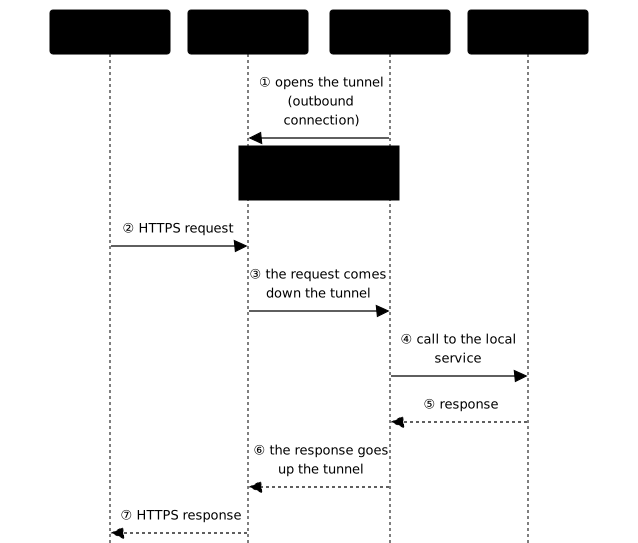
A Cloudflare tunnel reverses the usual direction of the connection. Instead of opening an inbound port on your firewall for the Internet to come to you, the cloudflared daemon opens an outbound connection to the Cloudflare network (the edge: Cloudflare's entry servers, spread around the world), and public traffic flows through this tunnel to your local service.
The following diagram shows the sequence. Look at message ①: the connector (here cloudflared) opens the tunnel toward the outside, and it is this tunnel that visitors' requests then reuse. The "public entry point" is, for cloudflared, Cloudflare's edge.
The defensive benefit is real: no inbound port to expose, so nothing to scan or brute-force on your public IP. It is the same philosophy as mesh VPNs such as Tailscale (in French) or NetBird (in French), or as an identity proxy such as Pomerium (in French): you remove the exposed surface instead of hardening it.
The downside: your access path depends on Cloudflare (a third party), and outbound traffic (the egress), almost always allowed by firewalls, becomes a royal road. This is precisely what attackers exploit.
Demonstration: expose a service in 30 seconds
The simplest mode, the quick tunnel, requires no account and no domain. First install the binary in a verifiable way (never a curl | sh): download the release and check its SHA256 digest published by Cloudflare. This check is possible here because Cloudflare publishes its digests, which the vendor of Pangolin does not do for its installer.
This page documents version 2026.6.1. On 2026-10-26, the current version is 2026.10.3 (published on 2026-10-20). No CVE is cited in the notes of the last thirty cloudflared releases: this is a freshness gap, not a risk flagged by the vendor. For lasting use, prefer the current version from the releases page all the same (the digest of the named tunnel's image then changes with the tag), knowing that this page has not been replayed on it.
# Download the binary (Linux amd64) and check its digestcurl -fsSL -o cloudflared \ https://github.com/cloudflare/cloudflared/releases/download/2026.6.1/cloudflared-linux-amd64sha256sum cloudflared# Compare the output with the checksum published by Cloudflare before running the# binary. The digests are not a file to download: they live in the body of# the GitHub release, under "SHA256 Checksums", one "name: digest" line per# binary. Checked on release 2026.6.1 on 2026-10-25.chmod +x cloudflaredOn RHEL/Debian, prefer Cloudflare's signed repository (pkg.cloudflare.com) to benefit from updates and GPG verification.
You need a service to expose. In a first terminal, start a test web server on port 8765 (Python is enough):
python3 -m http.server 8765 --bind 127.0.0.1In a second terminal, ask cloudflared to expose this port:
./cloudflared tunnel --url http://localhost:8765Within a few seconds, cloudflared returns a random public URL:
INF Requesting new quick Tunnel on trycloudflare.com...INF | https://administrators-garlic-misc-dip.trycloudflare.com |INF Registered tunnel connection connIndex=0 location=cdg08 protocol=quicThis output was captured during an earlier lab run, and has not been replayed for version 2026.6.1: the format of the log lines is not a contract documented by Cloudflare and may vary from one version to another. Your localhost:8765 is now reachable from the Internet, without having opened a single port or modified the firewall. To check it, open the https://....trycloudflare.com URL displayed in a browser: the list of files of the directory where the Python server runs must appear. Then stop the tunnel (Ctrl+C) and the server: the URL stops answering. It is stunning for productivity, and it is exactly what makes it a weapon.
What do you delegate to Cloudflare with a named tunnel?
A named tunnel moves the TLS termination (the place where HTTPS encryption stops and traffic is decrypted), the routing and the access authentication to Cloudflare: in exchange for simplicity, you entrust these functions to a third party. The visitor establishes their HTTPS session with Cloudflare's edge, which presents the site's certificate and decrypts the traffic before sending it back into the tunnel. Cloudflare therefore sees your requests and responses in clear, which is the price of its functions (cache, application firewall, Access). For sensitive or regulated data, this is a decision to make knowingly, not a technical detail.
| Function | With Pangolin (self-hosted) | With a Cloudflare named tunnel |
|---|---|---|
| TLS termination | on your hub (Traefik) | on the Cloudflare edge |
| Site certificate | Let's Encrypt, managed by you | issued and renewed by Cloudflare |
| Access logs | at your place | at Cloudflare |
| Availability | that of your server | that of Cloudflare |
| Domain DNS | any provider | zone added to Cloudflare (1) |
| Operations | a public server to maintain | nothing to host |
(1) The Cloudflare documentation requires adding the site (the DNS zone) to Cloudflare before publishing an application through a tunnel. Only the so-called partial setup (CNAME) leaves the DNS at another provider, but it is reserved for the Business and Enterprise plans.
In return, you gain: no public server to operate, certificates and protection against denial-of-service attacks (standard protection, included in all plans, free ones too) provided, and an identity layer (Cloudflare Access) built into the same dashboard. If sovereignty comes first, Pangolin keeps the same mechanics at your place.
How do you start a named tunnel with a token?
This section describes the production mode, as opposed to the demonstration's quick tunnel; it is not a complete procedure. The steps of the Zero Trust dashboard (create the tunnel, associate the public hostname, set the Access policy) are not detailed here: they depend on Cloudflare's interface, which evolves, and have not been replayed for this page. Do not count on this section alone to get a working named tunnel: it shows the shape of the launch and what to check. Follow the steps in Cloudflare's documentation, and keep the prerequisite in mind: a DNS zone hosted at Cloudflare (outside the partial setup, see the note under the table above), without which the public hostname cannot be created. The principle: creating a named tunnel produces a token that the connector uses to enroll, with no local configuration. In a container, the daemon is started with the image pinned by tag and digest, and the token passed through an environment file rather than as an argument visible in the process list.
The token opens a tunnel into your network: the same vigilance as for Newt's secret in Pangolin. An export typed in the terminal leaves it in the shell history. So create an empty environment file with restricted permissions, then open it in an editor to paste the token, without going through echo or a redirection:
install -d -m 700 ~/cloudflaredinstall -m 600 /dev/null ~/cloudflared/cloudflared.envnano ~/cloudflared/cloudflared.envIn the editor, write a single line with the token displayed by the dashboard, then save:
TUNNEL_TOKEN=YOUR_CLOUDFLARED_TOKENThen start the container with --env-file, and check the permissions:
docker run -d --name cloudflared --restart unless-stopped \ --env-file ~/cloudflared/cloudflared.env \ cloudflare/cloudflared:2026.6.1@sha256:6d91c121b803126f7a5344005d17a9324788fc09d305b6e2560ec6040a7ae283 \ tunnel --no-autoupdate runls -l ~/cloudflared/cloudflared.env # -rw-------: readable by you onlydocker logs cloudflared 2>&1 | grep -i "registered tunnel connection"The limit is the same as for Newt: the variable remains readable through docker inspect, hence by the docker group, already equivalent to root.
The success criterion is the "healthy" state of the tunnel in the dashboard. The log generally displays a Registered tunnel connection line when a connection is established, but this wording is not documented by Cloudflare: if it differs on your version, rely on the dashboard. What remains is to associate a public hostname with the internal service from that same dashboard, then to put Cloudflare Access in front. Without this access policy, the public URL gives access to the service to anyone who knows it.
The double-edged tool: real attacks
The very property that protects you, an encrypted and trusted outbound tunnel, is a gift to an attacker already present on a machine. Several documented campaigns have industrialized it.
- Serpentine#Cloud (analyzed by Securonix): chains of
.lnkshortcuts and obfuscated Python scripts deliver payloads injected into memory, relying on the Cloudflare Tunnel infrastructure. - Gamaredon (reported by Surefire Cyber): this state-sponsored group adopted Cloudflare tunnels to carry out its attacks.
- RAT delivery via TryCloudflare: phishing campaigns use disposable
trycloudflare.comsubdomains to distribute remote access Trojans (reported by The Hacker News). - Persistent access and exfiltration (analyzed by GuidePoint Security): attackers expose SSH, RDP, SMB to the outside without modifying the firewall rules, and maintain discreet access.
Why attackers love it, in a list:
- The tunnel is outbound: it crosses the firewall, because egress is almost always allowed. No inbound rule to create.
- The traffic is encrypted and carries trusted Cloudflare certificates: it blends into legitimate traffic, invisible to signature-based detection.
trycloudflare.comis free, disposable and not always blocked or monitored by organizations.- Minimal footprint: launching a named tunnel only needs a token, so no configuration has to be written to disk before the tunnel is established. Few pre-connection traces.
In MITRE ATT&CK (in French) terms, this is T1090 (proxy) and T1572 (protocol tunneling), serving command and control (in French) (C2, the channel through which the attacker drives the compromised machine) and persistence.
Detect the abuse
Since the content is encrypted and the infrastructure trusted, detection is behavioral. Here are the concrete indicators, several of them captured during an earlier lab run on a real tunnel, not replayed for version 2026.6.1.
Network indicators
A cloudflared tunnel establishes very recognizable outbound connections:
- Resolutions and connections to
*.argotunnel.com(for exampleregion1.v2.argotunnel.com),*.trycloudflare.com,*.cftunnel.com. - QUIC protocol (encrypted transport over UDP) first, with a TCP/HTTP2 fallback, on port 7844 toward the Cloudflare IP ranges.
- An internal workstation or server that talks directly to the Cloudflare edge when it should not is a strong signal.
# Spot a process holding connections to the tunnel edgesudo ss -tunp | grep -Ei 'argotunnel|7844'Process and file indicators
On the machine itself, the tool leaves traces in the process list and, depending on how it was launched, on the disk (configuration and credentials files). Here is what to look for:
- Execution of a
cloudflaredbinary that you did not deploy, especially withtunnel run,--url, or a token on the command line. - Presence of
~/.cloudflared/or/etc/cloudflared/:cert.pem, a tunnel credentials file, aconfig.yml. A token-only launch leaves few, hence the importance of the network indicators.
# A running cloudflared + its possible artifactspgrep -a cloudflaredls -la ~/.cloudflared /etc/cloudflared 2>/dev/nullThe countermeasures that hold
No measure is enough alone: they combine, from those that prevent (restricting outbound traffic, forbidding execution) to those that spot (inventory, alert).
- Egress filtering (outbound allowlist): breaks the "outbound that always gets through" channel. Block
argotunnel.comandtrycloudflare.comif you do not use them. - Application allowlisting: on RHEL, fapolicyd (in French) prevents the execution of an untrusted
cloudflareddropped by an attacker. - Inventory of authorized tunnels: any undeclared tunnel is suspect.
- Behavioral EDR (detection and response tool for workstations and servers) + an alert on the execution of
cloudflaredoutside your deployments.
Use cloudflared without shooting yourself in the foot
If you adopt Cloudflare Tunnel legitimately, a few reflexes keep it from becoming an unintended backdoor.
-
Named tunnel + identity: never a bare tunnel. Put Cloudflare Access (or an SSO) in front, so that a URL found by chance is not enough to get in.
-
Least privilege: run the
cloudflaredservice with a dedicated non-root account, and keep the tunnel's secrets (cert.pem, credentials) with0600permissions. -
Monitor your own tool: even legitimate, log its execution and its connections; a compromised tunnel looks like a healthy one.
-
Sovereignty: if depending on Cloudflare bothers you, Pangolin publishes your web services the same way with the control plane at your place. For administration, a self-hosted mesh such as NetBird (in French) (or Tailscale (in French) with Headscale) offers the same "zero inbound port" without a third party. For a simple development test, ngrok is enough.
Key points
-
cloudflared exposes a service without opening a port: it removes the attack surface instead of hiding it, which is a real good practice.
-
It is a double-edged tool: the same encrypted outbound tunnel is an attacker's dream tool for C2, persistence and exfiltration.
-
Real campaigns have industrialized it (Serpentine#Cloud, Gamaredon, RAT via TryCloudflare): it is T1090/T1572 on the ATT&CK side.
-
Installing it or not does not change the worst case: an attacker brings their own binary. Defense is detection.
-
Detection is behavioral: connections to
*.argotunnel.com/*.trycloudflare.com(port 7844, QUIC then HTTP/2 fallback), unexpected execution ofcloudflared, egress filtering and application allowlisting. -
For legitimate use, put an identity in front, apply least privilege, keep the token in a
600file passed through--env-file(never as an argument or throughexport), and monitor your own tunnel. -
The price of simplicity: a named tunnel terminates TLS at Cloudflare, which sees the traffic in clear; it is a trust choice, not a detail.
-
The named tunnel requires an account and a DNS zone at Cloudflare: this page describes it without detailing the steps of the Zero Trust dashboard, which you follow in Cloudflare's documentation.
Knowledge check
Check that the essentials of this guide are mastered. The questions cover only what has just been explained here.
Knowledge check
Check what you have learned with this interactive quiz
How it works
- The timer starts when you click Start
- Multiple choice, true/false and short answer questions
- You can move between questions
- Detailed results are shown at the end
Starts the quiz and the timer
Review
(0/0)Score by domain
A domain groups several guides and gets several questions, so its score is more reliable than a per-topic score, which often rests on a single question.
Summary
Strengths
No topic passed at 80% on at least two questions yet.
Weak areas
No topic below the pass mark.
Recommended next
Hints before you try again?
Continue the course: ngrok: expose a local service and detect its abuse
A new full quiz with random questions
Work again only on the questions you missed