
To change HAProxy's state live without opening a door to every account on the machine, give reading and acting two distinct sockets, each with its own level and group, then have the reload itself write the servers' state to a file. This lesson is for readers who already operate an HAProxy 3.4 and want a metrics collector to read without being able to touch the servers, an operator to take a server out of service without editing the configuration, and a reload not to cancel that decision. The admin socket is the file through which you query and drive a running HAProxy, without touching its configuration. The lesson covers the rights on this socket, the persistence of state and the return to nominal.
What you will learn
The lesson goes from the open door to the decision that survives a reload.
- Tell apart a socket's mode, which says who opens it, from its level, which says what you do with it.
- Separate reading the state from acting on the state, each with its own socket and group.
- Place
server-state-fileandload-server-state-from-filein the right section of the configuration. - Hook the saving of the servers' state to the reload, with a systemd drop-in.
- Prove that a decision taken live changes the traffic and survives the reload.
- Deliver a return-to-nominal method that can be executed.
Prerequisites
The lesson assumes a running HAProxy and an account able to use sudo. The commands were established on HAProxy 3.4.7, the 3.4.7-1~bpo13+1 package from the trixie-backports-3.4 repository of Debian 13, which is the lab's version. Only the systemd drop-in of the persistence section has not been replayed yet, and the page says so where it teaches it.
- Install HAProxy 3.4, read its sections and query its socket with
socat: Install HAProxy and read its configuration sections. - Take a server out of service with
set server … state drain, and know what draining does: Choose the load-balancing algorithm and measure health checks. - Understand a file mode (
660), an owner and a group: Linux permissions: read and understand file rights and Users and groups: create a Linux account. - Know what a systemd unit is and reload a service with
systemctl: systemctl: list, start and diagnose Linux services.
Why is HAProxy's admin socket a surface to protect?
The admin socket is HAProxy's runtime API: any account that can connect to it reads the proxy's state and, depending on the socket's level, changes it without touching haproxy.cfg. A Unix socket is a special file through which two programs on the same machine talk; its rights are therefore those of a file. In global, the stats socket line sets four of them: the path, the mode (who can open the file), the owning group and the level (what the connection is allowed to ask HAProxy).
The trap is that mode and level get confused. A socket in mode 666 can be opened from any account, including one with no group and no sudo, and if it carries level admin, that account can take a server out of service. Nothing breaks and nothing is displayed: the proxy works, which is why nobody looks.
To measure what your socket lets through, play the command under the identity of an account with no particular right:
sudo -u <account> sh -c "echo 'show info' | socat -t2 stdio /run/haproxy/admin.sock"If the response displays fields such as Nbthread, this account reads your proxy. If it displays a connection refusal, the door is closed for it.
How do you separate reading from acting with two sockets?
Declare two stats socket lines in global: one with level operator to read, the other with level admin to act, each with mode 660 and its own group. The level belongs to the socket, not to the account: a single socket cannot let one group read and another group act. You therefore need two, and each is set on least privilege, that is, on the right strictly necessary for its use.
global stats socket /run/haproxy/sondes.sock mode 660 group sondes level operator stats socket /run/haproxy/pilotage.sock mode 660 group pilotes level adminThe mode 660 answers the question "who opens the file?": the owner and the group, nobody else. The level answers "what can be asked?". The HAProxy 3.4 manual defines three levels: user only reads non-sensitive statistics, operator (the default level) reads everything and allows only "non-sensitive" changes according to the manual ("non-sensitive changes"), such as resetting the maximum counters, and admin allows everything, set server included.
Do not read "non-sensitive" as "harmless". Measured on HAProxy 3.4.1, an operator socket refuses the actions on servers (set server, disable server, set weight, set maxconn, shutdown sessions), but accepts set table and clear table: an operator account can therefore create or erase a stick-table entry, including a ban that the protection module has written there. Reserve operator for trusted accounts, and do not treat it as a read-only level. The exact message of a refusal was not recorded on the lab VM: observe it yourself.
Both settings are necessary: a socket with level operator but in mode 666 lets any account on the machine read what the proxy knows, and a socket in mode 660 but with level admin gives the right to act to its whole group.
| Setting | Question asked | Value that protects |
|---|---|---|
mode | Who can open the file? | 660, never 666 |
group | Which group opens it? | One group per use |
level | What can be asked through it? | operator to read (trusted accounts), admin to act |
On Debian, the global section already contains a shipped stats socket line (the section on the Debian package's sockets describes it). Replace it with your two lines rather than adding a third one: a socket left at level admin keeps the right to act for its group.
The socket is only created when the configuration is loaded, so after a haproxy -c -f /etc/haproxy/haproxy.cfg that validates the file and a systemctl reload haproxy that applies it. An account joins a group only at its next login: to test without reconnecting, play the commands with sudo -u <account>, and check the group with id <account> and the owner with ls -l /run/haproxy/.
How do you prove that each identity has the right permission?
The separation is proven with three identities, never by rereading a line of configuration: an account that reads, an account that acts, and an account with no group at all that must be able to do nothing. Rereading haproxy.cfg tells what you wrote, not what HAProxy applies. The only reliable measurement is to play the command under each identity and read the response.
The reading account connects to the sondes.sock socket and reads the state with show info or show stat. The same account then tries an action on this socket, for example set server applicatif/b state drain: HAProxy must refuse, and the server must stay UP in show stat. The acting account plays the same command on pilotage.sock and gets DRAIN. The account with no group tries show info on both sockets and gets nothing.
Choose a reversible operation to prove the right to act: taking a server out of service then putting it back to ready demonstrates the right without damaging anything. Emptying a table or cutting sessions cannot be undone: the machine would stay in a modified state for the following measurements. To read a server's state at a glance, the status column of show stat is the eighteenth of the CSV format (the manual numbers it 17 because it counts from zero, whereas cut -f counts from one):
echo 'show stat' | sudo socat -t3 stdio /run/haproxy/pilotage.sock | cut -d, -f1,2,18Which sockets does the Debian package provide, and which one should you use?
On an HAProxy installed from the Debian 13 package, before any change, two sockets are open: /run/haproxy/admin.sock, in mode 660 and at admin level, which drives the worker, and /run/haproxy-master.sock, which is the master process's one. HAProxy indeed runs as two kinds of processes: a master process, which supervises and orchestrates reloads, and workers, which handle the traffic. show servers state and set server are played on the worker's socket, the one that the global section declares with stats socket. The trap is to take the other for a second admin socket.
The master's socket is opened with the -S option of the haproxy command line. Knowing where it comes from on your machine is something you read, not something you assume. The systemd unit (the service file that starts HAProxy) of the 3.4.7-1~bpo13+1 package for Debian 13 runs haproxy -Ws, measured on this package: -W enables master-worker mode (a master and workers) and -s makes it notify systemd when the service is ready. This line does not carry -S itself. Display yours with systemctl cat haproxy, and look in it for -S, without forgetting the extra options ($EXTRAOPTS) it adds.
The two sockets do not speak the same language. A show stat sent as is to the master's socket returns no statistics: it returns the list of commands it accepts, among which show proc, show version and show startup-logs. The statistics and set server are played on the worker's socket. The master socket's rights are not the ones you have just set for yours: check them with ls -l /run/haproxy-master.sock before concluding that the separation is done.
Why does a reload forget a server taken out of service?
A reload starts a new process that rereads haproxy.cfg and starts again from its values, whereas a set server … state drain only modifies the memory of the running process. A decision taken live therefore lives exactly as long as that process. As soon as a reload happens, the server you had taken out returns to the rotation, as if nothing had happened.
The reload that erases the decision is rarely the one you triggered on purpose. It is the one another event started, for example the renewal of a certificate at four in the morning: operations believes the server is out of service for the ongoing maintenance, and the traffic goes back to it. The lesson Route by names and paths with ACLs and maps measures the same effect on a routing table modified live.
The way to observe it is the traffic, not the state. show stat says what HAProxy thinks; a request loop says what it does:
for i in $(seq 20); do curl -s http://<proxy-address>/; done | sort | uniq -cIf each server returns its name, the count shows who receives the traffic. A server marked as leaving in show stat but present in this count is a displayed state, not an applied decision.
How do you make server state survive a reload?
HAProxy can reread a state file at startup, but it takes three gestures and not two: declare the file, ask to load it, and write it just before every reload. The first two are configuration, the third is a command, and the third is the one published recipes forget. In production, it is not played by hand: it hooks onto the reload itself.
These three gestures are not the steps of the diagram. The diagram follows a decision through time, across a reload, in four steps: decide on the socket, ask systemd for the reload, write the state file, then send the signal. Steps 3 and 4 carry out the third gesture, and their order matters: the state file is written neither by the decision, nor by HAProxy, it is written by a show servers state that systemd plays before the signal. The two configuration gestures, detailed after the diagram, only serve to reread this file at startup.
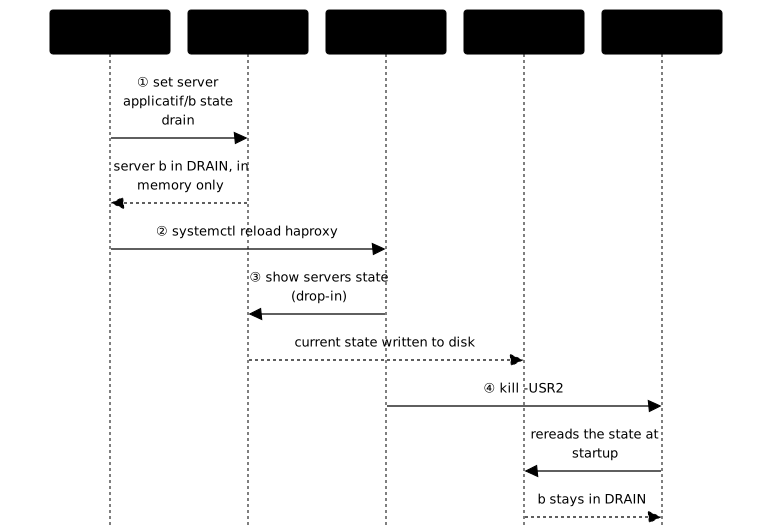
The configuration takes two lines, but they go in different sections:
global    server-state-file /var/lib/haproxy/serveurs.state
defaults    load-server-state-from-file global
server-state-file is declared in global: it says where the file lives. load-server-state-from-file is declared in defaults (or in a backend): it says whether the servers of this section reread it. It accepts three values: global (here the value, not the section of the same name) loads the file declared by server-state-file, local one file per backend (server-state-file-name), none loads nothing for this backend. Placed in global, the second line makes HAProxy 3.4 refuse the whole configuration, and its error message itself suggests the neighboring keyword. Most recipes show the two lines side by side without saying they are not in the same section, and a reader who copies them gets a failed startup. Always validate with haproxy -c -f /etc/haproxy/haproxy.cfg before reloading.
Neither of them writes the file. To understand what must be produced, first play the gesture by hand, on the admin socket:
echo 'show servers state' | sudo socat -t3 stdio /run/haproxy/pilotage.sock \ | sudo tee /var/lib/haproxy/serveurs.state > /dev/nullThe sudo tee is not a detail. A > redirection to the state file would be run by your shell and not by sudo, and /var/lib/haproxy is HAProxy's confinement directory (its chroot), where your account has no reason to write: look at its rights with ls -ld /var/lib/haproxy. The write would fail as soon as your account has no right to create the file; sudo tee makes a privileged writer do the writing, and the final > /dev/null only silences tee's echo in the terminal. Without this write, the file reread at reload is that of an earlier state, which is worse than a missing file since nothing warns you.
This manual gesture keeps a flaw, which the drop-in below fixes: tee truncates the state file as soon as the pipe starts, before socat has answered. If socat fails, the file stays empty.
This manual dump serves to understand, not to operate: it assumes a human thinks of it before every reload, including the one started by a certificate renewal at four in the morning. In production, you hook the dump onto the reload. A systemd drop-in is an override file that completes the package's unit without modifying it (the hardening of a systemd service (in French) uses it the same way), and sudo systemctl edit haproxy creates yours in /etc/systemd/system/haproxy.service.d/override.conf.
ExecReload is the unit directive that lists, in order, the commands systemd runs when you launch systemctl reload haproxy. The trap comes from the Debian unit, which carries two of them, measured on the repository's package:
ExecReload=/usr/sbin/haproxy -Ws -f $CONFIG -f $CFGDIR -c $EXTRAOPTSExecReload=/bin/kill -USR2 $MAINPIDThe first validates the configuration, the second sends the signal that triggers the reload. A drop-in that merely adds an ExecReload line is appended to the two existing ones: it therefore comes after the signal, too late. You must empty the list by first writing ExecReload= with no value (a line that stops at the equals sign, not a blank line), then rewrite the three lines in the wanted order:
[Service]ExecReload=ExecReload=/usr/sbin/haproxy -Ws -f $CONFIG -f $CFGDIR -c $EXTRAOPTSExecReload=/bin/sh -c 'echo "show servers state" | socat -t3 stdio /run/haproxy/pilotage.sock > /var/lib/haproxy/serveurs.state.nouveau && mv /var/lib/haproxy/serveurs.state.nouveau /var/lib/haproxy/serveurs.state'ExecReload=/bin/kill -USR2 $MAINPIDThe configuration validation takes the unit's line as is, -f $CFGDIR included ($CONFIG, $CFGDIR and $EXTRAOPTS are variables that the unit defines and that the drop-in reuses): without this option, the reload would validate a different configuration from the one that is running. The dump comes next, and the kill -USR2 last. No sudo tee here: systemd runs these lines as root, and the > redirection is done by the sh -c itself, therefore with its rights.
The order is not a detail. The signal starts the new process, which rereads haproxy.cfg and the state file at its startup; a dump written after the signal arrives after the read, and the file read is that of the previous state. If the dump fails, systemd does not run the next line and the reload is cancelled, which is the wanted behavior.
The temporary file and the mv are not a matter of style, and it is the kind of detail you pay for only once. A > redirection opens and truncates its target before the command writes anything: a failing socat would therefore leave an empty file, not the previous state. The reload would indeed be cancelled, but the decision to keep would already be lost. Writing next to it then moving makes the substitution atomic on the same file system: as long as the dump has not succeeded, the old state remains readable.
This drop-in has not yet been replayed on the lab VM: the quoting of the sh -c line, the write without sudo and the stop of the sequence when a line fails remain to be observed. It is checked by reloading with sudo systemctl reload haproxy, then rereading the state file to look for the server taken out of service.
How do you return to the nominal state without leaving a trap?
A complete return to nominal takes two gestures in this order: put the server back in service on the admin socket with set server … state ready, then rewrite the state file from show servers state. If you only do the first, the server is back right away, but the state file keeps the old decision. With the drop-in, the next reload rewrites it first from the current state; without it, or if HAProxy is reloaded outside systemd, it brings back the old decision. The return script therefore does not assume the drop-in: it rewrites the file itself.
Both gestures reuse the commands already seen, on the acting socket:
echo 'set server applicatif/b state ready' | sudo socat -t3 stdio /run/haproxy/pilotage.sockecho 'show servers state' | sudo socat -t3 stdio /run/haproxy/pilotage.sock \ | sudo tee /var/lib/haproxy/serveurs.state > /dev/nullForgetting the second gesture is the symmetric trap of persistence, as soon as the drop-in is missing or the reload happens outside systemd, and it is proven the same way: after the return, reload, then look at who receives the traffic. Both servers must answer. A return that has not been verified by a reload has only proven its half.
The return method is delivered as an executable script, not as a page of instructions: a method that has never been played is not a return method, and the machine at three in the morning has no time to discover that a command of the procedure was wrong. This script comes with a decision record read by a human, which answers three questions: which decision was taken, by which route, and how to go back. The executable serves the machine, the record serves the person who takes over the watch.
Practice
The lab starts from a working HAProxy, with a single socket in mode 666 at admin level, no state file, two servers behind the proxy and three test identities: an account that must read, an account that must act and an account that must be able to do nothing. You separate reading from acting, you make a decision survive a reload and you deliver a return to nominal. Validation covers four measurements: the three identities each play their commands (critical check), taking a server out really changes which server answers, the decision survives a reload read in the state HAProxy reports, and the return to nominal is executed then holds through a second reload.
Key points
Separating reading from acting and having the reload write the state are two distinct jobs, and the second is the one most often forgotten.
- A socket's mode says who opens it, the level says what you do with it: both are necessary.
- The level belongs to the socket, so you need two sockets:
operatorto read,adminto act, each with its group;operatordoes not touch the servers but can modify the stick-tables. - A separation is proven with three identities, one of them with no group at all.
server-state-filegoes inglobal,load-server-state-from-fileindefaultsor abackend; inglobal, the second one makes the configuration be refused.- Neither of them writes the file: the manual
show servers stateserves to understand, in production a systemd drop-in plays it before the signal. - The drop-in resets
ExecReload=then rewrites the three lines (validation with-f $CFGDIR, dump,kill -USR2): an added line would come after the signal. The dump writes to a temporary file then moves it withmv, so that a failure never leaves an empty state file. - The master process's socket (option
-S) does not answer the same commands as the worker's: check its rights, do not assume it is closed. - A
set serverlives only in the process's memory: a reload erases it without warning. - The traffic says what HAProxy does,
show statwhat it thinks. - A return to nominal takes two gestures, put back in service then rewrite the file, and is delivered as an executable script that has been played.
Knowledge check
Eight questions check that you can place the directives, separate the rights and chain the three gestures before moving on to the lab.
Knowledge check
Check what you have learned with this interactive quiz
How it works
- The timer starts when you click Start
- Multiple choice, true/false and short answer questions
- You can move between questions
- Detailed results are shown at the end
Starts the quiz and the timer
Review
(0/0)Score by domain
A domain groups several guides and gets several questions, so its score is more reliable than a per-topic score, which often rests on a single question.
Summary
Strengths
No topic passed at 80% on at least two questions yet.
Weak areas
No topic below the pass mark.
Recommended next
Hints before you try again?
Continue the course: Diagnose HAProxy without masking the cause
A new full quiz with random questions
Work again only on the questions you missed