Publishing a web service means getting an HTTPS request from the Internet to an application that is not itself exposed. Between the two, a reverse proxy (a server placed in front of your applications) receives the connection on port 443 (port 80 is used to redirect to it and to validate certificates), picks the certificate from the name requested, decrypts, picks the route from the Host header, then forwards to the backend (the application that actually answers). This lesson, written for administrators, ops people and developers who self-host, describes that path independently of the product: the measurements quoted come from Traefik and Nginx, but the mechanisms are the same everywhere. It also shows what the backend can believe, what a proxy must never do, and the errors you will see.
What you will learn
- Describe the path of a request, from the DNS name to the backend
- Tell what the SNI decides (the certificate) from what the Host header decides (the route)
- Choose between TLS termination (decrypting at the proxy), re-encryption and passthrough (relaying without decrypting), and measure their consequences
- Apply the trust rule to
X-Forwarded-Forand its neighbors - Explain load balancing and active or passive probes
- Match the 404, 502, 503, 504 and certificate errors to their cause
Prerequisites
This lesson assumes the Networking (in French) and Docker (in French) courses: you know what an IP address and a port are, what a DNS resolution is (see DNS, in French), and you have already started a container. Also read, before you begin, Reverse proxy: definition, role and which tool to choose, which places the reverse proxy in an architecture and skims the path of a request. Here the point of view is that of the request: we look closely at the proxy's two decisions (SNI and Host), at what the backend can believe of what it receives, and at the errors each stage produces.
To read an HTTP exchange or a certificate by hand, two guides already exist and are not redone here: HTTP and HTTPS (in French) for headers and status codes, TLS diagnosis with openssl for reading a certificate.
What path does a request follow from the browser to the backend?
A published request goes through four steps, plus an optional redirect: resolving the name to a public IP address, a TLS connection on the proxy's port 443, reading the decrypted HTTP request, then forwarding to the backend. The proxy is the only exposed element, on two ports: 443 carries the useful traffic, 80 is only used to redirect and to validate certificates. The backends stay on a private network and only talk to the proxy.
Look at the diagram below from left to right. The dotted line is the DNS resolution, which happens before any contact with the proxy. The thick line is the path of the useful traffic, over HTTPS on port 443. The thin line to the proxy is an optional first visit over HTTP on port 80, which only ends in a redirect. The two thin lines to the backends are internal: no client reaches them directly.
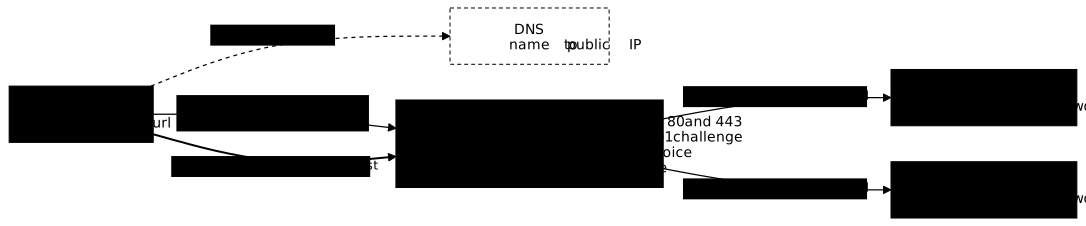
Concretely, with a service named app.exemple.fr:
- The browser asks the DNS for the address of
app.exemple.fr. TheA(orAAAA) record returns the public IP of the machine that runs the proxy, not that of the application. - Optional step: the request first arrives over HTTP on port 80 when it follows an
http://link, comes from an old client or from a tool such ascurl, or when the HTTPS attempt failed. Recent browsers indeed try HTTPS first: for a name typed without a scheme (Chrome since version 90, in 2021), then also for anhttp://link (Chrome 115, in 2023), and only fall back to HTTP as a last resort. The proxy answers on port 80 with a redirect tohttps://app.exemple.fr/. - The browser opens a TCP connection to that IP, port 443. The firewall or the router must let this port through to the proxy.
- It starts the TLS negotiation by announcing the name it wants (this is the SNI, detailed below), then sends its encrypted HTTP request.
- The proxy decrypts, picks the route, opens its own connection to a backend and copies the response back to the client.
Port 80 must therefore stay open, for two reasons. Without it, a client that does not try HTTPS first (curl, a script, an old browser) gets nothing, instead of being redirected. And the HTTP-01 challenge of certificate validation takes place there: the certificate authority queries the proxy over HTTP, as the lesson Automatic certificates: ACME, HTTP-01, TLS-ALPN-01 and DNS-01 challenges details.
Once the redirect is followed, the HSTS header (Strict-Transport-Security) can ask the browser not to go through HTTP again for this name for the duration given: it goes straight to HTTPS. Its setting in Traefik is shown in Secure Traefik: authentication, rate limiting and good practices; it does not exempt you from opening port 80 for the clients that still arrive there.
Ten names can point to the same IP for ten applications: it is the proxy that tells the applications apart, never the DNS. HTTP/3, which travels over UDP on port 443, is outside the scope of this lesson.
How does the proxy choose the certificate, then the route?
The proxy makes two distinct decisions, at two distinct moments: the SNI picks the certificate before any HTTP, the Host header picks the route once the request is decrypted. Confusing them is the source of most wrong diagnoses.
The SNI (Server Name Indication) is an extension of the TLS negotiation: the client writes the name of the server it wants in it, in clear text, in its first message (ClientHello). Without it, the proxy would not know which certificate to present, since a single IP and a single port 443 serve several names. If it finds no certificate for that name, it presents a default certificate, and the client shows a certificate error: the name does not match.
Because the SNI travels in clear text, an intermediary can read the name visited. ECH (Encrypted Client Hello) is the recent extension that encrypts this name; it is outside the scope of this lesson, and the guide TLS diagnosis with openssl gives the essentials.
The Host header is an HTTP header, so it is encrypted inside the request. The proxy reads it after decryption to find the route: which backend receives app.exemple.fr, which one receives wiki.exemple.fr. In HTTP/2 (RFC 9113, section 8.3.1) as in HTTP/3, the same role is played by the :authority pseudo-header, which proxies treat the same way.
What becomes of a request whose Host matches no route? That depends on the product. Traefik answers a 404 produced by itself. Nginx sends the request to the server designated as default_server (failing that, the first one declared), and HAProxy to the default_backend. A default that serves an application is a classic trap: it then answers any name, including a bare IP. The rule is to declare a default that refuses (404, or closing the connection).
How do you observe the certificate chosen by the SNI?
The openssl s_client command reads the certificate the proxy presents for a given name. The SNI is set with -servername, without changing anything on the server side:
openssl s_client -connect 203.0.113.10:443 -servername app.exemple.fr </dev/null 2>/dev/null | openssl x509 -noout -subject -issuerRun it again while changing -servername, or removing it: the certificate presented changes, which proves that the SNI is indeed the criterion. The address 203.0.113.10 belongs to a range reserved for documentation; replace it with that of your proxy.
Replayed on Traefik 3.7.6 (the course targets 3.7.15: behavior to reconfirm) with two self-signed certificates (a.lab.test and b.lab.test), the result is as follows:
-servername | Certificate presented |
|---|---|
a.lab.test | subject=CN = a.lab.test |
b.lab.test | subject=CN = b.lab.test |
| an unknown name, or none (an IP address is not sent as SNI) | subject=CN = TRAEFIK DEFAULT CERT, the proxy's default certificate |
How do you test the route before DNS is configured?
The --resolve option of curl forces the resolution of a name, which tests the routing before the DNS is set up:
curl -v --resolve app.exemple.fr:443:203.0.113.10 https://app.exemple.fr/--resolve name:port:ip makes curl believe the name points to that IP, while keeping the name in the SNI and in Host. On a port other than 443, curl adds the port to Host (Host: app.exemple.fr:8443).
To separate the two stages, add -H "Host: wiki.exemple.fr": the certificate is still chosen by the SNI of the URL, the route by the modified Host. On the same Traefik test bench, --resolve followed by -H "Host: b.lab.test" displayed the certificate CN=a.lab.test (SNI of the URL) but the response of backend b (route of the Host), and an unknown Host returned a 404 from the proxy. This experiment is the best way to understand the difference.
What does TLS termination change for the backend?
Terminating TLS means decrypting at the proxy: the backend then receives plain HTTP, on a network you control. It is the most common mode, because it centralizes certificates in one place and lets the proxy read Host to route.
Three modes exist, depending on where the decryption happens:
| Mode | What flows to the backend | What the proxy can read | When to choose it |
|---|---|---|---|
| Termination | plain HTTP | everything (Host, path, headers) | trusted private network, general case |
| Re-encryption | HTTPS, with a second certificate | everything | requirement for internal end-to-end encryption |
| Passthrough | original TLS, not decrypted | only the SNI | the backend must keep its certificate |
Re-encryption adds a certificate to manage on the backend side and costs computation, but nothing flows in clear text on the internal network. Passthrough relays the bytes without reading them: the proxy sees neither Host nor path, can only route on the SNI, can add no header and apply no HTTP protection. For a web service published behind an application proxy, termination is the rule, and passthrough the exception.
Termination has a direct consequence: the backend no longer sees HTTPS, and depending on the proxy's setting it can also lose the original name (some proxies replace Host with the backend's). It believes it is speaking HTTP to a neighboring machine. An application that builds its own links or redirects can then produce http:// URLs, and cause redirect loops: it redirects to HTTPS, the proxy talks to it in HTTP again, and it redirects again. This is the role of the headers in the next section.
Losing the client IP is not due to TLS termination: it comes from simply going through a proxy, whatever the mode. The backend sees a TCP connection coming from the proxy, so the proxy's IP. In termination, the proxy signals it through HTTP headers. In passthrough, it cannot add any, and the backend recovers the IP through the PROXY protocol: the proxy writes the client's address in a header placed at the very start of the TCP connection (version 1 in text, version 2 in binary).
The PROXY protocol is enabled on both sides: a backend that does not expect it reads this header as invalid data, and a backend that expects it refuses a connection that does not carry it. Enabled on one side only, it therefore breaks the connection. The backend must accept it only from a trusted proxy, otherwise anyone can write the address of their choice into it. The configuration belongs to each product's own lessons.
What does the backend know about the real client, and can it believe it?
The proxy passes the origin of the request in headers, but the backend must believe them only if they come from the proxy: any client can send them itself. Without this rule, an IP is forged in one line.
The common headers are the following:
| Header | Content | Example |
|---|---|---|
X-Forwarded-For | list of the addresses of the previous clients and proxies, client first; the address of the last proxy is not in it, it is the TCP source | 198.51.100.7, 192.0.2.10 |
X-Forwarded-Proto | protocol requested by the client | https |
X-Forwarded-Host | name requested by the client | app.exemple.fr |
Forwarded | standardized form that groups the three (RFC 7239) | for=198.51.100.7;proto=https;host=app.exemple.fr |
X-Forwarded-* is a widespread historical convention; Forwarded is its version standardized by RFC 7239. The two coexist, and an application reads the one its framework supports. In Forwarded, an IPv6 address or an address with a port must be in quotes: for="[2001:db8:cafe::17]:4711" (RFC 7239, section 6).
The trap lies in the word "list". Each proxy that receives a request appends to the end of X-Forwarded-For the address of its peer, and it is this list the backend reads, in addition to the TCP source of the connection. With two proxies in a chain, the diagram below shows what flows: the TCP source changes at each hop, while the list grows by one address. Look at the last arrow: the backend receives 198.51.100.7, 192.0.2.10 in the header, and 10.0.0.2 (proxy B) as the TCP source.
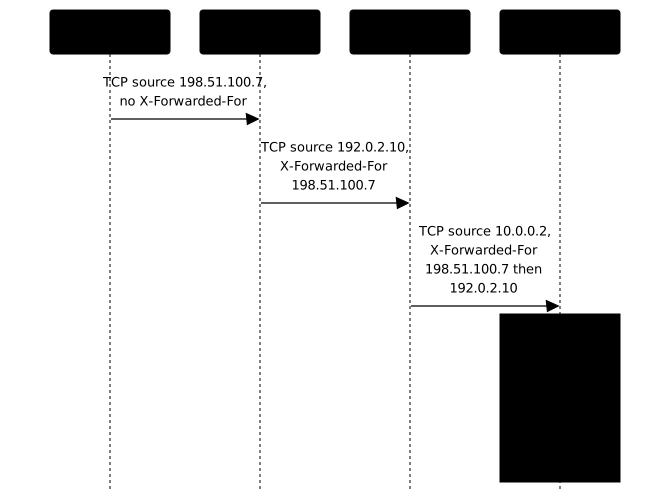
If a client sends X-Forwarded-For: 10.0.0.5 itself (a trusted internal address) to a proxy that trusts it or that appends without filtering, the proxy appends the client's real IP to it, and the backend receives 10.0.0.5, 198.51.100.7 (with a single proxy, whose address is the TCP source). An application that reads the first element concludes that the request comes from 10.0.0.5: an IP filter or a rate limit is bypassed.
The behavior depends on the proxy setting. Measured with Traefik 3.7.6 in front of traefik/whoami, which displays the headers received, a curl -H "X-Forwarded-For: 10.0.0.5" coming from 10.10.110.1 gives two results. By default, since the client is not declared trusted, the proxy overwrites the header: the backend receives X-Forwarded-For: 10.10.110.1. With forwardedHeaders.trustedIPs: ["10.10.110.0/24"] on the entry point, the proxy keeps the header and appends the observed IP: the backend receives X-Forwarded-For: 10.0.0.5, 10.10.110.1. Declaring as trusted a range that contains clients therefore opens the door to forgery.
The trust rule has three parts, two on the backend side and one on the proxy side:
- the backend accepts these headers only from a list of trusted proxies (the setting is often called trusted proxies), that is, the addresses of your own proxies;
- it starts from the TCP source of the connection, then reads
X-Forwarded-Forfrom right to left, skipping trusted addresses: the first one that is not trusted is the client; - a proxy placed at the edge of the Internet does not trust the
X-Forwarded-*headers received from an unknown client: it overwrites them with what it observed itself.
You can test it with curl: send curl -H "X-Forwarded-For: 10.0.0.5" https://app.exemple.fr/ then look in the backend log at which address it keeps. If the first element kept is 10.0.0.5, the trust is misconfigured. The reminder of the risk is also in HTTP and HTTPS (in French); the configuration, for its part, depends on each product and lives in the lessons that cover them.
How does the proxy balance the load and detect a failure?
When several copies of a service exist, the proxy picks one copy for each request and removes those that no longer answer, based on probes. Without a probe, it keeps sending requests to a stopped copy, and clients receive errors.
The choice of the copy follows an algorithm: in turn (round robin), to the copy with the fewest connections open, or with a different weight per copy. For a stateless service, round robin is enough. If the application keeps a user's session in memory, it also needs persistence ("sticky session"), which sends the same client back to the same copy.
To know which copies are healthy, two families of probes exist:
| Probe | Principle | Advantage | Limit |
|---|---|---|---|
| Active | the proxy itself queries a health route at a fixed interval | detects the failure without waiting for a client to fail | consumes a few requests continuously; detection delay is not zero |
| Passive | the proxy observes the failures of real requests and removes the copy after N failures | nothing to configure on the application side | some clients suffer the first errors |
The two can be combined. Some open source proxies only offer passive detection (Nginx open source, for instance): the expected result remains the same, but the way to get it differs. A good active probe queries a dedicated health route, which says whether the copy itself can serve without depending on all its dependencies; the full logic, including the trap of a probe that removes all the copies at once, is detailed in Load balancer, API gateway, ingress: telling them apart (in French). The success criterion is observable: you stop one copy, and no client keeps receiving errors.
Beware of what the active probe really guarantees. It detects the failure without waiting for a client request to fail, but not instantly: the delay is about interval × threshold (for example a 10-second interval and 3 consecutive failures before removal, so about thirty seconds). During that time, requests can still reach the stopped copy. What removes the error on the client side is retries: the proxy replays the request to another copy. This remedy has a limit: only idempotent requests (a read, for example) can be replayed without risk, never a payment or a creation that could run twice. If no copy is healthy, the code returned depends on the product.
What must a proxy never do?
A published proxy must never expose the backends directly, trust a client's headers, or open its administration interface to the Internet. Each of these three mistakes cancels the protection the proxy is meant to provide.
-
Backends reachable directly. If the application also listens on a public IP, an attacker contacts it without going through the proxy, so without limits or filtering. With Docker, publishing a port (
-p 8080:80) opens it by default on all interfaces of the host, and bypasses the machine's firewall rules, for example ufw: Docker redirects this traffic to the container, and it is not subject to ufw's "deny incoming" rule.Measured on Ubuntu 24.04 with Docker 29.9.1 and ufw active (
Default: deny (incoming), only SSH allowed): from another machine,curl http://10.10.110.11:8080answered 200, while a service started directly on the host (port 9090) stayed unreachable.To restrict access, publish on
127.0.0.1(-p 127.0.0.1:8080:80, the port is then no longer reachable from the outside), or publish no port and reach the backend through an internal private network. Filtering an already published port is possible in theDOCKER-USERchain, but with a trap detailed in the box below. -
Trust given to the client's headers. This is the rule of the previous section: an IP, a protocol or a name read in a header that was not set by the proxy has no value.
-
Open administration interface. Most proxies offer a dashboard or an API to view and change their configuration. Exposing them on the same entry point as the applications gives anyone control over the routing. They stay on a local interface or behind authentication.
These three rules can be checked from the outside: testing the backend's IP and port from a machine that is not on the private network must fail, and the dashboard must not answer on the public name. The implementation is practiced in the Traefik lessons of this course, with the protections of each product.
Which errors will you see, and what do they say?
Each error code of a proxy points to a precise stage of the path, which lets you locate the failure before reading a single log. The table places the stage; the proxy and backend logs then confirm the cause.
| What you see | Stage involved | Probable cause |
|---|---|---|
| Certificate error in the browser | TLS negotiation (SNI) | name missing from the certificate, expired certificate or default certificate presented |
| 404 produced by the proxy | route choice (Host) | no route matches the name requested (Traefik; Nginx and HAProxy serve their default) |
| "Too many redirects" in the browser | forwarding to the backend | X-Forwarded-Proto not read by the application, or not believed because the proxy is not declared trusted: it redirects endlessly to HTTPS |
| 502 Bad Gateway | connection to the backend | connection refused (backend stopped, wrong port) or invalid response |
| 503 Service Unavailable | load balancing | no healthy copy available (depending on the product) |
| 504 Gateway Timeout | waiting for the backend | backend too slow to answer, or connection that does not succeed within the delay |
One way to remember the logic: the certificate error comes before HTTP, the 404 happens when choosing the route, the 502 and 504 appear when the proxy tries to reach the backend. A 404 that comes from the backend itself (a path that does not exist in the application) says nothing about the proxy, however: you have to look at which stage produced the response.
The choice between 502 and 503 depends on the product. RFC 9110 defines 502 as an invalid response received from upstream and 503 as a service temporarily unable to handle the request; depending on the proxy, "no healthy copy" gives a 503 or a 502. Nginx open source 1.30.6, measured with two backends in the same upstream group (the list of backends that Nginx balances across), never returns a 503 here. The code depends on how the backend is unreachable:
- Connection refused (backend stopped, port closed): 502 response right away. The log shows
connect() failed (111: Connection refused), thenno live upstreamsas long as the copies are set aside. - Silence (two stopped containers whose address no longer answers): the first request waits for the connection to time out and receives a 504, the following ones a 502.
Why do timeouts matter for large uploads and websockets?
A proxy applies several timeouts: one to establish the connection to the backend, one to wait for the response (read), one to cut an idle connection. A read timeout that is too short produces 504s on a legitimate but long operation. An idle timeout cuts a large upload whose throughput stalls, or a websocket connection that stays open without exchanging for a while. The default values differ by product and are not given here: locate these three timeouts in your product's documentation before publishing a large file upload or a real-time service.
Practice
The section on the SNI and the Host header announced two independent decisions; the lab has you observe them on two names published over TLS at the same address. You first tell a normal DNS resolution from a forced one, then you see that the SNI picks the certificate, chain and SAN checked, while the Host header alone decides which application is reached. The validation checks these four points, the last of which is that an unknown name is not served by any application by accident.
Key points
- The DNS gives the proxy's IP, never the backend's; the proxy is the only exposed point.
- The SNI picks the certificate before any HTTP; the
Hostheader picks the route after decryption. With no matching route, Traefik answers 404, Nginx serves itsdefault_serverand HAProxy itsdefault_backend: declare a default that refuses. - Port 80 stays open: redirect to HTTPS and HTTP-01 challenge.
- TLS termination gives the backend plain HTTP on a private network; re-encryption and passthrough are variants to justify.
- A backend believes
X-Forwarded-For,X-Forwarded-ProtoandForwardedonly if they come from a trusted proxy, read from right to left starting at the TCP source. In passthrough, the client IP goes through the PROXY protocol. - An active probe detects a failure without waiting for a client to fail, in about interval × threshold; a passive probe reacts after real failures. Retries to another copy, limited to idempotent requests, hide the detection interval.
- A proxy never exposes the backends directly (a port published by Docker bypasses ufw), does not believe the client's headers and keeps its administration closed.
- Certificate error: TLS. 404: route. 502: backend that refuses the connection or answers badly. 504: backend that does not answer within the delay. 503: no healthy copy, depending on the product (Nginx does not return it in this case). "Too many redirects":
X-Forwarded-Protonot read or not believed.
Knowledge check
Knowledge check
Check what you have learned with this interactive quiz
How it works
- The timer starts when you click Start
- Multiple choice, true/false and short answer questions
- You can move between questions
- Detailed results are shown at the end
Starts the quiz and the timer
Review
(0/0)Score by domain
A domain groups several guides and gets several questions, so its score is more reliable than a per-topic score, which often rests on a single question.
Summary
Strengths
No topic passed at 80% on at least two questions yet.
Weak areas
No topic below the pass mark.
Recommended next
Hints before you try again?
Continue the course: Automatic certificates: ACME, HTTP-01, TLS-ALPN-01 and DNS-01 challenges
A new full quiz with random questions
Work again only on the questions you missed