
Diagnosing Nginx means following a fixed reading order, from the loaded configuration down to the error log, before touching anything. A 403, 404, 502 or 504 code is not a cause: it is a symptom that must be tied to a component, the proxy, the application or the link between them. This lesson is for someone who already knows how to publish an application with Nginx. It teaches you where to look, in what order, how to tell what comes from the proxy from what comes from the application, and why the first fix that comes to mind is often the most dangerous one.
What you will learn
The lesson follows the path of a request, from the configuration file to the backend.
- Read the configuration actually loaded with
nginx -T. - Locate a failure on the proxy side or the application side with the access log.
- Find the exact reason for a refusal in the error log.
- Fix a wrong route selection, a permission refusal, a backend failure and a rejected certificate.
- Verify the repair with an acceptance test that also contains what must remain refused.
Prerequisites
You know how to publish an application with Nginx and how to read a log line.
- Publishing,
nginx -tandreload: Publish an application with Nginx and Install Nginx. - How a
locationis selected: Nginx routing. - The log variables
status,upstream_statusand the durations: Observe Nginx. - A Debian 13 machine with
sudo.
In what order should you look?
You look first at what Nginx actually loaded, then at what the request went through, and only then at the reason for the refusal. This order avoids the classic mistake: reading a configuration file that Nginx does not use, or fixing the apparent cause when the real cause is elsewhere.
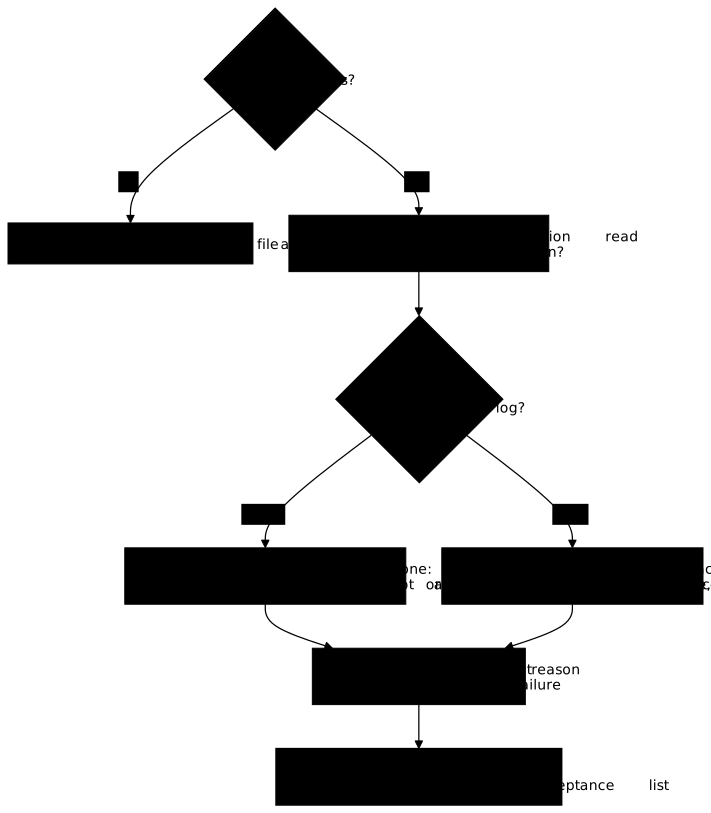
The diagram reads from top to bottom, and its two branches are decided by a single field. If Nginx did not contact the upstream (the backend to which it forwards the request), the field is - and the problem is in the proxy: route selection, permissions, file not found, body too large. If it did, the problem is between Nginx and the application, or in the application itself: the field says that the attempt took place, not that the application answered. In both cases, the last step is the error log, which names the file, the address or the certificate at fault.
Three commands cover the first steps. systemctl status nginx says whether the service is running. sudo nginx -t validates the syntax and names the file and the line at fault. sudo nginx -T does the same validation and then prints the whole effective configuration, with every include resolved: it settles the question between what you think you wrote and what the process really reads. To see which files are loaded and in what order, filter on the marker lines:
sudo nginx -T 2>&1 | grep -nE '^# configuration file|server_name|location|proxy_pass|error_log'The output lists the files read and the useful directives; check that the file you modified appears there, and that the expected server_name and location are there. A file missing from this list is not read: it is a frequent cause of "my change does nothing".
What should you do about the noise around the failure?
A real configuration contains noise that looks suspicious without explaining anything: a server block for an abandoned domain, a conf.d/ file that holds only comments, a duplicated directive, a commented-out proxy_pass. The reflex is to "clean" them first; it is a waste of time, and a risk of breaking something else.
The rule is simple: an element is a cause only if the observed symptom goes through it. A commented-out proxy_pass with a wrong port can cause nothing, since it is not loaded: nginx -T does not show it, or shows it as a comment. A server block for another name is selected only for that name. To know whether a block or a location concerns your request, replay it with curl -v while imposing the name (-H 'Host: ...') and read the matching line in the access log. You fix a proven cause, never an impression.
How do you tell the proxy from the application?
Replay the request twice: once to the proxy, once directly to the backend on its local address. If the direct answer is correct and the proxy's is not, the failure is in the link or in the proxy. If both fail the same way, the application is at fault, and Nginx's configuration has nothing to do with it.
# Through the proxy, with the publication's namecurl -sv -H 'Host: publication.exemple.test' http://127.0.0.1/api/ -o /dev/null
# Directly to the backend (address and port to read in nginx -T)curl -sv http://127.0.0.1:18102/ -o /dev/null
Compare the response codes and the < header line in each output; the backend's address is read in the proxy_pass directive of nginx -T. Then open the access log: a filled-in upstream_status says that Nginx tried the upstream, and with what code. Beware: on a refused connection or an exceeded timeout, it is Nginx that writes 502 or 504, and the application may have answered nothing; the error log settles it. One exception is worth knowing: if the client closes the connection before the response, Nginx finalizes the request as 499, a code of its own, written before the upstream's status. A 499 therefore says nothing about the application: it says the caller left. When the two answers differ, the difference is your lead.
Where is the error log, and what does it say?
The error log is the file named by the error_log directive, and it gives the exact reason for a refusal that the status code does not say. The path is not guessed, it is read: sudo nginx -T | grep -n error_log. On Debian 13, with the nginx.org package, it is written to /var/log/nginx/error.log. One point deserves attention: Nginx has two outputs. Operating messages go to the error_log file, whereas journalctl -u nginx shows only what the service wrote on its error output, for example a refused start or reload. Looking for a refused request in journalctl means looking in the wrong place.
The level matters too: by default, only errors are written. To understand a route selection or a negotiation, temporarily raise the level (error_log ... info;), reload, replay, then go back: a very low level writes a lot and ends up hiding what is useful.
Here is what each family of failure most often leaves as a trace. The fragments are pieces of the error text, not guaranteed wordings; the full line also names the file, the address or the certificate.
| Symptom | Typical fragment in error.log | What it points to |
|---|---|---|
403 | Permission denied | A file or a directory of the path is not readable by the worker (the Nginx process that handles requests) |
404 | No such file or directory | The path tried does not exist: see root or alias |
502 | Connection refused | Nothing listens on the backend's address |
502 | certificate verify or does not match | The backend's certificate is not accepted |
504 | timed out | The backend did not answer within the set delay |
413 | too large body | The body exceeds client_max_body_size |
The table reads in two steps: the code comes from the access log, the fragment from the error log, and it is their pair that gives direction. A 502 without a known fragment must be read in full: it names the address at fault. To check on a machine: the fragments certificate verify, does not match, timed out and too large body come from Nginx's code (for example upstream SSL certificate does not match, client intended to send too large body), whereas Permission denied, No such file or directory and Connection refused are the system's text, in parentheses behind a number (13:, 2:, 111:). The association between an HTTP code and a given fragment has not been verified on a machine: the table guides the search, it promises no exact wording. Compare with what your log displays.
How do you fix a 403 and a 404 without loosening permissions?
A permission 403 means an account cannot traverse or read a path: you fix the owner, the group or the mode of the file concerned, not those of the whole system. The workers run under an unprivileged account (nginx with the nginx.org package, user directive), and two rights are needed: the right to traverse (x) each directory of the path, and the right to read (r) the file. A single missing link is enough.
The namei -l command prints the owner and the mode of each link of a path, which points at the faulty directory at a glance:
namei -l /var/www/catalogue/index.htmlLook for the first link whose mode does not grant x (directory) or r (file) to the worker's account, then fix that one only. To read modes, see Linux permissions.
For a 404, the error line that carries No such file or directory names in principle the real path tried. Compare it with the one you expected: root appends the whole URL to the directory, alias replaces the prefix of the location. The details are in Serve files with Nginx. If the path is right but the route is not the expected one, go back to nginx -T: a higher-priority location captured the request, and the selection order (=, then ^~, then regular expressions in file order, then the longest prefix) is not the writing order.
How do you fix a 502 or a 504?
A 502 says Nginx did not get a valid response from the backend; a 504 says it waited for one too long. The error log tells the causes apart, and each has its own fix.
- The name no longer resolves. A domain name placed in
proxy_passor in anupstreamis resolved at load time: if the name has disappeared (a line removed from/etc/hosts, a DNS that no longer answers),nginx -tor the startup fails naming the file and the line, so this case is detected at validation, even before a502. The details of resolution are in Nginx upstream. - The backend refuses the connection.
Connection refused: the service does not listen on the address or port ofproxy_pass. Check the service itself, not Nginx. - The backend's certificate is not accepted. With
proxy_ssl_verify on, Nginx checks the backend's certificate against the authority supplied byproxy_ssl_trusted_certificateand the name given byproxy_ssl_name. A502accompanied by a verification message signals a missing authority or a name that does not match: you fix the authority file or the name, never the verification. - The timeout is shorter than the service.
timed outon a route that the application can legitimately serve slowly: theproxy_read_timeoutbound is too low for a legitimate use.
A lengthened proxy_read_timeout does not repair an unavailable backend: it only makes the user wait longer, and it keeps the connection and the worker busy. Conversely, a timeout that is too short refuses a legitimate slowness, and the failure is then self-inflicted. The right setting sits between the longest normal response and the tolerable patience. For redirects, see Nginx TLS; for body sizes, see Nginx limits.
How do you prove the failure is repaired?
A repair is proven by a whole acceptance test, positive and negative, replayed after the fix. The positive test checks that each route does what it should: render its own content. A 200 code is not enough: a route that goes to the neighboring backend also answers 200, and only a marker specific to each route shows it. The negative test checks what must remain refused: a backend that must not be reachable from the network, an unknown certificate that must still give 502, workers that must not run as root, a directory that must not be open for writing to everyone.
The negative test is the one people forget, and it is the one that catches the fix that repairs one thing while breaking another, or while loosening a protection. Add a last check: the timeout of a request that no longer progresses must end in a 504 and not in a 000; with curl, 000 means that the client gave up, not the proxy.
Finish with the written diagnosis: the component at fault, the cause, and the observations that led to it (the command run, the log line read). This short text is what lets another person understand without redoing the investigation.
Put it into practice
In the lab, a real failure has been injected into a publication stack that serves a static page, two backends and a control route. It is drawn at random from five families: route selection, permission, name resolution, TLS trust or timeout, with configuration noise around it. You find the failure, fix it and write a short diagnosis file. The validation does not know the variant: it replays the final state of the acceptance test, identical for all five, checks that each route renders its marker, that an endless request is cut by a 504, that the workers do not run as root, that the backends' ports are not reachable from the network, that the static root is not open for writing to everyone, and that a route to a backend with an unknown certificate stays refused with a 502.
Key points
A diagnosis is a reading order, not a list of codes.
- Read the effective configuration first with
nginx -T: it is the one the process uses. - The
upstream_statusfield of the access log says whether the upstream was contacted:-, the proxy answered alone; filled in, the attempt took place, without proving that the application answered, because Nginx itself writes502or504there on a failure. - The exact reason is read in the error log, whose path is read with
nginx -T | grep error_log;journalctl -u nginxshows only the service's output. - A
403is fixed by repairing the faulty link of the path (namei -l), never bychmod 777or by running the workers asroot. rootappends the URL to the directory,aliasreplaces the prefix: the error line names in principle the path really tried.- A longer
proxy_read_timeoutdoes not repair an unavailable backend, andproxy_ssl_verify offdoes not repair a certificate. - A configuration element is a cause only if the symptom goes through it: the noise around it is not fixed first.
- The repair is proven by a positive and negative acceptance test, replayed in full, and concludes with a written diagnosis.
Knowledge check
Check that you have mastered the essentials of this guide. The questions cover only what has just been explained here.
Knowledge check
Check what you have learned with this interactive quiz
How it works
- The timer starts when you click Start
- Multiple choice, true/false and short answer questions
- You can move between questions
- Detailed results are shown at the end
Starts the quiz and the timer
Review
(0/0)Score by domain
A domain groups several guides and gets several questions, so its score is more reliable than a per-topic score, which often rests on a single question.
Summary
Strengths
No topic passed at 80% on at least two questions yet.
Weak areas
No topic below the pass mark.
Recommended next
Hints before you try again?
Continue the course: Upgrade, roll back and reboot Nginx
A new full quiz with random questions
Work again only on the questions you missed