
Checking a backend means asking HAProxy to verify at regular intervals that the server can really serve, and to remove it from the rotation when it can no longer do so. This lesson is for someone who already routes requests with HAProxy and wants traffic to avoid failing servers without needless failovers. It covers the load-balancing algorithms and the weights, the active health checks check and option httpchk, the inter, fall and rise thresholds, the difference between an open port and a ready service, then draining, which removes a server without cutting what it already serves. Unlike Nginx, which only detects a failure passively (see Nginx upstream: spread the load and remove failures), HAProxy checks actively.
What you will learn
The lesson goes from the choice of balancing to the measurement of a convergence.
- Choose
roundrobinorleastconn, weights and abackupserver according to the need. - Declare an application-level health check with
check,option httpchk,inter,fallandrise. - Tell apart an open TCP port, a live service and a ready service.
- Remove, drain and reinstate a server, then read HAProxy's counters to prove it.
- Verify that an outage shorter than the threshold triggers no failover.
Prerequisites
The lesson assumes you can write an HAProxy frontend and backend and query its socket.
- Install HAProxy, read its sections and talk to the admin socket: Install HAProxy and read its configuration sections.
- Route requests to backends: Route by names and paths with ACLs and maps.
- The lab runs on Debian 13 with HAProxy 3.4.7, the
3.4.7-1~bpo13+1package of thetrixie-backports-3.4repository. The number of columns ofshow statvaries from one version to another, which is why they are read by their name and never by their position.
How does HAProxy spread traffic across servers?
HAProxy picks a server of the backend according to the balance algorithm and the servers' weights: roundrobin rotates requests in proportion to the weights, leastconn sends to the server that has the fewest active connections. Neither is better in the absolute: the right choice depends on the duration of requests. And it must be written: without a balance directive, HAProxy 3.4 applies random, which draws a server at random (it has been the default since 3.3).
With roundrobin, each server receives a request in turn, respecting the weights. It is the right choice when requests are short and uniform. With leastconn, HAProxy compares the number of open connections and picks the least loaded: it suits long or very uneven requests (downloads, sessions, streams), where a round robin would let one server pile up slow connections.
Always write balance yourself, roundrobin included. With random, there is no round robin: a demonstration that counts on "one request at one server, the next at the other" can only be checked on average. For this reason, the lab's starting backend declares balance roundrobin in black and white, and that is what makes the alternation predictable.
Weights declare the relative capacity. weight 3 against weight 1 means the first takes three requests out of four when healthy. The lab prescribes weights of 3 and 1, and measures the share taken on a sample. A server marked backup receives nothing as long as all the ordinary servers are down: it is the last resort, not one more server.
backend api balance leastconn option httpchk GET /sante http-check expect status 200 default-server inter 2s fall 3 rise 2 server api1 127.0.0.1:9101 check weight 2 server api2 127.0.0.1:9102 check weight 1 server api3 127.0.0.1:9103 check backupThis example is deliberately different from the lab's: another algorithm, also declared explicitly, other thresholds, a backup server. default-server sets the settings shared by all the servers of the backend, which avoids repeating them. The lab's acceptance criteria prescribe their own values: read them in /opt/pub-haproxy-sante/recette.txt rather than copying these.
What happens when no health check runs?
Without a health check, a failed server stays in the rotation: HAProxy keeps sending it its share of the traffic, and clients receive errors. The lab starts from this state, with equal weights, with no check and no option httpchk.
Observe it before writing anything. The scenario does it by setting the state file of the beta server to casse, then sending six requests:
echo casse > /opt/pub-haproxy-sante/etat-betafor i in $(seq 6); do curl -s -o /dev/null -w '%{http_code} ' http://127.0.0.1/; doneecho pret > /opt/pub-haproxy-sante/etat-betaWith equal weights and under balance roundrobin, HAProxy sends one request out of two to beta, which answers a 500 error: about half of the responses are failures, while the beta process is still running. Putting the state back to pret afterwards avoids leaving the service broken. The point to keep: as long as HAProxy does not know beta is sick, it can do nothing.
Does an open port prove the service is ready?
No: a bare check only verifies that a TCP connection opens, which a service that has lost its database also does. You have to tell three levels of health apart, and each answers a different question.
| Level | Question asked | Example health check | What it misses |
|---|---|---|---|
| Open port (TCP) | Is the process listening? | check alone | A live service that is unable to answer |
| Liveness (alive) | Does the process answer in HTTP? | option httpchk GET /vivant | A failed dependency: the process answers, but serves nothing useful |
| Readiness (ready) | Can the service serve? | option httpchk GET /ready | Nothing essential, if /ready checks what the service needs |
In the lab, each backend exposes /ready. The casse state makes the health check get a 503 and useful requests a 500: this is the situation a readiness check exists to cover, that of a live service whose dependency has failed. A bare check would keep seeing the port open and would leave beta in the rotation. Kubernetes contrasts the same notions of liveness and readiness: see Kubernetes probes: liveness, readiness, startup without false positives (in French).
The lab's check requires the health check to be at layer 7 (the application layer, that of the HTTP protocol, as opposed to layer 4, that of the TCP connection), which HAProxy reports through the check_status field of show stat. The L7OK value means the health check read an acceptable application response; L4OK only means that a port accepted a connection. The two can be told apart on reading, and a bare check will never give better than L4OK.
A health check can also go further than a status: http-check expect verifies the status or the content of the response (http-check expect status 200, or a string expected in the body). check-ssl forces the health check to use TLS, whether or not the server is declared ssl for traffic: it is mostly used when the health check targets another port or addr and so does not inherit the server's TLS. For an HTTPS health check, the SNI (the server name announced in the TLS handshake) is derived from the Host header by default (sni-auto, since 3.3). These variants are not replayed in the lab, which checks in plain HTTP.
How do you tune inter, fall and rise?
inter is the interval between two health checks, fall the number of consecutive failures before removing a server, rise the number of consecutive successes before reinstating it. These three numbers set the window during which an outage goes unnoticed, and the one during which a recovered server stays out.
The calculation is direct. With inter 1s, fall 5 and rise 3 (the values of the lab's acceptance criteria), a server is removed after about five seconds of continuous failure, and reinstated after about three seconds of continuous success. These bounds show up in the test: it waits fall × inter + 8 seconds to observe the removal, and rise × inter + 12 to observe the return, with a margin added each time.
Why not set fall 1 to react faster? Because a health check tuned too short turns every hiccup into a failover, and the failover costs more than the hiccup: all the new traffic shifts onto the remaining server, and the load it takes can bring it down in turn. Only this new traffic is moved. The manual says of the on-marked-down shutdown-sessions option: "Actions are disabled by default". From this we infer that, without it, HAProxy does not cut the connections already established to a server it marks DOWN; the manual does not state it in a general sentence. A well-tuned threshold therefore removes what has really failed and ignores what does not last.
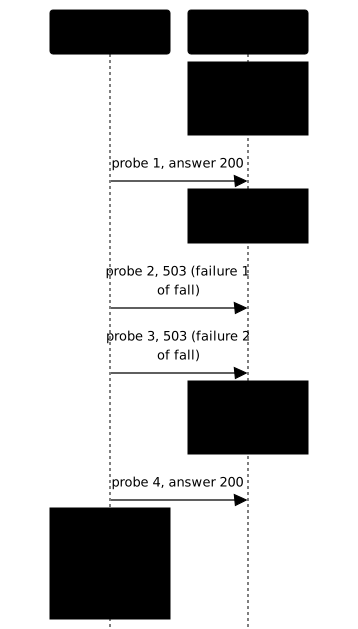
Tune inter, fall and rise according to what your service tolerates. A short inter detects fast, but sends more health checks: if there are many, each one loads the service even in the middle of an outage. An expensive health check, which queries the database on every call, can itself worsen an incident. HAProxy offers two variants, not to be confused: fastinter replaces inter during a transition (a server going down after a failure, or coming back up, or not yet checked), to decide faster; downinter replaces inter when the server is fully DOWN, useful to slow the health checks of a server that is already dead. Without them, inter applies everywhere (2000 ms by default, fall at 3 and rise at 2 if nothing is specified).
How do you read HAProxy's counters?
show stat, through the admin socket, returns one line per server with its current state and transition counters; it is the counters, not the state, that tell what happened. The columns useful here are status, check_status, weight, chkfail and chkdown.
chkfail counts the failed health checks while the server is UP (once DOWN, it no longer moves), chkdown the down transitions, that is, the times the server went from UP to DOWN. A state alone does not distinguish two opposite stories: a server UP ten seconds after a short outage may never have been removed, or may have been removed then put back. With rise 3 and inter 1, both give UP at the same instant. Only chkdown tells which of the two happened: that is exactly the difference between a stable health check and one that oscillates.
The lab's test reads the columns by their name, in the first line of the output, which starts with # pxname,svname,.... A shift in a column added by a version of HAProxy would break a reading by position. You can do the same:
echo 'show stat' | sudo socat -t3 stdio /run/haproxy/admin.sock |awk -F, 'NR==1 { sub(/^# /, ""); for (i=1; i<=NF; i++) col[$i]=i; next } $col["pxname"]=="applicatif" && $col["svname"]!="FRONTEND" && $col["svname"]!="BACKEND" { print $col["svname"], $col["status"], $col["check_status"], $col["chkfail"], $col["chkdown"] }'This script prints, for each server of the applicatif backend, its name, its state, the type of health check and the two counters. It has not been replayed on a machine: if a column is missing, check the exact name in the first line of your output. The status values to know are UP, DOWN, DRAIN and MAINT.
How do you remove an unready backend, and measure it?
Making /ready fail on a live server turns it DOWN after fall failures, and the client no longer sees an error once convergence is reached. This is the gesture to prove, and the proof is a counted down transition, not an observed state.
The demonstration follows the outage without stopping the process. You set the state file of beta to casse: the process runs, /ready returns 503, the health check fails. HAProxy counts the failures, then at the fall-th it removes beta. The test then requires three things: a status other than UP in the planned window, one more down transition in chkdown (more than one means the server went down, came back, then went down again, so the thresholds oscillate), and no more requests to beta after convergence, with no error on the client side.
The return is measured the same way. You restore the pret state: the health check starts succeeding again, and at the rise-th consecutive success the server returns to UP. What happens in between is the remaining capacity: with weights of 3 and 1, removing the weight-3 server leaves the weight-1 server carrying all the traffic. Ask yourself the question before the outage, not during it: does the remaining server hold the load? If not, maxconn on the server line caps its simultaneous connections and timeout queue sets how long a request waits in the queue before failing: requests wait rather than saturate the server.
To reinstate smoothly, slowstart raises the weight of a returning server gradually: it takes back its share over the duration you set rather than all at once. This setting is not replayed in the lab; test it with a bounded load before keeping it.
Why should a short outage remove nothing?
A health check is well tuned when it removes a server that has really failed and ignores a dip shorter than its threshold; the second half's test is the counter-test that stops you accepting fall 1. Without it, a threshold that is too short would pass the previous measurement with flying colors.
The lab's test takes beta down for (fall - 2) × inter seconds, that is 3 seconds with the acceptance-criteria values, then restores it. Enough for health checks to fail, not enough to reach the threshold. It then requires that chkfail has increased, proof that the outage was seen, and that chkdown has not moved, proof that no down transition took place. If chkfail does not increase, the health check is slower than the dip or does not read /ready: the test measured nothing.
Read this counter-test as a property of your configuration, not as a lab trick. In operation, service restarts, garbage-collector pauses and network micro-cuts can last a few seconds. A health check that removes at each of them makes the backend oscillate, and each oscillation abruptly shifts new traffic to the other servers (and also cuts established connections if on-marked-down shutdown-sessions is set).
What do a stop, an HTTP failure and slowness change?
A health check tells three failures apart: a stopped process refuses the connection, an HTTP failure answers a bad status, slowness exceeds the health check's timeout; each leaves a different trace in check_status. Knowing them avoids looking in the wrong place.
A stopped server no longer answers at all: the health check fails on the TCP connection, and check_status carries a layer-4 value. An HTTP failure, like the 503 of /ready in the lab, lets the connection establish but the response is not acceptable: the value is layer 7, with an unexpected status. Slowness that exceeds timeout check (or inter when timeout check is not set) is counted as a timeout failure. None of the three has the same remedy: restart a process, fix a dependency, or tune a timeout.
To test these cases without damaging the machine, bound the test rate. Send a finite number of requests (twenty, forty), with curl --max-time, and never an endless loop. The lab provides a client-side utility that counts responses per server on a fixed sample, which makes the measurement reproducible and prevents saturating the service you are diagnosing.
How do you drain a server without cutting what it serves?
Draining a server stops new assignments but lets already established connections finish, whereas stopping the process cuts them; this is what allows maintenance without a visible outage. The difference between draining and stopping is what the lab measures on an open stream.
The state is driven through the admin socket:
echo 'set server applicatif/beta state drain' | sudo socat -t3 stdio /run/haproxy/admin.sockecho 'set server applicatif/beta state ready' | sudo socat -t3 stdio /run/haproxy/admin.sockA drained server appears as DRAIN in show stat. New requests no longer reach it, except those that a session persistence (the mechanism that sends the same client back to the same server) ties to it. A long stream, opened before the draining, continues to its end. The maint state (or the disable server command) removes the server from the rotation and also stops its health checks; it does not let through the persistent sessions that drain still accepts. Returning to ready puts the server back in the rotation, and the health check remains the judge of its state.
The test chains two drainings: it first drains alpha, so that a long stream can only land on beta, deterministically, without opening at random and retrying. Then it restores alpha, drains beta, and measures two things. Forty new requests no longer reach beta and produce no error; and the stream established on beta keeps receiving its lines, with no error message. If the stream stops as soon as the draining starts, you have not drained, you have stopped.
Practice
The lab gives you two backends that serve the same application behind HAProxy, with no health check and no weights. You declare the /ready health check and the thresholds prescribed by the acceptance criteria, the weights of 3 and 1, then you show that you remove a server without cutting what it serves. The validation measures four things: the share of each server and a layer-7 health check, the removal of a live but unready backend within the computed window, the absence of removal on an outage shorter than the threshold, and a draining that stops new assignments without cutting the established stream.
Key points
roundrobinsuits short, uniform requests,leastconnlong or uneven ones, and withoutbalanceHAProxy 3.4 appliesrandom: you write the algorithm; weights set each server's share,backuponly serves when all the others are down.- A bare
checkonly verifies an open port (L4OK); anoption httpchkhealth check reads an application response (L7OK) and covers the case of a live service whose dependency has failed. inter,fallandriseset the detection and return window: aboutfall × interseconds to remove,rise × interto reinstate.- A
fallthat is too short turns every hiccup into a failover: the counter-test requireschkfailto rise andchkdownnot to move on an outage shorter than the threshold. - A failover shifts new traffic to the other servers; connections already established are not cut by a transition to
DOWN(inferred from the manual), unlesson-marked-down shutdown-sessionsis set. - The
chkfailandchkdowncounters ofshow stattell what happened; anUPstate does not say whether the server went down and came back. Columns are read by name. - Before the outage, compute the remaining capacity: the server that remains must hold the load;
maxconnandtimeout queuebound the queue. - Draining (
set server ... state drain) stops new assignments without cutting what is established; stopping the process cuts established streams. - Test with a bounded rate: a finite number of requests, never an endless loop on an already fragile service.
Knowledge check
Check that you have grasped the essentials of this guide. The questions cover only what has just been explained here.
Knowledge check
Check what you have learned with this interactive quiz
How it works
- The timer starts when you click Start
- Multiple choice, true/false and short answer questions
- You can move between questions
- Detailed results are shown at the end
Starts the quiz and the timer
Review
(0/0)Score by domain
A domain groups several guides and gets several questions, so its score is more reliable than a per-topic score, which often rests on a single question.
Summary
Strengths
No topic passed at 80% on at least two questions yet.
Weak areas
No topic below the pass mark.
Recommended next
Hints before you try again?
Continue the course: HAProxy and ACME certificates: a proven renewal cycle
A new full quiz with random questions
Work again only on the questions you missed