
Observing an Nginx that acts as a reverse proxy means being able to say, for each request, whether the lost time or the error comes from Nginx or from the application behind it. Open source Nginx does not do it alone: it exposes neither native Prometheus metrics nor active health checks. This lesson is for someone who already publishes an application with Nginx. It teaches you to correlate (set side by side) the request seen by the proxy with the one seen by the upstream, that is, the application Nginx queries, to read the counters of stub_status, the Nginx module that exposes global totals, for what they are worth, and to build an alert that rests on measured data. The minimal setup of the JSON log is already in Protect and observe Nginx: here, you learn to read what it says.
What you will learn
The lesson starts from what Nginx can measure, then moves up to the alert.
- List what open source Nginx lets you observe, and what it does not.
- Interpret
status,upstream_status,request_timeandupstream_response_time. - Write an escaped JSON
log_format, with a request identifier and no secret. - Read the
stub_statuscounters and derive a throughput from them. - Build an alert based on the logs and on an outside probe.
Prerequisites
You already publish an application with proxy_pass and you know how to read an HTTP status code.
- Publishing an application behind Nginx: Publish an application with Nginx.
- The HTTP vocabulary (method, header, status code): Read HTTP before configuring a proxy.
- Validating and reloading a configuration, checking the compiled modules: Install Nginx.
- A Debian 13 machine with
sudo.
What can you observe with open source Nginx?
Open source Nginx is observed in three ways: its logs, the stub_status module and an external exporter. It has neither a built-in metrics endpoint in Prometheus format, nor active health checks that query the backends at regular intervals: the health_check directive belongs to the commercial NGINX Plus offer, as the lesson Nginx upstream recalls. A configuration found online that advertises "native" metrics therefore targets another product.
| Way | What it gives | What it does not give |
|---|---|---|
| Access log | One line per request: status, durations, path, upstream contacted | An aggregated view without a collection tool |
stub_status | Seven global counters on connections and requests | Status, latency, route, upstream |
| Exporter | The stub_status counters in Prometheus format | What stub_status does not count |
Read the table line by line: each way has a blind spot, and it is their combination that gives a useful observation. An exporter is a small program that reads a source (here stub_status) and republishes it in a format a monitoring tool can collect, as described in the page on Prometheus exporters (in French). To get error rates or latencies per route, you must therefore use the log, not the counters.
How do you link the proxy's request to the application's?
Four variables are enough to know who did what: $status, $upstream_status, $request_time and $upstream_response_time. The proxy and the application are two distinct actors, each with its own response code and duration. The default log (combined) writes only the first of each pair, which makes it impossible to tell a slow proxy from a slow application.
$statusis the code sent to the client.$upstream_statusis the one received from the upstream, or the one Nginx records itself when the attempt fails (Nginx writes502or504there for a refused connection or an exceeded timeout, without the application having answered; if the client has already closed the connection, the request is finalised as499before the status is written). When Nginx answers alone, without contacting the upstream,$upstream_statusis-.$request_timeis the total duration seen by Nginx: the time elapsed since reading the first bytes sent by the client, request reading included.$upstream_response_timeis the time spent with the upstream, from the connection to the end of receiving its response, in seconds with millisecond resolution.$upstream_addrsays which backend was contacted, useful as soon as a group has several.
The following diagram shows a request to a page that the application takes two seconds to produce. Look at the two notes: they say where each duration is measured.
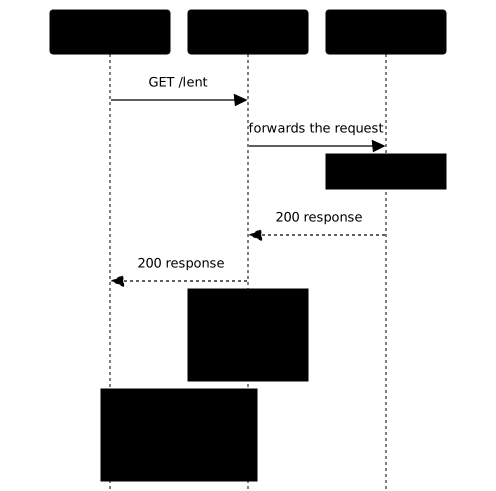
The gap between the two durations guides the diagnosis, it does not conclude it. If upstream_response_time is close to request_time, the time was spent on the upstream side: a slow application, but also a connection that was slow to establish, since this duration includes it. If request_time is much larger, the time was spent around the upstream: a request the client sends slowly (the $request_time stopwatch starts as soon as the first bytes are read from the client), a slow network, a client slow to read the response or a bulky response. In both cases, the gap says where to dig; the cause is then confirmed in the logs.
Two subtleties prevent misreading a line. First, when Nginx retries another backend (see proxy_next_upstream in the lesson on upstreams), $upstream_status and $upstream_response_time carry several values separated by commas, one per attempt: they are therefore not numbers. When the upstream group changes (internal redirect by error_page or X-Accel-Redirect), the values of the two groups are separated by a colon.
Next, the same final $status can hide different causes. A 503 sent by the application is written with $upstream_status at 503. A 503 produced by Nginx alone, for example because a rate limit refused the request (limit_req answers 503 by default, see Nginx limits), is written with $upstream_status at -: Nginx answered without contacting the upstream. Same code seen from the client, two causes, two teams to warn.
A third case traps the reading: a 502 or a 504 is written with a filled-in $upstream_status even when the application answered nothing, since Nginx itself writes the code of the failure there (refused connection, exceeded timeout). A filled-in $upstream_status therefore proves that Nginx tried to reach the upstream, not that the application answered. To settle a 502 or a 504, you read the error log, which the lesson Diagnose Nginx details.
How do you write a JSON log that says something?
A useful log is one JSON line per request, produced by log_format ... escape=json, that carries at least the status and the two durations. JSON can be filtered without text parsing, and escape=json (a parameter introduced in 1.11.8) protects the line by escaping ", \ and control characters as JSON requires: without it, a URL that contains a quote breaks the object, and a collector silently rejects the line.
log_format observation escape=json  '{"heure":"$time_iso8601","id":"$request_id","methode":"$request_method",'  '"uri":"$uri","status":"$status","upstream_status":"$upstream_status",'  '"request_time":"$request_time","upstream_response_time":"$upstream_response_time",'  '"amont":"$upstream_addr"}';
access_log /var/log/nginx/access.json observation;
The upstream values are written between quotes: since they can carry several values or -, they are not always numbers, and a collector converts them on the reading side. $request_id is a unique identifier built from 16 random bytes and written in hexadecimal (32 characters), generated by Nginx for each request since 1.11.0. To link the proxy's line to the application's, pass it on with proxy_set_header X-Request-ID $request_id;: the application writes it in its own log, and the same string finds the request on both sides.
After each change, validate then reload with sudo nginx -t && sudo systemctl reload nginx, then send a request and read the last line of the file. A field that is present is not a field that measures: a request_time stuck at 0.000 would be parsable and useless. The check is done by causing a known fact, for example a route that the application slows down by two seconds, and requiring the line to say so.
Retention is decided, not endured. Look for the logrotate rule of your installation rather than assuming it: dpkg -L nginx | grep logrotate says whether the package ships one, and ls /etc/logrotate.d/ shows those in place. Then read it to know the real rotation, and check that its pattern covers the name you chose: a rule written for *.log does not rotate an access.json, which then grows without limit until it fills the partition. If the package ships none, or if the pattern does not match, write your own rule. Nginx reopens its files on receiving the USR1 signal (nginx -s reopen). How logrotate works is covered in the lesson logrotate.
What does stub_status say, and what does it not say?
stub_status exposes global counters since Nginx started: active connections, accepted and handled connections, requests, and the state of connections (reading, writing, waiting). The module is not always compiled in: check for --with-http_stub_status_module in nginx -V, as shown in the installation lesson. The page is declared in a location carrying the single stub_status; directive, placed in a server that listens on 127.0.0.1; the full configuration is in Protect and observe Nginx.
The nginx.org documentation describes the format of the response, with example values:
Active connections: 291server accepts handled requests 16630948 16630948 31070465Reading: 6 Writing: 179 Waiting: 106The second line is a header naming the columns; on the third, the three numbers are totals since startup: accepted connections, handled connections, requests. A total alone says nothing about the moment. To get a throughput, read the counter twice at a known interval and divide the difference by the duration, which an exporter does for you. The ratio of requests to handled connections shows how many requests go through each connection, which varies with persistent connections (keep-alive).
What stub_status does not say matters as much as what it says. It tells apart neither the response codes, nor the routes, nor the durations, nor the backends. An alert such as "502 rate on /api/" therefore cannot come from it, but from the log. On the other hand, a lasting rise in the Waiting or Active connections counter without a rise in throughput often signals connections piling up: confirm in the log before concluding.
That leaves the exposure. A status endpoint exposed to everyone gives anyone the number of ongoing connections of your service. The gesture is to bind it to the loopback interface and to check that it is refused from the network address: curl locally must answer, curl to the machine's address must not answer 200. Collecting from another machine goes through an exporter placed on the server, or through restricted network access, not by opening the status endpoint.
How do you build an alert from this data?
A reliable alert starts from a symptom measured in the log and is cross-checked with a probe that looks from the outside. Three signals cover the essentials, each with its source:
| Signal | Source | Condition to threshold |
|---|---|---|
| Error rate | Log | Share of 5xx status over a window, per route |
| Latency | Log | request_time duration exceeding the tolerated value, on a percentile |
| Saturation | stub_status | Active connections or Waiting rising over time |
The table says what to measure; the threshold is chosen from the observed normal traffic, never from a copied figure. To tell Nginx from the application in a latency alert, add the ratio between upstream_response_time and request_time: it is what guides the first minute of the diagnosis.
An external probe completes the picture: a request sent from outside the machine to the public name (DNS, port, certificate, route) checks the path a user really follows. A local stub_status that answers proves nothing about that path. This also holds in a lab: seeing the status endpoint work inside the machine does not exempt you from testing access over the network.
An alert without a response instruction is worth little. The runbook (the intervention sheet) fits in four lines: which signal triggered, which log line to read first (the last 5xx, with its upstream_status), which command to confirm with (nginx -T, curl on the route), and when to return to normal. The lesson Diagnose Nginx follows on from this approach. After the incident, replay the faulty request: the alert must clear, otherwise it was not measuring what you thought. For a contrast, Traefik exposes its own metrics (see Traefik observability): what Nginx asks you to build by hand, it provides.
Which mistakes are made most often?
Five confusions keep coming back, and each one is detected by a simple test.
- Believing
stub_statusgives per-route metrics. It only has global counters: per-route detail comes from the log. - Logging
$request_timealone. Without$upstream_response_time, a slow page stays unattributable. - Considering the status endpoint protected because it answers locally. You must check that it is refused elsewhere.
- Leaving a field that measures nothing. A parsable but frozen format passes every form check.
- Writing a secret in the log. A token in a URL parameter ends up in plain text in a file readable by several accounts.
Put it into practice
In the lab, Nginx publishes a test application but says nothing about it: default log, no status endpoint. You expose stub_status on the loopback interface, you replace the log with a JSON format carrying at least status, request_time and upstream_response_time, then you prove that these fields measure. The validation causes facts: it checks that the status endpoint answers locally and is refused from the network address, it parses each line as JSON, it requests a page that the application takes two seconds to serve and requires request_time to say so, then it compares a 503 error from the upstream with a healthy 200 request.
Key points
Observing a proxy means measuring two actors, not one.
- Open source Nginx has neither native Prometheus metrics nor active health checks: observation goes through the log,
stub_statusand an exporter. $request_timeis the total duration seen by Nginx,$upstream_response_timethe one spent with the upstream, connection included: their gap says where to look, without naming the culprit.$upstream_statusis-when Nginx answers alone: two identical503can have two causes. When filled in, it does not prove that the application answered, because Nginx itself writes502or504there when the upstream fails.- A
log_formatwithescape=jsonproduces one object per line, and$request_idpassed on to the application links the two logs. - A log field must measure, and is checked against a caused fact.
stub_statuscounts global totals: a throughput is computed by difference, and per-route detail comes from the log.- The status endpoint is restricted to the loopback interface, with a refusal checked from the network, and the log carries no secret.
- An alert rests on the log, is cross-checked with an external probe and comes with a runbook.
Knowledge check
Check that you have mastered the essentials of this guide. The questions cover only what has just been explained here.
Knowledge check
Check what you have learned with this interactive quiz
How it works
- The timer starts when you click Start
- Multiple choice, true/false and short answer questions
- You can move between questions
- Detailed results are shown at the end
Starts the quiz and the timer
Review
(0/0)Score by domain
A domain groups several guides and gets several questions, so its score is more reliable than a per-topic score, which often rests on a single question.
Summary
Strengths
No topic passed at 80% on at least two questions yet.
Weak areas
No topic below the pass mark.
Recommended next
Hints before you try again?
Continue the course: Diagnose Nginx: where to look and in what order
A new full quiz with random questions
Work again only on the questions you missed